

Why Most Developer Bios Don't Work#
Here's the average developer bio: a job title, a company name, a list of technologies, and maybe a line about "loving to solve hard problems." Sometimes there's a link to a GitHub profile with a README that says "Hi, I'm Alex." If you're lucky, there's a portfolio link that leads to a site last updated in 2019.
That's not a bio. That's a placeholder.
How to write a developer bio: lead with a specific tagline, write 150–300 plain-language words about what you build, list 8–12 skills you'd actually reach for, then back all of it with 3–6 projects carrying live GitHub and revenue data. That proof layer is what separates a dev bio that gets replies from one that gets skimmed.
That's the short version. It answers the question every recruiter, client, and collaborator silently asks when they find you online: "Has this person actually shipped anything real?" A strong developer bio doesn't just describe your skills — it demonstrates them.
GitHub now has more than 180 million developers on the platform, with one new developer joining every second. Standing out in that crowd requires more than a two-line social bio or a static résumé PDF.
This post covers the 11 components that make up a modern developer bio, why "proof over claims" is the framework that actually works in 2026, developer bio examples you can copy the shape of, and a platform comparison for where to host one.
The Proof-over-Claims Framework#
For years, the advice was: list your skills, show your experience, attach a portfolio link. Hiring managers and clients would infer competence from the bullet points.
That stopped working.
Everyone lists "React, Node.js, TypeScript" now. With AI-assisted résumés flooding every hiring pipeline, the ratio of claims to actual evidence has never been higher. The developers who get the inbound recruiter DM — or the client inquiry — are the ones whose profiles make the reader feel the difference between a claim and a fact.
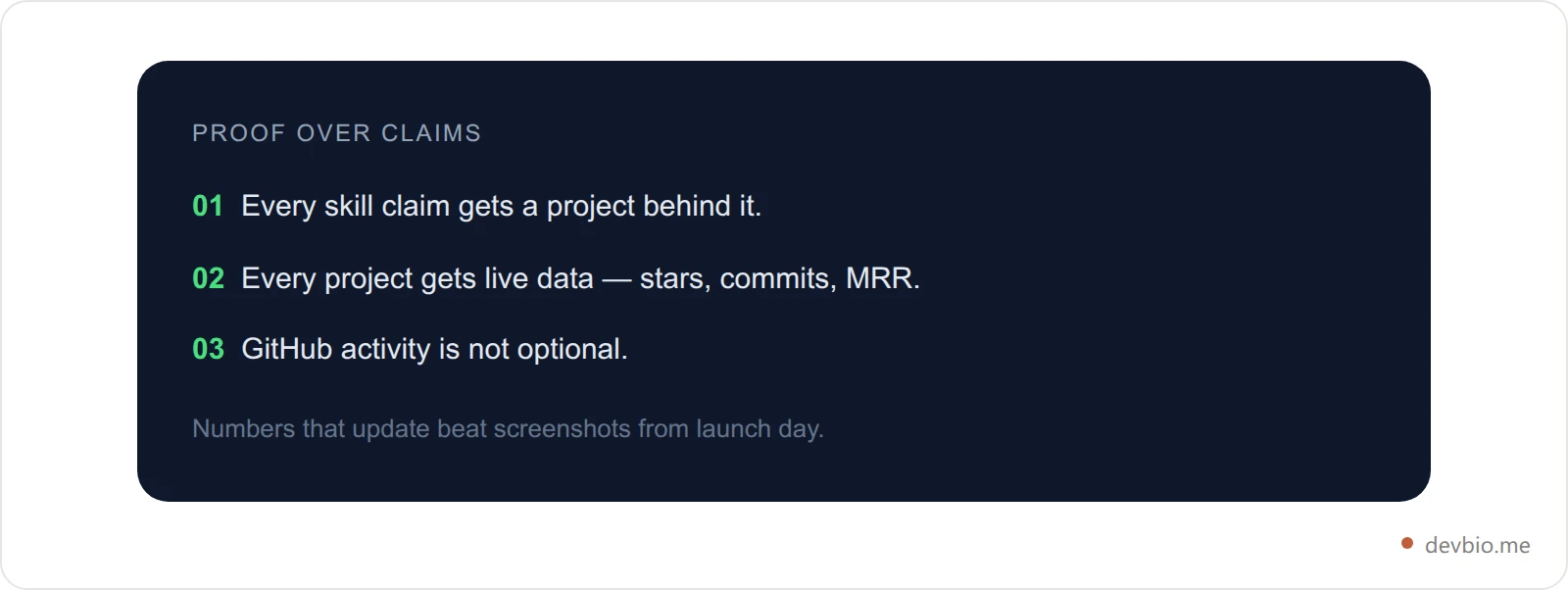
The Proof-over-Claims Framework has three rules:
Every skill claim gets a project to back it. "Proficient in TypeScript" is a claim. "Shipped a TypeScript compiler plugin with 3,200 GitHub stars" is proof.
Every project gets live data. Stars, commits, MRR, active subscribers. Numbers that update — not screenshots from launch day.
GitHub activity is not optional. A contribution graph that's active says you code regularly. An empty one says you don't, whatever your résumé claims.
More than 60,000 founders now share revenue numbers publicly on platforms like Indie Hackers. Pieter Levels runs Nomad List, RemoteOK, and PhotoAI as a solo developer with over $3M in annual revenue — and shares his MRR publicly. Marc Lou publishes his revenue monthly and has crossed $100K MRR. They don't claim to be successful. They show the number.
This is the standard a modern developer bio has to clear.
How to Write a Developer Bio in 6 Steps#
If you want the process rather than the component list, this is the order that works. Each step feeds the next, and the whole thing takes an afternoon — most of it spent connecting accounts, not writing.
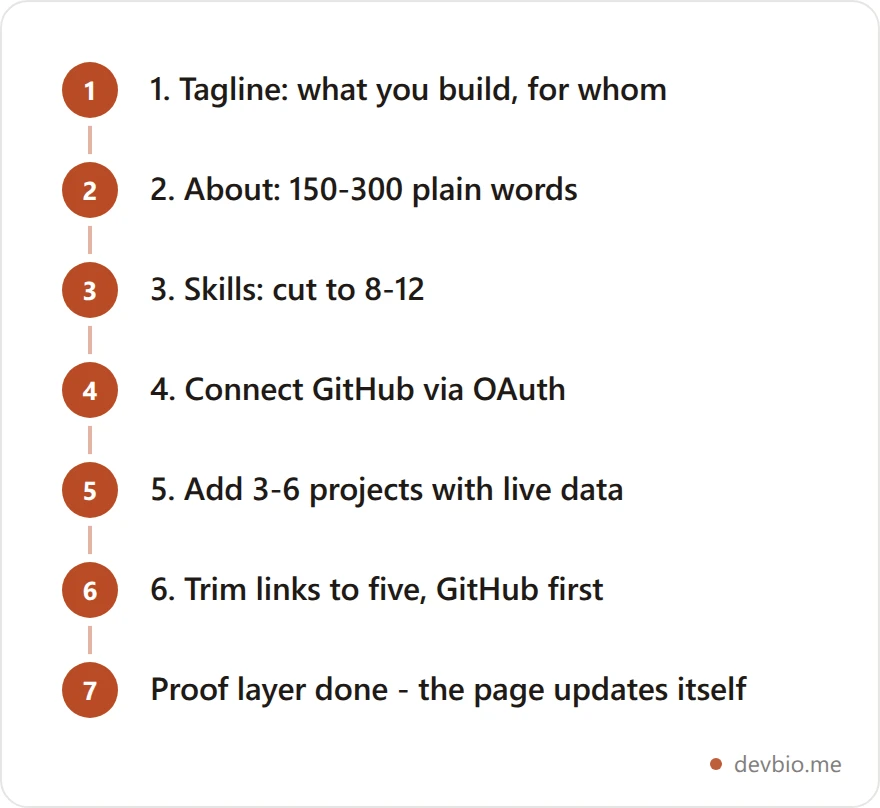
Write the tagline first. One line: what you build, and for whom. It frames everything below it and populates your social preview card.
Draft the About section in plain language. 150–300 words, explained the way you'd explain it to a smart friend outside software.
Cut the skills list to 8–12. What you'd reach for on a new project today — not everything you've ever touched.
Connect GitHub. Stats and the contribution heatmap come from the API, so this is a click, not a writing task.
Add 3–6 projects with live data. Stars and commits pull automatically; MRR too, once a payment gateway is connected.
Trim the links to five. GitHub first, then only the platforms you're actually active on.
Skip the blank page
Connect GitHub and the stats, heatmap, and project cards fill themselves in. You only write steps 1, 2 and 3.
Start your developer bioThe 11 Components of a Modern Developer Bio#
A well-structured developer bio is built from composable components — each carrying a different type of signal. Here are all 11, and what each one proves:
# | Component | What it signals |
|---|---|---|
1 | Basic Info | Name, title, location, tagline |
2 | Avatar | You're a real person |
3 | Banner | Visual identity |
4 | About | Your story in plain language |
5 | Skills | Your actual stack |
6 | Projects | Shipped work, with live GitHub and revenue data |
7 | Work Experience | Professional track record |
8 | GitHub Stats | Coding frequency and reach |
9 | Contribution Heatmap | Coding consistency over time |
10 | Earnings | Live MRR from connected payment gateways |
11 | Links | How to reach you |
Think of these as four layers:
Identity layer: Basic info, avatar, banner
Story layer: About, skills
Proof layer: Projects, work experience, GitHub stats, contribution heatmap, earnings
Contact layer: Links
Build all four and you have a complete developer bio. Skip the proof layer and you have a placeholder.

The proof layer carries five of the eleven components — nearly half. That's a fair reflection of where the weight sits when someone actually reads your page.
Layer 1 — Identity: Basic Info, Avatar, and Banner#
Basic Info is your header: name, job title, location, and a one-line tagline. Keep the tagline specific. "Full-stack developer building dev tools" beats "passionate problem solver" because it tells the reader exactly what you do and who might care. Your tagline also populates the auto-generated OG image when someone shares your bio link, so make it count.
Avatar is your photo. Use a real one — recruiters and clients both notice when it's AI-generated or a logo. On profiles that support it, you can also attach a short intro video (up to 10 seconds). A brief "here's what I build and why" clip is a small thing that instantly makes a profile feel human in a way no amount of well-crafted text achieves.
Banner is the visual strip behind your header. Most developers skip it. Don't. A clean, intentional banner sets a tone and signals that you care about how your profile looks. Default gray says "I haven't finished setting this up."
These three components take about ten minutes to complete and determine whether someone reads the rest or bounces.
Layer 2 — Story: About and Skills#
About is your 150–300 word section in plain language. No jargon, no buzzwords. Write like you're explaining what you do to a smart friend who doesn't work in software:
"I build developer tools in TypeScript and Go. For the past two years I've been working on an open-source CLI that makes database migrations less painful — 1,800 GitHub stars, actively maintained. By day I'm on the API infrastructure team at Acme Corp. By nights and weekends I'm building a SaaS for indie hackers."
Four sentences. Origin story, current focus, side project. No "proven track record." No "dynamic team player."
Skills is a tag list of your actual working stack: languages, frameworks, databases, cloud platforms, tools. Not everything you've ever touched — what you'd reach for on a new project today. Most profiles list too many skills and dilute the signal. Keep it to 8–12 tags. Hiring managers and clients scan this in under 10 seconds, so put your primary language first, then frameworks, then infrastructure.
Layer 3 — Proof: Projects with Live GitHub Data and MRR#
This is the most important section on any developer bio. Everything else is context. This is where you prove you can ship.
A well-built project card shows:
Name and description — what it is, one sentence, who it's for
Live GitHub stars and commit count — pulled from the GitHub API automatically, not manually entered
52-week commit activity chart — the sparkline visualizes whether a project is actively maintained or abandoned
Live MRR and subscriber count — if you've connected a payment gateway, current revenue syncs automatically to the card
That last item is the one most developers skip and the one that matters most. Showing $1,200/month MRR on a project card says more than a dozen bullet points about "growing a product from zero to profitability." The number is the proof.
Platforms like DevBio connect to Stripe, Dodo Payments, Lemon Squeezy, and Polar to pull this data automatically. MRR refreshes on an hourly sync — so the number on your card is always current, not a screenshot from launch day. Choosing between those four processors comes down to your customer base — see how they compare for indie hackers — and if you bill internationally, how to keep that MRR number honest across currencies.
You don't need a big number. A project at $80/month MRR from 14 paying customers still tells the reader: this is real, someone pays for this, you can ship things people want. That's the bar. Not "I built this" — "people pay for this." Connect a gateway and let the number speak for itself.
How many projects to include: Keep it to 3–6. More than that and the page becomes a dump. Pick your strongest work and link to your GitHub profile for everything else. Projects that haven't had a commit in two years signal neglect if you present them as active — be selective.
Layer 4 — Track Record: Work Experience#
Work experience on a developer bio is not the same as a résumé work history. Keep it tight.
For each role: company, title, date range, and 1–2 bullet points. Every bullet point should contain a number. Not "led backend development" — "rebuilt the payments API, reducing P99 latency from 4.2s to 340ms." Not "worked on infrastructure" — "migrated 14 microservices from EC2 to ECS, cutting monthly cloud cost by 31%."
If you're a self-taught developer or made a career switch, include that context honestly. Former teachers tend to write great documentation. Former finance people understand business metrics pure CS grads often don't. Put that in your About section and let work experience confirm the trajectory.
Cap it at five entries on a developer bio. The full work history goes on your résumé. The bio carries the highlights.
Layer 5 — GitHub Activity: Stats and Contribution Heatmap#
GitHub Stats gives a summary card: total commits, public repos, pull requests, followers, and a stars count. It's a macro view — useful for quickly communicating seniority and overall involvement.
Contribution Heatmap is more revealing because it shows pattern, not just totals. A heatmap that shows coding five or six days a week for two years is a stronger credibility signal than a high total commit count that was all done in one sprint years ago. Recruiters and investors look at the heatmap specifically because consistent long-term activity is hard to fake.
One practical note: GitHub Stats shows public repo data by default, but if you do most of your work in private repositories (common for employed engineers), connecting your GitHub account via OAuth unlocks private repo contribution data — which makes the stats significantly more representative of your actual output.
Layer 6 — Links and Contact#
The Links component is the most commonly misused section on a developer profile. Most people link to everything. That's wrong.
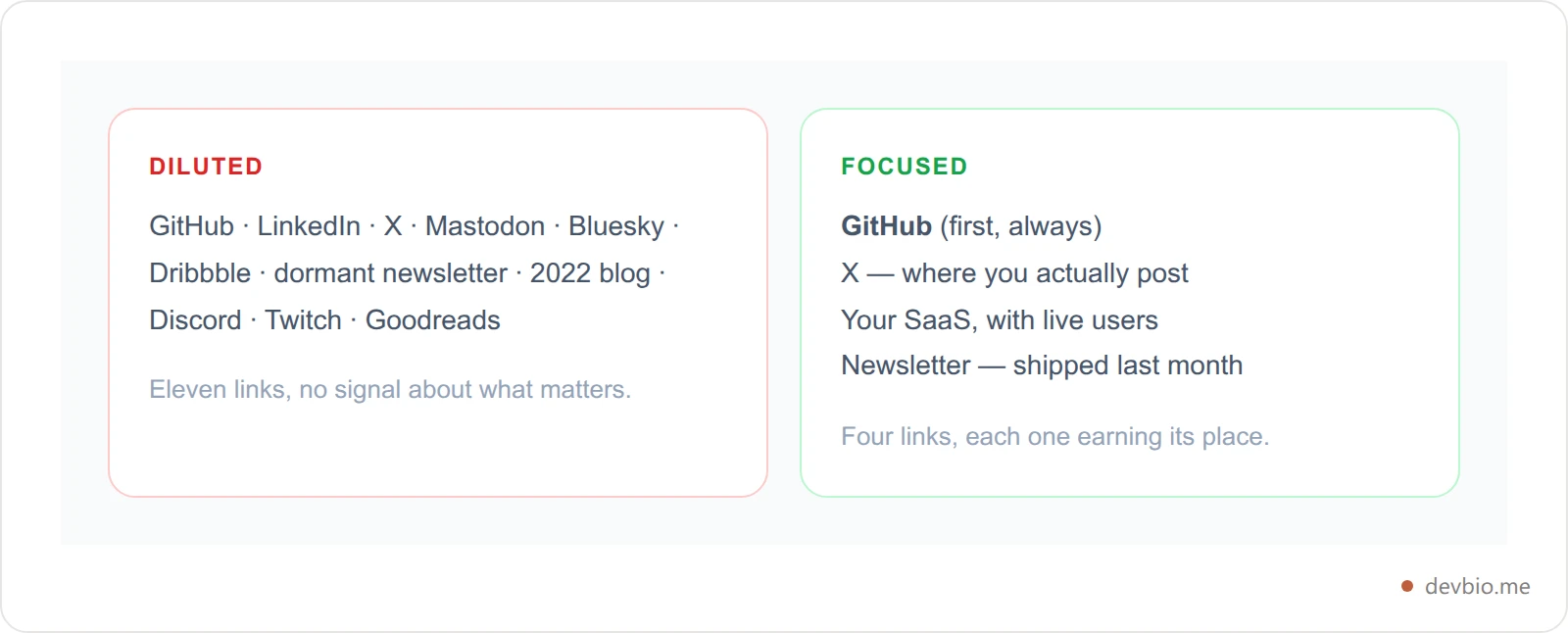
Link to what matters. For most developers:
GitHub — mandatory, always first
X / Twitter or LinkedIn — the platform where you're actually active, not both if you're not
Your product or SaaS — if you have one with live users
A newsletter or blog — only if it's been updated in the last 90 days
Five links max. An inactive newsletter link or a blog last posted to in 2022 signals neglect. If it's not active, cut it.
What Gets Auto-Compiled Into Your Resume#
A developer bio and an ATS-ready résumé serve different audiences. Your bio is a live, human-readable proof page. Your résumé is a document that passes through an automated hiring system before a human ever sees it.
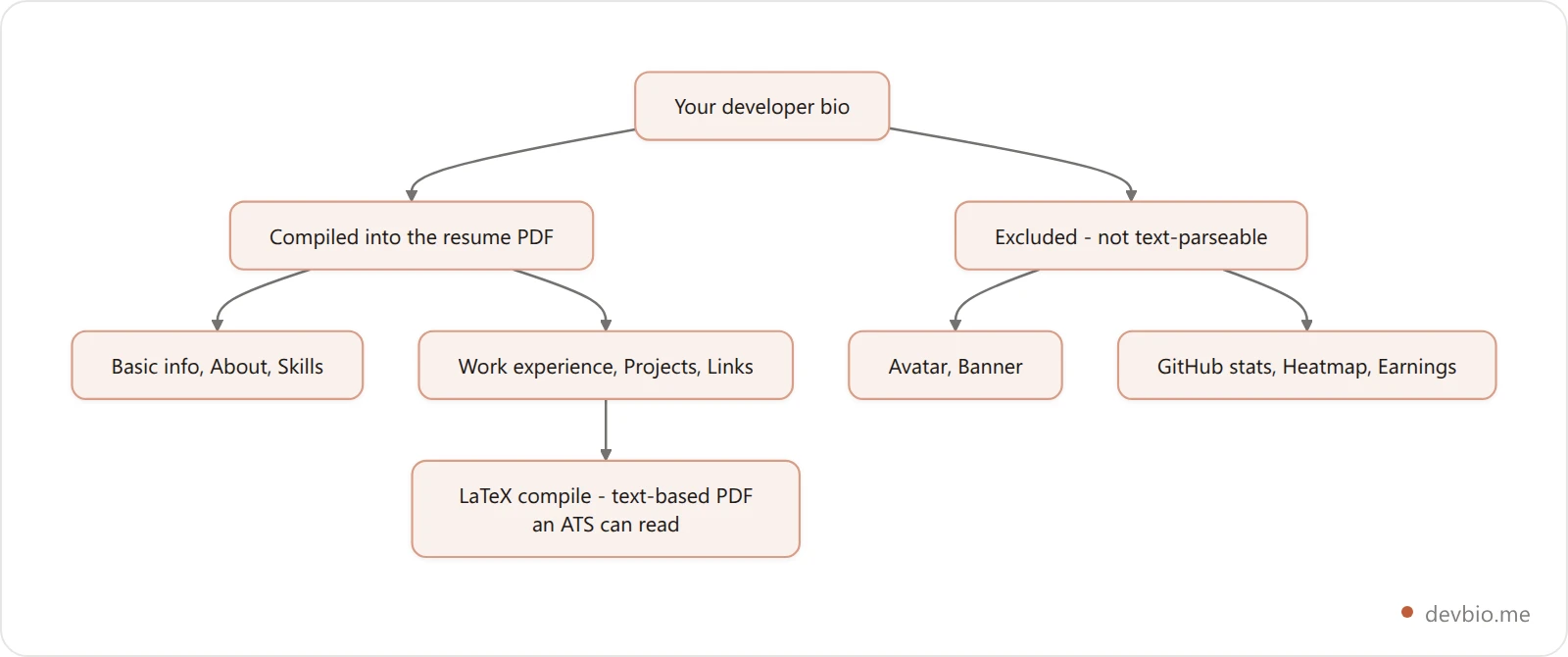
The components that compile into the resume PDF: basic info, about, skills, work experience, projects, and links. The ones excluded: avatar, banner, GitHub stats, contribution heatmap, and earnings — none of those translate to text-parseable content that ATS systems can read.
On DevBio, the resume is generated from LaTeX and compiled to PDF at devbio.me/yourname/resume. This matters because résumés with heavy formatting — columns, tables, embedded graphics — cause parsing failures in ATS systems. A LaTeX-compiled PDF sidesteps all of that and renders cleanly in every PDF viewer and applicant tracking system.
If you have an existing résumé format you prefer, you can point the resume URL to an external PDF instead, so the same yourname/resume link stays consistent regardless of where the underlying document lives.
Developer Bio Examples: Before and After#
The typical developer bio:
"Senior software engineer with 6 years of experience. Skills: React, Node.js, TypeScript, AWS. Built several web applications. Looking for new opportunities."
What's missing: any evidence. "Several web applications" tells the reader nothing. No stars, no users, no revenue, no commit history.
A Proof-over-Claims developer bio:
Tagline: "Backend engineer — open-source CLI tools and fintech APIs"
About: 200 words, plain language, covers day job at Acme Corp and the Logfire side project
Project card (Logfire): 1,847 GitHub stars, 344 commits, 52-week activity chart, $920/month MRR from 42 customers via Stripe — updated 47 minutes ago
Contribution heatmap: 11 months of consistent daily contributions
GitHub Stats: 847 contributions this year, 23 public repos, 284 followers
Work experience: 2 entries, each with a quantified impact bullet point
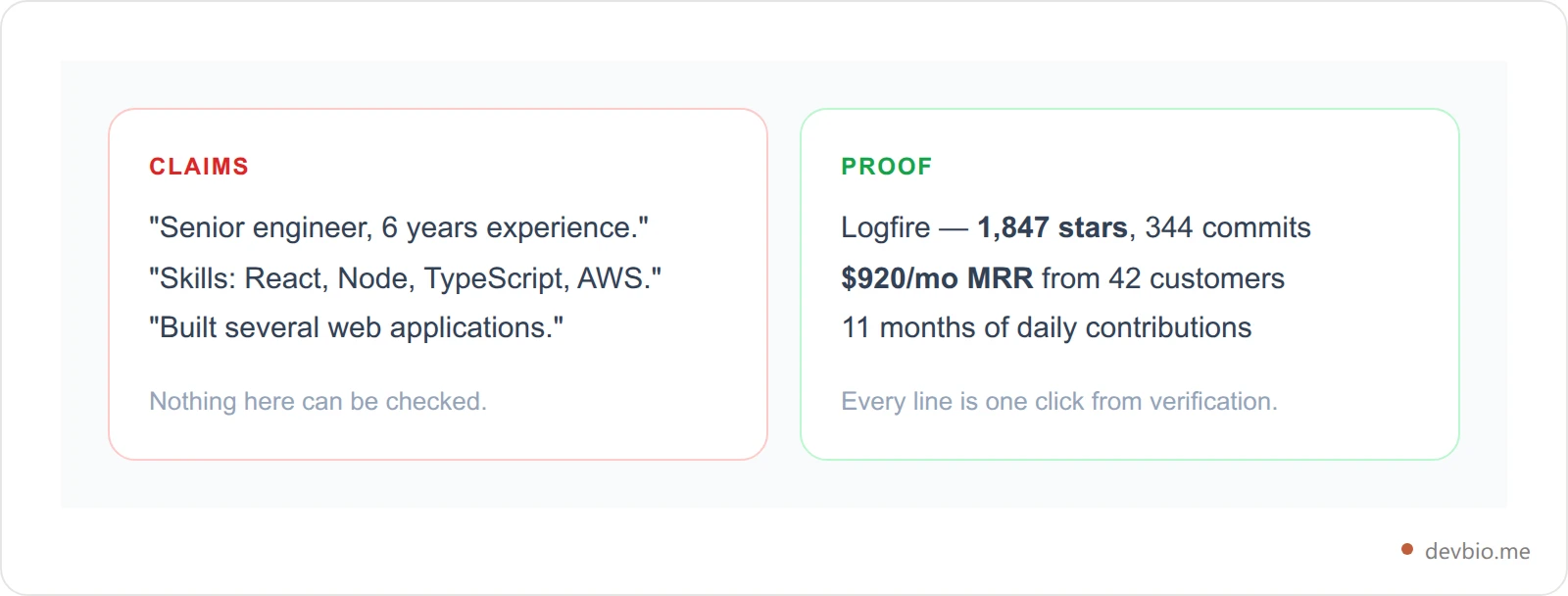
One bio makes a claim. The other makes a case. The second is what gets a recruiter to reach out before you send a cold application — there's nothing left to pitch when the profile already answers every question they'd ask. If your copy keeps drifting back toward the left-hand column, our list of words to avoid in a resume and developer bio makes a useful red-pen pass.
Where to Host Your Developer Bio: Platform Comparison#
Platform | Developer-native | Live GitHub data | Live MRR | ATS Resume | Custom Domain | SaaS Marketplace |
|---|---|---|---|---|---|---|
DevBio | Yes | Yes (auto-sync) | Yes — 4 gateways | Yes (LaTeX PDF) | Yes (Pro) | Yes |
GitHub Profile README | Yes | Static only | No | No | No | No |
read.cv / cv.dev | Partial | No | No | Manual upload only | No | No |
Linktree | No | No | No | No | Yes (paid) | No |
Bento.me | No | No | No | No | No | No |
about.me | No | No | No | No | Yes (paid) | No |
Carrd | No | No | No | No | Yes (paid) | No |
The GitHub Profile README is the closest native alternative — it's indexed by Google and tends to rank for your name. But it's static: you push text to a markdown file and it stays there. No live data pulls, no auto-generated resume, no way to list a SaaS for sale or connect a payment gateway. It's a strong supplement but not a replacement for a purpose-built developer bio — here's what to include in a GitHub profile README if you're maintaining both.
Linktree and Bento are link aggregators, not developer profiles. They work for pointing people to your social accounts. They don't communicate technical credibility or show live product data.
If you're weighing a hosted bio against building something yourself, we ranked 7 developer personal website setups by effort — launch time, cost, and upkeep side by side — and developer portfolio vs personal site vs link in bio covers how the formats differ in what they can actually prove.
The Developer Bio Checklist#
Use this to audit your current profile or build a new one from scratch.
Identity Layer
Real photo — not a logo or AI-generated avatar
Specific tagline: what you build and for whom
Location and availability status set
Banner image configured (not the platform default)
Story Layer
About section: 150–300 words, plain language, no buzzwords
Skills: primary language first, then frameworks, then infrastructure (8–12 tags max)
Zero instances of "passionate", "proactive", or "team player"
Proof Layer
At least 3 projects with GitHub repos connected and live data showing
If you have paying customers: payment gateway connected, MRR visible on at least one project card
Contribution heatmap active (requires GitHub OAuth)
Each work experience entry has at least one quantified bullet point
Contact Layer
GitHub link first in the list (mandatory)
1–2 social links for platforms you're actually active on
Product or SaaS link if you have one with live users
Distribution
Bio URL in your GitHub profile, LinkedIn about section, and email signature
Resume URL reviewed — formatting confirmed clean for ATS parsing
Custom domain set up if you're actively freelancing or job hunting — the CNAME setup takes about ten minutes
Key takeaways#
Lead with the tagline. One specific line about what you build beats any adjective — and it populates the social preview card people see before they click.
The proof layer is five of the eleven components. Projects, work experience, GitHub stats, heatmap, earnings. That's the half a reader actually weighs.
Live data beats typed data. Stars, commits, and MRR that refresh on their own never go stale the way a launch-day screenshot does.
Cut ruthlessly. 8–12 skills, 3–6 projects, five links. Every extra entry dilutes the ones that matter.
Knowing how to write a developer bio is mostly knowing what to leave out. The blank-page problem mostly disappears once GitHub is connected.
Frequently Asked Questions#
What's the difference between a developer bio and a developer portfolio?#
A portfolio usually means a full website — project pages, case studies, a contact form. A developer bio is a single structured page, closer to an enhanced profile than a site. The practical difference: a portfolio is built and maintained manually; a developer bio connected to GitHub and payment gateways keeps itself current. Most developers don't maintain their portfolios. A bio with live data doesn't need maintaining.
How long should a developer bio be?#
Short enough to scan in under two minutes. About section: 150–300 words. Skills: 8–12 tags. Projects: one sentence each, plus live data. Work experience: 1–2 bullet points per role. If someone is scrolling for more than 30 seconds, you've included too much.
What should a junior developer put on their bio with no shipped projects?#
Open-source contributions and consistent GitHub activity. A few meaningful PRs to established repos, a contribution heatmap with steady green squares, and an honest About section that explains what you're learning and building carry more weight than most junior developers expect. Don't inflate experience levels — it surfaces immediately in interviews.
Do I need the earnings component if I don't have a revenue-generating product?#
No. Skip it entirely. An empty MRR card is worse than not having one — it draws attention to the absence. Add it when you have at least one paying customer.
Does a developer bio replace your résumé?#
No — it works alongside it. Your bio is your live, shareable proof page. The auto-generated PDF is what goes into ATS systems when you apply to a specific role. Some developers link to their bio in the résumé header. Others use the bio as their primary inbound surface and produce the PDF only when asked. Both approaches work.
How often does the live data update?#
On DevBio, GitHub data and payment gateway MRR sync every hour on Pro and every six hours on the free plan. Every project card shows a "last synced" timestamp so visitors can see exactly how fresh the data is.
Should I set up a custom domain for my developer bio?#
If you're freelancing, actively job hunting, or building a personal brand, yes. yourname.dev or yourname.me pointing at your bio looks more intentional than a platform subdirectory URL. DevBio's custom domain routing rewrites the URL transparently — the page is identical, just served from your domain with no redirect.
What makes a developer bio rank on Google?#
Three things: a unique URL based on your actual name or handle; an About section in plain language that includes your skills and what you've built; and inbound links from your GitHub profile, LinkedIn, and anything you've published. Developer bios indexed by default come with per-profile OG images and structured metadata that help search engines understand the page's topic and entity.
Build the Bio That Proves You Ship#
A developer bio that actually works doesn't start with a technology list. It starts with proof: GitHub data that refreshes automatically, project cards with real commit activity, and — if you're building in public — live revenue numbers that communicate what bullet points can't.
If you take one thing from this guide on how to write a developer bio, take this: build the proof layer first (projects with live data, GitHub activity, MRR if you have it), wrap it in your story (about, skills, work experience), and anchor it with your identity (name, photo, tagline). Complete all four layers and your bio does the work of a well-crafted cold email — except it's live 24 hours a day and never needs updating.
GitHub has 180 million developers. One new one joins every second. More than 60,000 founders now share revenue numbers publicly. The developers who stand out aren't the ones with the longest skill list — they're the ones whose profile makes someone think: "This person actually ships."
Take the checklist above, go through it line by line, and get the live data connected. It takes an afternoon. The profile works for you indefinitely after that.