---
title: JSON Resume Format Explained: Schema, Themes, 2026 Guide
description: JSON Resume is the open standard for resume.json files. See the schema, best themes, and how to turn it into a live, GitHub-verified profile.
keywords: json resume, json resume schema, resume.json, json resume themes, resume as code, ATS resume format, developer resume
published: 2026-07-24
updated: 2026-07-25
url: https://devbio.me/blogs/json-resume-format-guide
word_count: 2940
---
## Related Pages
- [019ef207-923d-7197-8d66-3527fa21e1e7](https://devbio.me/blogs019ef207-923d-7197-8d66-3527fa21e1e7)
- [019ef732-f0a2-76ff-997d-aa7ea5390274](https://devbio.me/blogs019ef732-f0a2-76ff-997d-aa7ea5390274)
- [019e9557-6522-7488-b04b-e568b9f2a15d](https://devbio.me/blogs019e9557-6522-7488-b04b-e568b9f2a15d)
- [019f6878-cc4f-75bb-a760-d99fcf03e056](https://devbio.me/blogs019f6878-cc4f-75bb-a760-d99fcf03e056)
- [019f5e2d-f18a-7633-aee1-1fa6fd1b448b](https://devbio.me/blogs019f5e2d-f18a-7633-aee1-1fa6fd1b448b)

*Photo by [Emile Perron](https://unsplash.com/@emilep?utm_source=quillly&utm_medium=referral) on [Unsplash](https://unsplash.com?utm_source=quillly&utm_medium=referral)*
Updated for July 2026. A resume.json file and a rendered PDF are not the same thing, and mixing them up is why most "JSON Resume" guides online are either ten years old or written by someone who has never shipped a resume.json to production.
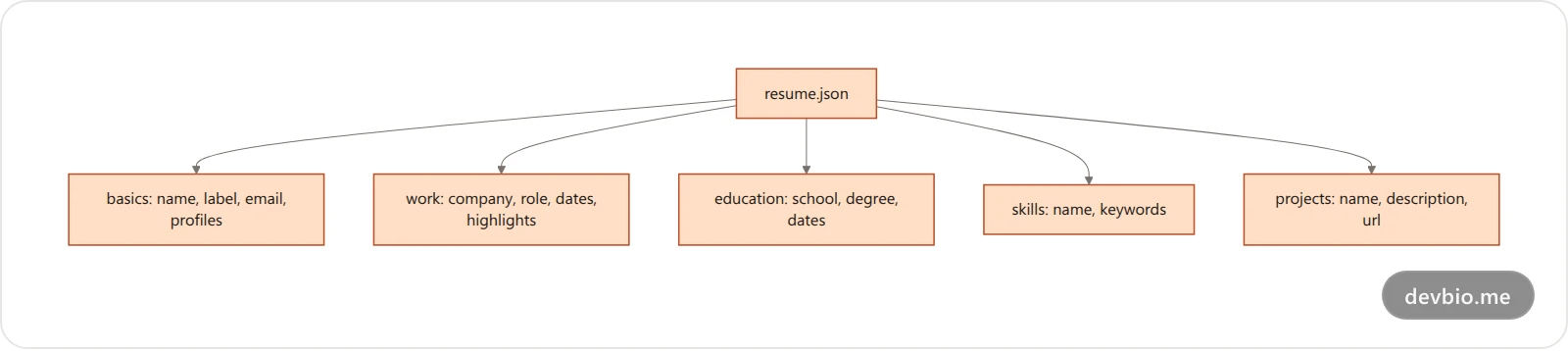
**JSON Resume is an open, versioned JSON schema for representing a resume as structured data instead of a Word document.** You write one `resume.json` file with sections like `basics`, `work`, `education`, `skills`, and `projects`, then render it into HTML, a PDF, or a hosted page using any of dozens of community themes. It has been stable at schema version 1.0.0 since 2014, which is exactly why it still works with tools built a decade apart.
This guide covers the schema field by field, compares the tools that render it, and then goes further than most JSON Resume content: what a resume.json still can't do on its own, and how to turn one into a profile that a hiring manager can actually verify instead of just read.
## What Is JSON Resume, Exactly?
JSON Resume is a community-maintained standard, not a product. There's no single company behind it. The schema lives at [jsonresume.org](https://jsonresume.org/schema) and on [GitHub](https://github.com/jsonresume/resume-schema), and anyone can build a tool against it.
Thomas Davis, who created the project in 2013, put the reasoning plainly: "There is no reason why there can't be a common standard for writing a resume that can be extended with an ecosystem of open source tools." That's the whole pitch. One file, many renderers, no lock-in.
In practice, a resume.json does three things a PDF can't:
- **Version control.** Commit it to Git, diff changes between job applications, roll back a bad edit.
- **Portability.** The same file feeds a website theme, a PDF export, a job-board import, or your own script.
- **Automation.** CI can validate the schema, regenerate your PDF on every push, or feed a script that tailors bullet points per job posting.
## The JSON Resume Schema, Field by Field
The schema defines ten top-level sections, but four cover almost every real resume: `basics`, `work`, `education`, and `skills`. `projects`, `awards`, `certificates`, `publications`, `volunteer`, and `languages` round it out for people who need them.
Here's a minimal but valid example:
```json
{
"basics": {
"name": "Jordan Lee",
"label": "Backend Engineer",
"email": "[email protected]",
"url": "https://jordanlee.dev",
"summary": "Backend engineer focused on distributed systems.",
"profiles": [
{ "network": "GitHub", "username": "jordanlee", "url": "https://github.com/jordanlee" }
]
},
"work": [
{
"name": "Acme Systems",
"position": "Senior Backend Engineer",
"startDate": "2023-01-01",
"endDate": "",
"summary": "Owns the payments pipeline.",
"highlights": ["Cut p99 queue latency 38% by rewriting the consumer"]
}
],
"skills": [
{ "name": "Node.js", "keywords": ["TypeScript", "Postgres", "Redis"] }
],
"projects": [
{ "name": "queue-lite", "description": "A minimal job queue for Node.", "url": "https://github.com/jordanlee/queue-lite" }
]
}
```
Copy that structure, swap in your own data, and it's already a valid resume.json. `endDate` left blank means "current." `highlights` is an array of bullet strings, not one paragraph, keep each one to a single measurable claim.
## Why Developers Treat Their Resume Like Code
Most people rewrite a resume from scratch, or hand-edit a Word doc, every time they apply somewhere new. Developers who use JSON Resume treat it like any other config file: one source of truth, branched per use case.
In practice that looks like a normal Git workflow. Keep a `main` branch with your general resume.json, then cut a short-lived branch when you're tailoring bullet points for a specific role, tweaking `work[].highlights` to foreground the parts of your experience that match the posting. Merge back or discard the branch when you're done. You get a real history of what changed and when, something no Word document's "track changes" ever gave you cleanly. Some developers wire a GitHub Action to lint the schema and regenerate a PDF on every push, so the exported file is never more than one commit stale.
That habit lines up with where hiring actually moved in 2026. ATS software isn't a niche filter anymore, it's the default gate:
- 98% of Fortune 500 companies use an applicant tracking system to filter resumes before a human ever sees them ([Select Software Reviews](https://www.selectsoftwarereviews.com/blog/applicant-tracking-system-statistics)).
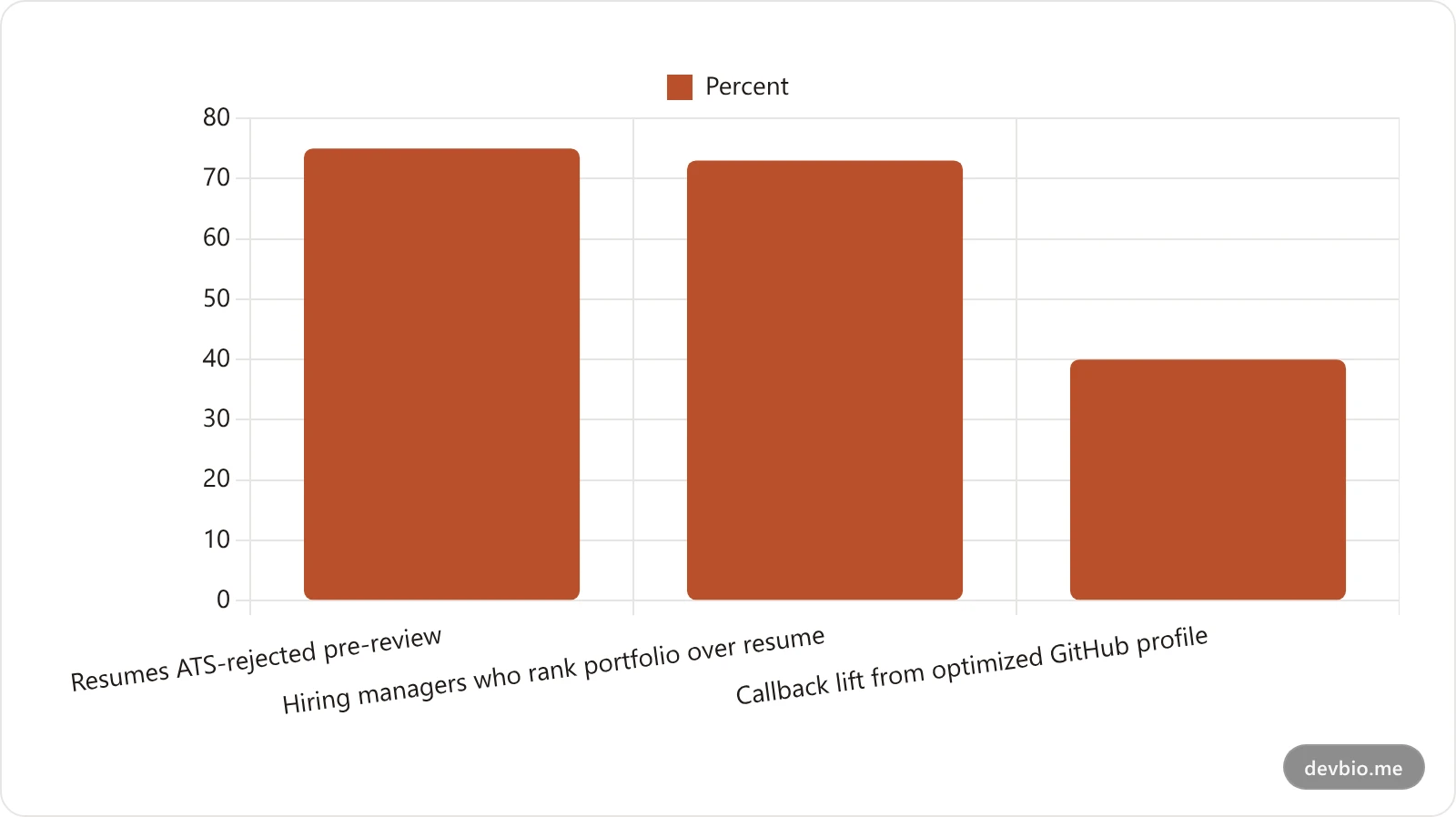
- 75% of resumes get rejected by ATS software before a human recruiter reviews them, often for formatting problems rather than missing skills ([Select Software Reviews](https://www.selectsoftwarereviews.com/blog/applicant-tracking-system-statistics)).
- 88% of companies now use some form of AI in initial candidate screening.
- The ATS software market itself is valued at roughly $7.94B in 2026 and is projected to hit $15.46B by 2035.
A structured resume.json sidesteps a lot of the formatting failure mode entirely, since there's no table, no two-column layout, and no embedded image for a parser to choke on. It's plain data. That's a real advantage. It's just not the whole story, which the next section gets into.
## JSON Resume Themes and Renderers Compared
The schema itself doesn't render anything. You need a theme or a tool that reads your resume.json and turns it into something a human looks at. Here's how the main options stack up:
| Tool | What it does | Needs an account | Shows live GitHub or revenue data |
| --- | --- | --- | --- |
| [resume-cli](https://github.com/jsonresume/resume-schema) + community themes | Renders resume.json into a static HTML/PDF theme | No | No |
| [Reactive Resume](https://docs.rxresu.me/guides/json-resume-schema) | Full builder UI with JSON Resume import/export | Yes | No |
| jsonresu.me | AI-assisted builder, tailors JSON per job posting | Yes | No |
| JSONResume Web / theme-manager | Browser-based theme renderer | No | No |
| DevBio's JSON Resume converter | Converts resume.json fields directly into live bio components | No | Yes |
Every renderer in that list, DevBio's included, does the same base job: it turns your structured data into a page. The difference is what happens after that. A community theme gives you a nicely formatted version of the words you typed. It still can't confirm any of them.
Picking between them is mostly about what you're optimizing for. If you just want a clean static page or PDF from a resume.json you already maintain, resume-cli and community themes are the lightest option, no account, no lock-in. If you're starting from zero and want a guided builder with a visual editor, Reactive Resume or jsonresu.me handle that well. If your goal is a page a hiring manager actually trusts on sight, you need the fourth column in that table, live data, which static theme renderers structurally can't provide no matter how polished the layout is.
[See the live-data column in action](https://devbio.me/tools/json-resume){cta=explore-converter} with your own resume.json, no account needed to try it.
## The Problem JSON Resume Can't Solve
Here's the part most JSON Resume guides skip. A resume.json that says "340 commits this year, shipped a project with 1,200 GitHub stars" renders exactly the same, in exactly the same theme, whether that's true or not. The schema guarantees structure. It says nothing about accuracy.
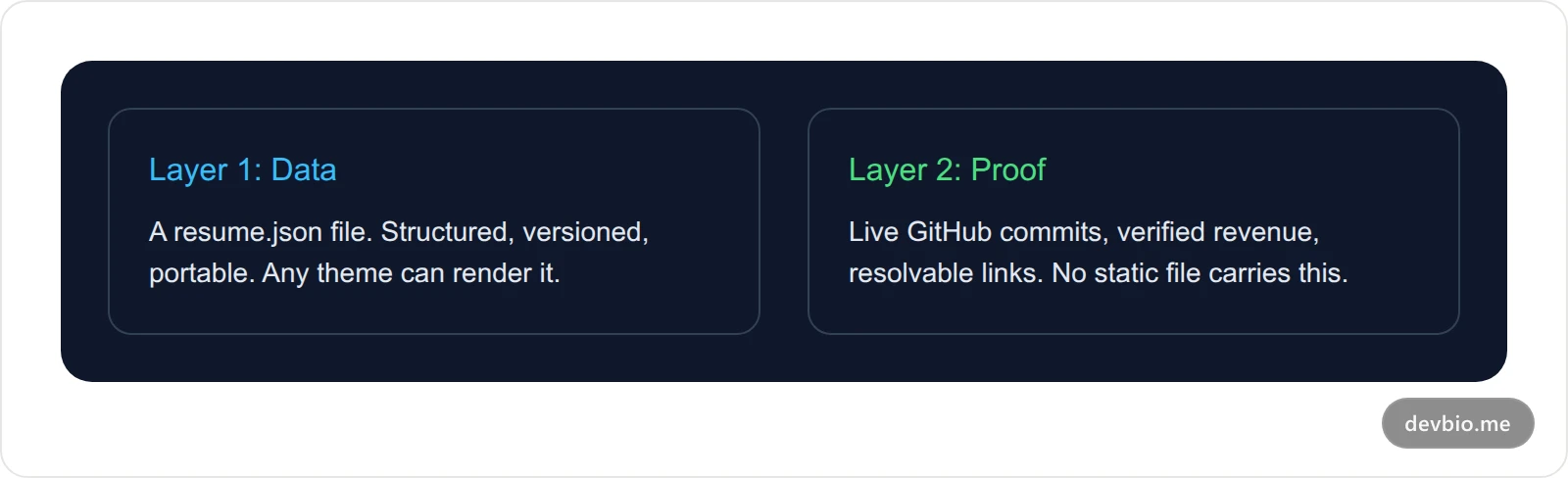
Think of it as two layers:
**Layer 1: Data.** Your resume.json. Structured, versioned, portable. This is what JSON Resume gives you, and it's genuinely useful.
**Layer 2: Proof.** Live signals no static file can carry: real-time GitHub activity, verified Stripe or Polar revenue, links that actually resolve. A JSON file can claim these things. It can't verify them.
Consider the same resume.json rendered two ways. Through a static theme, "Node.js, 4 years experience, shipped side projects" is just text a recruiter has to take on faith. Imported into a profile that pulls live data, that same entry can show 340 commits across 12 repos in the last year, a project sitting at 1,200 GitHub stars, and $1,400 in monthly revenue verified straight from Stripe. Same words. One version cites a source, the other doesn't. That's the entire argument for [proof over claims](/developer-portfolio-vs-resume) in one comparison.
## From resume.json to a Live, GitHub-Verified Profile
DevBio has a free tool at `/tools/json-resume` that does exactly this conversion, no signup required. Paste or upload your resume.json, and it maps the schema straight into bio components:
- `basics.name`, `basics.label`, `basics.summary`, and `basics.image` populate your basic info, about section, and avatar.
- `basics.profiles` becomes your links component.
- `skills[].name` and `keywords` populate a skills list, deduplicated and capped at 24 entries.
- `work[]` maps to a work-experience component, with `highlights` becoming bullet points.
- `projects[]` maps to a projects component, with `keywords` becoming tags.
One honest caveat: the `education` field is defined in the schema, but DevBio's converter doesn't map it to a component yet. If your resume.json leans heavily on formal education, add that manually after importing.
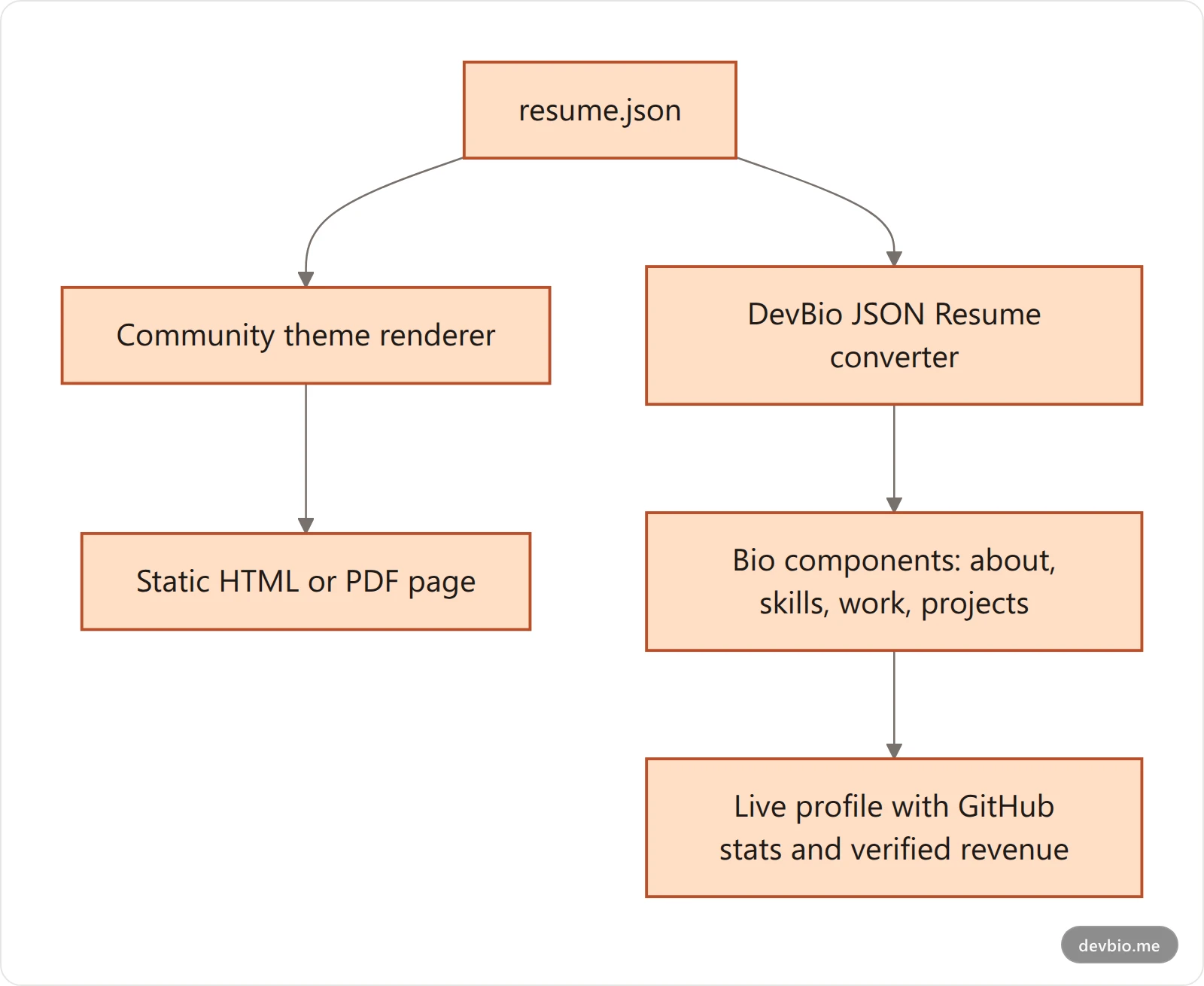
Once your data lands in those components, it stops being static. Your projects component can pull live GitHub stars and commit activity. If you've connected Stripe, Dodo Payments, Lemon Squeezy, or Polar, a revenue component can show real MRR instead of a number you typed once and never updated. [Try the converter](https://devbio.me/tools/json-resume){cta=try-json-resume-tool} and see your own resume.json turned into a live page in under a minute.
## JSON Resume vs. the ATS PDF Resume: Not the Same Thing
These two get conflated constantly, so it's worth being precise. JSON Resume is a portable data format for interop between tools. It's not the same pipeline as an ATS-ready PDF export.
DevBio also generates an ATS-parseable PDF resume, served at `devbio.me/{username}/resume` (and transparently on your custom domain if you've set one up), built from a completely separate LaTeX pipeline: each bio component contributes its own LaTeX, DevBio compiles the combined document into a clean PDF, and that's what you'd actually attach to a job application. It's a free-tier feature, not paywalled.
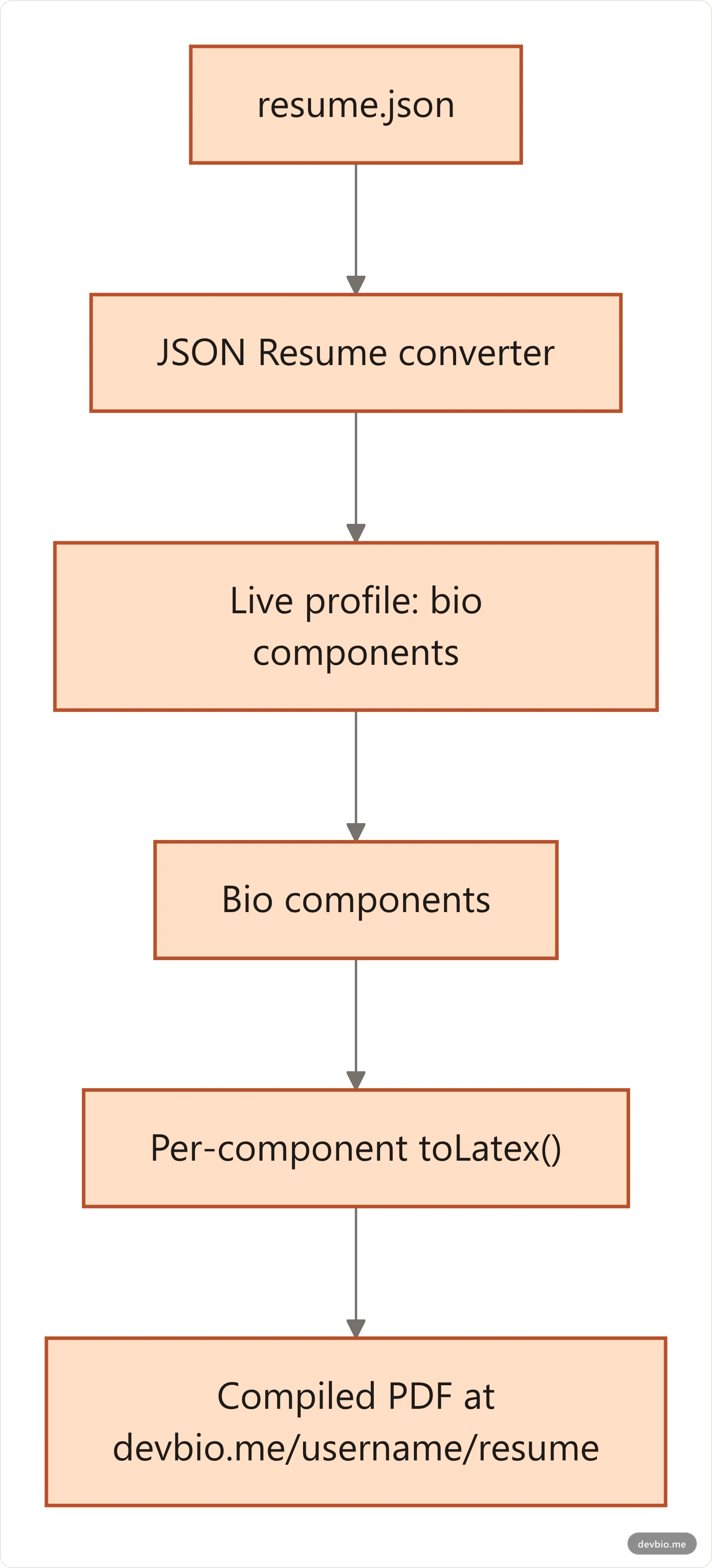
The JSON Resume converter and the PDF resume generator solve different problems. One gets your data into a live profile. The other gets a clean, parseable PDF out of it. If you're building out a full resume workflow, our [guide to the five main developer resume formats](/developer-resume-formats-2026) and the [ATS-ready resume walkthrough](/developer-resume-ats-github) cover the PDF side in depth.
## How a JSON Resume Actually Gets You Interviews
None of this matters if it doesn't change outcomes. The data on developer hiring in 2026 is fairly blunt about what does:
- 73% of hiring managers say a strong portfolio matters more than a polished resume for developer roles ([Stack Overflow Developer Survey](https://survey.stackoverflow.co/2025)).
- Developers with an active, maintained [portfolio](/developer-portfolio-guide-2026) report meaningfully higher interview callback rates than those relying on a resume alone.
- A well-maintained [GitHub profile](/github-profile-guide-2026) can lift interview callbacks by around 40% on its own.
A JSON Resume gets you partway there: clean data, no ATS formatting failures, one file to maintain. But "partway" is the operative word. The resume.json format was built to solve a data-portability problem, not a credibility problem. Pairing it with a profile that verifies your GitHub activity and revenue closes that gap without you rewriting anything, since the same resume.json becomes the input either way.
[Turn your resume.json into a verified profile](https://devbio.me){cta=signup-interviews} in the time it takes to paste in the file.
## Where Your resume.json Data Should Come From
Most guides assume you're typing a resume.json by hand, but you rarely have to start from a blank file. A few common sources:
- **Export from LinkedIn.** Browser extensions and scripts like [linkedin-to-jsonresume](https://github.com/joshuatz/linkedin-to-jsonresume) pull your profile into a rough resume.json you then clean up.
- **Write it directly.** For most developers this is faster than it sounds. Copy a minimal example, fill in `basics` and one or two `work` entries, and expand from there.
- **Generate it from an existing PDF.** DevBio's dashboard has a separate resume importer that reads an uploaded PDF or plain-text resume and parses it into the same underlying component data, a different pipeline from the JSON Resume converter, useful if a resume.json isn't where you're starting.
Wherever the data comes from, the same rule applies before you render anything: validate it against the [official schema](https://docs.jsonresume.org/schema) so a typo in one field doesn't quietly break a section in every theme downstream.
## Common JSON Resume Mistakes to Avoid
- **Treating **`**highlights**`** as a paragraph.** Each string in the array should be one measurable claim, not a wall of text. Themes render each one as a separate bullet.
- **Leaving **`**basics.url**`** blank.** This is usually the one link a recruiter clicks first. Point it at your live profile, not a placeholder.
- **Skipping schema validation.** A malformed resume.json will render inconsistently across themes. Validate against the [official schema](https://docs.jsonresume.org/schema) before you rely on it.
- **Stuffing **`**keywords**`** with every technology you've ever touched.** Renderers and ATS parsers both weight relevance; 40 keywords reads as noise, not skill.
- **Assuming a rendered theme is the same as an ATS-ready PDF.** Most community themes are built for humans to read on a webpage, not for ATS parsers. Check before you submit one to a job application.
- **Never updating it after the first draft.** A resume.json only stays useful if you commit changes as your work changes, the same as any other file in a repo.
## Frequently Asked Questions
### What is JSON Resume?
JSON Resume is an open-source schema for writing a resume as structured JSON data instead of a Word document or PDF. You maintain one resume.json file with sections like basics, work, education, and skills, then render it into HTML, a PDF, or a live page using any compatible theme or tool.
### Is JSON Resume still relevant in 2026?
Yes. The schema has been stable at version 1.0.0 since 2014, and it's still actively used by resume builders, CLI tools, and profile converters. Its age is a feature here: a resume.json written years ago still renders correctly in current tools.
### What's the difference between JSON Resume and a regular resume?
A regular resume is a formatted document, a PDF or Word file meant to be read once. A JSON Resume is structured data meant to be reused: version-controlled, diffable, and renderable into multiple formats from a single source file.
### Do I need to know how to code to use JSON Resume?
You need to be comfortable editing a JSON file, which is closer to filling out a form than writing a program. Most people copy an example, swap in their own details, and validate the result against the schema before rendering it.
### Can I convert a JSON Resume into a PDF?
Yes, most community themes and tools support PDF export directly from resume.json. Separately, DevBio's ATS-ready PDF resume pipeline builds a clean, parseable PDF from your profile data, whether that data originally came from a resume.json import or was entered directly.
### Does JSON Resume support education history?
The schema defines an `education` field with school, degree, and dates. Support for it varies by tool. DevBio's converter, for example, currently maps basics, skills, work, and projects, but doesn't yet map education into a component, so add that section manually if you use it.
### Is JSON Resume the same as an ATS-friendly resume?
Not automatically. JSON Resume avoids common ATS parsing failures like tables and multi-column layouts because the underlying data is plain JSON. But how a theme renders that data into a final PDF still determines whether the output itself is ATS-friendly.
### What's the best JSON Resume theme in 2026?
There's no single best theme, it depends on whether you want a static page, a builder with a visual editor like Reactive Resume, or a live profile that shows verified GitHub and revenue data alongside your resume content rather than just formatted text.
## The Bottom Line
JSON Resume solves a real problem: it gets your resume out of a Word document and into structured, portable, version-controlled data. That's worth doing on its own. Schema stability since 2014 means the file you write today still works with tools built years from now.
But a resume.json, rendered through any theme, is still just claims in a nicer format. The gap between Layer 1 (data) and Layer 2 (proof) is what actually moves interview callback rates, not the file format underneath.
If you already have a resume.json, the fastest way to see the difference is to run it through [DevBio's converter](https://devbio.me){cta=signup} and look at your own work experience sitting next to live GitHub activity instead of static text. Your code already proves you can build. Put the data you've already written to work.