> Content index: https://devbio.me/blogs/llms.txt
> Canonical page: https://devbio.me/blogs/markdown-image-size

---
title: Markdown Image Size: The Syntax That Doesn't Exist
description: Markdown has no width syntax. See what GitHub, GitLab, Obsidian and Pandoc each accept, and the one HTML tag that resizes an image everywhere.
keywords: markdown image size, markdown image width, github markdown image size, markdown img tag
published: 2026-09-07
updated: 2026-09-13
url: https://devbio.me/blogs/markdown-image-size
word_count: 2304
---

# Markdown Image Size: The Syntax That Doesn't Exist

> Markdown has no width syntax. See what GitHub, GitLab, Obsidian and Pandoc each accept, and the one HTML tag that resizes an image everywhere.

Canonical: https://devbio.me/blogs/markdown-image-size
Published: 2026-09-07

## Related Pages

- [Markdown Line Break: The Two-Space Trap](https://devbio.me/blogs/markdown-line-break)
- [Markdown Center Text: What Works, What Gets Stripped](https://devbio.me/blogs/markdown-center-text)
- [GitHub README Generator: Free Tool, No Sign-Up (2026)](https://devbio.me/blogs/github-readme-generator)
- [GitHub README Stats: What They Show (and What They Miss) in 2026](https://devbio.me/blogs/github-readme-stats-guide)
- [Markdown Emoji: Why :tada: Isn't Markdown](https://devbio.me/blogs/markdown-emoji-shortcodes)
- [GitHub Tech Stack Badges: Copy, Order, Cut to 12](https://devbio.me/blogs/github-tech-stack-badges)
- [OG Image Size: The 2026 Spec for Every Platform](https://devbio.me/blogs/og-image-size-spec)
- [Markdown Code Block: Syntax, Languages, Nesting](https://devbio.me/blogs/markdown-code-block)
- [GitHub Profile README Best Practices: The 82% Gap](https://devbio.me/blogs/github-profile-readme-guide)

![Developer editing markdown source code on a dark screen, where image sizing syntax is written](https://images.unsplash.com/photo-1515879218367-8466d910aaa4?crop=entropy&cs=tinysrgb&fit=max&fm=jpg&ixid=M3w4OTM1MDJ8MHwxfHNlYXJjaHwxfHxjb2RlJTIwZWRpdG9yJTIwc2NyZWVuJTIwbWFya2Rvd24lMjBkb2N1bWVudGF0aW9ufGVufDB8MHx8fDE3ODg3NDMyNjV8MA&ixlib=rb-4.1.0&q=80&w=1080)
*Photo by [Chris Ried](https://unsplash.com/@cdr6934?utm_source=quillly&utm_medium=referral) on [Unsplash](https://unsplash.com?utm_source=quillly&utm_medium=referral)*

You dropped a screenshot into your README and it came out the size of a billboard. So you searched for the markdown image size syntax, found four different answers on Stack Overflow, tried three of them, and every one rendered as literal text next to your image. That's not you doing it wrong — every one of those answers is correct, for a different markdown parser than the one you're using.

**The direct answer:** Markdown has no image size syntax at all. The `![alt](url)` form takes alt text, a URL, and an optional title, so there is no slot for a markdown image width. To resize one you either write a markdown img tag — meaning raw HTML's `<img>`, which works in GitHub, VS Code, and most renderers — or use a parser-specific extension like GitLab's `{width=300}` that breaks everywhere else.

## Table of Contents

- [Why Markdown Has No Image Size Syntax](#why-markdown-has-no-image-size-syntax)

- [The Markdown img Tag: The Method That Works Almost Everywhere](#the-markdown-img-tag-the-method-that-works-almost-everywhere)

- [Markdown Image Size by Platform](#markdown-image-size-by-platform)

- [GitHub: HTML Only, and What the Sanitizer Keeps](#github-html-only-and-what-the-sanitizer-keeps)

- [The Curly-Brace Extensions: GitLab, Pandoc, kramdown](#the-curly-brace-extensions-gitlab-pandoc-kramdown)

- [Why Your SVG Ignores the Width You Set](#why-your-svg-ignores-the-width-you-set)

- [Retina, Aspect Ratio, and the Two-Attribute Rule](#retina-aspect-ratio-and-the-two-attribute-rule)

- [Five Mistakes That Break Image Sizing](#five-mistakes-that-break-image-sizing)

- [Frequently Asked Questions](#frequently-asked-questions)

## Why Markdown Has No Image Size Syntax

Because sizing is presentation, and markdown was designed in 2004 to be readable as plain text. Its author left presentation to HTML on purpose. Every parser that later added a markdown image width syntax invented its own, which is why the answer you found works for someone else and not for you.

The [CommonMark specification](https://spec.commonmark.org/0.31.2/) — the standard nearly every modern parser implements — defines an image as exactly three parts: the alt text in square brackets, the destination URL in parentheses, and an optional quoted title. There is no fourth slot. There is no attribute list. The grammar simply has nowhere to put a number.

What the spec *does* guarantee is an escape hatch: raw HTML is passed through as-is, without changing the parser's state. That single rule is why the `<img>` tag is the answer to this question on almost every platform — it isn't a markdown feature at all, it's markdown getting out of the way.

So when you find a snippet like `![alt](img.png){width=300}` and it renders as the literal characters `{width=300}` after your image, nothing is broken. Your parser followed CommonMark exactly. The braces were never part of the image; they were just text that happened to sit next to one.
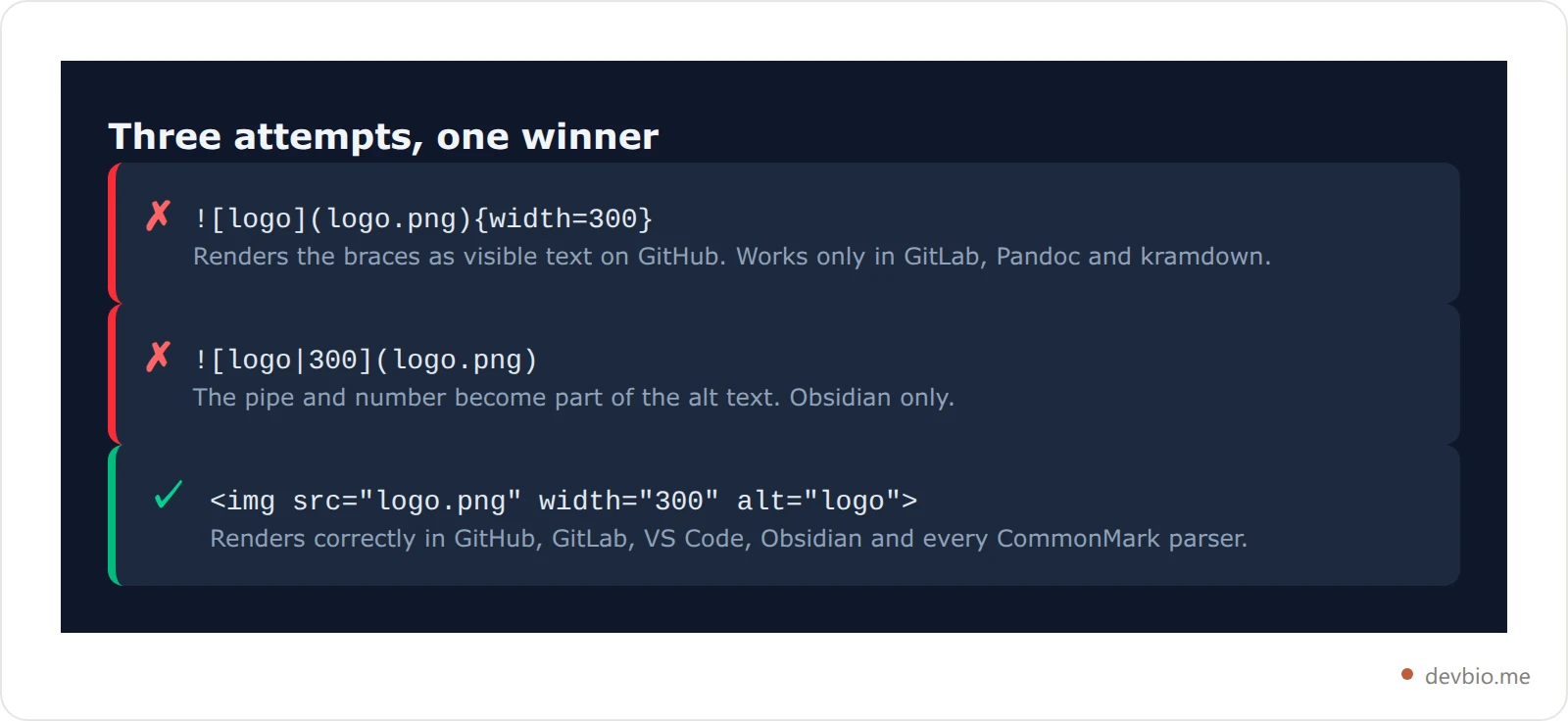
![Three markdown image sizing attempts side by side, showing that only the HTML img tag renders correctly](https://quillly.com/serve/v1/019e3623-8b91-738d-ae30-42d5bcd996a0/images/94026b8af57f3007db6e8c16caf4afede6810275.webp)

## The Markdown img Tag: The Method That Works Almost Everywhere

If you only remember one line from this page, remember this one:

```html
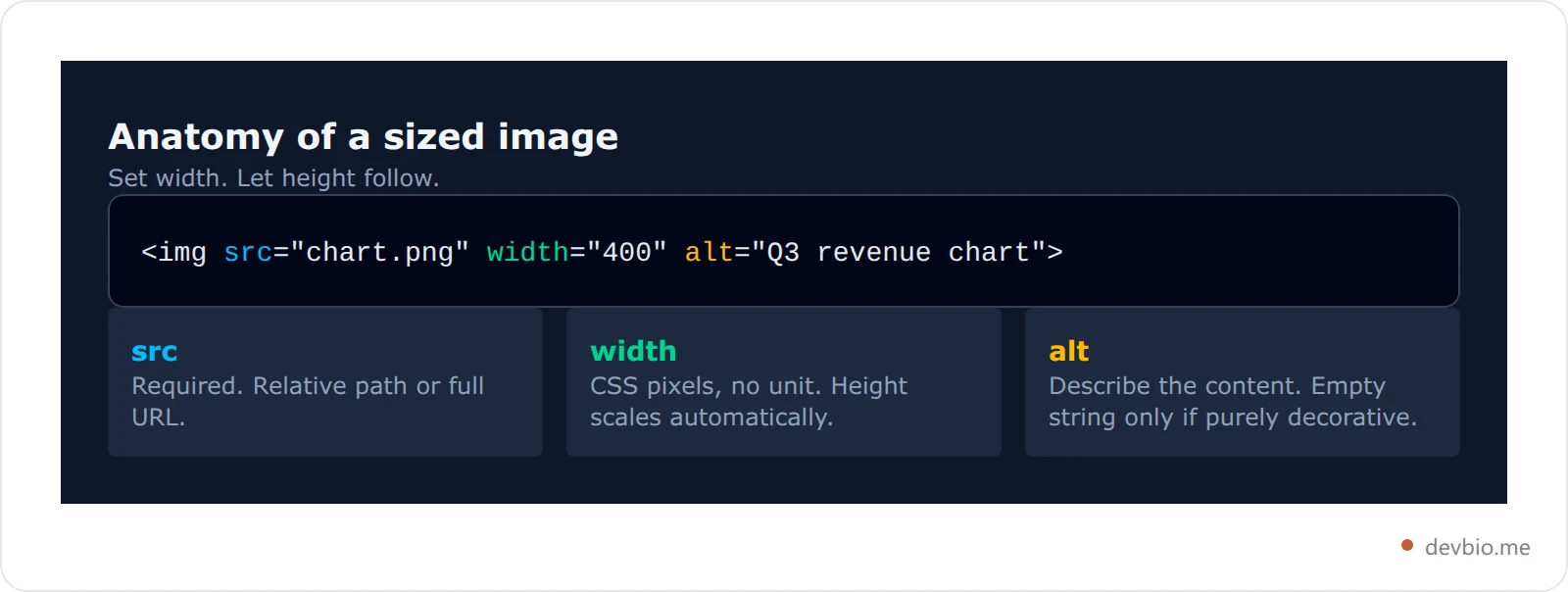
<img src="screenshot.png" width="400" alt="Dashboard showing weekly commit totals">
```

Four things make it the safest choice:

- **It's HTML, not markdown**, so no parser extension has to be enabled for it to work.

- **Width alone preserves the aspect ratio.** The browser scales the height to match the image's natural proportions. You almost never want to set both.

- **The alt attribute still works**, so you don't lose accessibility by dropping the `![]()` form.

- **It degrades gracefully.** In the rare renderer that strips HTML entirely, you get nothing rather than a broken layout — and you find out immediately.

One catch: on many parsers, an HTML block interrupts the surrounding markdown. If you put an `<img>` tag on its own line inside a paragraph, the text after it may stop being parsed as markdown. Keep raw HTML in its own block, separated by blank lines, and the problem disappears. It's the same class of gotcha that makes [markdown line breaks](https://devbio.me/blogs/markdown-line-break) so unpredictable.
![Anatomy of an HTML img tag showing which attributes control size and which are required](https://quillly.com/serve/v1/019e3623-8b91-738d-ae30-42d5bcd996a0/images/673f1f70ea31bffcd44033a98c243506abb77859.webp)

## Markdown Image Size by Platform

Every row below is what the platform's own documentation says, not what a forum thread claims.

| Platform | Native markdown sizing | What to use |
| --- | --- | --- |
| GitHub / GFM | None | `<img width="400">` |
| GitLab | Yes — `{width=100 height=100px}` | Either; braces are cleaner |
| Obsidian | Yes — `![alt\ | 300](url)` | Pipe syntax inside the vault |
| Pandoc | Yes — `{width=50%}` | Braces, with unit support |
| kramdown / Jekyll | Yes — `{: width="300"}` | Braces on the next line |
| VS Code preview | None | `<img width="400">` |
| npm README | None, and HTML is stripped | Pre-size the image file |
| Reddit / Slack | None | Not supported at all |

The pattern is clear. Parsers that stuck close to CommonMark give you nothing and expect HTML. Parsers built for documentation pipelines — Pandoc, kramdown, GitLab — added an attribute-list extension, and each one spelled it differently.

## GitHub: HTML Only, and What the Sanitizer Keeps

The GitHub markdown image size answer is unambiguous, and it is where most people hit this problem in the first place: [GitHub's own formatting documentation](https://docs.github.com/en/get-started/writing-on-github/getting-started-with-writing-and-formatting-on-github/basic-writing-and-formatting-syntax) shows the `![alt](url)` syntax and never documents a way to set dimensions. There is no hidden flag. HTML is the supported path.

GitHub runs every rendered README through an HTML sanitizer, so not all tags survive. The ones that matter here do:

- `<img>` with `src`, `width`, `height`, and `alt` — kept.

- `<p align="center">` — kept, and it's the standard way to centre an image, since [centring text in markdown](https://devbio.me/blogs/markdown-center-text) has no native syntax either.

- `<picture>` with `<source media="(prefers-color-scheme: dark)">` — explicitly supported, and the correct way to ship separate light and dark logos.

- `<style>`, `<script>`, and inline `style` attributes — stripped. You cannot size an image with CSS in a README.

That last point catches people who try `<img style="width:400px">` and watch it render at full size. The `style` attribute is removed; the `width` attribute is not.

If you'd rather not fight a sanitizer every time you want a screenshot at the right size, [put the same work on a page you control](https://devbio.me).

Here's a real example from DevBio's own [GitHub README generator](https://devbio.me/blogs/github-readme-generator). When it emits GitHub stats cards, it writes raw HTML rather than markdown:

```html
<p align="center">
  <img height="160" src="https://github-readme-stats.vercel.app/api?username=yourname&show_icons=true&theme=transparent&hide_border=true" alt="GitHub stats card showing total commits, stars and pull requests" />
  <img height="160" src="https://github-readme-stats.vercel.app/api/top-langs/?username=yourname&layout=compact&theme=transparent&hide_border=true" alt="Card ranking most-used programming languages by share of code" />
</p>
```

The `height="160"` is doing real work. Two stat cards from different endpoints come back at different natural heights, and side by side that looks broken. Pinning height — not width — makes them line up while each card keeps its own aspect ratio. It's the same reason the [README stats cards guide](https://devbio.me/blogs/github-readme-stats-guide) recommends matching heights rather than widths when you put two widgets in a row.

![Decision flowchart for choosing a markdown image sizing method based on the target platform](https://quillly.com/serve/v1/019e3623-8b91-738d-ae30-42d5bcd996a0/images/83e8893dc6d0f69cda072f6d9cd3772bc8a68a19.webp)

## The Curly-Brace Extensions: GitLab, Pandoc, kramdown

If you control the renderer, the brace syntax is genuinely nicer than HTML. Just know which dialect you're writing.

**GitLab** supports an attribute list directly after the image. Per [GitLab's markdown documentation](https://docs.gitlab.com/user/markdown/), values must be integers with a unit of `px` (the default) or `%`:

```markdown
![GitLab logo](img/logo.png){width=100 height=100px}
![Half width banner](banner.png){width=75%}
```

GitLab also auto-appends dimensions when you paste a high-resolution PNG, adjusting for retina displays so a 2x screenshot doesn't render at double size.

**Pandoc** uses the same brace shape but a wider set of units, including `%`, `in`, and `cm` — useful when the same source file compiles to both HTML and PDF.

**kramdown**, which powers Jekyll and therefore GitHub Pages, puts the attribute list on its own line underneath:

```markdown
![Architecture diagram](diagram.png)
{: width="600"}
```

Note the colon. kramdown's syntax is `{: ... }`, not `{ ... }`, and quoted values rather than bare ones. Copying GitLab's version into a Jekyll post gets you visible braces.

**Obsidian** takes a fourth approach entirely, encoding the size into the alt text slot. Per [Obsidian's syntax guide](https://obsidian.md/help/syntax), you append the dimensions after a pipe, as in `![Engelbart|100x145](engelbart.jpg)`. Width comes first, height second — and if you give only the width, the image scales to its original aspect ratio.

Four platforms, four syntaxes, and none of them portable. That's the real cost of markdown having no answer: your README stops being one document and becomes a document plus a target.

Image sizing isn't the only place this happens. [Markdown emoji](https://devbio.me/blogs/markdown-emoji-shortcodes) has the identical shape — no syntax in CommonMark, none in the GFM spec either, so `:tada:` expands on github.com and renders as raw text in your docs build.

Building a profile README you'll paste into GitHub, your portfolio, and a job application? Skip the syntax roulette and [put your live profile on one link with DevBio](https://devbio.me) — the images render the same everywhere because there's only one renderer.

## Why Your SVG Ignores the Width You Set

Because an SVG has no pixel dimensions unless the file declares them. Set `width="200"` on one that lacks an intrinsic size and it stretches to fill its container instead. The fix lives inside the file: give the `<svg>` element its own width, height, and `viewBox`.

That is worth unpacking, because it wastes hours. An SVG is not a bitmap. It has no fixed pixel dimensions unless the file declares them. What decides its rendered size is the combination of two attributes inside the SVG file itself:

- **`width` and `height` on the `<svg>` element** give it an intrinsic size, the same way a PNG's pixel dimensions do.

- **`viewBox`** defines the coordinate space, which is what lets the graphic scale cleanly when you override the size.

An SVG with both scales predictably: your `width="200"` wins, and the `viewBox` keeps the artwork proportional. An SVG with a `viewBox` but no intrinsic width will stretch to fill whatever box it's given. An SVG with neither may render at a browser default of 300×150 regardless of what you asked for.

DevBio's [tech stack badges](https://devbio.me/blogs/github-tech-stack-badges) are a working example of the well-behaved case. Each badge SVG is generated with an explicit `width`, an explicit `height` of 22 pixels, and a matching `viewBox` — the height chosen to sit level with shields.io badges so mixed rows stay visually even. Because the file carries its own dimensions, plain markdown is enough:

```markdown
![TypeScript](https://devbio.me/api/tools/badges/typescript.svg)
```

No `<img>` tag, no width attribute, no brace extension. The image is already the right size because the file says so. That's the general lesson: when you control the asset, sizing it at the source beats sizing it at every call site.

![Comparison of three SVG files showing how viewBox and intrinsic width affect rendered size](https://quillly.com/serve/v1/019e3623-8b91-738d-ae30-42d5bcd996a0/images/eac04726fcb0a2f958250ddda95b933ea485dff7.webp)

## Retina, Aspect Ratio, and the Two-Attribute Rule

Two sizing habits are worth building.

**Set one dimension, not two.** The moment you write both `width` and `height`, you've hard-coded an aspect ratio. Swap in a screenshot at a slightly different crop and it renders squashed. Give the width only, and the browser derives the height from the file. Use both only when you're deliberately reserving layout space to prevent content shifting as images load.

**Halve your retina screenshots.** A screenshot taken on a 2x display reports twice the CSS pixels it should. A window you captured at 800 points wide arrives as a 1600-pixel PNG, and markdown renders it at 1600 — huge and soft-looking. Setting `width="800"` puts it back to its intended size while keeping the full pixel density, so it stays crisp on high-DPI screens. This is the same density arithmetic behind [OG image sizing](https://devbio.me/blogs/og-image-size-spec), where the 1200×630 spec is really a 2x asset for a 600×315 slot.

![Retina screenshot sizing math showing a 1600 pixel capture displayed at 800 pixels wide](https://quillly.com/serve/v1/019e3623-8b91-738d-ae30-42d5bcd996a0/images/fbd7893bf37141bb795cbd127610bdaae5a5c8ca.webp)

## Five Mistakes That Break Image Sizing

- **Using `style` instead of `width`.** GitHub's sanitizer strips inline styles. The `width` attribute survives; `style="width:400px"` does not.

- **Copying GitLab braces into a GitHub README.** They render as literal text after the image. The reverse is fine — GitLab accepts HTML too.

- **Setting width and height on a screenshot.** Any future crop change distorts it. Set width only.

- **Forgetting alt text when switching to HTML.** The `![]()` form makes alt mandatory by shape; `<img>` lets you silently omit it. Screen readers and search engines both notice.

- **Wrapping the tag in a code fence by accident.** An `<img>` tag indented four spaces becomes a code block and renders as visible source. The same indentation trap breaks [markdown code blocks](https://devbio.me/blogs/markdown-code-block) in the other direction.

Once your README looks right, the harder problem is that it's still one file in one repo. A [profile that renders identically wherever you share it](https://devbio.me) solves the distribution half.

## Frequently Asked Questions

### Can I set markdown image size as a percentage?

Only in parsers that support the attribute-list extension. GitLab accepts `{width=75%}` and Pandoc accepts percentages plus physical units. GitHub does not support either, and the HTML `width` attribute takes CSS pixels rather than percentages, so there's no percentage option in a GitHub README at all.

### Does the HTML img tag work in every markdown renderer?

Almost, but not all. CommonMark passes raw HTML through, so most renderers honour it. The exceptions are contexts that sanitize HTML entirely — npm package READMEs strip most tags, and chat-style markdown in Slack or Reddit supports no HTML. There, resize the source file before uploading it.

### Why does my image render at full size even with a width attribute?

Three usual causes. The tag is inside a code fence or indented four spaces, so it's rendering as text. You used `style` instead of `width`, and the sanitizer removed it. Or the file is an SVG with no intrinsic width, in which case it stretches to fill its container regardless.

### How do I centre a resized image in a README?

Wrap it in `<p align="center">`, which GitHub's sanitizer keeps. Markdown has no alignment syntax, so this is the standard approach for a centred logo or a row of badges in a [profile README](https://devbio.me/blogs/github-profile-readme-guide).

### Can I show different image sizes for light and dark mode?

Yes, with the `<picture>` element, which GitHub explicitly supports. Give each `<source>` a `prefers-color-scheme` media query and set the width on the fallback `<img>` inside. Both variants then render at the size you specified.

## Key Takeaways

Markdown never had an image size syntax, and it never will — sizing is presentation, and CommonMark deliberately hands presentation to HTML. Everything else is parsers filling that gap in mutually incompatible ways.

Write `<img src="..." width="400" alt="...">` and you'll be right in GitHub, VS Code, GitLab, Obsidian, and nearly every static site generator. Reach for `{width=300}` only when you know the renderer, and never assume the file will travel. Set one dimension and let the other follow. And when the image is an SVG you control, give it a `width`, a `height`, and a `viewBox` at the source — then plain `![alt](url)` is all the syntax you need.

If your images are there to prove what you've built, the size is the easy part. [Show the work on one link that renders the same everywhere](https://devbio.me).
