` versus `
` — and mixing them up is why some fixes add too much vertical space and others add none. That same blank line decides more than spacing: leave it out above three dashes and you don't get a divider at all, because [the dashes underline the paragraph into a heading instead](https://devbio.me/blogs/markdown-horizontal-line).
## The three Markdown line break signals that work
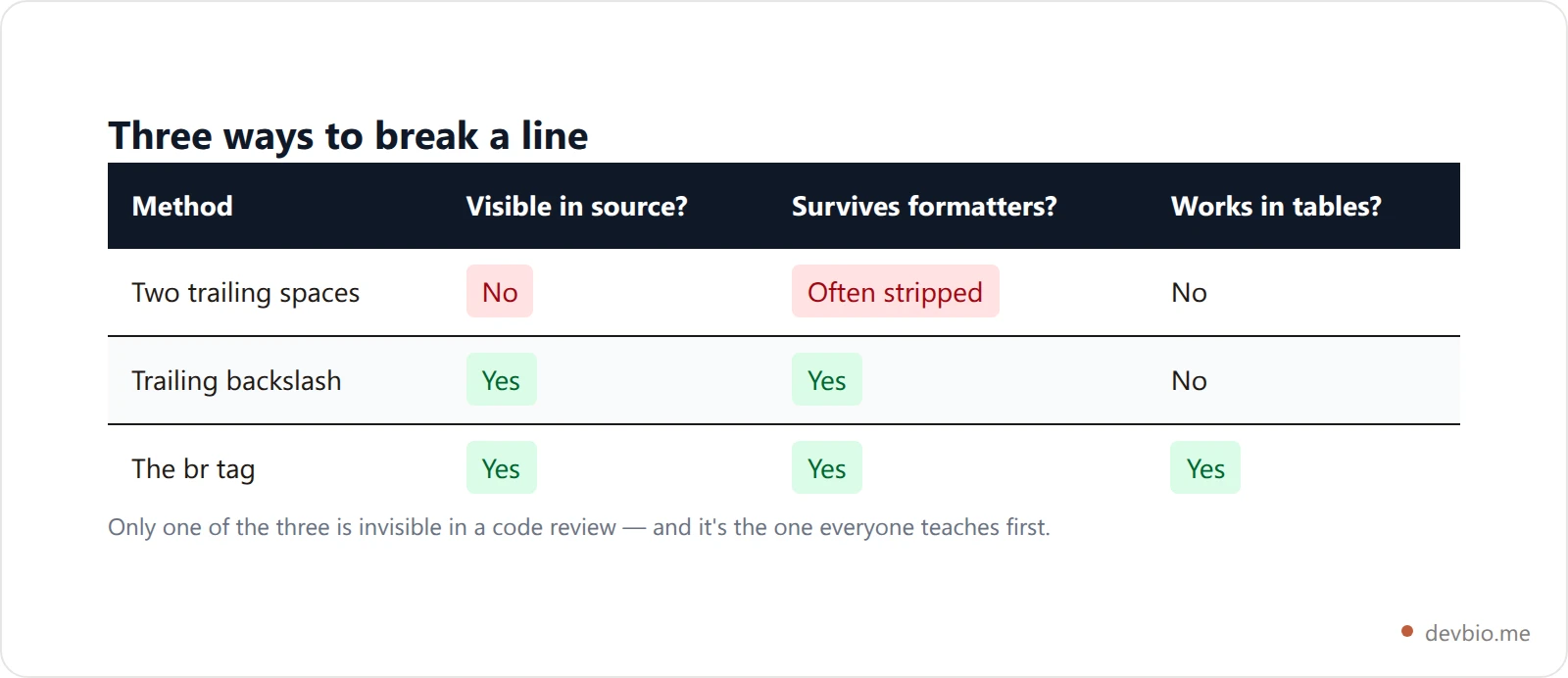
GitHub [documents three ways](https://docs.github.com/en/get-started/writing-on-github/getting-started-with-writing-and-formatting-on-github/basic-writing-and-formatting-syntax) to force a break inside a `.md` file: two trailing spaces, a backslash, or an HTML break tag. They produce identical output. They do not survive identical toolchains.
Written out, using `·` to mark a literal space:
```markdown
Ships on every merge··
Not nightly
Ships on every merge\
Not nightly
Ships on every merge
Not nightly
```
All three render the same two lines. The backslash is the underrated one: it's real CommonMark syntax, it's visible in a diff, and no formatter silently eats it. Reach for it whenever you're writing prose in a `.md` file and don't want to think about whitespace again.
The `
` tag is raw HTML, which means it depends on the renderer passing HTML through — the same dependency that decides [what works for underline in Markdown](https://devbio.me/blogs/underline-in-markdown) and why [colored text fails on GitHub](https://devbio.me/blogs/markdown-color-text). For line breaks specifically, `
` is safe nearly everywhere, because it's on every sanitizer allowlist worth using. Contrast that with `**bold**`, which is [real syntax rather than an HTML workaround](https://devbio.me/blogs/bold-in-markdown) and never touches a sanitizer at all.
## GitHub breaks lines in comments but not in files
This is the single biggest source of "it worked yesterday."
GitHub's own documentation states it plainly: *"If you're writing in issues, pull requests, or discussions in a repository, GitHub will render a line break automatically."* And then, about the exact same text: *"However, if you are writing in an .md file, the example above would render on one line without a line break."*
Two renderers, one platform, opposite defaults.
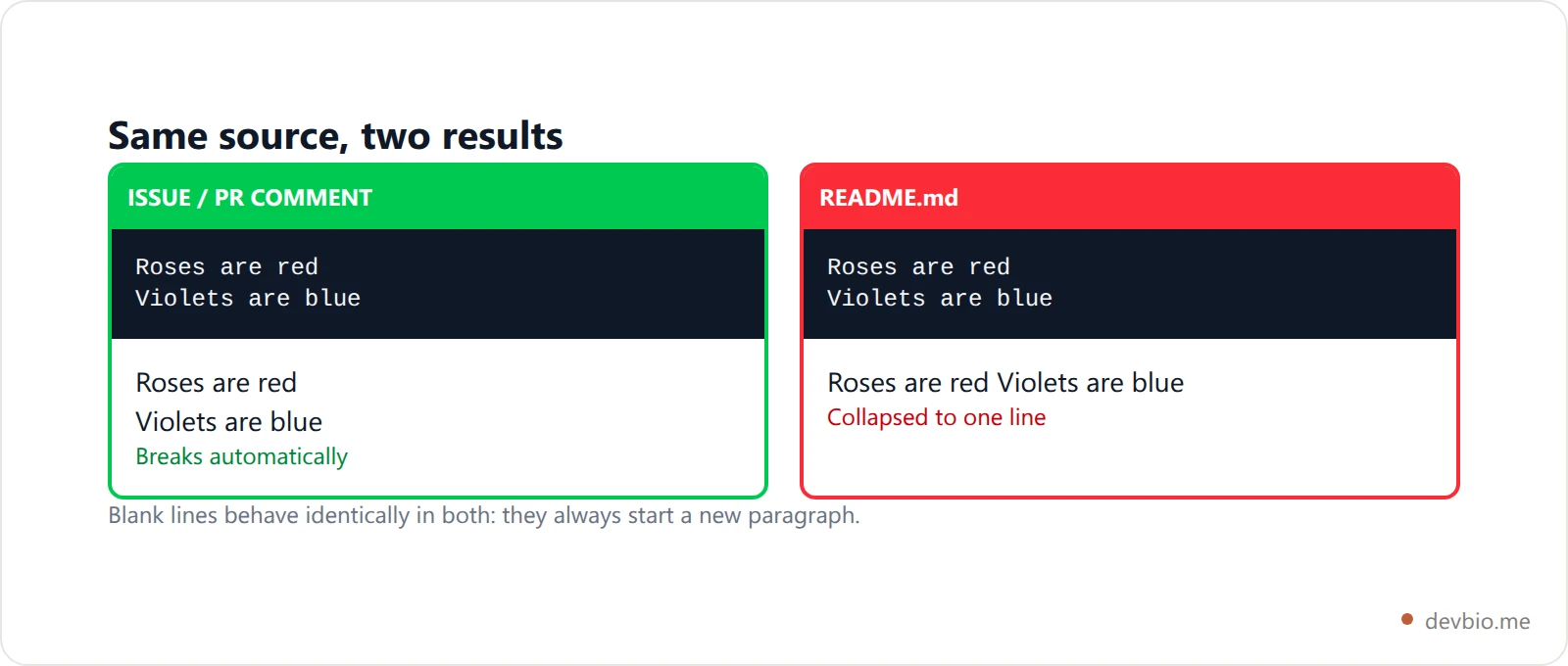
The practical consequence: **never trust an issue-comment preview as a test for README formatting.** Drafting in a comment is still the best way to check sanitizer behavior for tags, but for line breaks it's actively misleading — the comment renderer is more forgiving than the file renderer will ever be.
Blank lines are the one thing that behaves the same in both. If you only need paragraph separation, use a blank line and the whole problem disappears.
## Why the two-space break keeps failing
Two trailing spaces are the most-taught answer and the least durable one, because nearly every part of a modern toolchain is designed to remove exactly that character sequence.
- **Editors trim on save.** VS Code's trim-trailing-whitespace setting, and the equivalent `trim_trailing_whitespace` in a shared `.editorconfig`, delete your break the moment you hit save. Turn it on repo-wide and every existing two-space break in the project dies at once.
- **Linters flag it.** Markdown linters treat trailing whitespace as a defect by default; [markdownlint](https://github.com/DavidAnson/markdownlint) has a dedicated trailing-space rule with an option controlling how many trailing spaces are allowed through for line breaks, which exists precisely because of this conflict.
- **Formatters rewrite it.** Run an opinionated formatter over your Markdown and two-space breaks are typically normalized away or converted, depending on configuration.
- **Code review can't see it.** Nobody reviewing a pull request can tell one trailing space from two. The break silently becomes a non-break and no human catches it.
- **Git treats it as an error.** Trailing whitespace is highlighted as a defect in diffs, and Git's own whitespace-fixing options strip it during patch application.
There's also a spec-level gotcha almost nobody knows: **trailing spaces at the very end of a paragraph do nothing.** CommonMark strips final whitespace before inline parsing, so a paragraph that ends with two or more spaces does not end with a hard break. Same for the text of a setext heading. Inside a fenced code block the opposite is true — trailing spaces are preserved as content, which is why a code sample can carry invisible whitespace into a copy-paste.
None of this makes two spaces wrong. It makes them fragile. If a break matters, make it visible: a backslash or a `
` states your intent in a way a formatter respects and a reviewer can see.
> **Your README shouldn't depend on invisible whitespace**
> DevBio builds a profile page from structured fields — projects, stack, live GitHub stats — so layout isn't a whitespace negotiation with a Markdown parser.
> → [See what a live dev bio looks like](https://devbio.me)
## Where the normal rules don't apply
Four contexts break the pattern, and tables are the one that catches everyone.
**Table cells.** A GFM table row is defined by its line — a newline ends the row. There is no way to put a literal newline inside a cell, so the `
` tag isn't the best option, it's the only option:
```markdown
| Field | Value |
| --- | --- |
| Stack | TypeScript
PostgreSQL
Redis |
```
**List items.** To break a line inside a bullet without ending the bullet, use two spaces or a `
` at the end of the line and indent the continuation to match the item's text. Insert a blank line instead and you get a "loose" list — every item gets wrapped in a paragraph and the spacing of the whole list changes, not just the item you touched.
**Blockquotes.** Each line doesn't strictly need its own `>` marker — CommonMark's laziness rule keeps paragraph continuation lines inside the quote without one, which is [why a markdown blockquote eats the next line](https://devbio.me/blogs/markdown-blockquote-syntax). What laziness won't do is break a line: a hard break still needs two spaces, a backslash or a `
` on top of the quote markers.
**Code blocks.** Newlines are preserved literally, exactly as typed. No signal needed, and none of the rules above apply — though [the fence around a markdown code block](https://devbio.me/blogs/markdown-code-block) has rules of its own, especially once the code you're showing contains a fence.
Notice what every one of these exceptions has in common: they're rules about somebody else's renderer, and you only find out you got one wrong after you publish. That's the standing tax on hand-maintained Markdown, and the reason [a structured profile page](https://devbio.me) renders the same everywhere without charging it.
## Other renderers, other defaults
Outside GitHub, the split is between renderers that follow CommonMark and renderers that decided their users don't care about it.
Most chat and comment platforms — Slack, Discord, and the like — treat every newline as a break, because in a chat box that's obviously what you meant. They aren't CommonMark implementations and don't pretend to be.
Library-level renderers usually expose this as a switch. In `markdown-it` and its relatives, a `breaks` option converts every soft break into a `
`; it ships off by default, and plenty of downstream tools flip it on. That's the whole explanation for "the same file looks different in my static site than on GitHub" — one of them turned the switch on. Note-taking apps do the same thing under names like "strict line breaks."
Before you spend an hour debugging, find out which renderer you're actually targeting and whether it follows the spec. If you want a scratch space with GitHub's exact pipeline, a [Gist](https://devbio.me/blogs/github-gists-guide) renders through the same machinery a README does.
## What a README generator does instead
Here's a useful tell: tools that generate Markdown for other people to render tend to avoid whitespace-dependent breaks entirely. We ran into this building ours — the moment your output has to survive somebody else's editor, an invisible Markdown line break is a bug waiting to be filed.
DevBio's [README generator](https://devbio.me/blogs/github-readme-generator) is pure string assembly — no AI, no external API — and it never emits a two-space break. Instead:
- The headline and identity rows are **block-level HTML** — a centered `
` elements for the link row and location. Markdown has no centering syntax at all, so once you're in HTML for alignment, the line-break question stops existing — along with a fresh set of rules about [what survives when you center text in Markdown](https://devbio.me/blogs/markdown-center-text). - Sections are separated by **blank lines**, not breaks. Paragraph separation is the durable primitive; nothing strips a blank line. - Stat widgets — the [live GitHub stats](https://devbio.me/blogs/github-profile-readme-vs-developer-bio) cards a profile README usually opens with — are wrapped in a single centered `
` with newlines between the images. Inside an HTML block those newlines collapse, so three cards sit on one row — the collapsing behavior everyone fights becomes the feature.
- The last step collapses any run of three or more newlines down to exactly two, because extra blank lines add no extra space in rendered Markdown. Normalizing them keeps the file honest about what it will look like.
The same principle shows up in the bio itself: a DevBio About section supports a deliberately tiny Markdown subset — bold, italic, links, and `\n\n` paragraph breaks — and treats everything else as plain text. Single newlines don't break, on purpose. Fewer formatting rules means fewer ways for a profile to render wrong on a device you've never tested.
That's the trade at the heart of this whole topic. Hand-maintained Markdown gives you total control and total responsibility for details you can't see. Structured fields give up some control and hand you output that renders the same everywhere — which is also what keeps [a profile README](https://devbio.me/blogs/github-profile-readme-guide) from rotting the week after you write it.
> **Stop hand-editing your profile**
> Live GitHub stats, real project data and an ATS-readable resume at one URL — rendered consistently, without a single trailing space.
> → [Build your bio](https://devbio.me)
## Key takeaways
- A Markdown line break is never implicit: a plain newline is a **soft break** that collapses to a space, so every break needs a signal you put there on purpose.
- Three signals work in a `.md` file: **two trailing spaces, a trailing backslash, or `
`**. The backslash is the most durable plain-Markdown option.
- **GitHub auto-breaks in issues and pull requests but not in files.** A comment preview is not a valid test of README formatting.
- Two-space breaks are stripped by editors, linters, formatters and Git — and are invisible in code review.
- Inside a **table cell**, `
` is the only option. Inside a **code block**, newlines are already literal.
- Trailing spaces at the very end of a paragraph do nothing at all; the spec strips them before parsing.
## Frequently Asked Questions
### How do I make a line break in Markdown?
End the line with two or more spaces, a backslash, or a `
` tag, then start the next line. All three produce the same `
` in the output. Prefer the backslash or the tag in files that pass through formatters or linters, since both are visible in a diff and neither depends on whitespace surviving a save.
### Why doesn't pressing Enter create a new line in Markdown?
Because a single newline inside a paragraph is a soft break, which renderers collapse into a space so source files can be hard-wrapped without changing the output. Press Enter twice instead and you'll get a blank line, which starts a new paragraph — usually what people actually want.
### Why does my line break work in a GitHub issue but not in my README?
GitHub runs two different renderers. Issues, pull requests and discussions break on single newlines automatically; `.md` files follow standard CommonMark rules and collapse them. The same text genuinely produces different output in the two places, so always verify README formatting on the rendered file.
### How do I add a line break inside a Markdown table cell?
Use a `
` tag. It's the only method that works, because a newline in the source ends the table row and the two-space break can't apply inside a cell. Most renderers that support GFM tables allow the tag inside cells, GitHub included.
### Is the backslash line break safe to use?
Yes. A backslash at the end of a line is a hard line break in CommonMark, so any spec-compliant renderer honors it, GitHub included. Its practical advantage over two spaces is that it's a visible character no editor or formatter silently removes.
### What is the difference between a line break and a paragraph in Markdown?
A line break puts the next line directly underneath, inside the same paragraph, and renders as `
`. A blank line ends the paragraph and starts a new one, rendering as a separate `
` with more vertical space between them. Choose the blank line whenever you don't specifically need the tighter spacing. ### Do trailing spaces work at the end of a paragraph? No. CommonMark strips final whitespace before inline parsing, so a paragraph ending in two or more spaces does not end with a hard break. This is one reason a break that "works in the middle of a block" appears to fail at the end of one — the spec never applied it. Formatting is the cheapest part of a good developer page. Keeping it true as your work changes is the expensive part — and that's the part [a live bio](https://devbio.me) solves that no Markdown syntax can.