> Content index: https://devbio.me/blogs/llms.txt
> Canonical page: https://devbio.me/blogs/markdown-table-of-contents
---
title: Markdown Table of Contents: Why Your Links 404
description: A markdown table of contents is just links to heading anchors. Here's how GitHub builds those anchors, why hand-written TOC links break, and what works.
keywords: markdown table of contents, github table of contents, markdown toc, heading anchors
published: 2026-09-17
updated: 2026-09-25
url: https://devbio.me/blogs/markdown-table-of-contents
word_count: 2278
---
# Markdown Table of Contents: Why Your Links 404
> Markdown has no table of contents syntax. Here's how GitHub builds heading anchors, why hand-written TOC links break, and what actually works.
Canonical: https://devbio.me/blogs/markdown-table-of-contents
Published: 2026-09-17
## Related Pages
- [Markdown Emoji: Why :tada: Isn't Markdown](https://devbio.me/blogs/markdown-emoji-shortcodes)
- [Markdown Code Block: Syntax, Languages, Nesting](https://devbio.me/blogs/markdown-code-block)
- [Markdown Nested List: Why Two Spaces Isn't Enough](https://devbio.me/blogs/markdown-nested-list)
- [Markdown Comment: Why Yours Shows Up on the Page](https://devbio.me/blogs/markdown-comment-syntax)
- [How to Change GitHub Username Without Breaking Links](https://devbio.me/blogs/change-github-username)
- [Markdown Anchor Link: Why {#id} Breaks on GitHub](https://devbio.me/blogs/markdown-anchor-link)
- [GitHub Profile README Templates: Copy-Paste for 10 Goals](https://devbio.me/blogs/github-profile-readme-templates)
- [Markdown Collapsible Section: The Blank Line Rule](https://devbio.me/blogs/markdown-collapsible-section)
Your README has a table of contents. Six tidy links. Three of them scroll nowhere, and the one with the rocket emoji is the worst offender — it jumps to the top of the page as if you never clicked.
Markdown has no table of contents syntax. Not in CommonMark, not in GitHub Flavored Markdown. A markdown table of contents is only ever a plain bullet list of links pointing at heading anchors, and those anchors get generated by whatever renders the file. Miss by one character and the link silently does nothing — no error, no 404 page, just a dead click.

*Photo by [Olga Tutunaru](https://unsplash.com/@otutunaru?utm_source=quillly&utm_medium=referral) on [Unsplash](https://unsplash.com?utm_source=quillly&utm_medium=referral)*
## Contents
- [Does Markdown Have a TOC Syntax?](#does-markdown-have-a-toc-syntax)
- [How GitHub Turns Headings Into Anchors](#how-github-turns-headings-into-anchors)
- [Six Slug Rules That Break Hand-Written TOCs](#six-slug-rules-that-break-hand-written-tocs)
- [GitHub's Built-In Table of Contents Menu](#githubs-built-in-table-of-contents-menu)
- [Where the TOC Markers Actually Work](#where-the-toc-markers-actually-work)
- [How to Generate a Markdown Table of Contents Automatically](#how-to-generate-a-markdown-table-of-contents-automatically)
- [Linking Your Profile README's Sections](#linking-your-profile-readmes-sections)
- [Key Takeaways](#key-takeaways)
- [Frequently Asked Questions](#frequently-asked-questions)
## Does Markdown Have a TOC Syntax?
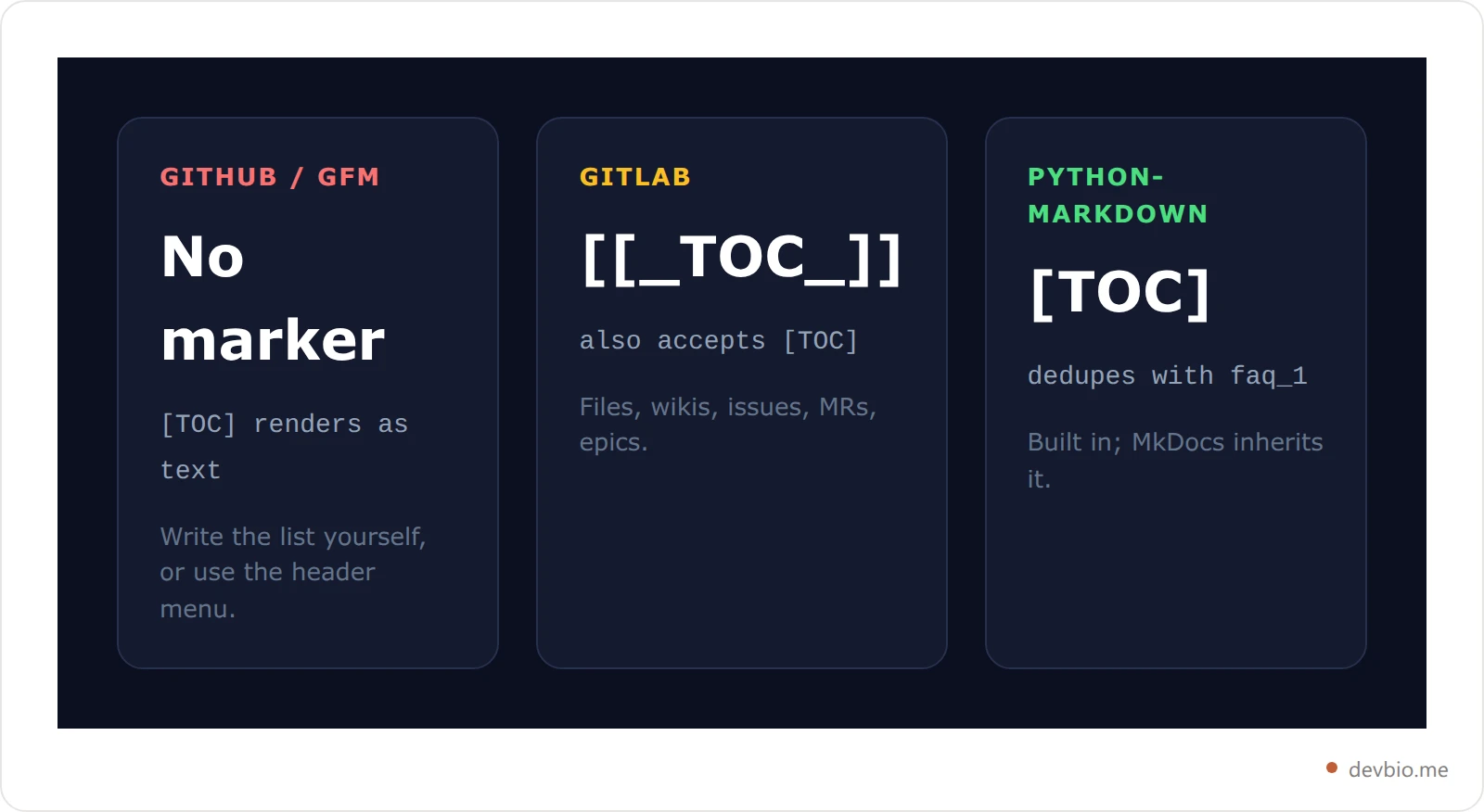
No. There is no `[TOC]`, no `[[_TOC_]]`, and no `` directive in the markdown spec. Those markers exist, but each belongs to a specific renderer, not to markdown itself. Put `[TOC]` in a GitHub README and GitHub prints the literal text `[TOC]` on the page.
### Marker Support at a Glance
That is the single most common source of confusion here, so it's worth laying out which tool understands which marker.
| Renderer | TOC marker | Duplicate anchors | Notes |
| --- | --- | --- | --- |
| GitHub (GFM) | none | `faq`, `faq-1`, `faq-2` | Auto TOC lives in the file header menu |
| GitLab | `[[_TOC_]]` or `[TOC]` | `faq`, `faq-1` | Works in `.md` files, wikis, issues, MRs, epics |
| Python-Markdown | `[TOC]` | `faq`, `faq_1`, `faq_2` | `toc` extension ships in the standard library |
| MkDocs | `[TOC]` | `faq`, `faq_1` | Inherits Python-Markdown's `toc` extension |
| CommonMark | none | n/a | Spec defines no heading ids at all |
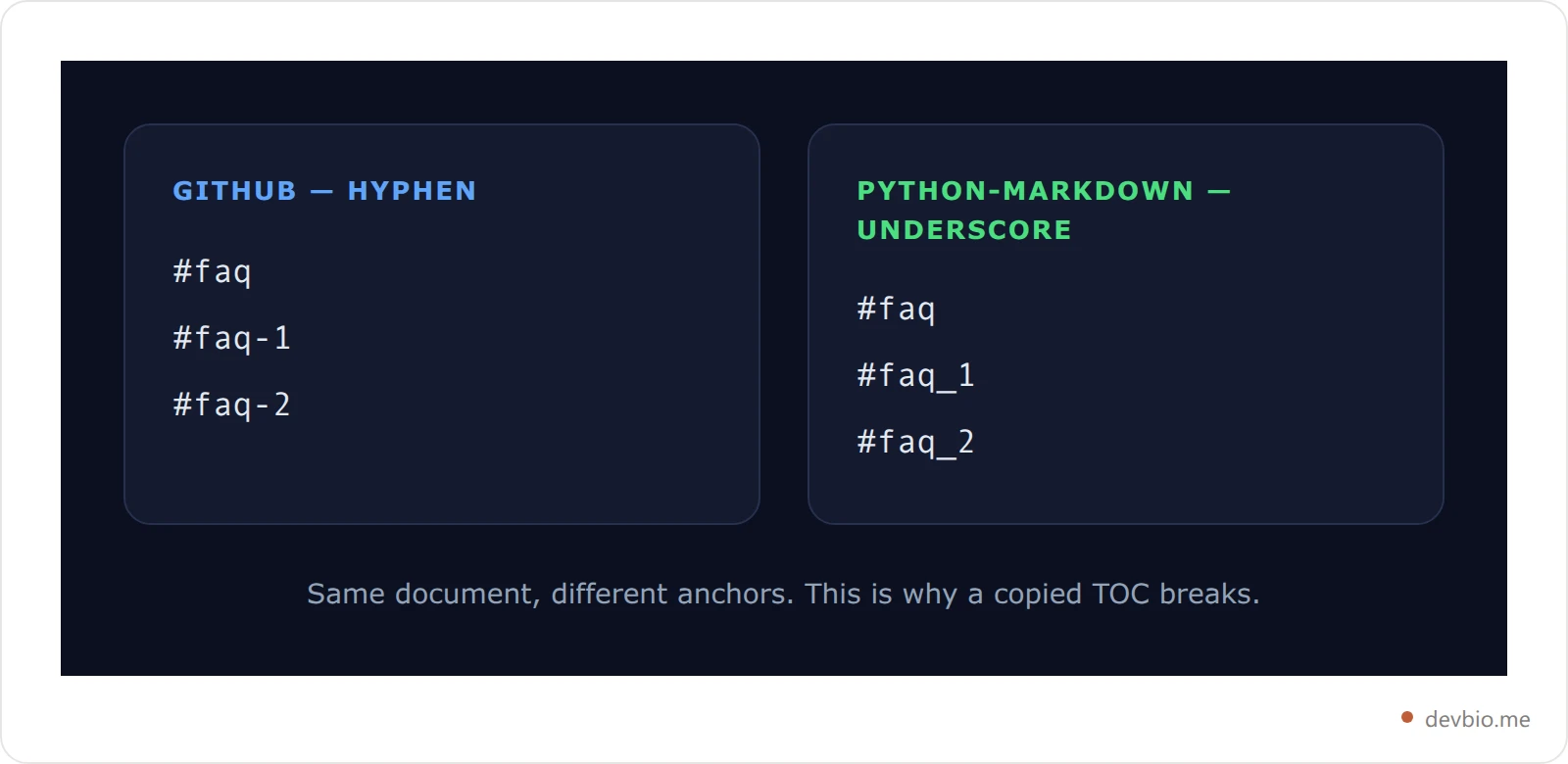
Two things jump out of that table. GitHub, the place most READMEs live, supports no marker at all. And Python-Markdown separates duplicates with an **underscore** (`faq_1`) where GitHub uses a **hyphen** (`faq-1`) — so the exact same document produces different anchors depending on where you publish it. A TOC copied from your MkDocs site into your README breaks on every repeated heading.
## How GitHub Turns Headings Into Anchors
GitHub builds an `id` for every markdown heading, and a TOC link works only when your `#fragment` matches that generated id exactly. The reference implementation is [github-slugger](https://github.com/Flet/github-slugger), the npm package that exists to "emulate the way GitHub handles generating markdown heading anchors as close as possible."
### The Slug Pipeline, Step by Step
The pipeline is short, and every step is a place your hand-written link can go wrong.
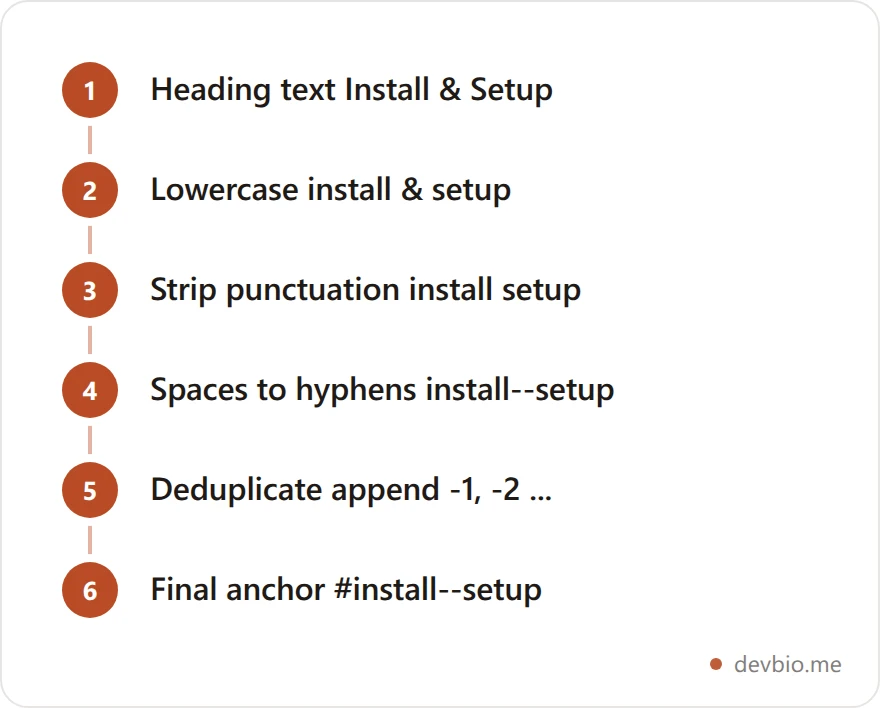
Note what happened at step three. The `&` was **deleted**, not replaced — and the spaces on both sides of it survived into step four as two separate hyphens. `## Install & Setup` becomes `#install--setup`, with a double hyphen. Almost nobody writes that by hand.
## Six Slug Rules That Break Hand-Written TOCs
I ran these headings through github-slugger 2.0.0 to get the exact output rather than guess at it. The results are unintuitive enough to be worth memorising.
| Heading | Anchor | Rule |
| --- | --- | --- |
| `## Getting Started` | `#getting-started` | Lowercase, space to hyphen |
| `## What is a TOC?` | `#what-is-a-toc` | `?` deleted, no hyphen left behind |
| `## Step 1: Install` | `#step-1-install` | `:` deleted, surrounding space becomes one hyphen |
| `## Install & Setup` | `#install--setup` | `&` deleted, **two** hyphens remain |
| `## Node.js 20` | `#nodejs-20` | The dot vanishes with no hyphen |
| `## C++ vs Rust` | `#c-vs-rust` | Both `+` characters vanish |
The pattern: punctuation is **removed**, and only whitespace becomes a hyphen. So `Node.js` collapses to `nodejs` (no separator) while `Install & Setup` keeps both spaces and gains two hyphens. Those two cases look similar and behave oppositely.
Three more traps deserve their own callout, because they are the ones that produce links that look completely correct:
- **Emoji leave a hyphen behind.** `## 🚀 Deploy` becomes `#-deploy` — a *leading* hyphen. Put the emoji at the end instead, `## Deploy 🚀`, and you get `#deploy-` with a *trailing* one. If you decorate headings with emoji, read [why ](https://devbio.me/blogs/markdown-emoji-shortcodes)`:tada:`[ isn't markdown](https://devbio.me/blogs/markdown-emoji-shortcodes) before you write the TOC.
- Code spans keep their backticks' contents. A heading like \``## The `--force` flag slugs to `#the---force-flag\` — three hyphens, because the two dashes survive as characters while the spaces around the code span each become a hyphen. Our guide to [markdown code blocks](https://devbio.me/blogs/markdown-code-block) covers where inline code behaves differently from fenced blocks.
- **Repeated headings get numbered.** Three sections called `## FAQ` produce `#faq`, `#faq-1`, `#faq-2` in document order. Insert a new FAQ section near the top and every downstream anchor shifts by one, silently breaking links that worked yesterday.
## GitHub's Built-In Table of Contents Menu
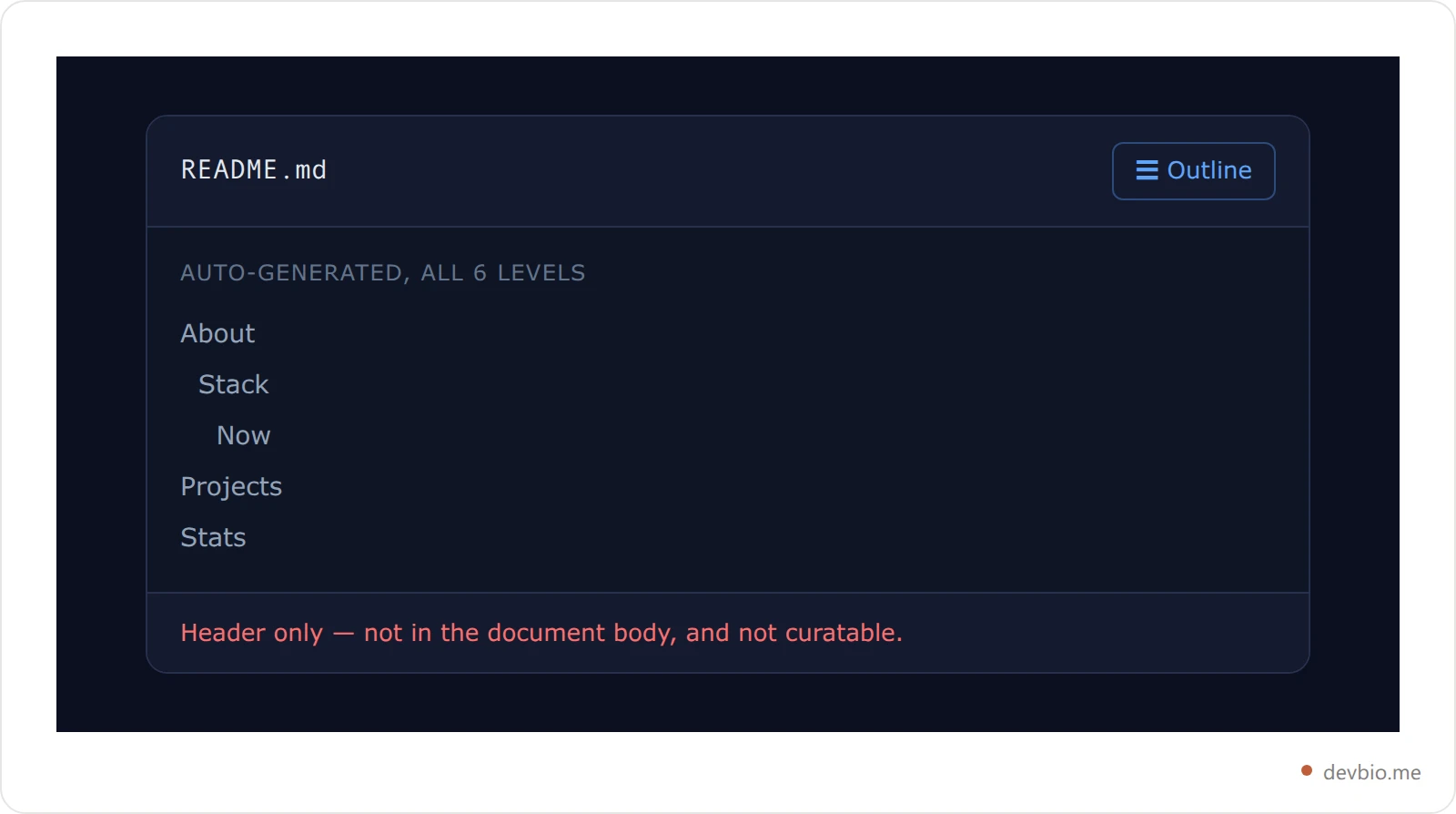
Before you hand-write anything, check whether you need to. On 13 April 2021 GitHub [shipped automatic table of contents support](https://github.blog/changelog/2021-04-13-table-of-contents-support-in-markdown-files/): "Markdown files will now automatically generate a table of contents in the header when there are 2 or more headings." All six heading levels are included.
That gets you a GitHub table of contents with zero markup and zero maintenance. It's an interactive dropdown in the file header rather than inline content, so it has real limits:
- It only appears when GitHub renders the file — not in your editor, not on npm, not in a docs site build.
- It lives in the header menu, so a reader scrolling the README body may never notice it.
- You can't curate it. Every heading appears, in document order, at every level.
For a repository's own docs that trade-off is usually fine. For a profile README, where you want a short curated list of three or four sections, you still write the list yourself.
Want a README whose headings are predictable from the start? The [devbio.me README generator](https://devbio.me/tools/readme-bio) emits clean, single-word H2s — the kind whose anchors you can guess correctly on the first try.
## Where the TOC Markers Actually Work
If you've seen `[TOC]` work somewhere, you weren't imagining it — you were on a different renderer. `[[_TOC_]]` belongs to GitLab, `[TOC]` to GitLab and Python-Markdown, and neither does anything on GitHub. Each marker is interpreted by one specific tool at render time.
### Marker Support, Renderer by Renderer
**GitLab** supports both `[[_TOC_]]` and `[TOC]`. Per [GitLab's markdown documentation](https://docs.gitlab.com/user/markdown/), the tag works in markdown files, wiki pages, and the description fields of issues, merge requests, and epics. The double-bracket form is the documented one; prefer it.
**Python-Markdown** uses `[TOC]` via its `toc` extension, which the docs confirm "is included in the standard Markdown library." The marker is configurable, and setting it to an empty string disables marker searching entirely. Anything built on Python-Markdown — **MkDocs** most notably — inherits this behaviour, including the underscore-style duplicate ids.
**Editors** are their own category. The popular Markdown All in One extension for VS Code generates a TOC as literal markdown text and keeps it updated on save, which means the list it writes is committed to your file and works anywhere, GitHub included.
The rule of thumb: a marker is interpreted at render time by one specific tool, so it only works where that tool runs. Generated markdown text is plain content, so it works everywhere.
## How to Generate a Markdown Table of Contents Automatically
For a README that needs an inline, curated markdown TOC, generating the list beats typing it. Use the VS Code Markdown All in One extension, or the `markdown-toc` or `doctoc` npm CLIs. Each computes anchors with the same slug rules you'd apply by hand, which removes the one bug that matters: a mistyped fragment.
### Three Tools Worth Using
Three approaches, roughly in order of how much they fit a small repo:
1. **VS Code — Markdown All in One.** Run the "Create Table of Contents" command, and it inserts a [nested list](https://devbio.me/blogs/markdown-nested-list) and refreshes it whenever you save. No dependency in your project, and the output is committed text.
2. `markdown-toc` **(npm).** A CLI that injects a list between `` comment markers and rewrites it in place on re-run. Those HTML comments are invisible in rendered output but give the tool a stable anchor point — invisible being a different thing from absent, which is exactly [what a markdown comment does to your HTML](https://devbio.me/blogs/markdown-comment-syntax).
3. `doctoc` **(npm).** Similar model with a broader dialect setting; it can target GitHub, GitLab, or Bitbucket anchor styles, which is exactly the difference the underscore-versus-hyphen split above creates.
Whichever you pick, the generator computes anchors with the same slug rules you'd otherwise apply by hand — which is the entire point. The bug you're avoiding is a human typing `#install-setup` where the renderer wrote `#install--setup`.
A worthwhile habit either way: after you push, click every TOC link once on the rendered page. A dead anchor fails silently, so a broken markdown table of contents can sit in a popular repo for months. It's the same discipline as checking that your links survive a rename — see [changing a GitHub username without breaking links](https://devbio.me/blogs/change-github-username).
## Linking Your Profile README's Sections
Profile READMEs are where this bites hardest, because they're short enough that a four-item TOC is genuinely useful and visible enough that a dead link looks careless.
Here's a concrete, checkable example. The devbio.me README generator emits five markdown H2s — `## About`, `## Stack`, `## Now`, `## Projects`, and `## Stats`. Single plain words, no punctuation, no emoji, so their anchors are exactly what you'd expect:
```markdown
- [About](#about)
- [Stack](#stack)
- [Now](#now)
- [Projects](#projects)
- [Stats](#stats)
```
That is the whole argument for boring headings. `## Now` gives you `#now`. A heading like `## 🔥 What I'm Building Right Now!` gives you `#-what-im-building-right-now` — leading hyphen from the emoji, apostrophe deleted, exclamation mark deleted — and you will get it wrong by hand.
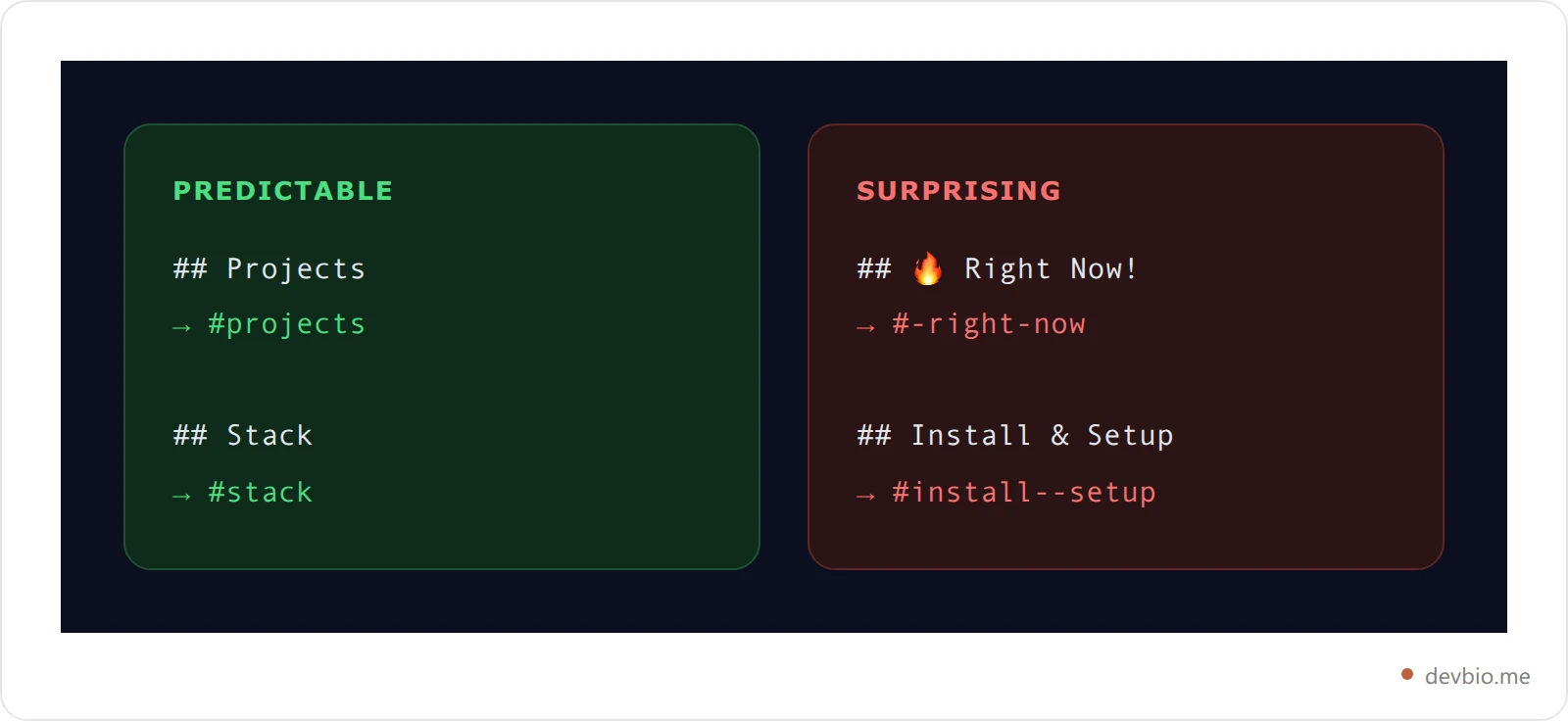
If a heading has to carry an emoji or punctuation for the look of it, generate the TOC with a tool instead of typing the anchor. Don't try to out-guess the slugger. Or sidestep it: an empty `` tag above the heading gives you a stable [markdown anchor link](https://devbio.me/blogs/markdown-anchor-link) target that survives any later rewording, and unlike `{#custom-id}` it works on GitHub.
For the wider set of choices that make a profile README readable — section order, what to cut, which widgets earn their space — our [profile README templates for 10 goals](https://devbio.me/blogs/github-profile-readme-templates) covers the structure, and this post covers making its navigation actually work.
If you'd rather skip the anchor arithmetic altogether, [generate your README from a form](https://devbio.me/tools/readme-bio) and copy the result straight into your profile repo.
When a TOC grows past a dozen entries, folding it into a `` toggle keeps the top of the README readable without dropping any of the links. The anchors keep working — but [the Markdown inside only renders after a blank line](https://devbio.me/blogs/markdown-collapsible-section), which is where most folded tables of contents come out as raw hyphens.
## Key Takeaways
- Markdown has no TOC syntax. A markdown table of contents is a bullet list of links to heading anchors.
- GitHub deletes punctuation and converts only whitespace to hyphens, so `Install & Setup` becomes `#install--setup` and `Node.js` becomes `nodejs`.
- Emoji leave a stray hyphen: `## 🚀 Deploy` is `#-deploy`.
- Duplicate headings are numbered `-1`, `-2` on GitHub but `_1`, `_2` on Python-Markdown and MkDocs, so copied TOCs break.
- GitHub auto-generates a TOC in the file header when a file has 2+ headings — free, but not curated and not inline.
- `[[_TOC_]]` is GitLab; `[TOC]` is GitLab and Python-Markdown. Neither works on GitHub.
- Keep headings short and punctuation-free, or generate the list with `markdown-toc`, `doctoc`, or VS Code.
> **Build a profile that needs no README hacks**
> devbio.me gives you one link that shows live proof — projects, stack, and stats — with clean, predictable structure. Start with the free README generator, or claim your profile.
> → [Claim your devbio.me profile](https://devbio.me)
## Frequently Asked Questions
### Does [TOC] work in a GitHub README?
No. GitHub renders `[TOC]` as literal text, because GFM defines no table of contents marker. Either rely on GitHub's automatic TOC in the file header menu, or write the bullet list of anchor links yourself and keep it updated with a generator.
### How do I link to a heading in the same markdown file?
Use a normal link with a `#` fragment matching the generated anchor: `[Setup](#setup)` for a heading `## Setup`. Lowercase the text, delete punctuation, and replace each space with a hyphen. Then click the link on the rendered page to confirm it lands.
### Why does my TOC link scroll to the top of the page instead of the section?
The fragment doesn't match any element id, and browsers do nothing visible when that happens. Usually it's punctuation: an ampersand or code span that added a hyphen you didn't expect, or an emoji that left one at the start. Copy the anchor from the rendered heading's own link to be sure.
### Can I get a table of contents without adding one to the file?
Yes, on GitHub. Any markdown file with 2 or more headings gets an automatic TOC in its header dropdown, added in April 2021. You can't curate or reorder it, and it isn't visible in the document body, but it costs nothing to maintain.
### What's the difference between [TOC] and [[_TOC_]]?
`[[_TOC_]]` is GitLab's documented tag. `[TOC]` is Python-Markdown's default marker, and GitLab accepts it too. On GitLab prefer `[[_TOC_]]`; on MkDocs or another Python-Markdown setup use `[TOC]`. On GitHub neither does anything.
### How do duplicate headings affect anchors?
The first keeps the plain slug and later ones get a counter. On GitHub that's `#faq`, `#faq-1`, `#faq-2`; Python-Markdown uses `#faq`, `#faq_1`. Because numbering follows document order, adding a section can renumber every later anchor and break existing links.