

What a GitHub Profile README Is (and Why It Matters)#
Every developer has a GitHub. Fewer than half have a GitHub profile README. And of those who do, most are hiding about 82% of their actual work — buried in private repositories, team codebases, and client projects that will never be public.
That's not an opinion. GitHub's own Octoverse data shows 82% of all contributions on the platform happen in private repositories. Your public profile, however polished the README, only surfaces the rest.
Still, a GitHub profile README is worth having. Industry estimates put the GitHub review rate among technical recruiters at 78–87% for engineering roles. With 180 million developers on the platform as of 2025 — 36.2 million of whom joined in 2025 alone — standing out from the default profile view matters.
This guide covers what to include in a GitHub profile README in 2026, what to skip, and — plainly — the five things no README can fix regardless of how much time you put into it.
Quick answer: A GitHub profile README needs a sharp one-liner bio, your core tech stack, pinned repos with real descriptions, one stats widget, and a single link that goes somewhere useful. The goal is 30-second comprehension, not completeness.
How It Works#
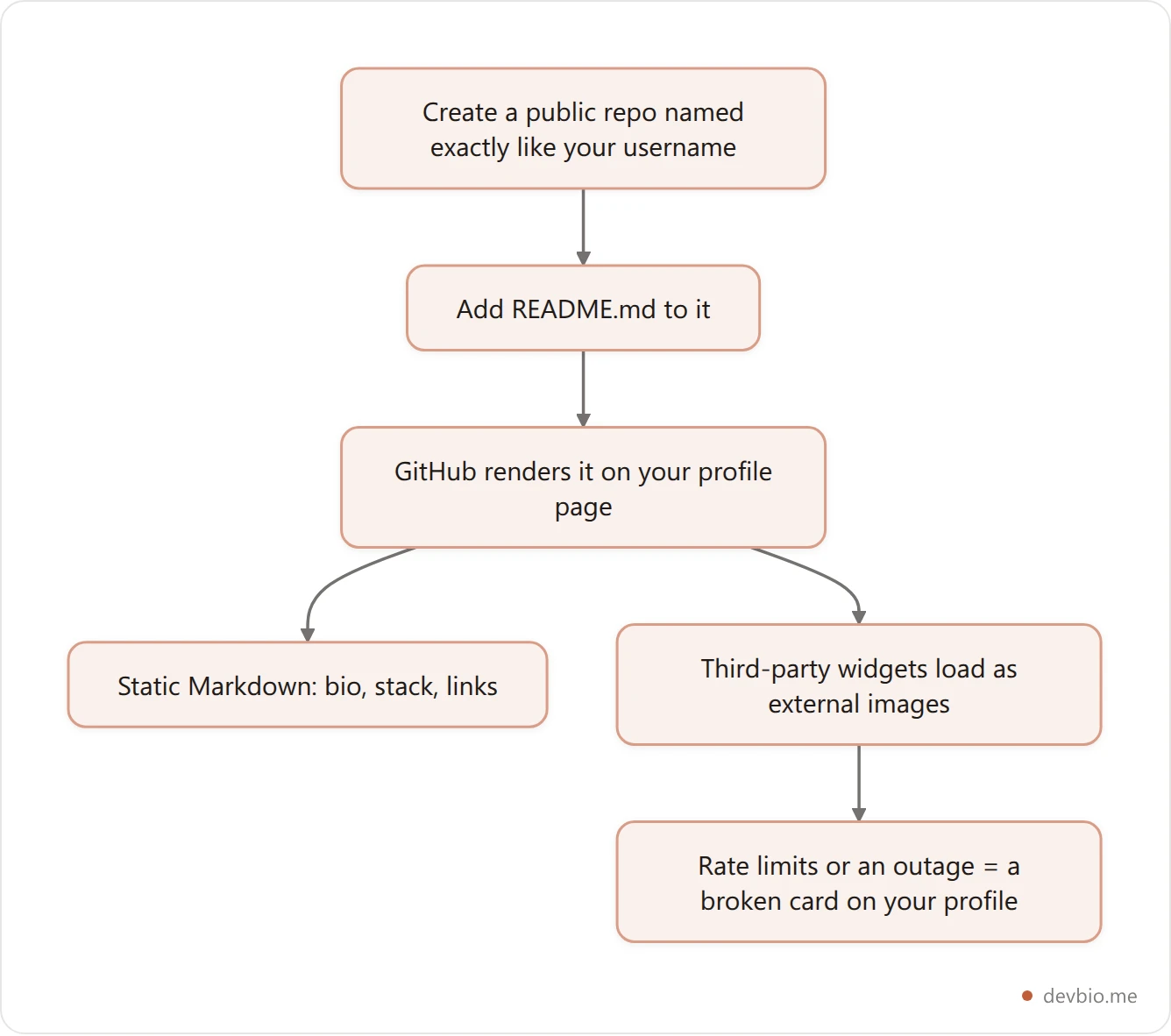
Create a public repository with the same name as your GitHub username, add a README.md to it, and GitHub displays that file on your profile page.
That's the entire mechanism. No CMS, no dashboard, no preview environment. It's a Markdown file. The "dynamic" content — stats widgets, typing animations, visitor counters — is all third-party hosted services that query GitHub's API and render as embeddable images.
They work, with caveats. The most popular one, github-readme-stats, regularly hits GitHub API rate limits on its shared infrastructure, causing broken image cards on thousands of profiles at once. The fix is self-hosting. Most developers skip it.
GitHub Profile README Best Practices: The 8 Elements That Matter#
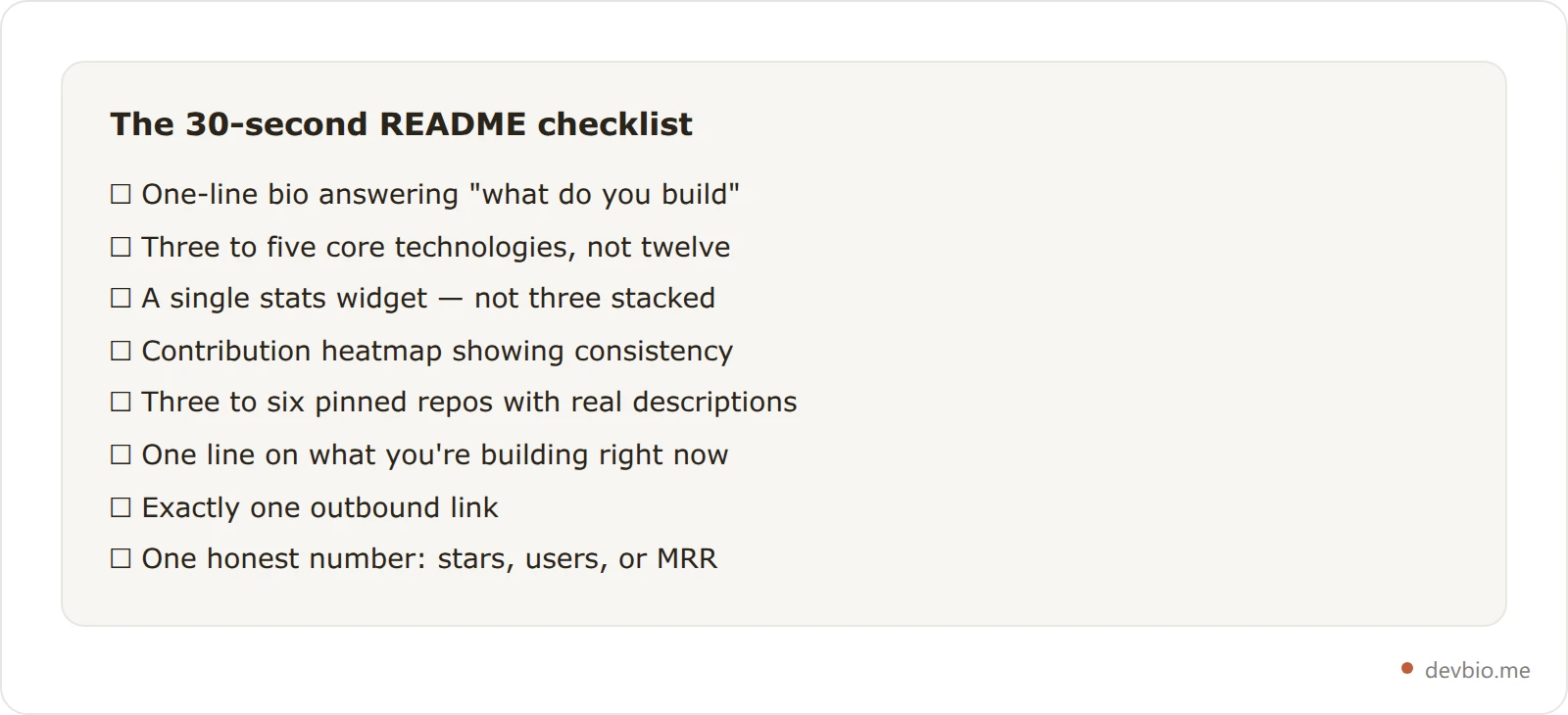
Most README guides list everything you could include. These are the GitHub profile README best practices that survive a 30-second scan — what to keep if you want someone to understand you fast.
1. A one-line bio that answers "what do you build"#
Not your job title. Not "passionate developer." What do you actually build? Note that this is the README's opening line, not the profile bio field — that one is hard-capped, and the GitHub bio character limit covers what fits inside its 160 characters.
Works:
"I build developer tools. Currently working on [Project], an open source [X]."
"Full-stack engineer focused on Postgres performance and Next.js."
"Indie maker. Shipped three SaaS products. Currently at $4K MRR."
Doesn't work:
"Hi! I'm [Name], a passionate software developer who loves to code."
"Open to opportunities." (save this for LinkedIn)
One sentence. Use it.
2. Your tech stack — as a signal, not a list#
List what you're genuinely expert in, not every language you've written five lines of. Three to five technologies. More than that signals breadth without depth.
For 2026 specifically: TypeScript surpassed Python and JavaScript as the #1 language on GitHub in August 2025, growing 66.6% year-over-year according to GitHub Octoverse 2025. If you build with TypeScript and AI tooling, saying so explicitly catches recruiter attention in a way "JavaScript" no longer does.
Use shields.io badges or a clean text list. Either works. Animated badge carousels: skip them.
3. GitHub stats widget#
A github stats readme card shows total commits, pull requests, issues, and contributions. It's the most-copied element in developer READMEs — which also makes it noise. Recruiters scan past it.
Make it useful with a single dark-themed card that matches your profile. Three different stat widgets stacked vertically signal that you optimized your README instead of building things.
One caveat worth knowing: AI coding tools are inflating raw contribution counts platform-wide. GitHub tracked over 1 million AI-generated pull requests between May and September 2025 alone. Volume is a weaker signal than it was two years ago.
4. Contribution heatmap#
The 365-day contribution graph is one of the few places where consistency shows. A developer with two years of steady green squares signals something different than a recent burst.
A github contribution heatmap rendered by a third-party widget embeds as a static image, with no hover details and no streak data. If you link from your README to a live developer profile, visitors get an interactive version — with hover tooltips, exact contribution counts per day, and a running streak counter.
That interactivity isn't a UI trick layered on top of GitHub's raw data. A synced heatmap component stores per-day counts, the current streak, and a longest-streak high-water mark as a rendered snapshot recomputed on every GitHub sync — not a number someone typed once and left to rot. It's the same logic as the revenue architecture described further down this guide, applied one layer earlier: "how many days in a row" is math that reruns, not a fact anyone has to remember to update.
5. Pinned repos with context#
GitHub lets you pin up to six repositories. Pin the best ones. More importantly, add one sentence to each repo's description about what it does, not just what it's called.
"Personal portfolio" is not a description. "React + Supabase web app — 400 GitHub stars, used in production by 3 companies" is.
If those star counts are the kind of number you'd rather not retype every quarter, a profile that syncs them from GitHub keeps the descriptions honest for you.
6. What you're currently building#
One line on your active project. This does more than any static list of past work. It signals momentum and gives someone a concrete reason to reach out right now.
7. One link — to somewhere that tells the full story#
Most READMEs fail here. Either no link, five links in a row, or a portfolio site that hasn't been updated since 2022.
One link. Pick it deliberately. It should go to wherever someone can understand you fastest: your live profile, your primary project, or a personal site that's actually maintained. If you're weighing which platform to send people to, see The Best Link in Bio for Developers in 2026.
8. One honest number#
A star count. A download number. A monthly revenue figure. A user count. One real metric does more for credibility than any amount of well-crafted prose. Developers respond to specific numbers.
If you're early-career, 50 stars on a real project counts. If you're an indie founder with $8K MRR, lead with that.
What to Skip#
Animated typing text ("I'm a developer... who loves... to code..."). Every README generator produces this. It's the profile equivalent of a loading spinner on a static page.
Visitor counters. They inflate instantly and tell nobody anything. Your visitors already know you can see them.
"Currently learning X, Y, Z, A, B, C." Listing everything you're learning signals you're not doing any of them well yet. One technology you're actively shipping with is fine.
Snake game on your contribution graph. Impressive the first 50 times you saw it. Noise now.
Three-paragraph bios. Recruiters spend an estimated 90 seconds on a GitHub profile. They're not reading paragraphs.
Soft skills in prose form. "Team player", "fast learner", "passionate about clean code." Nobody writes "bad at teamwork" on their profile. These phrases carry zero signal.
The Structural Problem: 82% of Your Work Is Invisible#
Here's the honest limit of any GitHub profile, README or not: it only shows public work.
GitHub Octoverse data shows 82% of all GitHub contributions happen in private repositories. Call this The 18% Problem — most developers' public profile represents less than a fifth of their actual technical output. For enterprise engineers, that fraction skews even higher. The best work of your career might be inside a private monorepo solving genuinely complex distributed systems problems, and your public GitHub looks sparse.

"LinkedIn shows you what developers claim they can do. GitHub shows you what they've actually built." — widely cited across technical recruiting platforms including GitRoll and Kula.ai
The irony: even what GitHub does show is becoming harder to read. AI coding tools inflated contribution volume across the platform — GitHub tracked over 1 million AI-generated pull requests between May and September 2025 alone. Recruiters know this. Raw commit counts are cheap. What they're scanning for is signal in the noise: real shipped projects, meaningful pull request reviews, complexity in the public work that does exist.
74% of developers in the Stack Overflow Developer Survey 2025 identified as not actively job searching. That makes passive discoverability through your GitHub profile more valuable than it's ever been — and makes the gap between what your profile shows and what you've actually built more consequential.
Five Things a GitHub README Genuinely Can't Do#
A well-crafted README handles first impressions on GitHub. These are the things it structurally cannot do — not limitations you can hack around, but hard constraints of the format.
1. Show live business metrics#
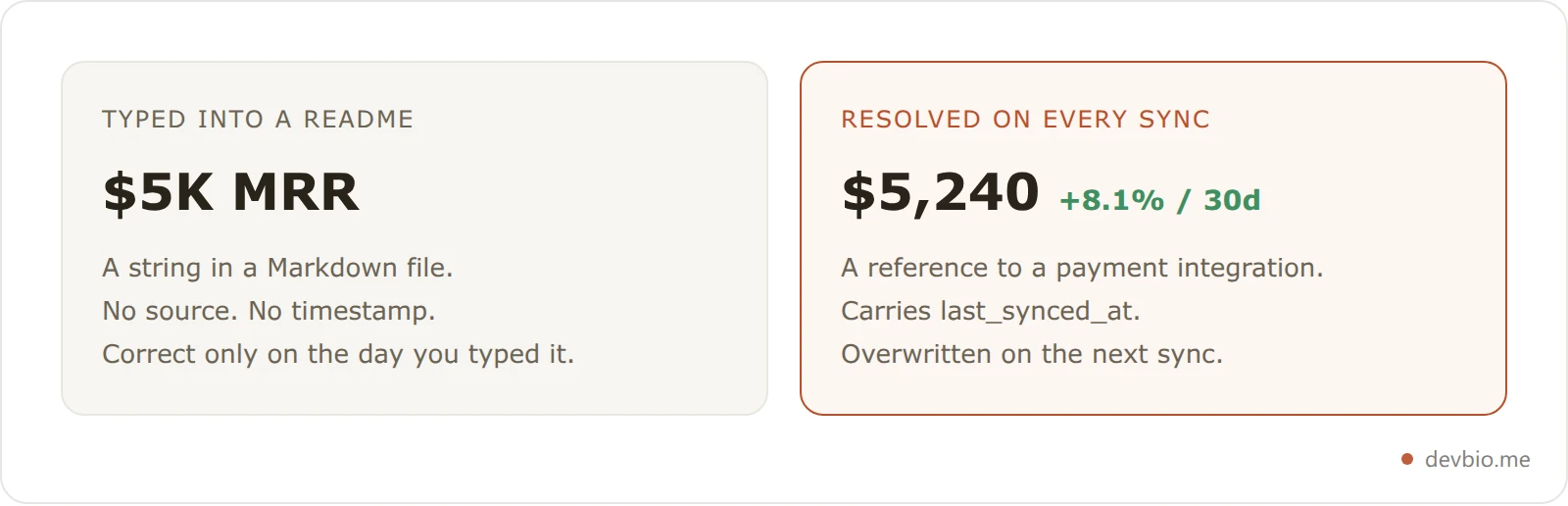
If you've built a SaaS product generating $5K MRR, that information doesn't exist on your GitHub profile. You can type "$5K MRR" in the README — but it's a static claim, disconnected from any payment gateway, unverified, and never automatically updated.
Solo founders are at an all-time high: 63% of new corporations formed on Stripe Atlas in Q2 2026 were solo-founded, according to Stripe's blog. Developer-founders have a dual identity — technical contributor and business operator. A GitHub README can show one side. The business story disappears.
Platforms built specifically for this connect to Stripe, Dodo Payments, Lemon Squeezy, and Polar to pull live MRR, active subscriber counts, and customer numbers directly onto project cards — updating on sync. For anyone building in public, revenue that updates from source is the difference between proof and a claim you made six months ago.
2. Export as an ATS-parseable PDF resume#
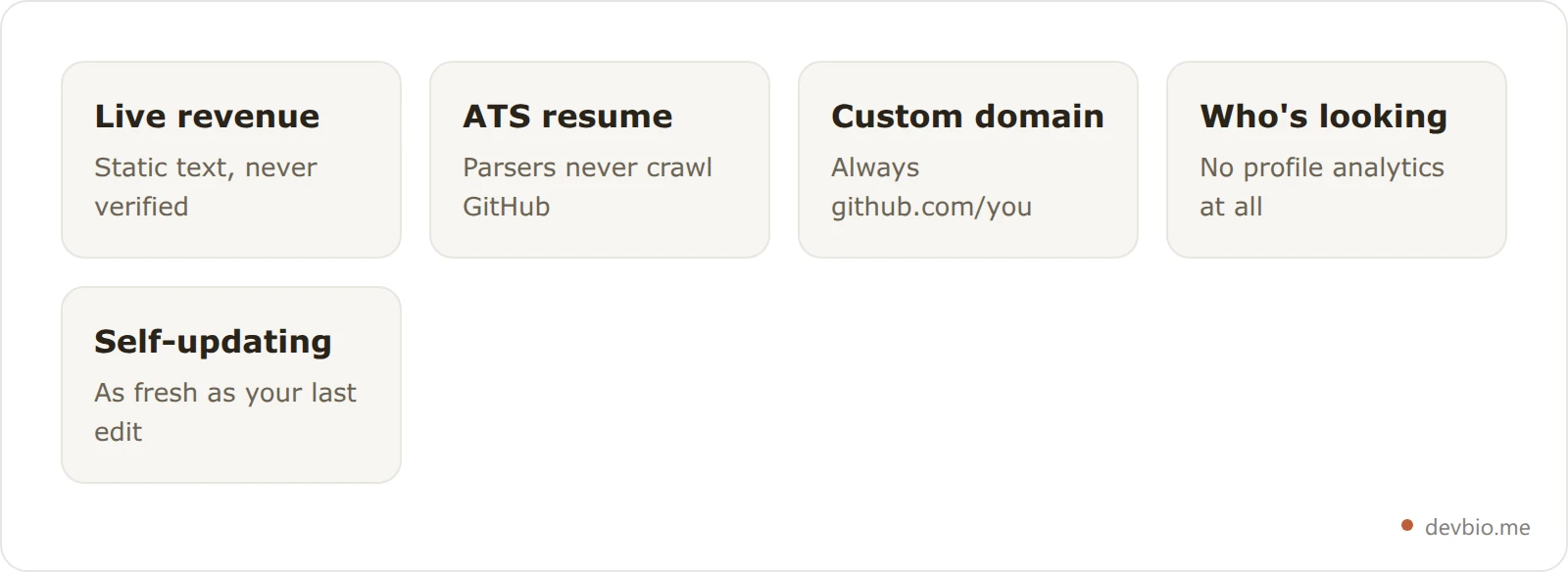
Applicant tracking systems parse PDF files submitted through job portals. They don't crawl GitHub profiles. The content in your README — your experience, projects, skills — exists entirely outside the resume pipeline.
The README and the resume are separate formats serving separate audiences. Having a great README doesn't reduce the need for a properly formatted resume, and keeping both in sync is manual work every time your situation changes. If you want a resume that auto-compiles from the same source as your profile, see ATS-Ready Developer Resume: From GitHub Profile to PDF for how that works end-to-end.
3. Work on a custom domain#
Your GitHub profile lives at github.com/[username] — GitHub's domain, not yours. You cannot point yourname.dev at it. You cannot own that URL.
For most developers this is fine. For freelancers, consultants, and founders who want a professional presence under their own domain — one that survives if they ever leave GitHub — it's a real constraint.
4. Tell you who's looking#
GitHub provides no profile page analytics. You can't see how many people visited your profile this week, where they came from, or whether they clicked anything. Repository traffic reports exist but cover only individual repos in 14-day rolling windows — they don't touch your profile page.
If you're actively doing outreach, applying to roles, or building in public, that blindspot is a real problem. You'd know immediately if your email open rate was 0%. You won't know if your GitHub profile is being ignored entirely.
5. Update itself when your situation changes#
Your README is exactly as fresh as the last time you edited it. Pinned repos with stale descriptions. A "currently working on" line pointing to a project you shipped — or abandoned — six months ago. A revenue number you typed that's been wrong for two years.
The decay is silent and invisible to you, but visible to every person who visits.
Why this doesn't happen the same way on a synced profile: the fix isn't "someone remembers to click sync" — it's structural. A project card on a live bio doesn't store a star count; it stores a reference (the repo's owner and name), and that reference resolves against a separately-synced snapshot on every page load, in one batched lookup no matter how many projects are on the profile. The bio document itself never holds a number that can quietly drift, because there's nothing cached in it to correct. Revenue works the same way: a card references a connected payment integration, not a typed dollar figure — change your MRR and the card reflects it on the next sync, no README edit and no recommit required. That's the actual difference between "stays current" as a tagline and as an architecture decision: the number a visitor sees and the thing you'd have to remember to update were never allowed to live in the same place.
Concretely, on a DevBio profile with GitHub connected, one pinned project renders as six resolved values, not six typed ones: repo_name and owner (the reference the card actually stores), stars_count and primary_language (read live from GitHub's API on each sync), last_synced_at (a timestamp, not a claim), and — where a payment gateway is attached to that project — mrr_current next to mrr_delta_30d. None of those six are prose someone wrote once; each is fetched, cached briefly for a single batched lookup per page view, and overwritten outright on the next sync. A README repo line that says "$5K MRR" is one hand-typed field with no last_synced_at attached — there's no way for a visitor to tell if it's this month's number or two years stale without asking you directly.
GitHub README vs Developer Bio: What Each Does#
Feature | GitHub Profile README | Dedicated Developer Bio |
|---|---|---|
Setup | Edit a Markdown file | Dashboard with drag-and-drop components |
GitHub stats | Third-party SVG widget | Native synced component |
Contribution heatmap | Third-party widget | Interactive, streak-aware, hover tooltips |
Live MRR / revenue | Not possible — static text only | Connected to Stripe, Dodo Payments, Lemon Squeezy, Polar |
PDF resume export | Not available | Auto-compiled LaTeX PDF at /{username}/resume |
Custom domain | Not available | Fully supported — all sub-paths work |
Profile analytics | Not available | Live visitor data, globe view |
OG image for sharing | GitHub's generic 1280×640 preview | Per-profile 1200×630 card with live MRR, stars, commits |
AI-readable export | Not available | /llms.txt — full profile for AI agents |
Single shareable link | github.com/username only | devbio.me/username or your own domain |
Freshness | Manual — you edit the file | Syncs from connected sources on demand |
When Your README Is Enough — and When It's Not#
Student or early-career developer: A clean README is the right starting point. Focus on building things you can pin, not on platform choices. GitHub is where hiring managers expect to find you. Revisit this when you have projects with real users or revenue.
Mid-career engineer looking for a better role: Your README matters, but 82% of your best work is in private repos. A profile that lets you describe your actual impact — the systems you designed, the incidents you resolved, the migrations you shipped — does more than a contribution graph can.
Indie founder with a shipped product: Your GitHub profile is actively underselling you. Consider this scenario: a developer ships a SaaS that hits $3K MRR in its first 90 days. Their GitHub shows 6 months of green squares and a pinned repo with a launch-day description. A recruiter or investor sees "developer." Their live profile — project card showing current MRR, active subscriber count, and a synced contribution heatmap — shows "founder, shipping, earning." Same person. Completely different signal. What goes on a developer bio is a genuinely different question from what goes on a README.
Freelancer or consultant: You need a link that non-technical people can process in 30 seconds. github.com/username is not that link. A personal domain pointing at a clean, branded profile is.
Building in public: GitHub is where your code lives, but it's not where your story lives. Revenue numbers, shipped products, and the decision-making behind them belong on a platform built to tell that story — with live data making the proof automatic rather than manual. If you're eventually thinking about listing a project for acquisition, verifiable MRR on your public profile makes the pitch before you even speak to a buyer.
The 15-Minute README + Profile Upgrade#
You don't have to choose between a GitHub README and a live developer profile. They complement each other: the README for people already on GitHub, the profile as the single link in your README and everywhere else.
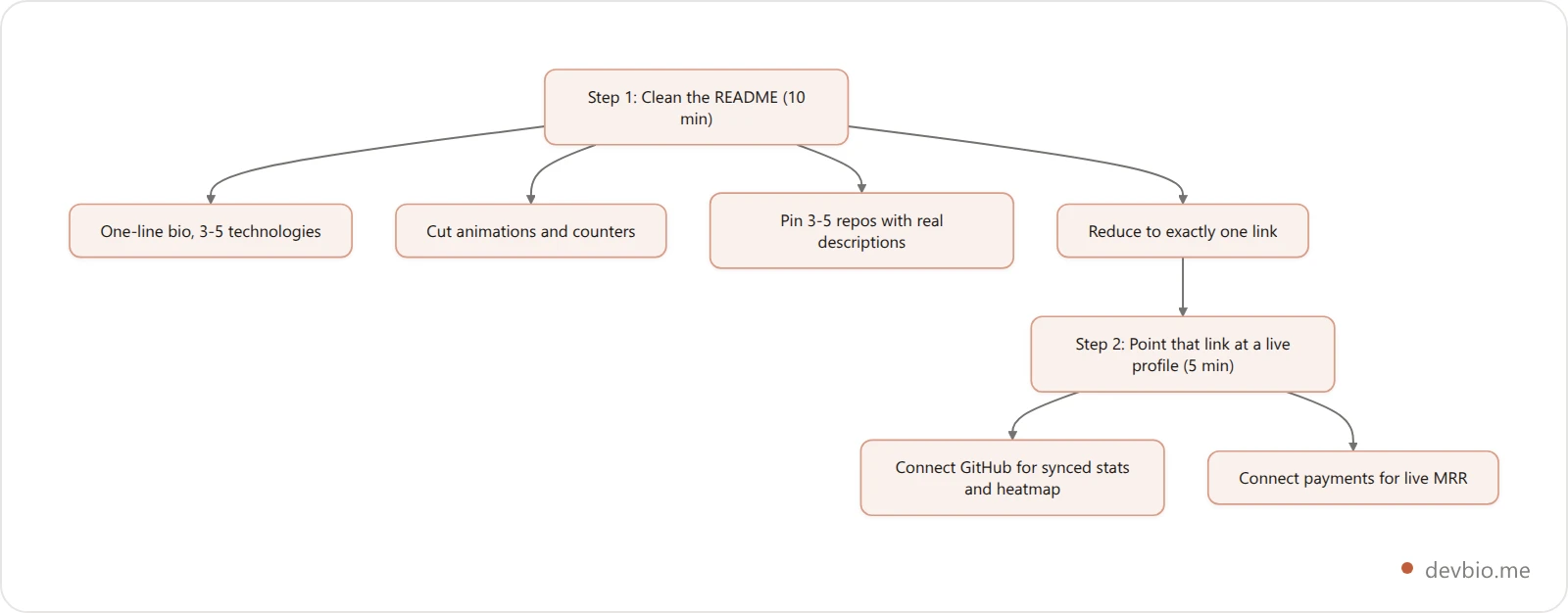
Step 1 — Clean up your README (10 minutes)
Write a one-line bio that answers "what do you build"
Remove animated text, visitor counters, and anything that won't load in under 2 seconds
Pin 3–5 repos with current, accurate descriptions
Remove all links except one
Step 2 — Make that one link your live profile (5 minutes)
Create a profile at devbio.me, add your name, bio, stack, and current project
Connect GitHub to sync your stats and contribution heatmap
Your profile URL becomes your single public link — clean, shareable, works in any context
From there: if you have a product, connect your payment gateway for live revenue on project cards. If you want a resume, set resume mode to auto and it compiles itself at /[username]/resume. If you have a domain, point it.
The README becomes the door. The profile is the room.
GitHub Profile README Template (Copy This)#
Here's a minimal, copy-paste-ready github readme template for 2026. Replace every placeholder. Remove any section that doesn't apply.
## [Your Name]
[One sentence: what you build and for whom.]
**Stack:** [3–5 core technologies]
**Currently building:** [Project name] — [one sentence describing it]
**Find me:** [single link — your live profile, site, or primary project]
---
[](YOUR_PROFILE_URL)
---
[Optional: one honest metric — stars across repos, active users, or current MRR]Swap STATS_CARD_URL for a github-readme-stats endpoint carrying your own handle, and YOUR_PROFILE_URL for your github.com address. Those placeholders are deliberate — a stats-card URL only renders an image once it points at a real username, which is exactly why copied READMEs so often show a broken card.
What this template excludes: animated typing, skill badge carousels, language pie charts, snake animations, visitor counters, and multiple stacked stat widgets. Every element loads fast and reads in 10 seconds. That's the goal.
One last detail most READMEs miss: the card people see when they share your profile link is a separate asset with its own dimensions. Our OG image size spec covers the 1280×640 GitHub repository preview and the 1200×630 standard everywhere else.
Give that one link somewhere worth landing — build a live profile free.
Frequently Asked Questions#
How do I create a GitHub profile README?#
Create a public repository named exactly the same as your GitHub username — if your username is janedev, create the repo janedev. Add a README.md to it. GitHub automatically displays it on your profile page. No other configuration required.
What should I put in my GitHub profile README in 2026?#
A one-line bio that describes what you build, your three to five core technologies, pinned repos with real descriptions, a single stats widget, your current project, and one outbound link. That's the complete list. Everything else competes with the signal.
How long should a GitHub profile README be?#
Short enough to read on screen without scrolling. Recruiters and developers spend 30–90 seconds on a GitHub profile — they won't read paragraphs. Aim for two or three sections, each scannable in under 10 seconds.
Can I use my GitHub profile README as a resume?#
Not effectively. ATS systems parse PDF files submitted through job portals — they don't crawl GitHub profile pages. Your README content won't be read by any applicant tracking system. You still need a separate resume for applications. If you want both from one source, tools exist that auto-compile your developer profile into an ATS-ready PDF — see ATS-Ready Developer Resume: From GitHub Profile to PDF for how that works end-to-end.
Why do my GitHub stats widgets sometimes show broken images?#
The most popular stats widgets (github-readme-stats) run on shared Vercel instances that regularly hit GitHub's API rate limits. When that happens, the widget returns a broken image. The fix is to self-host the service. It's a structural problem with any third-party README widget approach, not a bug in your README.
Will recruiters actually look at my GitHub profile README?#
Industry estimates put GitHub profile review rates at 78–87% among technical recruiters for engineering roles. But the time they spend is under 2 minutes. What gets noticed: consistent contribution history, pinned repos with clear descriptions, and evidence of shipped work. A wall of badges and animations actively hurts — it signals time spent on the README instead of on projects.
What is the difference between a GitHub profile page and a developer bio?#
Your GitHub profile shows only your public contributions — roughly 18% of most developers' actual output — and can't export a resume PDF, display live revenue, or show who's viewing it. A dedicated developer bio is a standalone page on your own domain showing the full picture: GitHub activity, shipped products, live MRR from connected payment gateways, career history, and profile analytics.
How often should I update my GitHub profile README?#
When your situation changes: new project shipped, tech stack shift, different focus, updated contact link. Don't let it sit stale longer than a quarter. Stale "currently building" lines are the most common README problem — they tell anyone reading that the page was abandoned around the same time the project was.
Conclusion#
A GitHub profile README is worth the 30 minutes it takes to do right. A sharp bio, your core tech stack, three pinned repos with real descriptions, one stats widget, and one link covers 90% of what it needs to do. Keep it that short.
But be clear-eyed about what it can't do. It shows roughly 18% of your actual work. It can't prove business traction, won't produce an ATS-parseable resume, and gives you no data on who's looking. For most developers in most phases of their career, those limits don't matter yet.
For indie founders with real revenue, freelancers who need domain-level credibility, and engineers whose best work lives in private repos — the README is a starting point, not a destination.
Your code already proves you can build. Put it somewhere that shows the full picture — devbio.me.