

If you've searched "who viewed my GitHub profile," the short answer is: GitHub does not tell you. There is no viewer log, no notification, and no official GitHub profile views metric anywhere in GitHub's settings. Every "views" badge you've seen on a README is a third-party counter tracking image requests, not people. If you want to know who's actually looking at your work in 2026, you need to track it yourself, and the best place to do that is the page you control, not the one you don't.
That's a hard pill for a platform where 180 million-plus developers host their work and where a hiring manager quietly clicking through your repos might decide whether you get a callback. You're being evaluated constantly. You just can't see it happening.
This guide covers what GitHub actually shows you, why the popular "view counter" badges are functionally fake, and how to build a real answer to "who's looking at my profile" using the one page online that's actually yours. There is one piece of genuine traffic data GitHub hands you, and it's worth knowing its exact limits before you go looking for a workaround.
In this guide:
Why GitHub Doesn't Show You Who's Looking#
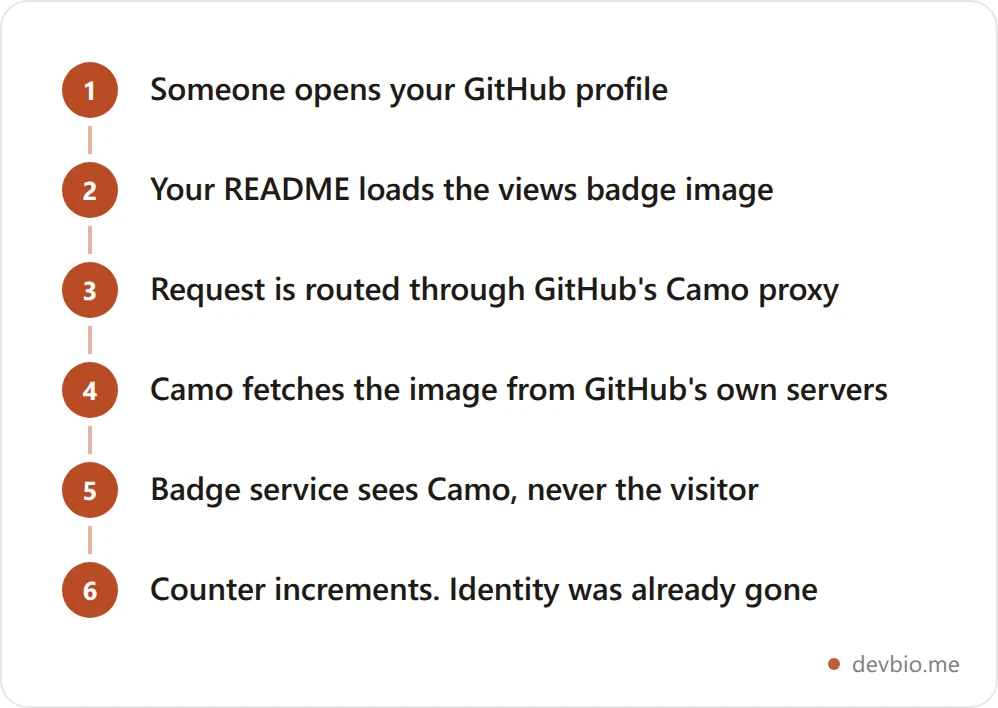
GitHub has never shipped a per-profile visitor log, and it's not an oversight. Every image embedded in a GitHub README, including those "profile views" badges, gets routed through Camo, GitHub's image proxy. Camo fetches the image on GitHub's servers and re-serves it to the viewer, which means the badge provider never sees the visitor's real IP address or browser. It only sees a request from GitHub's proxy.
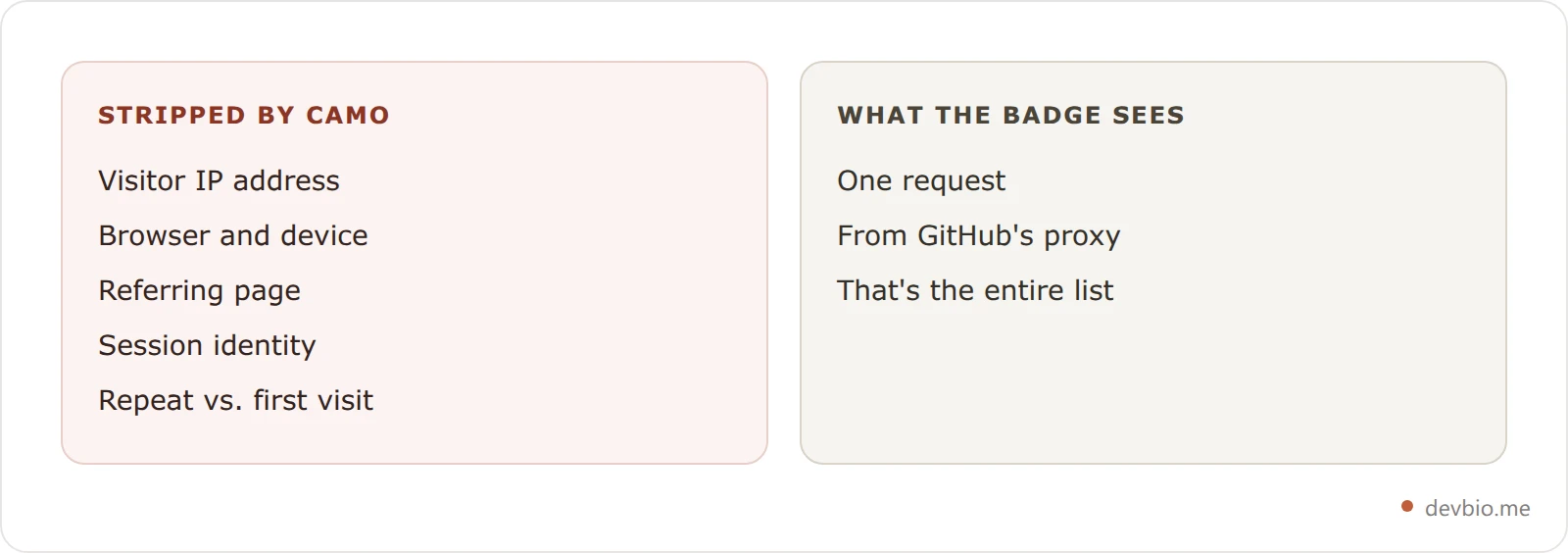
That single design decision is why nobody, not even the counter services themselves, can tell you who triggered a view. They can only count requests, and even that number is unreliable.
The One Real Window GitHub Gives You#
GitHub does expose one legitimate traffic view: the repository traffic graph, available to anyone with push access under a repo's Insights tab. It shows unique visitors and clones for the trailing 14 days, plus top referring sites. It's real data, but it's scoped to individual repos, capped at two weeks of history, and invisible to anyone who isn't a maintainer. There is no equivalent for your profile page itself. If you want to know who's checking out you, not just one repo, GitHub simply has nothing to offer.
The Camo Problem: Why Every "Views" Badge Is Lying to You#
The most common addition to a GitHub profile README is a views-counter badge: a small SVG that increments every time your README image loads. Developers use them to signal popularity. The problem is the number means almost nothing.
Because Camo caches and re-proxies every request, the counter can't distinguish a real visitor from a repeat visit, a bot, or a bored crawler re-fetching your README for search indexing. Worse, it can be gamed outright. Search GitHub itself and you'll find public repos built specifically to spam view-counter services with fake requests, one popular project is literally named a "GithubViewcountBot." The maintainer of one of the most widely used counters has said as much: a billion fake views doesn't make you popular, it makes you a person with a large number.
If your profile "view count" is doing any work in your personal brand, it's decorative at best and misleading at worst. It answers "how many times did an image load," a question nobody actually cares about, instead of "who looked, and did they stick around."
The GitHub Blind Spot: Why Not Knowing Who Viewed My GitHub Profile Costs More Than You Think#
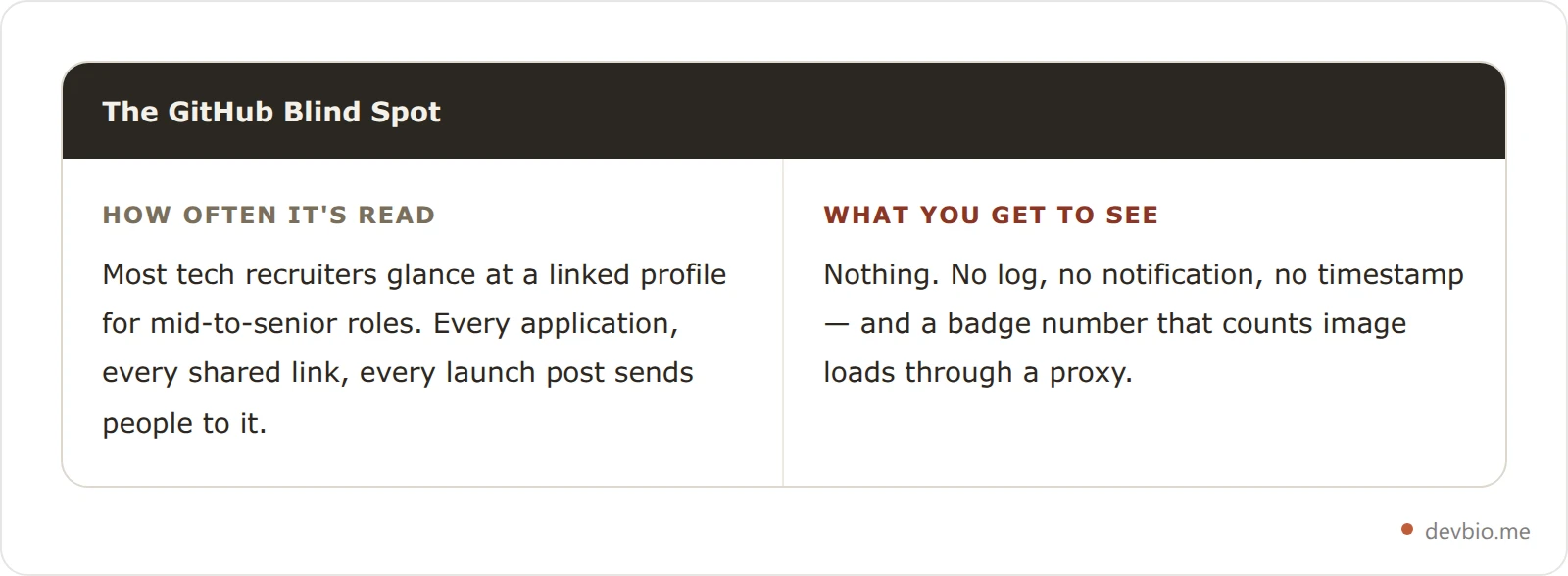
Call it the GitHub Blind Spot: the gap between how often your profile is evaluated and how little you're allowed to see about it. It's the most-viewed, least-tracked page in most developers' job search.
Recruiting platforms estimate that 60 to 80 percent of tech recruiters at least glance at a candidate's linked GitHub profile for mid-to-senior roles, with deeper reviews common for specialized positions. Gergely Orosz, the former Uber engineering manager and author of The Tech Resume Inside Out, has documented that recruiters often spend just seconds scanning a candidate's materials before deciding whether to keep reading. On GitHub, that scan happens even faster, and entirely off your radar.
You won't know if a hiring manager clicked through three of your repos and closed the tab, or if they never opened your profile at all. You won't know if the traffic spike after you posted on X came from recruiters or from other developers. Every other channel in your job search gives you a signal. Applications show a status. Cold emails show an open rate. Your GitHub profile, arguably your most important asset, shows you nothing.
Scale makes the blind spot worse every year. GitHub added 36 million new developers in 2025 alone, roughly one new account every second, pushing the platform past 180 million total developers. Your profile isn't just being evaluated in a vacuum. It's competing for attention in the noisiest field GitHub has ever had, with zero data on whether you're winning that attention or losing it.
Why This Matters More in 2026: GitHub Became the Trust Signal#
Résumés got easier to fake the moment AI writing tools went mainstream. The 2025 Stack Overflow Developer Survey found that trust in AI-generated output has actually fallen even as adoption climbed to 84 percent, with only 3 percent of developers saying they "highly trust" what AI produces. Hiring managers read the same survey data. A polished, AI-assisted cover letter no longer proves much on its own.
That's why GitHub activity, real commits, real repos, real contribution history, has become the tie-breaker in a lot of hiring conversations. It's much harder to fake a year of commit history than a paragraph of prose. Which makes it even stranger that the one channel now carrying the most evaluative weight is also the one channel where you get zero visibility into who's checking.
What Real Visitor Analytics Actually Shows#
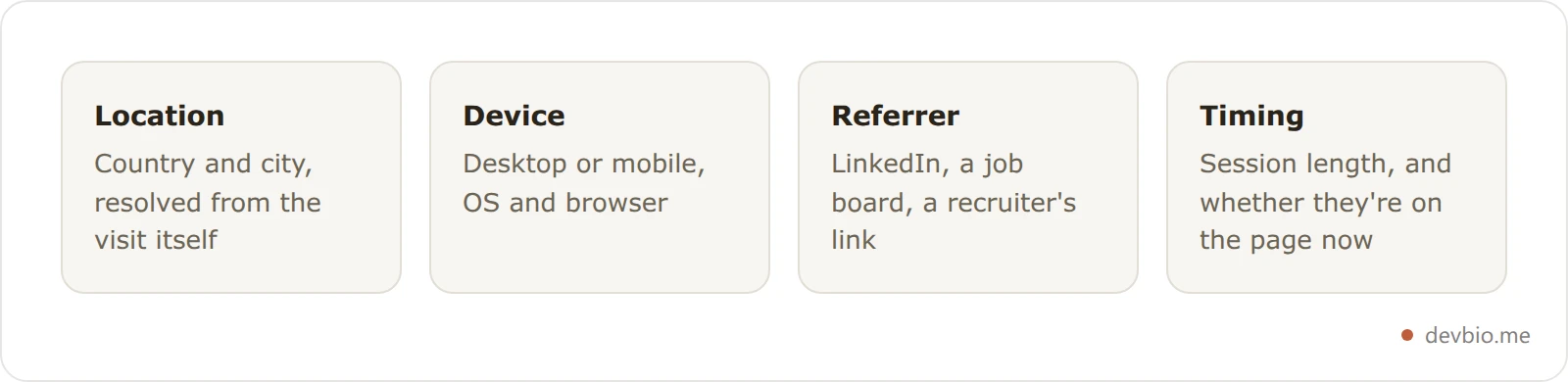
The fix isn't a better GitHub badge. It's moving the tracking to a page you actually control: your bio link. Real visitor analytics, the kind used on any modern website, captures data GitHub structurally can't:
Where visitors come from — country, city, and referring site (LinkedIn, a job board, a recruiter's inbox link)
What device and browser they're on
How long they stayed and what they looked at
Whether someone is on your page right now, not just historically
None of this requires knowing a visitor's name or email. It's session-level, not personal-identity-level, which is the same boundary Google Analytics and every reputable analytics tool operates within. You're not building a surveillance list. You're finally getting the same visibility a landing page or a SaaS dashboard has had for years, applied to the one page recruiters actually read.
Real-time matters more than it sounds. A weekly or monthly traffic summary tells you a story after it's already over. A live feed tells you a story while you can still act on it, following up with a warm lead the same day, instead of noticing a spike in a report three weeks later.
GitHub View Counter vs. Real Analytics: A Side-by-Side Look#
Not every alternative to a GitHub badge is built the same way, and some go further than a personal bio ever should. Here's how the common options actually compare:
Tool | Shows individual visitor identity | Real-time | Country / device / referrer | Tracks your GitHub traffic | Cost |
|---|---|---|---|---|---|
GitHub profile view badge | No — Camo-proxied, fakeable | No | No | Only counts image loads | Free |
GitHub repo traffic graph | No — aggregate only | No, 14-day lag | Referrer only | Repos only, not your profile | Free |
Google Analytics on a personal site | No — anonymized | Near real-time | Yes | Only if you self-host a full site | Free |
LinkedIn "who viewed your profile" | Partial, if the viewer allows it | No | No | Not connected to GitHub at all | Free / Premium |
B2B visitor-identification tools | Yes — matches sessions to companies/LinkedIn | Near real-time | Yes | No, built for marketing sites | Paid, often expensive |
A live bio-page visitor dashboard (e.g. DevBio) | No — session-level, no PII | Yes | Yes | Yes, once your GitHub bio links to it | Paid tier |
The pattern is consistent: nothing built for a personal profile should give you a viewer's name, and the tools that do (built for B2B marketing, not developer bios) are a different category entirely. What separates a useful tool from a decorative badge is whether it gives you behavioral signal, timing, location, referrer, device, in real time, without crossing into identifying specific people.
We build the live analytics view on DevBio, and the question we field more than any other is whether it can put a name to a visitor. It can't, and that's a deliberate design constraint rather than a missing feature — the moment a personal bio page starts resolving sessions to individuals, it stops being analytics and becomes something most developers would not want pointed at them.
How to See Who's Actually Visiting Your Profile in 2026#
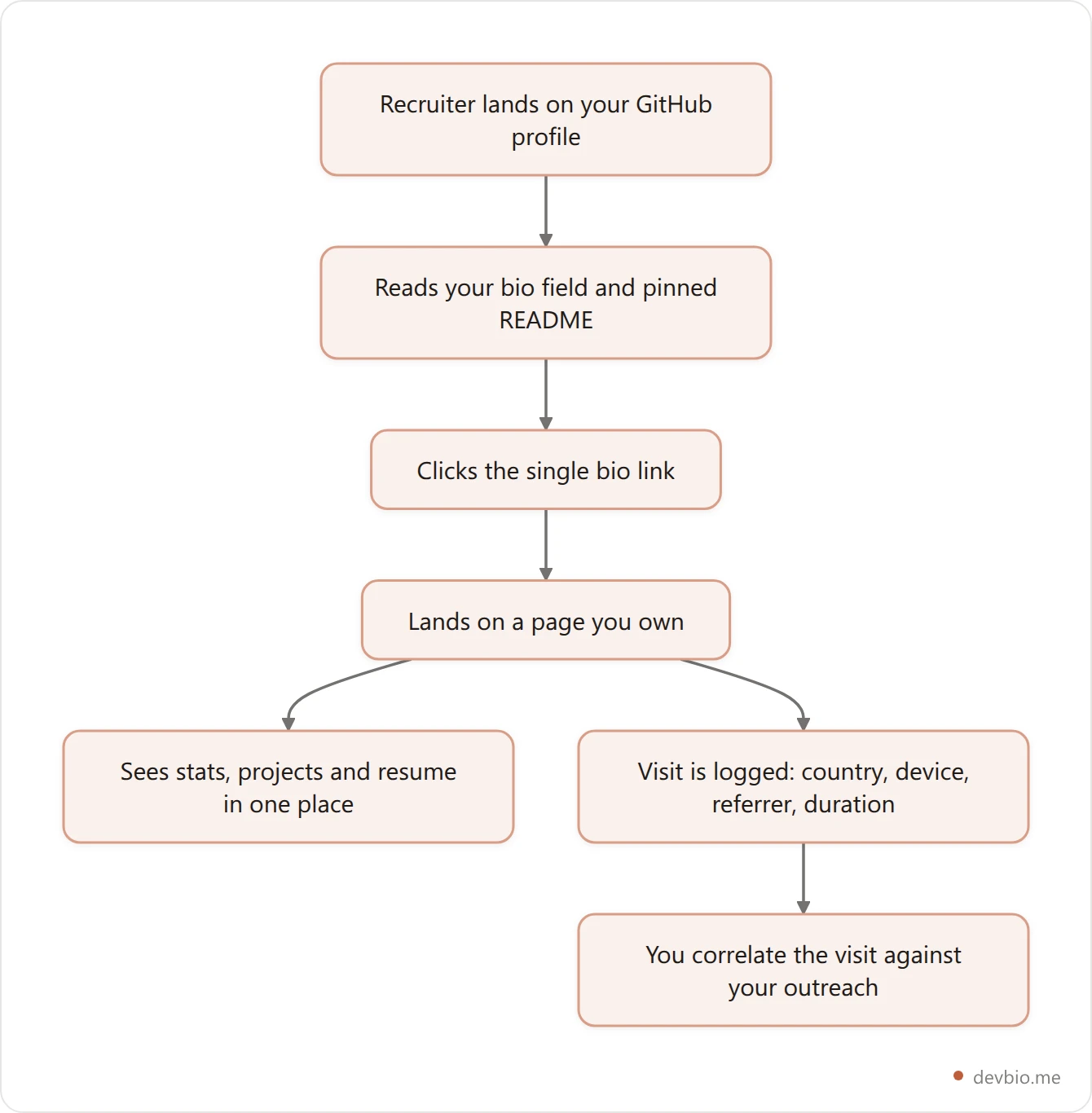
GitHub's own profile is a dead end for tracking. The workaround developers use is simple: put a bio link in the one field GitHub does give you, your profile bio or pinned README, and point it at a page that can actually track visits.
Put a bio link where recruiters already look. Your GitHub bio field and profile README both support a single link. That's the handoff point.
Send it to a page built for this, not a bare portfolio with no analytics attached. A developer bio that already pulls your GitHub stats, projects, and resume in one place means the click isn't wasted, the visitor lands somewhere that proves your work instead of just linking to it.
Turn on visitor tracking for that page. DevBio's dashboard includes a live analytics view, complete with a rotating globe, that plots every visitor by location the moment they land, alongside a feed of device, referrer, and session length.
Watch the timing. A cluster of visits from a company's city, arriving minutes after you submit an application, is a far stronger signal than any "profile views" badge will ever give you.
This isn't a GitHub hack. It's a redirect: stop trying to instrument a platform that was explicitly built not to expose this, and start tracking the page you fully own.
Turn the click into a signal you can actually see
A tracked bio page shows country, device, referrer and live session length for every visitor — the data GitHub's Camo proxy structurally cannot give you.
See how the live dashboard worksIt also fixes a second problem most GitHub-only profiles have: a bio field or README link is a dead end with no context attached. A visitor who clicks through gets a single URL and has to decide, cold, whether to trust it. A page that already covers what hiring managers actually check, stats, shipped projects, and a resume in one place, answers that trust question before the visitor has to ask it, which is also why the click is worth tracking in the first place.
Reading the Signals: Country, Device, Referrer, and the "Live Now" Badge#
Here's roughly what a real session looks like on a tracked bio page, reformatted from a live dashboard view:
Visitor
├─ Location: Austin, TX, US
├─ Device: macOS · Chrome
├─ Referrer: linkedin.com
├─ Landed on: /yourname
├─ Session length: 3m 42s
└─ Status: live now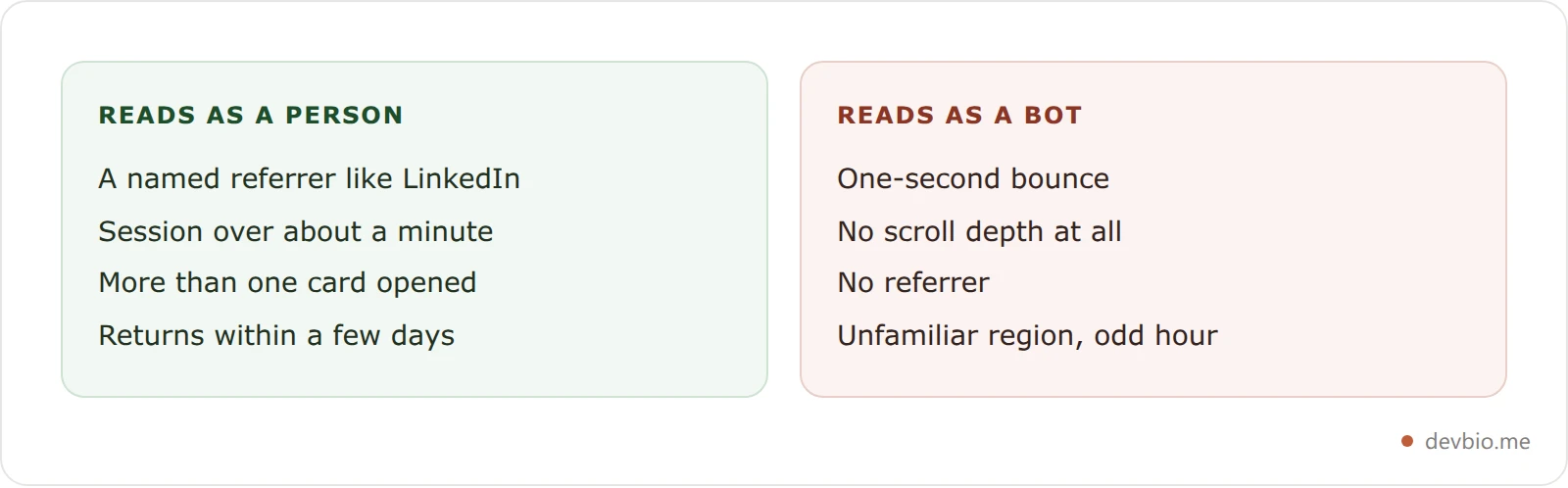
That single row tells you more than any GitHub badge ever could. A LinkedIn referrer plus a multi-minute session is a strong tell that a human, not a crawler, is reading your work closely. A one-second bounce from an unfamiliar country is probably a bot.
A dashboard like this refreshes automatically, so the "live now" count updates while you watch, and it's built on first-party session data, not a third-party ad-tech vendor bolted onto your page. You're not exporting your visitors' behavior to another company's tracking network; the data stays inside your own dashboard.
A Realistic Before/After: Spotting a Recruiter Before They Email You#
Consider a backend developer who spent months guessing whether anyone actually opened their GitHub profile after applying. Before adding visitor tracking to their bio link, the only signal was silence: no callback, no clue whether their profile had even been opened.
After putting a tracked bio link in their GitHub profile and turning on live analytics, the picture changed within two weeks. A visit landed from Seattle, referred from LinkedIn, staying on the page for four minutes and opening two project cards, three days before a recruiter from a Seattle-based company reached out. It wasn't proof on its own, but paired with the application timeline, it was the first concrete evidence that the profile was actually doing its job instead of sitting unread.
That's the actual value of developer profile analytics: not vanity numbers, but a timeline you can correlate against your own outreach.
The same pattern shows up outside job hunting. An indie hacker sharing a new project on X can watch, in real time, whether the traffic is actually landing on their project card or bouncing before it loads, useful the moment a launch post goes out, not three days later in a weekly digest. Freelancers pitching a client get a similar tell: a visit from the client's city, minutes after sending a proposal link, is a far better read on interest than waiting for an email reply.
Put a tracked link in your GitHub bio and watch what happens after your next application — the baseline takes about a week to learn.
Privacy and Ethics: What Visitor Analytics Should Never Do#
Tracking visits to a page you own and control is standard practice, every company website does it. But there's a line worth naming so you don't cross it by accident:
Don't de-anonymize visitors. Country, device, and referrer are useful. Trying to match a session to a specific person's identity without their knowledge (the kind of thing B2B "visitor identification" tools do) is a different, much more aggressive category of tracking, and not something a personal bio needs.
Keep it first-party. Data that stays in your own dashboard, instead of being sold to an ad network, is a meaningfully different privacy posture than most consumer analytics.
Disclose it if you're collecting anything beyond basic session data. A one-line note in your footer costs nothing and keeps things honest.
Session-level, non-personally-identifying analytics on your own page is not the same thing as surveillance. Treat the distinction seriously and you keep the tool useful without making anyone uncomfortable.
The 5-Minute Setup Checklist#
Copy this if you're setting it up today:
Add a single bio link to your GitHub profile settings and pinned README
Point that link at a profile that already shows your GitHub stats, projects, and resume, not a blank page
Enable visitor analytics on that page
Check it after every application or public post for a week to learn your normal traffic baseline
Watch for location- or referrer-based spikes that line up with outreach you've sent
Before you point your GitHub bio at a tracked profile link, double check the handle is consistent everywhere — our developer username checker and free username generator both help confirm or find one that's actually available.
Frequently Asked Questions#
Can I see who viewed my GitHub profile?#
No. GitHub has no built-in feature that shows who viewed your profile, and no third-party tool can bypass this. Every image on GitHub is routed through GitHub's Camo proxy, which strips the visitor's real IP address and identity before any counter service sees the request.
Does GitHub notify you when someone visits your profile?#
No. GitHub sends notifications for things like follows, stars, mentions, and issue activity, but never for a profile page view. There's no setting to enable this because the underlying tracking doesn't exist.
Are GitHub profile view counter badges real?#
They count something, but not what most people assume. They increment on every image load routed through Camo, including repeat visits, crawlers, and bot traffic. The numbers can also be artificially inflated using publicly available scripts, so treat any "views" badge as decorative, not data.
Can I see traffic to my GitHub repositories?#
Yes, partially. Any repo maintainer can open the Insights tab and view the traffic graph, which shows unique visitors, clones, and top referrers for the trailing 14 days. It's real data, but it only covers individual repos, not your profile as a whole, and it's invisible to anyone without push access.
What's the best way to track visitors to my developer profile?#
There's no way to answer who viewed my GitHub profile using GitHub itself. Put a single link in your GitHub bio or README pointing to a page you fully control, then turn on real visitor analytics for that page. That combination gives you country, device, referrer, and real-time visit data GitHub will never expose.
Do recruiters actually look at GitHub profiles?#
Yes. Recruiting platforms estimate that a majority of tech recruiters at least glance at a linked GitHub profile for mid-to-senior roles, and GitHub itself now hosts over 180 million developers, most of whom are indexed and searchable by anyone doing candidate research.
Is tracking visitors to my own bio page ethical?#
Yes, as long as you stay at the session level. Country, device type, referrer, and time-on-page are standard, widely used metrics, the same categories every company website tracks. The line to avoid is trying to identify a specific individual without their knowledge.
Will visitor analytics slow down my page or require a cookie banner?#
Lightweight, first-party, non-personally-identifying analytics typically doesn't require the same consent banners as third-party ad-tracking cookies, though rules vary by region, so check your local requirements if you're processing EU traffic specifically. Performance-wise, a simple session collector adds negligible load compared to a full third-party analytics suite.
Key Takeaways#
GitHub was never going to tell you who's looking. Camo strips identity by design, the 14-day repo traffic graph only covers individual repos, and every "views" badge on a README is counting image loads, not people. That's not a bug you can patch around with a better counter.
The fix is to stop trying to instrument a platform designed not to expose this, and start tracking the page you actually own. A GitHub bio link pointed at a developer profile with live analytics turns on the same country, device, referrer, and real-time signal every SaaS dashboard has had for years, applied to the page recruiters are already reading. Pair that with the kind of building-in-public transparency more indie hackers are adopting anyway, and the GitHub Blind Spot stops being permanent.
Your code already proves you can build. See who's actually looking at it — devbio.me.


