

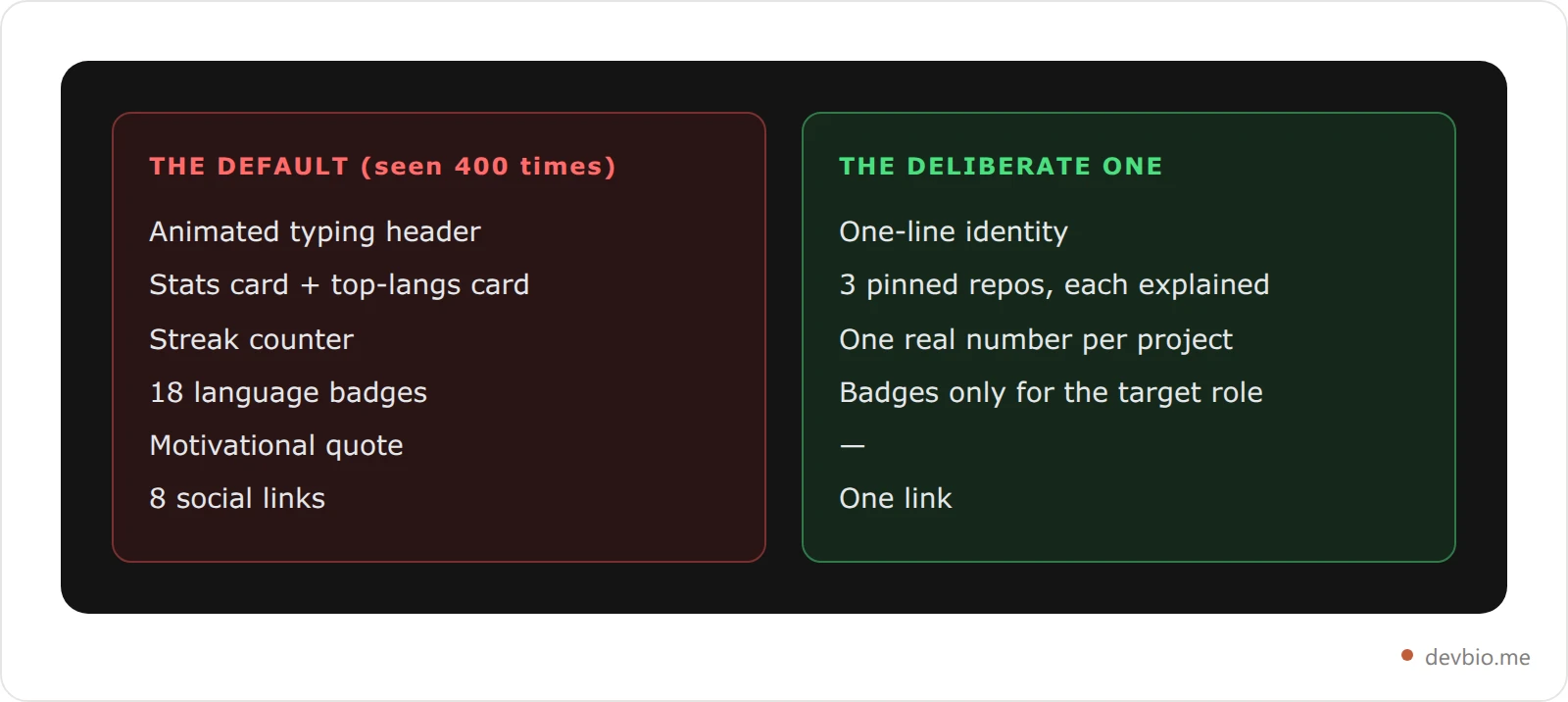
Scroll GitHub profiles for an hour and you'll see the same composition 400 times: a github-readme-stats widget, a streak counter, a badge row for every language touched since 2018, and somewhere in there, a motivational quote in italics.
GitHub's profile README feature turned every developer's profile into a blank canvas. Most people painted the same picture. That is exactly why the GitHub profile README examples worth studying are the ones that broke the pattern on purpose rather than the ones with the most widgets.
That's your opportunity. Standing out in 2026 is easier than it was in 2021 — not because the bar dropped, but because the default looks identical. The profiles that actually get noticed don't have the most widgets. They're the ones where every element earns its place.
Between 78% and 87% of technical recruiters check GitHub for engineering roles. Most developer profiles exist out of obligation rather than intention. The developers who treat their profile like a product see more inbound. This guide breaks down the best GitHub profile README examples 2026 has produced — what each one does right, the signal it sends, and the one technique worth stealing from each. Most github readme examples roundups just screenshot ten profiles; this one names the archetype behind each so you can copy the reasoning rather than the layout. Whether you're starting a github profile readme from a blank file or rebuilding one that's gone stale, the same ten patterns apply.
On this page: What every standout README does · The 10 examples · The 5-layer signal stack · What a README can't show · Audit checklist · FAQ
What Every Standout GitHub Profile README Does in 2026#
A great GitHub profile README in 2026 does four things: it states clearly who you are and what you ship, proves that claim with linked working projects and real numbers, signals what kind of work you want next, and gives every visitor one clear place to go.
Everything else is optional. Most things in the average README are noise.
Identity: One sentence. Present tense. "I build developer tools" beats a three-paragraph origin story. If it takes a visitor more than 10 seconds to understand what you do, the intro needs a rewrite.
Proof, not claims: A link to a repo with 800 stars doesn't need a supporting sentence. One working product with real numbers does more for credibility than any amount of well-crafted self-description. The best GitHub profile README examples don't claim experience — they demonstrate it.
Signal for the next thing: Your stack choices, OSS contributions, and project types all tell visitors what work you want next. A profile full of frontend widgets tells a different story than one full of infrastructure contributions. Make the signal intentional.
One exit: Most profiles try to send visitors to LinkedIn, a personal site, Twitter, a blog, and a portfolio. Pick the one destination you most want them to reach and link only that. A visitor with one clear option clicks it. A visitor with eight usually clicks none.
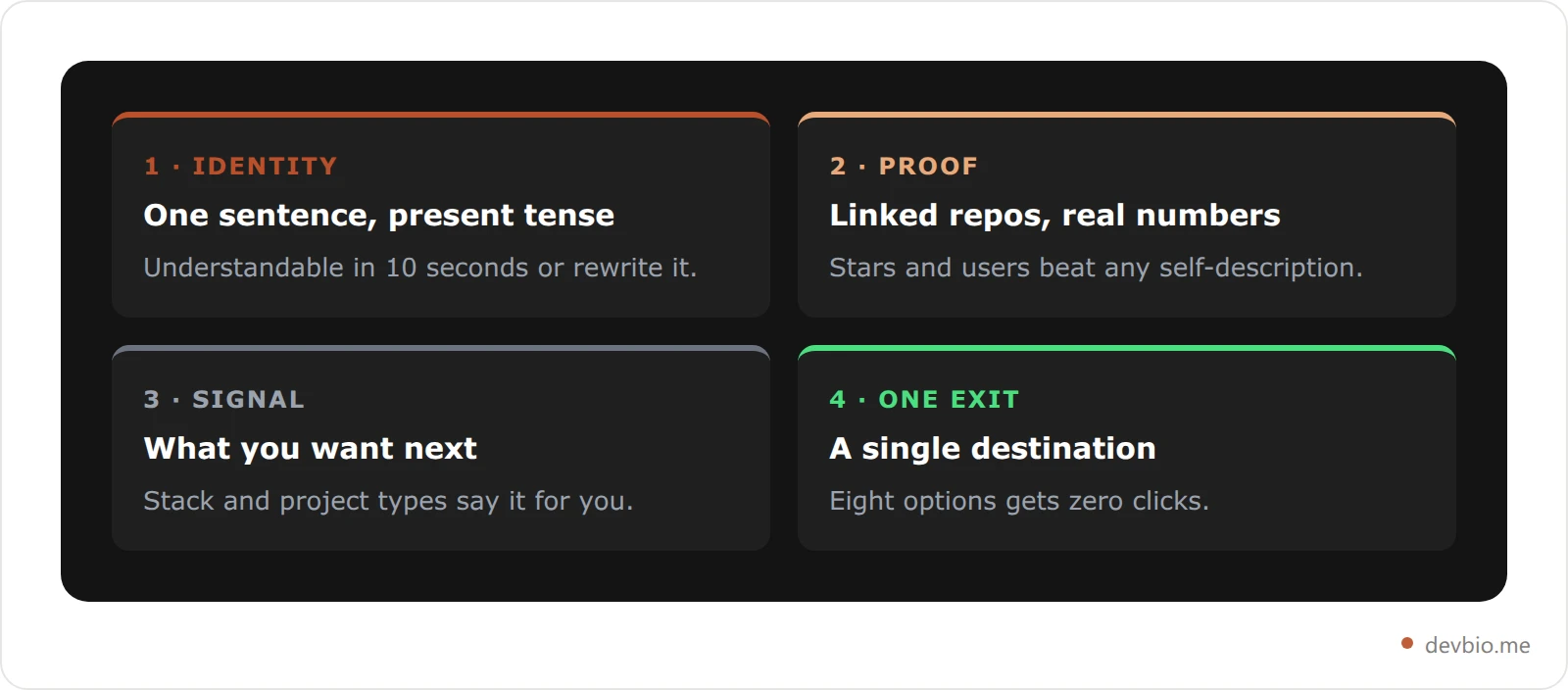
The ten archetypes below show how different developers build different strengths on top of this skeleton. If you'd rather not hand-build all four layers, a developer bio assembles them from live data.
The 10 Best GitHub Profile README Examples of 2026#
There is no single best github profile readme. The best one is calibrated to who you're trying to reach. Here are ten distinct approaches that work in 2026 — and the conditions under which each one wins.
1. The Minimalist Achiever#
What it looks like: Three pinned repos. No stats widgets. A two-line bio. The contribution graph does the work.
What it signals: "I have nothing to prove. The code is here." This archetype works when the repos themselves speak clearly — a library with 2,000+ stars, a tool running in production at scale, or PRs merged to major OSS projects. When the work is strong, decoration is noise.
The tradeoff: Unhelpful for recruiters who can't interpret context without guidance. If your repos need explanation to look impressive, minimalism backfires.
What to steal: The discipline to cut anything that doesn't add signal. The average README has 40% filler. Cutting it is the fastest improvement most profiles can make.
2. The Revenue-First Founder#
What it looks like: Exact MRR or ARR in the bio. Links to live products. Sometimes a Stripe dashboard screenshot. Profile text references the current month.
What it signals: "I ship things people pay for." Pieter Levels spent a decade building 600,000 Twitter followers while launching 40+ products — and his $3.1M ARR portfolio grew largely on public revenue posts that were specific, verifiable, and updated regularly. A profile README can do the same work: replace vague success language with a single specific number.
The tradeoff: Numbers age. "$5K MRR" from 18 months ago — is it still true? Static revenue claims on a README aren't the same as live, verified proof. (More on this in the comparison section below.)
What to steal: One real metric with a date. Not "growing SaaS." Not "hundreds of users." Something like: "$2,300 MRR as of June 2026."
3. The Stack Specialist#
What it looks like: Technology badges front and center. Specific frameworks, cloud platforms, tools. Often organized by category: Frontend / Backend / DevOps.
What it signals: "Hire me for this exact stack." ATS systems and human reviewers both scan for keywords. A badge for "Kubernetes" on a DevOps-focused profile does measurable work in the first 10 seconds of review.
The tradeoff: Badges list fast. "React Native" without context doesn't answer "how experienced are you?" The best stack profiles pair badges with 1–2 repos that prove the skill is real, not just listed.
What to steal: Order by relevance to the role you want, not alphabetically or by how long you've used each tool. The framework your target role uses most should appear first.
4. The Project Narrator#
What it looks like: Each pinned repo gets a 2–3 line story in the README itself, not just the repo description. Format: what it does, who uses it, one number (stars, downloads, active users).
What it signals: "I understand my own work and can explain it to non-technical people." Product managers and engineering managers both respond to developers who can communicate about their projects clearly. This archetype is underrepresented and therefore more memorable.
The tradeoff: More maintenance. If your projects change, the README gets stale — and a stale project narrative reads worse than no narrative.
What to steal: For every pinned repo, write one sentence that a non-developer can understand. If you can't write it, the project description needs work regardless of how the README looks.
5. The Stats Dashboard — And When It Backfires#
What it looks like: github-readme-stats card. Language breakdown widget. Contribution streak counter. Sometimes a WakaTime embed showing hours coded per week.
What it signals: Activity and code commitment. For developers earlier in their career without high-impact repos yet, stats fill the signal gap.
The tradeoff: github-readme-stats is the most popular GitHub profile tool in existence — with over 65,000 GitHub stars on its own repository. That means your stats card looks identical to half of all developer profiles. What was impressive in 2021 reads as the default template in 2026.
Worse: GitHub rate-limits these dynamic widgets. A broken image during a traffic spike looks unprofessional at exactly the wrong moment.
What to steal: Use one stats widget, not three. The contribution graph is honest signal. A streak counter showing "0 days" because you were on holiday sends the wrong message to anyone who checks at that moment.
6. The Active Builder#
What it looks like: "What I'm working on right now" as the first element. Updated automatically via GitHub Actions pulling from a blog RSS feed, recent commits, or a live API. The profile reads like a status page.
What it signals: "I ship constantly and I build systems for it." Technical leads who value automation read this as developer discipline. It shows you use developer tooling to maintain your own presence — a small but memorable signal.
The tradeoff: Setup takes real work. GitHub Actions workflows for profile READMEs break when upstream APIs change. A broken automation sitting for months sends the opposite signal.
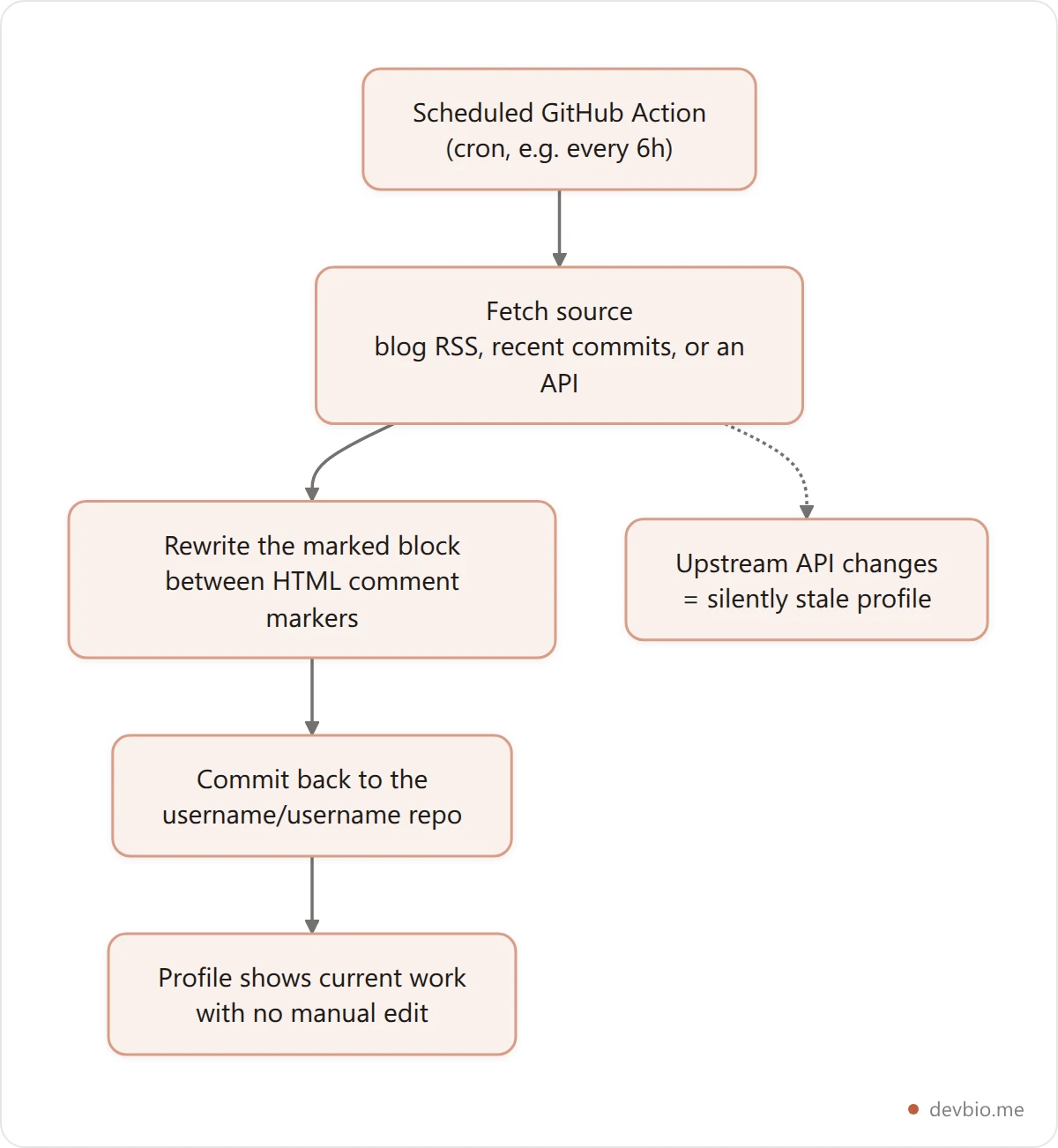
The dotted branch is the failure mode worth planning for: these workflows break quietly when an upstream feed changes shape, and nothing tells you. If you build one, have the Action fail loudly rather than commit an empty section.
What to steal: Even a manually-updated "Currently working on: [project]" refreshed every few weeks beats a profile that still says "I'm learning React" when you've been writing React for four years.
7. The Community Connector#
What it looks like: Links to YouTube, newsletter, blog, Twitch, Twitter/X, Discord community. The profile reads as an index to a wider presence.
What it signals: "I contribute beyond commits." This archetype works for developers who've genuinely built something to find at those destinations — course creators, newsletter writers, community builders. The profile amplifies whatever is at the other end of those links.
The tradeoff: Five links to empty or inactive channels reads worse than no links. The honest version of this archetype requires actually having an audience somewhere.
What to steal: One external destination only. Where do you most want people to go? Link only that. Remove everything else and let the destination speak.
8. The OSS Contributor#
What it looks like: Contribution counts to major repositories. Recent PR links. A "merged contributions" section showing repos with thousands of stars.
What it signals: "I've earned trust from real teams at scale." A merged PR to a major open-source project says more than any self-description because it required another team to approve it. This is the strongest credentialing available on a GitHub profile — and it's hard to fake, which is the point.
The tradeoff: Hard to maintain if you're not actively contributing to large projects. And if your contribution list is thin, the emphasis on it highlights the gap.
What to steal: Even one significant OSS contribution to a high-star repo is worth surfacing explicitly. Don't let it stay buried in the contribution graph where nobody finds it.
9. The Technical Founder#
What it looks like: Product name. One-line description. One real metric. A "hire the product, not the resume" vibe. Not "I built a SaaS" but "ProductName — automated expense reporting for construction teams — $8K MRR."
What it signals: "I ship things that earn money." In 2026, 63% of new corporations formed on Stripe Atlas are solo-founded. Technical founders are everywhere. The profiles that stand out aren't those claiming to be founders — they're showing the product and the number.
The tradeoff: Revenue transparency isn't right for everyone. Some employment contracts restrict it. Some founders aren't ready to share until they hit a threshold they feel proud of.
What to steal: Even without exact MRR, link to a live product with users. "Live at [URL], 400 active users" is more credible than any sentence about your founder experience.
10. The Career Pivot Storyteller#
What it looks like: "I'm transitioning from [Role A] to [Role B]." Current learning path. Projects built specifically to demonstrate the target skill. A clear "this is where I'm headed" narrative.
What it signals: "I'm self-aware and I learn deliberately." This archetype works for developers in transition — early-career developers, bootcamp graduates, engineers shifting from one domain to another. Honesty backed by proof of the pivot beats pretending to have experience you don't.
The tradeoff: Needs constant updates. "I'm learning TypeScript" from 18 months ago — while you've been shipping TypeScript since — needs to come down immediately.
What to steal: Date your milestones. "Shipped first TypeScript project, February 2026" beats "learning TypeScript." Specificity signals honesty, and hiring managers respect it.
Which GitHub Profile README Examples Fit Your Situation?#
Ten archetypes is nine too many to apply at once. Pick by what you can prove today, not by whichever profile looked best while you were scrolling.
Your situation | The archetype to copy | Why it fits |
|---|---|---|
A repo with 1,000+ stars | Minimalist Achiever | The work already argues for you; decoration dilutes it |
Paying customers | Revenue-First Founder | One dated number outranks any adjective |
Targeting one specific stack | Stack Specialist | Reviewers scan for keywords in the first 10 seconds |
Strong projects nobody understands | Project Narrator | Explanation is the missing signal, not more widgets |
Early career, few repos | Stats Dashboard (one widget only) | Activity fills the gap while proof accumulates |
Merged PRs to big projects | OSS Contributor | Another team's approval is the hardest signal to fake |
Changing specialism | Career Pivot Storyteller | Dated milestones beat claiming experience you lack |
Two rules cut across all of them. Pick one archetype and commit — a profile that is 30% of four different archetypes reads as indecision rather than range.
And whichever you pick, keep your section headings short. If a README grows long enough to want its own section links, those anchors are generated from the heading text rather than chosen by you, and punctuation quietly changes them: ## Install & Setup becomes #install--setup, with two hyphens. Our guide to building a markdown table of contents shows how each anchor is derived.
The 5-Layer Developer Profile Signal Stack#
A useful way to think about your GitHub profile README: every element either adds to or fails to add to one of five signal layers. Profiles that hit all five stand out. Most profiles hit one or two.
Layer 1 — Identity: Who you are and what you do. One sentence. Present tense. Specific enough to distinguish you from the other 100 "full-stack developers" a recruiter sees this week.
Layer 2 — Activity: What you do consistently. Contribution graph, commit cadence, language distribution. This is the "trust the pattern" layer. Consistent commits over two or three years say more than any badge or widget.
Layer 3 — Products: What you've shipped. Repos, live links, real numbers. Stars and forks are the strongest signals here because they require other people to validate your work — you can't give them to yourself.
Layer 4 — Revenue or Traction: The layer most GitHub profile READMEs skip entirely. There's no native way to show verified MRR, subscriber count, or product revenue on a GitHub profile. You can write the number, but it's a static claim — unverified and manually maintained. Developers who want this layer to actually carry weight typically link to a dedicated developer profile that pulls live data directly from their payment gateway. DevBio, for example, syncs MRR automatically from Stripe, Dodo Payments, Lemon Squeezy, and Polar — and marks the profile as "Verified Founder" when revenue is above zero.
Layer 5 — The Exit: Where do you send people? One clear destination. Everything else is distraction reduction.
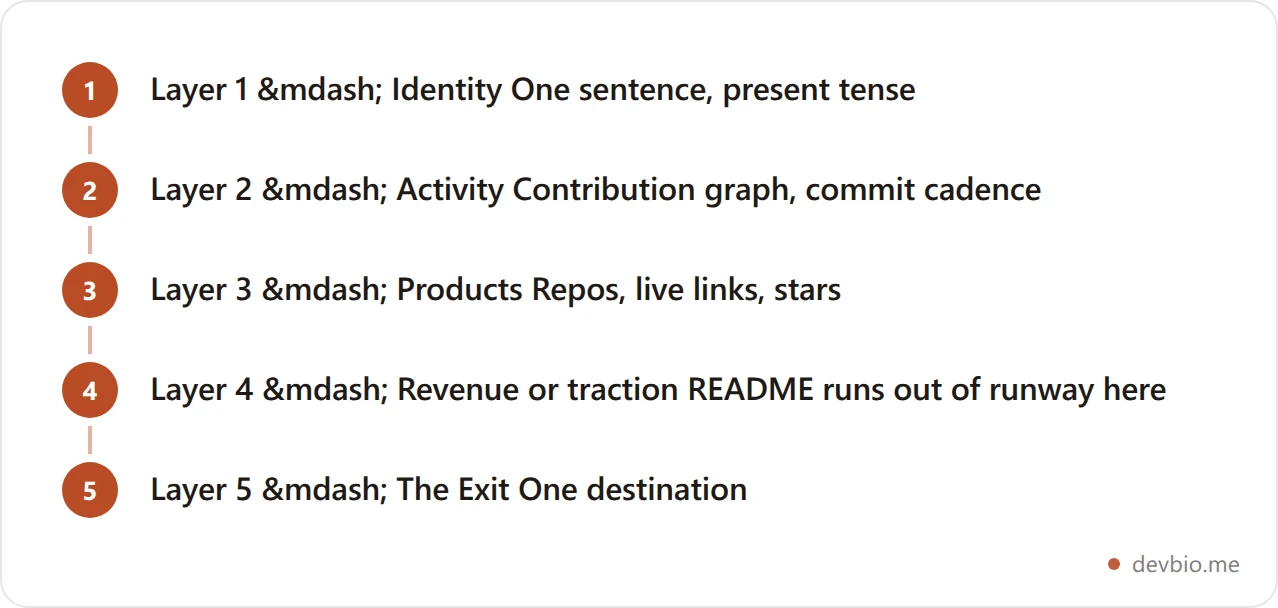
Read that diagram as a ceiling, not a ladder: a README can carry Layers 1 through 3 honestly, and Layer 4 is where a Markdown file stops being able to prove anything on its own.
Most profiles have Layers 1 and 2. Strong profiles add Layer 3. Layer 4 is where real differentiation lives — and where the README format runs out of runway. For a complete framework on building all five layers into a cohesive strategy, see the Developer Personal Brand Guide: The 4-Layer Playbook for 2026. For a deeper look at how live revenue proof works on a developer profile, see the guide to Live MRR Developer Profile: The Setup Guide for 2026.
What Even the Best GitHub Profile READMEs Can't Show#
The GitHub profile README is a Markdown file. It has structural limits that no widget or automation fully overcomes.
Signal | GitHub Profile README | Dedicated Developer Profile |
|---|---|---|
Identity and bio | ✅ | ✅ |
Tech stack badges | ✅ | ✅ |
Contribution graph | ✅ (widget, can rate-limit) | ✅ (native, Pro tier) |
Project descriptions | ✅ | ✅ |
Live GitHub stars (auto-syncing) | ✅ (via widget) | ✅ (synced natively) |
Verified live MRR | ❌ Static text only | ✅ (Stripe / Dodo / Lemon Squeezy / Polar) |
Visitor analytics | ❌ Not available | ✅ (live globe view and visitor count) |
ATS resume export to PDF | ❌ Not available | ✅ (LaTeX to PDF at /username/resume) |
Custom domain | ❌ | ✅ |
AI-discoverable llms.txt | ❌ | ✅ (auto-generated) |
Per-profile link-preview image | Default GitHub card | ✅ (custom OG image per profile) |

The recruiter figure is the top of a reported 78–87% range, and the developer numbers come from the 2025 Stack Overflow Developer Survey. Taken together they describe a profile that is mostly read when you are not looking for work, by people and tools that will not read your code.
For a code-first audience — engineers reviewing repos, OSS contributors, technical leads — a GitHub profile README handles the evaluation well. For hiring managers who don't read code, potential customers, investors, or the growing share of AI-powered hiring tools that scan profiles before humans do (51% of professional developers now use AI tools daily, according to the 2025 Stack Overflow Developer Survey), the README format runs short.
The most effective developer profiles in 2026 treat these formats as complementary. Their README links to the thing that shows everything the README can't — here's what that destination looks like. For a full breakdown of what hiring managers see in each format, see GitHub Profile README vs Developer Bio: What Hiring Managers Actually See in 2026.
The GitHub Profile README Audit Checklist#
Use this to grade your current profile in under 5 minutes. One point per box checked.
Identity
My name and primary role are clear in the first 3 lines
My bio is one sentence, not a paragraph about being "passionate about technology"
My profile photo is professional and recognizable
Proof
I have at least 2 of my six pin slots filled with descriptions explaining what each does
At least one pinned repo links to a live demo or published package
Each project description includes at least one real number — stars, users, or downloads
Signal
My stats widgets (if any) are loading correctly right now, not broken
My contribution graph shows consistent activity, not just a burst from years ago
My profile doesn't say "I'm learning X" for a skill I've used for more than 3 months
Action
There is exactly one primary call to action
Every external link goes somewhere worth clicking today
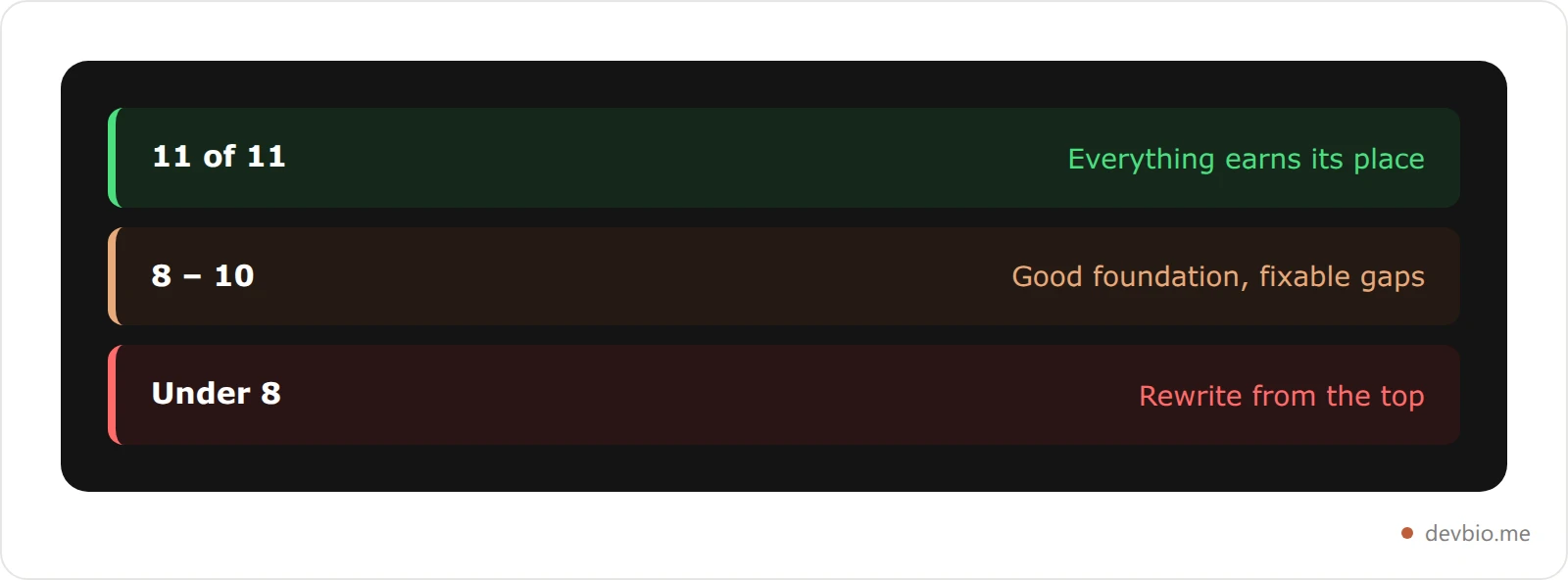
Score:
11 of 11: Strong profile. Everything earns its place.
8–10: Good foundation with fixable gaps.
Under 8: Time for a rewrite from the top.
For a deeper breakdown of which profile components matter most for your goals, see What to Put on a Developer Bio (Components That Actually Matter in 2026). Scored under 8? Start from a profile that fills Layers 1 to 4 for you.
Frequently Asked Questions#
What is a GitHub profile README?#
A GitHub profile README is a Markdown file displayed at the top of your public profile page. You create it by making a public repository named exactly after your GitHub username and adding a README.md file. GitHub detects the match and automatically shows it on your profile. The feature launched in 2020 and has since become a standard part of developer identity — every major software company's engineering candidates have one.
How do I create a GitHub profile README in 2026?#
Create a new public repository with the same name as your GitHub username. Add a README.md file with your content. No special settings required. The repository can be a simple text file or a complex auto-updating dashboard driven by GitHub Actions. For the patterns that work best in 2026, see GitHub Profile README Templates: 10 Patterns That Get Noticed in 2026.
What should I include in my GitHub profile README?#
Four things, in priority order: who you are in one sentence, proof of what you've shipped with linked repos and real numbers, a signal for the type of work you want next, and one clear call to action. Everything else is optional and should be cut if it doesn't serve one of those four purposes. The 10 archetypes above show how different developers build this structure for different goals.
How long should a GitHub profile README be?#
Short enough to scan in under 30 seconds. If a visitor scrolls more than twice before reaching your pinned repos, it's too long. The most effective profiles run 100–250 words of text plus one or two carefully chosen widgets. Longer almost always means worse — every extra sentence is another decision you're forcing the visitor to make.
Can I show live revenue or MRR on my GitHub profile README?#
You can write static revenue numbers, but GitHub has no native integration with payment gateways. The number won't update automatically and can't be independently verified — anyone can type "$10K MRR" in a README. Developers who want verified, auto-updating revenue on their public profile typically link to a dedicated developer profile that connects directly to Stripe, Dodo Payments, Lemon Squeezy, or Polar. For setup specifics, see Live MRR Developer Profile: The Setup Guide for 2026.
Do GitHub profile READMEs help with job searching?#
Yes, meaningfully. Between 78% and 87% of technical recruiters check GitHub for engineering roles. A profile README that clearly signals your skills, shows working projects, and communicates your intent improves how those 15–30 second reviews go. Notably, 74% of developers in the 2025 Stack Overflow Developer Survey reported not actively searching for a job — which means passive profile optimization matters just as much as active job-search optimization.
What is the most common GitHub profile README mistake in 2026?#
Trying to show everything at once. Five stats widgets, badges for every language ever touched, three motivational quotes, and ten links to different destinations. The mistake isn't having too little — it's having too much and forcing the visitor to decide what matters. Pick the single most impressive signal about your work and lead with it. Cut everything that doesn't serve the visitor in the first 10 seconds.
What tools should I use to build a GitHub profile README?#
For visual elements: github-readme-stats for contribution data, readme-typing-svg for animated headers, and shields.io for clean version and status badges. For tech stack badges, the simple-icons library covers nearly every framework and tool. For automation: GitHub Actions to update sections dynamically from RSS feeds or APIs. Use tools for formatting — write the actual identity and project content yourself. A generated README with no human voice is recognizable and forgettable.
Key Takeaways#
Your GitHub profile README shapes how you appear in the first 30 seconds of any technical evaluation. The developers whose profiles work in 2026 aren't the ones with the most features — they're the ones who've made deliberate choices about what to show and what to cut.
Three things to take from this guide:
Lead with proof, not aspiration. One working project with a real number beats five "I'm currently building..." items every time. Specificity is credibility.
Your README has structural limits. It can show commits and code. It cannot verify revenue, track who's visiting your profile, or generate an ATS-ready resume. The 5-Layer Signal Stack only goes to Layer 3 inside a README.
One exit beats eight. A visitor with a single clear destination clicks it. A visitor with eight options usually clicks none.
Your code already proves you can build. The next step is making sure the first link anyone finds proves it too — automatically, verifiably, without requiring them to do the interpretive work.


