

Build in Public Has a Trust Problem#
When you build in public, every number you post is only as good as the audience's willingness to believe you. A live MRR component fixes that at the source: a read-only API key from your payment processor renders the current figure on your profile, re-synced hourly and timestamped. Nobody has to take your word for it.
In Q3 of 2025, one recruitment firm flagged 23.2% of all applicants as fraud risks. Karat, which runs over 500,000 technical interviews annually, reported a fivefold increase in cheating-detection rates over two years. And 49% of US hiring managers now say they dismiss resumes they suspect were AI-generated.
The problem isn't just resumes. The entire stack of developer self-presentation — skills lists, project descriptions, revenue claims — has become suspect. Everyone can claim anything. AI makes claims cheaper. Screenshot-based "proof" has been dead for over a year.
A live MRR developer profile solves this at the source. Instead of writing "$2,400/month" in your bio, your Stripe or Dodo Payments account connects via a read-only API key. The number on your profile is the actual current figure from your payment processor — fetched on an hourly sync, displayed as a live component on your project card. No screenshot. No manually updated text. The number your payment account says it is.
This guide covers how it works, which payment providers are supported, how to set it up in five steps, and why verifiable revenue is the highest-signal proof a developer-founder can show in 2026.
If you build in public, this is the difference between an audience that takes your numbers on faith and one that doesn't have to.
Why "I Built a SaaS That Does $X MRR" Doesn't Land Anymore#
There's a sentence every indie hacker writes and almost no one believes: "I built a SaaS that does $X MRR."
It's not that the claim is false. It's that the signal is degraded. Revenue screenshots are trivially editable. Dashboard numbers can be mocked in minutes. Marc Lou, whose 2025 revenue was $1,032,000 building in public, created TrustMRR specifically because of this problem. As he explained in his newsletter, the inspiration came from what Pieter Levels told him directly: "A lot of people share fake MRR screenshots to get attention."
The result is screenshot inflation: everyone who has ever shipped anything has a screenshot of a big number. The signal is gone.
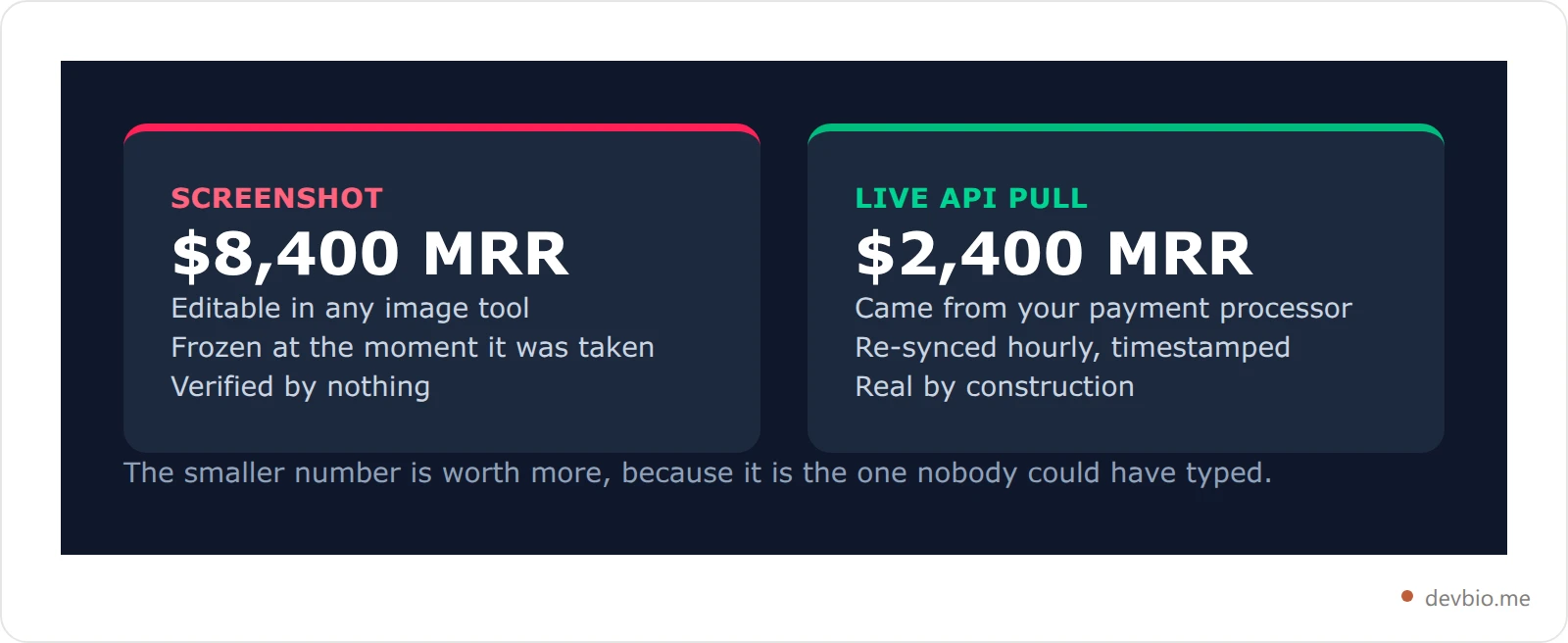
Live MRR via an API pull is structurally different. If your profile connects to your Stripe account via a restricted read-only key and renders the current MRR live, that number is real by construction. The API call is the verification. You can't fake an API response that your payment processor didn't send.
72% of talent acquisition leaders say they don't trust self-reported skills on resumes (CertifyMe / Resume Genius, 2025). The same logic applies to revenue. The gap between a "claimed MRR" typed in bio text and a "verified MRR" pulled from Stripe is the most visible credibility gap on a developer profile today — and it's one you can close in about five minutes.
For a broader look at why proof beats claims across your entire profile, see the developer personal brand guide and 4-layer framework.
What "Live MRR on Your Developer Profile" Actually Means#
When people say "live MRR on a profile," there are two very different things they might mean. Only one is actually live.
Version 1 — fake live: You type "$2,400 MRR" in your bio text and update it manually every few months. Slightly better than a screenshot but has the same credibility ceiling: you wrote it yourself.
Version 2 — actual live: Your profile connects to your payment processor via a read-only API. The number visitors see came from your Stripe, Dodo Payments, Lemon Squeezy, or Polar account — not from text you typed.
Here's how Version 2 works under the hood:
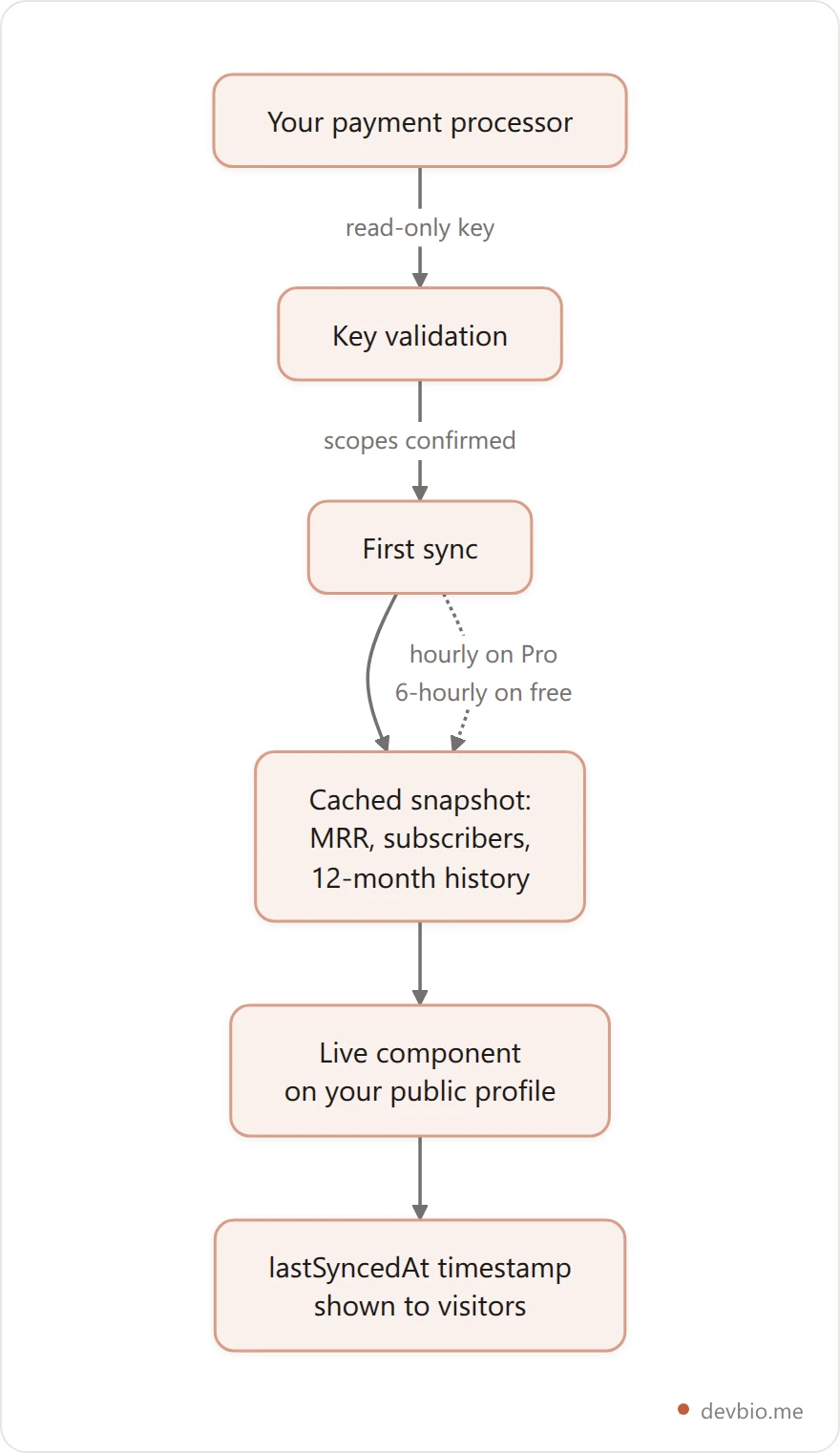
You generate a read-only API key from your payment processor (restricted key for Stripe, org token for Polar, API key for Dodo, JWT for Lemon Squeezy)
The platform validates the key immediately — it makes a test call to confirm scopes and that the key is active
An initial sync fires: MRR, active subscriber count, customer total, and up to 12 months of revenue history are cached
When someone visits your profile, the number is pulled from the latest snapshot and rendered on your project card or earnings widget
The
lastSyncedAttimestamp is stored and displayed, so visitors know exactly when the data was refreshed
On paid plans, syncs run hourly. On free plans, every 6 hours. The data is fresh within that window — not real-time by the second, but for a public profile it's more than sufficient. Your MRR doesn't change minute-to-minute.
The component shows: current MRR in large text, active subscriber count, total customer count, and a 12-month sparkline of revenue history. Multi-currency accounts are normalized to USD automatically.

For context on all the components that go on a developer bio — not just revenue — see what to include on a developer bio and which components actually matter. If you're weighing a hand-built site instead, we compared seven free developer portfolio templates and what each one still leaves you to fill in.
The Revenue-Proof Profile: A Framework for Developer Credibility#
Here's a useful mental model. Think of a developer profile as having three layers of credibility:
Layer 1 — Claimed credentials. Skills, job titles, education. Easily AI-generated, unverifiable. This is what a LinkedIn profile or traditional resume consists of almost entirely.
Layer 2 — Activity signals. GitHub contributions, commit streaks, open-source projects, stars. Harder to game but not immune — commit spam is real. This is where GitHub profiles and READMEs live.
Layer 3 — Revenue proof. Live MRR from an actual payment account. The hardest layer to fake and, for developers who ship real products, the most signal-dense data point you can put on a public profile.
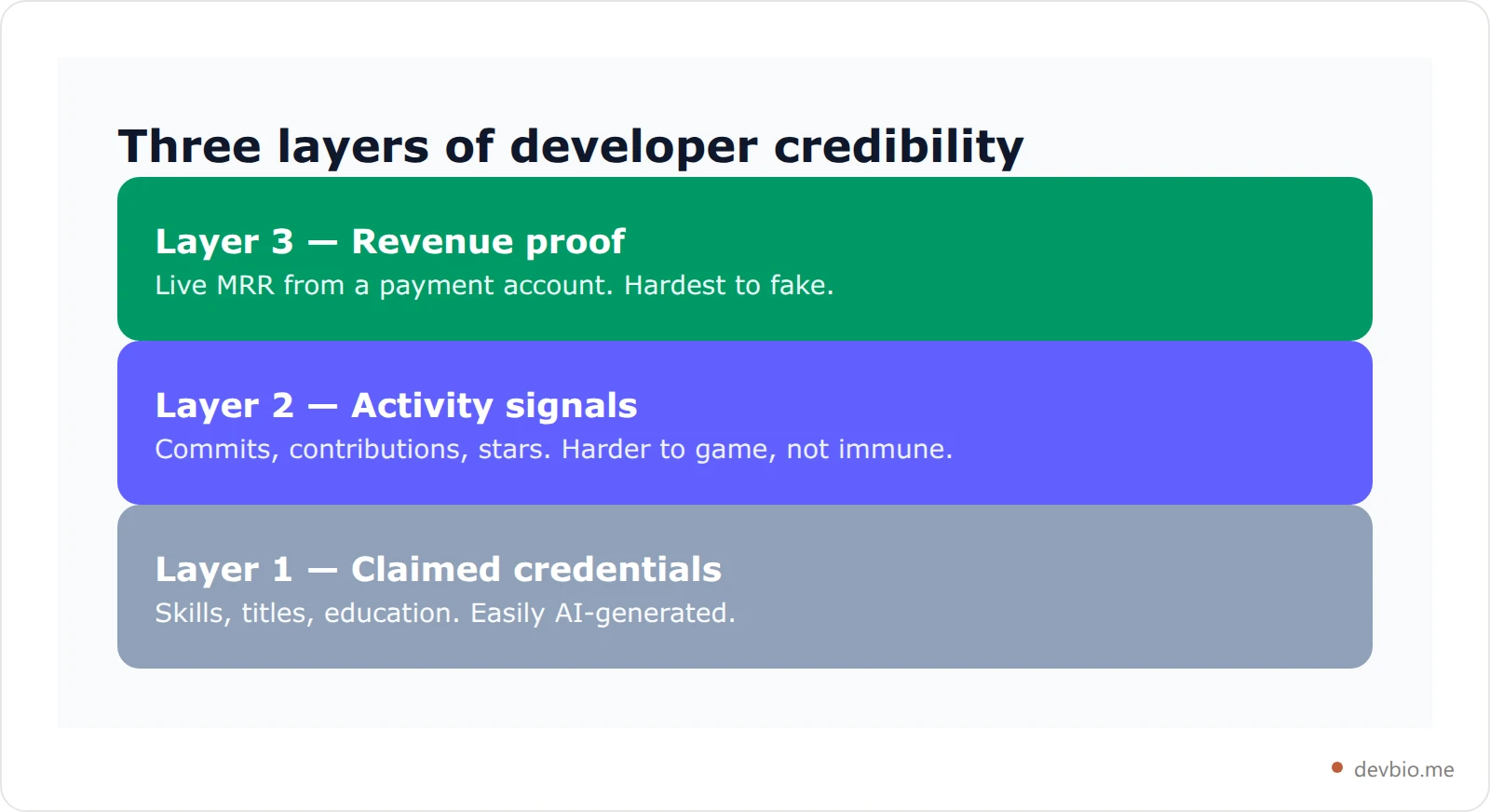
Call this the Revenue-Proof Profile: a developer profile that stacks all three layers, with live payment data as the apex. It doesn't replace GitHub activity or a well-written bio. It makes everything else more credible because it proves something binary: you shipped something people actually pay for.
68.3% of developers code outside of work as a hobby (Stack Overflow Developer Survey 2024), and 39% of independent SaaS founders are solo (MicroConf State of Independent SaaS 2024). The developers who can add Layer 3 to their profiles are a significant, growing slice of the community — and for job applications, acqui-hire pitches, freelance client outreach, and building-in-public credibility, they're the ones with the clearest differentiation.
Pieter Levels, whose projects generate roughly $3M/year, described his approach on the Indie Hackers podcast: "My status signaling would be like, 'Look, this cool thing I made. It works now.'" Live MRR is that signal, expressed as a number that can't be typed.
For more on how building in public compounds over time when you have real proof to share, see the complete building-in-public developer guide.
Put a verified number where the screenshot used to go
The Four Payment Providers: What Each One Pulls#
DevBio supports four payment processors. All of them feed the same component on your profile. The credential types and connection details differ slightly.
Provider | Credential type | MRR | Active subs | 12-month history | Multi-currency |
|---|---|---|---|---|---|
Stripe | Restricted key ( | Yes | Yes | Yes | Auto-converts to USD |
Dodo Payments | API key (live/test auto-detected) | Yes | Yes | Yes | FX-converted to USD |
Lemon Squeezy | JWT API token | Yes | Yes | Yes | Store currency |
Polar | Org Access Token + Org UUID | Yes | Yes | Yes | Per-subscription |
A few specifics worth knowing:
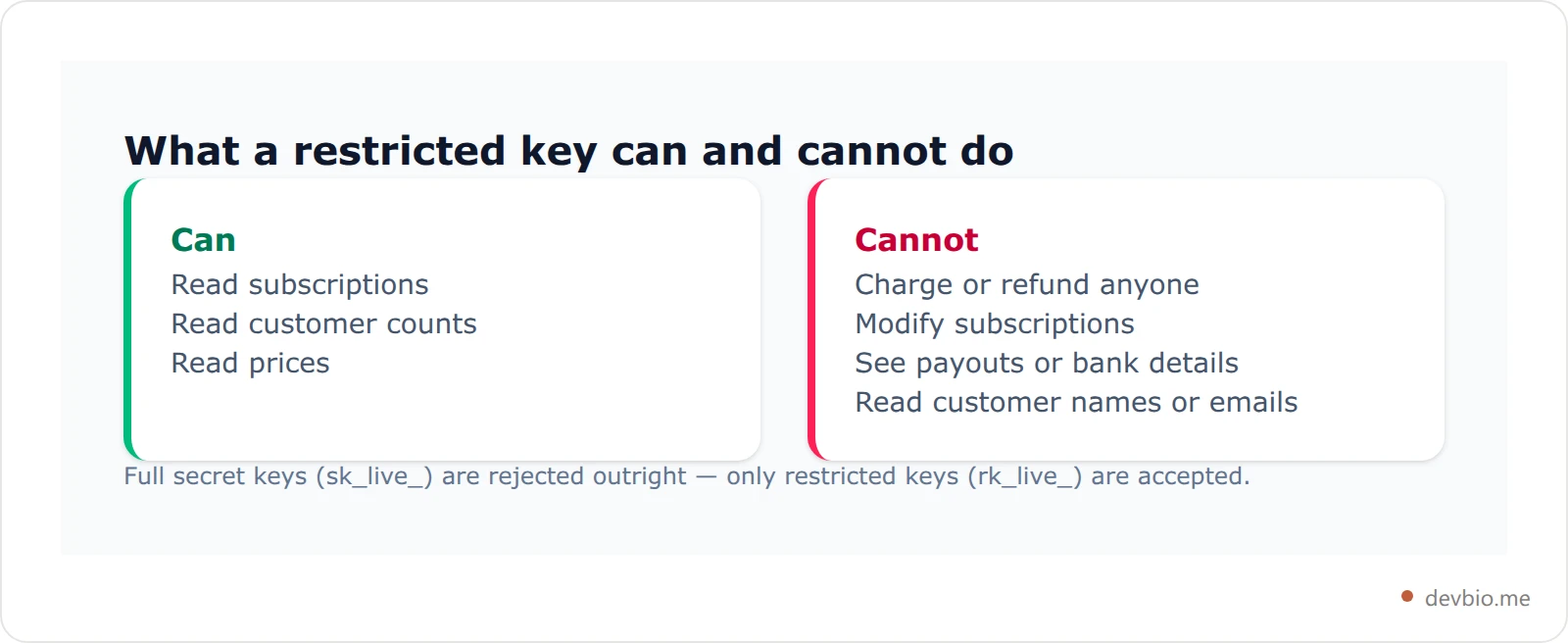
Stripe requires a restricted key — the rk_live_* format, not a full secret key (sk_live_*). Full secret keys are explicitly rejected. Minimum required scopes: Subscriptions:Read, Customers:Read, Prices:Read. No write access, no payout data, no bank details.
Dodo Payments auto-detects live vs. test mode from the key itself, so you don't need to specify. You can connect during testing and the integration correctly transitions when you go live.
Lemon Squeezy uses a JWT API token (the header.payload.signature format from your LemonSqueezy API settings). Because LemonSqueezy doesn't offer scoped keys, the integration is engineered to call only read endpoints — no write operations are made.
Polar is org-scoped: one Organization Access Token (polar_oat_*) per organization. If you run multiple products under the same Polar org, they aggregate automatically. Products under separate orgs can be added as separate integrations.
Not sure which processor fits your product? Here's how Stripe, Dodo Payments, Lemon Squeezy, and Polar actually compare for indie hackers. And if your customers pay in more than one currency, here's how to get an honest MRR number instead of a distorted one.
How to Build Your Live MRR Developer Profile: 5 Steps#
The setup takes about 5 minutes from zero to live numbers on your profile.
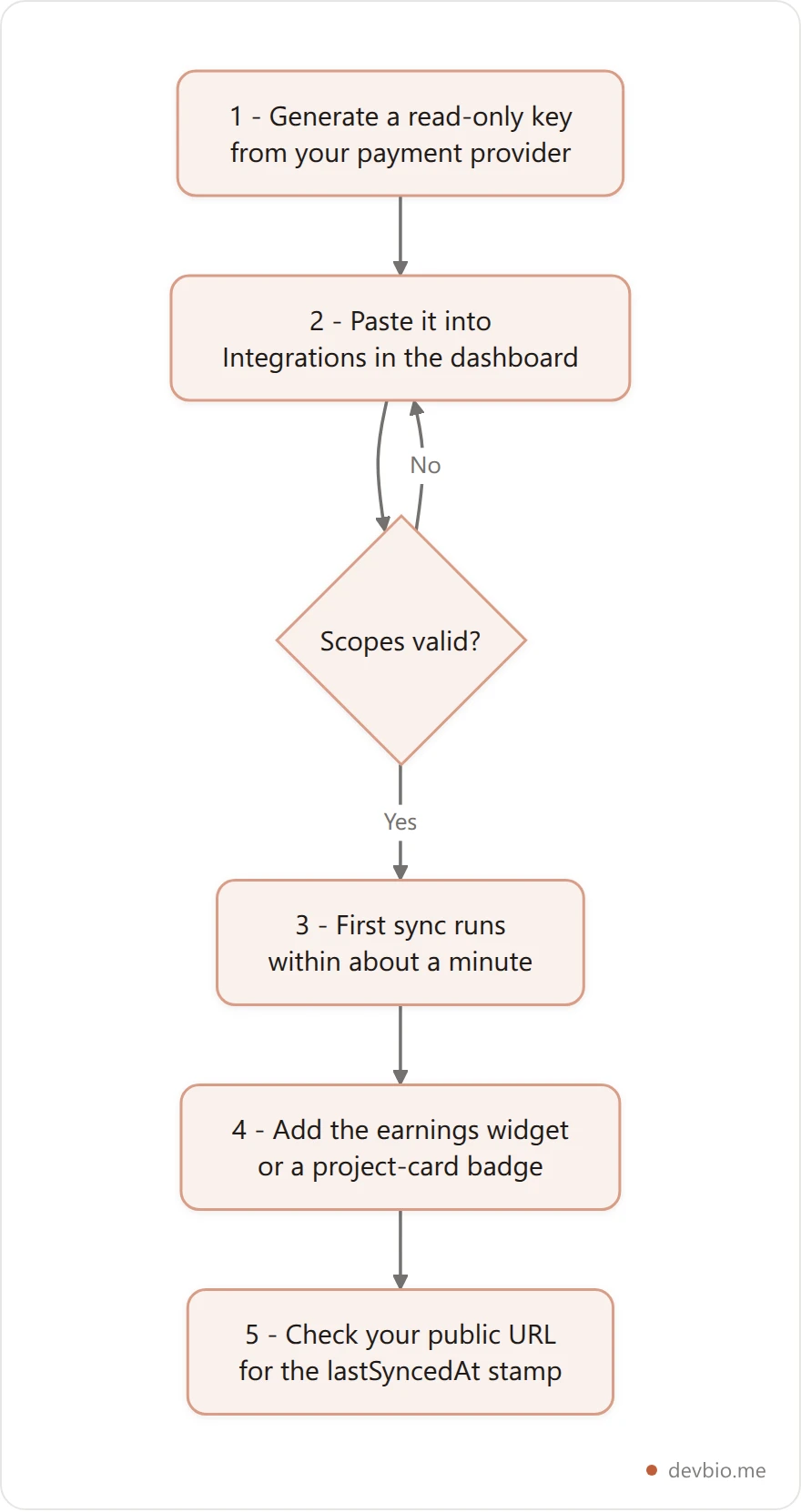
Step 1: Generate a read-only API key from your payment provider
Stripe: Developers → API keys → Create restricted key. Add scopes: Subscriptions:Read, Customers:Read, Prices:Read. Copy the
rk_live_*key immediately — you won't see it again after leaving the page.Dodo Payments: Dashboard → API Settings → create an API key.
Lemon Squeezy: Profile → API → create a new API token. Use the full JWT string.
Polar: Organization settings → Access Tokens → create a token with
orders:read,subscriptions:read,organizations:readscopes. Also copy your Organization UUID from the org settings URL.
Step 2: Connect the integration in DevBio
In your DevBio dashboard, go to Integrations → select your payment provider → paste the API key. A validation call fires immediately to confirm the key is live and the scopes are correct. If anything is missing, you'll see exactly what needs fixing.
Step 3: Wait for the first sync
The first sync fires automatically right after validation. Within about a minute, your initial snapshot is cached: current MRR, active subscriber count, total customer count, and up to 12 months of revenue history.
Step 4: Add the MRR component to your bio
Two options:
Earnings widget: A standalone component showing current MRR + 12-month sparkline. Add from the bio builder, select your integration from the dropdown, optionally rename the title. Place it wherever you want in your layout.
Project card integration: Open a specific project card, click "Connect integration," select your linked account. A live MRR badge appears on that project card alongside GitHub stars if you've also connected the repo.
Both options can run simultaneously. The earnings widget gives the overview; the project card badge puts the revenue number directly next to the product that earns it.
Step 5: Verify on your public URL
Visit your public DevBio URL and confirm the number shows. The lastSyncedAt timestamp displays when the data was last refreshed. After this, syncs run automatically — nothing else to maintain.
A Before-and-After: What Changes When Visitors See the Numbers#
Here's a concrete example.
Alex is a backend developer who built a Git workflow automation tool on the side. It's doing $2,400/month MRR, 47 active subscribers. He's job hunting and also active in the indie hacker community.
Before connecting Stripe:
Project card: title, description, GitHub link, 212 stars
Bio text: "Built DevSyncr, a Git workflow tool for teams"
Visiting recruiters see: an interesting side project, no different from the next 30 candidates who also "built a tool." Community members: he posts occasionally, but with no hard numbers there's nothing concrete to engage with.
After connecting Stripe:
Project card: DevSyncr — $2,400 MRR · 47 active subscribers · [Stripe badge] · 212 GitHub stars
Earnings widget: current MRR with a 12-month sparkline showing 3x year-over-year growth
Public URL in his email signatures, cover letters, and Twitter bio
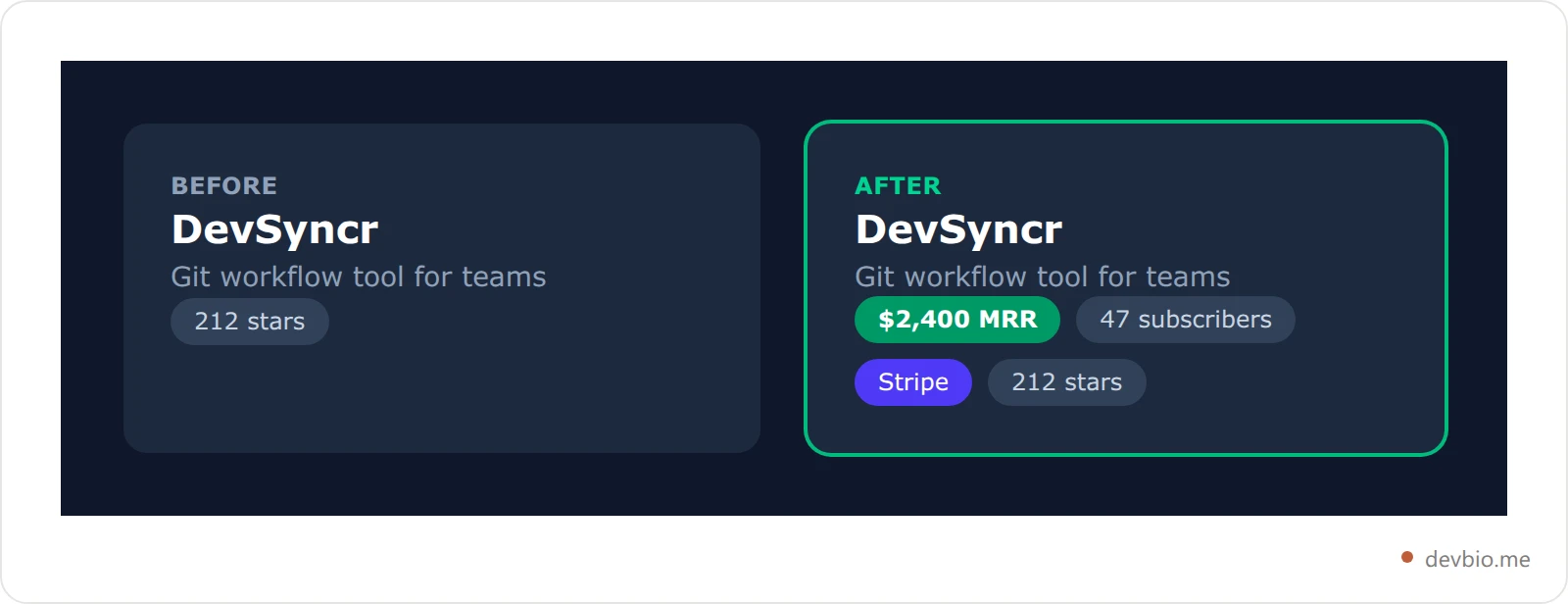
The profile didn't change what Alex built. It changed what's verifiable about it. A recruiter who sees "$2,400 MRR" next to a Stripe badge reads it differently than "$2,400 MRR" in a bio description. One came from a payment processor. The other came from the developer.
84% of employers say they want to see working applications, not just code repositories (Resume Genius, 2025). A project card with live MRR is a working product and a revenue signal at once. That's rare enough to be memorable.
For developers thinking about going further — listing their product in a marketplace for potential buyers — live MRR is also the most credible data point you can present to an acquirer. See how to sell your SaaS side project for how a verified revenue number changes the due diligence conversation.
Is It Safe? Answering the Security Questions#
The most common concern about connecting a payment account is security. The direct answer: a read-only API key with limited scopes cannot do anything to your account except let someone see the same aggregate numbers your profile already displays publicly.
Can someone steal from your account with a read-only key?
No. A Stripe restricted key with Subscriptions:Read, Customers:Read, and Prices:Read cannot initiate charges, create or modify customers, adjust subscriptions, or access payout or bank details. The worst case if the key were leaked is someone seeing your MRR — which your profile badge already shows to anyone who visits. The key grants no additional exposure beyond what the component displays.
Are your customer names or emails accessible?
No. The data synced is aggregate only: total MRR, subscriber count, customer count, and per-month revenue totals for the last 12 months. No customer PII is fetched or stored.
Should you rotate your keys?
Yes, periodically — not because of any specific risk, but because rotating API keys regularly is good hygiene. If you revoke a key, your integration moves to revoked status and you reconnect with a new key. Your revenue history is preserved through the transition.
When NOT to show live MRR:
Your MRR is $0 — the component hides automatically if there's no data
You're in active acquisition negotiations where the exact figure could affect your valuation
Your revenue is highly seasonal and a current snapshot would misrepresent your typical run rate
69% of employers use search engines to research job candidates (The Borden Group, 2025), so your DevBio profile is live and public to anyone evaluating you. Make sure the number you're displaying is one you're comfortable with being public — the same way you'd think about a tweet.
Stop asking people to trust the screenshot
Connect Stripe, Dodo Payments, Lemon Squeezy or Polar with a read-only key and your profile shows the number your payment processor reports — re-synced hourly, timestamped, and impossible to type.
Connect your revenueFrequently Asked Questions#
What's the difference between live MRR and putting my revenue in my bio text?#
Bio text is self-reported. Anyone can write "$5K MRR" in a description — and because screenshot inflation has degraded that signal, most evaluators don't take unverified revenue claims at face value. Live MRR is pulled from your payment provider via read-only API. The number is accurate by construction: it came from your actual Stripe or Dodo account, not from your keyboard. That distinction matters most when someone evaluating you doesn't already know you.
Which payment providers are supported?#
Currently Stripe, Dodo Payments, Lemon Squeezy, and Polar. You can connect multiple integrations — for example, subscriptions on Stripe and one-time product sales via Lemon Squeezy. Each integration links independently to its relevant project card or earnings widget.
How often does the live MRR number update?#
Hourly on paid plans, every 6 hours on free. The lastSyncedAt timestamp is displayed on your profile so visitors know the data freshness. It's not second-by-second real-time, but accurate enough for any practical use: a profile visit, a job application review, an acqui-hire due diligence.
Does showing live MRR help with job applications?#
It depends on the role. For a developer applying to a startup or growth-stage company, a side project with verifiable revenue is a stronger signal than most things on a resume — it proves initiative, the ability to ship, and that real users pay for your work. 91% of HR leaders say they're more likely to interview candidates with validated digital credentials (CertifyMe, 2025). For large-enterprise roles it's less directly relevant, but still demonstrates product thinking and follow-through. If you're actively job hunting, see how to turn your developer profile into an ATS-ready resume PDF.
What if my MRR drops to $0?#
The earnings component hides automatically when MRR reaches zero or the integration is disconnected. You're not stuck displaying a bad number. You can also manually remove or reorder the component in your bio builder at any time.
Can I show revenue from one-time purchase products, not just subscriptions?#
The primary metric is MRR, which is optimized for subscription products. Monthly revenue totals are pulled for all payment types. If your product is primarily one-time purchases, the MRR figure may show as low even if total revenue is significant — in that case, reference total revenue in your bio text and use GitHub stats as the primary proof signal on project cards.
Is it safe to connect a live Stripe account?#
Yes — with restricted keys. Stripe's restricted key system (rk_live_*) exists precisely for this use case: granting third-party tools read-only access to specific data endpoints. The three required scopes give no write capability and no access to financial account data, payouts, or customer PII. You can revoke the key from your Stripe dashboard at any time, and the integration handles the revoked state gracefully.
Does this work before I have any revenue?#
You can connect a Stripe account in test mode (Dodo auto-detects test vs. live). Test-mode revenue won't display as real MRR on your public profile. For pre-revenue projects, skip the earnings widget and use GitHub stats on project cards as your proof signal. Add the integration when your first paying subscribers come in.
Key Takeaways#
Screenshots are dead as proof. They're editable, frozen in time, and verified by nothing — which is why Pieter Levels flagged fake MRR screenshots as an industry-wide problem.
A read-only key is the whole trick. Stripe restricted keys (
rk_live_) can read subscriptions and revenue; they cannot charge, refund, or see customer PII. Full secret keys are rejected outright.Four providers are supported: Stripe, Dodo Payments, Lemon Squeezy, and Polar. You can connect more than one.
Setup is about five minutes, and syncs run hourly on Pro, every six hours on free.
Revenue proof is Layer 3. It doesn't replace GitHub activity or a good bio — it makes both more credible.
Know when not to show it: during acquisition talks, with highly seasonal revenue, or at $0 (where the component hides itself anyway).
See what a verified number looks like on a real profile
Build in Public: The Three Things That Can't Be Faked#
The hiring market's trust problem isn't going away. AI makes credentials cheaper to generate. Screenshots are worthless as proof. The only developer profile signals that hold up under scrutiny are ones that can't be typed.
Three things fall into that category:
GitHub activity — your commit history is real because GitHub records it
Live revenue — your MRR is real because your payment processor says so
The product URL — it resolves or it doesn't
Connecting your Stripe, Dodo Payments, Lemon Squeezy, or Polar account to your developer profile takes about 5 minutes. After that, every hour your profile shows a number that's structurally harder to fake than anything else in developer self-presentation. That's the edge in a market where everyone has a polished LinkedIn, an AI-written resume, and a folder of screenshots.
Your code already proves you can build. Put the revenue on one link — devbio.me