

Type "mrr calculator" into Google and you'll get a dozen tools that do the same five-second math: subscribers times price. That's the easy part. The harder part, especially in 2026, is convincing anyone the number is real. A wave of "verified MRR" services (TrustMRR, VerifyMRR, MRRverified) exists for exactly one reason: fake revenue screenshots got so common that a bare number stopped meaning anything.
A SaaS MRR calculator multiplies your active subscriber count by average revenue per account, then normalizes every non-monthly plan down to its monthly value. MRR is the sum of each active subscription's normalized monthly value. Annual plans get divided by 12, quarterly by 3, weekly multiplied by roughly 4.33. That's the formula. Whether anyone trusts the output is a separate problem, and it's the one this guide actually solves.
Below: the exact formula (with a worked example most calculators get wrong), how MRR differs from ARR and raw revenue, a side-by-side of manual math vs. calculator tools vs. live-synced dashboards, why screenshots stopped counting as proof in 2026, and how to show a number that's connected to your actual payment processor instead of a static export.
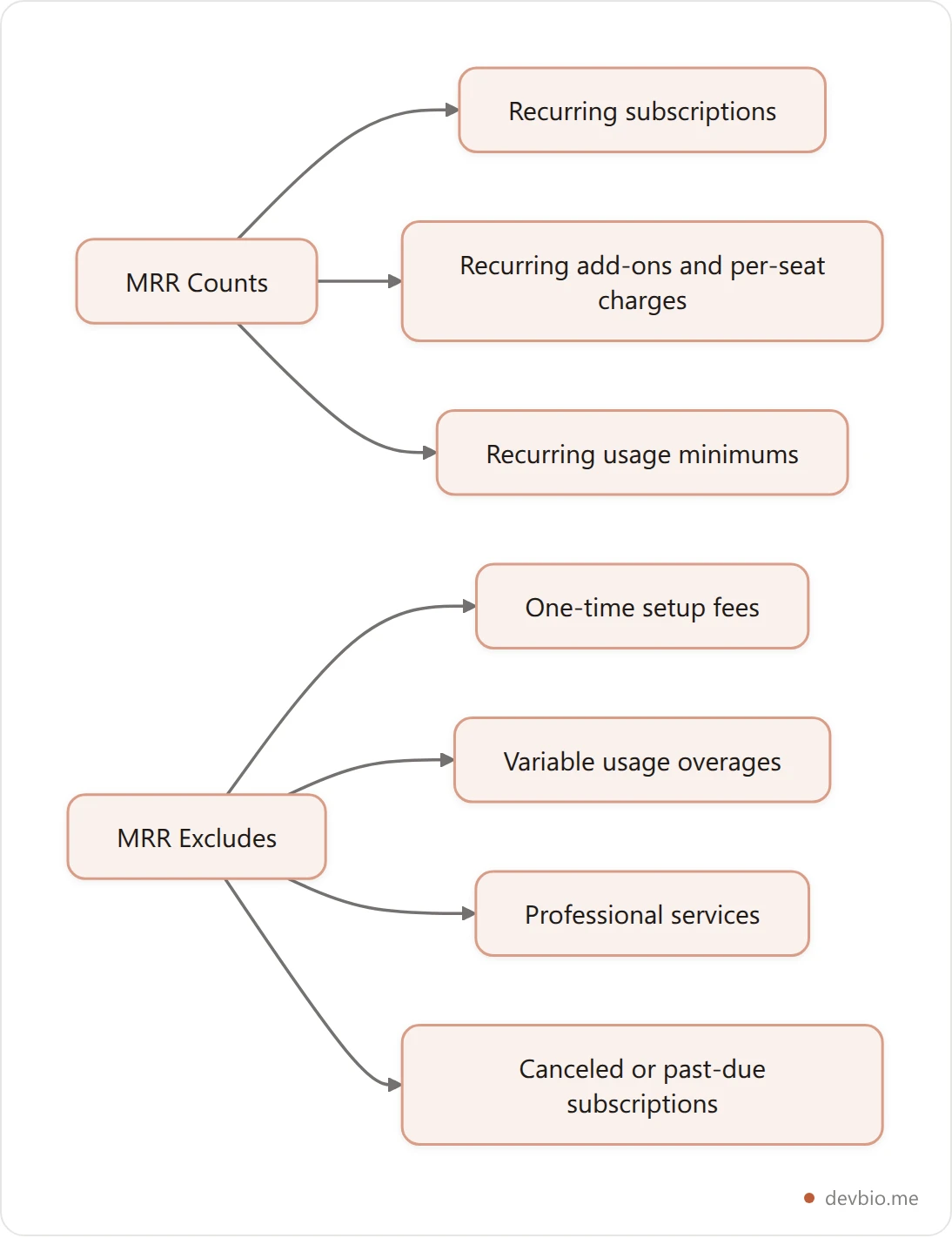
What Counts as MRR (and What Doesn't)#
MRR only counts revenue you can reasonably expect to repeat next month from an active subscription. Nothing else belongs in the number.
Counts toward MRR:
Recurring subscription charges (monthly, annual, quarterly, weekly, normalized to monthly)
Recurring add-ons and per-seat charges on an active plan
Recurring usage minimums baked into a plan price
Does not count toward MRR:
One-time setup or onboarding fees
Usage-based overages that vary month to month
Professional services or custom work billed separately
Revenue from canceled or past-due subscriptions
List price on discounted accounts (use the discounted price)
Mixing in one-time fees is the fastest way to inflate MRR and get caught. Investors and acquirers doing diligence recalculate MRR from raw Stripe data anyway, so a number that doesn't survive re-derivation is worse than no number at all.
The SaaS MRR Calculator Formula, Step by Step#
Every SaaS MRR calculator runs the same base formula: MRR equals the sum of the normalized monthly value of every active subscription. This mirrors the standard formula used across the industry (Baremetrics Academy).
Normalization rules by billing interval:
Billing interval | Conversion to monthly |
|---|---|
Annual | Divide by 12 |
Quarterly | Divide by 3 |
Weekly | Multiply by ~4.33 |
Daily | Multiply by ~30 |
Worked example. Say you run a dev-tools SaaS with 40 customers: 25 on a $19/month plan, 10 on a $180/year plan, and 5 on a $50/quarter plan.
Monthly plan: 25 × $19 = $475
Annual plan: 10 × ($180 ÷ 12) = 10 × $15 = $150
Quarterly plan: 5 × ($50 ÷ 3) = 5 × $16.67 = $83.35
Total MRR = $475 + $150 + $83.35 = $708.35

The mistake almost everyone makes on their first calculation: adding the full $1,800 in annual payments collected that month instead of the normalized $150. That single error can double a small SaaS's reported MRR.
Once you have a baseline, track the four components of month-over-month movement:
New MRR — from customers who subscribed this month
Expansion MRR — from upgrades, seat additions, add-ons on existing accounts
Contraction MRR — from downgrades on existing accounts
Churned MRR — from cancellations and failed-payment losses
Net New MRR equals New plus Expansion minus Contraction minus Churned. This is the number that actually tells you if the business is growing, not the headline total.
Usage-Based and Hybrid Pricing Complicate the Formula#
More SaaS products in 2026 combine a subscription base with metered usage on top, a $29/month plan plus $0.02 per API call, for example. Only the fixed subscription portion belongs in MRR. The usage-based portion is real revenue, but it varies month to month by definition, so folding it into MRR turns a stable metric into a volatile one nobody can forecast from.
The common workaround: report a "minimum committed MRR" (the guaranteed subscription floor) separately from total revenue, and track usage revenue as its own line. If most customers blow past their usage minimums every month, some teams average the last three months of usage revenue and label it "usage MRR" explicitly, so nobody mistakes it for the same guarantee as subscription MRR.
MRR vs. ARR vs. Revenue: Not Interchangeable#
ARR (Annual Recurring Revenue) is simply MRR multiplied by 12. They measure the same recurring base at different time scales, and mixing them up in a pitch deck or on a public profile is an easy credibility hit.
Revenue is broader and messier: it includes one-time fees, services, and usage charges that MRR deliberately excludes. A SaaS company can report $50K in monthly revenue while its actual MRR is $31K, with the rest coming from onboarding fees and a services engagement. Both numbers are legitimate, they just answer different questions. MRR answers "how big is my predictable base?" Revenue answers "how much cash came in?"
When you're comparing your numbers to SaaS benchmark reports or another founder's public numbers, confirm you're comparing MRR to MRR, not MRR to gross revenue. It's the most common apples-to-oranges error in build-in-public revenue comparisons.
Manual Math vs. Calculator vs. Live Dashboard: Picking the Right Tool#
A free SaaS MRR calculator is fine for a one-time gut check. It's the wrong tool the moment you want to publish the number somewhere other people can see.
Method | Data source | Update frequency | Public proof format |
|---|---|---|---|
Spreadsheet or free calculator | Manually entered | Manual, whenever you remember | None, just a number you typed |
Baremetrics / ChartMogul dashboard | Synced from Stripe/Paddle | Real-time in-app | Private dashboard; needs a screenshot to share |
VerifyMRR / TrustMRR | Read-only Stripe API key | On connect, periodic refresh | Dedicated public page, independently hosted |
DevBio live MRR component | Read-only Stripe, Dodo Payments, Lemon Squeezy, or Polar API | Every 6 hours (free) / hourly (paid) | Embedded on your public profile next to your GitHub activity, resume, and links |
Calculators answer "what's my number right now." Dashboards answer "how is my number trending." Only the last two rows answer the question that actually matters to a reader: "how do I know this number is real and not typed into a bio field?" If you're still on row one or two, connect a live MRR component to your profile and skip straight to proof.
Why an MRR Screenshot Stopped Being Proof#
A Stripe dashboard screenshot is a PNG. Nothing stops anyone from editing one in five minutes, and after years of viral "$50K in 3 days" posts that turned out to be staged, most experienced readers now assume a screenshot is marketing, not evidence.
Marc Lou, the indie hacker behind more than a dozen shipped products, built TrustMRR for exactly this reason: "Bye bye fake MRR screenshots. I built the database of verified startup revenues... There's no way to game the system. It's all running on my server, and users can't edit the revenue data." The mechanism: founders connect a read-only Stripe key, the platform computes MRR server-side, and nobody, including the founder, can hand-edit the published figure.
The traction backs up the demand: TrustMRR opened its API in March 2026 with verified data from over 840 startups across 82 countries, and crossed $13,883 in its own MRR within 48 hours of launch. That's not a niche curiosity, it's a signal that "screenshot as proof" is over, and the market has already priced in the replacement.
The MRR Proof Ladder: How Credible Is Your Number, Really?#
Every public MRR claim sits on one of four rungs. Most founders don't realize which rung they're standing on.
The Claim — a number in a tweet or bio with zero backing. Costs nothing to fake.
The Screenshot — a dashboard export. Looks convincing, editable in any image tool, unverifiable by the reader.
The Shared Dashboard Link — a read-only view into a real tool. Harder to fake, but the founder still chooses the date range and filters shown.
The Live Sync — a number computed at render time from a connected, read-only API key. Nobody, reader or founder, can manually inflate it without revoking the connection entirely.

Screenshots and even shared dashboard links can be curated. A live sync can only be turned off, not edited. That distinction is the entire reason "verified MRR" products exist, and it's the bar a serious profile should clear. See what rung 4 looks like on a real profile.
How to Put Live, Verified MRR on Your Developer Profile#
If you're a developer or indie hacker who ships and sells, a static calculator result belongs in a spreadsheet, not in your bio. Rung 4 of the ladder, a number pulled live from your actual payment processor, is what belongs in public.
DevBio's live revenue component connects directly to Stripe, Dodo Payments, Lemon Squeezy, or Polar with a read-only key — if you haven't settled on a processor, compare the 2026 fees and tax-handling tradeoffs first — then computes normalized MRR the same way this guide does: it pages through your active subscriptions, converts every non-monthly plan to its monthly equivalent, and sums the result. It displays current MRR, active subscriber count, currency, and a rolling revenue-history chart, and it re-syncs automatically, every six hours on the free plan, hourly on paid, so the number on your profile updates itself instead of going stale the day after you post it. For the exact setup steps, see the live MRR developer profile guide.
The same computed MRR can also show up as a small badge on an individual project card, right next to that project's live GitHub stars and commit activity. That combination, shipped code plus connected revenue, both pulled live rather than typed in, is what makes a building-in-public profile hold up under scrutiny instead of reading like every other unverifiable indie hacker screenshot.
If you're closer to the acquisition side, the same live number matters when you're listing a SaaS for sale or evaluating one to buy. Buyers discount any revenue figure they can't independently trace back to a payment processor.
SaaS Benchmarks: What a Healthy MRR Trend Looks Like in 2026#
A single MRR number means little without context. Here's roughly where the market sits in 2026:
Median ARR growth for private B2B SaaS companies has settled around 18-25% year-over-year, down from 2021 highs, and roughly 35% of companies now report a year-over-year decline rather than growth (Data-Mania, 2026).
Median annual B2B SaaS churn sits near 3.5% (2.6% voluntary, 0.8% involuntary) (SHNO, 2026).
Enterprise accounts (ACV over $100K) churn under 5% annually; SMB accounts (under $15K ACV) commonly churn 10-15% annually (Livmo, 2026).
Median gross dollar churn across SaaS companies is roughly 12%, with median annual logo churn near 13%.
Median Net Revenue Retention for B2B SaaS is 106%, with top performers exceeding 130%, meaning expansion MRR from existing customers now drives 40-50% of new ARR at the best-run companies.

If your Net New MRR is negative two months running while logo churn tracks near the 13% median, that's ordinary attrition, not a crisis. If it's negative while churn runs well above 15%, the calculator isn't your problem, retention is.
Why MRR Accuracy Matters More at Exit#
Micro-SaaS products under $500K ARR typically sell for 2.5-4x SDE, or roughly 2-3.5x ARR, compared to 4-5x ARR for larger SaaS businesses ([Livmo, 2026](https://livmo.com/blog/saas-valuation-multiples-2026/)). A SaaS doing $5K-$15K MRR commonly lists in the $150K-$500K range on acquisition marketplaces. Every dollar of inflated MRR gets multiplied straight into the asking price, and every dollar a buyer's due diligence knocks off gets multiplied straight back out.
That's exactly why acquirers recompute MRR from the raw payment-processor export instead of trusting the figure in a listing. A revenue multiple applied to a number that includes one-time setup fees or double-counted annual payments doesn't just look bad, it can stall a deal in diligence and undermine every other number in the listing.
Churn compounds the same problem in reverse. A micro-SaaS at 3% monthly churn loses roughly a third of its customer base every year; at 1% monthly churn, it loses about 11%. That gap alone can swing a valuation multiple by a full point. A live-synced MRR number a buyer can verify against the actual payment account is worth more at the negotiating table than a slightly higher number nobody can confirm.
Common MRR Mistakes That Skew Your Number#
Copy this checklist before you publish any MRR figure:
Annual and quarterly plans normalized to monthly, not counted as a lump sum in the month collected
One-time setup fees and services revenue excluded
Trialing (non-paying) users excluded, even on a free trial that required a card
Canceled and past-due subscriptions removed the month they lapse, not at the next renewal date
Discounted price used, not list price, for anyone on a coupon or custom deal
All subscriptions converted to one currency before summing, if you sell in more than one
Failed payments tracked separately from voluntary cancellations, since they need different fixes
Every one of these mistakes inflates the number in the same direction: up. That's exactly why a reader who's been burned by fake screenshots assumes an unverified number is optimistic until proven otherwise. Put a number on your profile nobody can second-guess.
FAQ#
What is a good MRR for a SaaS startup?#
There's no universal "good" number, it depends on stage and pricing. What matters more than the absolute figure is Net New MRR direction and whether churn stays near the ~3.5% median annual rate for your segment. A small, growing MRR with low churn beats a large, flat one.
How does a SaaS MRR calculator handle annual subscriptions?#
Divide the annual contract value by 12 and count that monthly slice, even if the customer paid the full year upfront. A $1,200/year plan contributes $100 to MRR each month it stays active, not $1,200 in the month it was billed.
What's the difference between MRR and ARR?#
ARR is MRR multiplied by 12. They're the same recurring revenue base measured over different periods: MRR for monthly tracking and cash-flow planning, ARR for annual reporting and investor conversations.
Do free trials count toward MRR?#
No. MRR only counts active, paying subscriptions. A trialing user, even one who provided a card, doesn't contribute revenue until the trial converts to a paid plan.
Can MRR be negative?#
The MRR total itself can't go negative, but Net New MRR can. If churned and contracted MRR in a given month exceed new and expansion MRR, your net movement is negative even though absolute MRR is still positive.
What is verified MRR, and how is it different from a screenshot?#
Verified MRR is computed directly from a read-only connection to your payment processor rather than typed in or captured as an image. Because the founder can't edit the computed figure, it functions as proof instead of a claim, which is the premise behind tools like TrustMRR and VerifyMRR.
How often should I recalculate MRR?#
Monthly at minimum for reporting. If you're displaying it publicly, a live-synced source that refreshes automatically (hourly to every few hours) is more credible than a number you manually update once a quarter.
Does showing live MRR require sharing my Stripe login?#
No. Legitimate live-MRR integrations, DevBio's included, use a read-only API key scoped to your payment processor. That key can read subscription and charge data to compute MRR, it can't move money, change your account, or expose your login credentials.
Does a live MRR component handle multiple currencies automatically?#
Not always, and it's worth checking before you rely on it. If you connect one payment integration, the number reflects that account's own currency correctly. If you're summing revenue across several projects on different payment integrations, some tools (DevBio included) currently display the combined figure in whichever currency the first connected project uses, rather than converting everything to one currency. Worth confirming for any multi-currency business before you publish a combined number — see how to get an honest multi-currency MRR figure if you sell internationally.
The Bottom Line#
The formula takes thirty seconds: normalize every plan to its monthly value, sum the active subscriptions, and track New, Expansion, Contraction, and Churned MRR separately so Net New MRR tells you the real trend. That part was never the hard problem.
The hard problem, the one that spawned an entire category of "verified MRR" tools in the last year, is that a calculated number typed into a bio or captured in a screenshot convinces nobody anymore. The fix is climbing the proof ladder: connect a read-only API key, let the number compute itself, and let it re-sync automatically instead of going stale the day after you post it.
If you're building toward your first $10K in MRR, the indie hacker profile checklist covers what else your page should show.
Your code already proves you can build. Put your live MRR next to it on one profile.


