

You hand someone a digital business card at a conference, they tap it, and three weeks later you want that contact in your CRM. Whether that works — and what it costs — is the whole Blinq vs HiHello decision. The marketing pages both say "free forever." They cap completely different things.
Blinq's free plan gives you 2 cards with unlimited sharing. HiHello's free plan gives you 4 cards but meters you at 5 card-and-badge scans per month. If you mostly hand your card out, Blinq's free tier is roomier. If you mostly collect other people's, HiHello's meter runs out fast.
Blinq vs HiHello at a Glance#
Here's every number that matters, pulled from both vendors' own pricing pages.
Blinq | HiHello | |
|---|---|---|
Free tier name | Free | Personal |
Free cards | 2 | 4 |
Free scan limit | Unlimited sharing | 5 scans/month |
Paid individual tier | Premium — $9.99/mo | Professional — $6/mo |
Individual annual price | $7.33/mo billed yearly | $72/yr (= $6/mo) |
Cards on individual tier | 5 | 16 |
Team tier | Business — $6.99/user/mo | Business — $5/user/mo |
Team annual price | $4.99/user/mo | $60/user/yr (= $5/mo) |
Team size limits | Not published | 5–100 users |
Public API | Yes — docs.blinq.me | Not documented |
Contact export | CSV, Premium and up | Not listed on pricing |
Compliance tier | SOC 2 Type II, GDPR | SOC 2, SAML/SCIM |
Two things jump out of that table, and neither one shows up in the usual "which is better" roundups.
HiHello's Annual Billing Saves You Nothing#
Look at HiHello's Professional tier again: $6 per month, or $72 per year. That's exactly $6 × 12. The Business tier is the same story — $5 per user per month, or $60 per user per year. Paying twelve months up front buys you zero discount.
Blinq discounts hard in the same slot. Premium drops from $9.99 to $7.33 a month on annual billing, about 27% off. Business drops from $6.99 to $4.99 per seat, about 29% off.

So the sticker comparison flips depending on how you pay. Month to month, HiHello Professional ($6) undercuts Blinq Premium ($9.99) by a third. On annual billing, the gap narrows to 67 cents. For teams, Blinq's annual seat ($4.99) actually comes in under HiHello's ($5).
Skip the tier math — own your profile URL
What Each Free Plan Actually Stops You Doing#
Blinq's free plan stops you at 2 cards but never meters how often you share them. HiHello's free plan gives you 4 cards but stops you after 5 card-and-badge scans per month. One limits how many identities you keep; the other limits how many contacts you collect.
Free tiers are where most people live, so it's worth being precise about the ceiling.
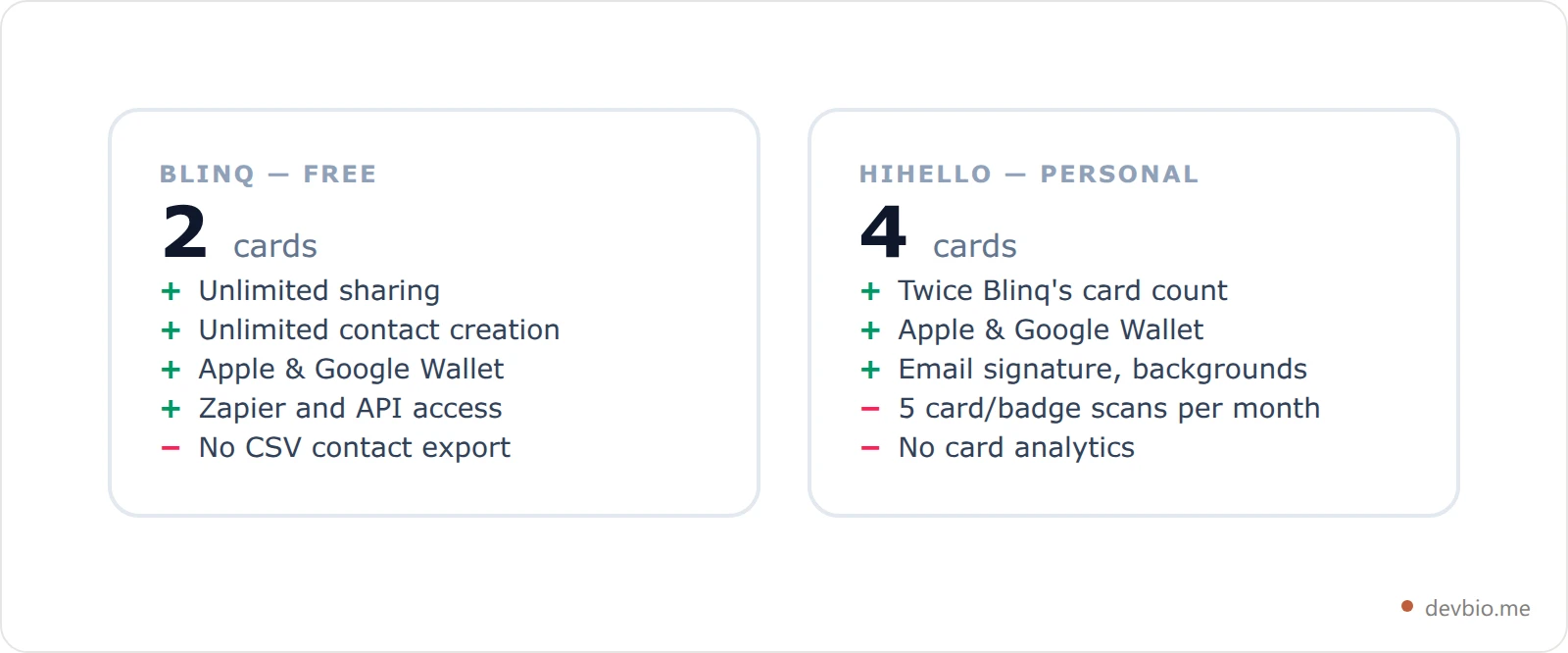
The four-versus-two card count reads like a HiHello win, and for some people it is. Multiple cards exist so you can hand a consulting card to one person and a day-job card to another. If you genuinely juggle four personas, HiHello's free tier is the better deal.
But the scan meter is the one that bites. Five scans a month is roughly one conference coffee break. Once you hit it, collecting contacts — the actual point of carrying a card at an event — stops until the month rolls over. Blinq puts no such meter on its free plan.
Blinq Pricing: The Individual Tier Costs More Than a Seat#
The oddest line in Blinq pricing is that Premium, the plan for one person, is more expensive than Business, the plan sold per seat. Premium runs $9.99 a month; Business runs $6.99 per user per month. On annual billing it's $7.33 against $4.99.
That's not a typo on their site, it's ordinary SaaS shape: the team plan is priced to land multi-seat contracts and the solo plan is priced for people who will pay to avoid a sales conversation. It does mean a two-person company should price out Business before assuming Premium is the cheaper door.
What Premium buys over Free: up to 5 cards, the universal contact scanner, AI notetaker, AI contact enrichment, branded QR codes, custom card design, and CSV contact export. That last one matters more than the AI features, for reasons the next section gets into.
HiHello Pricing: 16 Cards and a Scan Meter#
HiHello pricing is simpler to read. Professional at $6/month lifts you to 16 digital business cards and 20 card-and-badge scans per month, with an unlimited-scan add-on sold separately. You also get contact enrichment, card analytics, and full card customization.
Business at $5 per user per month covers 5 to 100 users with unlimited cards and unlimited scans, plus SSO and directory sync, card templates, team analytics, and CRM integrations for Salesforce, HubSpot, and Dynamics 365. Enterprise starts at 101 users and adds SAML/SCIM provisioning, SOC 2, and verified badges.
Note the shape: HiHello meters scans at every tier below Business. If contact capture is your main use case, you are buying your way up that ladder, not the card ladder.
Which One Gets Your Contacts Back Out#
Blinq does, more openly. It publishes API documentation, lists Zapier and API access from the free tier up, and offers CSV contact export on Premium and above. HiHello documents CRM integrations and SSO but publishes no public API reference you can evaluate before buying.
This is the question that decides it for anyone technical, and the two products answer it differently.
Blinq documents a public API at docs.blinq.me and lists "Zapier and API access" from the Free tier up, with bulk card creation via API from Premium up and webhook integrations at Enterprise. CSV contact export lands on Premium.
HiHello's pricing page and homepage document integrations — Salesforce, HubSpot, Dynamics 365, SSO via OAuth 2.0 and SAML, SCIM for provisioning — but no public API reference or developer portal. Its support material lives at support.hihello.com. That isn't proof no API exists; it does mean you can't evaluate one before you buy.
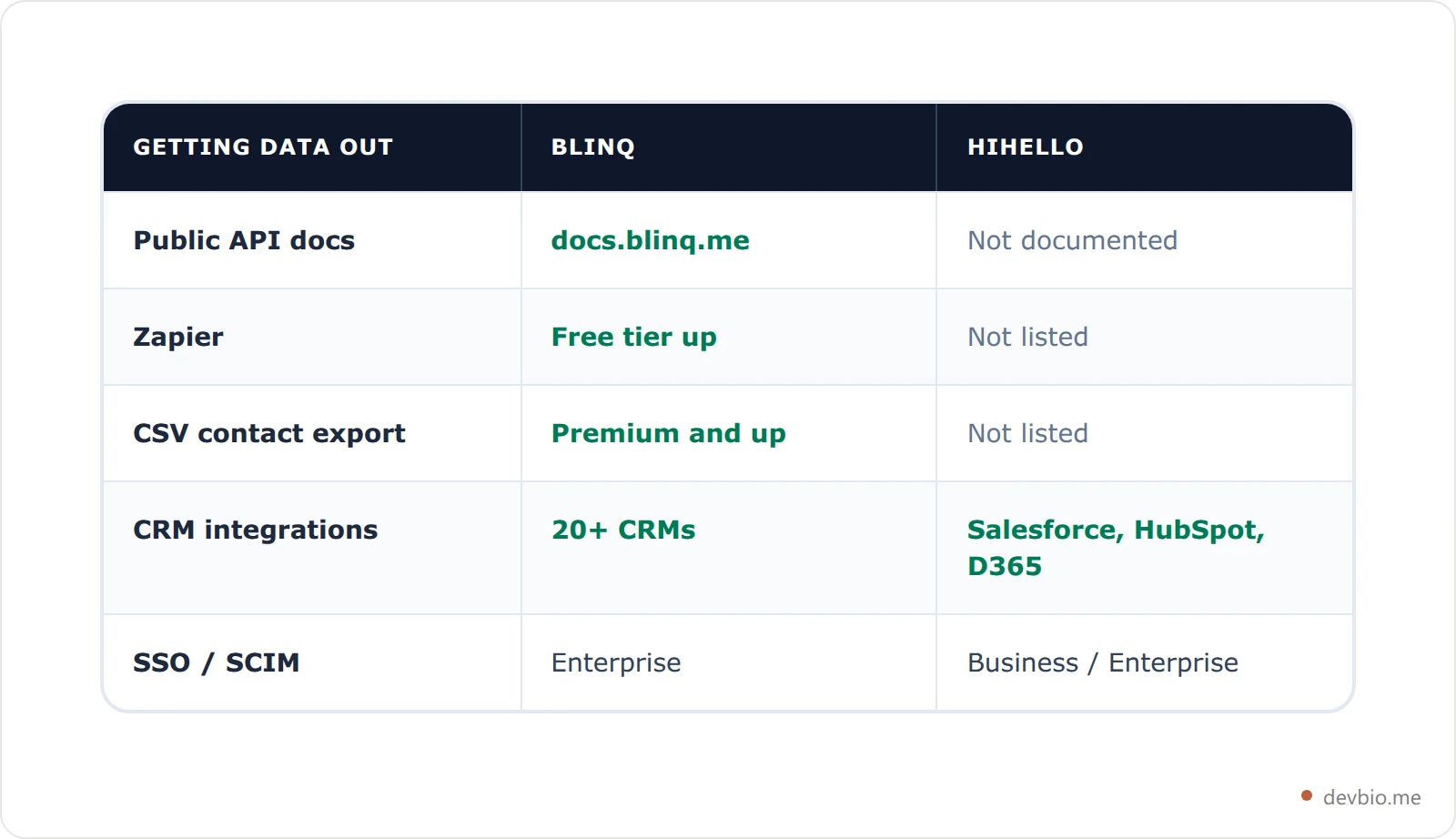
If you plan to pipe scanned contacts into something you wrote yourself, Blinq is the only one of the two you can evaluate up front.
The Gap Neither One Closes#
Both products solve the same narrow problem: you meet someone in person and want them to have your details without paper. Both do it well. Neither is a place to put your work.
A digital business card holds a name, a title, a handful of links, and a photo. It does not hold your repositories, your shipped projects, your stack, or anything a hiring manager or a prospective client would actually read before replying to you. That's a different artifact — a developer digital business card that doubles as a profile, not a contact record.
The practical consequence shows up when you cancel. Your card link lives on the vendor's domain. Stop paying, or watch the vendor get acquired, and the URL you printed on a conference badge becomes someone else's redirect. The same trap closes on NFC cards, where the chip holds nothing but a URL — a vendor-hosted link burned into every card in the box. We've written about what happens when a link-in-bio host shuts down — the pattern repeats.
Your Card Should Be a URL You Own#
The fix is the same one that applies to any hosted profile: make the canonical thing a URL under your control, and let the card apps point at it.
On devbio.me, every published bio serves machine-readable endpoints alongside the page itself — a versioned JSON document at /{username}/bio.json, companion me.json and projects.json feeds, a vCard 3.0 contact file at /{username}/bio.vcf, and an SVG QR code at /{username}/qr that takes a size parameter between 128 and 1024 plus optional fg and bg hex colors for brand use.
That vCard route matters for exactly the job Blinq and HiHello do. It's a text/vcard response built from your basic-info and links components, served with a content-disposition: attachment header, which is what makes a phone prompt "Add to Contacts" on tap. vCard 3.0 is the older spec (RFC 2426) rather than 4.0, chosen because mobile defaults still read 3.0 most reliably.
The QR code is an SVG with no client-side JavaScript, so it scales losslessly into a print stylesheet — the practical detail if you're putting a code on an actual printed card. Our QR code business card guide covers the print side in more depth.
Which Should You Pick?#
The Blinq vs HiHello answer splits on one question: do you collect more cards than you hand out? Heavy scanners and annual payers should take Blinq. Monthly payers who want the cheapest individual tier, or who need more than five separate cards, should take HiHello.
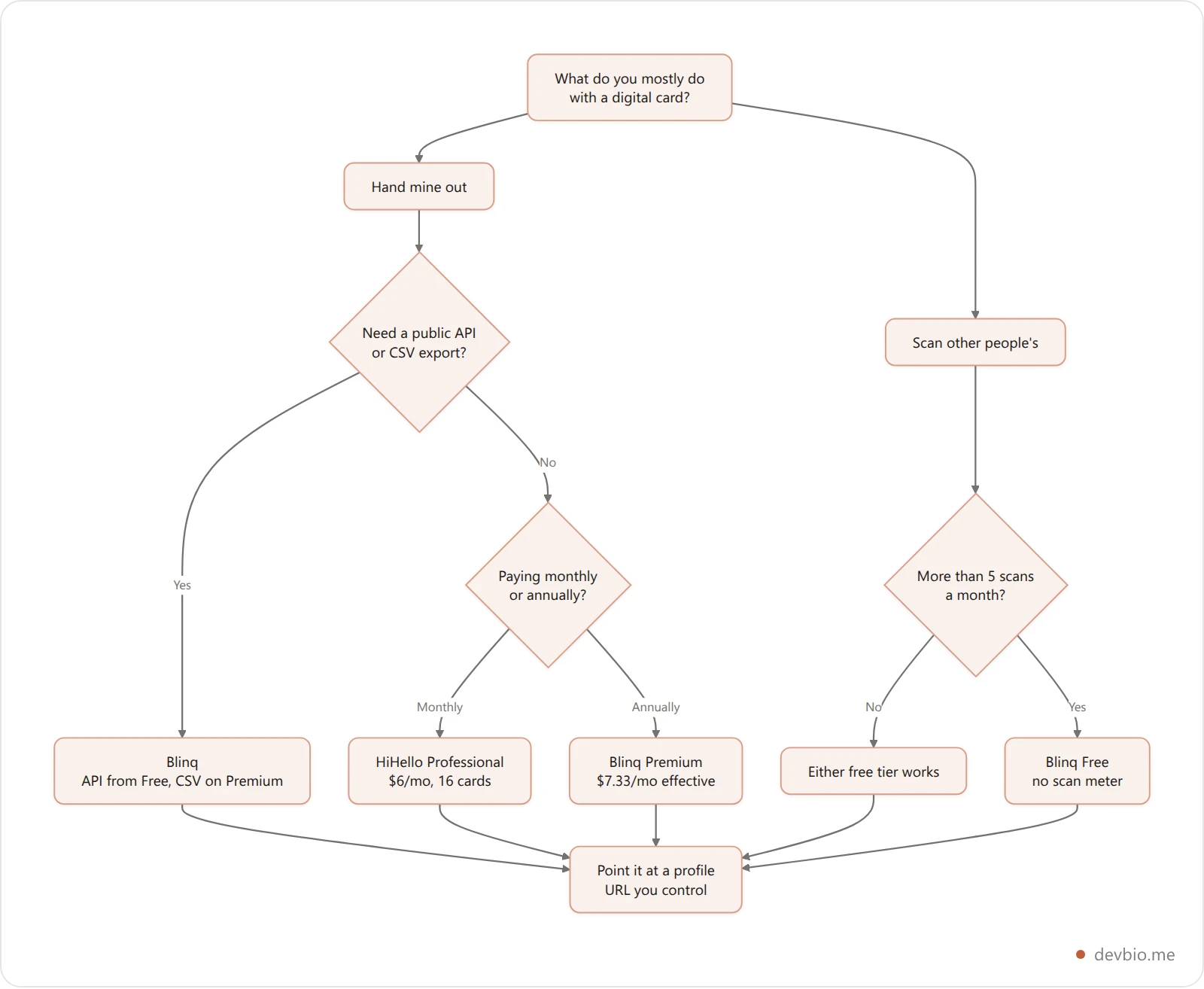
Pick Blinq if you scan more than five cards a month on a free plan, if you pay annually, or if you need documented API access and CSV export.
Pick HiHello if you pay month to month and want the cheapest individual tier, if you need more than five separate cards, or if you're a 5-to-100-person team that wants unlimited scans at $5 a seat.
Pick neither as your canonical link. Whichever card app you carry, the URL it shares should resolve to something you own. If you're weighing hosted profile tools more broadly, our link in bio comparison for developers covers that layer, and the machine-readable developer profile guide covers the formats worth serving.
Frequently Asked Questions#
Is Blinq or HiHello cheaper?#
It depends on billing period. Month to month, HiHello Professional at $6 beats Blinq Premium at $9.99. On annual billing Blinq Premium drops to $7.33/month while HiHello stays at $6, narrowing the gap to 67 cents. For teams on annual billing, Blinq Business ($4.99/seat) undercuts HiHello Business ($5/seat).
Does HiHello's free plan really limit scans?#
Yes. HiHello's Personal tier allows 4 digital business cards but caps card-and-badge scans at 5 per month. Professional lifts that to 20 per month with an unlimited add-on available, and Business removes the cap entirely. Blinq's free tier has no equivalent scan meter.
Does HiHello have a public API?#
HiHello's pricing page and homepage document CRM integrations, OAuth 2.0 and SAML SSO, and SCIM provisioning, but no public API reference or developer portal. Blinq publishes documentation at docs.blinq.me and lists Zapier and API access from its Free tier upward, with bulk card creation via API on Premium and above.
What happens to my card link if I stop paying?#
Both products host your card on their domain, so the link's future is the vendor's decision, not yours. Downgrades typically reduce card counts and features rather than deleting links outright, but an acquisition or shutdown can retire the URL entirely. Pointing your printed QR code at a domain you control avoids the whole category of problem.
Can I export my digital business card as a vCard?#
Neither Blinq nor HiHello lists vCard export on its pricing page; Blinq offers CSV export of collected contacts from Premium up. A self-hosted profile can serve one directly — devbio.me publishes a vCard 3.0 file at /{username}/bio.vcf for every published bio, which phones recognize and offer to save as a contact.
Do I need a digital business card at all?#
If you attend events, yes — tapping a phone is faster than carrying paper and the contact lands in the right place. But treat it as a transport layer. The thing it points to should be a profile with your actual work on it, which is a separate decision from which card app you install.
Key Takeaways#
Blinq's free tier caps cards (2) but not sharing; HiHello's caps scans (5/month) but allows 4 cards.
HiHello's annual billing costs exactly the same as monthly. Blinq's discounts roughly 27–29%.
Blinq Premium ($9.99) costs more per month than Blinq Business ($6.99/seat) — price out the team plan first.
Blinq documents a public API and CSV export; HiHello documents integrations and SSO but no public API.
Whichever you pick, point it at a URL you own so a vendor change never retires your printed QR code.


