

A developer QR code business card is one code that does two jobs: it opens your live profile and it offers a one-tap "save contact" vCard, no app required. As of August 2026, 72% of consumers have scanned a QR code in the past month, and QR codes on business cards convert at roughly 34% — nearly three times the rate of QR codes used in advertising. Meanwhile 88% of paper business cards get thrown out within a week of being handed over.
If you're a developer who still hands someone a printed card, or spells your GitHub handle out loud over conference noise, you're burying your best proof — real commits, shipped projects, actual revenue — in a drawer or a typo. With over 180 million developers now on GitHub, a name and a handle aren't differentiators anymore; verifiable proof is. This guide breaks down how a QR code business card actually works under the hood: the SVG that gets generated, the vCard version decision most DIY setups get wrong, and exactly how to wire one up yourself in under 10 minutes.
What a Developer QR Code Business Card Actually Is#
A developer QR code business card is a scannable code that, when photographed with a phone camera, opens your live profile — GitHub activity, shipped projects, real revenue — and separately offers a downloadable contact file so the other person can save your name, title, and links straight into their phone contacts, without installing anything.
That's two separate jobs from one code: prove (the profile) and connect (the contact save). Most QR-code-on-a-business-card setups only do the first. A plain QR code pointing at a link-in-bio page opens a page; it doesn't put you in someone's phone. That gap is where most digital business cards quietly fail — the dedicated card apps included. Neither Blinq nor HiHello lists vCard export on its pricing page, as our Blinq vs HiHello comparison breaks down.
Why Paper Business Cards Fail Developers in 2026#
Paper business cards don't fail because they're old-fashioned. They fail because they can't prove anything and they don't survive contact with reality.
Roughly 88% of business cards get thrown away within a week of being handed over, and 63% of people say it's because they didn't think they'd need the service. Only about 12% get kept longer than a year. On the business side, adoption has moved fast in the other direction: 37% of businesses have adopted digital business cards as of 2026, up from just 16% in 2020, and tech companies lead every other industry at 72% adoption.
For a developer specifically, a paper card has a second problem: it can't verify anything. A GitHub handle printed on cardstock is a claim. A QR code that opens a profile pulling live commit activity, real stars, and connected MRR is proof — the same distinction that matters when replacing a paper card with a proof-backed link instead of a printed one.
To be fair to paper: cards that do get kept convert well, around 12%, which actually beats the average website's 2.35%. But that number only describes the roughly one card in eight that survives the first-week purge. A QR code doesn't need to survive a pocket or a desk drawer — it just needs one clean scan.

QR Code vs NFC vs a Plain Link: What Actually Works#
Developers debate NFC tags, QR codes, and just telling someone a URL. They're not equivalent, and the differences matter most exactly when you're standing in a loud room with 30 seconds to make an impression.
QR code | NFC tag | Spoken URL / handle | |
|---|---|---|---|
Works without an app | Yes (native camera) | Mostly (some Android settings block it) | N/A |
Works on any phone, any age | Yes | No — needs NFC hardware | Yes, if remembered correctly |
Upfront cost | $0 | $5–$30 per card/tag | $0 |
Survives being printed on a badge, sticker, or slide | Yes | No (needs a physical chip) | N/A |
Can be updated after printing | Yes, if dynamic | Depends on tag type | N/A |
QR codes win on reach: every phone camera can read one, no hardware required, and they print onto anything flat — a badge, a laptop sticker, a slide at the end of a talk. NFC is faster when it works, but it's device-dependent and costs money per card — and the chip in an NFC card only holds a URL anyway, so both routes end up pointing at the same profile. A spoken handle is free but has zero error correction; one mistyped letter and the connection is gone.
The One-Scan Stack: Why One QR Code Should Do Two Jobs#
Call it the one-scan stack: a single QR code that lands on your live profile first, and offers a one-tap contact save as a secondary action on that same page — instead of two separate codes, two separate links, or a paper card as a fallback.
The mechanism is simpler than it sounds. DevBio's live implementation, for example, serves two endpoints off the same username:
GET /<your-handle>/qr?size=512&fg=1a1a1a&bg=ffffff   ->  SVG QR code
GET /<your-handle>/bio.vcf                           ->  downloadable vCard 3.0
The first renders a server-side SVG QR code pointing at your profile. The second serves a downloadable contact file. Both live under the same handle, so one QR code — the one pointing at /yourname — puts a "Save contact" button in front of the visitor after they've already seen your commits, your projects, and (if you show it) your MRR.
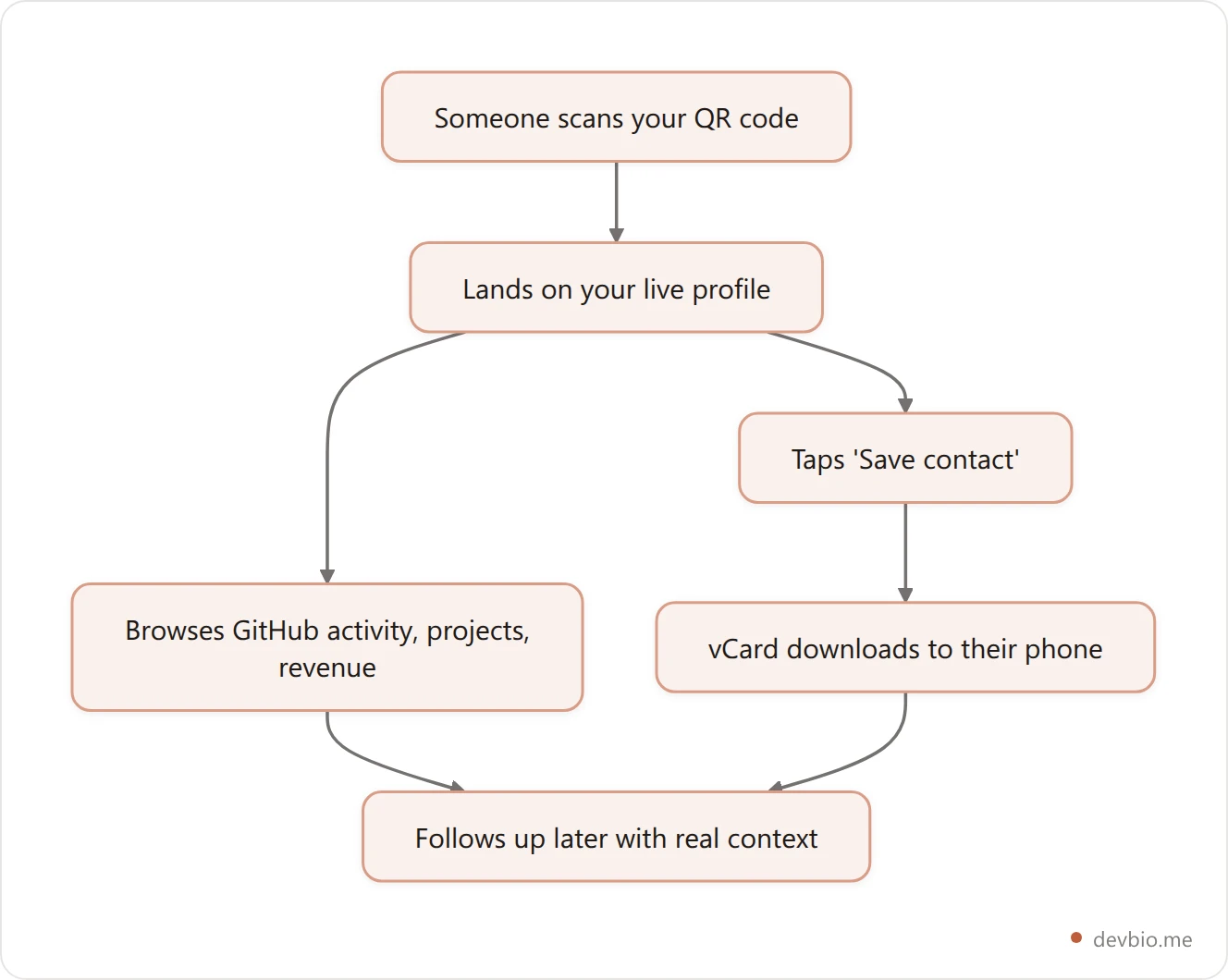
That ordering matters. Proof before pitch means the person is deciding to save your contact after seeing evidence, not before. See a live one-scan stack in action to get a feel for how the two endpoints sit on the same page.
Inside a Live QR Endpoint: How the SVG Actually Gets Generated#
Most "QR code generator" tools bake a fixed image once and hand you a PNG to download. A profile-bound QR endpoint works differently: it generates the code server-side, on request, from your current profile URL.
A well-built version supports a few practical parameters directly in the URL — size (typically clamped somewhere between 128px and 1024px so it never renders unusably small or absurdly large), and foreground/background hex colors so the code matches a badge, slide deck, or brand palette instead of shipping as flat black-on-white. Server-side rendering also means it can be cached aggressively (a day-long cache with a week of stale-while-revalidate is a reasonable default) without going stale, because the destination — your profile — doesn't need the image itself to change when your bio updates.
The scan itself is worth tracking as its own event, separate from a generic pageview, because it tells you the visitor arrived from a physical touchpoint (a badge, a printed slide, a sticker) rather than a link click.
The vCard Half: Why Format Version Is the Detail Everyone Gets Wrong#
This is the part most DIY QR business cards get wrong, and it's a version number. A vCard QR code is only as good as the phones that can read what it hands over, and that comes down to which version you emit.
vCard comes in a few flavors — 2.1, 3.0, and 4.0 — and they are not interchangeable. vCard 3.0 works on essentially every iPhone, Android phone, and desktop email client, while vCard 4.0 support is inconsistent, particularly on older Android devices, older Outlook versions, and iOS releases below 16. A contact card generated in 4.0 can silently fail to import on a meaningful slice of the phones in any given room.
vCard 3.0 | vCard 4.0 | |
|---|---|---|
iPhone / iOS support | Universal | Inconsistent below iOS 16 |
Android support | Universal | Inconsistent on older devices |
iOS Quick Look preview | Clean | Often broken |
Feature richness | Basic fields | Richer (multi-value types, better structure) |
Best choice for a public QR scan | Yes | Only for controlled, known-device environments |
For a card meant to be scanned by strangers on unknown devices, 3.0 is the safer default — richer formatting in 4.0 isn't worth a contact card that silently fails to save on a third of the room.
A minimal, well-formed vCard 3.0 file looks roughly like this:
BEGIN:VCARD
VERSION:3.0
FN:Jane Doe
N:Doe;Jane;;;
TITLE:Backend Engineer
ORG:Independent
EMAIL:[email protected]
URL:https://devbio.me/janedoe
END:VCARD
The fields map directly to whatever you've already filled in on your profile — name, title, email, and your links — so there's no separate contact card to maintain by hand. Every field is one you're already keeping current for your GitHub profile bio and links section anyway.
Static or Dynamic: Don't Print a QR Code That Can't Change#
A static QR code has its destination baked directly into the pixel pattern. A dynamic one points at a redirect that you control, so the destination can change after the code is already printed on 500 badges.
The general guidance across QR platforms is consistent: always use dynamic codes for anything printed and handed out, because if anything changes after printing — a job, an email, a URL — you're stuck reprinting or living with a broken code. A QR code that resolves through your profile, rather than encoding a fixed destination, is dynamic by construction: the code stays the same, but everything behind it — your projects, your bio, even a custom domain you set up later — can change without a single printed card going stale.
Setting Up Your Own Developer QR Code Business Card in Under 10 Minutes#
You don't need a QR-specific tool if your profile already generates one for you. The setup is mostly about getting the underlying profile right first.
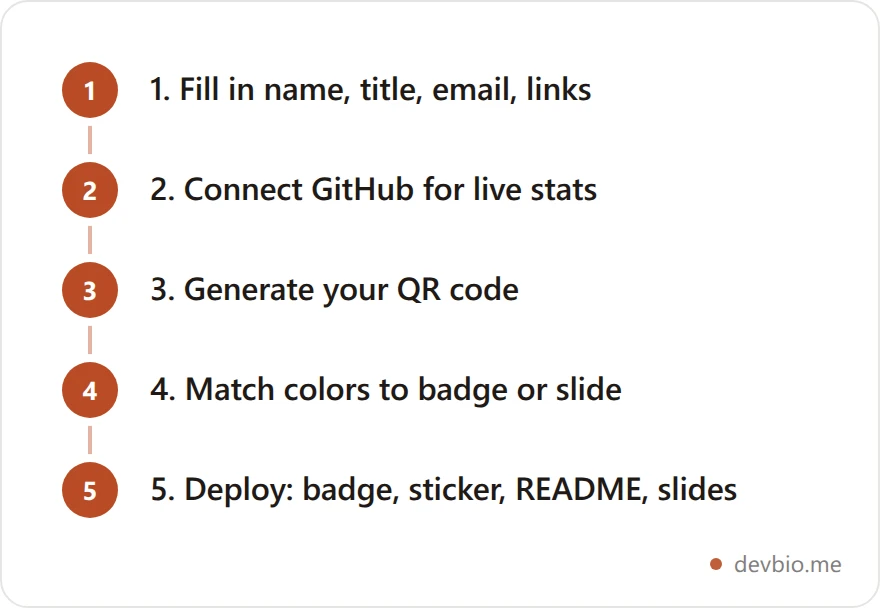
Fill in the fields your vCard will actually use. Name, title, and email are the minimum. Skip a field and it just won't appear in the saved contact — it won't break anything.
Connect GitHub (and any revenue integration) first. The whole point of scanning your profile instead of a static card is that what the visitor sees is live, not a snapshot from six months ago.
Generate the QR code from your live URL, not from a generic third-party QR generator pointed at a link. A generator-issued code baked from an external tool is one more static image you'll need to regenerate if your URL ever changes.
Match the color to wherever it's printed. A code that blends into a dark conference badge is a code nobody scans.
Deploy it everywhere it makes sense — badge, laptop sticker, resume footer, GitHub profile README, the closing slide of a talk.
None of this requires a paid tool to start. Set up your profile and QR code free, then upgrade only if you need a custom domain or unlimited edits later.
Where to Actually Put It: Badges, Laptops, README, Email Signatures#
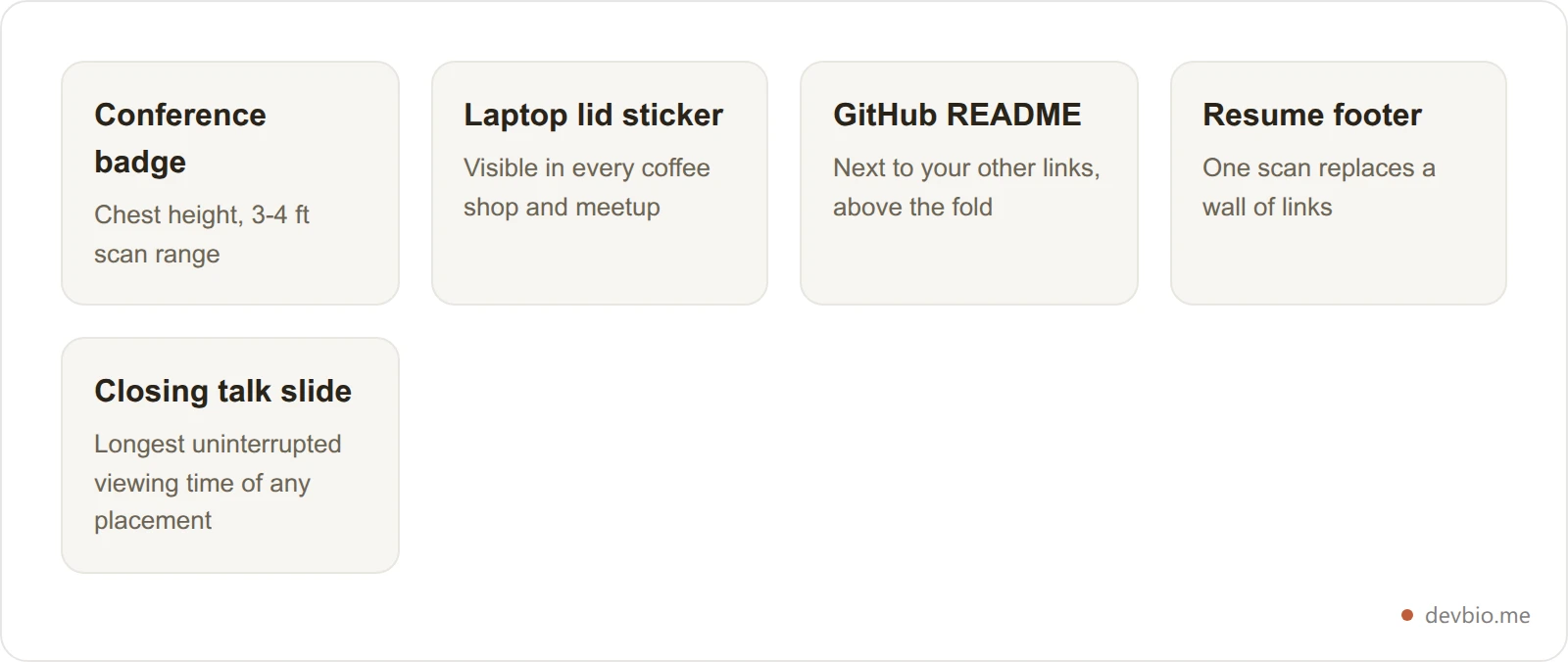
Placement changes scan rate more than most people expect. Guidance on event badges specifically recommends chest height, sized large enough to scan from three to four feet away, with a short, direct call-to-action label like "Scan to connect" next to it — a labeled QR code sees meaningfully higher scan rates than a bare code with no context.
Beyond badges, the same code works on a laptop lid sticker, the last slide of a conference talk (where it's visible for the longest uninterrupted stretch of any placement), a resume footer, and a GitHub profile README next to your other links. It's also a natural fit alongside a broader building-in-public setup, where the whole point is making your work verifiable at a glance.
A Realistic Before/After: One Booth, Two Networking Strategies#
Picture a typical two-day conference booth. One developer hands out 50 printed cards over the weekend. Following the general throwaway rate, roughly 44 of those are gone within a week — tossed, lost, or buried in a bag. A handful of the remaining six get a follow-up email, if the handwriting on the back is legible.
A second developer at the same event uses a QR code business card instead. Applying the roughly 34% scan rate typical of business-card QR codes to 130 badge scans and booth conversations over the same two days works out to about 44 actual scans — each one landing on a live profile with real GitHub activity and shipped projects, and each one offering an instant contact save rather than a card that has to survive a pocket. The numbers aren't identical between any two events, but the shape holds: a scan that lands on proof and saves a contact in one motion beats a card that has to survive being carried, remembered, and manually typed into a phone later.

Measuring Whether It's Actually Working#
A QR code you can't measure is just a nicer-looking business card. The two events worth tracking separately are the scan itself (someone reached your profile via the code, not a link) and the contact save (someone actually kept your details).
Tracking these separately from a general profile view tells you something a paper card never could: not just that someone looked, but that they looked and then decided your information was worth keeping. That's a meaningfully stronger signal than a raw view count, and it's the same kind of "who's actually engaging" data covered in more depth in a live profile analytics setup.
Two numbers are worth checking after any event: the scan-to-save ratio (what share of people who scanned also downloaded the contact) and where the scans came from geographically, if your analytics track that. A booth that generates 40 scans but only 5 saves usually means the profile itself isn't closing the loop — weak headline, no visible proof, or a bio that doesn't say what you actually do. A QR code fixes reach. It doesn't fix a profile that gives someone no reason to save it.
See your own scan and save data
A live profile tracks QR scans and vCard saves as separate events, not just page views — so you know who actually kept your details, not just who looked.
Build your profile freeCommon Mistakes That Kill Scan Rates#
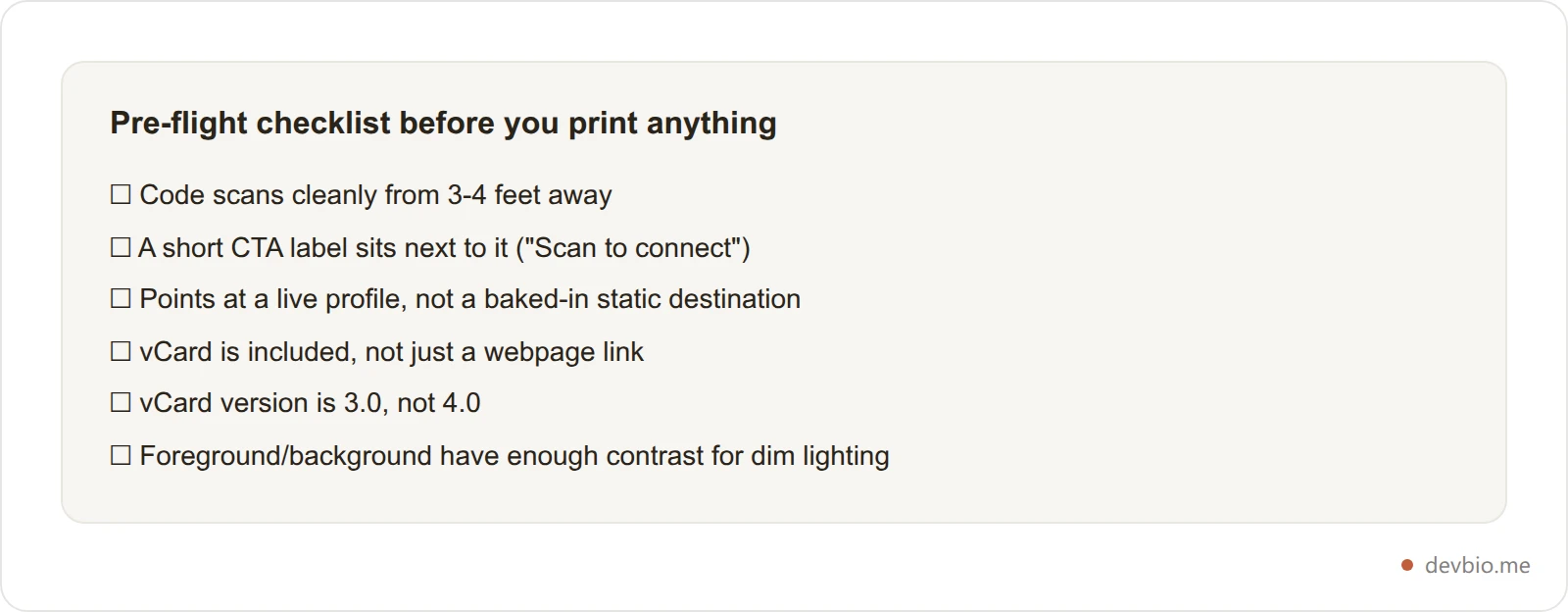
Printing it too small. If it can't be scanned from three to four feet away, it's decoration, not a tool.
No call-to-action text. A bare code with nothing next to it gets ignored; "Scan to connect" gets noticed.
Shipping a static code as a permanent fixture. Anything printed in bulk should resolve through a page you control, not a baked-in destination.
Skipping the vCard entirely. A code that only opens a webpage makes the visitor do the work of remembering to follow up. A code that also offers a contact save does that work for them.
Using vCard 4.0 for a public, unknown-device audience. It looks more "modern" and quietly fails to import on a chunk of the room.
Low contrast colors. A QR code needs enough contrast between foreground and background to scan reliably in bad lighting — badge halls are rarely well lit.
Frequently Asked Questions#
What is a developer QR code business card?#
It's a QR code that opens a developer's live profile — GitHub activity, shipped projects, and sometimes revenue — and separately offers a downloadable vCard so the scanner can save their name, title, and links straight to their phone contacts, without installing an app.
Do I need an app to scan a QR code business card?#
No. Every modern phone camera reads QR codes natively — iPhones since iOS 11 and Android phones since roughly Android 9. Point the camera, tap the notification or on-screen prompt, and it opens directly in the browser. No download required.
Is vCard 3.0 or vCard 4.0 better for a QR code contact card?#
vCard 3.0 is the safer choice for anything scanned by strangers on unknown devices. It works universally across iPhone, Android, and desktop email clients, while vCard 4.0 support is inconsistent on older Android phones, older Outlook versions, and iOS versions below 16.
Should a business card QR code be static or dynamic?#
Dynamic, whenever the code will be printed and handed out. A static code has its destination locked into the image forever; a dynamic one — including any code that simply points at your live profile URL — can keep working even after your job, email, or links change.
Where should developers put their QR code business card?#
Anywhere it'll be seen for more than a second: conference badges at chest height, laptop lids, resume footers, GitHub profile READMEs, and the closing slide of a talk. Badge placement specifically benefits from a short label like "Scan to connect" next to the code.
Can I add a QR code business card to my GitHub profile?#
Yes. A QR code image embeds in a GitHub profile README the same way any other image does — link it to your bio URL so the code stays valid even if you update your profile later, rather than baking a fixed destination into the image itself.
How do I track whether people are actually scanning my QR code?#
Track the scan and the contact save as two separate events, not just a general pageview. That distinction — someone reached the page vs. someone kept your details — is the difference between a code that looks used and one that's actually generating follow-ups.
Is a QR code business card actually more effective than a paper one?#
For reach, yes: paper cards that survive get kept and convert around 12%, but 88% never survive the first week. A QR code skips that filter entirely — every scan is someone who already chose to engage, and it can hand over a saved contact and a live, verifiable profile in the same motion a paper card can't match.
Key Takeaways#
A developer QR code business card isn't a novelty add-on to a paper card — it's a replacement built around a real gap: paper can't prove anything, and most digital alternatives only do half the job. Three things matter more than the rest. First, one code should do two jobs: open your live profile and offer a one-tap contact save, in that order, so proof comes before the ask. Second, vCard 3.0 is the compatibility-safe choice for any code scanned by strangers on unknown devices — 4.0 looks newer and quietly breaks on older phones. Third, anything printed and handed out should resolve dynamically through a page you control, not a destination baked permanently into the image.
Your code already proves you can build. Put it, your GitHub activity, and a scannable way to save your contact behind one QR code — devbio.me.


