

You've just finished a lightning talk at a developer conference. Someone asks what you're building. You reach for a paper card with your name and a Gmail address.
That card shows no GitHub commits, no shipped projects, no revenue. And according to HiHello's networking research, 88% of paper business cards get thrown away within one week of being handed out.
Developers deserve a better first impression than that.
A developer digital business card is a live, shareable profile link — your GitHub activity, your shipped projects with real stars and commits, and your revenue from connected integrations — accessible via QR code, saved to phone contacts with one tap, and never out of date. It updates itself when you push code or hit a new MRR milestone. No reprints needed.
Why Paper Business Cards Fail Developers#
Paper cards were built for a world where contact info rarely changed and credentials lived on letterhead. Neither is true for developers.
The problem list:
They go stale immediately. You ship a new project, cross $1K MRR, change jobs. The card in someone's wallet still shows last year's stack and title.
They carry no proof. A card says "full-stack developer." A live profile shows 1,200 GitHub contributions this year, 3 shipped products, and $2.4K MRR. One is a claim. The other is a record.
They get discarded. 100 billion business cards are printed globally every year. Around 7.2 million trees' worth ends up in landfills within days of being handed out. 63% of recipients throw cards away immediately because they don't currently need that person's services.
They don't travel. A paper card can't be forwarded over Slack, scanned into a contact manager, or opened in a single tap on someone's phone three days after the conference.
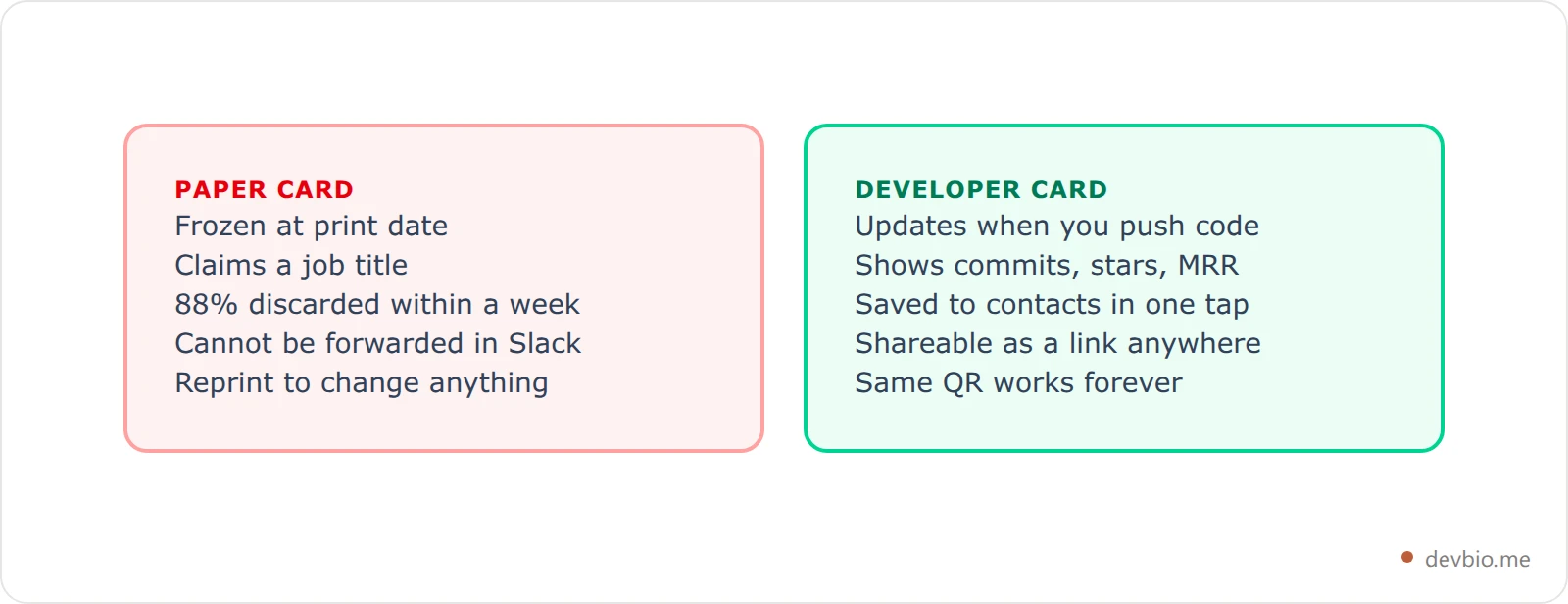
The developer digital business card market is growing at 12.2% annually — from $239 million in 2026 toward $680 million by 2035. That growth is driven by a simple realized truth: digital cards get 700% more shares than paper ones and produce 16% higher follow-up conversion rates. For developers specifically, the gap is even wider. Your value is in code repositories, shipped products, and revenue numbers — none of which fits on 3.5 × 2 inches of cardstock.
What a Developer Digital Business Card Actually Needs#
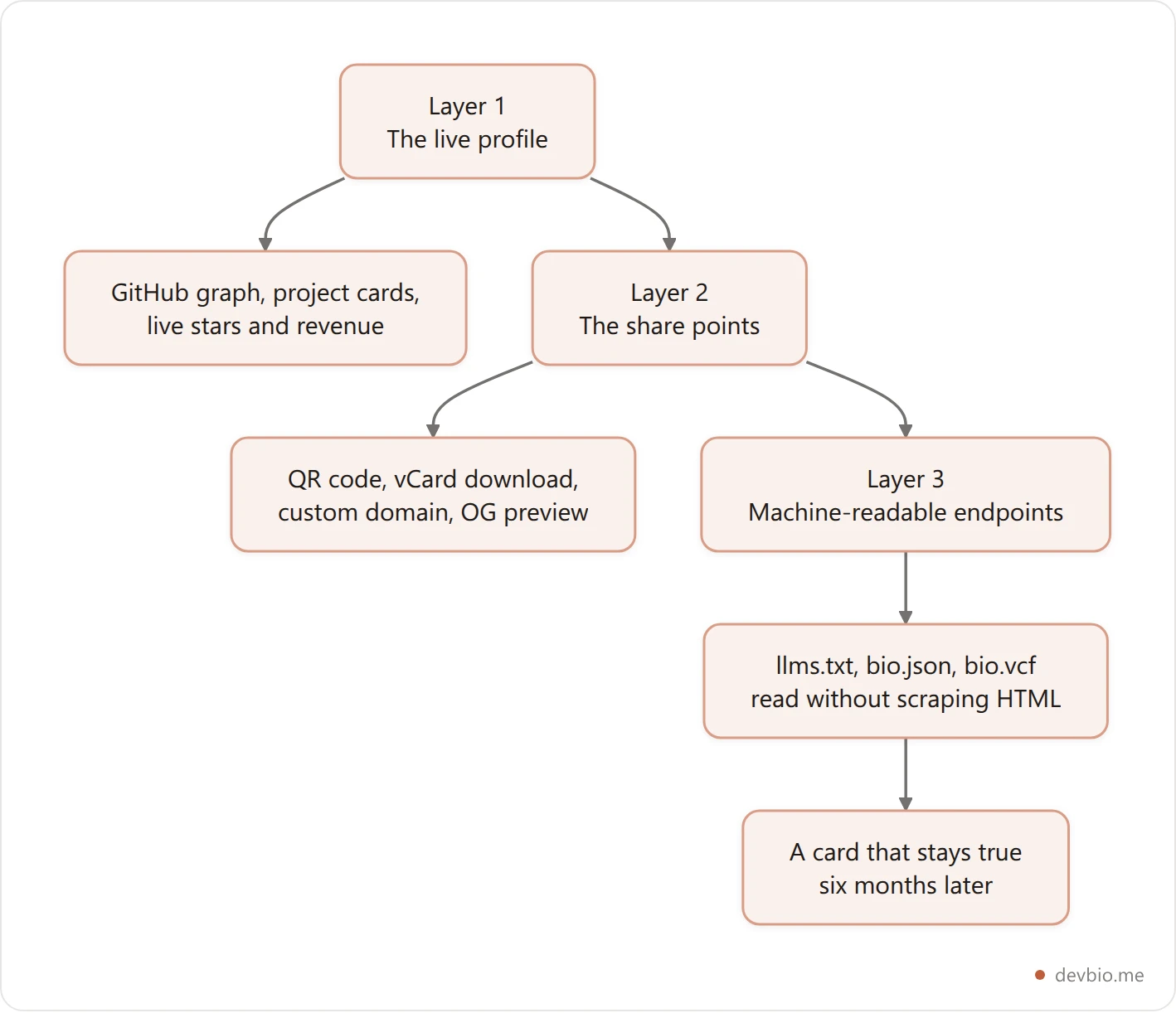
A digital card for most people is just a link to a contact page. For a developer, it needs three layers.
The 3-Layer Developer Card:
Layer 1 — The live profile. A composable page showing who you are and what you ship. Not a static resume. Not a link dump. A page with a GitHub contribution graph, project cards pulling live star counts and commits, and revenue data from connected payment gateways — because proof beats claims, every time.
Layer 2 — The share points. The mechanisms that get your card into someone's phone: a scannable QR code, a one-tap vCard download, a custom domain URL that's easy to say out loud, and a preview card that shows up when your link gets shared in Slack or on Twitter.
Layer 3 — Machine-readable endpoints. Structured URLs like /llms.txt, /bio.json, and /bio.vcf that let AI tools, contact managers, and other systems read your profile without scraping HTML. This is what separates a developer card from a generic link page in 2026.
Most platforms only cover Layer 1. The ones that add Layer 2 stop short of Layer 3. All three layers together is what makes a developer digital business card actually stick.
If you want that stack without assembling it from four separate tools, start with a profile that ships all three layers.
The QR Code That Goes Anywhere#
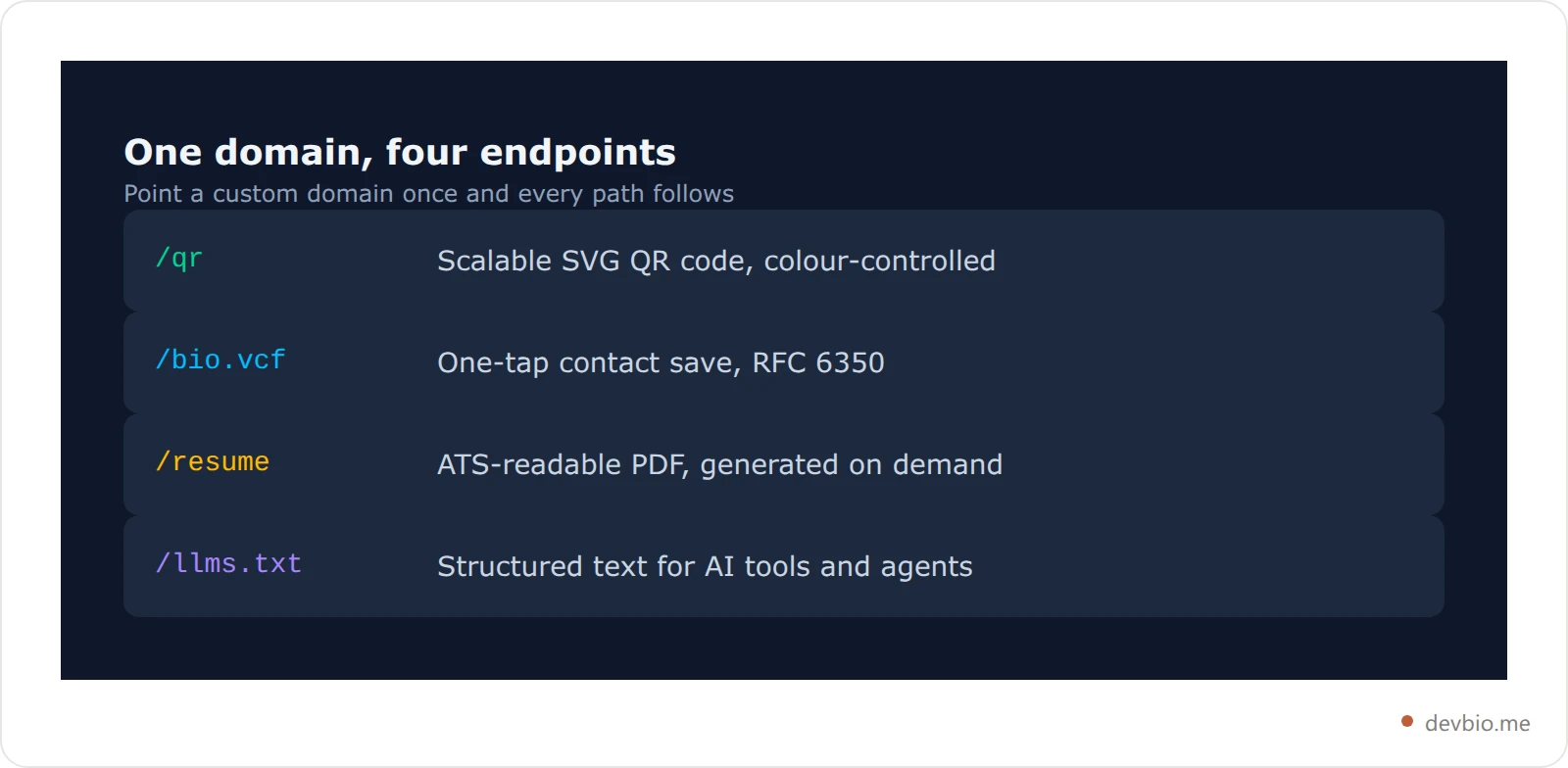
Every DevBio profile includes a dedicated QR endpoint at /{username}/qr. It returns a lossless SVG — infinitely scalable, embeddable anywhere.
/{username}/qr
/{username}/qr?size=512&fg=7c3aed&bg=0f0f0f
Optional parameters give you control over appearance:
?size=512— image size in pixels (128 to 1024, default 512)?fg=7c3aed— foreground color as a hex value?bg=0f0f0f— background color as a hex value
That color control matters. A QR code in your personal brand colors looks intentional, not bolted on. Use it on:
The last slide of a conference talk
An email signature (inline image linked to your profile URL)
A minimal printed card — QR only, no info that'll go stale
A conference badge lanyard insert or name tent
Business card QR codes earn a 34% scan rate — roughly 10x higher than QR codes used in advertising contexts. Developers at tech conferences already have their cameras out. Give them something worth scanning.
The QR encodes your canonical profile URL. If you add a custom domain later, every QR code that already exists still works. Nothing to reprint.
One-Tap vCard: Save to Contacts in Two Seconds#
The friction point after scanning a QR code is manually copying contact info. vCard eliminates it.
DevBio exposes a vCard 3.0 file at /{username}/bio.vcf — RFC 6350 compliant, readable by iOS Contacts, Android, Gmail, Outlook, and every major contact manager without an app on the recipient's end.
When someone scans your QR and taps the vCard link, they get your name, tagline, profile URL, social handles, contact links, and avatar — imported in one tap.
This is where dedicated card platforms like V1CE and Blinq make their money. And it's precisely why Linktree and Carrd don't compete in the developer networking space: Linktree has no vCard export. Carrd has no built-in QR generation. Both are link pages masquerading as contact solutions.
48% of professionals now use digital cards at conferences, up from 16% in 2020. The ones who don't offer a vCard download leave the smoothest part of the interaction — "save my contact" — entirely to chance.
Your Custom Domain as a Developer Business Card URL#
devbio.me/yourname works fine. But yourname.dev is a business card URL — one you can say out loud, put on a conference slide, and have someone remember ten minutes later.
DevBio supports custom domains on Pro. Routing works via middleware rewrite: when a request arrives on your domain (say, rahul.dev), the server rewrites it internally to your DevBio profile while the browser URL stays on your custom domain. Your bio, QR code, vCard, and resume all work at that domain automatically — no separate configuration for each endpoint.
So your full developer card suite becomes:
URL you say at conferences:
rahul.devQR endpoint:
rahul.dev/qrOne-tap contact save:
rahul.dev/bio.vcfPDF resume:
rahul.dev/resume
A setup that used to require a hosted server, a static site generator, and separate third-party tools for QR and vCard is now one DNS record pointed at one place. The full setup takes under 10 minutes.
The Live Social Preview: Your OG Card Does the Selling#
When your link gets dropped in a Slack channel, shared on Twitter/X, or pasted into a Hacker News thread, the OG preview card is what people see before they click.
A standard OG image is a static JPG with your name and maybe a tagline. DevBio generates a premium dark founder card with a live KPI strip — GitHub stars, commit count, current MRR from connected payment integrations. The card updates automatically when your data changes.
Link previews are a silent first impression. Someone sees your link in a Discord server and decides in two seconds whether to click. "Full-stack developer, building things" as a plain description versus "3 projects, 2.4K GitHub stars, $1.8K MRR" as a live data strip — the difference in click-through is not subtle.
No other developer-focused profile platform generates a live data OG card. Linktree's OG image is static. Carrd generates a generic site preview. GitHub's preview shows a repo grid. Here's a deeper look at what separates a developer bio from a generic link-in-bio page.
Developer Digital Business Card Comparison#
How the options stack up when you treat them as actual developer networking tools — not generic link pages or enterprise sales card platforms.
Platform | Custom QR | vCard (.vcf) | Custom Domain | Live GitHub | Live MRR | ATS Resume | Developer-Native |
|---|---|---|---|---|---|---|---|
DevBio | Yes (color params) | Yes (RFC 6350) | Yes (Pro) | Yes | Yes | Yes (LaTeX PDF) | Yes |
Linktree | Basic (Premium $35/mo) | No | Premium only | No | No | No | No |
Carrd | No built-in | No | Yes ($19/yr) | No | No | No | No |
read.cv | No | No | Limited | Partial | No | No | Partial |
V1CE | Yes | Yes | Enterprise | No | No | No | No |
Blinq | Yes | Yes | Premium | No | No | No | No |
GitHub README | No | No | No | Yes (static) | No | No | Yes |
Two things worth noting on this table:
Bento.me shut down February 13, 2026. All user data was deleted with no migration path. If you were on Bento, you need an alternative that actually covers developer-specific features — which Bento never fully addressed.
GitHub README is a starting point, not a destination. No vCard, no QR, no custom domain, no resume PDF. It shows GitHub data well. It can't show live MRR, accept one-tap contact saves, or generate an ATS-readable PDF resume. Here's what actually separates a developer bio from a GitHub profile README.
Before/After: Conference Networking Without a Printed Card#
Before (paper card):
Marcos is a solo founder at a developer conference. He ships a SaaS with $3.2K MRR and 12K GitHub stars across his repositories. He hands out 40 paper cards over two days. Each card shows his name, "founder," and a URL to a marketing landing page.
Result: Two people visit the landing page. One might follow up. The other 38 cards are in jacket pockets or hotel trash by Sunday night. Marcos can't tell who engaged, who scanned anything, or whether anyone remembered what his product actually does.
After (developer digital business card):
Same conference. Same Marcos. His last slide shows a large QR code and the words: "Scan to see the projects and real MRR." He mentions it takes three seconds.
Forty people scan. Twelve tap "Save Contact" via the vCard link. Six follow up on Twitter after seeing his live KPI preview when he tweets the talk. Three DM him directly about the product. His analytics show which companies the visitors came from.
The difference is proof over claims — and a contact mechanism that doesn't require both people to remember to email each other later. Set yours up before the next conference.
Digital cards produce 35% more follow-up responses than paper cards. At 40 conference interactions, that's 14 additional real conversations instead of hoping a name surfaces from someone's coat pocket. HiHello
Setting Up Your Developer Digital Business Card#
This takes about 15 minutes end to end.
1. Build your profile
Head to devbio.me and add the components that matter for your audience:
Basic info + avatar — name, tagline, location
About — two to three sentences on what you build and for whom
Projects — connect a payment integration (Stripe, Dodo Payments, Lemon Squeezy, or Polar) so project cards show live MRR; GitHub integration pulls live stars and commits automatically
GitHub stats — contribution count, total stars, follower count
Contribution heatmap — shows your shipping cadence visually at a glance
Links — GitHub, Twitter/X, LinkedIn, contact email
Here's a full breakdown of which components to prioritize and in what order.
2. Test your three share points
Visit the
/{username}/qrpath on your profile — your QR code, ready to embed or printVisit the
/{username}/bio.vcfpath — download it and open on your phone to confirm it imports correctly into ContactsPaste your profile link into a private Slack or Discord message and check what the OG preview looks like
3. Optional: Set up a custom domain
Point a domain you own at DevBio. Once live, QR, vCard, and resume all ride that domain automatically.
Conference prep checklist:
Last slide of any talk: large QR code + domain URL in text
Email signature: inline QR image linked to your profile
GitHub README: DevBio link at the top so README visitors see the live version
LinkedIn About section: replace static portfolio links with your DevBio URL
The QR points to a permanent URL. Update your profile — new project, new MRR number, new job — and every QR code that already exists still points to the right, updated page. No reprints. And if those conversations turn into freelance work, run the numbers through a rate calculator before you send a quote.
Where Else Your Developer Card Works#
Beyond conferences, the same link works across your whole developer presence.
Email signature. Embed the QR from /{username}/qr?size=128 as an inline image linked to your profile. Clients, collaborators, and hiring managers see it on every thread.
Job applications. Your profile's /resume endpoint generates an ATS-readable LaTeX PDF on demand. One URL in your application covers the human-readable version (the bio) and the machine-readable one (the PDF resume). No separate file to maintain.
AI and search discovery. Your profile exposes /{username}/llms.txt — a structured plain-text file that lets ChatGPT, Perplexity, and other AI systems read your profile accurately instead of guessing from fragments. Here's how that works and why it matters for developer discoverability.
Personal site or GitHub README. Drop the QR in as an image with a caption linking to your bio. Visitors who want to go deeper tap once.
Fediverse and chat apps. If you want your card to resolve by handle inside Mastodon or other ActivityPub apps, not just by a link someone has to tap, add WebFinger support to your profile. And before you print anything, confirm the handle you're using is actually available across every platform you list — a mismatched handle across cards and platforms reads like two different people.
Before you print anything, see our dedicated guide to QR code business cards for developers for color params and where to use them, and how vCard, QR, and llms.txt fit together as one machine-readable system.
Frequently Asked Questions#
What is a developer digital business card?#
A developer digital business card is a live, shareable profile link — accessible via QR code, downloadable as a vCard, and optionally hosted on your own domain. Unlike a paper card, it shows real-time data: GitHub contributions, project stars, current MRR from connected integrations. It updates automatically and works across every device with no app required on the recipient's side.
How do I make a QR code for my developer profile?#
If your DevBio profile is live, your QR code already exists at the /{username}/qr path. It's a scalable SVG with optional size (?size=512) and color (?fg=hex&bg=hex) parameters. No third-party QR generator needed — use that URL directly in slides, email signatures, or print.
Do I need NFC to share a digital developer card?#
No. NFC requires a physical card with an embedded chip, which is useful but optional. A QR code works on any camera-equipped smartphone — iOS since 2017, Android since 2018. For developers, a QR code plus vCard download covers nearly every real-world use case without spending $20–80 on hardware.
What should I put on a developer digital business card?#
The highest-signal items: name, tagline, top 2–3 projects with live GitHub stars and revenue data, tech stack, a GitHub link, and a contact method. Skip anything that'll go stale within six months. Full component guide here.
Can I use my own domain for my developer card?#
Yes. DevBio Pro supports custom domain hosting. Once configured, yourdomain.com, yourdomain.com/qr, yourdomain.com/bio.vcf, and yourdomain.com/resume all work automatically. Your domain stays in the browser; the profile is served behind it.
How does vCard work for a developer profile?#
A vCard (.vcf file) is a standard contact format supported by iOS Contacts, Android, Gmail, and Outlook. DevBio generates one at /{username}/bio.vcf with your name, links, and contact info. Someone scans your QR, taps the vCard link, and saves your contact in one tap — no typing, no spelling errors on their end.
Is a digital business card better than a paper card for developers?#
For developers: yes, categorically. Paper cards can't show GitHub activity, live MRR, or shipped-product proof. They go stale immediately and get discarded within a week in 88% of cases. Digital cards get 700% more shares, produce 16% higher follow-up conversion rates, and update automatically when your data changes. The one remaining argument for paper — the physical gesture — is handled by printing a minimal card with just a QR code pointing at your live profile.
Which link-in-bio tools offer vCard export for developers?#
Dedicated card platforms like V1CE, Blinq, and Wave Connect offer vCard export — but none of them are developer-native (no GitHub data, no MRR integration, no ATS resume). Generic link-in-bio tools like Linktree and Carrd don't offer vCard at all. Bento.me, which had some developer community traction, shut down in February 2026. DevBio is currently the only platform that combines vCard, QR, custom domain, live GitHub data, live revenue, and a PDF resume in one link.
Put Your Proof in One Link#
Paper business cards aren't thrown away because people are rude. They're thrown away because nothing on that card gives someone a reason to keep it.
A live developer profile with real commits and real revenue gives them one. Three things to do this week:
Test your QR endpoint — the
/{username}/qrpath on your profile. Drop it in your next slide deck.Download your vCard — the
/{username}/bio.vcfpath. Open it on your phone and confirm it imports cleanly.Swap one link — GitHub README, LinkedIn, or email signature. Replace it with your DevBio URL.
The developer who hands you a QR code at a conference isn't being lazy. They're handing you something that can prove what they've built, save their contact in two seconds, and still be accurate six months later. The paper card person is hoping you remember to Google them.
Your code already proves you can build. Put it on one link — devbio.me.


