Most lists of GitHub username ideas hand you 200 "cool" handles like c0d3ninja_99. Half of them won't even pass GitHub's sign-up form, because GitHub doesn't allow underscores. The other half will follow you into every clone URL, commit, and job application for the next ten years.
The short answer: a good GitHub username is your real name or a stable nickname, 39 characters or fewer, using only letters, numbers, and single hyphens, with no hyphen at the start or end. Pick one of six patterns below, then check it on GitHub and the other platforms you use, so you get one handle everywhere.
This guide, checked against GitHub's docs in September 2026, covers the GitHub username rules that are actually enforced, six naming patterns with examples, what "available" really means (a 404 can lie), and how DevBio's free username generator builds its candidate list.
What Characters Can a GitHub Username Use?#
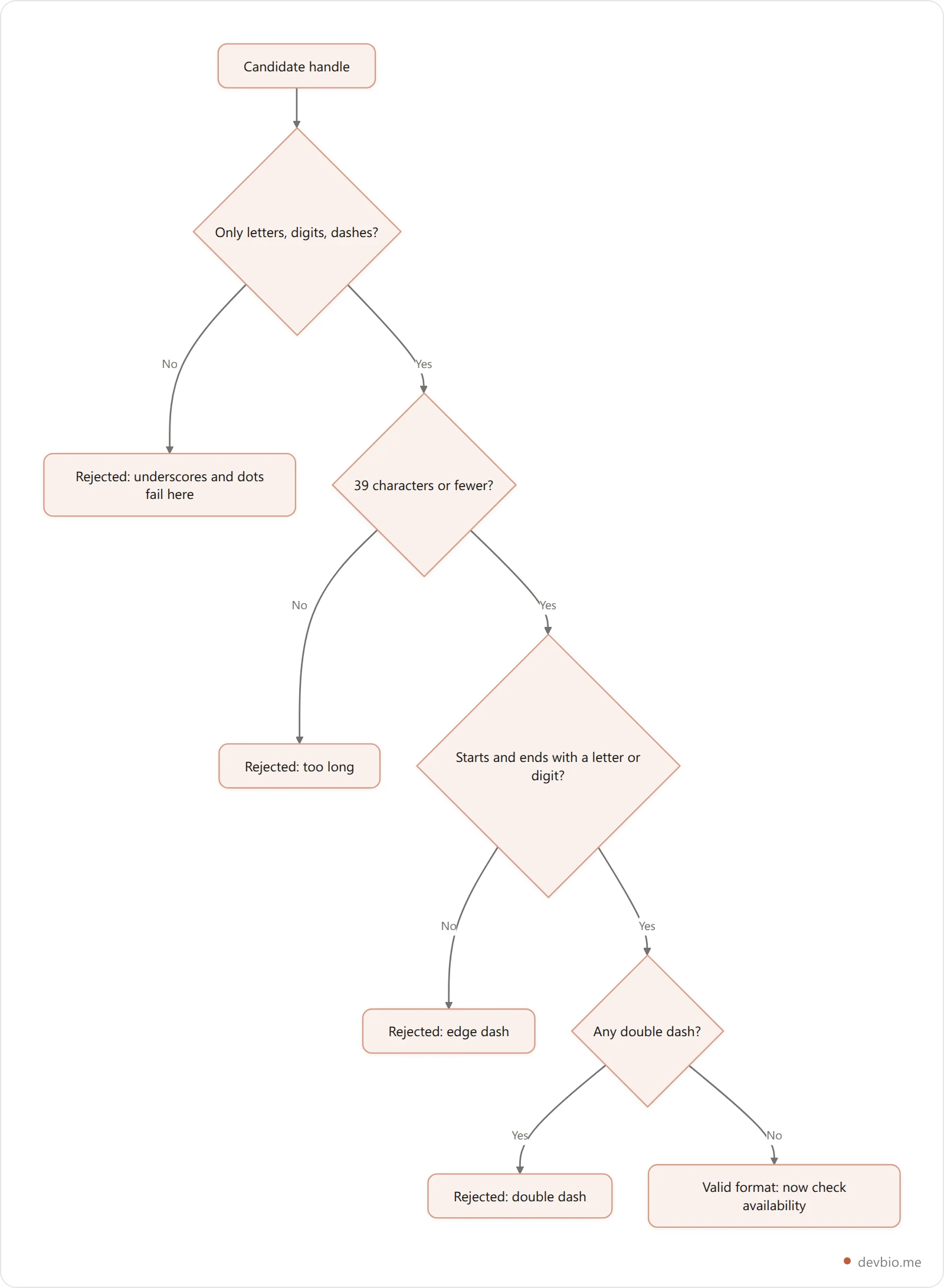
The GitHub username rules fit in one sentence: letters, numbers, and single dashes only, 39 characters at most, and no dash at the start or end. Underscores, dots, and spaces are all rejected. Capitalization is kept for display, but two accounts can't differ only by case.
GitHub's documentation is blunt: "Usernames for user accounts on GitHub can only contain alphanumeric characters and dashes (-)." The same page adds that a username can't start or end with a dash, can't contain two dashes in a row, and must not exceed 39 characters (GitHub Docs, username considerations).
Here's the whole rule set in one place:
Rule | Allowed | Rejected |
|---|---|---|
Characters |
|
|
Length | 1 to 39 characters | 40+ characters |
Dashes |
|
|
Edges |
|
|
Case | Stored as typed, matched case-insensitively | Two accounts differing only by case |
That underscore rule surprises people who pick a handle on X or Instagram first, where alex_rivera is normal. On GitHub it's rejected. The one place you'll see underscores in a GitHub username is Enterprise Managed Users, where GitHub itself appends _SHORTCODE to every provisioned account. You can't type one yourself.
If you want to validate a handle in code, this regex matches the personal-account rules:
const GITHUB_USERNAME = /^[a-z0-9](?:[a-z0-9]|-(?=[a-z0-9])){0,38}$/i;

GITHUB_USERNAME.test('alex-rivera');  // true
GITHUB_USERNAME.test('alex_rivera');  // false: underscore
GITHUB_USERNAME.test('alex--rivera'); // false: double dash
GITHUB_USERNAME.test('alex-');        // false: trailing dash
The lookahead -(?=[a-z0-9]) is doing the work: a dash is only allowed when a letter or digit comes right after it, which rules out doubled and trailing dashes in one move.
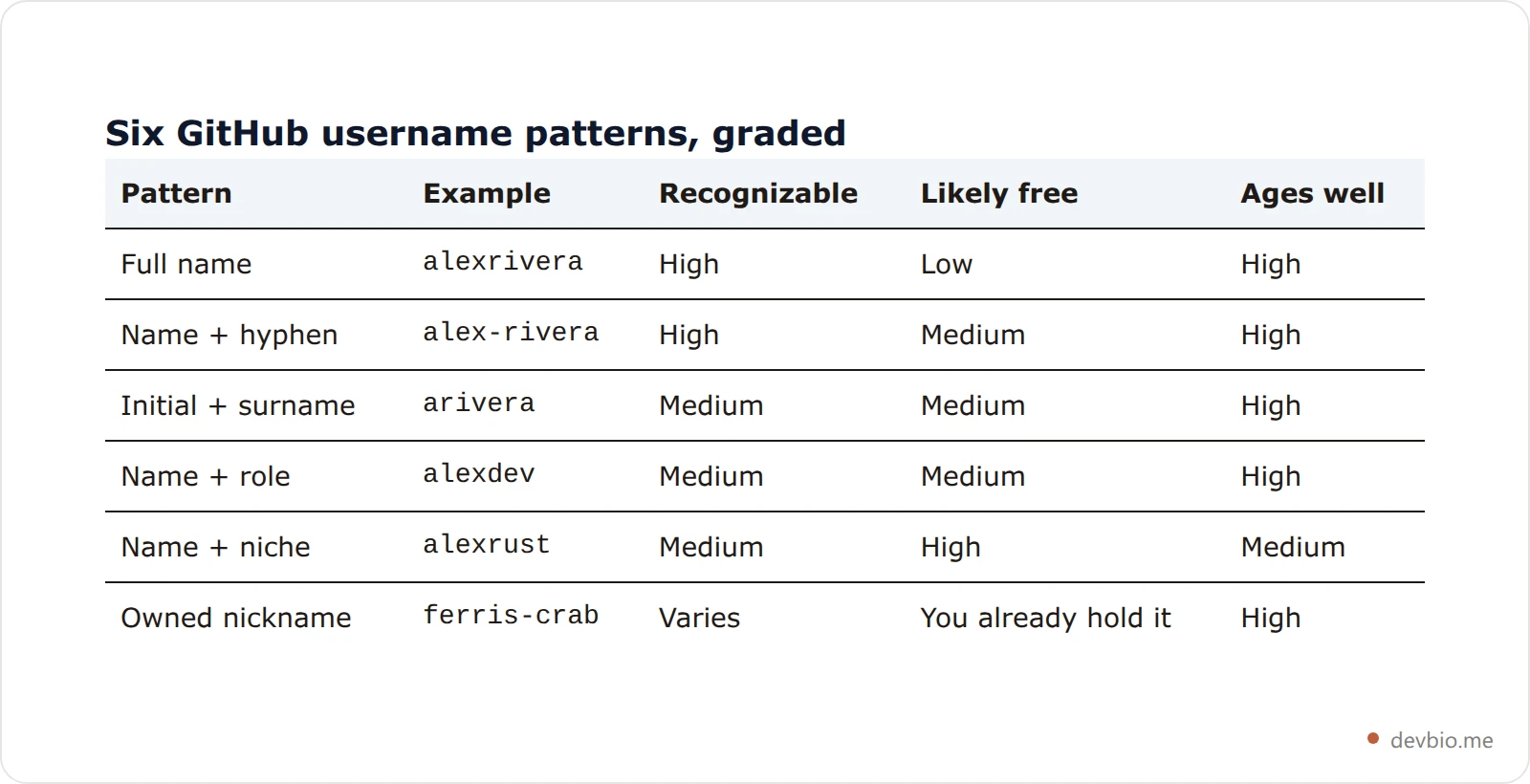
GitHub Username Ideas: 6 Patterns That Age Well#
Your GitHub handle ends up in places that are painful to change: git clone URLs, Go module paths, npm scopes, GitHub Pages at username.github.io, and every @mention in old issues. So the best GitHub username ideas are boring on purpose. Here are six patterns, roughly from most to least professional.
1. Full name, joined#
alexrivera. This is the default for a reason. A recruiter who knows your name can guess your GitHub URL, and it matches the name on your resume. If it's taken, move to pattern 2 before you start adding numbers.
2. Full name with a hyphen#
alex-rivera. GitHub explicitly suggests "a number, hyphen, or an alternative spelling" when your first choice is gone (GitHub Username Policy). A hyphen reads cleanly and keeps the name intact. It's also the closest legal equivalent to the alex_rivera you might use elsewhere.
3. Initial plus surname, or name plus initial#
arivera or alexr. Short, easy to type in a terminal, and still traceable to you. This works best when your surname is distinctive. For a common surname, arivera is probably long gone.
4. Name plus a role suffix#
alexdev, alexcodes, alexlabs, alexhq. A suffix signals you write code without locking you into one stack. Keep it generic: "dev" still fits in ten years, while "reactdev" might not.
5. Name plus your niche#
alexrust, rustalex, alex-gamedev. This is a strong pick if you're building a public identity around one community. The risk is that you outgrow the niche. Ask yourself whether you'd still be happy with it if you switched stacks.
6. A stable nickname you already own#
If you're known online as ferris-crab and you've held it for years across platforms, use it. The test isn't whether it's clever; it's whether you already own it in two or three other places. A consistent nickname beats a real name you can only get with a random number tacked on.
Which Usernames Should You Avoid?#
Avoid anything that dates you, confuses people, or ties you to someone else's brand: birth years, random digits, leetspeak, employer or school names, trademarks, and jokes. Each one either makes your handle hard to guess or gives you a reason to rename later, which breaks links. Here's why each one hurts:
Birth years and random digits.
alex1994dates you andalex48213looks auto-generated. If you need a number, a meaningful short one is better than a string of noise.Leetspeak.
4l3xis hard to say out loud and impossible to guess. People will typealexand land on someone else.Employer or school names.
alex-acmestops making sense the day you change jobs, and it can look like an official company account.Trademarks. GitHub's policy says valid trademark complaints are the only requests it reviews for releasing a claimed username. The flip side: if you pick a brand name, the brand owner can have it taken from you.
Joke handles you'll regret. Your username shows up in commit history that you can't fully rewrite. If you wouldn't put it on a resume, don't put it in
git log.
Length matters less than you'd think. The cap is 39, but anything past about 15 characters gets annoying to type in git remote add commands and eats room in your GitHub bio and profile card.
Why a 404 Doesn't Mean a Username Is Free#
A 404 on github.com/name only means no public profile exists right now. The username may still be held for 90 days after an account was deleted, so the sign-up form can refuse it. The only authoritative check is GitHub's own sign-up or rename form.
The quickest availability test is to open github.com/your-idea. If it 404s, you'd assume the name is free. That's usually true, but GitHub's own docs describe two cases where it isn't:
Deleted accounts are held for 90 days. When someone deletes their account, "your username will be available for anyone to use after 90 days" (Personal account reference). During that window the profile 404s, but the sign-up form still refuses the name.
Renamed accounts free up instantly. The reverse case: "After changing your username, your old username becomes available for anyone else to claim" (Username changes). A name you saw taken last month may be open today.
There's also a case where a name looks taken but is really just quiet. GitHub warns that "accounts with no visible activity may be in active use," and it won't release a username because it appears inactive. So an empty profile with zero repos isn't a sign you can ask for it. Squatting is against GitHub's rules, and so is buying or selling usernames, which can get an account permanently suspended.
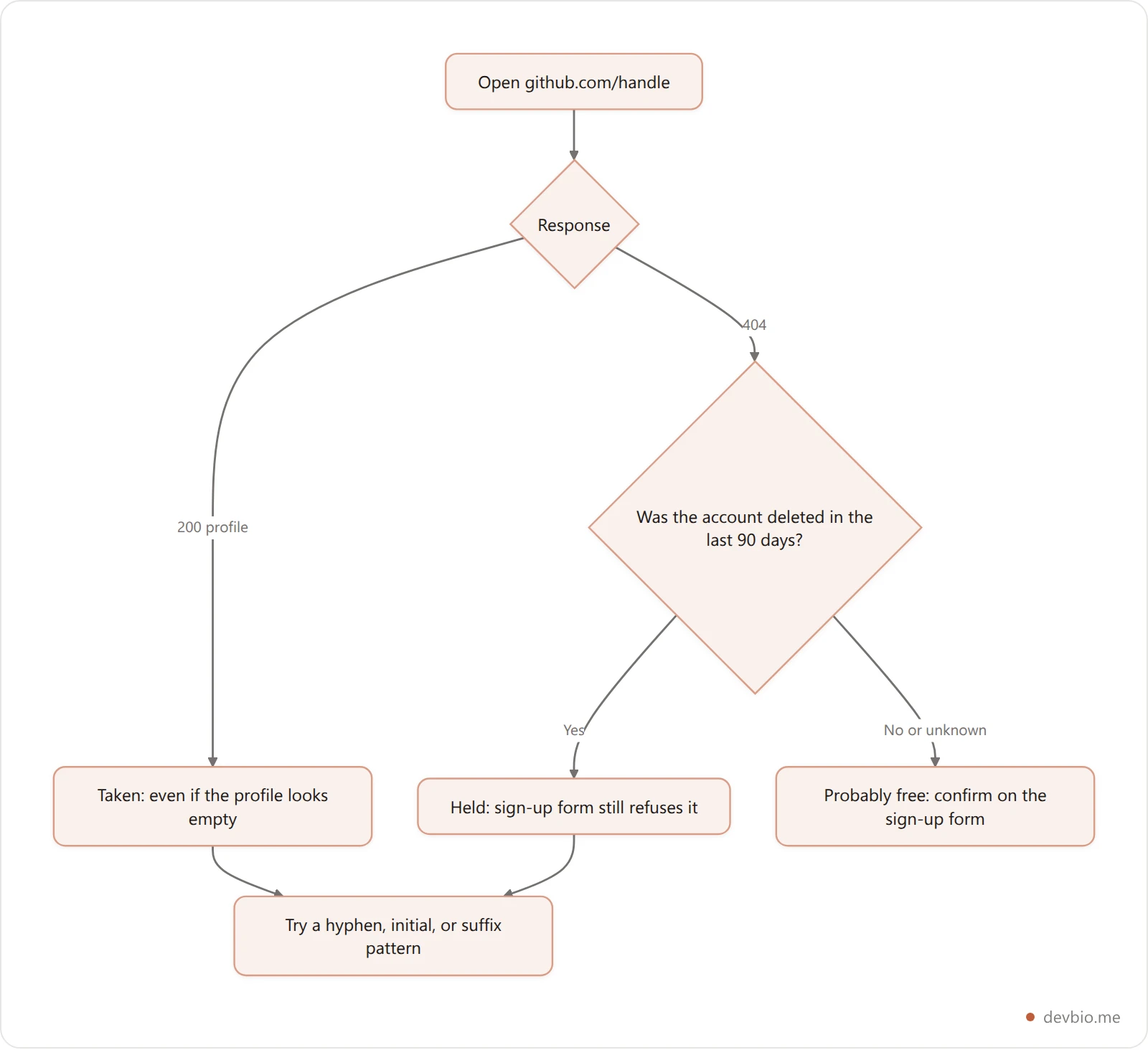
The only authoritative check is GitHub's own sign-up or rename form, which tells you whether the name is actually available before it lets you continue. Anything else, including third-party checkers, can only read the public profile response.
How to Get the Same Handle Everywhere#
Shortlist a few candidates, drop any with underscores or dots, check the survivors on every platform in one pass, then register the winner on the scarcest platform first. Doing it the same day stops someone else from grabbing the handle on a site you skipped.
Picking a GitHub username in isolation is how you end up as alexrivera on GitHub, alex_rivera_dev on X, and arivera2 on npm. Recruiters and collaborators cross-reference these, so a matching handle saves everyone a search.
The order that works:
Shortlist three to five candidates using the patterns above.
Drop any with underscores or dots if GitHub is on your list; they won't port.
Check each survivor on every platform you care about, in one pass.
Register the winner on the hardest platform first (usually GitHub or X, where short names are scarce), then the rest the same day.
DevBio's username checker does step 3 for you. It probes 15 platforms from one search: devbio, GitHub, GitLab, npm, PyPI, Hugging Face, dev.to, Hashnode, Twitter/X, Bluesky, mastodon.social, Reddit, LinkedIn, Product Hunt, and Medium. We wrote up how each probe works, and where it can't give a straight answer, in the developer username checker guide.
How DevBio's Username Generator Builds Candidates#
DevBio's free GitHub username generator combines your name, four role suffixes, and up to five interests into at most 24 deterministic candidates, filters them by format, and checks them all on devbio in one batch. It uses no AI and no randomness, so the same input always returns the same list.
Since the audience here writes code, here's exactly what it does, from its source. I read the generator's code while writing this, and ran it on a sample name to get the output below.
It takes two inputs: your name and an optional comma-separated list of interests. It lowercases both, splits on anything that isn't a letter or digit, and keeps up to five interest words. Then it builds candidates deterministically. There's no randomness, so the same input always gives the same list:
From your name:
first,firstlast,firstl,flast,first-last,first_lastRole suffixes:
firstplusdev,hq,labs, andcodesInterests:
firstinterest,interestfirst,first-interestfor each oneFallback: if that yields fewer than six, it combines interests with the suffixes on their own
It caps the list at 24 and drops anything that doesn't match DevBio's handle format (a letter or digit first, then letters, digits, - or _, 2 to 39 characters total).
For the input "Alex Rivera" with interests "rust, gamedev", it returns 16 handles: alex, alexrivera, alexr, arivera, alex-rivera, alex_rivera, alexdev, alexhq, alexlabs, alexcodes, alexrust, rustalex, alex-rust, alexgamedev, gamedevalex, and alex-gamedev.
Here's the catch worth knowing: DevBio handles allow underscores, and GitHub usernames don't. Run that list through the GitHub regex above and exactly one fails, alex_rivera. Every other candidate is a legal GitHub username too. If GitHub matters to you, skip the underscore variant.
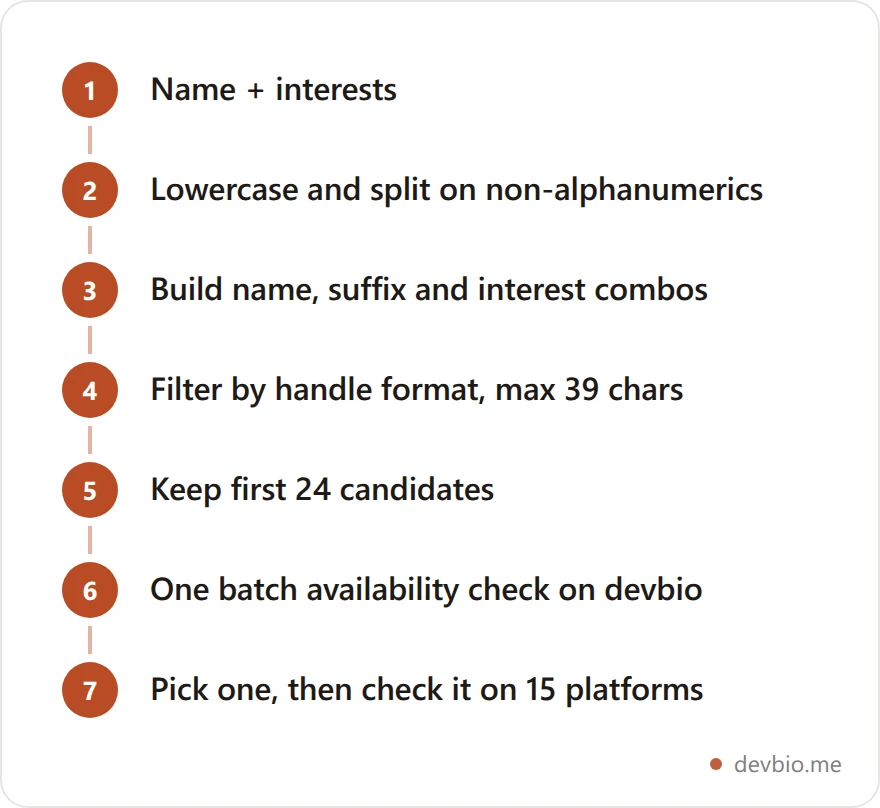
The generator checks availability on devbio only, in a single batched request. That's a deliberate cost trade-off in the code: fanning out 24 candidates to 15 platforms on every click would be slow and rude to those sites. Once you pick a favorite, it links straight to the full cross-platform check. Try it on the username generator; it's free, and you don't need an account to use it.
Can You Change Your GitHub Username Later?#
Yes, but it isn't free of side effects. GitHub redirects web links to your repositories, and pushes to old remote URLs keep working. Some things break, though:
Your old profile URL,
github.com/oldname, returns a 404.Links to your gists change and old ones 404.
@mentionsof your old name don't redirect.If someone claims your old name and creates a repo with the same name as yours, your redirect for that repo stops working.
We covered the full checklist in how to change your GitHub username without breaking links. The short version: it's much cheaper to pick well now than to rename later.
Key Takeaways#
GitHub usernames allow only letters, numbers, and single dashes, up to 39 characters, with no dash at either end.
Underscores fail on GitHub, so
first-lastis the portable version offirst_last.Your real name, a hyphenated name, or an initial plus surname ages best.
A 404 profile can still be a held username: deleted accounts are reserved for 90 days.
Check one handle across every platform before you register any of them.
Frequently Asked Questions#
Can a GitHub username have an underscore?#
No. GitHub usernames can only contain letters, numbers, and dashes. Underscores, dots, and spaces are rejected on the sign-up form. The only underscores you'll see are in Enterprise Managed User accounts, where GitHub appends _SHORTCODE itself. If you use first_last elsewhere, first-last is the closest match on GitHub.
How long can a GitHub username be?#
Up to 39 characters, and GitHub rejects anything longer. Short names are almost all taken, so most developers land somewhere between 6 and 15. Aim for the short end of that range, because your handle appears in clone URLs, package scopes, and commands you'll type by hand for years.
Are GitHub usernames case-sensitive?#
No. GitHub keeps the capitalization you typed for display, but it matches usernames case-insensitively. AlexRivera and alexrivera point to the same account, and nobody else can register a version that differs only by case. Lowercase is still the safer choice for URLs you'll share.
Should my GitHub username be my real name?#
For most developers, yes. Recruiters look you up by name, and a matching handle makes your profile easy to find and easy to trust. A long-held nickname is a fine alternative if you already use it across platforms. Avoid anything tied to an employer, a school, or a trend.
What happens to a username when an account is deleted?#
GitHub holds it. According to GitHub's docs, a deleted account's username becomes available for anyone after 90 days. During that window, the profile URL returns a 404, but you still can't register the name. A renamed account is different: its old username is free to claim immediately.
Can I ask GitHub for an inactive username?#
Not unless you hold a trademark for it. GitHub's username policy says it doesn't release, transfer, or reclaim names because they look inactive, since accounts with no visible activity may still be in use. Valid trademark complaints are the only requests it reviews. Buying or selling usernames is also prohibited.
Pick One Handle and Claim It Everywhere#
The best GitHub username ideas share three traits: they pass GitHub's format rules, they're recognizably you, and you can hold the same handle on the other platforms you use. Start with your name, fall back to a hyphen or initial, and only reach for suffixes after that.
Once you've settled on a handle, give it a home that isn't just a GitHub profile. A DevBio page at devbio.me/yourhandle shows your live GitHub stats, projects, and links on one URL, and pairs well with a strong GitHub profile README and a sharp GitHub profile bio.