

A custom domain developer bio setup changes the address bar, not everything. Point a CNAME record at cname.devbio.me, click Verify, and bio.yourname.dev serves your profile, your /resume PDF, your vCard and your llms.txt. But your canonical tag, your og:url, your QR code and the link inside your vCard still point at devbio.me/yourhandle. That split is on purpose. Most setup guides don't mention it.
We read DevBio's routing and verification code line by line for this post. Everything below is what the product does as of September 2026, not what a marketing page says it does.
Key Takeaways
Subdomain: one CNAME,
bio→cname.devbio.me. Apex: an ALIAS/ANAME record, or a Cloudflare CNAME that gets flattened.Verify checks the CNAME first. If there isn't one, it compares A records. That's why CNAME flattening passes.
Only a published bio with a verified domain gets routed. An unverified hostname serves nothing.
The domain wraps your bio's paths only.
/dashboard,/toolsand/blogsreturn 404 on your domain.Canonical,
og:url, the QR code and the vCard link stay ondevbio.me. Search credit and printed cards never break.Custom domains need Pro: $2/month or $12/year at the early-adopter price, or $39 once for a founding seat.
Set up a custom domain developer bio: the CNAME for a subdomain#
A subdomain like bio.yourname.com is the fastest setup. You add one record, and the apex stays free for a portfolio site later.
In DevBio, open Dashboard → Settings → Custom domain, type the full hostname (bio.yourname.com) and click Save. The hostname has to look like a real domain. Something like localhost or a bare word gets invalid-hostname. If another bio already claimed that hostname, you get a 409 with "Another bio already uses this domain." Saving does not make anything live. It only stores the mapping as unverified and shows you the target.
Then add this at your DNS provider:
Field | Value |
|---|---|
Type | CNAME |
Name / Host |
|
Value / Target |
|
TTL | 300 or Auto |
Put only bio in the Name field, not bio.yourname.com. Most DNS panels append the zone for you. If you type the full hostname, you create bio.yourname.com.yourname.com, and verification will never find it.
Before you click Verify, check the record from your own terminal:
dig +short CNAME bio.yourname.com
# cname.devbio.me.
If that prints the target, verification will pass. If it prints nothing, the record hasn't propagated yet, or it lives under the wrong name.
Apex domains need an ALIAS, ANAME, or CNAME flattening#
Under RFC 1034, a CNAME can't sit next to other records for the same name. An apex domain (yourname.com) always has SOA and NS records, so a plain CNAME there is illegal. When you type an apex into the field, DevBio's dashboard notices. Its suffix check even treats yourname.co.uk as an apex. The DNS table then switches the record type from CNAME to ALIAS/ANAME and shows a note.
You have two ways to do it:
ALIAS / ANAME. Route 53, DNSimple, Namecheap and others offer an apex record that behaves like a CNAME. Set name
@and valuecname.devbio.me.CNAME flattening on Cloudflare. Add a CNAME at
@pointing tocname.devbio.me. Cloudflare resolves the target and answers queries for your apex with plain A records.
The next question is how verification can pass when there's no CNAME left to find. The next section answers it.
How DevBio's Verify button actually checks your DNS#
This is the part other guides skip. Clicking Verify runs a real DNS check from the server. It's a two-step match:
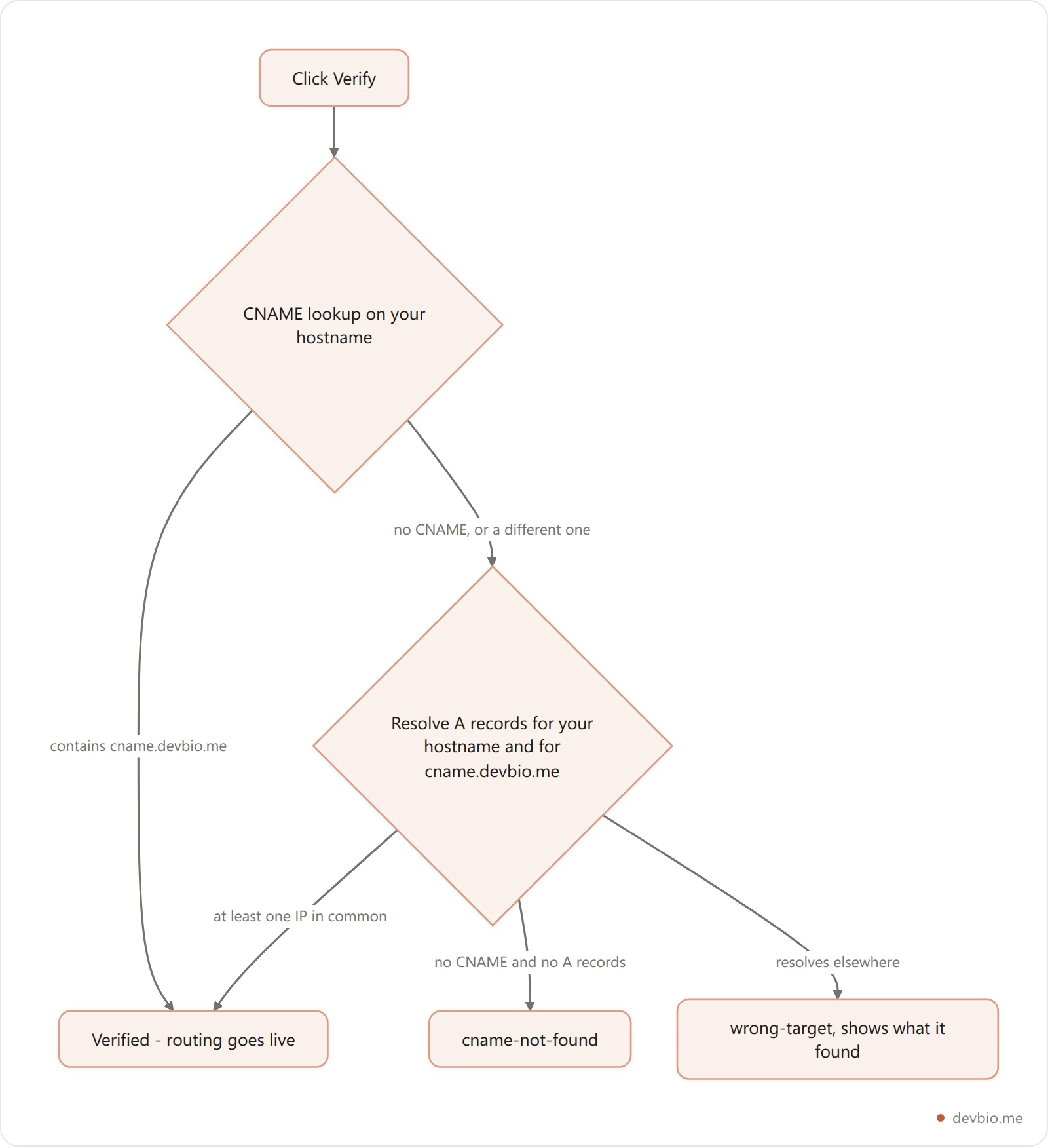
CNAME lookup. It resolves the CNAME on your hostname and strips trailing dots. If the answer contains
cname.devbio.me, you're verified.A-record fallback. If there's no CNAME, or it doesn't match, it resolves IPv4 addresses for your hostname and for
cname.devbio.me. If any address matches, you're verified. This is the path CNAME flattening and ALIAS records take.
When both steps fail, you get one of two errors, and each one names the fix:
cname-not-found: "No CNAME (or matching A) record found for bio.yourname.com. Add a CNAME pointing to cname.devbio.me — or an ALIAS/ANAME at the apex — then retry." Nothing resolves yet. Wait for propagation.wrong-target: "bio.yourname.com currently resolves to "something-else", expected "cname.devbio.me"." An old record is still there, often a parking page or a leftover GitHub Pages CNAME. Delete it, because a name can only hold one CNAME.
Verify is limited to 10 attempts per minute per account. If you click it every few seconds while DNS propagates, you'll get a 429 "Too many verify attempts" response. Run dig in your terminal instead, and click Verify once it prints the target.
What your custom domain serves, and what still says devbio.me#
After verification, every request to your hostname gets rewritten internally to your bio. It's not a redirect, so the address bar keeps showing your domain. The rewrite covers the root and every path under your bio:
URL on your domain | Serves |
|---|---|
| Your profile page |
| The PDF resume, compiled from your bio data |
| An SVG QR code |
| vCard for contact import |
| Structured profile data |
| Plain-text profile for AI tools |
| 404. The product UI stays on devbio.me |
Now the part that surprises people. Several links your bio generates are hard-coded to the canonical address, not your domain:
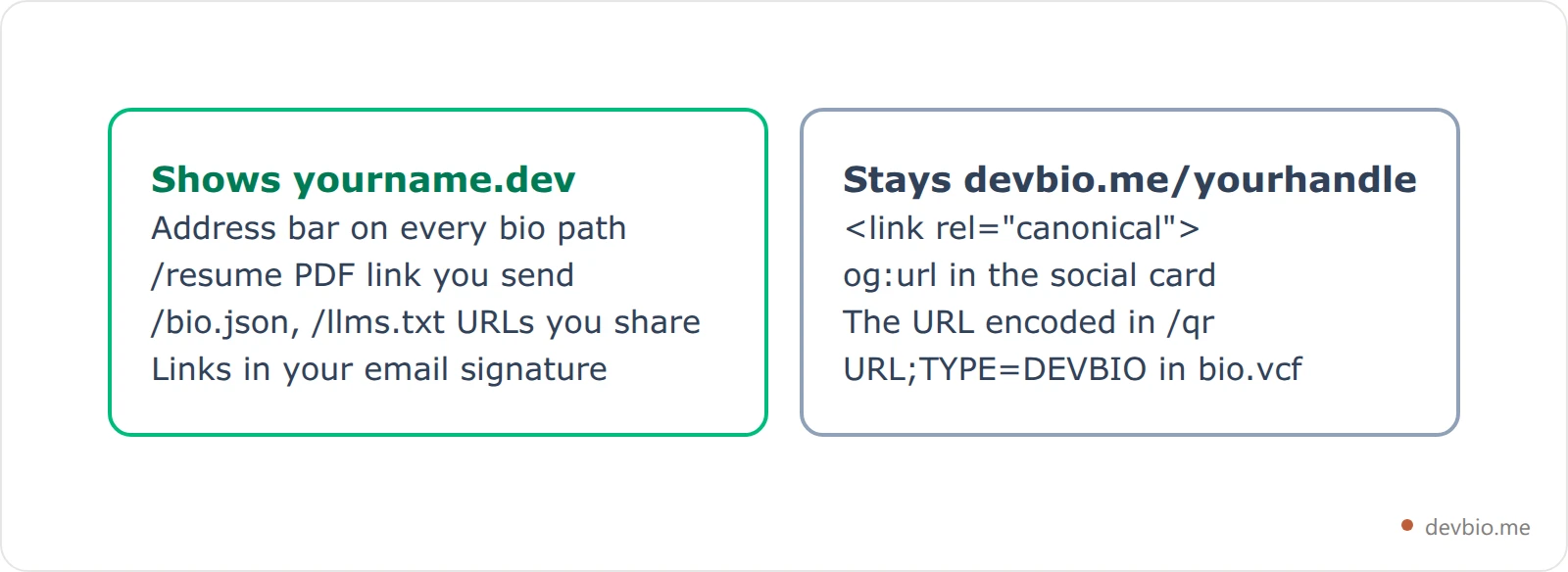
Here's why each of those stays put, and whether you should care:
Canonical tag. Your page is reachable at two URLs, so one has to be canonical, or Google sees duplicate content. Search credit goes to
devbio.me/yourhandle. If you wantyourname.devitself to rank for your name, you need a standalone site. Our ranking of 7 personal website setups covers those.og:url. Some platforms, LinkedIn in particular, may show theog:urlhost on the share card instead of the URL you pasted. Paste your link into the meta tags checker to see exactly what the tags declare.QR code.
/qralways encodesdevbio.me/yourhandle. That's a feature for print. If your domain lapses in three years, the cards you handed out still work. Our QR code business card guide goes deeper on what to encode.vCard.
bio.vcfadds aURL;TYPE=DEVBIOline pointing atdevbio.me/yourhandle, next to your own links. Any link you added on your profile is included as you entered it, so add your custom domain there if you want it in people's contacts.
Three conditions have to be true before a request routes#
For any hostname that isn't devbio.me, the router looks up a bio that matches all three conditions:
The hostname matches exactly (lowercased).
www.yourname.devandyourname.devare different hostnames, and each bio stores one. Pick one, and forward the other at your registrar.The domain is verified. A saved but unverified hostname is inert, so a typo can't serve your bio on a stranger's domain.
The bio is published. If you unpublish, your custom domain stops serving it too.
The lookup is cached in Redis for about a minute. A domain you just verified can take up to a minute to start serving, and one you just removed can take a minute to stop.
Common failures, matched to their cause#
Verify says cname-not-found right after you saved the record. Propagation. Low-TTL providers like Cloudflare usually answer within minutes, and registrars with a high default TTL can take hours. Check with dig +short CNAME bio.yourname.com or dnschecker.org.
wrong-target naming an old host. Delete the leftover record. People moving off GitHub Pages or Carrd hit this all the time. (Carrd's cheapest paid tier can't use a custom domain at all. We covered that in Carrd pricing.)
The registrar rejects a CNAME at @. Use its ALIAS/ANAME field. If it has none, move nameservers to Cloudflare's free plan, or use a subdomain.
yourname.dev works but www.yourname.dev doesn't. That's expected. Only the saved hostname routes, so add a registrar redirect for www.
The Save button is locked. The card shows a Pro badge on the free plan. Saving calls a Pro-gated endpoint, which returns plan-required (HTTP 402) for free accounts.
What a custom domain costs on DevBio#
The custom domain is a Pro feature. The free plan has it switched off. Pro is $2/month or $12/year at the current early-adopter price. The first 100 buyers can instead pay $39 once for a founding-member seat, which is lifetime Pro. Add $10–20 a year for the domain from any registrar. Pro allows one bio per account, and each bio has one custom domain, so plan around one address.
Removing it is free and instant: click the trash icon and confirm "Remove the custom domain mapping? Your bio stays reachable at devbio.me." The remove endpoint isn't Pro-gated, so you can still clean up after a downgrade.
Frequently Asked Questions#
Does a custom domain help my bio rank in Google?#
No. The canonical tag points at devbio.me/yourhandle, so that URL gets the ranking credit, and your domain adds none. That's deliberate. It prevents duplicate content, so the two URLs never compete.
Can I use a subdomain for DevBio and keep my apex for a portfolio?#
Yes. bio.yourname.com (a CNAME) and yourname.com (your portfolio's A or ALIAS record) are separate DNS entries, so they don't interfere. This is the setup we recommend for most people. Your portfolio host keeps the apex, DevBio gets one subdomain, and you can change either side later without touching the other.
Will my old devbio.me links and printed QR codes break?#
No. Nothing redirects away from devbio.me/yourhandle, and the QR code keeps encoding that address, so every link you've already shared keeps working. That holds even if you remove the custom domain or let it expire. The devbio.me address is the permanent one, and your domain is an extra way in.
Is HTTPS included?#
Yes. The dashboard card promises to "serve your bio at example.com or bio.example.com with auto-issued SSL", so you don't upload a certificate. There's no separate charge for it either. Give the certificate a few minutes after verification before you share the HTTPS link.
Your next step#
Pick the hostname first (a subdomain if you ever want a separate site at the apex), then do it in this order: Save → add the record → dig until it prints cname.devbio.me → Verify once. If you're still choosing between a bio page, a portfolio and a full personal site, this comparison of the three will settle it first. If you're weighing handles, vanity URLs for developers covers naming.
Your code already proves you can build. Put it on a domain you own — start on devbio.me.