

Developer Portfolio vs Personal Site vs Link in Bio: What's the Difference?#
A personal website gives full control but demands constant upkeep. A link-in-bio page (Linktree, Bento) is fast to set up but proves nothing about what you've built. A GitHub profile shows you write code but buries career context behind a wall of green squares. A developer bio page pulls live GitHub data and verified revenue into one always-current URL. Which format you lead with determines what a recruiter, client, or collaborator sees in the first 15 seconds.
Most developers don't make this choice consciously. They built a portfolio site when job-hunting three years ago, created a Linktree to manage their social links, and haven't revisited either since. In 2026, that's a liability — not just a gap.
Developer hiring is faster, more AI-assisted, and more proof-dependent than at any previous point. The format you use for your developer portfolio vs personal site decision shapes whether that proof lands or gets ignored entirely.
Table of Contents#
Why Your Developer Profile Format Matters More in 2026#
The numbers are direct.
AI has moved into hiring quickly, and resume screening is one of its most common applications — 82% of companies using AI in hiring deploy it for resume screening. Your profile isn't just read by humans anymore; it's parsed by systems that cannot browse a custom Next.js portfolio.
At the same time, GitHub became the standard technical credential. The 2025 Stack Overflow Developer Survey reports that 81% of developers use GitHub as their primary code platform. 87% of tech recruiters now review GitHub profiles during hiring, with 83% saying they trust GitHub activity more than a traditional resume.
The implication is direct: the format you choose for your developer profile determines what those AI systems and human reviewers actually find. A stale personal site sends a signal. A generic Linktree URL sends a different signal. Neither sends the signal most developers intend.
The Four Developer Profile Formats, Defined#
Before the comparison, here's a precise definition of each.
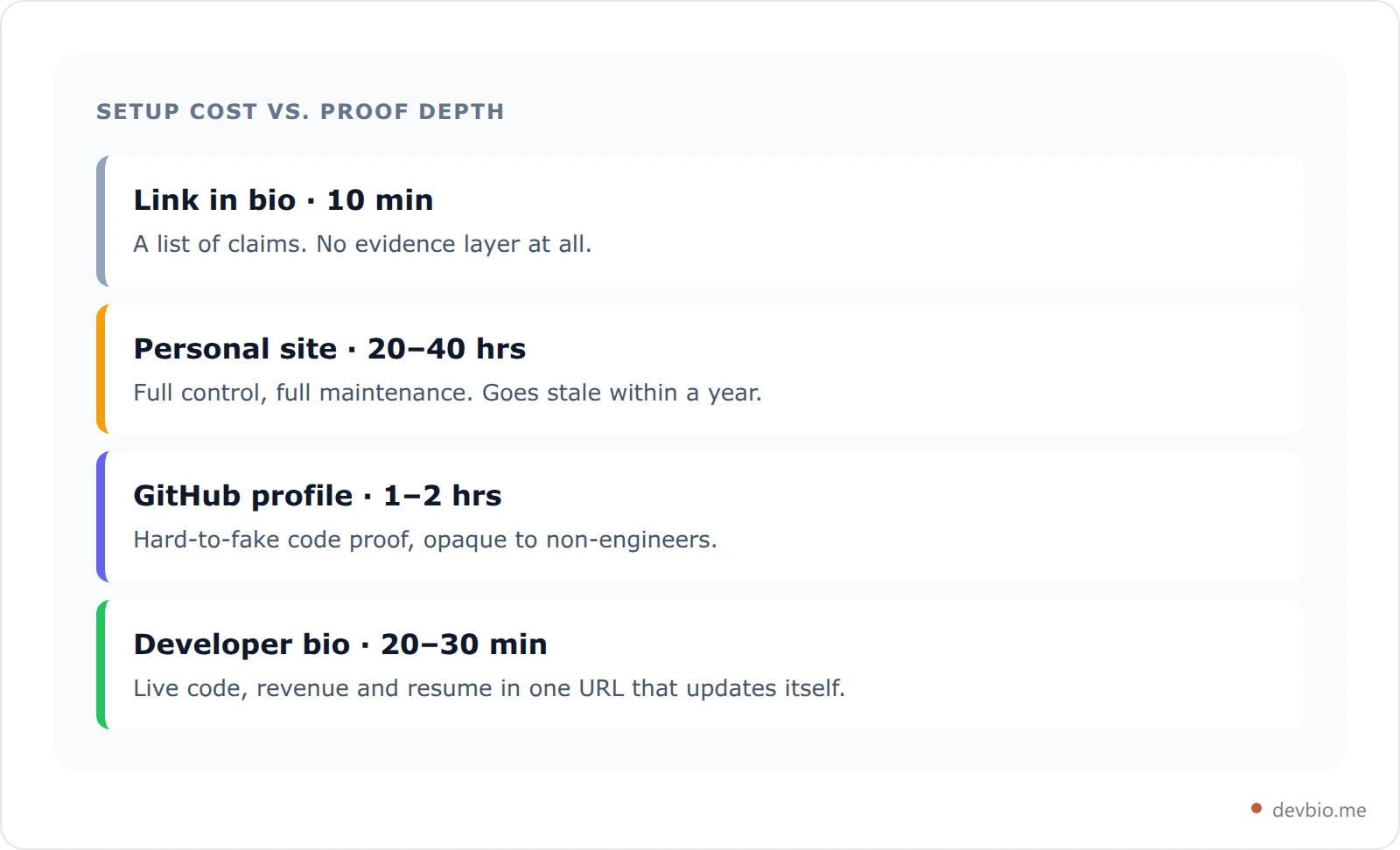
Personal portfolio website — A developer-built or no-code site (Webflow, custom Next.js, Framer) with project showcases, a bio, and optionally a blog. Full control over design, content, and SEO. You own the domain and everything on it.
Link-in-bio page — A single URL (Linktree, Bento.me, Beacons, Carrd) listing your links, a short bio, and a profile photo. Ten-minute setup. Near-zero proof depth.
GitHub profile + README — Your github.com/username page, optionally enhanced with a pinned profile README that adds narrative context to your public repos. Native code credibility.
Developer bio page — A composable, single-page profile that syncs live GitHub data and connected payment revenue, auto-generates an ATS-ready PDF resume, and supports your own custom domain. The newest format — and the one built for how hiring actually works now.
Each format has a different job. The question is which one matches what you actually need.
Personal Portfolio Website: Full Control, High Maintenance#
A personal developer website is the gold standard for control and long-term SEO. You own the domain, you choose the design, and blog posts you publish today can drive search traffic for years. Case studies, technical writing, and client work all live exactly where you put them.
That's the upside. Here's the real problem.
The average developer portfolio takes 20–40 hours to build. Most developers treat it as a project: they ship it carefully, then move on. Developer career writers have documented that the average portfolio site goes stale within 12 months of launch. Projects from a previous job disappear behind NDAs. That bootcamp React app is still on the homepage. The skills section lists frameworks from three jobs ago.
Hiring managers spend an average of 15 seconds on portfolio sites during initial screening. If those 15 seconds reveal a site last updated in 2024, the signal is clear.
There's also a subtler problem specific to 2026. A portfolio website proves you can build a website. With AI code tools, any developer can ship a polished Next.js or Framer portfolio in an afternoon. What a static personal site cannot prove is that you ship products people actually use, return to, and pay for.
A personal site is worth having if you write technical content or want full SEO ownership of your name. But it's no longer sufficient as your primary professional presence when you're competing for serious attention.
Link in Bio: Fast Setup, Zero Proof#
Link-in-bio tools — Linktree, Bento.me, Beacons, Carrd — solve the "one URL for everything" problem in about ten minutes. That's genuinely useful. You get a page, your links, a profile photo, and a short bio.
The problem is what they don't do.
Linktree was built for content creators who need to connect their Instagram, YouTube, Spotify, and merch store from one place. It was not designed for developers who need to communicate what they've shipped, what it earns, and whether their engineering is worth hiring.
A generic link-in-bio URL (linktr.ee/yourname) sends a subtle but real signal to hiring managers and potential clients: this person hasn't invested in their own professional presence. There's also no identity verification layer — nothing stops someone from creating a page with your name and links and impersonating you.
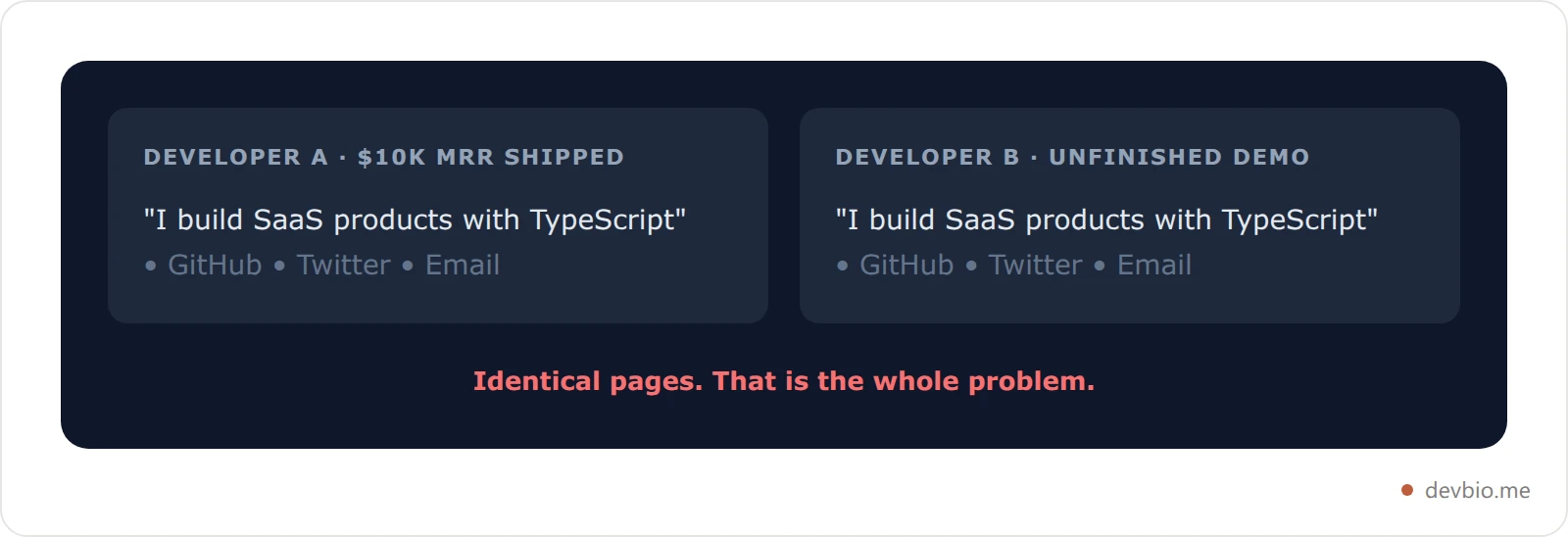
The biggest gap is proof. A link-in-bio page is a curated list of claims with no evidence layer. "I build SaaS products with TypeScript" looks identical on a Linktree page whether you've shipped a $10K MRR product or an unfinished to-do app. 60% of hiring managers now say they want to see proof of technical abilities rather than take resume claims at face value. A list of unverified links doesn't close that gap. If you're evaluating specific tools, here's how link-in-bio options for developers actually compare.
If you'd rather the page carry evidence instead of assertions, see what a proof-first profile looks like.
GitHub Profile: Real Proof, Wrong Container#
GitHub is where the evidence is hard to fake. Commit history is timestamped and public. Stars on your repos are earned. Your contribution graph is an honest record of how active you've been over the trailing year.
87% of tech recruiters review GitHub profiles during hiring, with 83% saying they trust GitHub activity more than a traditional resume. It's the most credible signal for "can this person write code" that currently exists.
But GitHub has structural limits as a standalone professional presence.
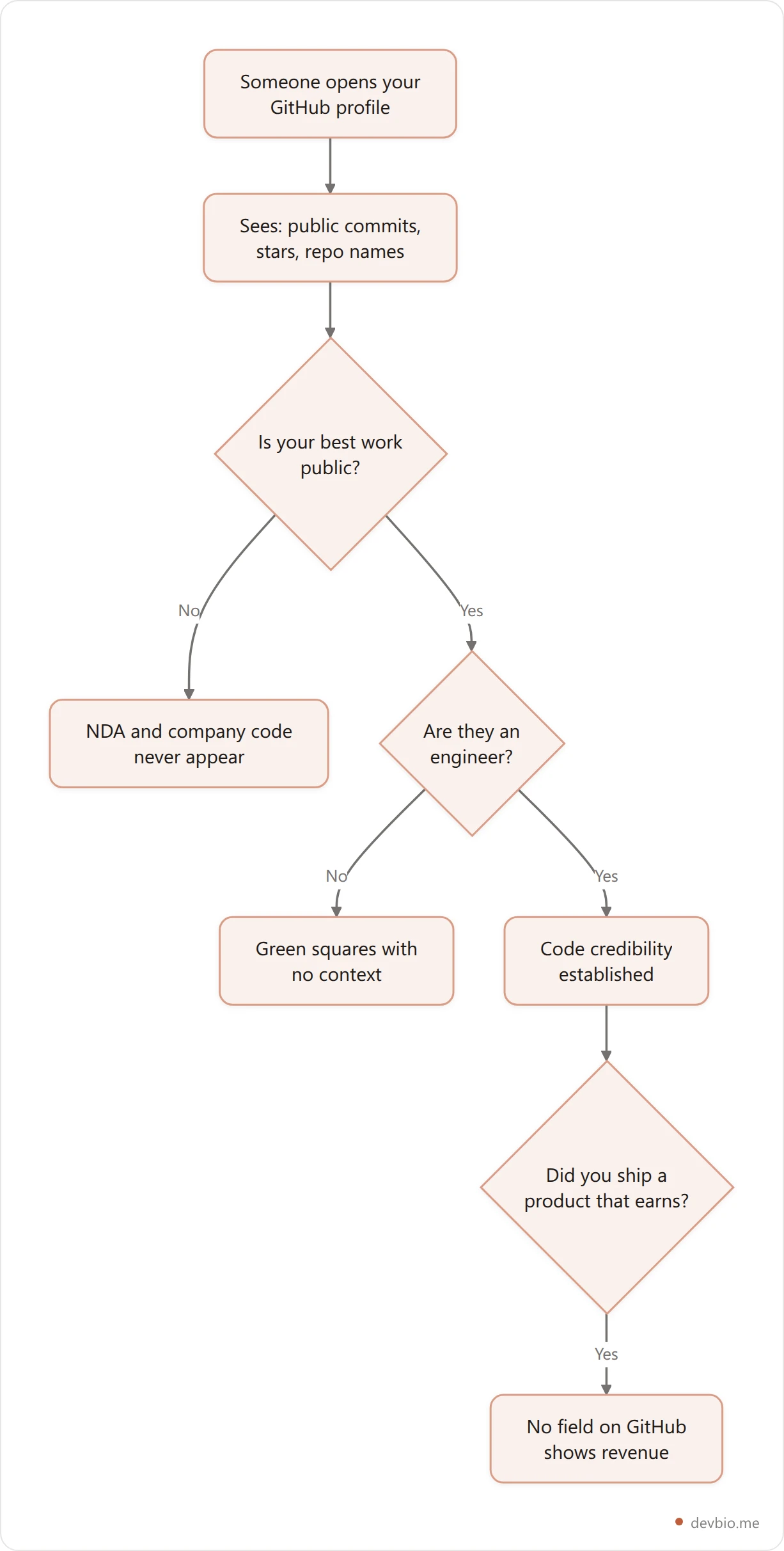
Most GitHub activity is private. If you work at a company or on client code under NDA, your public contribution graph shows a fraction of your actual output. A developer shipping critical infrastructure at a startup can look completely inactive to anyone scanning the public graph. The GitHub profile README guide covers how to work around this — but the underlying limitation doesn't disappear.
GitHub has no revenue layer. If you've built a product at $4K/mo MRR, there's no field on github.com for that. It's also a poor communicator for non-code work: product decisions, customer development, design.
GitHub is built for engineers. When a non-technical recruiter or potential client lands on your GitHub profile, they see a wall of green squares and a list of repo names with no context. They have no idea which repos matter, which are abandoned, or which ones you're actually proud of.
GitHub is necessary. It's not sufficient — especially if you want to build in public effectively or attract clients who aren't engineers themselves.
What AI Hiring Changed in 2025–2026#
Here's the shift that most portfolio-advice posts written before 2025 haven't caught up to.
AI-assisted hiring is now standard at companies above a certain size. 82% of companies using AI in hiring deploy it for resume screening, and adoption of AI across HR tasks has been climbing year over year. First-round AI screening is the majority experience for most developer job applications at mid-to-large companies now.
AI screeners don't browse your personal website. They parse structured text — resume fields, standardized formatting, GitHub contribution data where integrated. A beautiful Framer portfolio with custom animations is invisible to a screener reading a submitted PDF.
This creates a specific requirement: you need a human-readable, proof-rich presence AND a structured, machine-readable resume that survives ATS parsing. Most developers have one or neither.
The second shift is the proof mandate. 60% of hiring managers say they want to see or test proof of technical abilities rather than take claims at face value. "Five years TypeScript experience" is a claim. A public repo with years of consistent commits and three shipped projects with real users is proof.
This is exactly why generating an ATS-ready resume from your developer profile matters more now than it did 18 months ago. The resume needs to reflect your actual current output — not a static document last edited for a different job search.
The Developer Presence Comparison#
Here's how all four formats stack up across the dimensions that matter in 2026.
Capability | Personal Site | Linktree / Bento | GitHub Profile | Developer Bio (DevBio) |
|---|---|---|---|---|
Setup time | 20–40 hrs | 10 min | 1–2 hrs | 20–30 min |
Stays current automatically | No | No | Partially | Yes — live sync |
Live GitHub contributions | No | No | Yes | Yes |
Shows private repo activity | No | No | No | Yes (OAuth) |
Live revenue / MRR display | No | No | No | Yes |
ATS-ready resume export | No | No | No | Yes, PDF at /resume |
Custom domain support | Yes | Paid tier only | No | Yes (Pro) |
Auto-generated OG image | Custom only | No | No | Yes |
SaaS marketplace listing | No | No | No | Yes |
Identity verification layer | None | None | Partial | Yes |
One URL that is still accurate next quarter
Live GitHub contributions, connected revenue, and an ATS-ready resume compiled from the same data — so the profile you hand a recruiter never needs a manual update.
Build your developer bioNo format wins every column. A personal site is unmatched for long-form content and full SEO ownership. GitHub is unmatched for raw code credibility. But for the "one URL you hand a recruiter, client, or conference organizer" — the profile that needs to be always accurate, proof-rich, and readable by both AI systems and humans — the developer bio format wins by a clear margin.
How the "Stays Current Automatically" Row Actually Works#
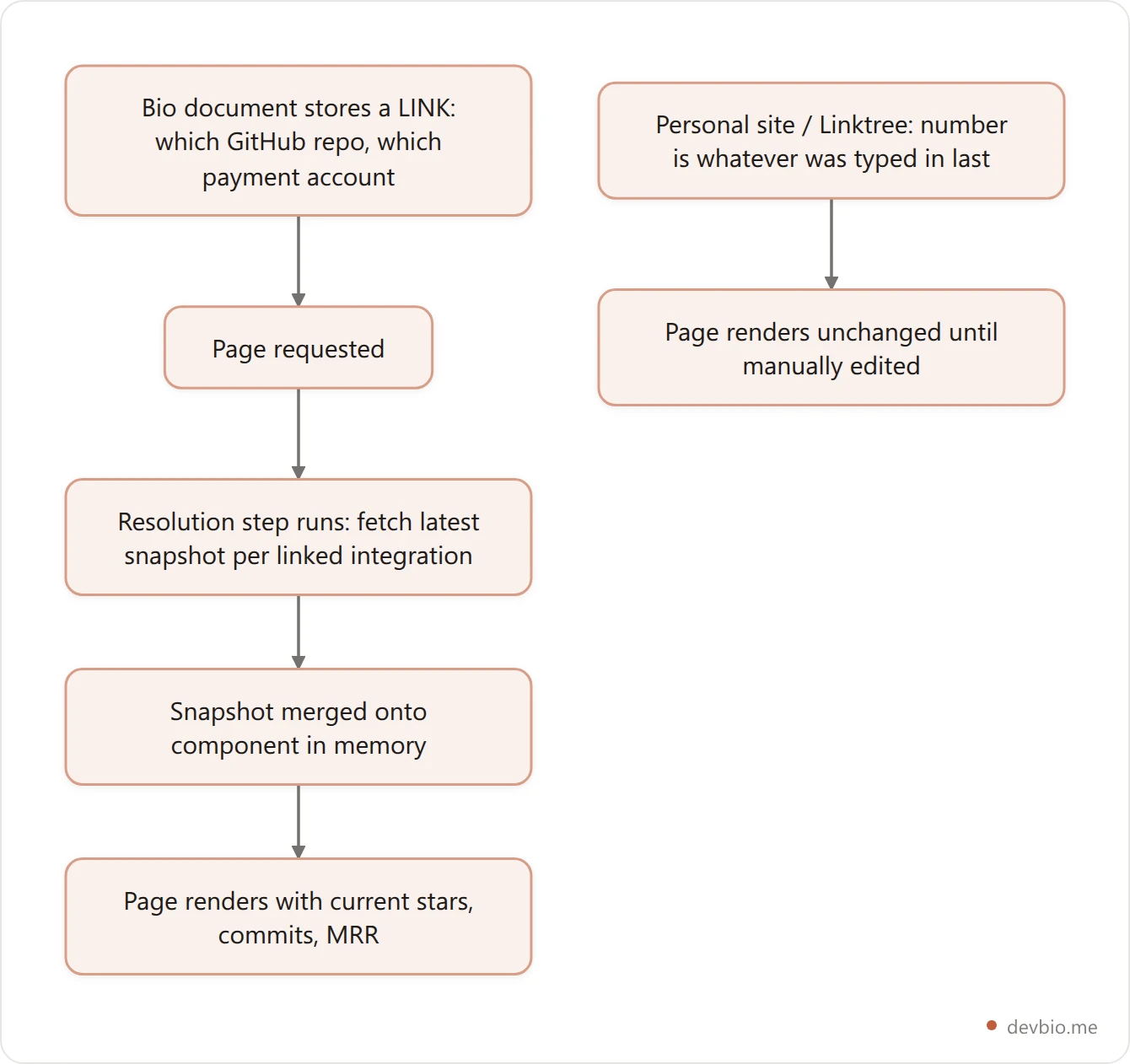
"Live sync" is a word most profile tools throw around loosely, so it's worth being precise about what a developer bio actually does under the hood. Your bio document doesn't store your GitHub star count or your MRR — it stores what you linked: which repo, which payment account. The numbers themselves are never written into your profile.
Instead, every time someone loads your page, a resolution step runs first: it looks up the latest snapshot for each linked integration and merges it onto the relevant component in memory, in one batched database query no matter how many projects or integrations you've connected. Your GitHub stars, commit counts, and MRR are re-fetched fresh on every read — not on a schedule you have to remember, and not baked into a document that quietly drifts out of date.
That's a structurally different guarantee than a personal site, where the number on the page is whatever you typed in last time you edited it, or a static Linktree card, where nothing updates unless you do. A page that displays numbers isn't automatically a page that stays accurate — the difference is whether the data is stored or resolved.
The Proof-Over-Claims Profile: A Framework for 2026#
There's a principle worth naming: proof beats claims, and live proof beats static proof.
A developer profile built on claims — "I specialize in TypeScript, I have 5 years experience, I build SaaS products" — is indistinguishable from every other developer's self-description. AI screeners can't validate claims. Hiring managers pattern-match them, not fact-check them.
A developer profile built on live, verified proof cannot be faked and doesn't require explanation.
The four layers of a proof-first developer profile:
Layer 1 — Code proof. GitHub contributions, public repos, and commit frequency over the trailing 12 months. Proves you ship consistently, not just when you're job-hunting.
Layer 2 — Product proof. Projects with real users, GitHub stars, and commit history. Proves you build things other people actually engage with — not just demos for a portfolio page.
Layer 3 — Revenue proof. Live MRR pulled directly from Stripe, Dodo Payments, Lemon Squeezy, or Polar. Proves market validation. Someone is paying for what you built.
Layer 4 — Career proof. An ATS-readable resume compiled from your real bio data — always current, always accurate, never a document you last updated for a different job search.
Layer 4 is worth unpacking, because "ATS-ready" gets used loosely. Most developers who try to make a portfolio ATS-safe end up exporting a webpage: a screenshot or a headless-browser render of a nicely designed page, saved with a .pdf extension. That produces an image wearing a PDF file extension — a parser sees pixels, not text, and none of your section headers or dates get extracted correctly.
A developer bio's resume works differently because it's compiled, not captured. Your bio isn't one document — it's already broken into separate typed sections (skills, work experience, projects, and so on), and each section carries its own conversion into resume markup as part of its definition. Building the PDF means walking through your bio in a fixed, resume-appropriate order, concatenating each section's own converted output into one document, then handing that document to a real text-typesetting compiler running server-side. The output is an actual text-based PDF — the kind an ATS parser reads correctly — not a rendered image of a webpage. No screenshot step, no headless browser, no HTML-to-canvas trick that turns text into pixels.
The practical effect: change your work-experience section on your bio, and the next resume you download reflects it, compiled fresh from the same typed data your bio page renders — not a separate resume file you have to remember to edit twice. That's the difference between "ATS-ready" as a marketing claim and ATS-ready as a mechanical property of how the file actually gets built.
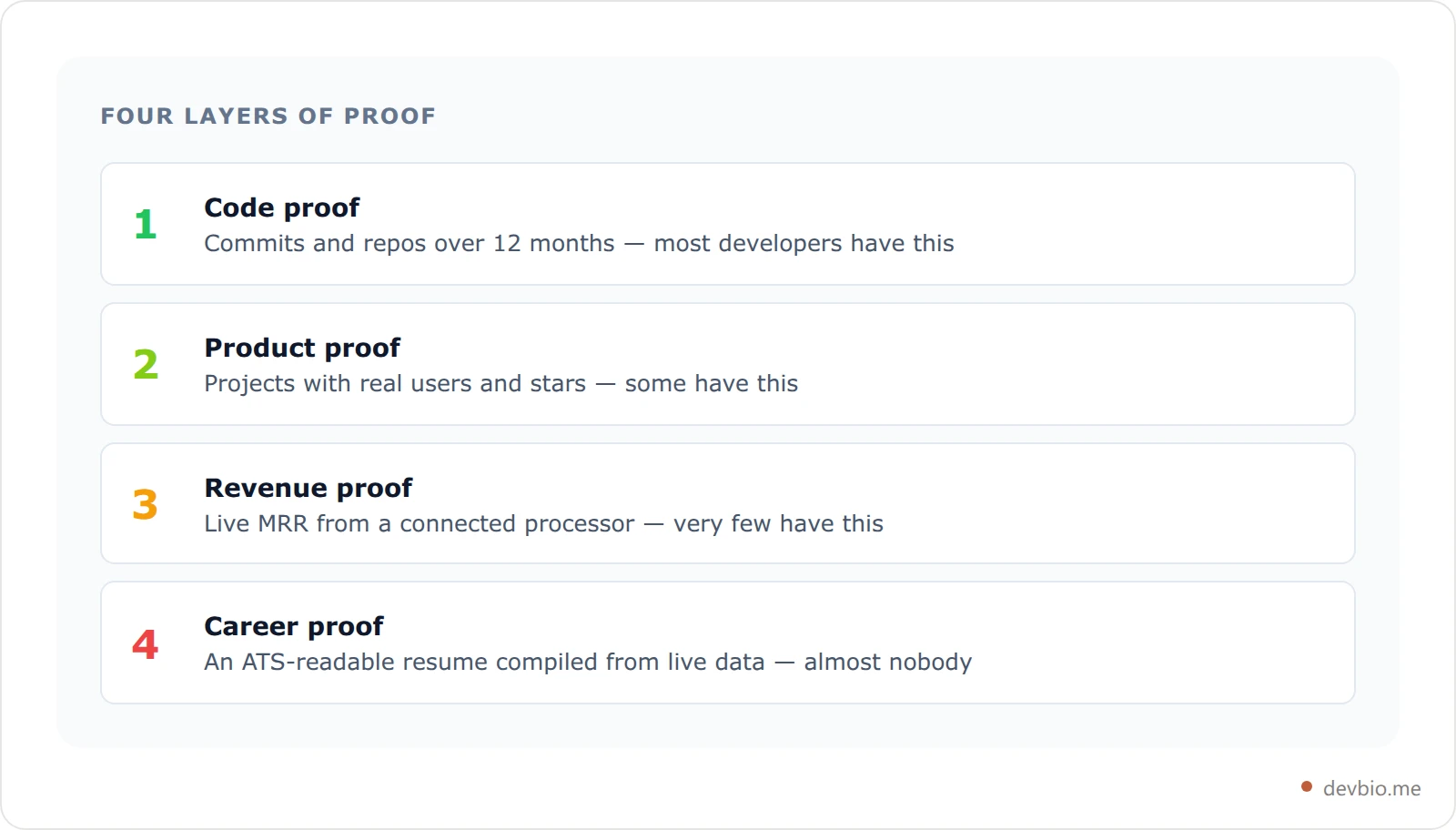
Most developers have Layer 1. Some have Layer 2. Very few have Layer 3. Almost nobody has all four assembled in one shareable URL — which is exactly why a complete proof-first profile is still a real differentiator.
The 4-Layer Developer Presence playbook covers building each layer in detail. For Layer 3 specifically, the live MRR profile setup walks through connecting a payment gateway so your profile shows actual current revenue.
When to Use Which Format#
Actively job searching: Lead with your developer bio URL and the auto-generated ATS resume PDF. Give the proof-rich link to recruiters; submit the PDF wherever the ATS form requires it. A developer with 18 months of private repo commits that only show up through OAuth-linked GitHub sync — and a project card showing live MRR — sends a fundamentally different signal than a static portfolio page listing the same claims.
Freelancing or contracting: A developer bio with live project metrics and connected payment revenue earns client trust faster than a portfolio site. It shows shipped work with real usage — not just the capability to ship.
Building in public: A developer bio updates itself as you grow. GitHub contributions sync automatically; connected payment revenue refreshes with every integration pull. You share one link once and it's always current. Building in public works best when the proof is live and automatic.
Considering selling a project: Your developer bio connects directly to a SaaS marketplace where live revenue figures are visible and verifiable to buyers. Verified MRR beats any written asking-price argument.
Want a blog, deep case studies, or long-term SEO: Build the personal site — we ranked 7 developer personal website setups by effort, from a ten-minute hosted page to a weekend Astro build, so you can pick one you'll actually maintain. Then link from it to your developer bio — you get the depth of written content plus the live-data credibility of a synced profile in one.
Just need a link for your Twitter or LinkedIn bio: A developer bio still beats Linktree. You get a proper URL (devbio.me/yourname or your own domain), a profile that communicates proof rather than just listing links, and zero ongoing maintenance overhead.
Frequently Asked Questions#
Is a personal website still worth building as a developer in 2026?
Yes, for specific reasons: long-form content, SEO depth, and full creative control over your narrative. If your primary goal is communicating what you've built and landing job offers quickly, a developer bio with live GitHub and revenue data does that job with far less maintenance cost. Use both if you have the bandwidth; prioritize the bio if you don't.
What's the difference between a developer portfolio and a developer bio?
A portfolio is typically static and manually curated — selected work shown in whatever state you last updated it. A developer bio is live: it syncs real-time GitHub contributions, pulls connected payment revenue, and auto-compiles an ATS resume from your current data. It stays accurate without you actively maintaining it. See which components belong on a developer bio for the full breakdown.
Does GitHub replace a portfolio website?
For code credibility, largely yes. For everything else — revenue proof, non-engineer audiences, career narrative, custom domain — no. GitHub proves you write code. A complete developer presence proves you build things people actually use and pay for.
Why doesn't Linktree work for developers?
Linktree was built for social media creators, not builders. It has no way to display GitHub contributions, live project metrics, or verified revenue. A generic linktr.ee URL also signals that you haven't committed to your professional presence — a subtle but real trust signal for hiring managers and clients.
How does live GitHub data work on a developer bio?
DevBio syncs your GitHub contribution history, stars, and commit data via OAuth. The data refreshes automatically — hourly on Pro — so your profile reflects current activity without manual updates. Private repository contributions show up through the OAuth connection, giving you credit for work that's invisible on your public GitHub graph.
What does "ATS-ready" mean for a developer resume?
ATS (Applicant Tracking System) software parses resumes as plain text and scores them against job requirements. Most custom-designed PDFs fail this parsing — images, multi-column layouts, and decorative fonts all create noise. An ATS-ready resume uses clean LaTeX-compiled formatting with standard section headers that parsers recognize reliably. DevBio generates this at /{username}/resume, compiled directly from your current bio data.
Can I use my own domain with a developer bio?
Yes. DevBio supports custom domains on Pro, so your profile lives at yourname.dev or a subdomain of your choice instead of devbio.me/yourname. The resume, QR code, vCard download, and all profile sub-paths work automatically on that custom domain.
Should I maintain all four formats — personal site, GitHub, link in bio, and developer bio?
You don't need all four. Most developers do well with GitHub (code credibility) plus a developer bio (full presence, resume, shareable URL). A personal site adds real value if you're writing content or want SEO depth around your name. Skip the Linktree — a developer bio does everything it does and more, with actual proof behind it.
Key Takeaways#
You don't need a custom-built portfolio to prove you can build. You need a developer profile that shows what you've actually shipped, earns trust in the first 15 seconds, and doesn't go stale the moment you move on to the next project.
The personal site is powerful but demands constant maintenance. The link-in-bio is convenient but proves nothing. The GitHub profile is credible for code and opaque for everything else. The developer bio pulls it together — live GitHub proof, verified revenue, ATS resume, custom domain — in one URL that keeps itself current.
Three things worth holding onto from this comparison:
Proof beats claims. Every format that relies on self-reported information is weaker than one that pulls verified data automatically.
Static goes stale. The average developer portfolio is outdated within a year. A live-synced profile never is.
AI screening is already the default. You need something human-readable and machine-parseable. Most formats handle one. A developer bio handles both.
In 2026, your code already proves you can build. The question is whether your profile makes that proof visible to the right people.