

You write ## Install {#install}, link to it with [see install](#install), and it works in your docs site. Push the same file to GitHub and the link scrolls nowhere, and the heading now literally reads "Install {#install}". Nothing errored. The anchor just never existed.
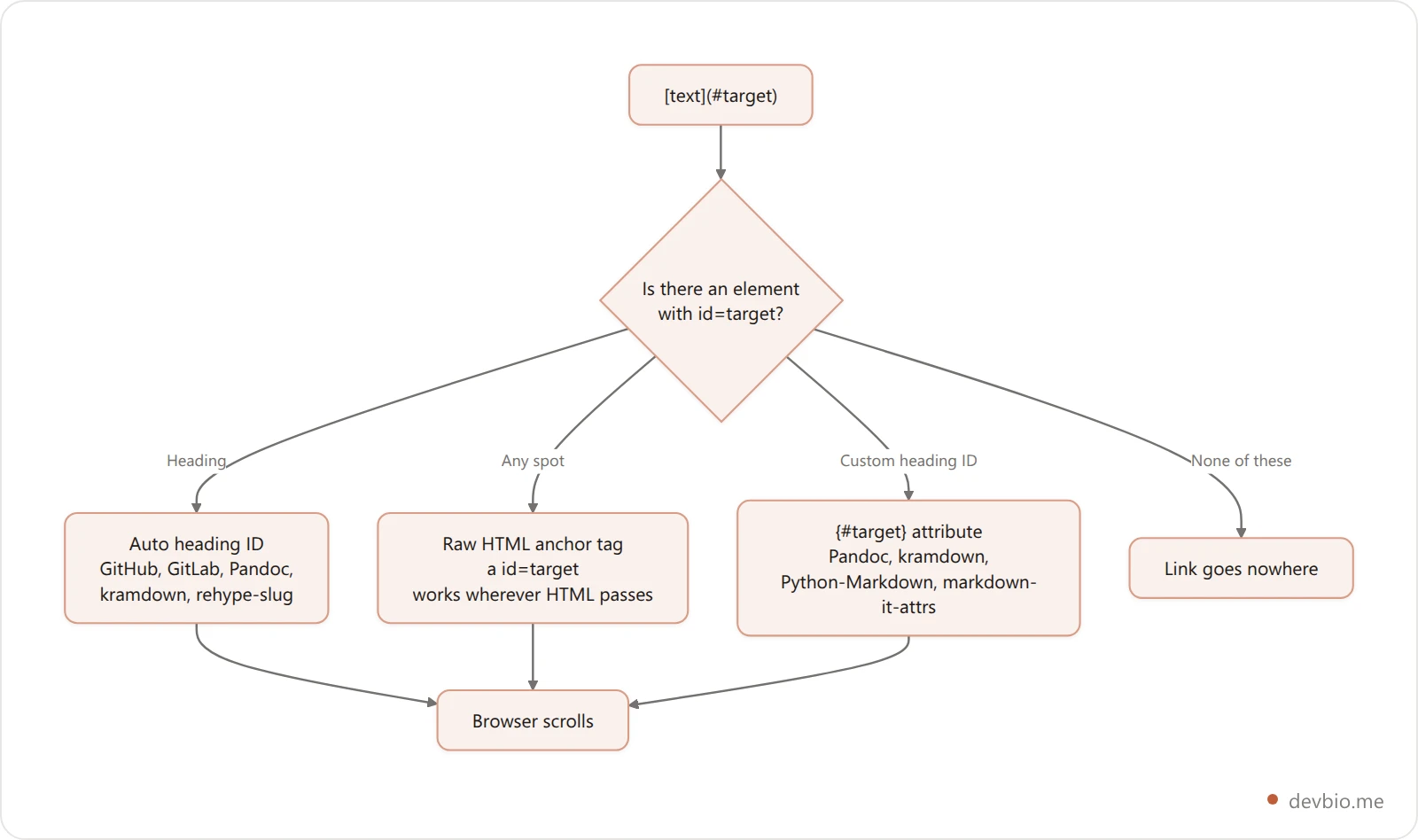
A markdown anchor link is an ordinary link whose target is a fragment, [text](#some-id), and it only works if the rendered page contains an element with that exact id. Headings get one automatically in most renderers. For any other spot, use <a id="name"></a>. The {#custom-id} shortcut only works in some renderers, and GitHub isn't one of them.
I ran every example below through nine real renderers in September 2026: markdown-it 15.0.2 (plain, with markdown-it-anchor 10.0.0, and with markdown-it-attrs 5.0.1), marked 18.0.14 (plain and with marked-gfm-heading-id 4.1.4), remark with rehype-slug 6.0.0 (with and without rehype-sanitize 6.0.0), Python-Markdown 3.10.3, Pandoc 3.9 and kramdown 2.5.2. GitHub's behavior comes from its own documentation and from rendered github.com HTML.
What a Markdown Anchor Link Actually Is#
Markdown has no anchor syntax of its own. The CommonMark spec defines links, and a link destination can be anything, including a bare fragment like #setup. The browser does the rest: when you click, it scrolls to the element whose id matches.
So every markdown anchor link has two halves, and they're written in different places:
The link.
[Jump to setup](#setup). This part is pure markdown and works everywhere.The target. An element with
id="setup"in the rendered HTML. Markdown can't write this directly. Either the renderer makes one for you (heading IDs), or you write raw HTML, or you use a renderer extension like{#setup}.
Almost every broken anchor is a target problem, not a link problem. The link is fine; the id it points to isn't on the page, or it's there under a different name.
Linking to a Heading: The Automatic Anchor#
Most renderers give every heading an ID, called a slug. ## Setup becomes id="setup", so [Setup](#setup) works with no extra markup. GitHub's rules, from its section links documentation: lowercase everything, turn spaces into hyphens, drop other punctuation, and add -1, -2 to duplicates.
Two things catch people here:
Plain markdown engines don't make a markdown heading ID at all. Stock markdown-it 15 and marked 18 both output a bare
<h2>Setup</h2>, with noid. You need a plugin (markdown-it-anchor, marked-gfm-heading-id, rehype-slug) or the target doesn't exist.Slug rules differ between plugins. More on that below.
The slug algorithm is its own rabbit hole: emoji, punctuation, duplicate headings. That's covered step by step in our markdown table of contents guide. This post is about what the slug can't do: point at a spot that isn't a heading, or give a heading a stable name you picked yourself.
Custom Anchors: The HTML Tag That Works Almost Everywhere#
To link to a paragraph, a table row, or a heading under a name you control, drop an empty HTML anchor right before it:
<a id="api-limits"></a>
Requests are capped at 60 per hour.
Then link to it the usual way: [rate limits](#api-limits).
GitHub documents this exact pattern under custom anchors, using <a name="...">. Two notes from that page are worth keeping: custom anchors don't show up in GitHub's outline menu, and they don't affect the -1/-2 numbering of heading anchors.
In my tests, <a id="custom-spot"></a> came through untouched in every renderer that allows HTML: markdown-it with html: true, marked, remark with rehype-raw, Python-Markdown, Pandoc and kramdown. That makes it the most portable markdown custom anchor there is.
id or name? Use id. The name attribute on <a> is obsolete in HTML5, and browsers only still honor it for backward compatibility. GitHub's docs show name, and GitHub supports both, but id is the one every other renderer and browser treats as the real fragment target.
Keep IDs lowercase with hyphens. On github.com, rendered anchors in the asabaylus heading-anchors gist show up in the HTML as name="user-content-thirty", while the links pointing at them still say href="#Thirty". If your ID is all lowercase from the start, case never matters.
Why {#custom-id} Works in Your Docs but Not on GitHub#
The attribute syntax ## Install Guide {#install} is the cleanest way to give a heading a stable ID. It isn't CommonMark, though. It's an extension, and support is all over the place:
Renderer |
|
|
|---|---|---|
Pandoc 3.9 (markdown) |
| Yes |
kramdown 2.5.2 (Jekyll) |
| Yes |
Python-Markdown 3.10.3 + attr_list |
| Yes |
markdown-it + markdown-it-attrs |
| Yes |
markdown-it + markdown-it-anchor only |
| No |
marked + marked-gfm-heading-id |
| No |
remark + rehype-slug |
| No |
Pandoc 3.9 in |
| No |
Python-Markdown + toc, no attr_list |
| No |
Read the "No" rows closely, because the failure is double. The {#install} shows up as literal text in your heading, and the slug swallows it, so the heading's real ID becomes install-guide-install. Your link to #install misses, and your link to #install-guide misses too.
GitHub follows the GFM behavior. Pandoc's gfm mode, built to match GitHub, left the braces in the heading, as did every GFM-style slugger I tested. Pandoc documents the extension it relies on as header_attributes; kramdown describes the same idea under specifying a header ID; Python-Markdown needs the attr_list extension turned on.
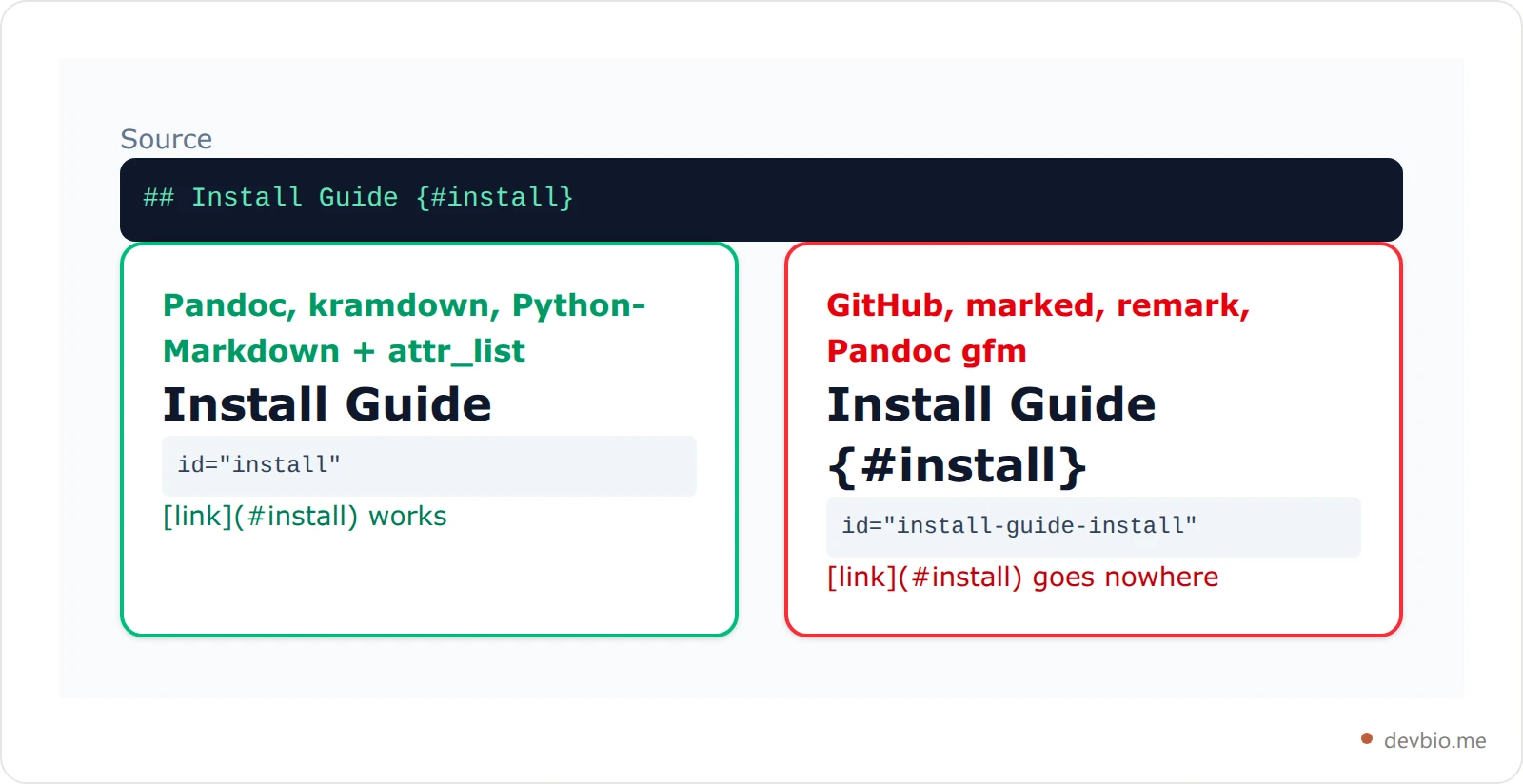
The portable fix: skip the attribute and put an HTML anchor on the line above the heading.
<a id="install"></a>

## Install Guide
Now #install works on GitHub, in Pandoc, in kramdown, everywhere HTML passes, and the heading's own automatic slug (#install-guide) still works too.
The user-content- Prefix: Why Your id Changed#
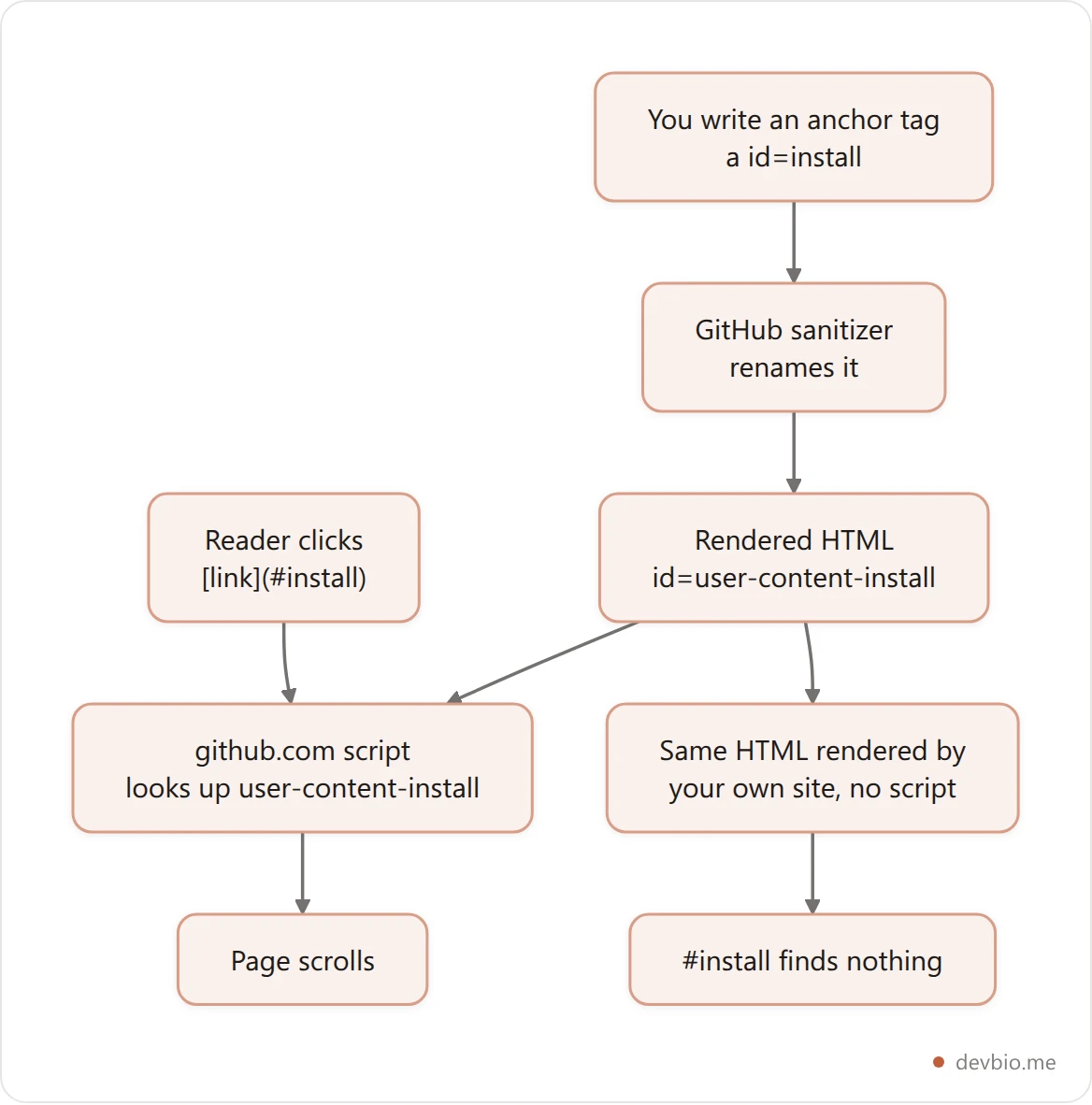
Open GitHub's rendered HTML and your id="install" isn't there. It's id="user-content-install". GitHub prefixes every user-written id and name so a README can't hijack IDs the page itself uses (a heading called "Notifications" could otherwise collide with GitHub's own UI). The same gist that showed the lowercasing documents this in its comments: <span id="85af93540870"> renders as <span id="user-content-85af93540870">.
Links still work on github.com because the page's JavaScript maps #install to #user-content-install when you click or load the URL. Heading anchors are built the same way: GitHub renders a separate <a id="user-content-setup" class="anchor" href="#setup"> next to each heading.
This matters the moment you render GitHub-flavored content yourself. rehype-sanitize's default schema copies GitHub's policy. In my remark test with rehype-sanitize turned on, every ID got the prefix: id="user-content-setup", id="user-content-custom-spot". Your #setup links then break unless you add GitHub's script trick yourself, or set the sanitizer's clobberPrefix to an empty string when the content is trusted.
Linking to a Section in Another File#
A markdown link to section headings in another file uses the same fragment, with the file path in front:
[Deploy steps](docs/deploy.md#rollback)
[Deploy steps](../README.md#rollback)
On GitHub this resolves relative to the current file and scrolls to the heading in the target file. Every renderer I tested passed other.md#setup through as-is. None of them rewrite it, so whether it works depends on where the HTML ends up:
On GitHub or GitLab,
.mdlinks are routed to the rendered file, so they work.In a static site, the output file is
deploy.htmlordeploy/, notdeploy.md. MkDocs and Docusaurus rewrite.mdlinks for you; Hugo needs a render hook, and Jekyll needs the jekyll-relative-links plugin (on by default on GitHub Pages). If nothing rewrites it, the page 404s before the fragment is ever read.On npm or PyPI, a relative path points at the registry, not your repo. Use a full
https://github.com/...#fragmentURL for anything a package page shows.
If you want a deep link to the rendered file from outside, copy it from GitHub's heading link icon rather than typing it. The icon's URL is the one GitHub will actually honor.
Building out a profile README with sections like these? Our GitHub profile README generator writes the markdown from a form, with badges and stats widgets included.
Why Your Markdown Anchor Link Scrolls to the Top#
When a fragment matches nothing, browsers leave the scroll position where it was. When it's # or #top, they jump to the top. So if a click "does nothing" or "jumps to the top," the target is missing. Check these in order:
View the rendered HTML, not the source. Search for your ID. If it's not there, the renderer never made it: wrong slug, no heading-ID plugin, or
{#id}on an engine that ignores it.Look for a prefix.
user-content-on GitHub-style sanitizers; some site generators add their own.Check the case and encoding. markdown-it-anchor percent-encoded my braces into
%7B%23install%7D. Non-ASCII headings get encoded too, so copy the ID from the rendered page.Check whether HTML is allowed at all. Some surfaces strip raw HTML, so
<a id>disappears silently.
That last one bites on profile pages. devbio.me's About field, for example, runs a deliberately small renderer that supports **bold**, *italic* and [text](https://…) links, and its link pattern only matches http and https URLs. A [text](#section) fragment link there renders as plain text, and raw HTML never gets through. Short bio fields rarely need in-page anchors anyway, but it's a good example of why the same markdown behaves differently depending on where it lands.
Your developer profile, one link
devbio turns your GitHub, projects and links into a single profile page, with every section rendered for you and nothing to anchor by hand.
See example profilesAnchors Inside Collapsed and Hidden Content#
A link to an element inside a closed <details> block is a quiet failure. The element exists, but it has no layout while collapsed. Recent Chromium-based browsers auto-open a closed <details> when a fragment navigation targets something inside it, but other browsers and embedded viewers may just not scroll. If a README section is both collapsible and linked, put the anchor on the line above the <details> block rather than inside it. The blank-line rules that decide whether the markdown inside <details> renders at all are in our markdown collapsible section guide.
Anchors written as HTML comments don't work either. <!-- id: setup --> produces nothing a browser can scroll to, which is why markdown comments are no substitute for a real <a id>.
A Portable Anchor Pattern You Can Copy#
If your markdown has to render correctly on GitHub and in at least one other tool, this is the pattern that survived every renderer I tested:
<a id="rate-limits"></a>

## Rate Limits

Jump back to [rate limits](#rate-limits) or to the
[changelog's rollback notes](CHANGELOG.md#rollback).
Put the anchor on its own line with a blank line after it, so it never gets merged into a paragraph or heading.
Lowercase, hyphenated, ASCII IDs only.
Keep
{#id}for single-renderer projects (a Jekyll or Pandoc build) where you control the parser.Prefix anchors you add by hand (
faq-,api-) so they can't collide with auto-generated heading slugs, the same advice GitHub gives.
Key Takeaways#
A markdown anchor link is
[text](#id); the hard part is making sure an element with thatidexists in the rendered HTML.Headings get automatic IDs on GitHub and in most docs tools, but stock markdown-it and marked don't add any.
<a id="name"></a>is the most portable custom anchor: it passed through every renderer that allows HTML.{#custom-id}works in Pandoc, kramdown, Python-Markdown with attr_list and markdown-it-attrs, but GitHub and GFM-style renderers leave it as literal text and add it to the slug.GitHub prefixes user IDs with
user-content-and relies on JavaScript to resolve links; sanitize-based pipelines inherit the prefix without the script.For cross-file links, use
file.md#fragmenton GitHub and a full URL on package registries.
Frequently Asked Questions#
How do I create an anchor link in markdown?#
Write a normal link with a fragment as its destination: [Jump to setup](#setup). For a heading, the target usually exists already as its automatic slug. For any other spot, add <a id="setup"></a> on its own line just above it. The link and the id must match exactly, including case.
Does GitHub support {#custom-id} for headings?#
No. GitHub renders ## Title {#custom} with the braces visible and builds the heading's ID from the whole line, so #custom doesn't match. Put <a id="custom"></a> on the line above the heading instead. That works on GitHub and in every other renderer that allows HTML.
Should I use a name or id attribute for markdown anchors?#
Use id. The name attribute on <a> is obsolete in HTML5 and only supported for backward compatibility. GitHub accepts both and its docs happen to show name, but id is what every browser and renderer treats as a fragment target, so it's the safer default.
How do I link to a section in another markdown file?#
Put the relative path before the fragment: [Rollback](docs/deploy.md#rollback). That works on GitHub and GitLab. Static site generators usually rewrite .md to the built page, and package registries like npm need a full GitHub URL, since relative paths resolve against the registry.
Why does my anchor ID start with user-content?#
GitHub, and pipelines that copy its sanitizer (like rehype-sanitize's default schema), prefix user-written IDs so content can't clash with the page's own IDs. On github.com, JavaScript maps #setup to user-content-setup for you. On your own site, either add that mapping or set the prefix to empty for trusted content.
Can I link to a specific line or paragraph without a heading?#
Yes, with an empty HTML anchor right before the text: <a id="the-quote"></a>. Markdown has no native syntax for this. On GitHub, line links like #L42 belong to the code view; for a markdown file, open it with ?plain=1 to get them.


