

You drop a note into a README — <!-- rewrite this before launch --> — push it, and there it is on the rendered page for everyone to read. Or the reverse happens: you hide half a paragraph, ship it, and someone finds it in View Source a month later.
Markdown has no comment syntax. Every trick people call a markdown comment is one of two different things: raw HTML that gets copied straight into your output, or a link reference that resolves to nothing and disappears. They look identical in your editor and behave nothing alike once a renderer, a sanitizer, or a bio field gets hold of them.
Every block of HTML below is real output. In September 2026 I ran each sample through markdown-it 14, a CommonMark-compliant renderer, with raw HTML switched on and off, and then through a standard HTML sanitizer. The results are pasted in unedited, because this is a topic where one word in the spec decides what your reader can see.
Markdown Never Defined a Comment#
There is no such thing as a comment in Markdown. What gets called Markdown comment syntax is always borrowed from a neighbouring format: either an HTML comment that Markdown passes through untouched, or a link reference definition that the parser quietly swallows. Knowing which one you picked is the whole game.
The original Markdown syntax document doesn't define a comment. What it defines is inline HTML: you can drop HTML into a Markdown file and it passes through untouched. That passthrough is the whole mechanism behind the <!-- --> trick — you're not commenting in Markdown, you're writing HTML and relying on the browser to skip it.
The CommonMark spec makes it explicit. A line starting with <!-- opens a type 2 HTML block, the block ends on a line containing -->, and everything between the two is "passed through as-is." Passed through, not removed. The parser copies your note into the HTML file it produces.
That single word is the difference between a note nobody sees and a note anybody can read.
What an HTML Comment Actually Produces#
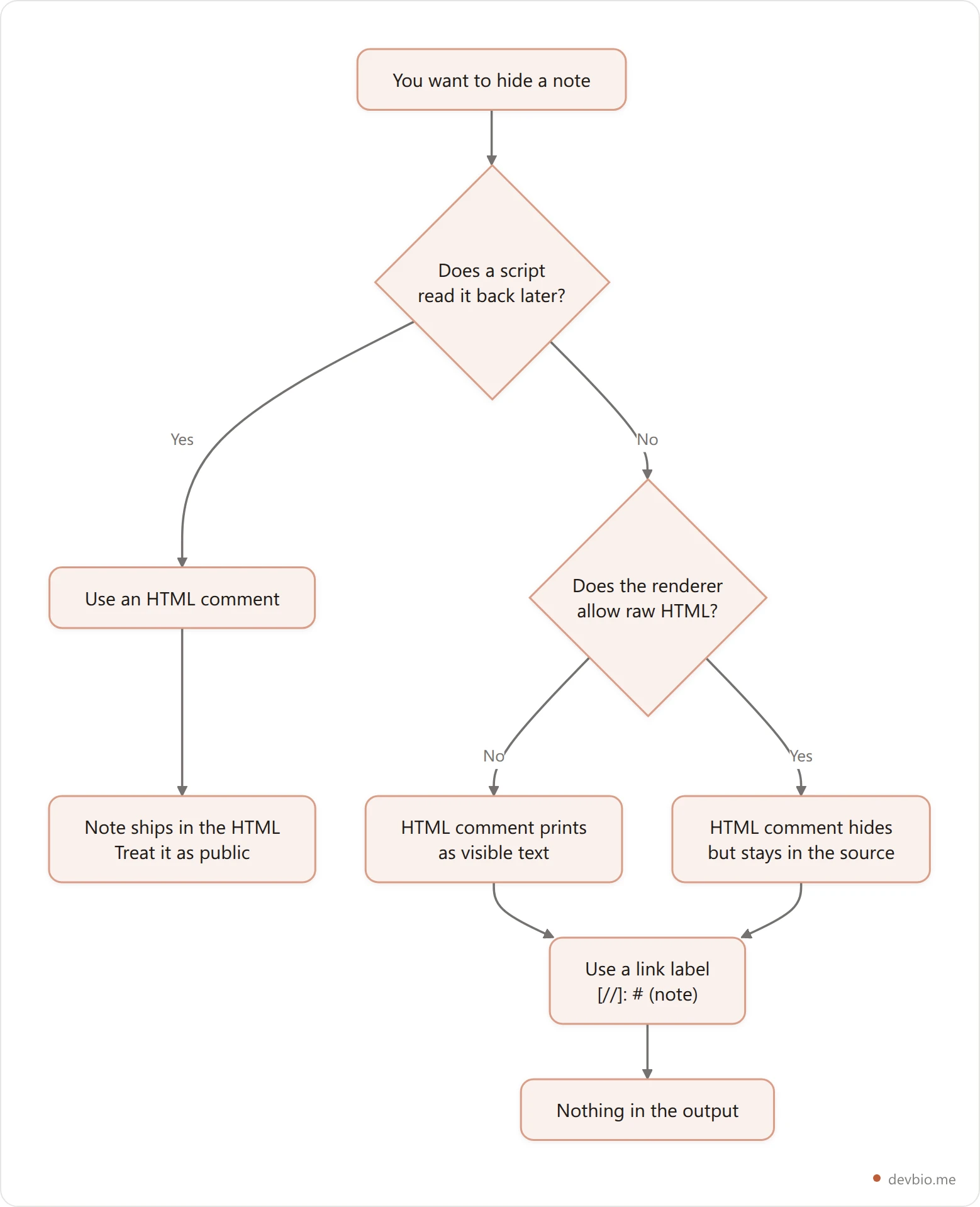
An HTML comment hides your note from the rendered page and leaves it in the HTML file. The browser skips the node, so the page looks exactly as intended — but the text is still shipped to anyone who reads the source rather than the pixels.
Here's the input:
Before.

<!-- secret note -->

After.
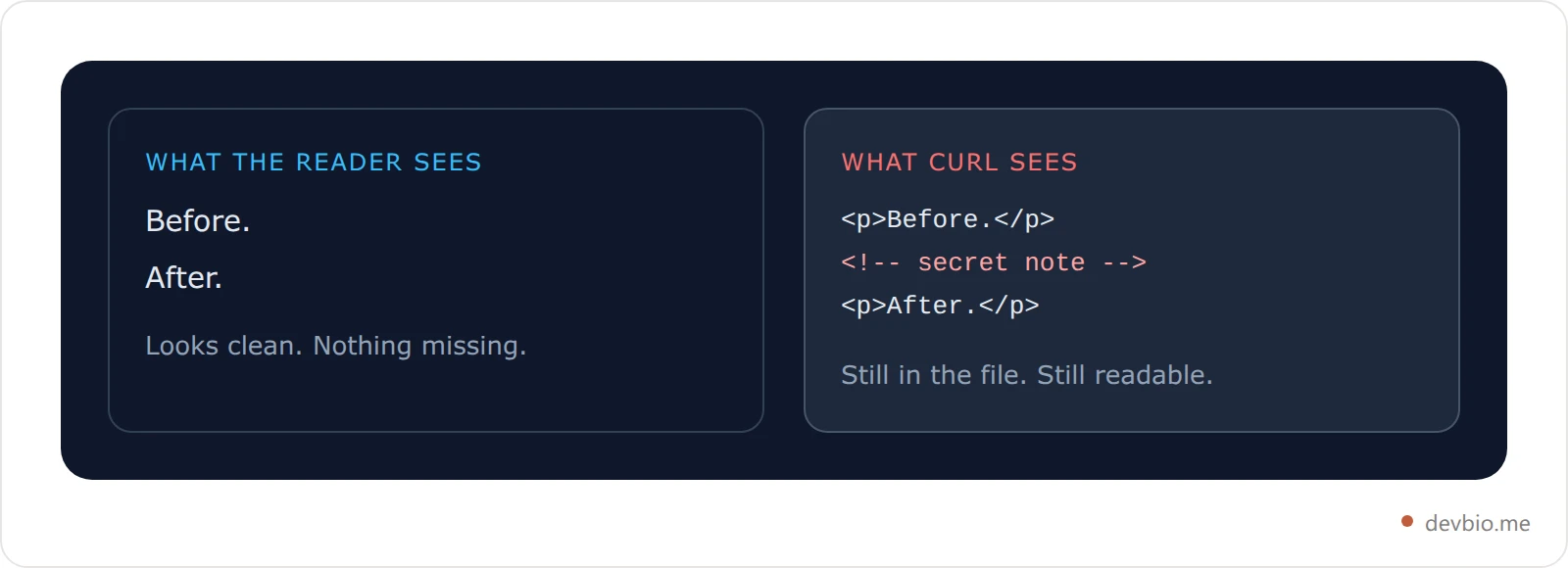
And the rendered output, verbatim:
<p>Before.</p>
<!-- secret note -->
<p>After.</p>
Your note is still there. The browser doesn't paint it, so the page looks clean — but View Source shows it, curl shows it, and so does any scraper, translation proxy, or AI crawler that reads HTML rather than pixels.
This is the same trap as a secret Gist: hard to stumble on is not the same as private. We took that one apart in why secret Gists aren't private, and the rule carries over — if it ships to a public URL, treat it as public.
The Link-Label Hack Leaves Nothing Behind#
The other common approach abuses link reference definitions:
Before.

[//]: # (secret note)

After.
Output:
<p>Before.</p>
<p>After.</p>
Nothing. No node, no whitespace, no trace. The parser reads [//]: # (secret note) as a definition of a link labelled // pointing at #, with secret note as its title. Because nothing in the document ever references that label, the definition is consumed during parsing and never emitted. [comment]: <> (secret note) works the same way with a different label.
This is the only method in common use that vanishes in every renderer, because it never depends on HTML being allowed in the first place. If you want to hide text in Markdown and have it genuinely absent from the output, this is the one. Three rules keep it working:
Put it in its own block with a blank line before and after. Without the blank line it stops being a definition.
Don't use an unescaped closing parenthesis inside the note — it ends the title early.
Keep it to one line. A blank line inside the note breaks the definition in half, and the remainder renders as text.
Four Ways to Hide a Note, Compared#
Method | Shows on the page | Left in the HTML | Survives HTML being disabled | Best for |
|---|---|---|---|---|
| No | Yes | No | Machine markers other tools read back |
| No | No | Yes | Editorial notes you want gone |
| No | No | Yes | Same, if you prefer a readable label |
| No | No | Yes | Notes in Jekyll or Hugo source |
The row that surprises people is the first one. The <!-- --> form is the most recommended and the only one that ships your words to the reader's machine.
That's not automatically wrong — it's exactly why it's the right choice for machine markers. Tools that rewrite a README on a schedule look for markers like <!--START_SECTION:name--> and replace whatever sits between them, which only works because the marker survives into the file. If a human is supposed to never see your note, use a link label. If a script has to find it later, use an HTML comment and accept that it's public.
Draft your README bio in the browser — no account, and you can see exactly what renders before you push it.
Why Yours Renders as Visible Text#
A markdown comment renders as visible text for one of four reasons: no blank line before a link label, four spaces of indentation, placement inside a code fence, or a renderer with raw HTML disabled. Those four cover nearly every report. All four outputs below are real.
1. No blank line before the link label. Glued to the paragraph above, it's just more paragraph:
Paragraph text
[//]: # (secret note)<p>Paragraph text
[//]: # (secret note)</p>2. Indented four spaces. Four spaces means code block, and code blocks are shown, not interpreted:
<pre><code><!-- secret note -->
</code></pre>This one bites inside lists, where nested content is already indented and one extra level tips you over the edge. The same indentation rule breaks checkbox lists and code blocks in exactly the same way.
3. Inside a fenced block. A fence means "show this literally," so your comment is content now.
4. The renderer has raw HTML turned off. This is the big one. Run the identical input through a renderer with HTML disabled and you get:
<p>Before.</p>
<p><!-- secret note --></p>
<p>After.</p>The comment is printed on the page. Not hidden, not stripped — displayed, angle brackets and all. Comment boxes, chat apps, CMS fields, and most profile bio fields disable raw HTML by default, because allowing user HTML is how you get cross-site scripting.
Where the Comment Really Dies: the Sanitizer#
Hiding a note isn't one step, it's a pipeline. The parser copies an HTML comment straight into the output, and only a sanitizer further down removes it. Whether your note reaches the reader depends entirely on which stages sit between your file and their browser — or none of them.
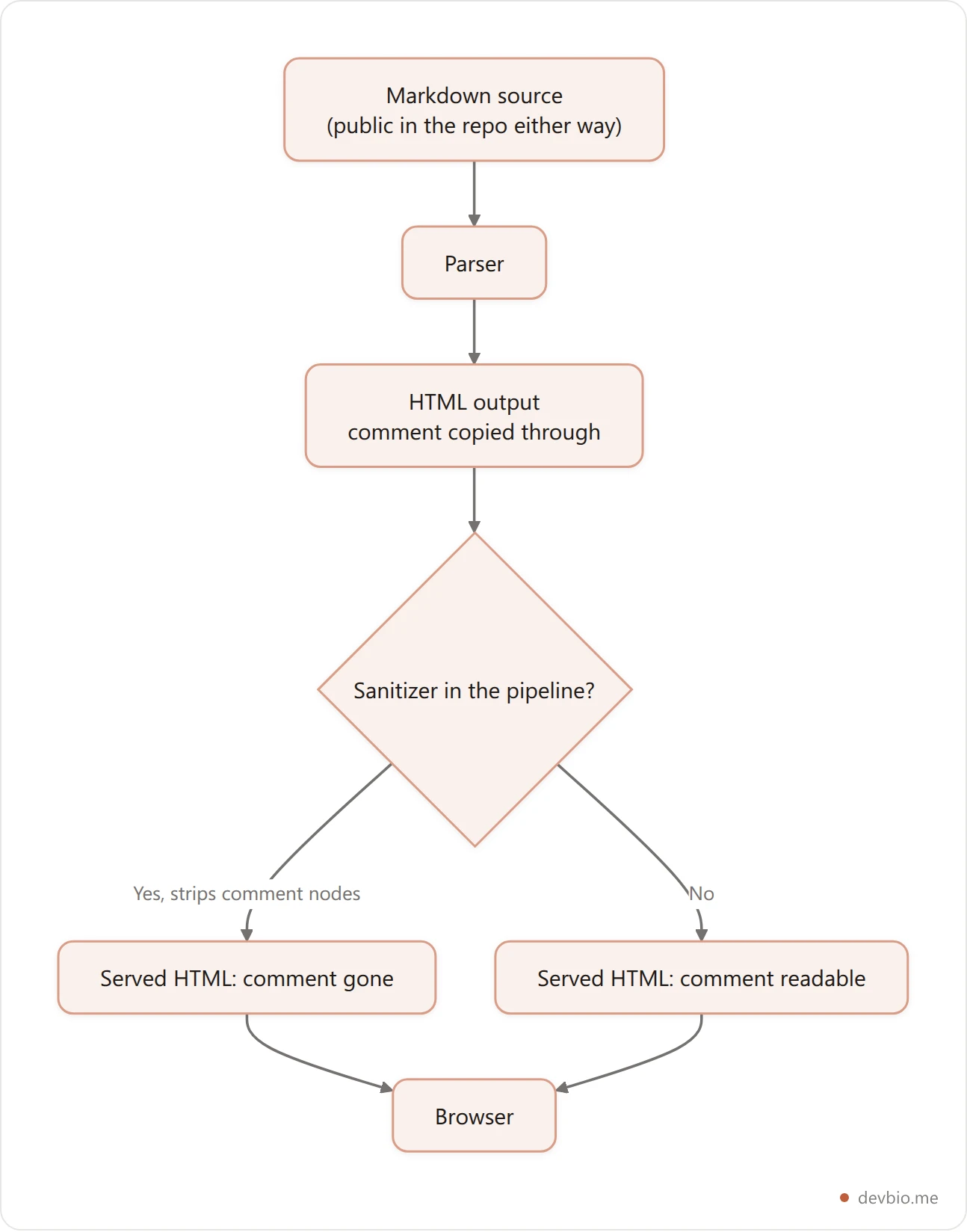
Run that same HTML through a standard sanitizer and the comment node is dropped:
<p>Before.</p>

<p>After.</p>
That's why <!-- --> behaves differently depending on where you publish. Platforms that render user Markdown almost always sanitize before serving, so the comment is gone from the rendered page — while the raw file it came from is still one click away on a public repo. Nothing was ever secret; one stage of the pipeline just tidied up after you.
The flip side shows up in small renderers. DevBio's about section, for example, handles a deliberately narrow slice of Markdown — bold, italic and links — and doesn't accept raw HTML at all, which is the safe default for anything a stranger can type into. Paste an HTML comment into a bio field like that and it prints as literal text, failure mode 4 above. Before you trust a note to be hidden anywhere other than a file you control, paste it in and look at the result.
Notes That Never Reach the Renderer#
If your file has YAML front matter, you already have a real comment syntax sitting at the top of it:
---
title: My Post
# reminder: swap the hero image before this goes out
draft: true
---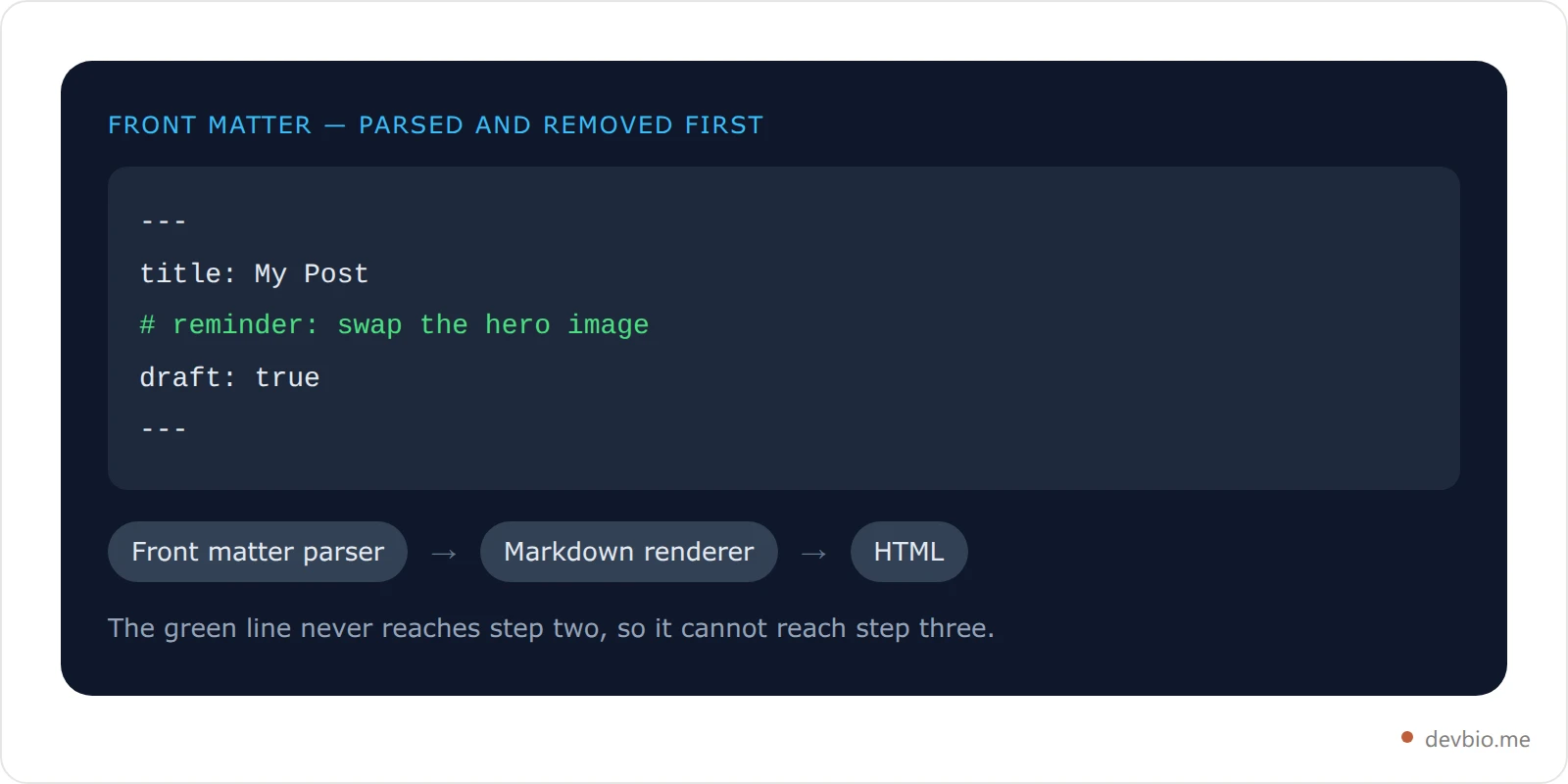
The # line is a YAML comment. Jekyll, Hugo, Astro, and every other generator that parses front matter discard it before Markdown rendering starts, so it can't leak into HTML by any route. For editorial notes about a page — as opposed to notes inside the prose — this is the cleanest option available, and it's the one most people forget they have.
The same logic applies to anything with its own comment syntax further up the chain: a build script, a data file, a template. Put the note where the format supports one instead of smuggling it through Markdown.
Pick One and Stay Consistent#
A note for a human collaborator:
[//]: # (note). Gone from the output, works everywhere.A marker a tool reads back:
<!-- START:name -->. Public by design, so word it accordingly.A note about the whole page: a
#line in YAML front matter.Anything genuinely sensitive: none of the above. A credential, an unannounced launch date, or a client's name doesn't belong in a file you're about to push, hidden or not.
An unfamiliar renderer: test before you trust. Babelmark renders one input through dozens of implementations at once and shows you where they disagree.
One more habit worth building: when a note is aimed at a reader rather than at you, it usually isn't a comment at all. A collapsed section, a clearly-labelled note block, or a line in the table of contents does the job without depending on a parser quirk. And if the goal is to mark a spot readers can jump to, a comment can't do that at all: you need a real <a id> target, as covered in our markdown anchor link guide.
Stop guessing what renders
Build a developer bio whose README, profile page, and live stats all come from the same source — and see exactly what each surface renders before it ships.
Start free on DevBioFrequently Asked Questions#
Does Markdown have a comment syntax?#
No. Neither the original Markdown syntax document nor CommonMark defines one. The two workarounds are HTML comments, which rely on Markdown passing raw HTML through untouched, and unused link reference definitions, which the parser consumes and never writes to the output.
Do HTML comments work on GitHub?#
On rendered pages they generally do, because platforms that render user-supplied Markdown sanitize the HTML and drop comment nodes before serving. The raw file is a different story: it's served verbatim, so anyone opening the raw view or cloning the repo reads your note in full.
Why does my markdown comment show up as text?#
Four usual causes: no blank line before a link-label comment, four spaces of indentation turning it into a code block, placement inside a fenced block, or a renderer with raw HTML disabled. That last one is the most common in bio fields, comment boxes, and CMS editors.
Is the [//]: # (note) trick safe to use?#
Yes, with three caveats: give it its own block with blank lines around it, avoid unescaped closing parentheses inside the note, and keep it on one line. Break any of those and the definition stops parsing as a definition and renders as ordinary text.
Can I comment out a whole section in Markdown?#
Wrap it in <!-- and --> and the block is skipped on the page, but it still ships in the HTML and in the raw file. To remove a section for real, delete it and let version control hold the history — that's what the history is for.
Are markdown comments private?#
No. Every method here hides text from a casual reader, not from anyone who looks. Comments live in the source file, and often in the served HTML too. Treat them as notes, never as a hiding place for anything you'd mind seeing quoted back to you.
If the goal is to fold a note away rather than hide it outright, a collapsible section is the honest version of the same idea — the reader can still open it. It runs on the same HTML-block rule, and one blank line decides whether its contents render.
Key Takeaways#
There is no markdown comment. There's HTML passthrough and there's an unused link reference, and they behave differently.
**<!-- -->**is copied into your HTML. Invisible on the page, plainly readable in View Source unless a sanitizer removes it.**[//]: # (note)**leaves nothing in any renderer — the one method that doesn't depend on raw HTML being allowed.Visible-text bugs come from four things: a missing blank line, four-space indentation, a code fence, or a renderer with HTML turned off.
Front matter has real comments. A
#line never reaches the renderer at all.Hidden is not private. If it ships to a public URL, assume it can be read.
If your profile is the thing you're maintaining by hand across a README, a portfolio page, and a resume, the comments are a symptom — three copies drifting apart is the actual problem. Put the data in one place and let each surface render from it.


