

You indent a sub-bullet by two spaces, commit, and GitHub renders your markdown nested list as one flat list. Same two spaces under a numbered item, and the sublist doesn't just flatten — it renumbers, so step 2a becomes step 3. Nothing in the source looks wrong, which is why this eats twenty minutes.
Here's the rule: a child item must be indented at least as far as its parent's content column — the width of the parent's marker including the space after it — and less than four columns past it. A dash gives you a content column of 2. 1. gives you 3. 10. gives you 4. Two spaces is enough for one and not the other.
I ran every claim below through three markdown engines in September 2026 — markdown-it 14.3.2, marked 18.0.14, and micromark — checking each case against CommonMark 0.31.2, and all three agreed every time. Where they agree, GitHub agrees too: they all implement the same CommonMark list rules.
The One Rule That Decides Whether a Nested List Nests#
Markdown doesn't count indent levels. It compares your child's indent against one number: where the parent item's content starts.
Take - Parent. The marker is -, followed by one space, so the parent's text begins at column 2. Any line indented to column 2 belongs to that item. Take 1. Parent — marker plus dot plus space — and the text begins at column 3.
That gives you two boundaries:
Floor. Indent the child to at least the parent's content column, or it isn't inside the parent at all.
Ceiling. Indent it four or more columns past that content column, and markdown stops reading it as a list.
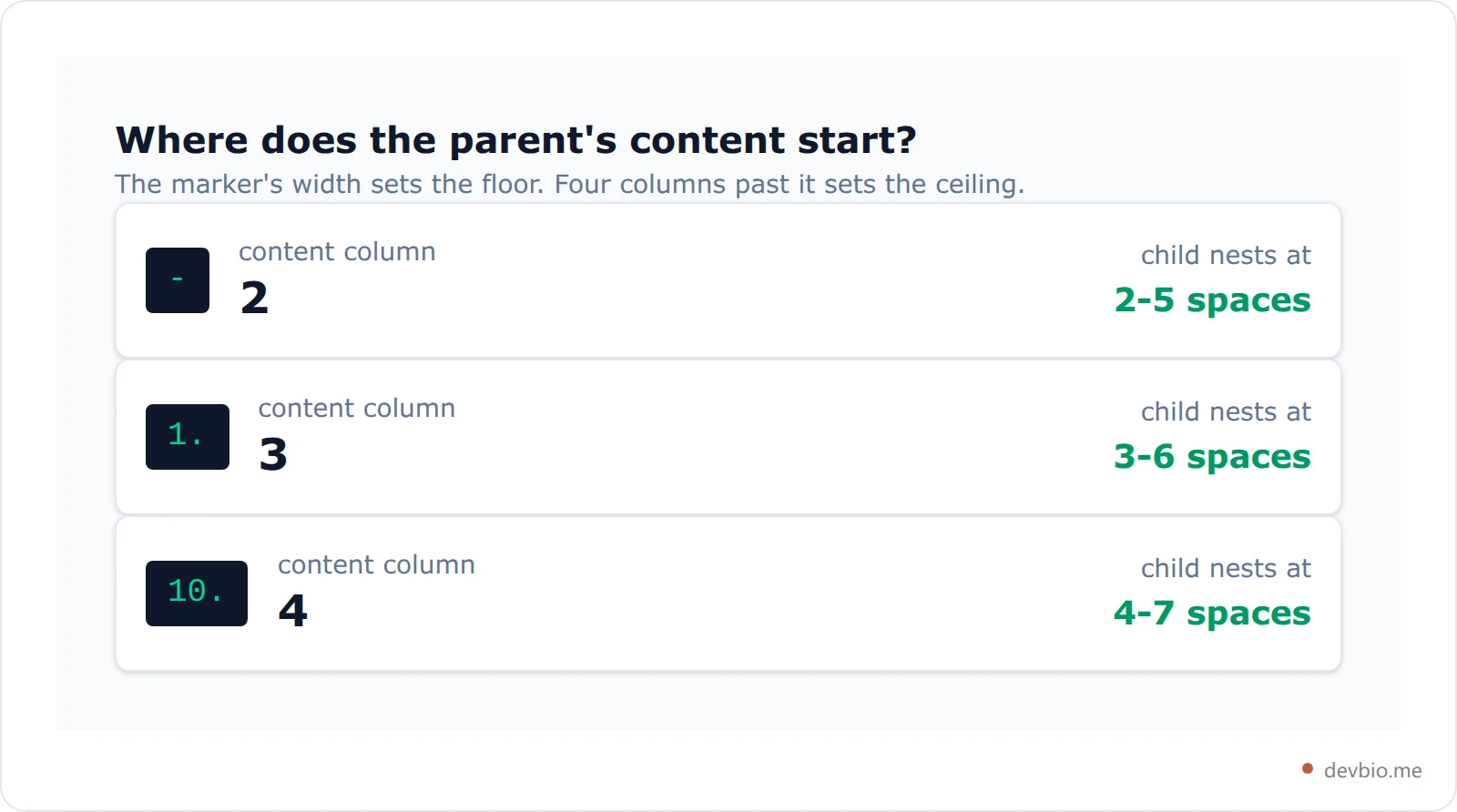
The CommonMark specification's list-items section states this as the rule that a list item's content is whatever is indented to the item's content column. Everything else in this post follows from it.
Why Two Spaces Nests a Dash but Flattens a Number#
This is the single most common way a markdown nested list breaks, so it's worth seeing both cases side by side.
Two spaces under a dash works, because 2 meets the floor of 2:
- Parent
  - Child
Two spaces under 1. does not, because 2 is below the floor of 3:
1. Parent
  1. Child
That second block doesn't error. It produces a flat, two-item ordered list — and because ordered lists renumber from their position, your "1." child is rendered as 2. Your nested numbered list silently became a sequence.
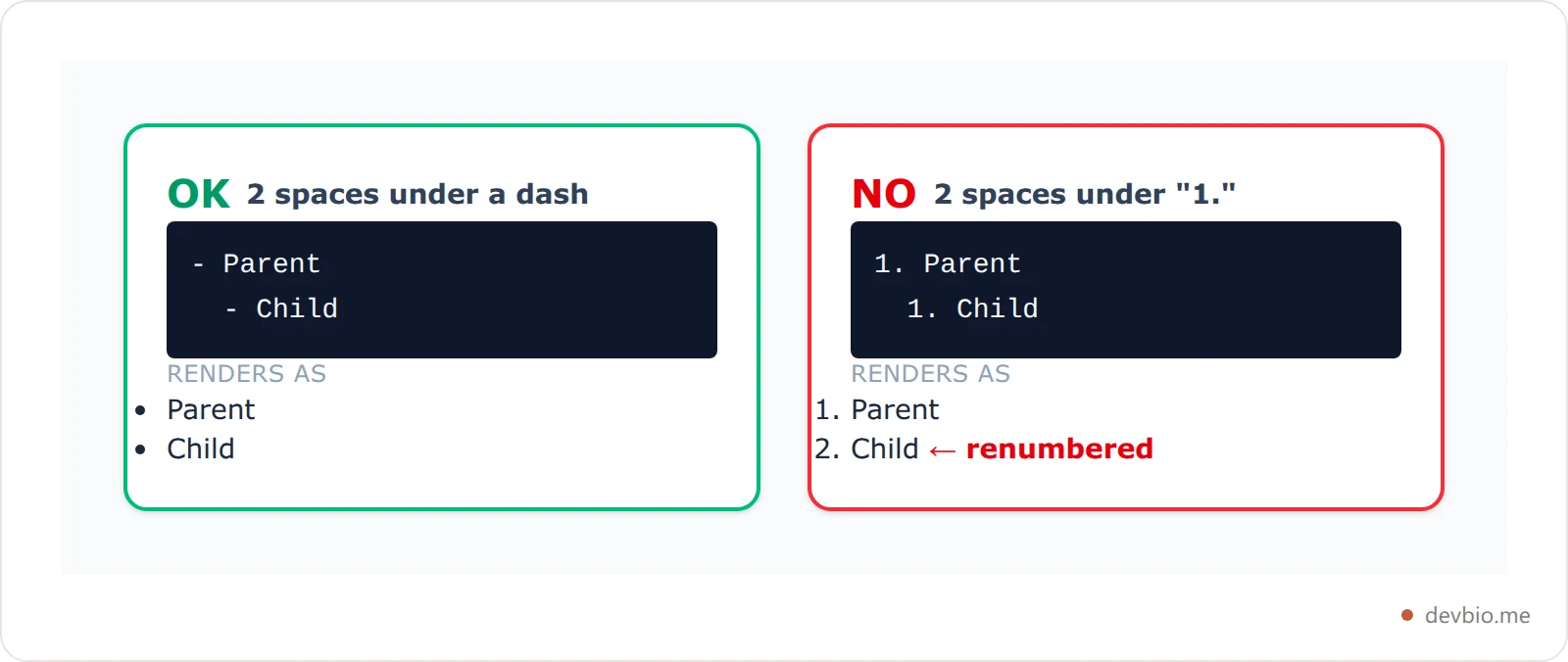
The fix is one space: indent the child to three.
1. Parent
   1. Child
If you want one habit that never fails, use four spaces per level. Four clears the floor for every common marker (-, *, +, 1., 1)) and stays under every ceiling, and it keeps working at depth — tested to four levels deep, four spaces per level nests correctly the whole way down. A tab works too; markdown counts it as four columns.
Every Indent Width, Tested#
Rather than trust folklore, here is the full sweep. Each row is a child indent; each column is a parent marker. Same result in all three engines.
Child indent |
|
|
|
|---|---|---|---|
0-1 spaces | flat siblings | flat siblings | flat siblings |
2 spaces | nested | flat siblings | flat siblings |
3 spaces | nested | nested | flat siblings |
4 spaces | nested | nested | nested |
5 spaces | nested | nested | nested |
6 spaces | literal text | nested | nested |
7 spaces | literal text | literal text | nested |
8 spaces | literal text | literal text | literal text |
Read the columns and the pattern is obvious: each marker has a four-wide window, and the window slides right as the marker gets wider. A 100. item needs five spaces and accepts up to eight.

Note what is not in that table: an error. Markdown has no invalid indent. Every width produces valid output — just not always the output you meant, which is the same trap behind the two-space line break.
The Three Ways a Nested List Fails#
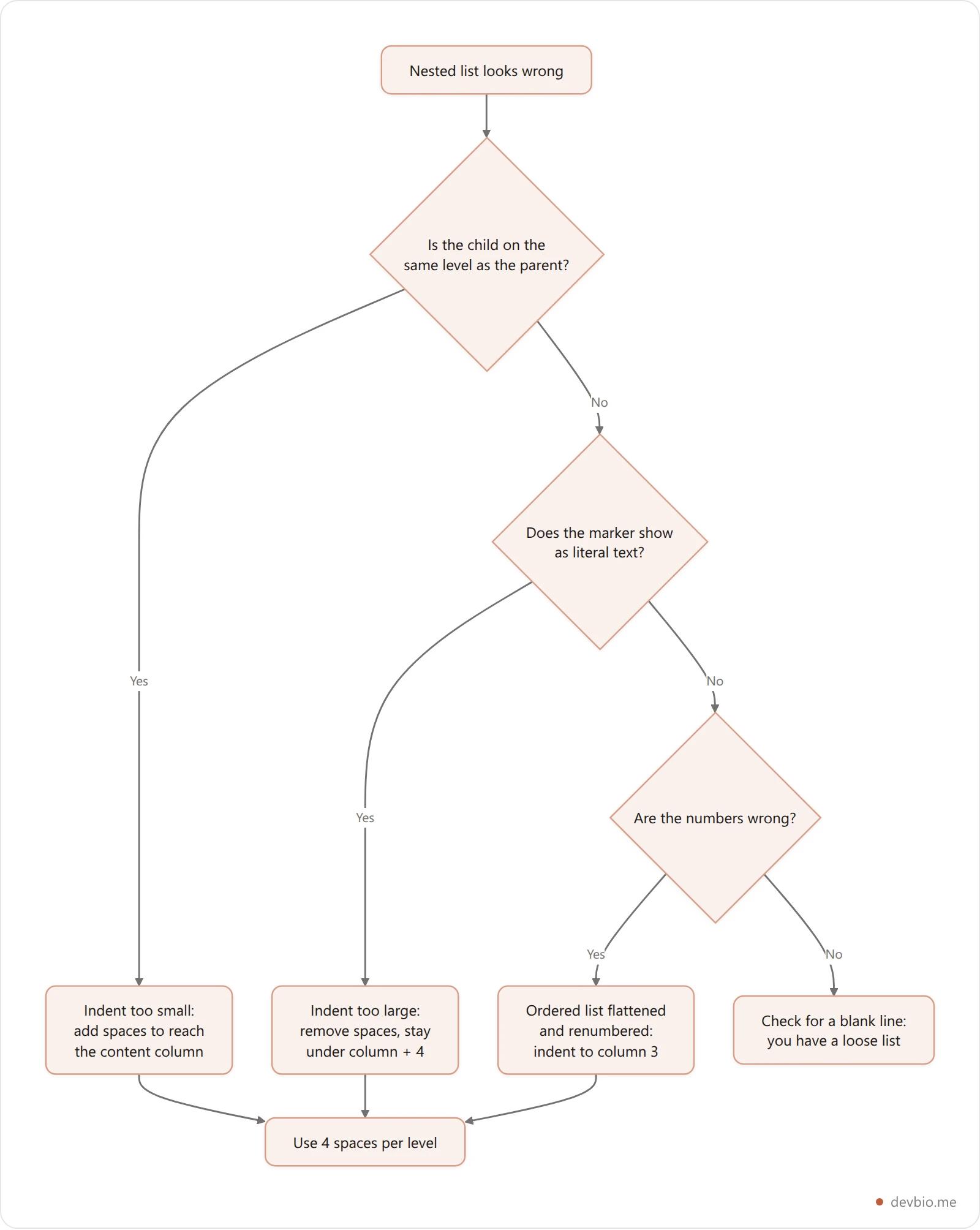
Every broken nested list in markdown lands in one of three buckets. Naming which one you're looking at tells you which direction to move the indent.
1. Flattened siblings (indent too small). The child joins the parent's list as a peer. Bullets look merely ugly; ordered lists renumber and change meaning.
2. Literal text (indent too large). Go four or more columns past the content column and the line stops being a list item. It gets absorbed into the parent's paragraph as a continuation line, dash and all — so readers see a stray - Child in the middle of a sentence.
3. Renumbered output (ordered lists only). A flattened ordered list doesn't preserve the numbers you typed. Markdown counts from the list's first marker, so hand-numbered steps come out resequenced.
That second one surprises people who expect four extra spaces to produce a code block. It doesn't — an indented code block can't interrupt a paragraph, so an over-indented line after text becomes part of that text. You only get a code block if a blank line separates it from the parent's text.
Nesting Ordered Lists Inside Bullets#
Mixing marker types is fine — markdown cares about indent, not about matching markers. An ordered child under a bullet parent nests at the bullet's content column of 2:
- Setup steps
  1. Install the CLI
  2. Run the init command
And a bullet child under an ordered parent nests at 3:
1. Setup steps
   - Install the CLI
   - Run the init command
The trap is a list that crosses from single- to double-digit markers. Items 1 through 9 have a content column of 3; item 10 has a content column of 4. If you indented every child three spaces, the children under items 10 and up quietly flatten. It's a genuinely nasty bug because the top of the list looks perfect and only the bottom breaks.
Four spaces per level immunizes you against it, since 4 satisfies both a content column of 3 and one of 4.
Writing a long README where this matters? Our GitHub profile README generator builds the markdown for you — form-based, no AI, with stack badges and GitHub stats widgets.
Nested Task Lists, Code, and Paragraphs Inside an Item#
Once an item nests, the same content-column rule governs everything you put inside it.
Task lists. Checkboxes are a GitHub Flavored Markdown extension, not core markdown, defined in the GFM specification. Nesting follows the ordinary bullet rule, so two spaces is enough:
- [ ] Ship the release
  - [x] Write the changelog
  - [ ] Tag the commit
A plain CommonMark renderer leaves [ ] as literal brackets — which is exactly why a checkbox that works on GitHub can render as text elsewhere.
Code blocks. A fenced block inside a list item must be indented to the item's content column, or the fence closes the list instead of sitting inside it. Fenced blocks are more forgiving than indented ones here — worth knowing if you're nesting fences inside fences.
- Install it:
npm install markdown-it
Extra paragraphs. Blank line, then indent to the content column, and the paragraph belongs to the item:
- First paragraph of the item.

  Second paragraph of the same item.
Drop that indent to zero and the paragraph ends the list entirely.
Put your whole profile on one link
devbio turns your GitHub profile, projects and links into a single developer bio page — no markdown indenting required.
See example profilesTight vs Loose: The Blank Line Changes Your Spacing#
This one isn't an indent problem, but it's the other half of "my list looks wrong."
Put a blank line anywhere between items and markdown switches the whole list from tight to loose. In a tight list, item text goes straight into the <li>. In a loose list, every item's text gets wrapped in a <p> — which browsers render with paragraph margins, so the entire list suddenly looks double-spaced.
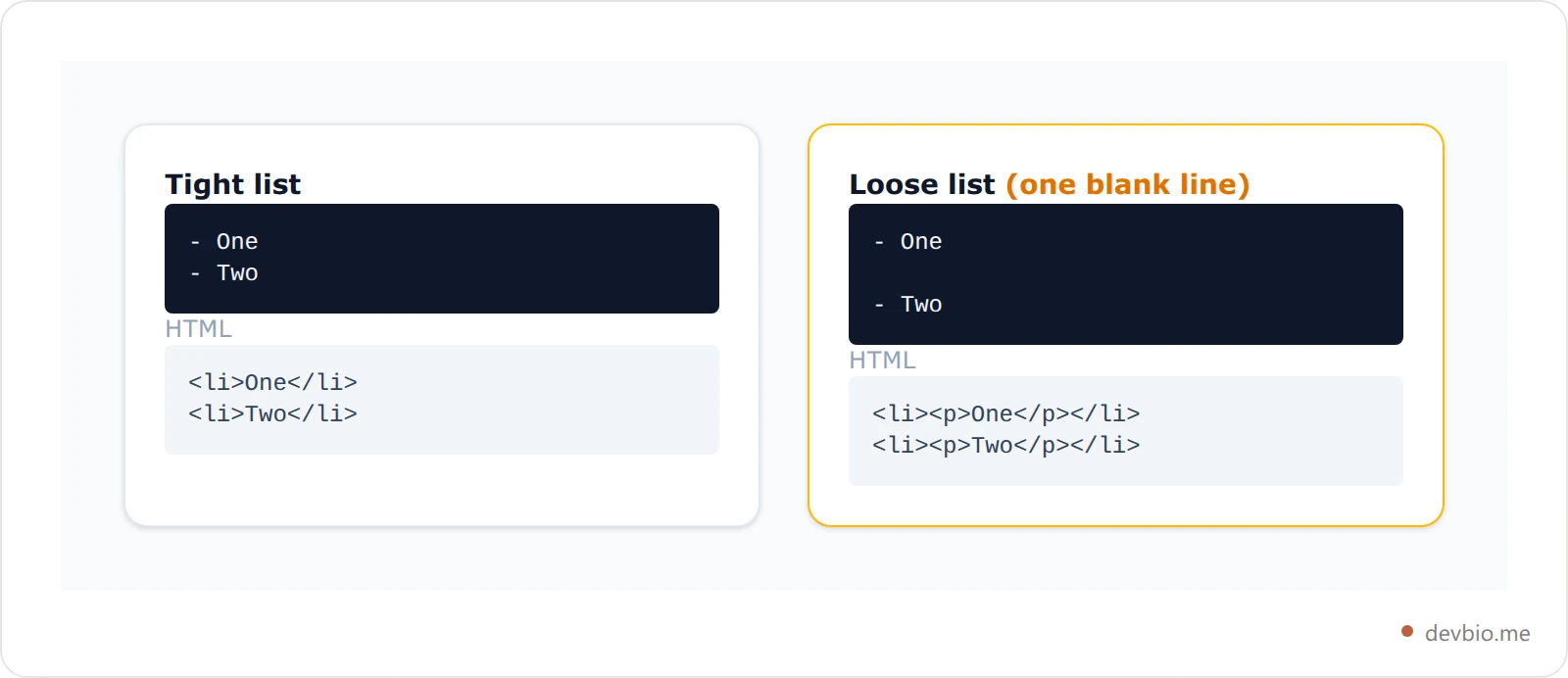
Looseness is a property of the whole list, not one item: a single blank line anywhere inside it spaces out every item. If your nested list suddenly gained air, look for a stray blank line rather than a CSS problem.
Where a Nested List Won't Render at All#
Worth knowing before you paste a carefully indented sublist into a profile field: most bio and profile inputs on the web don't run a full markdown parser.
devbio.me's About field is a deliberate example. Its renderer handles **bold**, *italic* and [text](url) and treats everything else as plain text, splitting on blank lines into paragraphs. Paste a nested list in markdown there and every dash prints literally. That isn't a bug — it's a small renderer chosen over a full markdown library for a short bio surface, which also means no raw HTML gets through.
For structured lists, devbio stores them as real data instead: work experience and project entries keep their bullets as an explicit list of strings (up to 10 per entry, 400 characters each) rather than as markdown text. That's a flat list by design — there's no nesting level to indent wrong, and the same bullets flow into the downloaded resume PDF.
The practical split: use nested markdown lists in READMEs, docs and issues, where a real CommonMark parser runs. Use structured fields on profile surfaces. If you need collapsible depth in a README instead of indentation, a details block does that job better than a fourth nesting level.
Key Takeaways#
A child nests when its indent is at least the parent's content column and less than that column plus four.
Content column equals the marker's width including its trailing space: 2 for
-, 3 for1., 4 for10..Two spaces nests a bullet and flattens a numbered list — the classic markdown nested list bug.
Four spaces per level is the safe habit; it clears every common marker and holds at depth.
Too little indent gives flat siblings; too much gives literal text, not a code block.
A blank line anywhere makes the whole list loose and adds spacing to every item.
Markdown's list rules date back to the original 2004 syntax description, which left indentation loosely specified — the ambiguity CommonMark later pinned down. That history is the reason two spaces feels like it should always work, and the reason it doesn't.
Frequently Asked Questions#
How many spaces do I need for a nested list in markdown?#
At least as many as the parent's marker is wide, including its space: two for -, three for 1. , four for 10. . The upper limit is three more than that. Four spaces per level satisfies every common marker, which is why it's the safest habit for a markdown sublist.
Why does my nested numbered list restart or renumber?#
Your child items are under-indented, so they joined the parent list as siblings. An ordered list numbers items by position, not by the digits you typed, so the flattened children get resequenced. Indent them to column 3 (or 4 once you pass item 10) and the sub-list numbers on its own.
Does GitHub use different nesting rules than other markdown tools?#
No. GitHub Flavored Markdown is CommonMark plus extensions like task lists and tables; it doesn't change list indentation. The nesting cases in this post produced identical output in markdown-it, marked and micromark, all of which implement the same CommonMark rules GitHub's renderer does.
Can I mix bullets and numbers in a markdown nested list?#
Yes. Markdown decides nesting from indentation alone, so an ordered child under a bullet parent (or the reverse) is fine. Changing the marker type does start a new list, which is exactly what you want for a sublist.
Why did my over-indented item turn into plain text instead of code?#
Because an indented code block can't interrupt a paragraph. A line that's four or more columns past the content column, following item text with no blank line between, is read as a continuation of that text — so the marker prints literally. Add a blank line first if you actually wanted a code block.
How deep can markdown nested lists go?#
There's no limit in the specification, and four-space-per-level nesting tested clean to four levels. Readability fails long before the parser does — GitHub's rendered width makes three levels about the practical maximum. GitHub's formatting documentation covers the supported syntax, and the CommonMark nested list tutorial is a good interactive sandbox.


