

You give a conference talk. Last slide, you flash a link: yoursite.com/talk?utm_source=conf&utm_medium=slide&utm_campaign=q3. Half the room photographs it. A third of those photos get shared in a Slack channel. By the time someone finally clicks, the query string is gone, stripped by whatever app relayed it, and your analytics shows a visit from "direct / none."
You did the work. The data just didn't survive the trip.
A vanity URL for developers is a short, branded link, like **yoursite.com/talk**, that redirects to a real destination while a server tracks the click against that link's own path instead of a query string tacked onto the end. Because the tracking lives in the URL's structure and not in a parameter, it survives copy-pasting, reposting, and the URL-stripping most platforms now do by default. That's the difference between a link and a UTM tag, and it's why one keeps working after your data reaches its fifth reshare.
This covers why UTM parameters break for personal-brand attribution, how a path-based vanity link fixes it, and how to set one up on your own developer profile.
What a Vanity URL for Developers Actually Is (And Why It's Not a UTM Tag)#
A vanity URL for developers is a short, memorable, branded redirect built around your profile instead of a generic shortener. devbio.me/priya/talk is a vanity URL. devbio.me/priya?utm_source=talk&utm_medium=slide is a UTM-tagged raw link. They look similar. They behave completely differently once they leave your control.
A UTM tag is metadata riding in the query string. Anyone who copies the link, shortens it again, or pastes it into an app that sanitizes URLs can lose that metadata in one step. The destination still works. The attribution doesn't.
A vanity URL's tracking key is the path itself: /talk, /cv, /book. There's no parameter to strip, because the "campaign" isn't a tag, it's the address. The server sees the request hit /talk, looks up what that key currently points to, logs the click, and redirects. Nothing about that process depends on the client preserving anything.
This matters more for a personal developer profile than for a company marketing site, because you don't have a marketing team re-pasting your tracked links correctly every time. You have one link, shared by other people, an unpredictable number of times, through channels you don't control.
Why Raw UTM Links Fail for Personal Brand Attribution#
Here's the direct answer: UTM parameters get stripped, truncated, or dropped by a meaningful share of the apps people use to reshare a link, and studies estimate 30% to 80% of UTM data gets lost depending on the channel it passes through. For a solo developer relying on a handful of high-value shares, that loss rate can erase the one data point that would have told you a conference talk actually worked.
Common failure points:
Messaging apps strip tracking parameters as a privacy default (several mobile browsers and messengers now do this automatically).
Re-shorteners eat the original URL. Someone runs your tagged link through their own shortener, and the new short link has no idea your UTM tag ever existed.
Manual retyping. Someone reads your link off a slide and types it by hand. The
?utm_source=confpart never survives that.Platform link wrapping. Some platforms rewrite outbound links through their own redirect service, which may or may not forward your original query string.
None of that breaks a vanity URL, because there's no query string to lose. The key is baked into the address. /talk resolves to whatever you pointed it at, every time, regardless of how many hands the link passed through first.
The Surface Key Model: Track Where, Not Just That#
Most attribution advice tells you to tag campaigns. That works for paid ads with a defined start and end date. It works badly for a developer profile, because your traffic doesn't come from campaigns. It comes from surfaces: your email signature, your GitHub README, a conference slide, your X bio, a Hacker News comment, a job application.
The fix is naming links after the surface they live on, not the initiative behind them. Call it the surface key model: one short, stable key per place your link appears, held constant for as long as that surface exists.
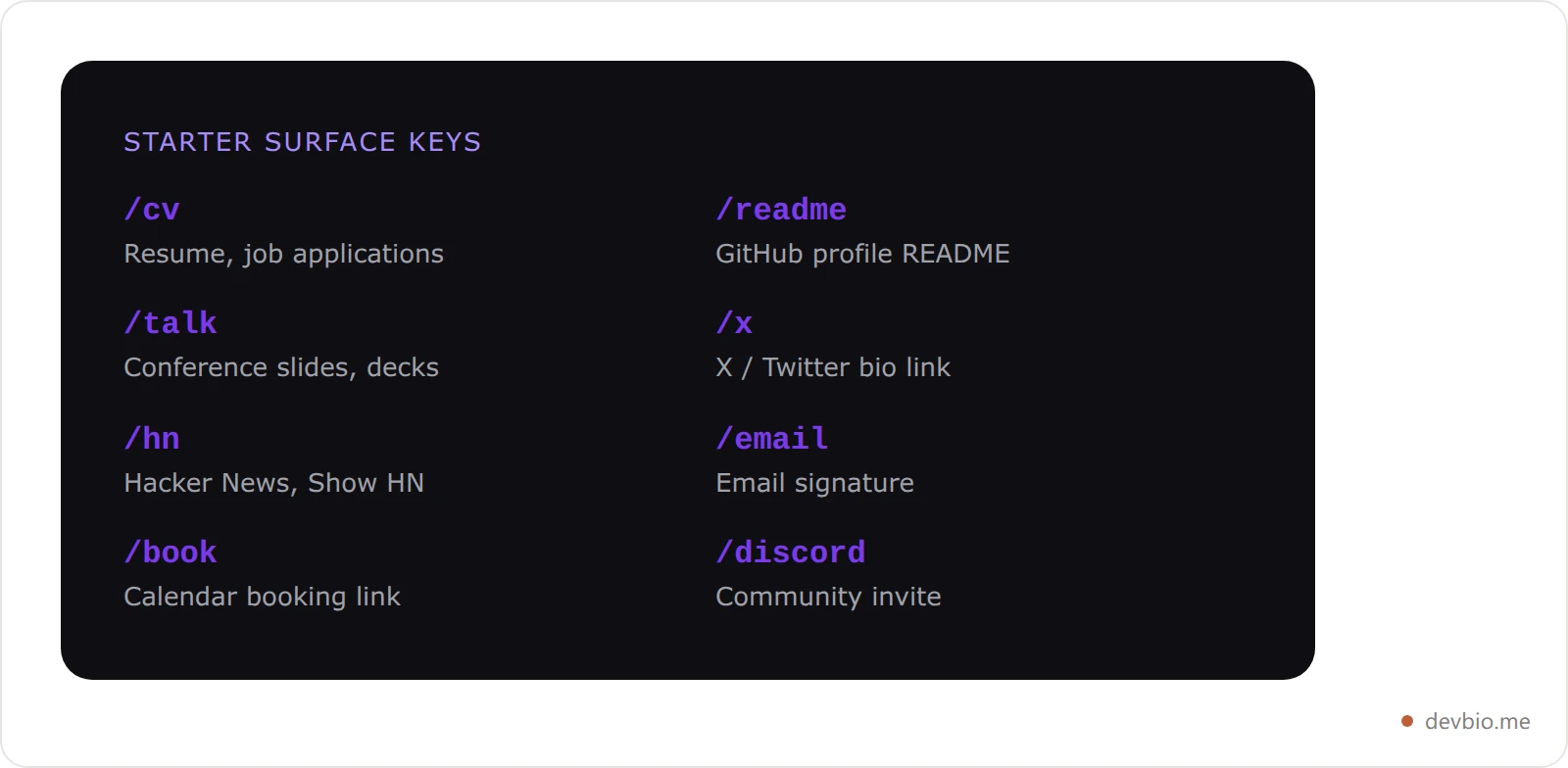
/cvon your resume PDF and job applications/readmeon your GitHub profile README/talkon conference slides (swap the destination between talks, keep the key)/xin your X/Twitter bio/hnon Hacker News and Show HN posts/emailin your email signature
A surface key isn't a campaign tag you bolt onto a URL for one push and then forget. It's a permanent address you own, and the destination behind it can change without the key ever needing to.
That's also why multi-destination support matters: a single key can point at more than one URL, split randomly for a simple A/B test, without changing the link you've already printed on a slide or pasted into a bio.
How the Redirect Actually Works#
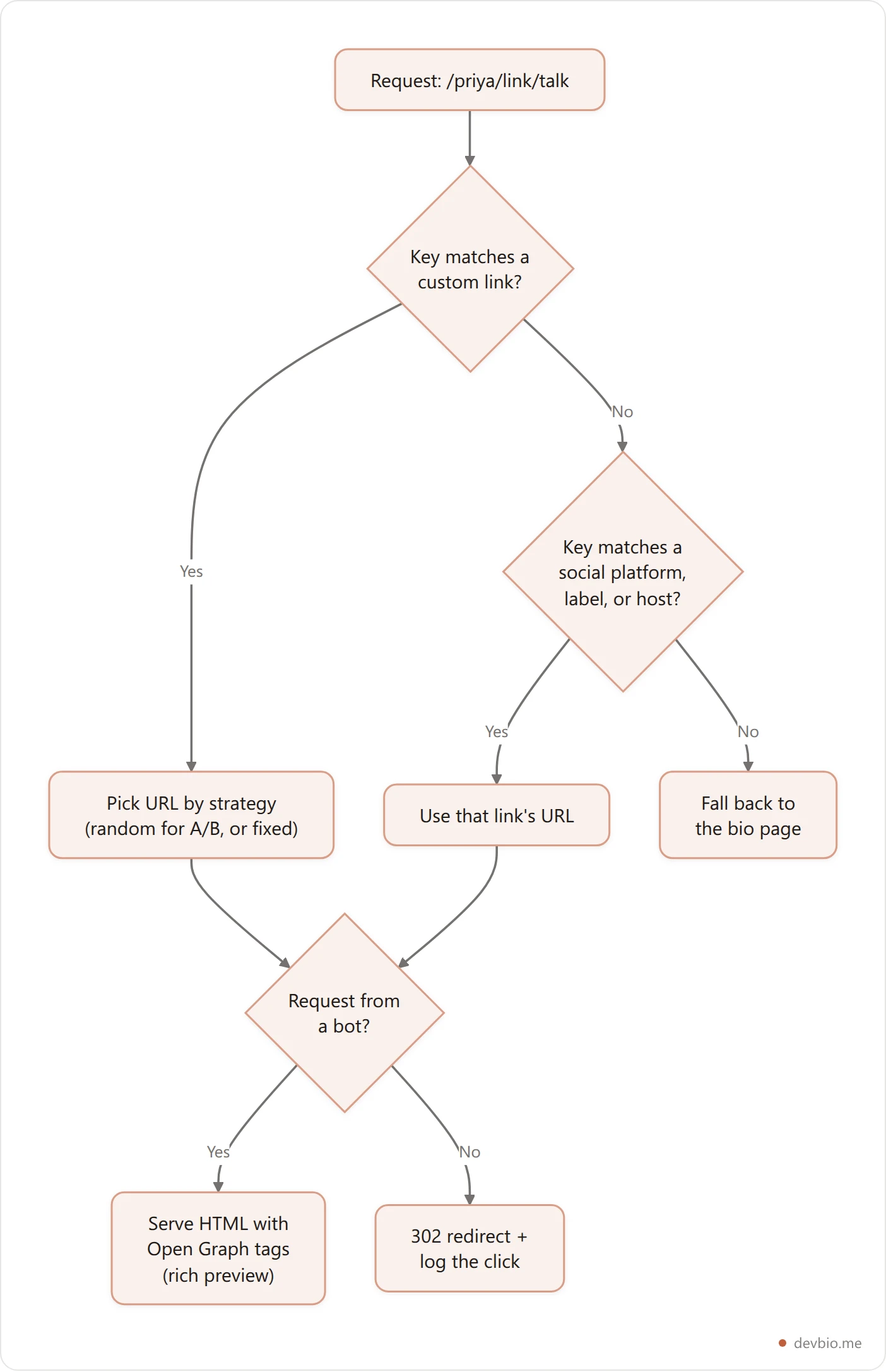
DevBio's version of this lives at /{username}/link/{key}, and every bio gets it without extra setup. The resolution order:
Custom links first. Keys you define yourself (in the dashboard's Links panel) take priority, so you can repoint
/talkto this quarter's recording without touching anything else. A key can carry multiple destination URLs with arandomorfirstselection strategy, and an optional expiry date, after which it quietly falls back to your bio page instead of 404ing.Auto-mapped social links. If a key isn't custom, it's matched against your existing Links component by platform (
github,linkedin), by a slugified label (Book a callbecomes/book-a-call), or by the destination's own hostname.Graceful fallback. An unresolved key doesn't dead-end on a 404. It redirects to your bio page, so a stale or mistyped link still lands somewhere useful.
Every human click increments a per-key counter and mirrors into your bio's unified analytics as a link_click event, tagged by surface, so it shows up next to your on-page click data instead of living in a separate tool. If you append ?from=readme to the shared link, that value gets carried through as utm_content on the outbound URL automatically, which gives you sub-surface detail (which README section, which slide) without you hand-building a UTM string.

Per-Link Rich Previews: Bots See a Different Response Than Humans#
Paste a link into Slack, Discord, or X, and the platform doesn't render the page a human sees. It sends a bot to fetch the URL, reads the Open Graph and Twitter Card meta tags on the response, and builds the preview card from those. A well-formed card with a real title, description, and image can lift click-through by an estimated 40% to 80% over a bare, cardless URL, and a single missing tag can quietly cost a busy page thousands of impressions worth of social traffic a day.
Most link shorteners return the same generic preview for every link, or none at all. A per-link vanity system can do better: when the request's user agent matches a known bot signature (Slack, Discord, X, LinkedIn, WhatsApp, Telegram, Facebook, plus search crawlers), the server responds with HTML carrying that specific link's own title and image instead of issuing a redirect. A human hitting the same URL gets a fast 302 straight to the destination. The bot gets something worth rendering; the person gets something worth waiting zero extra seconds for.
Practically: your /talk link can unfurl as "Priya: Scaling Postgres to 10M rows" with a matching image, while your /cv link unfurls as "Priya: Resume." Same person, same profile, a distinct card per surface. That's a level of OG preview control most link-in-bio tools don't offer at the individual-link level, only at the whole-profile level. Check what tags a link is actually serving with a meta tags checker before you trust the preview.
Vanity URLs vs. Bitly vs. Dub vs. Rebrandly#
A custom link shortener solves a real problem, but it's a second tool bolted onto a profile that already tracks clicks. Here's how the options actually compare for a developer who wants surface-level attribution without paying for or maintaining a separate service.
Tool | Free tier limit | Custom domain | Per-link OG preview | Built into your bio | A/B destinations |
|---|---|---|---|---|---|
DevBio vanity links | Unlimited keys, click counts always on | Yes (Pro) | Yes, bot-aware | Yes, no separate tool | Yes ( |
Bitly | 5 links/month, interstitial ad on free clicks | Paid plans only | Limited | No | Paid plans only |
Dub | Unlimited clicks, up to 3 domains free | Yes, free tier | Partial | No | Yes |
Rebrandly | 10 links / 100 tracked clicks per month | Paid plans only | No | No | No |
Raw UTM query string | Unlimited, but fragile | N/A | No | Depends on host | No |
Dub is the strongest dedicated shortener here, and it's worth using if you're managing links for a team or a product, not just a personal profile. Its founder, Steven Tey, built the original version while working on developer relations at Vercel, after running into the same problem this post is about: no reliable way to see which content and channels were actually driving signups. That's the whole argument for owning your attribution instead of relying on borrowed, strippable tags: Dub exists because a company with real engineering resources still couldn't answer "which link worked" without building the tracking into the link itself.
For a personal developer profile, the case for a dedicated shortener weakens fast: you'd be running click tracking in one tool and profile analytics in another, manually reconciling the two. A vanity system built into the bio itself, the same one already tracking your visitor analytics, keeps both in one place.
Before/After: One Talk, Two Ways#
Before. Priya, a backend engineer, gives a 20-minute talk at a regional dev conference. Her last slide reads priyacodes.dev/portfolio?utm_source=conference&utm_medium=talk. Forty people photograph the slide. Two weeks later, her analytics shows 11 sessions tagged utm_source=conference, and 19 sessions tagged direct / none that she can't place. She has no way to know if those 19 came from the talk, a tweet, or someone typing her name into Google.
After. Same talk, same slide, this time reading priyacodes.dev/talk. Same 40 photos, same reshares through Slack and group chats. Three weeks later, her dashboard shows 33 clicks against the /talk key specifically, because the tracking lived in the path, not a parameter that Slack's link preview or someone's messaging app could strip on the way through. She now knows the talk worked, roughly how well, and she can point that exact key at next quarter's updated portfolio without reprinting a single slide.
The gap between 11 attributable visits and 33 isn't better marketing. It's a link structure that survives being passed around by people she doesn't control.
Where Surface Keys Actually Pay Off#

A surface key is worth setting up anywhere the same link gets reused across a channel you can't edit after the fact:
Email signature.
/cvor/hire-me, so every thread you send carries a trackable, memorable link instead of a raw domain.GitHub README.
/readme, so you can tell README traffic apart from everything else, and swap the destination without touching the README file itself.Conference slides and talk descriptions.
/talk, reused across every talk you give, repointed each time.X/LinkedIn bio.
/xor/li, since bio links get clicked in a completely different context than a shared post.Hacker News and Show HN.
/hn, a notoriously high-traffic, high-skepticism audience worth measuring separately.Job applications.
/cvdoubles here, or a dedicated/applyif you're job hunting and want to see which applications actually got opened, tying into how the rest of your job-search profile should be set up.
The pattern that matters: pick the key once, keep it stable, and let the destination behind it change. That's what separates a surface key from a one-off UTM tag you'll forget the exact spelling of in three months.

Setting Up Your First Vanity URL for Developers#
This takes about ten minutes.
List your surfaces. Write down every place your link currently appears: email signature, README, socials, talks, job applications. Most developers have 4 to 8.
Pick a key per surface, not per campaign. Use the starter list above as a base and adjust to your own channels.
Set the destination and, optionally, a strategy. A single URL is fine for most keys. Use the random A/B strategy on a key like
/talkif you want to split traffic between two versions of a landing page.Swap your existing links. Replace the raw profile URL in your README, bio, and signature with the surface-keyed version. This is a one-time edit per surface.
Check back after your next talk, post, or application round. The click count against each key is now a real, durable answer to "did that work," not a guess based on vague traffic bumps.
If you're just getting your profile off the ground first, start with the core components before layering on attribution. Surface keys are most useful once there's a live profile behind them worth tracking clicks to.
One more thing worth checking before you print a key onto a slide: make sure the handle behind it is actually yours everywhere you're claiming it. A quick username availability check across platforms saves you from building surface keys around a handle you don't actually hold on X or Bluesky. And if a rename is on the cards, read what changing a GitHub username actually breaks before you print anything — repository links redirect, but your profile URL and every gist you've shared return a hard 404. And if you want people to find your profile by handle from Mastodon and other fediverse apps, not just by a link someone has to click, WebFinger support covers that setup.
Printing a surface key on a physical card too? Pair it with a QR code business card so the same trackable link works whether someone scans or clicks. If you're weighing a dedicated card app instead, our Blinq vs HiHello comparison explains why a key you own beats one that lives on a vendor's domain. And if you need inspiration for the handle itself, DevBio's free username generator suggests available options across platforms in seconds.
FAQ#
What's the difference between a vanity URL for developers and a UTM link?
A UTM link adds tracking as a query parameter (?utm_source=...) on top of a URL that stays the same. A vanity URL's tracking key is the path itself (/talk), so there's no parameter for an app or platform to strip. Vanity URLs survive reshares; raw UTM tags frequently don't.
Do vanity URLs actually improve click-through rate?
Yes. Branded short links get roughly 34% more clicks than generic shortened links, largely because a recognizable domain and path read as trustworthy while a random string of characters doesn't. The gain compounds with a good Open Graph preview, which can add another 40% to 80% over a bare URL with no card at all.
Can I A/B test a link without changing the URL I've already shared?
Yes, if your vanity key supports multiple destination URLs with a selection strategy. Point one key at two URLs with a random split, and the printed or posted link never has to change even as you test different landing pages behind it.
What happens if someone clicks an expired or mistyped vanity link?
A well-built system falls through to your main profile instead of showing a dead 404. That way a stale conference link or a typo still lands the visitor somewhere useful, rather than losing them entirely.
Do I need a custom domain to use vanity URLs?
No. Vanity URLs work on a shared subdomain path like devbio.me/yourname/talk just as well as on a fully custom domain. A custom domain makes the link shorter and more memorable, but it's not required for the tracking to function.
Why not just use Bitly or Dub instead of a built-in vanity link?
Dedicated shorteners are worth it if you're managing links across a team or product. For a single developer profile, they add a second dashboard you have to check separately from your bio's own analytics, and most free tiers cap you at a handful of tracked links or clicks per month. A vanity system built into the profile keeps click data next to the rest of your traffic picture.
Does this replace UTM parameters entirely?
Not always. UTM parameters still make sense for paid campaigns with defined start and end dates, run through channels you control end to end. For the links you hand out yourself, on slides, in bios, in signatures, a path-based surface key is more durable because it doesn't depend on anyone downstream preserving a query string.
How is this different from a regular link-in-bio page?
A link-in-bio page is a landing page listing multiple links. A vanity URL is a single trackable redirect, often one of several a profile can generate. They're complementary: DevBio's link-in-bio comparison covers the landing-page side; this post covers the individual, trackable link you hand out on its own.
Keep the Data, Not Just the Link#
Three things worth doing this week:
Replace your email signature and README link with a surface key like
/cvor/readmeinstead of a raw profile URL.Retire any UTM-tagged link you're currently handing out in person or on a slide. Swap it for a path-based key before your next talk or demo.
Check your click counts after the next share. That's the number a stripped UTM tag would never have shown you.
A link you hand out once and never touch again isn't giving you anything back. A surface key you keep for a year quietly builds a real picture of where your audience actually comes from.
Your code already proves you can build. Put it on one link, and make every share count, at devbio.me.


