

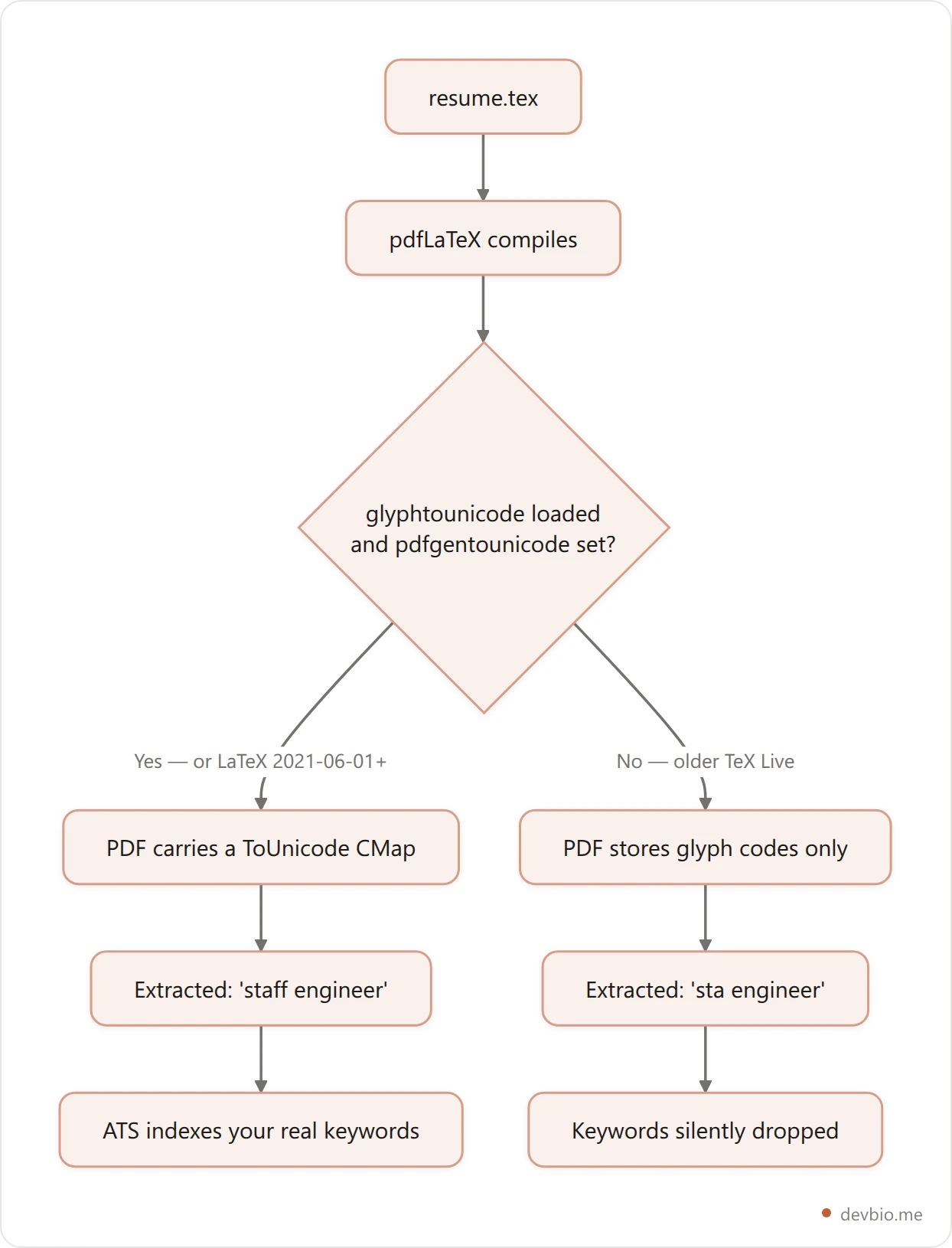
An applicant tracking system never sees your resume. It sees the text layer underneath it. And for most of pdfLaTeX's history, that layer came out wrong in a very specific way: the word "staff" extracted as "sta", because the ff was a single ligature glyph with nothing telling the PDF reader which letters it stood for.
The direct answer: almost any single-column LaTeX resume template parses fine — if the PDF it produces carries a /ToUnicode CMap. pdfLaTeX only writes one when glyphtounicode.tex is loaded and \pdfgentounicode=1 is set. That became automatic in the June 2021 LaTeX kernel, but not on the older TeX Live versions plenty of templates are still pinned to.
So the question isn't which template looks best. It's which one survives being read by a machine. Here's what breaks, seven templates measured against it, and a 30-second test on the PDF you already have.
On this page
The Two Lines That Decide Whether a Parser Can Read Your Resume#
A PDF doesn't store text. It stores instructions to draw glyphs, each identified by a code that's meaningful only inside the embedded font. Turning those codes back into letters requires a lookup table in the file — the /ToUnicode CMap. No CMap, no reliable extraction.
XeTeX and LuaTeX get this for free, because they work with Unicode-based OpenType fonts. pdfTeX historically did not. As the LaTeX team put it when they opened the issue to fix it, "Copy and paste, especially for ligatures, uncommon characters and fonts with non-standard glyphnames is often unreliable." The remedy was two lines in the preamble:
\input{glyphtounicode}
\pdfgentounicode=1
The first loads a data file mapping TeX's glyph names to Unicode code points. The second tells pdfTeX to actually emit the resulting CMap for every embedded Type 1 font. Set \pdfgentounicode=1 without loading the data file and you get a warning plus no CMap at all — the half-configured state that looks done and isn't.
Then, in LaTeX News 33 (June 2021), the kernel absorbed it. Under the heading "Improved copy & paste for pdfTeX documents":
"When compiling with pdfTeX, additional information (from the file glyphtounicode.tex) is now added automatically to the PDF file in order to improve copying from, and searching in, text."
That is the whole fix, and it's why this problem is invisible to most people today — and still live for anyone on an older toolchain.
Why an Old TeX Live Still Bites You in 2026#
Because the compiler version is a per-project setting, not a global truth. Overleaf lets each project pin its own TeX Live release. Fork a template built before June 2021 and you inherit that pinned version, and with it a PDF that still ships no ToUnicode CMap. The kernel fix never reaches you.
Overleaf hosts a large share of the world's resume templates, and its own documentation is explicit about this: "the TeX Live setting is specific to each project and does not affect any other projects you may have." It recommends the newest release precisely because "legacy versions are not recommended for new projects."
Fork a five-year-old template, inherit its pinned TeX Live, and you inherit its missing CMap. The PDF renders beautifully. The text layer is quietly broken. Nothing in the interface tells you.
This is why the good templates still carry those two lines explicitly instead of trusting the kernel: belt and braces costs nothing, and it makes the template correct on any toolchain.
7 LaTeX Resume Templates, Checked Against the Parser#
Ranked by what a machine reads, not by what a screenshot shows. Star counts and engine requirements are from each project's own repository.
Template | Stars | Engine | Columns | Ships the ToUnicode lines |
|---|---|---|---|---|
Jake's Resume | — | pdfLaTeX | One | Yes, explicitly |
sb2nov/resume | ~7k | pdfLaTeX | One | Not stated |
jankapunkt/latexcv | 3.3k | pdfLaTeX | Varies by design | Not stated |
Awesome-CV | 28.5k | XeLaTeX only | One | N/A — Unicode fonts |
moderncv | CTAN class | pdfLaTeX / Xe / Lua | One | Not stated |
AltaCV | 1.6k | pdf / Xe / Lua | Two (paracol) | Not stated |
Deedy-Resume | 5.1k | XeTeX only | Two, asymmetric | N/A — Unicode fonts |
1. Jake's Resume — the one that actually says it out loud. Its preamble carries \input{glyphtounicode} and \pdfgentounicode=1 under the comment "Ensure that generate pdf is machine readable/ATS parsable." Single column, plain article class, tabularx for the date alignment. It is the least decorated template here and the most defensible. If you want one recommendation and no further reading, this is it.
2. sb2nov/resume — roughly 7k stars, single-page and one-column, built for software engineers, MIT-licensed on the format. It makes no ATS claims, but the structural choices are right: no sidebar, no boxes, base LaTeX fonts. Add the two lines yourself and it's equivalent to Jake's.
3. jankapunkt/latexcv — 3.3k stars across nine designs, and notable for stating "No XeTeX, Koma or LuaTeX required," so everything compiles under pdfLaTeX. Read that as a warning too: the Sidebar, Two Columns, and Infographics variants are the parser-hostile end of the collection. Pick Classic or Minimalistic.
4. Awesome-CV — 28.5k stars, the most popular LaTeX CV project by a wide margin. It requires XeLaTeX (xelatex your-cv.tex) and uses Roboto and Source Sans Pro. Because XeTeX embeds Unicode-based OpenType fonts, the CMap question doesn't apply. Single column. The popularity is deserved.
5. moderncv — the CTAN class, at v2.6.1 as of June 2026, still actively maintained after original author Xavier Danaux went inactive. Classic and casual styles, single column, heavily customizable. It's the conservative institutional choice and it parses fine.
6. AltaCV — 1.6k stars, genuinely handsome, and two-column via paracol. It supports all three engines. The layout is the problem, not the engine; see the next section.
7. Deedy-Resume — 5.1k stars, one page, two asymmetric columns, XeTeX only. Its README is refreshingly honest about the tradeoffs, warning that it "overflows onto second page if any column's contents are more than the vertical limit," and noting the Mac font variant's EULA blocks open-source distribution. Beautiful for a design-forward role; risky for a keyword-matched pipeline.

The honourable mention that isn't LaTeX at all: RenderCV has 17.6k stars and looks like it belongs on this list, but it renders through Typst, not LaTeX. You write YAML, it produces the PDF. If what you actually want is "resume as version-controlled plain text" rather than "resume in LaTeX specifically," it's a serious option — and the same structured-data argument in the JSON Resume schema guide applies to it.
Want the PDF without maintaining a .tex file at all? devbio.me generates one from your profile.
One Column or Two: What a Sidebar Actually Costs#
The CMap problem is invisible and fixable. The column problem is visible and structural.
A parser reads a PDF's content stream in the order the glyphs were drawn. In a single-column document that order matches reading order, so "Senior Backend Engineer" stays next to the company and the dates. In a two-column layout it depends entirely on how the package interleaves the columns — and a sidebar of skills can end up spliced into the middle of your work history, or your job titles separated from their employers.
You can't inspect that from the rendered page, which is what makes it dangerous. It only shows up when you extract the text.
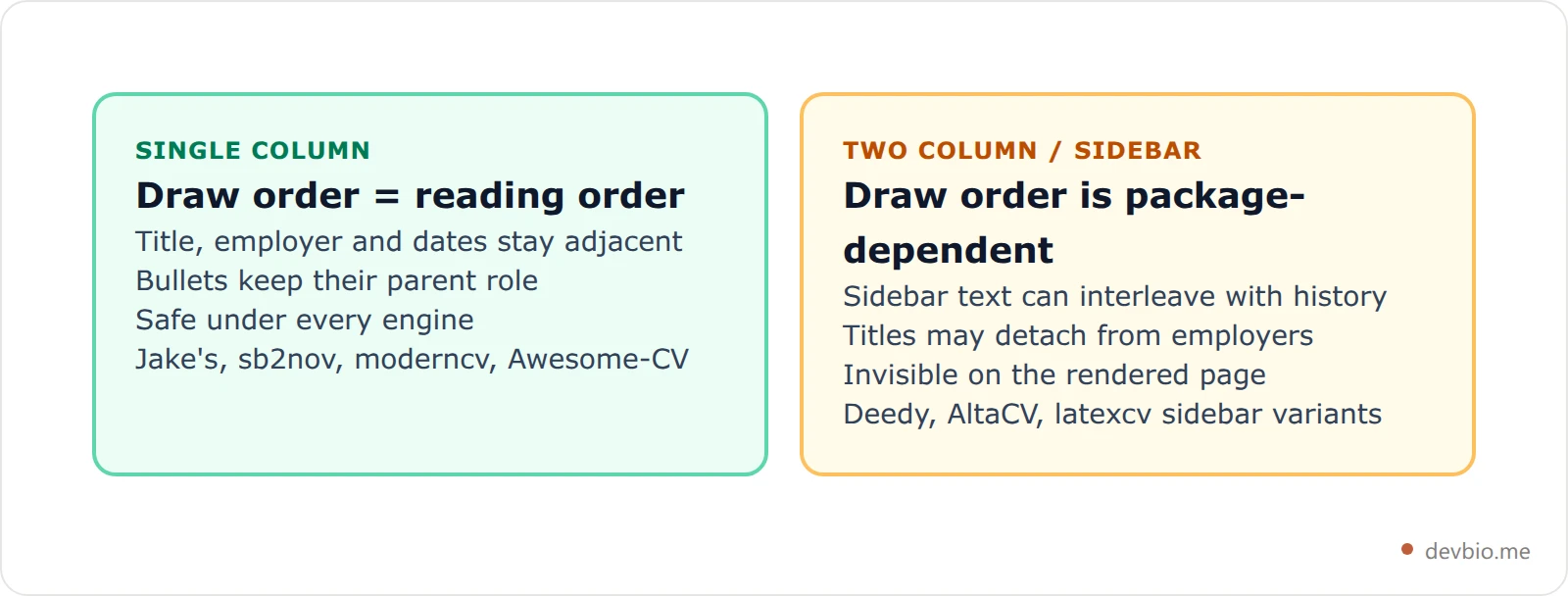
The practical rule: use two columns when a human is the first reader (a design studio, a referral, a conference bio) and one column when software is (a job board, a careers portal, anything that asked you to also type your work history into a form). If you only maintain one, maintain the single-column one. The five resume formats ranked by ATS behaviour covers how that choice plays out beyond LaTeX.
Rather not maintain a preamble at all? Generate a single-column resume straight from your profile data.
pdfLaTeX, XeLaTeX, or LuaLaTeX?#
For a resume the engine matters less than people assume, but it decides which precaution you need. pdfLaTeX is the default and the only one where the CMap question is live. XeLaTeX and LuaLaTeX embed Unicode OpenType fonts, so extraction works untouched. Pick pdfLaTeX with the two lines unless a template forces otherwise.
pdfLaTeX is the default on Overleaf and the fastest of the three. It's the only one where the CMap question is live. On LaTeX 2021-06-01 or newer you're fine automatically; older than that, add the two lines. Either way, adding them is harmless.
XeLaTeX handles Unicode and system OpenType fonts natively, which is why Awesome-CV and Deedy require it. Text extraction works without intervention. The cost is slower compiles and font availability — a template referencing Helvetica Neue won't build on a machine without it.
LuaLaTeX behaves like XeLaTeX for these purposes, with better programmability you almost certainly don't need for a one-page resume.
If you have no existing preference: pdfLaTeX with the two lines, single column. It's the fastest path with the fewest dependencies.
Test Your Own PDF in 30 Seconds#
Don't take a template's word for it — including this article's. Extract the text and read it.
The command-line version, from poppler-utils:
pdftotext -layout resume.pdf - | head -40No terminal? Open the PDF in any viewer, select all, copy, and paste into a plain-text editor. That paste is approximately what a parser receives.
Three things to look for:
Missing letters inside words. "sta" for "staff", "workow" for "workflow", "signicant" for "significant". Every one of those is a dropped
ff,fl, orfiligature, and it means no CMap.Interleaved sections. Skills appearing in the middle of a job description is the two-column tell.
Detached headings. A job title whose employer and dates landed paragraphs away.
If the text reads cleanly top to bottom in the order you'd say it aloud, the file is fine — whatever it looks like. If it doesn't, the layout is lying to you, and a purpose-built ATS-ready pipeline is a faster fix than debugging someone else's preamble.
Failed the paste test? Get a resume PDF that is single-column by construction.
Or Generate the PDF From Structured Data Instead#
There's a third option between hand-editing .tex and settling for a web builder: keep your history as structured data and compile the document from it.
That's the approach devbio.me takes. Your profile sections are the source of record, and the resume at devbio.me/{you}/resume is compiled from that same data — same facts, two outputs, no second copy to keep in sync. Under the hood it's ordinary pdfLaTeX against a single-column preamble built on the Jake's Resume macro set, carrying \input{glyphtounicode} and \pdfgentounicode=1 for exactly the reason this article opened with. User-supplied text is escaped for LaTeX's special characters before it reaches the document, so a project description containing a % or a Windows path doesn't break the build.
The wider argument — that a document should be a rendering of your data rather than the data itself — is the same one behind making the whole profile machine-readable, and it's why proof beats claims once a human finally opens the file.
Frequently Asked Questions#
Is a LaTeX resume template ATS-friendly?#
Yes, provided it's single-column and its PDF carries a /ToUnicode CMap. LaTeX's typographic quality is irrelevant to a parser — it reads the text layer, not the page. A single-column LaTeX resume template compiled on a current toolchain parses as cleanly as anything produced by Word.
Do I still need \pdfgentounicode=1 in 2026?#
Not strictly, if you're on LaTeX 2021-06-01 or later, because the kernel adds the glyphtounicode data automatically. You should include it anyway. Overleaf pins TeX Live per project, so a forked template can silently compile against a legacy version, and the two lines cost nothing while making the template correct everywhere.
Which LaTeX resume template is best for software engineers?#
Jake's Resume, for most people. It's single-column, compiles under plain pdfLaTeX, and is the only widely used template that explicitly ships the machine-readability lines and says why. sb2nov/resume is a near-equivalent alternative with a similar structure and about 7k stars.
Are two-column LaTeX CV templates a bad idea?#
Not inherently — they're a bad idea when software reads them first. Extraction follows the PDF's draw order, so a sidebar can interleave with your work history in ways the rendered page never reveals. Keep a two-column version for humans if you like the look, and submit the single-column one.
Can I use an Overleaf resume template without installing LaTeX?#
Yes. Overleaf compiles in the browser and lets you choose between pdfLaTeX, LaTeX, XeLaTeX and LuaLaTeX per project. Check the project's TeX Live version while you're in that menu — it's the setting that determines whether the automatic copy-paste fix applies to your build.
How do I know if my resume PDF is actually parseable?#
Run pdftotext -layout resume.pdf -, or select-all and copy into a plain-text editor. Read what comes out. Missing letters inside words mean a missing CMap; scrambled section order means a column problem. What you can copy is approximately what an ATS gets.
Key Takeaways#
The choice that matters in a latex cv template isn't the typeface. It's whether the file you send can be read twice — once by a parser, once by a person.
Single column, always, when software reads first. Draw order is reading order, and nothing else is guaranteed.
Ship the two lines regardless.
\input{glyphtounicode}and\pdfgentounicode=1are free insurance against a pinned TeX Live.Check the TeX Live version, not just the compiler, on any Overleaf resume template you fork.
Test the output, not the template. Thirty seconds with
pdftotextbeats any claim about being an ats friendly resume, including the ones here.
Jake's Resume gets you all of that in one file. Anything single-column plus two preamble lines gets you the same result. Everything past that is taste — which is exactly where it should sit.
Skip the .tex file
Keep your work history as structured data and let the resume PDF compile itself — single-column, machine-readable, always in sync with your profile.
Build your devbio profile

