

You go by priyacodes on GitHub, priya.codes on Twitter/X, and priya-k on npm. A recruiter Googles you, lands on a five-year-old GitHub account with three commits, and never finds the real one with 40 shipped packages.
That's not a hiring problem. It's a username problem.
A developer username checker is a tool that searches one handle across every platform a developer actually uses — GitHub, npm, PyPI, dev.to, Twitter/X, LinkedIn, and more — in a single pass, so you can see what's taken, what's free, and lock in one consistent identity before someone else claims it. Most username checkers built for "personal branding" only cover Instagram and TikTok. Developers need one built for GitHub, npm, and PyPI too.
Updated July 2026. This post covers why handle consistency matters more than most developers think, the three layers your handle actually needs to cover, how to audit and reclaim an inconsistent one, and a checklist to lock it in for good.
What Is a Developer Username Checker?#
A developer username checker searches a single proposed handle across the specific mix of platforms developers actually get looked up on — not just consumer social apps.
Generic tools like NameCheckup or DNSChecker's name search cover Instagram, TikTok, and Facebook well. They don't touch GitHub, GitLab, npm, PyPI, or Hugging Face — the platforms where a developer's real professional footprint lives. A search for "is this handle free" that skips npm isn't a developer tool. It's a creator tool with a different label.
The distinction matters because your GitHub username and your npm scope aren't cosmetic. They're how hiring managers and collaborators actually find you once your name comes up in conversation.
It's also a different job than a domain checker or a vanity URL tool. A domain checker tells you whether yourname.dev is sitting unregistered. A username checker tells you whether the handle itself — the string people actually type after an @ or into a profile search — is still yours to claim on the platforms that carry weight. Most developers eventually need both, but the handle audit comes first: it's free, it takes one search, and it tells you exactly how much work a rebrand is going to be before you register anything.
Why Your Username Is a Bigger Signal Than You Think#
Your username isn't a preference. It's the string someone types into a search bar the moment they want to verify you're real.
Here's what's actually riding on it:
GitHub now hosts over 180 million developers, with a new developer joining roughly every second in 2025 — the platform's fastest growth year on record, per GitHub's own Octoverse report. In a namespace that crowded, a short, memorable, available handle is a genuine asset — not a nice-to-have.
67% of developers use GitHub as a community platform, according to the 2025 Stack Overflow Developer Survey. It's not a side profile. For most developers, it's the primary place professional identity lives online.
60 to 80% of tech recruiters at least glance at a linked GitHub profile for mid-to-senior roles, with deeper repository review happening in 40–50% of cases for specialized and open-source-heavy positions, per Fonzi's analysis of recruiter behavior. If the handle they click on isn't yours, that glance finds someone else's commit history — or nothing at all.
Brands and individuals with inconsistent handles lose roughly 34% of social traffic to confusion — someone searches your name, lands on the wrong account, and gives up instead of hunting further, per Trademark Lens's handle consistency research.
Digital squatting cases rose 68% over five years, with 6,200 domain disputes filed with WIPO in 2025 — the highest figure in the organization's history, according to reporting on the trend. Handles are following the same pattern as domains: the good ones don't stay open.

None of this means you need a perfect username. It means an inconsistent one is a quiet tax on every introduction you make — a recruiter, a conference contact, a potential co-founder, all having to do extra work to confirm they found the right person.
The 3-Layer Handle Audit#
Most advice on "personal branding usernames" treats every platform the same. Developers don't operate on one layer — they operate on three, and each one gets checked by a different kind of person.
Layer 1 — Identity. The platforms that establish who you are in general: your DevBio page, Product Hunt, Medium. This is where someone lands first if they don't already know your work.
Layer 2 — Developer. GitHub, GitLab, npm, PyPI, Hugging Face, dev.to, Hashnode. This is where the actual GitHub contribution graph and proof lives — commits, packages, models, technical writing. A recruiter or engineering lead checks this layer specifically, not the identity layer.
Layer 3 — Social. Twitter/X, Bluesky, Mastodon, Reddit, LinkedIn. This is where you get discovered in the first place — a thread, a reply, a shared post — before anyone goes looking for layers 1 or 2.
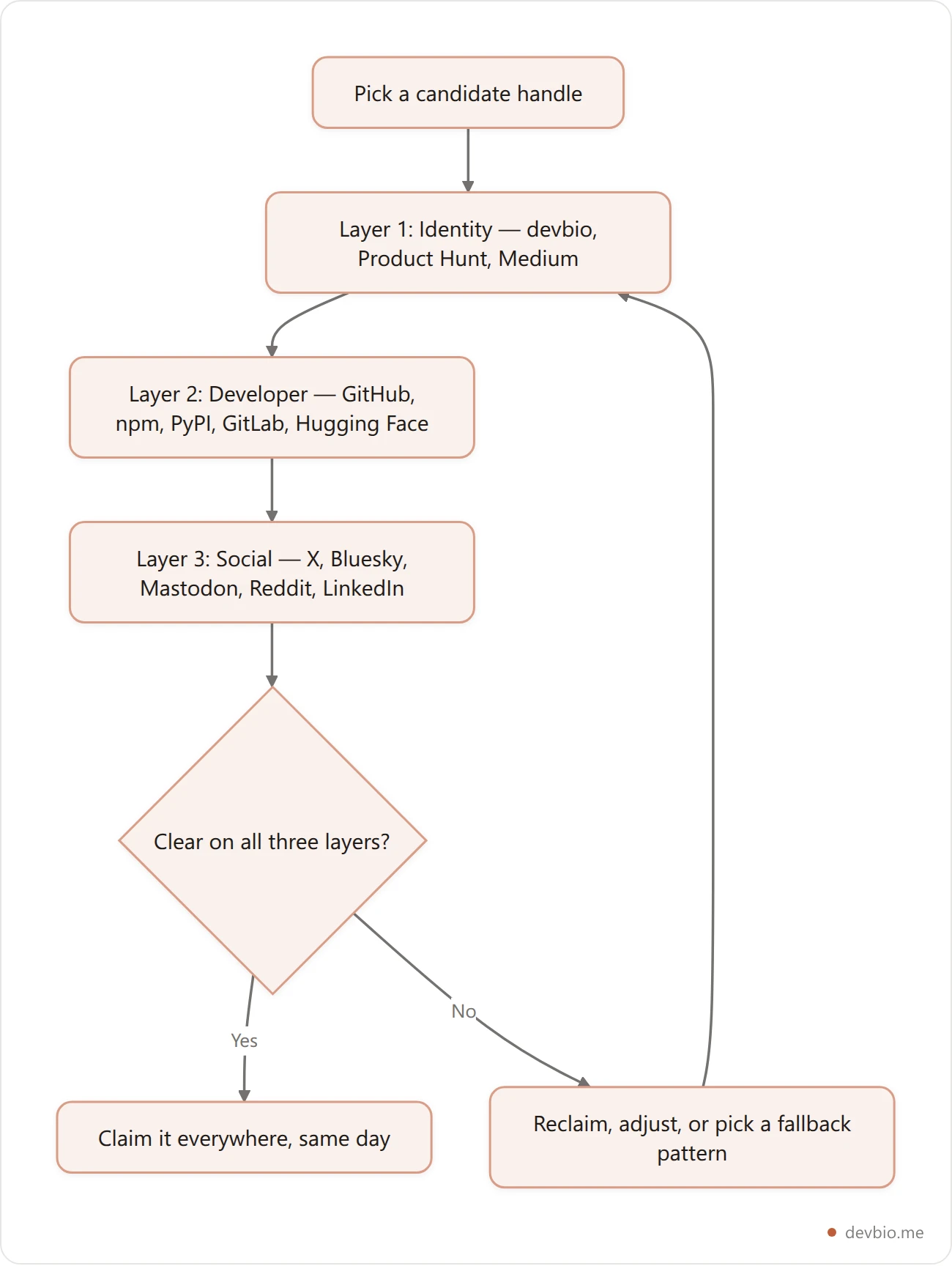
The reason this framework matters: a handle that's free on Layer 3 but squatted on Layer 2 is a broken audit. You'll look consistent to a casual scroller and inconsistent to the one person doing due diligence before an offer or a contract. Run all three layers together, every time — never just the layer that's easiest to check.
What Makes a Good Developer Handle#
Before you audit anything, decide what you're actually looking for. A good developer handle has four properties:
Short enough to say out loud. If you have to spell it during a conference intro, it's too long. Aim for one word or a tight two-part compound.
Free of platform-specific quirks. Numbers tacked on because the plain version was taken (
priya99,priya_dev2) signal "I got here late," not "I'm established." If your first choice needs a suffix everywhere, treat that as a sign to pick a different base handle rather than accept the suffix as permanent.Stable across job changes and rebrands. Don't bake a current employer, a specific stack, or a framework you might abandon into the handle itself.
priya-reactages badly the moment you move off React.Matching or close to your real name. 51% higher recall in follow-up searches comes from handles that closely track a person's actual name rather than an invented brand — recruiters and collaborators are usually searching a name, not a persona.
If GitHub is on your list, also check the format: GitHub usernames allow only letters, numbers, and single dashes, so an underscore handle won't port. We walk through six patterns that pass in GitHub username ideas.
Once you have a candidate handle that hits all four, the next step is finding out whether it's actually available where it counts — the same audit that anchors the 4-layer developer personal brand playbook.
Common Mistakes That Undercut a Developer Handle#
Even developers who understand the four rules above still trip on a handful of avoidable mistakes.
Different handles for "personal" and "work" accounts. Splitting your identity into a professional GitHub and a separate, unrelated side-project GitHub might feel tidy, but it fragments your contribution graph and your credibility. A hiring manager checking activity sees half your commits and assumes you're less active than you are.
Case-sensitivity assumptions. PriyaVerma and priyaverma resolve to different accounts on some platforms and the same account on others. Pick lowercase everywhere it's optional — it's the version people actually type.
Forgetting to update old bios after a rename. Renaming your GitHub handle is only half the job. Old blog posts, conference speaker pages, and Stack Overflow profiles often still link the previous URL — and GitHub does not redirect profile links at all. It redirects your repository URLs; your old profile page and every gist you've published return a hard 404 the moment you rename. Our guide to changing a GitHub username without breaking links walks through the full blast radius before you click.
Publishing before reserving. Shipping an npm package or a widely-shared blog post under a handle you haven't secured everywhere else first is how squatters find out a name is valuable. If a project is about to get attention, that's the moment to lock in the matching handles — not after.
How to Audit Your Handle Across 15 Platforms in One Search#
Manually checking a handle means opening 15 tabs, typing the same string into 15 different profile URLs, and noting which ones 404. It's tedious enough that most developers do it once, for GitHub only, and never check the other 14.
DevBio's free username availability checker runs all three layers in parallel from one input:
Identity: devbio, Product Hunt, Medium
Developer: GitHub, GitLab, npm, PyPI, Hugging Face, dev.to, Hashnode
Social: Twitter/X, Bluesky, Mastodon (mastodon.social), Reddit, LinkedIn
Each platform returns one of three states:
Taken — the profile URL resolves (a 404 means available, a live page means taken).
Available — no profile exists at that handle yet.
Unknown — the platform blocks automated detection. Instead of guessing, the tool links straight to the profile URL so you can check by hand in one click.
That third state matters. A tool that silently guesses "probably available" on a platform it can't actually verify is worse than one that tells you it doesn't know. Reddit and LinkedIn, in particular, are notorious for returning ambiguous responses to automated probes — a good checker flags that instead of hiding it.

The result is a single-page audit instead of 15 open tabs — and, since the same tool sits in front of DevBio's own signup flow, checking availability and claiming your devbio.me/yourname identity layer happen in the same visit instead of two separate errands.
Developer Username Checkers Compared#
Most "check your username everywhere" tools are built for creators and consumer brands, not developers. Here's how the options actually differ once you filter for developer-specific coverage.

Tool | Platforms checked | Covers GitHub / npm / PyPI | Free | Creates a live profile |
|---|---|---|---|---|
DevBio Username Checker | 15 (identity, developer, social) | Yes — all three | Yes | Yes — devbio.me/yourname |
NameCheckup.com | 15+ social networks + domains | No | Yes | No |
Apify Username Checker | 460+ (broad OSINT-style sweep) | GitHub only | Free tier + paid runs | No |
FootprintIQ | 500+ (OSINT, confidence-scored) | No | Free tier | No |
DNSChecker Name Checker | ~15 mainstream social apps | No | Yes | No |
The broad-sweep tools (Apify, FootprintIQ) are genuinely useful if you're doing an OSINT-style audit of your entire digital footprint — 460+ platforms is more coverage than any developer needs day to day. But they weren't built to distinguish "GitHub taken" from "some abandoned forum from 2014 taken," and none of them turn the check into a claimed profile. For a developer deciding where to put a stake in the ground, checking the 15 platforms that actually carry weight and then claiming the identity layer in the same motion is the faster path.
Run the free check across all 15 platforms
Reclaiming an Inconsistent Handle#
If you're already scattered across platforms — a different handle on GitHub than on Twitter, a childhood nickname still live on Reddit — you have three real options, not one.
Pick a canonical handle and migrate what you can. Most platforms let you rename in account settings without losing followers, stars, or history. GitHub, Twitter/X, and Reddit all support this. Be precise about what GitHub actually preserves, though: repository links redirect, but your profile URL and your gists 404 immediately, and your old handle is released for anyone to claim the same second — here's exactly what breaks when you change a GitHub username. npm is the exception — package names and scopes are permanent once published, so a stale
npmhandle usually stays as-is even after you rename everywhere else.File a dispute only where the platform actually accepts one. Policies differ sharply. GitHub's username policy says it does not release usernames because they look inactive; valid trademark complaints are the only requests it reviews, though it does remove accounts that break its name-squatting rules. npm and some social platforms have their own dispute processes. Expect weeks, not minutes, and read the platform's policy before you file.
Standardize on one canonical link instead of one canonical string. Where you can't get the identical handle everywhere, stop trying to force it. Put your custom domain or devbio.me/yourname link in every bio field, even on the platforms where the handle itself doesn't match. The handle is nice-to-have. The one link everyone lands on is the part that actually has to be consistent — and it's also the one thing you fully control, since nobody can squat a link that's already yours.
Case Study: Before and After a Handle Audit#
Here's a realistic composite of what an audit changes, based on the pattern above.
Before. A backend engineer — call her Priya — goes by priyacodes99 on GitHub (numbers added years ago when the clean handle was taken), priya.codes on Twitter/X, and publishes npm packages under @priyakumar. Her personal domain, priyakumar.dev, sits unclaimed. When a hiring manager searches her name after a conference talk, the first GitHub result that surfaces is a different, inactive priyakumar account with three years of no commits.
After. Priya runs a 15-platform audit, confirms priyaverma is free across the developer and social layers, and reclaims the one platform where an old dormant account was sitting on it. She claims a devbio profile at devbio.me/priyaverma as her one canonical link, pins it in every bio field — including the two platforms where the exact handle wasn't recoverable — and registers priyaverma.dev to point at the same profile.
The next time someone searches her name after a talk, one result comes up, and it's the right one. That's the entire value of the audit: not a perfect handle, a findable one.
Lock In Your Handle for Good#
Once you've settled on a handle, the window to claim it everywhere is short — a namespace with 180 million developers doesn't leave good handles open for long.
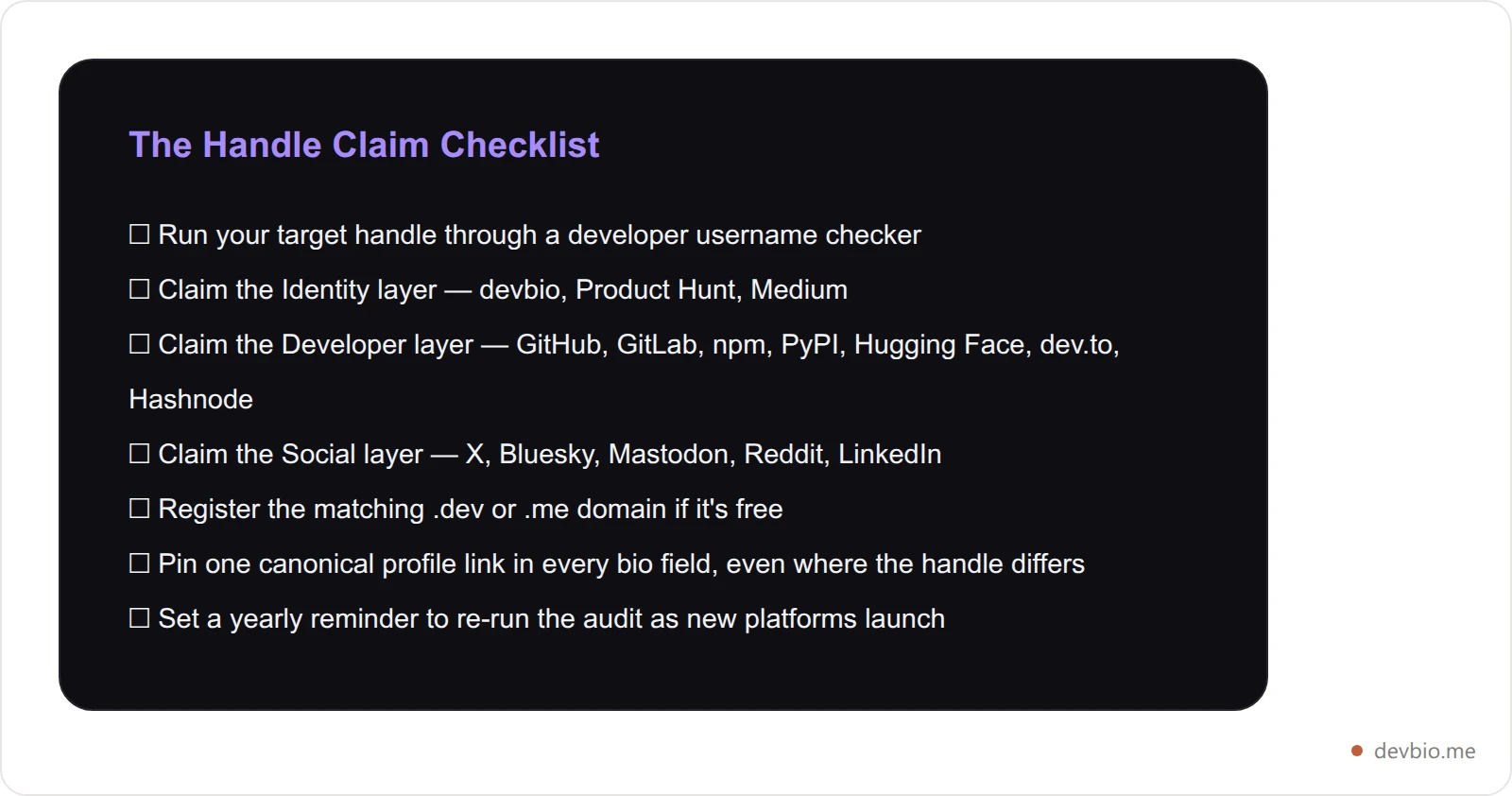
Copy that list into a note and work through it once. It takes under twenty minutes for someone who isn't reclaiming anything, longer if a dormant account needs a dispute process. Either way, it's the last time you'll have to think about this for a year.
Frequently Asked Questions#
What is a developer username checker?
A developer username checker is a tool that searches one proposed handle across the specific platforms developers use professionally — GitHub, npm, PyPI, GitLab, dev.to, Twitter/X, LinkedIn, and similar — in a single pass, showing which ones are taken, free, or unverifiable by automation.
Why does a consistent username matter for developers?
It removes the extra step someone takes to confirm they've found the right person. With 180 million developers on GitHub alone, an inconsistent handle means recruiters, collaborators, and conference contacts can land on the wrong profile — or none at all — instead of yours.
What if my ideal username is already taken on one platform?
Check the platform's policy first. GitHub won't release a username just because it looks inactive, so on GitHub your realistic options are a trademark complaint or a different variant. Some other platforms do run dispute processes. If the handle can't be recovered, standardize on one canonical profile link instead of forcing an identical string everywhere.
Should my GitHub username be my real name or a handle?
Either works, but pick one and use it everywhere. Handles that closely track your actual name perform better in follow-up searches, since most people searching for you are typing your name, not guessing at a persona.
How often should I re-check my username availability?
Once a year is enough for most developers, plus any time you adopt a new platform (a new AI tool registry, a new social app) that didn't exist during your last audit.
Is username squatting illegal?
It depends on jurisdiction and intent. Squatting on a handle to impersonate someone or extort a buyout can violate platform terms of service and, in trademark cases, actual law. Platforms increasingly enforce takedowns, but enforcement is inconsistent — reclaiming a squatted handle yourself is usually faster than waiting on a platform's dispute queue.
Does a consistent handle actually help with hiring?
Indirectly, yes. 60–80% of recruiters at least glance at a linked GitHub profile for mid-to-senior roles. If the handle in your resume or LinkedIn doesn't match the GitHub you actually use, that glance can land on the wrong account or nothing — costing you a signal that would have helped, for free.
What's the difference between a username checker and a domain checker?
A domain checker tells you whether yourname.dev is registered. A username checker tells you whether the handle itself is free across specific platforms — GitHub, npm, Twitter/X, and so on. Developers generally need both: a domain to point at a canonical profile, and a matching handle across the platforms people actually search. Check the handle first — it's free and faster, and it tells you how big a rebrand you're actually signing up for before you spend money on a domain.
Do I need the exact same username on every single platform?
No — close enough is fine as long as one canonical link ties everything together. If three of fifteen platforms won't give up the exact string, don't chase them. Use the closest available variant on those three, and put your DevBio link or custom domain in every bio field so people always land on the same page regardless of which handle they started from.
Key Takeaways: Put One Handle Everywhere#
An inconsistent username isn't a cosmetic problem. It's 180 million developers deep into a namespace where the clean, memorable handles are disappearing, and every mismatched account is one more chance for a recruiter, collaborator, or conference contact to land on the wrong page — or give up before finding the right one.
Three things to do this week:
Run your target handle through all three layers — identity, developer, and social — in one search instead of 15 tabs.
Reclaim what's dormant, standardize the rest around one canonical profile link instead of forcing an identical string everywhere.
Pin that link in every bio field you control, starting with GitHub and LinkedIn.
Your commits, your packages, and your shipped projects already prove what you can build. Put them behind one handle, one link — devbio.me.


