You picked that handle when you were sixteen. Now it's on your résumé, on three npm packages, and in the CI badge of every README you've ever written. Working out how to change GitHub username settings safely matters more than it looks, because the rename itself takes about thirty seconds — and quietly 404s your profile page, every gist you've published, and the GitHub profile README you spent a weekend building.
The short answer: open Settings, click Account in the sidebar, then Change username. GitHub redirects your repository URLs to the new handle, but it does not redirect your profile page, your gists, or @mentions — those return 404. Your old username is released for anyone to claim the moment you save, and some commits lose their attribution.
That's the part nobody tells you before they click. Here's the whole blast radius, and the order to work through it.
What Actually Happens the Moment You Rename#
GitHub treats a username change as an account rename, not a redirect layer. One thing gets a genuine redirect: repositories. Everything else that carried your old handle either follows the account or breaks.
According to GitHub's own documentation on username changes, web links to your existing repositories keep working, and command-line pushes from local clones to the old remote tracking URLs continue to work too. That's the good news, and it's genuinely useful — you don't have to re-clone anything on your laptop the same afternoon.
The bad news is everything in the second column.
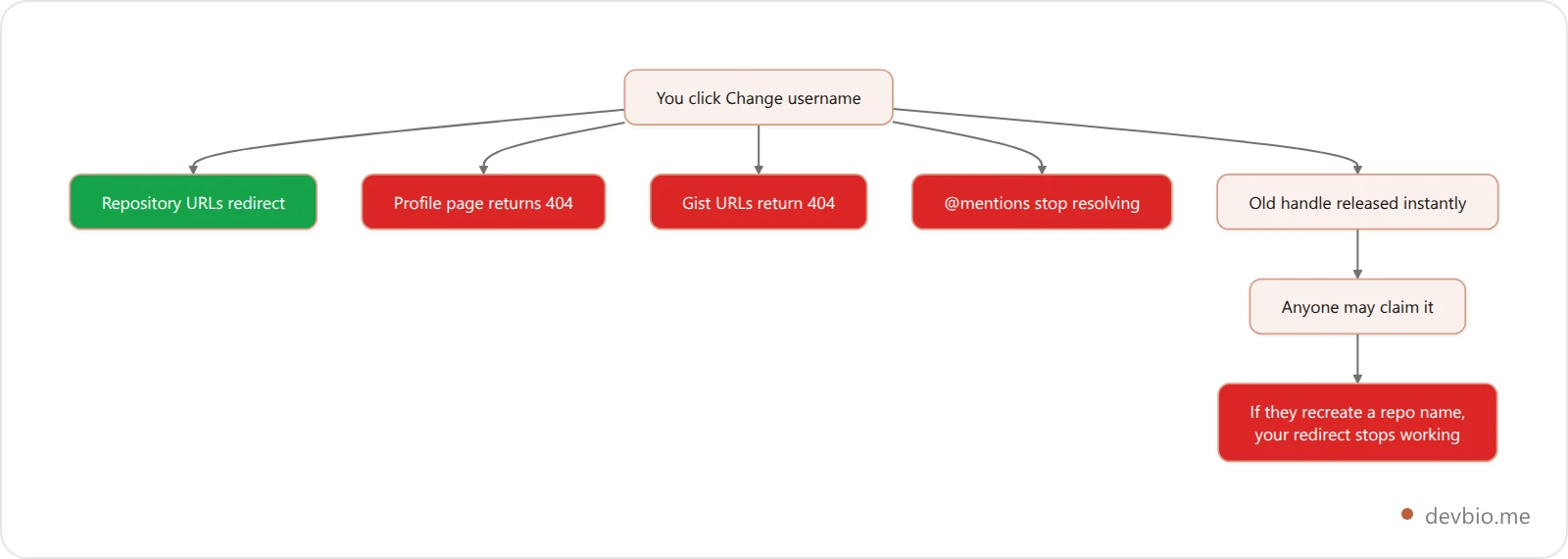
The rename itself is instant. The cleanup is not. Before you touch the button, check that your new handle is actually free everywhere else — there's no point winning github.com/newname if npm and PyPI already belong to someone else.
What Redirects and What Returns 404#
This is the table to screenshot. Everything on the left survives the rename untouched. Everything on the right is now your problem.
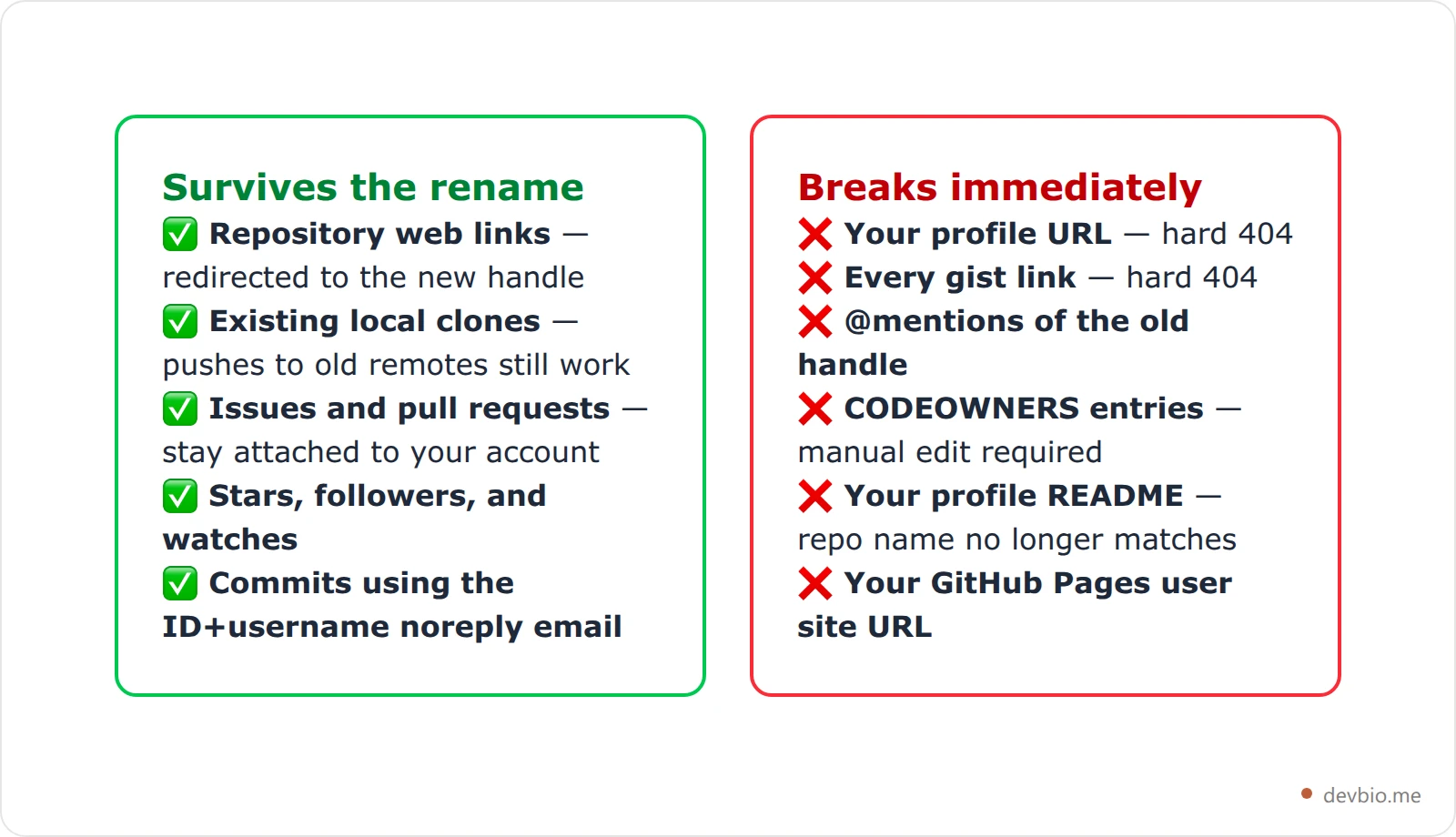
Two of those deserve their own sections, because they're the ones that silently delete work you can see on your own screen: commit attribution and the profile README.
The Commit Attribution Trap#
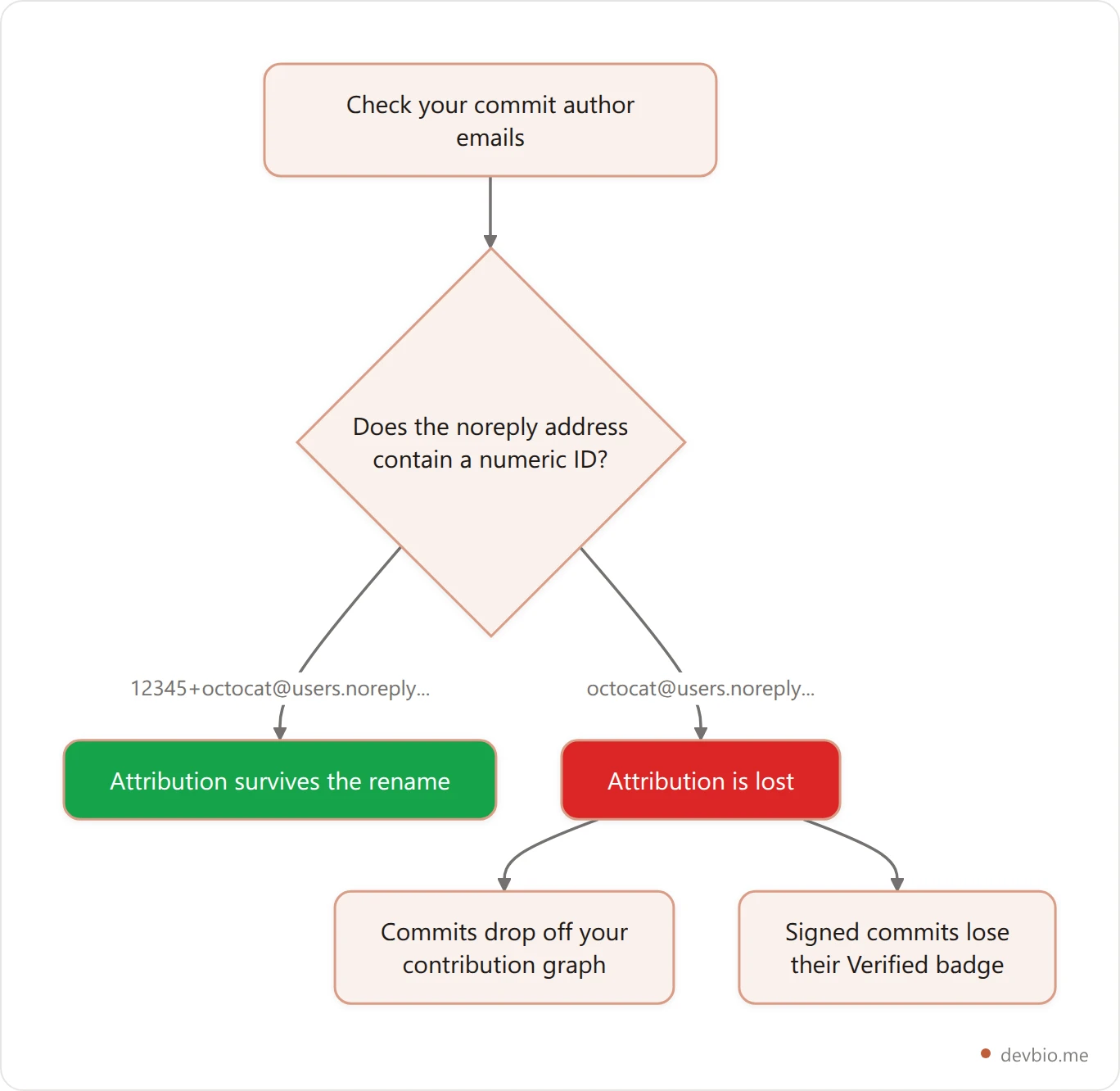
GitHub gives every account a noreply email so you can commit without publishing your real address. There are two generations of that address, and only one of them survives a rename.
The current format is [email protected], where ID is a stable numeric account ID. GitHub's username reference states that commits using this format are retained after an account rename — the numeric ID does the matching, so the username in the string is decoration.
The older format has no numeric ID: just [email protected]. GitHub is explicit that these "will not be associated with your GitHub account after changing your username." Those commits stop counting toward your contribution graph. If they were signed with that address, they also lose their Verified badge.
So before you rename, run this in any repo you care about:
git log --format='%ae' | sort -u | grep noreplyIf the output contains an address that starts with digits and a +, you're fine. If it's a bare [email protected], every commit made with it is about to fall off your graph — and a suddenly-patchy graph is exactly the thing people misread. (It's worth knowing what the green squares actually measure before you panic about a gap either way.)
Your GitHub Profile README Stops Rendering#
This one catches almost everybody, and it looks like a bug rather than a consequence.
A profile README only renders when four things are true, per GitHub's profile README documentation: the repository name matches your username, the repository is public, it holds a README.md in the root, and that file has content.
Rename the account and condition one quietly fails. Your old octocat/octocat repo becomes newname/octocat — which no longer matches newname — so the special rendering switches off. The repo is still there. The README is still there. Your profile just shows the plain overview instead, and you won't get a warning.
The fix is one rename: open that repository's settings and change its name to match your new handle exactly. GitHub redirects the old repo URL, so nothing else breaks.
While you're in there, it's a good moment to check the README still says something true — and to run the rest of the complete GitHub profile checklist while the account is fresh in your head. If yours is a wall of badges and a "currently learning" line from two jobs ago, our guide to what a profile README should actually include is the shorter version of that argument, and you can regenerate a clean one in a couple of minutes.
GitHub Pages: Your Site URL Changes#
If you publish a user site, it lives in a repository named <owner>.github.io and serves at https://<owner>.github.io — that naming rule is the whole mechanism, and you only get one user site per account.
Rename your account and that URL is no longer yours. You have to rename the repository from oldname.github.io to newname.github.io, and the site starts serving at the new address. Every link anyone has ever shared to your old Pages URL — in a talk, a résumé PDF, a Stack Overflow answer — now points at a domain you don't control.
Project sites are less dramatic. They serve at https://<owner>.github.io/<repositoryname>, and they follow the account rename with the repo redirect.
This is the single strongest argument for putting a custom domain in front of anything you link to publicly. A domain you own survives every platform rename you'll ever do. A platform subdomain never does.
Your Old Handle Is Free the Instant You Save#
Here's the part that turns an inconvenience into a security problem.
GitHub's username policy runs on first-come, first-served. With the platform past 180 million developers and a new one joining roughly every second, per GitHub's Octoverse report, a clean handle you release does not sit unclaimed for long. There's no grace period on a released name and no reclaim process — GitHub explicitly does not accept requests to release, transfer, or reclaim usernames on the grounds that they look inactive or unused. The moment you rename, your old handle is on the shelf. So pick the new one carefully: our guide to GitHub username ideas covers the format rules (no underscores, 39 characters max) and six patterns that won't need a second rename.
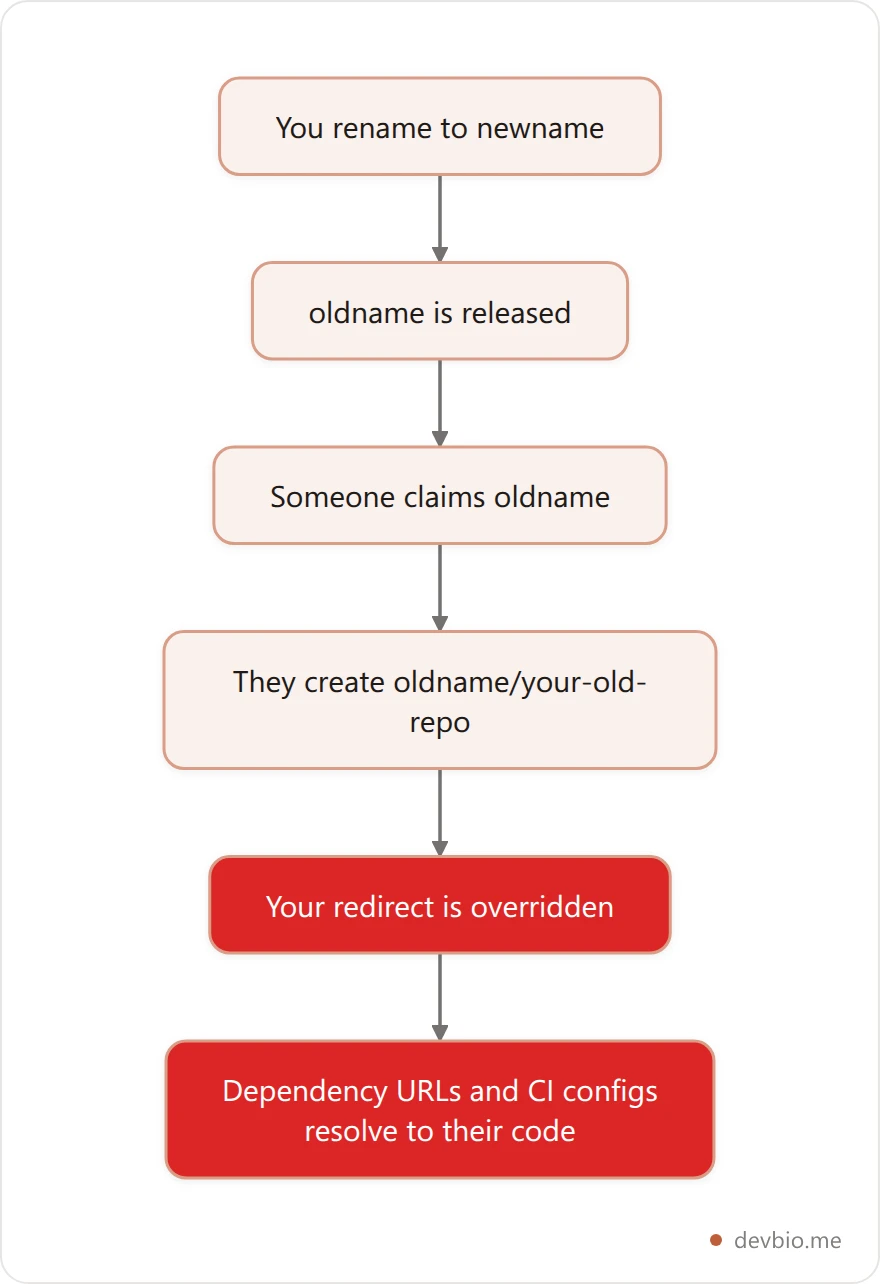
Now combine that with how repo redirects work. GitHub's own documentation names the failure: if someone claims your old username and creates a repository with the same name as one of your old repos, the redirect stops working and traffic goes to their repository instead.
That matters most when a package manifest, a go get path, a Dockerfile, or a CI config still points at github.com/oldname/oldrepo. Those requests don't 404 — they resolve, to code someone else controls.
The defence is boring and effective: claim your old username on a second account before anyone else does, or at minimum audit for external references to github.com/oldname/... and update them the same day. Search your own repos with grep -rn "github.com/oldname" and check any package you've published.
How to Change GitHub Username: The Pre-Rename Checklist#
Do these in order. The whole thing takes about twenty minutes and saves the week you'd otherwise spend finding breakage by accident.
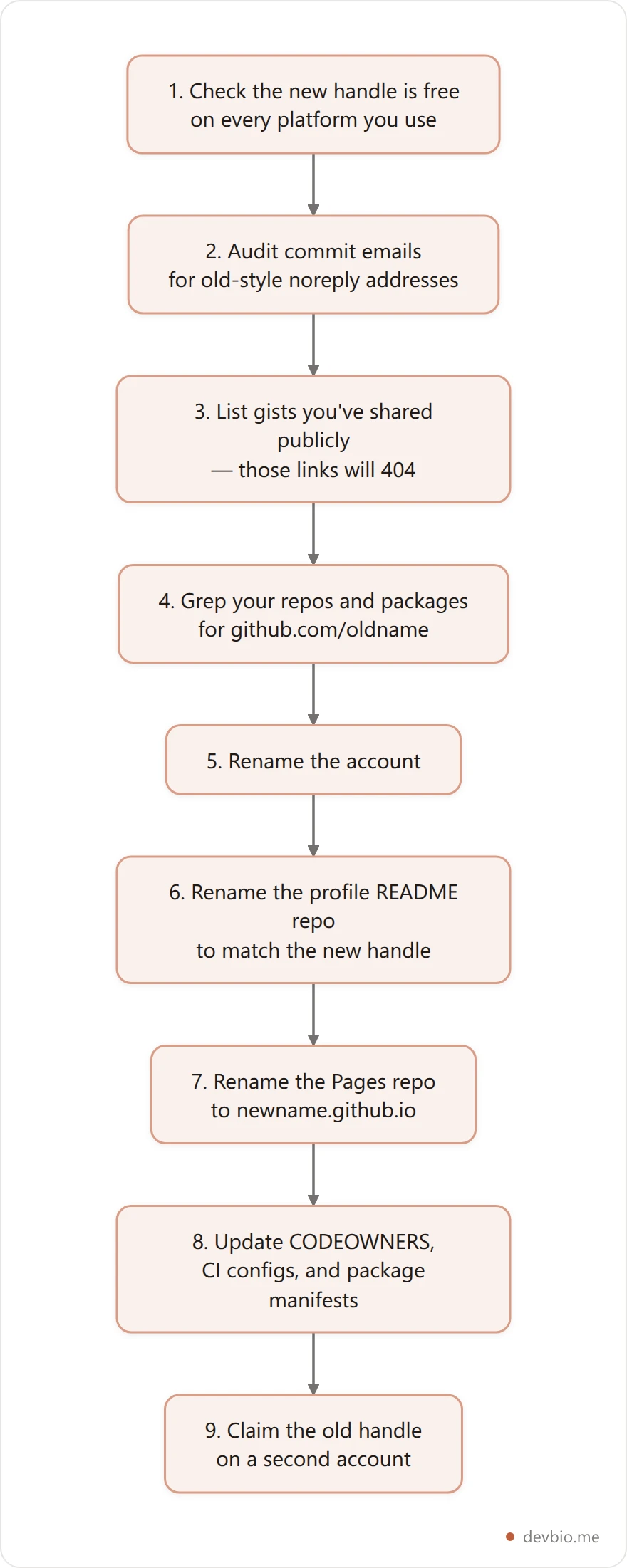
Step one is the one people skip, and it's the only one that's irreversible in the wrong direction: if you rename to a handle that's already taken on npm, you've traded one mismatch for another. The availability checker probes devbio plus fourteen other places developers actually get found — GitHub, GitLab, npm, PyPI, Hugging Face, dev.to, Hashnode, X, Bluesky, mastodon.social, Reddit, LinkedIn, Product Hunt, and Medium — so you find out in one pass instead of fourteen tabs. There's more on why that matters in our guide to consistent developer handles.
We built that checker to probe all fourteen in a single pass for a reason. In practice the handle you want is free on GitHub and already gone on npm, and checking them one tab at a time is how people end up renaming twice in a month.
GitHub Username Rules (and Better GitHub Username Ideas)#
GitHub's signup validation is strict: up to 39 characters, alphanumerics and single hyphens only, and it can't start or end with a hyphen. No underscores, no dots, no consecutive hyphens.
That last constraint surprises people coming from other platforms, so it's worth seeing the rules side by side with somewhere more permissive:
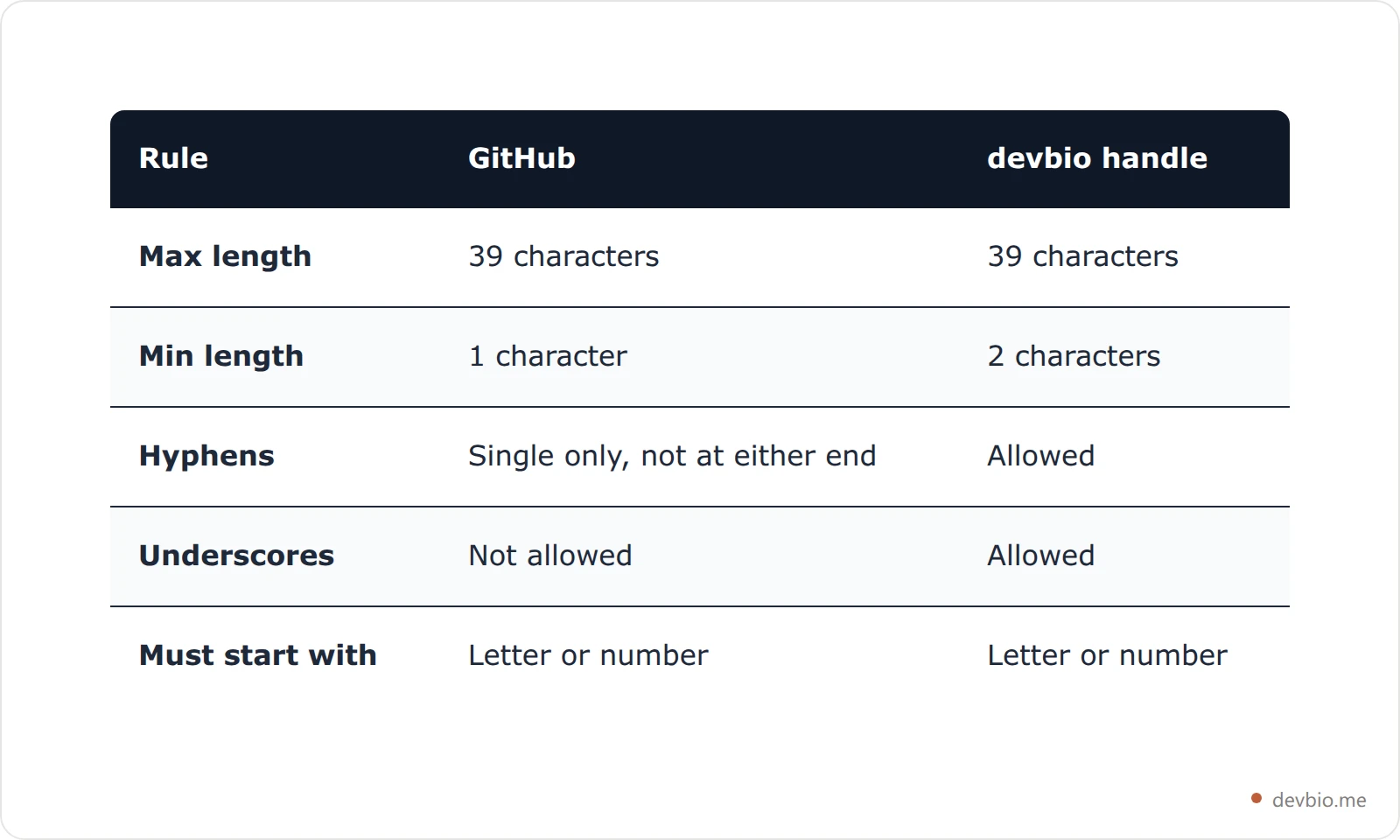
For github username ideas that still read well in five years, three patterns hold up:
Your actual name, or a clean shortening of it.
sarah-chen,schen. Boring is the point — a recruiter reading a commit log shouldn't have to decode anything.Name plus one signal.
chen-builds,mnizami-dev. Adds availability without adding noise.A word you'd say out loud in an interview. If you'd be embarrassed to read it into a phone, it's the wrong handle.
Avoid: birth years that will age you, framework names you'll leave behind, numbers substituted for letters, and anything that reads differently out of context. Your handle appears next to every commit you'll make for the next decade.
The 20-Minute Cleanup After You Rename#
You've renamed. Work down this list before you close the laptop:
Rename the profile README repo so the special rendering comes back.
Rename the Pages repo to
newname.github.ioand re-check the site loads.Update local remotes — the old ones still work, but repointing them now prevents the surprise later if someone claims your old handle:
git remote set-url origin [email protected]:NEW-USERNAME/REPO.gitFix CODEOWNERS files in every repo — GitHub does not rewrite them.
Update package manifests on npm, PyPI, crates.io, or wherever you publish, plus any
repositoryfield pointing at your old URL.Re-share critical gists — those links are gone, and there's no redirect coming. (What gists actually are and where they're used, if you're triaging which ones are worth re-posting.)
Update the links in your bio, résumé, and email signature.
Refresh badge URLs in READMEs that hardcode
github.com/oldname.
The pattern behind all eight is the same: every one of them is a hardcoded reference to a platform handle you don't own permanently. That's the real answer to how to change GitHub username without losing anything — own the layer above the handle, so the handle can move.
Stop rebuilding your links every time you rename
A devbio profile gives you one permanent URL that pulls your live GitHub activity, projects, and links — so the next handle change is a settings tweak, not a weekend of cleanup.
Claim your handleKey Takeaways#
Repository links redirect after a rename. Your profile page, gists, and
@mentionsdo not — they 404.Commits made with the old-style
[email protected]address lose attribution and fall off your contribution graph. TheID+usernameformat survives.Your profile README stops rendering until you rename its repository to match the new handle.
Your old username is claimable immediately, and whoever takes it can override your repo redirects by recreating a repo name.
Check availability everywhere before you rename, not after.
Frequently Asked Questions#
How do I change my GitHub username?#
Open Settings, click Account in the left sidebar, then Change username. GitHub checks availability, warns you about the consequences, and applies the change immediately. There's no confirmation email and no undo — the moment you save, your old handle is released.
Will changing my GitHub username break my repository links?#
Not directly. GitHub redirects web links to your existing repositories, and pushes from local clones to old remote URLs keep working. The redirect breaks only if someone claims your old username and creates a repository with the same name as one of yours.
Can I get my old GitHub username back?#
Only if nobody else has taken it. GitHub runs usernames first-come, first-served and does not reclaim names on the grounds that they look inactive. If you might want it back, claim it on a second account right after renaming.
Why did my profile README disappear after I changed my username?#
Because a profile README only renders from a repository whose name matches your username exactly. After the rename, your old repo no longer matches. Rename that repository to your new handle and it comes straight back.
Does changing my username affect my contribution graph?#
It can. Commits authored with a noreply address containing your numeric account ID stay attributed. Commits using the older bare [email protected] format do not, so they disappear from your graph and lose any Verified badge.
What are the rules for a GitHub username?#
Up to 39 characters, alphanumerics and single hyphens only. A username can't begin or end with a hyphen, and it can't contain underscores, dots, or two hyphens in a row.