

Every Linktree vs Carrd comparison opens with a price table, and most of those tables are wrong for somebody — Linktree bills in local currency and varies the amount by region, so the figure in a US-written post is not the figure on your checkout page. Meanwhile the one fact that actually decides this choice appears in none of them: Linktree's own paid-features documentation never uses the word "domain."
The short answer: Carrd is a one-page site builder, Linktree is a hosted link list. Carrd Pro Standard costs $19 a year and points yourname.com at your page with SSL. Linktree's paid tiers gate branding removal and analytics history, not domains. If you want your own address, only one of these sells it.
On this page: The comparison table · A list vs a page · The domain question · Carrd's $9 catch · What Linktree gates · The price nobody can quote · Which to pick · For developers · FAQ
Linktree vs Carrd: The Comparison Table#
Every row below is checkable against the two companies' own documentation, linked in the sections that follow.
Linktree | Carrd | |
|---|---|---|
What it is | Hosted link list | One-page site builder |
Your URL |
| A Carrd subdomain, or |
Custom domain | Not listed on any tier | Pro Standard, $19/year, SSL via Let's Encrypt |
Cheapest tier with a domain | None | $19/year |
Branding removal | Pro (third tier) | Pro Lite (first paid tier), $9/year |
Entry paid price | Regional, local currency | $9/year |
Pages per account | One | 3 free, 10 on Standard, 25 on Plus |
Forms | Not a feature | Pro Standard and up |
Analytics | Tiered retention: basic → 90 days → 365 days → lifetime | Bring your own (Google Analytics, meta tags) |
Design control | Themes and presets | Custom CSS, JS, and embeds on Pro Standard |
Two rows do most of the work here: the domain row and the branding row. They move in opposite directions. Carrd takes its badge off at the first paid tier and sells you a domain at the second. Linktree keeps its footer until the third tier and never sells you a domain at all.
The Split That Matters: A List vs a Page#
Most carrd vs linktree posts treat these as two versions of the same product. They aren't, and the confusion causes real money to get spent on the wrong one.
Linktree builds a link list. You get one page, it is a vertical stack of buttons, and the product's entire surface area is about what happens after someone taps one: scheduling, redirects, tracking pixels, Instagram auto-replies, seller fees on digital products. It is a distribution tool that happens to render a page.
Carrd builds a site. You get a canvas, sections, forms, embeds, and — on the paid tiers — custom CSS and JavaScript. It has no opinion about links at all. It is a page builder that happens to be popular for link hubs.
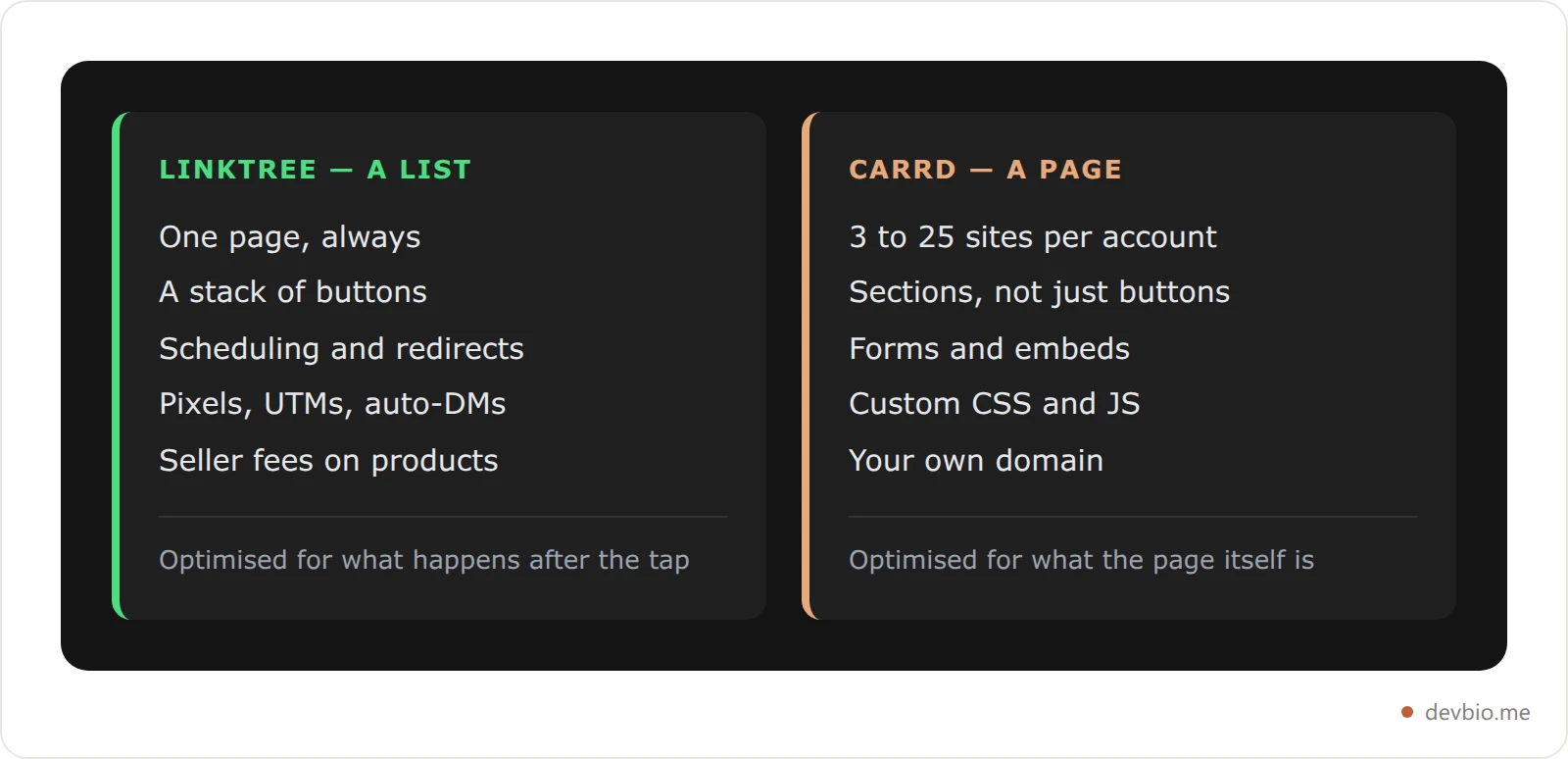
So the honest first question isn't "which is cheaper." It's: do you need a list or a page? If you are pointing an Instagram bio at five destinations and want to know which one people tap, Linktree is built for that and Carrd is not. If you need a section of prose, a contact form, and an address you own, Carrd is built for that and Linktree is not.
Custom Domains: The Word Linktree's Docs Don't Use#
This is the row that ends the argument for most people, and it is the row competing comparisons get wrong most often.
Carrd documents it plainly. Carrd's Pro plan documentation lists "Custom Domain URLs" with "full SSL support via Let's Encrypt" as a Pro Standard feature — $19 a year, 10 sites. Point a CNAME, wait for the certificate, and your page is at your own address.
Linktree does not document it, because it does not offer it. I read Linktree's own overview of paid features end to end in September 2026, looking for exactly this: it covers hero images, footer removal, 365-day analytics, QR customization, Mailchimp and Klaviyo integrations, Meta Pixel, UTM parameters, and Google Analytics. The word "domain" does not appear once. Your page is linktr.ee/yourname on the free plan, and it is still linktr.ee/yourname on Premium.
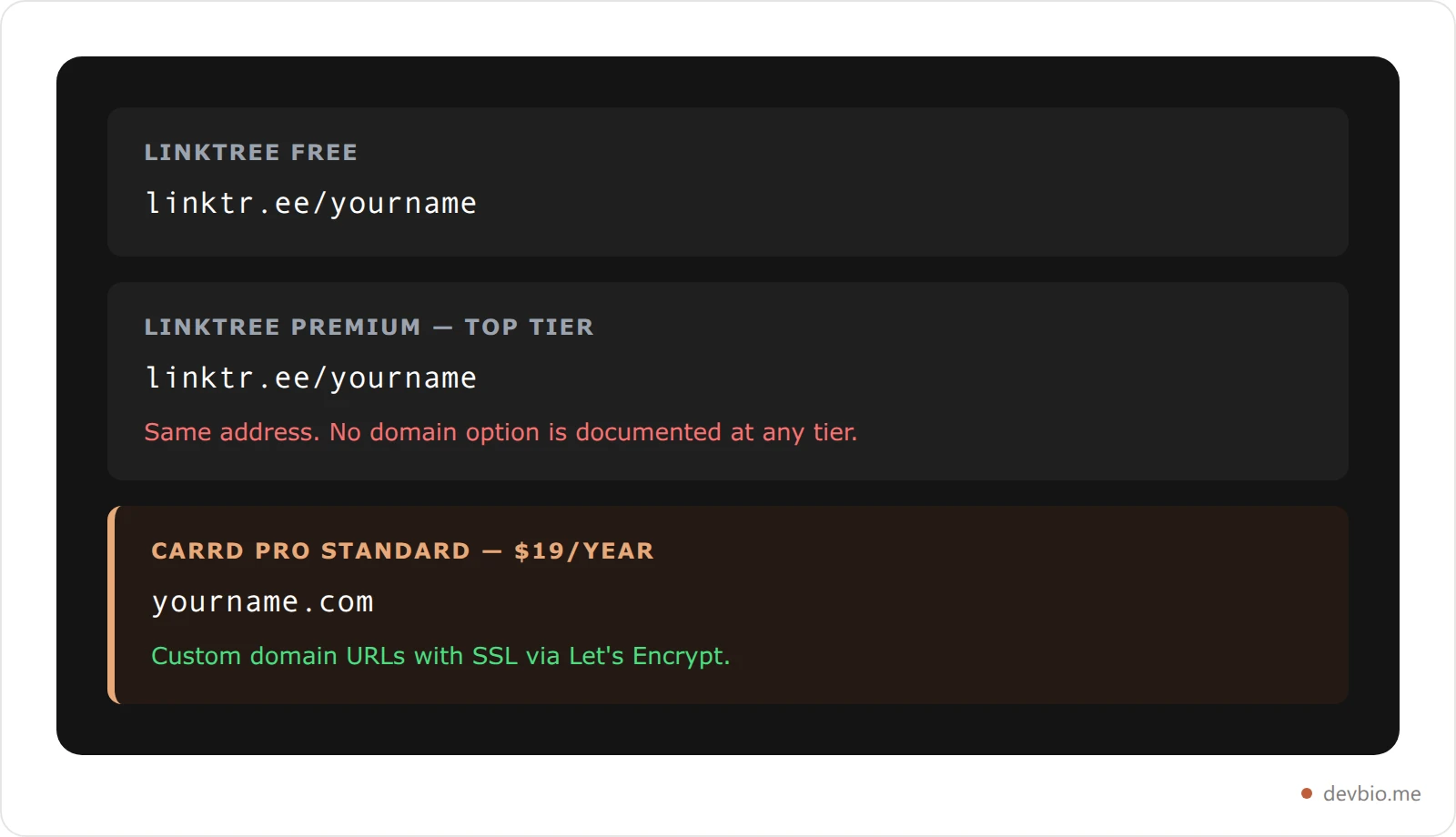
If the address matters to you — and for anything that goes on a business card, a CV, or an email signature it usually does — this single row settles Linktree vs Carrd before you compare another feature. Getting your own domain onto a bio page is a ten-minute job once a product supports it at all.
One aside worth knowing, because it will confuse you when you go looking: Carrd moved house. I checked both domains myself on 12 September 2026: carrd.co issues a 301 redirect to carrd.com, and carrd.com/pricing returns a 404. The live plan table lives at the Pro plans documentation and the Pro overview page. Any comparison still linking you to a pricing page on the old domain hasn't been re-checked in a while.
What Carrd's $9 Tier Quietly Leaves Out#
Carrd pricing looks like four clean numbers — $0, $9, $19, $49 — and the trap is assuming $9 is "the paid one."
Pro Lite at $9 a year gets you the "Made with Carrd" badge removed, premium unbranded URLs, larger image and video uploads, unlimited page elements, and premium templates. What it does not get you: a custom domain, forms, or widgets. Your site stays on a Carrd subdomain.
That $10 step from Lite to Standard is the whole decision. If you are paying Carrd because you want `yourname.com`, $9 buys you nothing you were shopping for. The floor is $19, and our [full breakdown of Carrd's tiers](https://devbio.me/blogs/carrd-pricing-2026) walks through where the site-count pricing goes after that — Pro Standard scales from $19/year at 10 sites to $119/year at 100.
Pro Plus at $49 adds advanced forms wired to Zapier, Make, n8n, or Airtable, Stripe Checkout inside forms, downloadable source, redirects, and password protection. Real features, but they serve funnels, not profiles. A single page for one person almost never needs them.
What Linktree's Tiers Actually Gate#
Linktree runs four cumulative tiers — Free, Starter, Pro, Premium — and once you stop looking at the prices, the ladder is mostly a data-retention ladder with one branding gate bolted on.
Free — unlimited links, one featured link, core appearance options, basic analytics, Linktree footer stays.
Starter — analytics extended to the last 90 days, link scheduling, redirect links, reduced seller fees, Instagram auto-replies capped at 1,500 DMs a month.
Pro — the footer comes off here, analytics extend to 365 days, plus hero profile image, QR customization, Mailchimp/Klaviyo/Kit integrations, Meta Pixel, UTMs, and Google Analytics.
Premium — lifetime analytics history, video profile image, uncapped auto-reply DMs.
The surprise is that Starter does not remove the branding. On most products the first paid tier takes the vendor's logo off; here you climb two tiers. And when you finally do, you buy a marketing attribution stack along with it whether you wanted one or not. Our tier-by-tier Linktree pricing guide works through which single blocked feature justifies which step.
Worth naming the asymmetry plainly: Carrd removes its badge for $9 a year, a number you can read. Linktree removes its footer at its third tier, at a price that depends on where you live. Compare what an unbranded page actually costs you before you climb that ladder.
The Price Comparison Nobody Can Actually Run#
Here is why every "Linktree vs Carrd pricing" table you have read is partly fiction.
Linktree's pricing page states that pricing varies by region and displays in local currency. There is no single Linktree price. A post quoting "$5/month" or "$9/month" loaded one region on one day and froze it. Load the page from the country you will be billed in and you may see something else entirely.
Carrd, by contrast, publishes flat annual USD figures that you can multiply. So the only price comparison that survives contact with reality is a one-sided one: what does the cheapest tier that gives you your own domain cost per year?

Linktree's bar is zero-height because the feature does not exist to price, not because it is free. That is the honest shape of this comparison, and it is the one nobody draws. If the domain row is the one you came here for, see the cheapest way to get one on a developer profile.
Which One Should You Pick?#
Run it as a sequence of blockers rather than a price hunt.
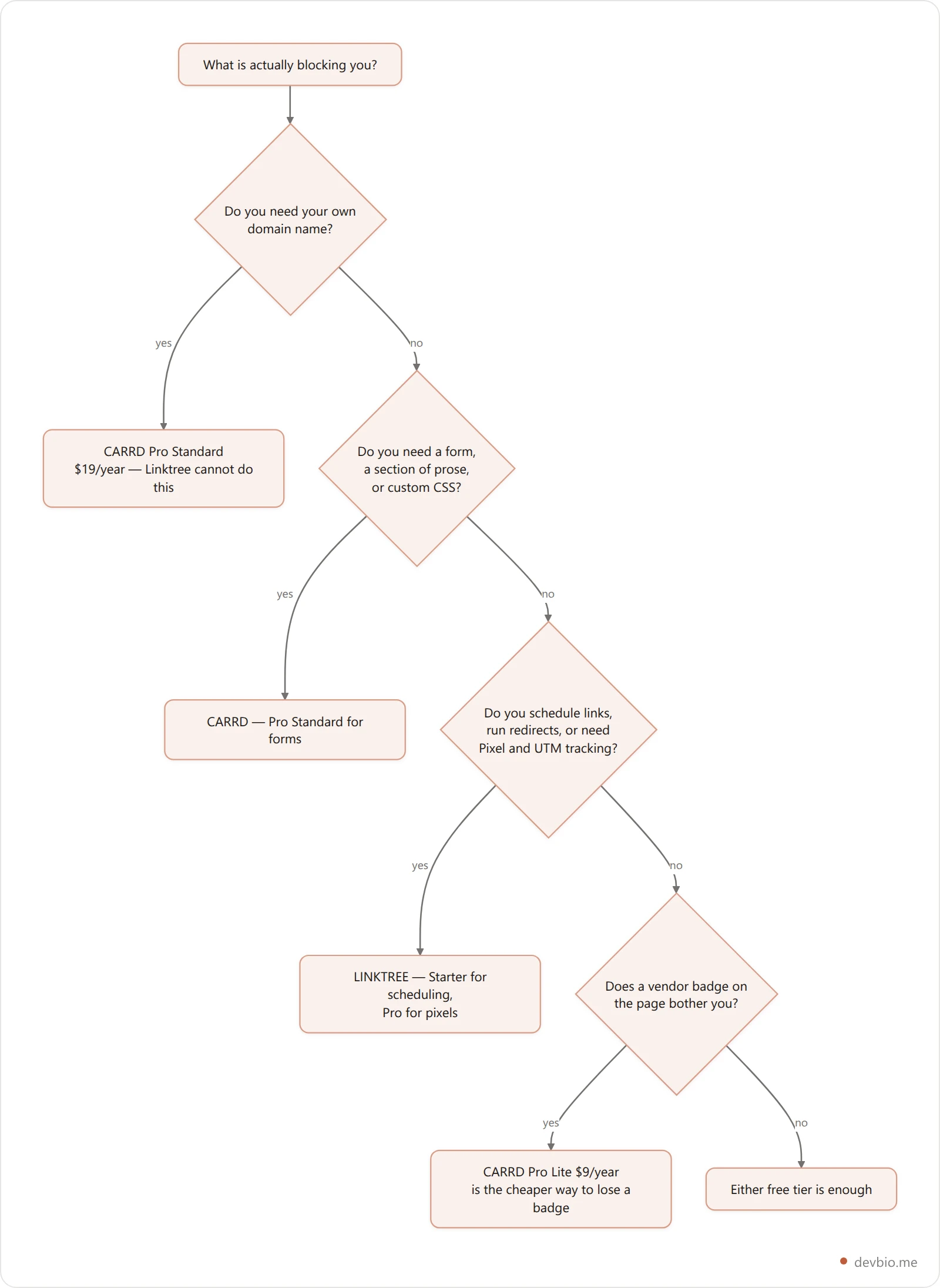
Run honestly, most individuals land on one of two answers: a free tier, or Carrd Pro Standard. The middle of this market is thinner than the marketing suggests. And if you want the field wider than two names, we ranked it in Linktree alternatives compared — or see how Linktree's subscription stacks against a percentage-based fee model, which is a different trade again.
Where Both Fall Short for a Developer Profile#
Both products share one blind spot, and it is the one that matters if the page is about your engineering work: neither knows anything about you. Whatever you typed is what the page says, forever, until you go back and retype it. Your GitHub activity, your shipped projects, your revenue — all of it is a screenshot or a stale sentence.
That is the gap DevBio is built for. Every part of a bio is a component that pulls its own data: GitHub stats and a 365-day contribution heatmap, projects, work experience, skills, and Stripe revenue synced in the background — hourly on Pro. The same components render a printable PDF resume at a /resume route, and the profile also answers as machine-readable endpoints — JSON, a vCard, a QR code, and an llms.txt summary for AI tools.
The custom domain is worth one technical note, since it is this article's whole axis. DevBio verifies your domain by resolving the CNAME you set and matching it against the target it gives you — and when that lookup comes back empty, it falls back to comparing resolved A records. That fallback exists because Cloudflare and most ALIAS-capable DNS hosts flatten CNAMEs at the zone, so an apex domain that is pointed perfectly still returns no CNAME record. Verification is owner-triggered, and an unverified mapping is inert until it passes.
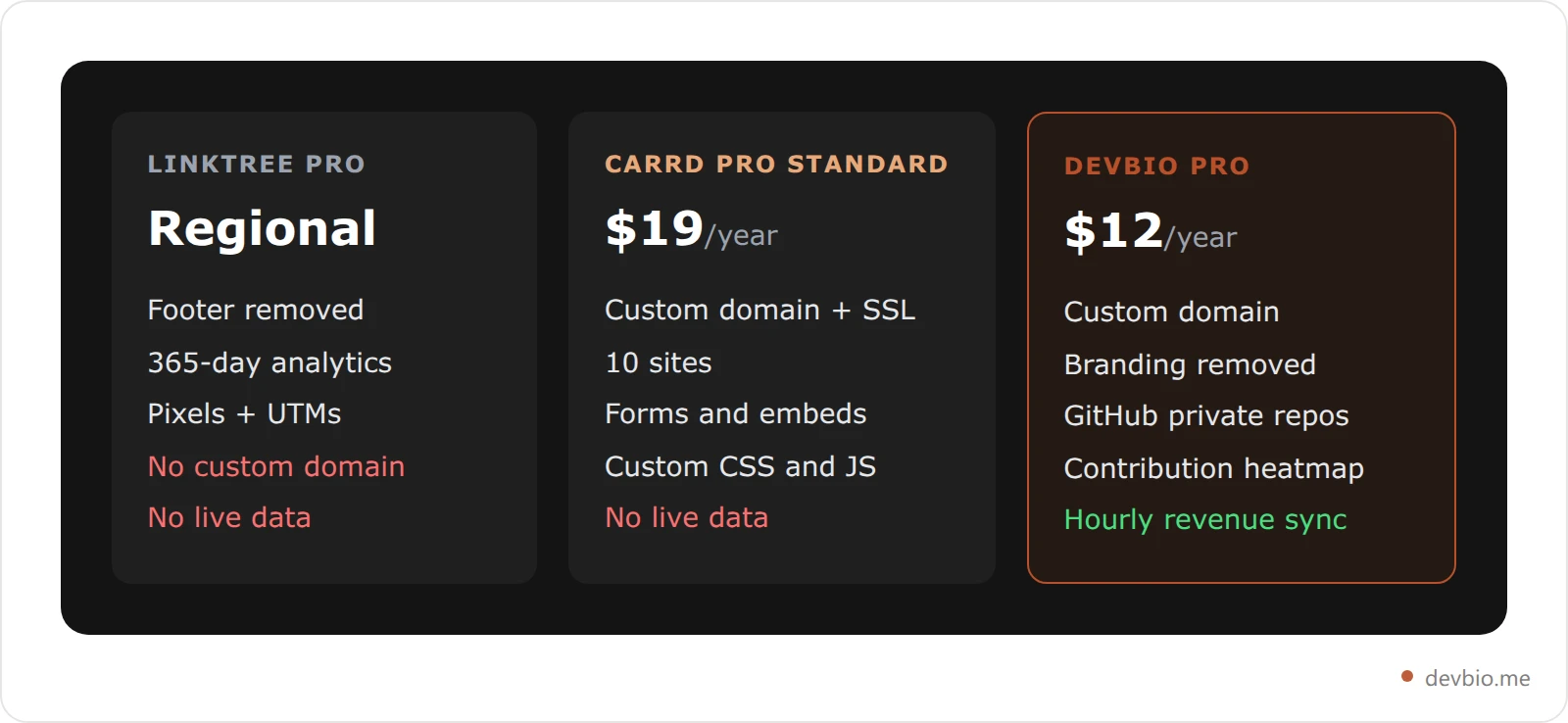
The free plan is $0 forever and already includes the public bio, every component, GitHub public-repo metadata, the LaTeX PDF resume, a marketplace listing, and custom theming with dark mode. Pro is $12 a year — $1 a month, billed yearly, with a 7-day trial — and adds the custom domain, footer removal, 30 days of analytics history, private-repo GitHub sync, and the hourly revenue updates. There is also a founding-member option: $39 once for Pro permanently, capped at the first 100 buyers.
That is a narrower product than either of the two in this comparison, and the trade is worth stating: you give up Carrd's design freedom — 250+ templates, arbitrary CSS and JS — for components that update themselves. If that trade sounds wrong for you, Carrd at $19 is a genuinely good deal and you should buy it. The full Carrd alternative breakdown and the Linktree alternative for developers each argue the case feature by feature.
Stop retyping your own résumé
A free developer bio at devbio.me with live GitHub data, a PDF resume, and machine-readable endpoints. Pro adds your own domain for $12 a year.
Claim your handleFrequently Asked Questions#
Is Carrd better than Linktree?#
For anything that needs its own domain, a contact form, or more than a stack of buttons, yes — Carrd does those and Linktree does not. For scheduled link drops, redirect links, tracking pixels, and Instagram automation, Linktree is purpose-built and Carrd has none of it. They solve different problems.
Can you use a custom domain with Linktree?#
Linktree's own paid-features documentation lists no custom domain option at any tier, and the word "domain" does not appear in it. Your page stays at a linktr.ee address on Free and on Premium alike. Carrd includes custom domain URLs with SSL from Pro Standard, at $19 a year.
Is Carrd cheaper than Linktree?#
Carrd publishes flat annual prices — $9, $19, $49 — while Linktree's pricing page states that pricing varies by region and displays in local currency, so no single figure compares. What is comparable: Carrd's cheapest domain-enabled tier is $19 a year, and Linktree has no domain-enabled tier at any price.
Does Carrd's $9 plan include a custom domain?#
No. Pro Lite at $9 a year removes the Carrd badge and unlocks premium URLs, bigger uploads, unlimited elements, and premium templates, but your site stays on a Carrd subdomain. Custom domains, forms, and widgets all begin at Pro Standard, $19 a year.
Which tier removes the branding on each product?#
Carrd removes its badge at Pro Lite, its first paid tier, for $9 a year. Linktree removes its footer at Pro, its third tier, bundled with 365-day analytics, Meta Pixel, UTM parameters, and Google Analytics whether you need them or not.
Can Linktree or Carrd show my live GitHub activity?#
Neither does natively. Carrd can embed arbitrary HTML on Pro Standard, so you could hand-wire a third-party stats image, and Linktree has no embed surface at all. A profile that pulls GitHub contributions and revenue automatically is a different category of product — see the link-in-bio comparison for developers.
Key Takeaways#
Linktree vs Carrd is not a pricing question, because one of the two prices cannot be quoted. It is a capability question with one decisive row: Carrd sells you yourname.com from $19 a year with SSL, and Linktree's documented feature set has no custom domain at any tier.
Everything else follows from the list-versus-page split. Linktree's tiers sell analytics retention and a footer removal that arrives two tiers later than you would expect. Carrd's tiers sell sites and capability, with a $9 plan that removes a badge and a $19 plan that does the thing you were actually shopping for.
Name your one blocking feature, find the cheapest tier that carries it, then look at the price — in your own currency, on the page itself. Do it in that order and this comparison takes about four minutes.


