

Linktree's Pro plan jumped from $9 to $15 a month in November 2025. Premium runs $35. And even on the plan that removes the branding, Linktree still takes a 9% cut of anything you sell through it — the fee only hits zero at the top tier. For a developer whose "product" is a portfolio, not a storefront, none of that buys anything a GitHub link doesn't already do for free.
A Linktree alternative for developers needs to do something Linktree structurally can't: pull live data from the places your credibility actually lives — GitHub commits, shipped-project revenue, a parseable resume — instead of hosting a list of links you have to type and retype yourself. Linktree is a link aggregator. What a developer profile needs is a proof aggregator. Those are different products wearing the same UI.
This covers what Linktree actually costs in 2026, the four specific gaps that show up for developers, a full feature comparison, and a step-by-step migration.
What Linktree Actually Costs in 2026#
Search Linktree pricing 2026 and you'll find the sticker prices easily enough. What you won't find near them is the fee structure underneath. Linktree's pricing didn't just go up — the fee structure got more layered. As of 2026, there are four tiers, and the commerce fee is the part most comparison posts skip:
Plan | Price | Commerce fee on sales | Branding removed | Custom domain |
|---|---|---|---|---|
Free | $0/mo | 12% | No | No |
Starter | $8/mo | 9% | No | No |
Pro | $15/mo (was $9 pre-Nov 2025) | 9% | Yes | No |
Premium | $35/mo | 0% | Yes | Yes |
Source: Linktree pricing breakdown, 2026. Treat those USD figures as indicative rather than exact: Linktree's own pricing page states that pricing varies by region and displays in local currency, so check your own checkout before you budget. Our tier-by-tier breakdown of what each Linktree plan unlocks compares the feature ladder instead, which moves far less often than the price does.
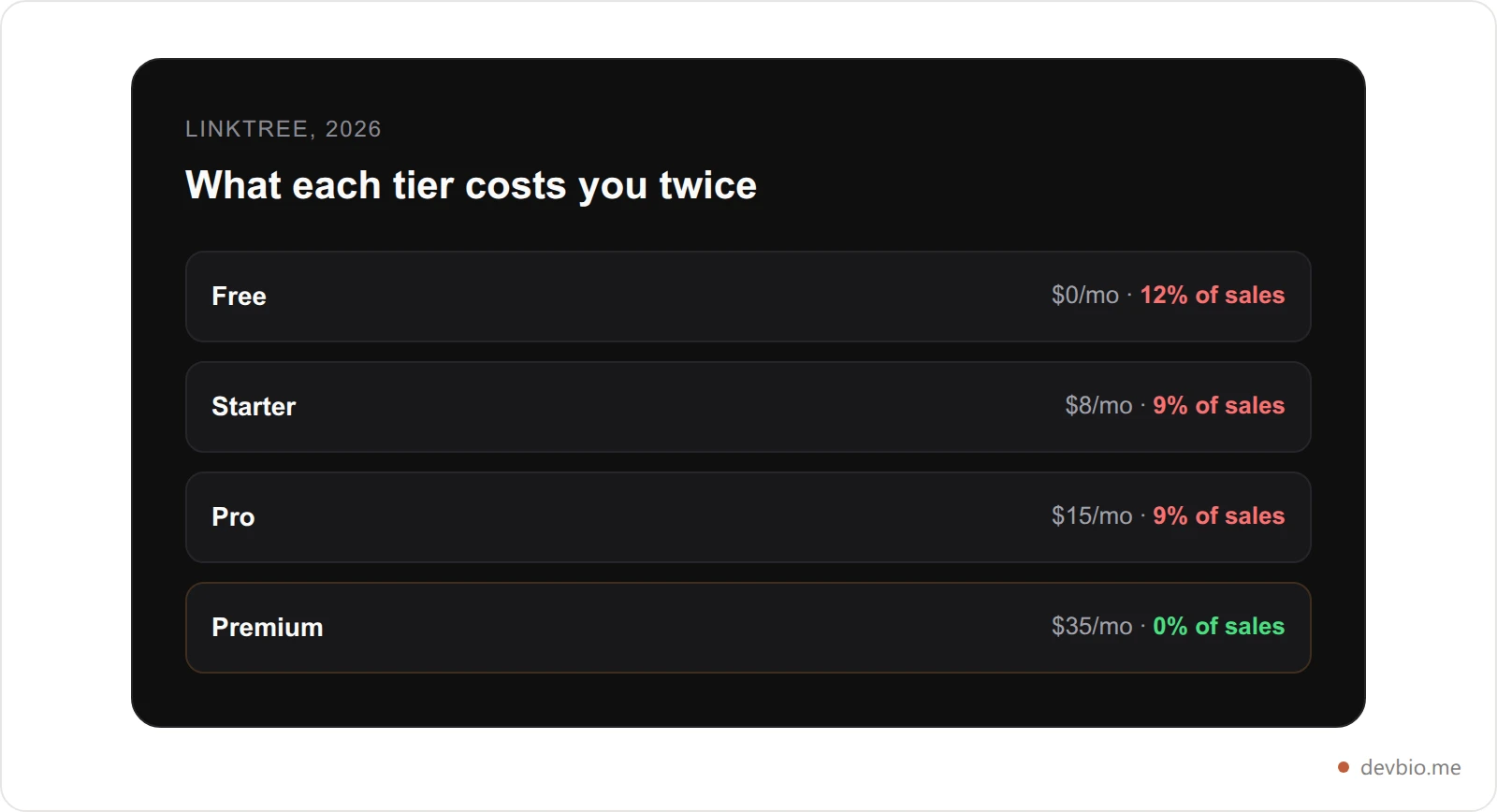
Notice what doesn't move: the commerce fee stays at 9% all the way through Pro. You pay $15 a month and Linktree still takes a cut of every sale. Zero-fee selling is Premium-only, at $35/month — a plan built for creators running a storefront, not developers who want a resume link in an email signature.
None of these tiers add anything developer-specific. Pro's headline features are Instagram/TikTok AutoDMs and a Zapier connection. Useful if you're a content creator running giveaways. Irrelevant if what you're trying to prove is that you shipped a working product.
Where Linktree Breaks Down for Developers#
Linktree does one thing well: it turns a single bio-slot URL into a list of other URLs. For a creator promoting five different platforms, that's the whole job. For a developer, it stops short of the job in four specific ways.
No live GitHub data. Linktree has no GitHub integration. Every stat, every "50k+ downloads" line, every stack badge is text you typed once and now have to remember to update.
No revenue proof. There's no way to show a real, current MRR number pulled from a payment processor. You can link to a Stripe checkout page. You can't show what it's actually earning.
No resume output. Linktree generates a page of buttons. It doesn't generate a document — nothing an applicant tracking system can parse, nothing you can attach to a job application.
No custom code, even on paid tiers. Linktree's customization stays inside its own theme system — colors, fonts, backgrounds. There's no way to embed arbitrary HTML, CSS, or JavaScript, on any plan, at any price. Carrd allows exactly that for developers who want it — which is itself a sign of how far outside Linktree's design a developer's actual needs sit.
One indie hacker who spent time talking to service businesses about their link-in-bio setups summed up the pattern bluntly: using a generic link aggregator for a professional portfolio signals "I grabbed the fastest option available," not "I thought about how I present my work." For a creator promoting a TikTok and an Etsy shop, that tradeoff is fine. For a developer whose entire pitch is technical credibility, it's the wrong tradeoff.
Who Actually Needs a Linktree Alternative for Developers#
Picking a developer link in bio tool starts with an honest question, because not every Linktree user needs to switch. If your page is five outbound links and nothing else, Linktree is doing exactly what it was built for, and no developer-specific tool will improve on that.
The developers who outgrow it share a pattern: they have something worth proving, not just linking to. A GitHub history with real contributions. A side project with actual paying users. A job search where a resume needs to survive an ATS before a human ever sees it. For that group, a generic link-in-bio tool becomes a bottleneck — every piece of proof lives one click away on a different platform, instead of on the page itself.
That's the actual decision point. Not "is Linktree bad" — it isn't, for what it does — but "does my profile need to hold proof, or just links." A developer job-hunting or building in public almost always needs the former. Here's what a genuine Linktree alternative for developers looks like when it's built around that requirement instead of around theme customization. For the fuller three-way breakdown of personal sites, link-in-bio tools, and developer bios side by side, see developer portfolio vs personal site vs link in bio.
The Link-vs-Proof Test#
Before picking any Linktree alternative, run it through four questions. Most "developer-friendly" roundups only ever check the first one.
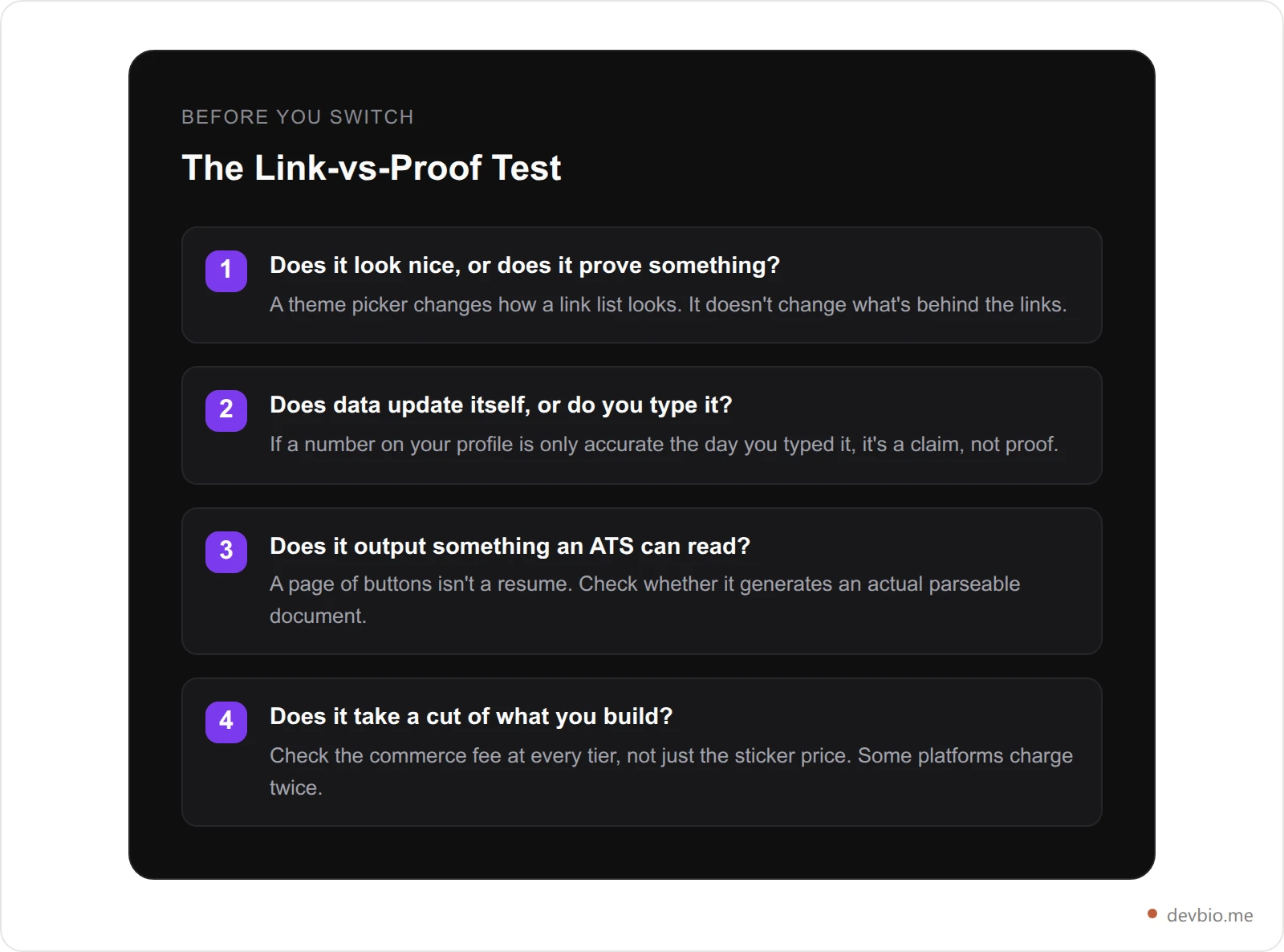
Linktree fails questions two and three outright — nothing on the platform updates itself, and it produces no document. It partially fails question four, since a real fee applies on every tier except the most expensive one. Any alternative worth switching to should clear all four, not just look better doing question one.
The Best Linktree Alternative for Developers: Full Comparison#
The short version of Linktree vs DevBio: one hosts links, the other hosts proof. Judged against those four questions instead of theme variety, here's how the realistic options stack up for a developer specifically:
Platform | Live GitHub data | Live revenue (MRR) | ATS PDF resume | Custom code | Commerce fee |
|---|---|---|---|---|---|
DevBio | Yes (stars, commits, heatmap) | Yes (Stripe, Dodo Payments, Lemon Squeezy, Polar) | Yes (LaTeX-typeset PDF) | N/A — components, not code | 0% |
Linktree | No | No | No | No, any tier | 12% → 9% → 9% → 0% |
Carrd | No | No | No | Yes, on paid plans | N/A — no commerce layer |
GitHub README | Static, self-maintained | No | No | Yes (markdown/HTML) | N/A |
See what a proof-backed profile looks like — devbio.me
Carrd is the closest thing to a genuine developer-friendly Linktree alternative already on the market, and it earns that reputation honestly — full HTML/CSS/JS embed access on a paid plan is real flexibility. But flexibility isn't data. A Carrd page with a custom embed still shows whatever number you last typed into it. The fuller breakdown of every general link-in-bio tool tested against developer needs is here if you want the wider field, including Beacons, Bio.link, and the rest. For all eight main options sorted by what each one is actually built to do — design, commerce, or live proof — see Linktree alternatives compared.
The Commerce Fee Nobody Puts in the Comparison Table#
Most Linktree alternative 2026 roundups compare monthly price and stop. That misses where Linktree actually makes money from developers who sell anything through their link.

If you're selling a digital product — a course, a template pack, a one-time download — through Linktree's built-in checkout, you're paying a monthly fee and a percentage, and the percentage only disappears at $35/month. Most developers aren't running that kind of storefront. What they have instead is a side-project SaaS, priced through their own Stripe or Lemon Squeezy account, with the profile link just pointing at it. In that setup, Linktree's commerce fee is irrelevant — but so is almost everything else on the platform, because a plain link can't show what the product is actually earning.
DevBio's marketplace listing for a shipped SaaS — used when a developer is ready to sell the whole product rather than just link to it — carries no commission. The platform isn't a broker or an escrow party to the deal; the terms are between buyer and seller directly. Listing itself, and the live MRR badge that gives a listing its credibility, are included on every plan, free included.
What "Live Data" Actually Looks Like on a Profile#
This is the part a link list can't replicate no matter how it's styled. Two integrations do the work:
GitHub. Connect your account and your profile pulls real contribution counts, star totals, and a commit heatmap directly from the GitHub API on a sync cycle — not a badge you edit by hand. Here's the full breakdown of what a GitHub-connected profile shows and how it differs from a static README.
Payments. Connect Stripe, Dodo Payments, Lemon Squeezy, or Polar with a read-only key and a project card shows live MRR, active subscriber count, and a 12-month revenue sparkline — sourced from the processor itself, refreshed hourly on paid plans. The full setup guide covers exactly which scopes each provider needs.
Neither of those is a Linktree feature at any price. They're not competing on the same axis — Linktree optimizes the container; a live-data profile optimizes what's inside it. A personal-site-vs-link-in-bio comparison puts a number on why that matters even before the data question: personal sites convert roughly 3x higher than third-party link tools, and 84% of professionals say a custom domain increases audience trust. A link aggregator, by definition, sends people away from something you own toward platforms you don't.
The REST API Linktree Doesn't Have#
Linktree publishes no public API on any tier. If you want your own link list back as data, you scrape your own page. That gap is exactly what people mean when they search for a developer-friendly Linktree alternative with a REST API — and it's the cleanest dividing line between a creator tool and a developer one.
Every published DevBio profile serves its own data as JSON over plain HTTP GETs:
Endpoint | What it returns |
|---|---|
| The whole profile — every component in display order, plus settings and resolved integration data |
| An IndieWeb h-card in microformats2 JSON, for Bridgy, Webmention.io and personal sites |
| Your projects in the same order the page renders them, with live metrics attached |
| A structured summary for AI tools and coding agents |
| A vCard 3.0 contact file phones offer to save |
| An SVG QR code, sized 128–1024 with hex |
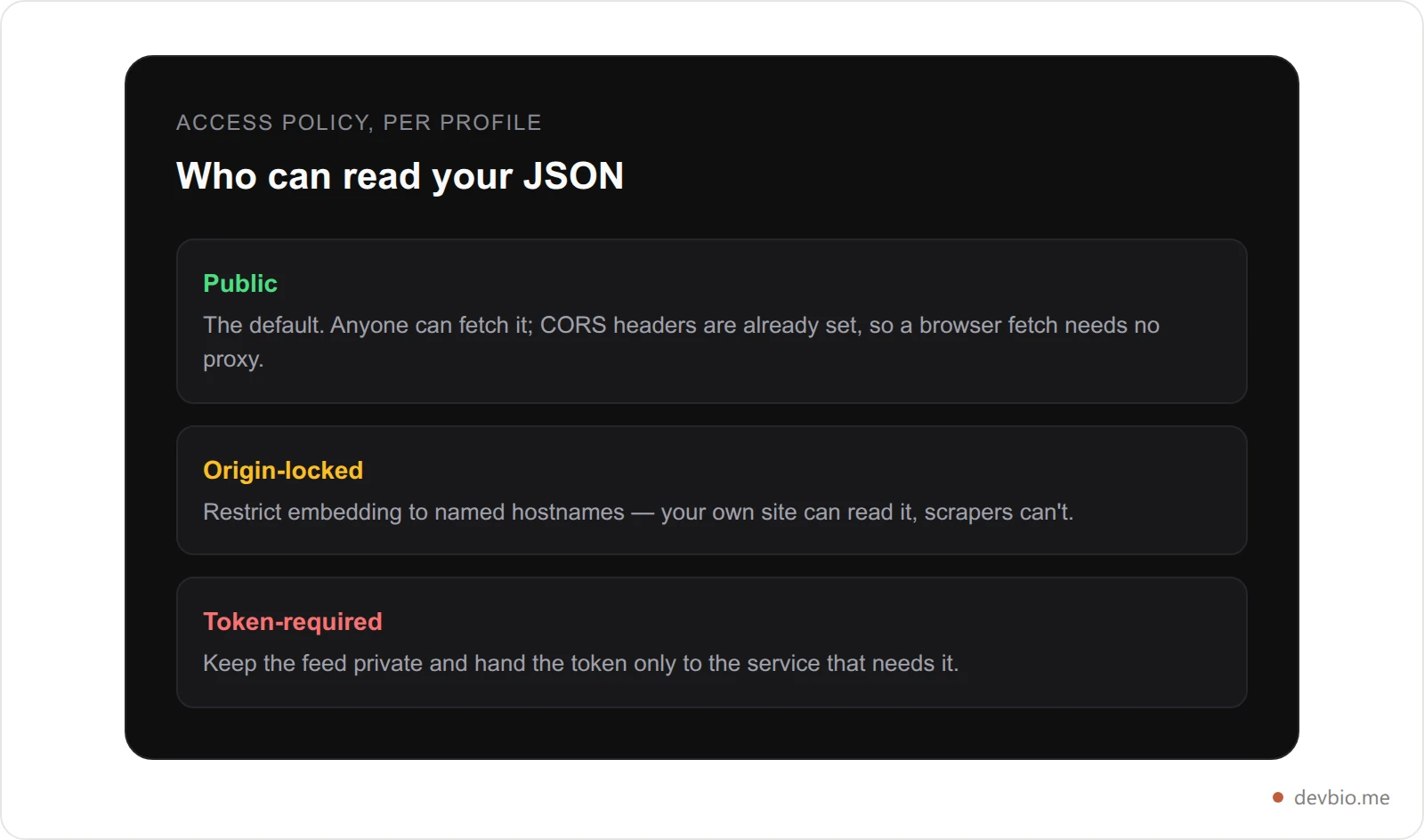
What that buys you in practice: your personal site can render your bio in its own design language by fetching bio.json; a hiring portal or community leaderboard can embed it; and "export my data" is a GET request rather than a support ticket. The machine-readable developer profile guide covers which of these formats are worth serving and why.
It's the question a $35/month Linktree plan still can't answer: where's the JSON?
Fetch your own bio as JSON — start free on devbio.me
Migrating From Linktree to DevBio, Step by Step#
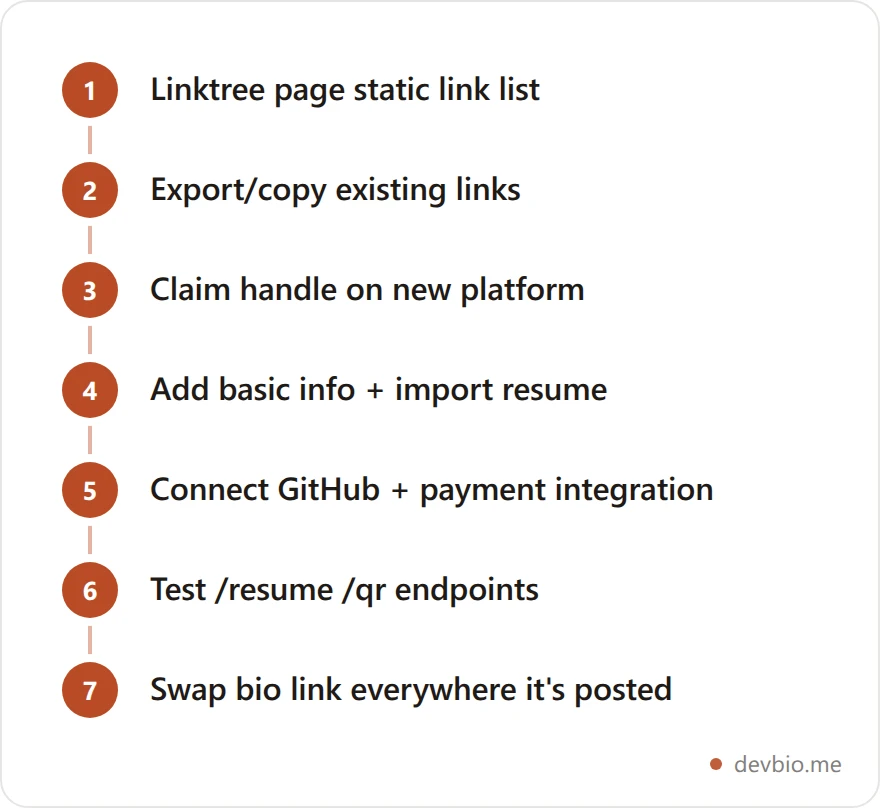
Unlike a platform shutdown, nothing is at risk here — your Linktree page stays live until you're ready to switch. That makes this a controlled move, not a scramble:
Copy your existing links. Screenshot or list out every URL currently on your Linktree page before you start — GitHub, socials, project links, anything you'd otherwise have to hunt for again.
Claim your handle. Go to devbio.me and grab the same username you use elsewhere, if it's available.
Import your resume, if you have one. DevBio's resume importer parses an existing file directly into bio components — faster than retyping work history from memory.
Connect GitHub. This is the step Linktree has no equivalent for — it turns on live star counts, commit activity, and the contribution heatmap.
Connect a payment integration, if you run a SaaS or subscription product. Stripe, Dodo Payments, Lemon Squeezy, and Polar all work; your project card starts showing real MRR automatically.
Add projects, skills, and the rest of your links. Here's which components to prioritize and in what order — not everything needs to go on day one.
Test your endpoints — visit
/resume,/qr, and/bio.vcfon your new profile before you put the link anywhere public.Swap the link everywhere it currently points to Linktree — GitHub README, LinkedIn, email signature, Twitter/X bio. Then leave the Linktree page up or delete it; either way, it's no longer doing the work.
The whole process runs 20–30 minutes for someone with an existing resume to import.
Before/After: A Frontend Developer's Linktree Switch#

Before: Priya is a frontend developer job hunting on the side while freelancing. Her Linktree page has six links — GitHub, LinkedIn, a portfolio site, two client project case studies, and a Calendly. It's clean, it's on-brand, and it works exactly as designed: every tap sends a visitor somewhere else. Nobody scanning her Instagram bio ever finds out she shipped 340 contributions this year, or that her weekend SaaS project is doing $600/month, because none of that lives on the page itself — it's buried two clicks deep on a portfolio site most people never open.
After: She switches to a profile built around live components instead of outbound links. Her GitHub connection shows the contribution heatmap and a real star count on her two open-source packages. Her Lemon Squeezy connection shows the $600 MRR figure directly on the project card, not as a claim in a paragraph. Her /resume endpoint generates an ATS-clean PDF she attaches straight to job applications instead of a separate file she has to keep in sync.
The links are all still there — GitHub, LinkedIn, Calendly — but they're not the whole page anymore. They sit alongside data that updates itself. In the following month, two recruiters specifically mention the contribution graph when they reach out, something a page of six buttons never gave anyone a reason to bring up.
Where Linktree Still Wins#
Fair tradeoffs cut both ways. Linktree is faster to set up if all you want is a link list with zero decisions to make, and its theme picker offers more surface-level visual variety out of the box than a component-based profile does. If you're a developer running a side Instagram or TikTok account with AutoDM funnels and Zapier automations, Linktree's Pro tier is built for exactly that — DevBio has no equivalent, because that isn't the problem it's solving.
The honest dividing line: Linktree is a distribution tool for driving traffic elsewhere. A developer profile is a destination that's supposed to hold up on its own. If your professional presence genuinely needs the former, keep it. If what's actually happening is that you're using a link-distribution tool to host your professional credibility, that's the mismatch this guide is about.
FAQ#
Is Linktree good for developers?
For a simple list of outbound links, yes — Linktree does that job reliably. For a professional developer presence, it falls short: no GitHub integration, no live revenue data, no resume output, and no custom code access at any price tier. It's built for creators driving traffic to other platforms, not for developers who need their profile itself to prove something.
What's the best free Linktree alternative for developers?
DevBio's free plan includes all bio components, public GitHub repo data, a LaTeX-typeset PDF resume, and a marketplace listing with no commission — all at $0, matching Linktree's free tier on price while adding the data layer Linktree doesn't have at any price.
Does Linktree take a cut of sales?
Yes, at every tier except Premium ($35/month). Free and Starter both charge 9-12% of digital product sales made through Linktree's checkout; Pro ($15/month) still charges 9%. Only Premium drops the commerce fee to 0%.
Can I add custom code to my Linktree page?
No. Linktree's customization is limited to its built-in theme system — colors, fonts, layout options — on every plan, including Premium. There's no way to embed HTML, CSS, or JavaScript. Carrd is the more common pick among alternatives specifically because it allows custom code on paid plans.
How do I migrate my links from Linktree to a new platform?
There's no built-in export tool, so start by listing out your current links manually — most Linktree pages have five to ten links, which takes a few minutes to copy. From there, most developer profile builders let you import an existing resume file to speed up the rest of the setup.
Will switching from Linktree hurt my existing traffic?
Not if you update the link wherever it's posted — GitHub bio, LinkedIn, email signature, social profiles. The URL changes, but nothing about your existing audience's ability to find you does, as long as you swap the link everywhere it currently points to Linktree.
Do I need a payment integration to use a developer profile?
No. Revenue display is optional and only appears if you connect Stripe, Dodo Payments, Lemon Squeezy, or Polar. A profile with just GitHub activity and project links is a complete, useful setup without connecting any payment account.
Key Takeaways#
Linktree's Pro plan jumped to $15/month in late 2025, and its commerce fee stays at 9% all the way up to that tier — zero-fee selling requires the $35/month Premium plan.
Linktree has no GitHub integration, no live revenue data, no resume output, and no custom code access at any price — it's a link distribution tool, not a proof platform.
Run any alternative through the Link-vs-Proof Test: does it prove something, does data update itself, does it output an ATS-readable document, and does it take a cut of what you build.
Your GitHub activity and your revenue already exist, independent of whatever tool hosts your links today. Put them on one profile that shows it — devbio.me.


