

Multi-currency MRR breaks the first time you sell outside your home currency. A customer pays €49 through Lemon Squeezy, another pays $49 through Stripe, and your dashboard just adds the numbers like they're the same unit. They aren't. Multi-currency MRR is monthly recurring revenue collected in more than one currency, normalized to a single reporting currency (usually USD) so the number is actually comparable month to month and founder to founder. Get the conversion wrong and every trend line built on top of it — growth rate, churn, runway — is wrong too.
This matters more than it used to. Payment platforms now settle in 130+ currencies by default, so the first non-domestic sale for most indie SaaS products isn't a rare event anymore, it's month one. Solo founders make up a large and growing share of new indie software projects, and most of them are one Stripe checkout link away from a customer paying in a currency they never planned for. If you're showing revenue publicly — on a dashboard, a bio, an X thread — an unconverted or badly-converted number either understates what you built or quietly inflates it, and neither looks good when someone checks your math.
Below is the actual mechanics of multi-currency MRR: the three conversion methods teams actually use, a framework for picking one and sticking to it, and what breaks when your exchange-rate source goes down (it will).
What Multi-Currency MRR Actually Means#
Multi-currency MRR is not "add up all the money." It's the recurring revenue from every subscription, in whatever currency the customer was billed, converted to one reporting currency using a defined, consistent exchange-rate rule.
The word doing the work is consistent. A EUR subscription converted at today's rate and a GBP subscription converted at last week's rate, mixed into the same MRR total, produces a number that moves for reasons that have nothing to do with your business — it moves because currencies moved. That's not growth. That's noise dressed up as a metric.
Three things have to be true for a multi-currency MRR number to mean anything:
One rate policy, applied to every currency, every month. Not "usually" — every time.
The native amount is preserved. You always need to know what the customer was actually charged, separate from the converted figure.
The rate source is documented. If someone asks "converted using what rate, from when," you have an answer.
Miss any of the three and you don't have multi-currency MRR — you have a number that happens to be denominated in dollars. Check how your own MRR calculation holds up before you add currency conversion on top of it.
Why One MRR Number Can Lie to You#
Here's the uncomfortable part: a single blended MRR figure can go up in a month where your actual business did nothing. If the dollar weakens against the euro, every EUR subscription converts to more dollars than it did last month — same customers, same plans, same churn, higher reported MRR. Flip the dollar the other way and identical performance reports as a decline.
Public companies solve this with constant-currency reporting — recalculating revenue as if exchange rates hadn't moved, specifically to separate real growth from currency drift. It's standard enough that IR Magazine found 92% of analysts covering multinational SaaS companies consider constant-currency metrics important or very important to their evaluation of a company. A PwC study found 89% of multinational companies run some form of FX impact analysis — but only 42% actually build it into regular reporting. Most companies know the problem exists and don't fix it.
Indie hackers and small SaaS teams inherit the same problem at smaller scale, minus the finance team. If your public MRR number quietly includes a currency swing you didn't disclose, you're not lying on purpose — but anyone comparing your growth to a USD-only competitor is drawing the wrong conclusion, and so are you.
Three Ways to Convert Multi-Currency Revenue#
Every tool that touches multi-currency MRR picks one of three approaches. None is universally "correct" — they trade off stability against real-time accuracy.
Method | How it works | Best for |
|---|---|---|
Locked-at-event rate | The exchange rate is fixed the moment a subscription starts or renews, and stays fixed until the next billing event. Paddle's ProfitWell metrics use this — rate is set at the rate-plan start date, or the last renewal event for that month. | Stable month-over-month trend lines; least noise |
Live/historical daily rate | Every transaction converts at the closing rate for the day it was paid. ChartMogul uses daily closing rates going back 15 years specifically so historical graphs stay accurate when re-run later. | Financial accuracy; audit-grade historical reporting |
Native-only, no conversion | Revenue is shown per currency, never summed. Technically the most honest, but it means you can't state one MRR number at all. | Multi-entity accounting, not public-facing metrics |
Locked-at-event rates are calmer to look at — your MRR doesn't wobble with the FX market. Live daily rates are more accurate to what the money was actually worth on the day it moved. Most public-facing tools pick locked-at-event because a bio, dashboard, or investor update needs a number that doesn't jump around for reasons a reader can't see.
How the Major Payment Platforms Actually Handle Currency#
The provider you bill through changes how much conversion work lands on you. The four platforms most solo SaaS founders connect handle it differently:
Provider | What the customer pays in | What you're actually paid in | What it means for your MRR |
|---|---|---|---|
135+ currencies at checkout | The currency you configured per account/product | Single currency per account — you convert to USD yourself if you want one MRR number | |
Lemon Squeezy | Local currency shown at checkout, 130+ countries | USD internally, regardless of checkout currency | Already USD-normalized at the processor level — no extra conversion needed |
Polar | Checkout currency per product | The currency you set up | Single currency per account, same as Stripe — normalize downstream |
Dodo Payments | 50+ currencies via "Adaptive Currency" | Can settle in local currency (e.g. INR for India-based founders) | Genuinely multi-currency inside one account — needs its own normalization, not just a pass-through |
Stripe, Lemon Squeezy, and Polar each give you one currency per account, so "multi-currency" only becomes a problem if you run separate accounts or products in different currencies. Dodo is the outlier: because it can settle a single account across multiple local currencies, the normalization has to happen inside the platform's own revenue summary, not bolted on afterward. If you're comparing payment processors for an indie project, this is the question that matters more than the fee percentage: does the platform hand you one currency, or does it hand you the normalization problem too?
The Honest MRR Framework#
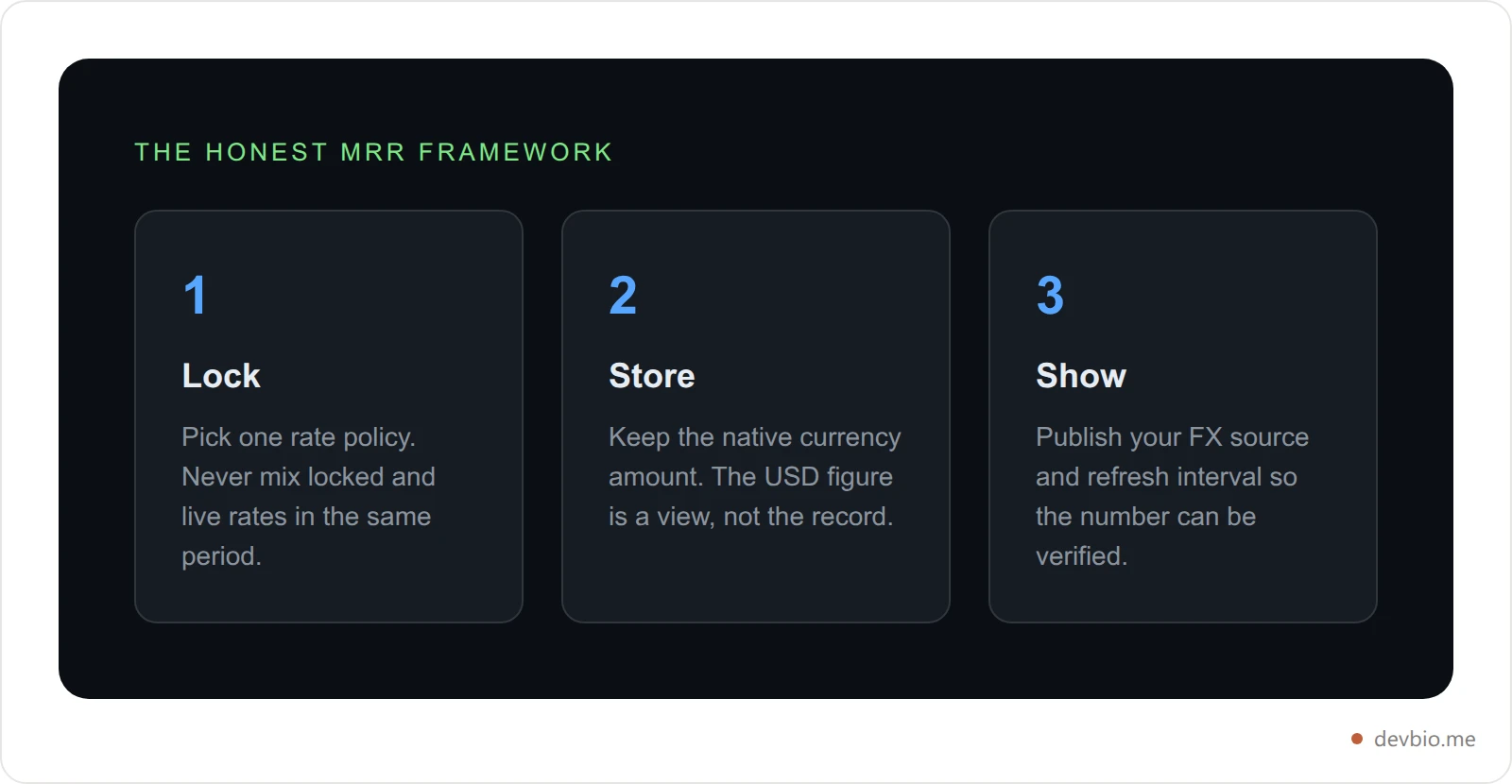
If you're building or choosing a system that touches multi-currency revenue, three rules cover almost every failure mode above. Call it the Honest MRR Framework — Lock, Store, Show.
Lock your rate policy. Decide once whether you're using locked-at-event or live-daily rates, write it down, and never mix the two in the same reporting period. Switching methods mid-stream is what actually breaks trend analysis — not which method you picked.
Store the native amount, always. Never overwrite what the customer was actually charged. The converted USD figure is a display layer on top of the source of truth, not a replacement for it.
Show your source. State which FX provider you use and how often it updates. "Converted to USD" with no source is a number nobody can verify. "Converted via ECB reference rates, refreshed every 12 hours" is a number they can.
How to Calculate Multi-Currency MRR, Step by Step#
If you haven't nailed down how to calculate MRR in a single currency yet, start there first — multi-currency is the same formula run once per currency, then converted. The mechanics are simpler than the policy decisions around them:
Group revenue by currency first. Sum recurring revenue separately for each currency you bill in — don't touch the exchange rate yet.
Pick your rate source. Central-bank reference rates (like the ECB's, distributed through providers such as Frankfurter) are free and auditable. Commercial APIs add uptime guarantees. Either way, document it — that's rule 3 of the Honest MRR Framework.
Apply your locked policy. Convert each currency group at the rate defined by your chosen method (event-date or daily-close). Don't hand-pick a "nicer" rate for a given month.
Sum the converted totals. Now, and only now, do you add the numbers together into one MRR figure.
Re-run history consistently. If you correct a rate or add a new currency, reprocess prior months with the same rule so the trend line doesn't have a seam in it.
Worked example: say a founder has 40 subscribers paying $9/mo through Stripe ($360) and 25 subscribers paying €9/mo through a second product ($225 face value in EUR terms). Summed blindly as digits, that's "585" — meaningless, because you just added dollars to euros. Grouped first ($360 USD, €225), converted at a documented rate of 1.08 (€225 × 1.08 ≈ $243), then summed: **$603 MRR**, with both the native €225 and the source rate stored alongside it. That's the whole difference between a number and a metric.
What Happens When Your Exchange-Rate Source Goes Down#
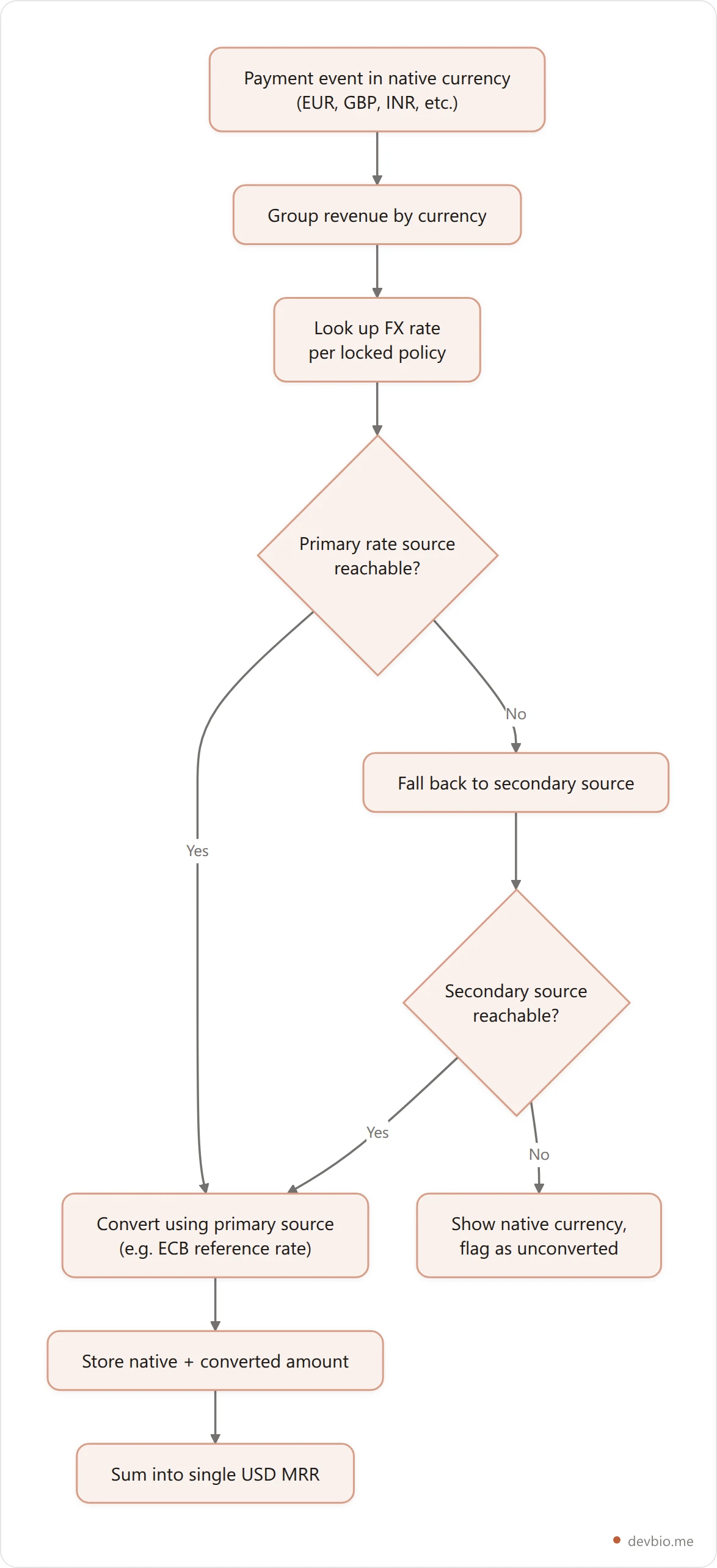
This is the failure mode almost nobody plans for. FX APIs have outages like any other API. If your MRR display just guesses when the rate feed is down — using a stale cached rate with no expiry, or silently defaulting to 1:1 — you'll show a wrong number confidently, which is worse than showing no number at all.
The safer pattern has three parts, and it's the one behind DevBio's own revenue normalization: cache exchange rates for a bounded window (hours, not days), fall back to a second independent rate source if the primary is unreachable, and if every source is down, degrade to the native currency instead of fabricating a converted figure. A visibly-native €4,200 is honest. A confidently-wrong "$4,200" converted at a stale or default rate is not.
If you're picking a tool to display revenue publicly — on a payment processor or anywhere else — ask what it does on FX-outage day. Most vendor docs don't say. That silence is itself an answer.

Case Study: Same Revenue, Two Very Different Numbers#
Take a realistic, anonymized example. A solo developer in Berlin sells a dev-tools SaaS through Lemon Squeezy, billed entirely in EUR. One month, the product does €4,200 in recurring revenue — a genuinely good number for a solo project.
If that founder posts "€4,200 MRR" next to peers who post "$8,000 MRR" and "$6,500 MRR," the raw digits make the EUR number look like the smallest of the three. It isn't. At a representative rate of roughly 1.08 USD per EUR, €4,200 converts to about $4,536 — still behind the other two, but a fair comparison instead of an accidental understatement caused entirely by which currency symbol comes first.

Now run it the other direction. A founder billing in a currency that's temporarily stronger than the dollar gets the opposite distortion — their raw number looks better than the business actually is, and it corrects itself downward the next time exchange rates move, with no change in customers or churn. Either way, without normalization, a founder billing in a weaker currency can look artificially small on any leaderboard, marketplace listing, or building-in-public post that ranks by raw MRR number. That's not a rounding error — it's a systematic bias against every non-USD founder using the platform, and it compounds every time someone screenshots the number without context. A marketplace that ranks listings by unconverted MRR is effectively ranking by which currency the seller happened to bill in, not by which business is bigger.

Showing Multi-Currency MRR on Your Developer Profile#
Once you've picked a rate policy, the display question is where the number lives and how it's labeled. A project card that just says "$4,536/mo" with no currency note is making a claim a reader can't check. The more useful pattern shows both: the converted figure as the headline, the native currency and rate source available on inspection.
This is exactly the gap a live MRR profile setup needs to close for anyone billing outside the US. DevBio's project cards pull revenue directly from Stripe, Lemon Squeezy, Polar, or Dodo Payments and normalize non-USD amounts to USD using cached FX rates with a documented fallback — if every rate source is unreachable, the card shows the native currency instead of guessing. That's the Honest MRR Framework applied directly: lock the policy, store the native amount, show where the rate came from.
If you're assembling a profile that leans on live revenue as proof rather than a claim, currency handling isn't a footnote — it's the difference between a number a visitor trusts on sight and one they have to mentally re-convert before they believe it. See what a currency-normalized project card looks like.
Multi-Currency MRR Checklist#
Copy this before you wire up revenue display anywhere public:
Pick one rate policy — locked-at-event or live-daily — and write it down somewhere you'll actually check
Never mix rate policies within the same reporting period
Store the native currency amount for every transaction, unconverted
Choose a primary FX rate source and a secondary fallback
Cache rates for a bounded window (hours), not indefinitely
Decide what happens on total FX outage — and make it "show native currency," not "guess"
Label the converted figure with its source and last-updated time wherever it's public
Re-process historical months consistently if you ever change rate source or policy
Stop making visitors do the math
DevBio's project cards pull revenue straight from Stripe, Lemon Squeezy, Polar, or Dodo Payments and normalize it to USD automatically — native amount and rate source included, no spreadsheet required.
Build your profile freeFAQ#
What is multi-currency MRR?#
Multi-currency MRR is monthly recurring revenue collected across more than one currency, converted to a single reporting currency using a consistent, documented exchange-rate policy. Without that consistency, the number reflects currency movement as much as it reflects business performance, making it unreliable for tracking growth.
How do I convert MRR to USD?#
Group revenue by the currency it was billed in, apply one exchange-rate policy (locked-at-event or live-daily) using a documented rate source, then sum the converted totals. Apply the same policy to every currency and every month — switching methods mid-stream breaks historical trend comparisons.
Should I use live or fixed exchange rates for MRR?#
Fixed rates locked at the billing event produce a calmer, more comparable trend line, which is why tools like Paddle's ProfitWell metrics use this method. Live daily rates are more accurate to real-time value and better for audit-grade financial reporting, which is ChartMogul's approach. Pick one and stay consistent.
Does Stripe convert MRR automatically?#
Stripe processes payments in 135+ currencies but doesn't automatically produce a single normalized MRR figure across them — that conversion logic has to be built on top, either in your own reporting or by the analytics tool you connect. Check whether your revenue-display tool documents its conversion method before trusting the number.
How often should exchange rates update for MRR reporting?#
Daily is standard for accuracy, though many tools cache rates for a shorter window (hours) to reduce API load while staying close to current. What matters more than the exact frequency is that the interval is fixed and disclosed, so a reader knows how fresh the conversion is.
What happens if my FX data source goes down?#
A well-built system falls back to a second independent rate source, and if both are unreachable, displays the native currency amount instead of guessing with a stale or default rate. Silently defaulting to a 1:1 conversion or an outdated cached rate produces a confidently wrong number, which is worse than an honest "unconverted" label.
Do investors care about constant currency ARR?#
Yes — constant currency ARR strips exchange-rate movement out of the growth figure, and IR Magazine found 92% of analysts covering multinational SaaS companies consider constant-currency metrics important or very important when evaluating growth. At any scale, separating real operational growth from FX drift is what makes a revenue trend line trustworthy rather than coincidental.
Can I show MRR in my local currency instead of USD?#
Yes, and for a primarily local audience it can be clearer than a converted figure. The tradeoff is comparability — anyone benchmarking your revenue against USD-denominated peers has to do the conversion themselves. Showing both the native amount and a normalized figure avoids the tradeoff entirely.
The Bottom Line#
Multi-currency MRR isn't hard math — it's a discipline problem. Pick one rate policy and never mix it mid-stream. Always store the native amount alongside the converted one. Publish your rate source so the number can be checked, not just trusted. Those three rules catch almost every way multi-currency revenue reporting goes wrong, from misleading trend lines to a confidently-wrong number on outage day.
If you're billing outside the US, an unconverted or badly-converted MRR figure isn't a small cosmetic issue — it's the difference between a number that proves what you built and one a reader has to mentally re-price before they believe it. Show your real revenue, converted honestly, on one link.


