

Unlike underline or color, bold in Markdown actually has real syntax — **text** or __text__, both compile to the same <strong> tag, on every renderer from GitHub to a static site generator. So when it doesn't render, the syntax isn't the problem. The cause is almost always one of four things: an underscore stuck inside a word, a bold marker started in one paragraph and closed in the next, an attempt to bold text inside a code span, or a stray extra asterisk breaking the pair count. Tested against GitHub's current Markdown renderer and the CommonMark 0.31 spec, this guide covers the syntax in thirty seconds, then every place it quietly fails.
Two ways to bold text — and the rule that breaks both#
CommonMark gives you two interchangeable markers for strong emphasis:
**This is bold**
__This is also bold__
Both produce identical output: <strong>This is bold</strong>. Pick one and stay consistent — GitHub's own style guide and most linters prefer asterisks, mainly because underscores collide with something asterisks don't.
That collision is the single most common reason bold "doesn't work": intraword emphasis. The CommonMark spec deliberately disables _ and __ in the middle of a word, so that identifiers like variable_name and snake_case_function don't accidentally turn into formatting. Asterisks have no such restriction.
foo**bar**baz   → foo<strong>bar</strong>baz   (works)
foo__bar__baz   → foo__bar__baz                (literal underscores — no bold)
If you've ever pasted __init__ or my_var__is_bold__ into a README and watched the underscores just sit there instead of rendering, this is why. The fix is simple: use ** for anything that touches a word character, and save __ for text with clear spaces or punctuation on both sides.
Where bold silently fails in GitHub Markdown#
Beyond intraword underscores, three more patterns produce the same symptom — asterisks that render as literal asterisks instead of bold text.
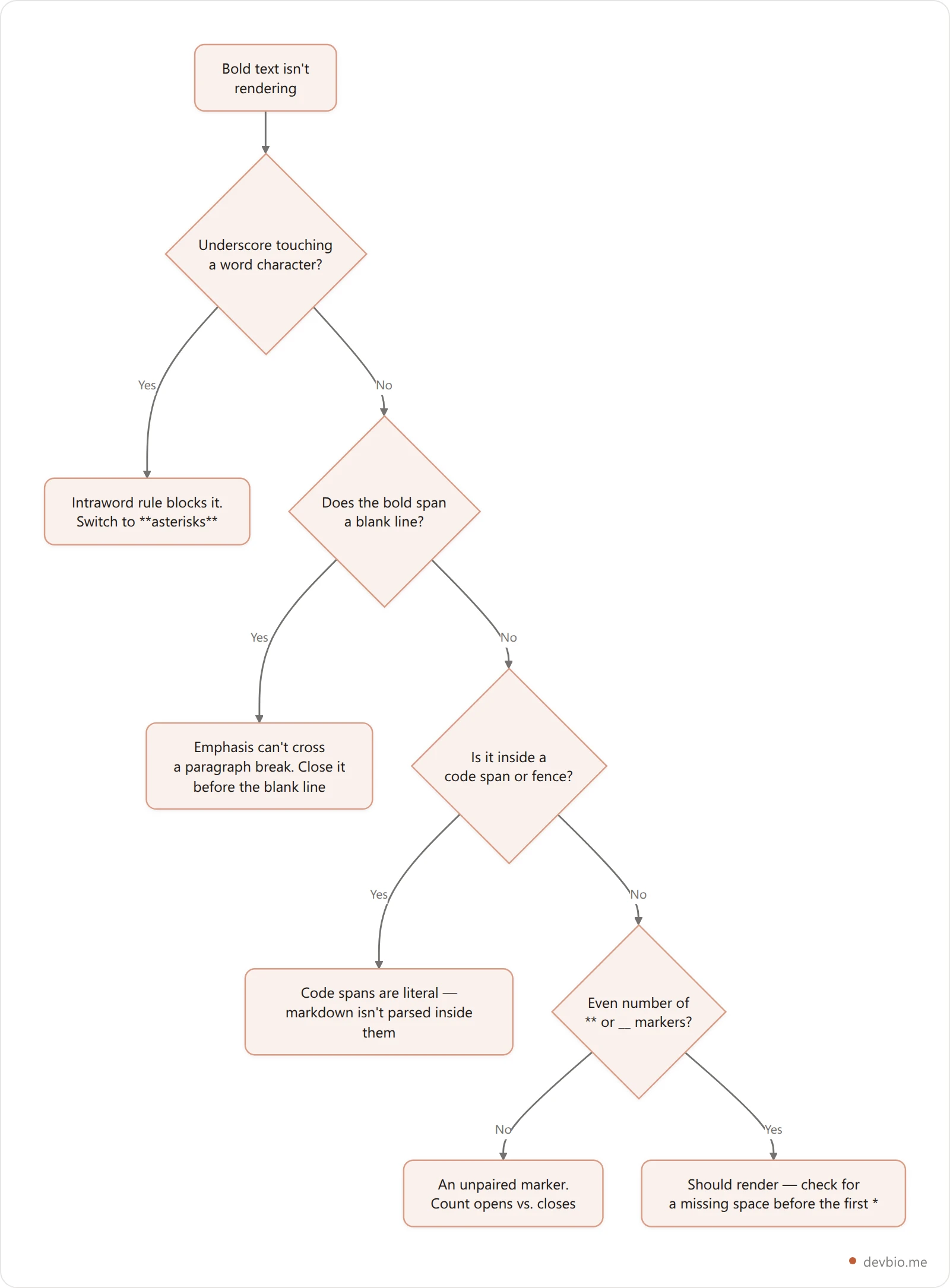
The blank-line case trips people up most in READMEs, because it usually happens inside something long — a bolded warning that spans two paragraphs, or a block quote:
**This opens bold here

and never closes, because a blank line
broke the paragraph in between.**
CommonMark treats each blank-line-separated block as its own paragraph, and emphasis markers don't carry across that break. The fix is to close the bold before the blank line and reopen it after, or restructure so the whole span sits in one paragraph.
The code-span case is the other frequent surprise: inside backticks, Markdown isn't parsed at all, by design — that's what makes code spans safe for literal ** characters in code samples.
Use `**not bold**` to show the literal syntax.That's exactly why code blocks demonstrating Markdown syntax (like the ones in this post) can safely contain ** without turning bold themselves.
Combining bold with italics, links, and code#
Nesting bold inside other formatting works, with one exception.
Bold and italic together use three markers instead of two:
***bold and italic***
**_also bold and italic_**
Both render as <strong><em>text</em></strong>. Bold inside a link also works cleanly, because link text is parsed as regular inline Markdown:
[**Read the docs**](https://example.com)The one place bold genuinely cannot go is inside a code span or fenced code block — not because of a sanitizer allowlist (the way <u> gets stripped on GitHub), but because code spans exist specifically to stop Markdown from parsing their contents. If you need to show someone the **bold** syntax in a README's code example, the backticks are doing their job by leaving it as plain text.
Bold in lists, tables, and headings#
Bold behaves the same inside every container element, with two things worth knowing:
In tables, a literal pipe character inside bold text needs escaping (
\|), since Markdown tables split columns on unescaped|.In task lists, bold works on the label but never on the marker.
- [ ] **Ship the release**renders a checkbox followed by bold text, which is the standard way to weight a roadmap item. What fails is bolding the box itself:- **[ ]** Ship the releaseputs asterisks in front of the bracket pair, so the item stops being a task list item and the brackets render as plain text.In headings,
## **Bold Heading**renders, but it's redundant — headings already carry their own strong visual weight in GitHub's stylesheet, so an extra<strong>inside an<h2>changes nothing a reader will notice. Save the emphasis for body text where it actually has contrast to create.
Lists need no special handling at all — - **Step one:** do this renders exactly as written, which is why bolded lead-in labels are one of the most common README patterns for scannable steps. One list form does carry an extra rule: a markdown checkbox has to put its [ ] marker before anything else in the item, so - **Step one:** [ ] do this never draws a box.
Bold vs <strong>: why the tag GitHub picks matters#
Every Markdown renderer that follows CommonMark compiles **text** to an actual <strong> element, not a <b> tag styled to look bold. That distinction isn't cosmetic. MDN's documentation for <strong> defines it as marking content of "strong importance, seriousness, or urgency" — screen readers can announce it differently, and search engines weight it as a semantic signal, not just a font-weight change. The <b> element, by contrast, is explicitly documented as stylistic only, with MDN's own guidance to prefer <strong>, <em>, or <mark> when the emphasis means something.
That's a useful thing to know if you're formatting more than a README. DevBio's bio editor renders **bold**, *italic*, and [links](url) through the same lightweight inline parser used across the product — so a dev bio built on DevBio handles this identically to a GitHub profile, without needing raw HTML or a sanitizer allowlist at all. It's the same reasoning that shapes what belongs in the components of a good developer bio more broadly: pick the element that says what the content is, not just how it looks.
Testing before you push#
Bold rarely fails silently in a way you'd catch by reading the raw Markdown — the safest check is rendering it the way your audience will see it:
Paste it into a GitHub issue draft. Same parser, same sanitizer pipeline as a README, without committing anything.
Check a Gist if you're testing a full block — read our guide to GitHub Gists for other ways they're useful for drafts.
Count your markers. An odd number of
*or_on a line is the single most common typo — one extra or missing asterisk turns the whole rest of the paragraph bold (or leaves it plain).
Formatting a README is the easy 5%
The other 95% is keeping the content behind it true — live stars, live revenue, projects that update themselves instead of going stale.
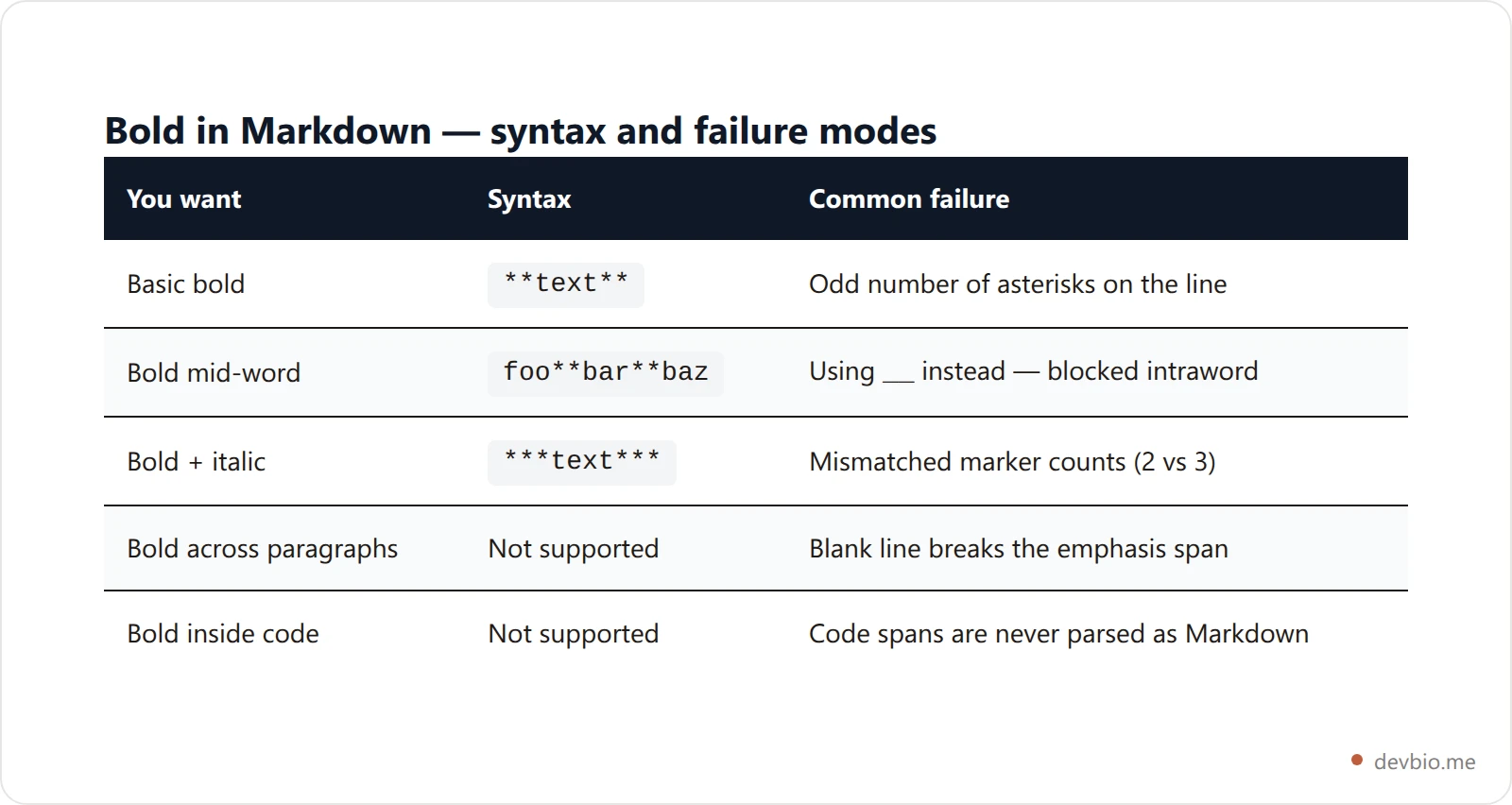
See a live dev bioQuick reference: bold in Markdown at a glance#
Key takeaways#
**text**and__text__both produce real<strong>bold — the syntax works everywhere Markdown does.The most common failure is an underscore touching a word character — CommonMark blocks intraword
_emphasis on purpose, so asterisks are the safer default.Bold can't cross a blank line, and it can't appear inside a code span — both are deliberate parsing rules, not bugs.
***text***combines bold and italic; an even marker count is the whole trick.Bold compiles to
<strong>, a semantic tag screen readers and search engines treat differently than a purely visual<b>.
Frequently Asked Questions#
Why isn't **text** rendering as bold on GitHub?#
The most common cause is an unpaired marker — an odd number of * characters on the line, often from a missing closing pair. The second most common is trying to bold text that spans a blank line, which breaks the emphasis span because Markdown treats each blank-line-separated block as a new paragraph.
What's the difference between **bold** and __bold__?#
Nothing in the output — both compile to the same <strong> tag. The practical difference is the intraword rule: ** works even touching a word character (foo**bar**baz), while __ is blocked from starting or ending inside a word, specifically so identifiers like variable_name don't accidentally bold.
Can I bold text inside a code span?#
No. Code spans (single backticks) and fenced code blocks are never parsed as Markdown — their entire purpose is to display text literally, including any ** or __ characters. That's a deliberate design choice, not a missing feature.
How do I bold and italicize text at the same time?#
Wrap it in three markers instead of two: ***text*** or **_text_**. Both produce <strong><em>text</em></strong>. The usual mistake is mismatching the counts — three asterisks on one side and two on the other won't parse as combined emphasis.
Does bold work inside Markdown tables?#
Yes, **text** renders normally inside a table cell. The one gotcha is a literal pipe character inside the bolded text, which needs escaping as \| so it isn't read as a column separator.
Is **bold** the same as HTML <b>?#
No. Markdown's ** compiles to <strong> ("strong importance"), which screen readers and search engines can treat differently from <b>, a purely visual tag with no semantic meaning. Writing raw HTML instead of Markdown, <strong> is almost always the better pick.
Bold is the one formatting question in this series with a short, satisfying answer: the syntax works, everywhere. The interesting part — same as underline, color, checkboxes, and line breaks in Markdown — is knowing exactly where the parser's rules stop being obvious. Line breaks are the closest cousin to this post: also real syntax, but the one piece of it an editor can silently delete on save.


