

You wrote <span style="color:red">Warning</span> in your README. GitHub rendered the word "Warning" in plain black. Nothing errored, nothing warned you — the color just quietly disappeared.
Markdown color text isn't a Markdown feature. There's no color syntax in the original 2004 version, in CommonMark, or in GitHub Flavored Markdown. Color appears only when the tool converting your Markdown into HTML decides to allow it — which is why the same file renders red in Obsidian and black on GitHub.
So the real question isn't how to change text color in Markdown. It's which method survives the renderer you're publishing to. Below are the five methods that exist and where each one works. Three of them survive a GitHub README. We also ran the HTML method through rehype-sanitize 6.0.0, whose default schema follows GitHub's allowlist, so you can see exactly what gets stripped.
Does Markdown support colors? Not in any spec#
Markdown was designed as a text-to-HTML converter, not a styling language. The CommonMark specification defines emphasis, headings, lists, links, code and a handful of other structures. There is no rule for color, because color was always meant to be HTML and CSS's job.
That leaves you with a three-stage pipeline, and color usually dies at stage three:
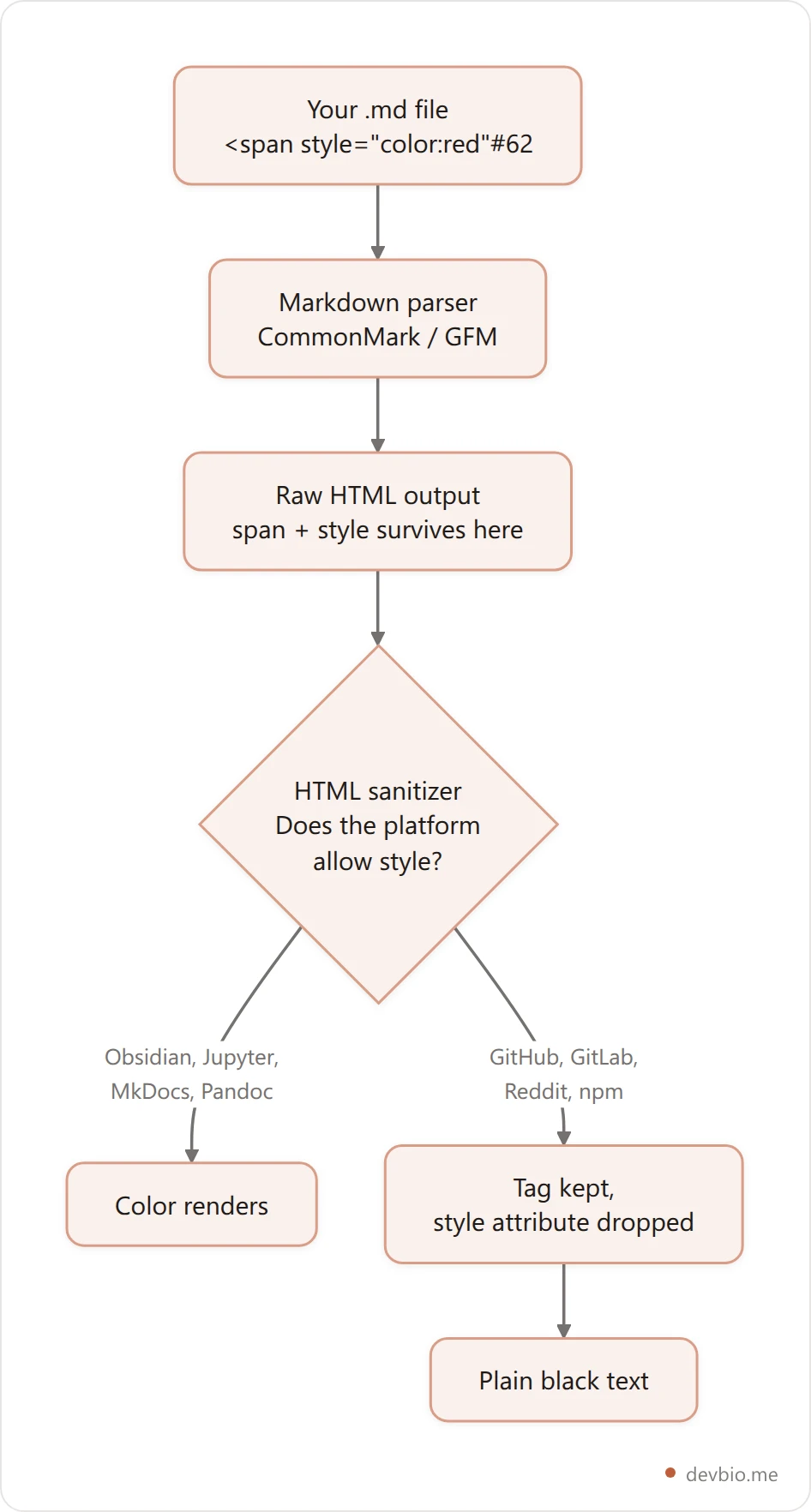
Stage three is the part almost every tutorial skips. Multi-user platforms run rendered HTML through a sanitizer with an attribute allowlist before showing it to anyone. A style attribute is a script-injection surface, so it doesn't make the list. The <span> tag itself often survives — which is exactly why you see your text but not your color, with no error to tell you why.
Once you know that, the whole topic collapses into one question: does my target platform sanitize?
Markdown colored text: which method works where#
Five approaches to Markdown color text exist. Here's the honest coverage map, tested across these surfaces in 2026, before the details:
Method | GitHub README | GitHub issue/PR | GitLab | Obsidian | Docusaurus (MDX) |
|---|---|---|---|---|---|
| No | No | No | Yes | Yes (JSX syntax) |
LaTeX | Yes | Yes | Depends | Depends | Depends |
| Yes | Yes | Yes | Yes | Yes |
Color chip (hex in backticks) | No | Yes | Yes | No | No |
Badge / SVG image | Yes | Yes | Yes | Yes | Yes |
Anything marked Depends varies by plugin, extension or version — test it in the actual surface before you ship it. The two rows that work nearly everywhere, diff blocks and badges, are the two most people never consider.
Method 1: inline HTML, the right idea on the wrong platform#
This is the answer you'll find first, and it's the one that fails most often:
<span style="color:#d73a49">This is red</span>
<p style="color:teal">So is this paragraph, in teal</p>
It works anywhere Markdown is piped straight to HTML without a sanitizer in between — Obsidian, Jupyter notebooks, MkDocs, Pandoc run with raw HTML enabled, most static site generators, and the VS Code preview pane.
It fails on GitHub, GitLab, Reddit, Discord, Slack, and on the README mirrors that npm and PyPI render from your repo. Every one of those accepts input from strangers, so every one of them sanitizes.
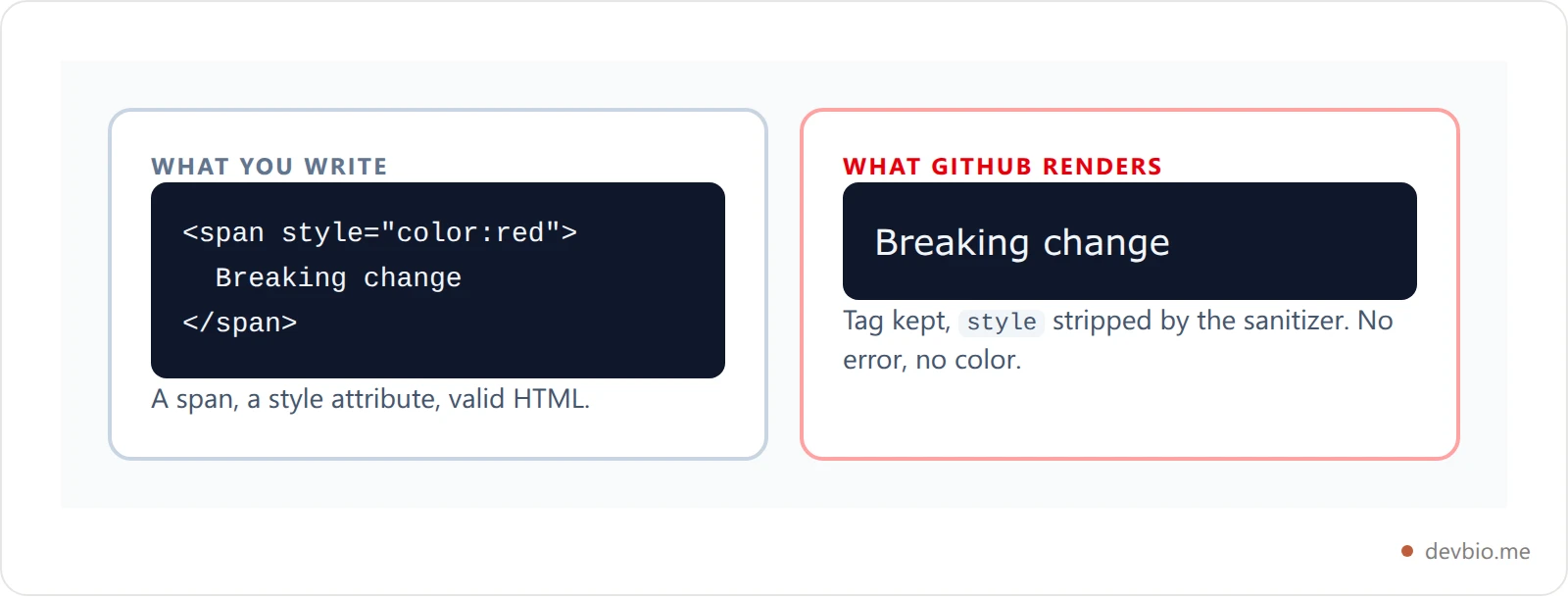
There's no workaround here. If the platform sanitizes, inline CSS is gone — and stacking <font color="red"> on top doesn't help, because that tag isn't on the allowlist either.
We checked this rather than trusting it. Here are three lines run through remark and rehype-sanitize 6.0.0, whose default schema mirrors GitHub's allowlist:
<!-- input -->
<span style="color:red">Breaking change</span>
<font color="red">Old tag</font>
<p align="center">centered</p>

<!-- output after sanitizing -->
<p><span>Breaking change</span></p>
<p>Old tag</p>
<p align="center">centered</p>
The span survives without its style, the font tag vanishes entirely, and align lives. That one test explains why your text shows up uncolored with no error, and why centering works on GitHub when coloring doesn't.
Want a profile that renders the same everywhere without fighting a sanitizer? See what a live developer bio actually renders.
Method 2: LaTeX, the only true GitHub markdown color text#
GitHub renders mathematical expressions with MathJax, and per GitHub's own documentation, that rendering is "available in GitHub Issues, GitHub Discussions, pull requests, wikis, and Markdown files."
Markdown files. That last one is the whole trick — it's the only way to get genuinely colored text into a README:
$\color{red}{\textsf{This text renders red}}$

$\color{#1f883d}{\textsf{And hex colors work too}}$
Two details that most copy-pasted versions get wrong:
Wrap the words in
\textsf{}. Bare$\color{red}{text}$renders in math italic, which looks like an equation dropped into your prose.\textsfgives you sans-serif that passes for normal text.The backtick form is safer. GitHub also accepts a form with backticks just inside the dollar signs. It protects the expression from being mangled when it contains characters Markdown wants to interpret. You add one backtick right after the opening dollar sign and one right before the closing dollar sign; everything between stays the same.
The caveats are real, though. The output is a math node, so it won't wrap across lines, copy-paste comes out as LaTeX, and screen readers announce it as a mathematical expression rather than a word. It also won't render anywhere that mirrors your README with a different engine — npm and PyPI will show you the raw $\color{...}$ source.
Use it for a single short label. Don't build a paragraph out of it.
Method 3: the diff code block, the trick that works everywhere#
This one isn't color styling at all — it's syntax highlighting, which is why no sanitizer touches it:
Open a fenced code block, set its language to diff, and start each line with + or -. This is that block rendered on this page:
+ This line renders green
- This line renders red
In our test, Shiki 4.4.3 (the highlighter family this blog renders with) and its github-light theme painted the + line #22863A and the - line #B31D28. Every renderer that supports GitHub Flavored Markdown ships the diff grammar, so this is the most portable colored output in the entire list. Some highlighters extend it further (! for orange, @@ text @@ for purple), but support there is inconsistent — stick to + and - if you need it to work everywhere.
The cost is that it's a code block. You get monospace type, a box around it, and the +/- characters become part of what readers see. That makes it excellent for release notes, changelogs, and do/don't lists, and useless for coloring one word mid-sentence.

Method 4: color chips and badges#
Both GitHub and GitLab shipped a color feature. GitHub markdown color support is real — it's just a swatch, not colored type.
Put a supported color model inside backticks and you get a rendered swatch next to the value. GitHub's docs scope this to issues, pull requests and discussions — not Markdown files, so it won't work in your README. GitLab's documentation documents the same feature with the syntax spelled out: a hex, RGB or HSL value such as #F00, RGB(0,255,0) or HSL(120,100%,50%) wrapped in backticks. It also states the underlying point plainly: "Markdown does not support changing text color."
Badges are the other half of the answer. A badge is just an SVG image with the color baked into the file, so it renders anywhere images render, README included. That's why every project you admire signals build status and version with badges instead of colored words — it's the only colored element that survives every renderer. Our guide to GitHub tech stack badges covers the layouts that read well.
DevBio's badge builder takes the same approach: brand colors are stored as hex values and drawn as inline SVG paths, with the foreground picked automatically from the background's luminance so the label stays readable on both dark and light brand colors. No external image host to rate-limit you, and nothing for a sanitizer to strip.
Method 5: platforms where color is native#
Some tools do give you real colored text — because they're not really rendering portable Markdown:
Notion — apply color from the UI or a
/redcommand. It's stored in Notion's own block format, and it vanishes when you export to Markdown.Obsidian — raw HTML passes straight through, so
<span style>works. It also supports==highlight==syntax.Docusaurus and other MDX sites — you're writing JSX, so it's
<span style={{color: 'tomato'}}>. Note the double braces: that's a JavaScript object, not a CSS string, and single braces are the most common error here.Discord — no colored text in normal messages, but code blocks tagged
ansiaccept ANSI escape codes.
The pattern is consistent. Color that lives inside a platform doesn't survive being exported as Markdown, which is exactly the trade-off to weigh before you build a document around it.
Building a profile that has to render identically across GitHub, a résumé PDF and a live page? Start with the components that travel.
When colored text is the wrong answer#
Before you reach for any of this, there's a standard worth knowing. WCAG 2.1 Success Criterion 1.4.1, Use of Color is a Level A requirement — the baseline — and it reads: "Color is not used as the only visual means of conveying information, indicating an action, prompting a response, or distinguishing a visual element."
A red word that means "deprecated" fails that test. A word that says Deprecated passes it, colored or not.
There's a practical version of the same problem too. Pick #d73a49 for a warning and it looks right on a white background — then someone opens your README in dark mode and it's a muddy smear. You can't attach a prefers-color-scheme rule to text in a README, though you can for images: GitHub supports the <picture> element, so a diagram or badge can ship a light and a dark variant that swap automatically.
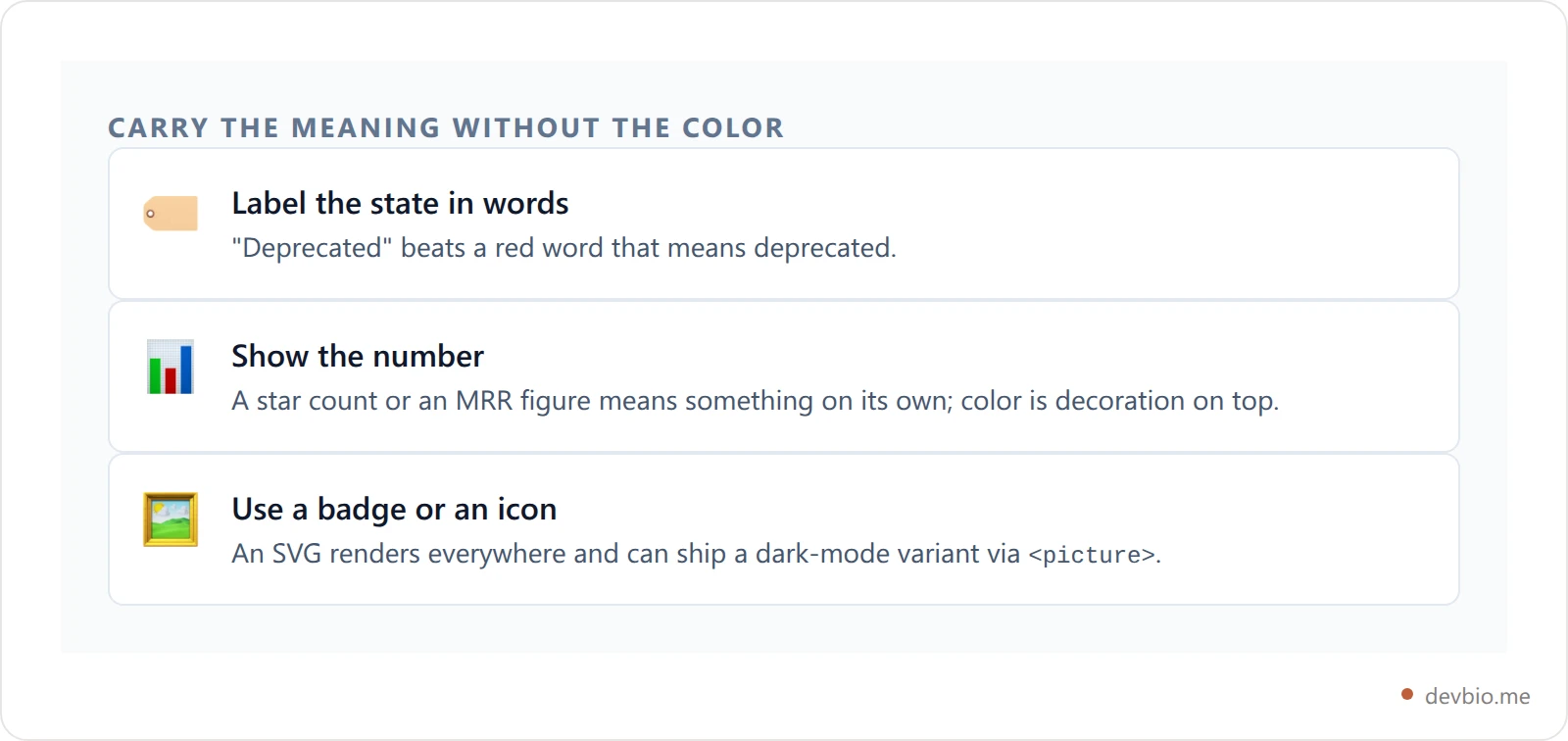
This is the same reason a bio page built on live data doesn't need much color. When a project card shows real GitHub stars or a live revenue figure, the number is the signal — the green is just polish. Markdown's refusal to color text pushes you toward writing that works in plain text first, which is generally the writing that travels.
The same constraint shows up with other formatting people expect Markdown to have and it doesn't — our post on what actually underlines text in Markdown walks through an almost identical sanitizer story, and centering text in Markdown hits the same allowlist from the other side — there align survives where style doesn't. Checkboxes are the same story in another form: a markdown checkbox is a GitHub extension that CommonMark never defines, which is why identical - [ ] syntax draws a box in one tool and literal brackets in another. Bold is the exception: unlike color or underline, bold in Markdown has real syntax that works everywhere — the failures there come from a handful of parsing rules, not a sanitizer.
Frequently Asked Questions#
Can you change text color in Markdown?#
Not with Markdown itself — no version of the spec defines a color syntax. You can only get color if the renderer converting your Markdown to HTML permits inline HTML, LaTeX math, or syntax highlighting. On sanitized platforms like GitHub and GitLab, that rules out the CSS approach entirely.
Why doesn't <span style="color:red"> work on GitHub?#
GitHub sanitizes rendered HTML against an attribute allowlist before displaying it. The style attribute is a script-injection risk, so it's removed. The <span> element itself usually survives, which is why your text appears normally with no error message and no color.
How do you make text red in a GitHub README?#
Use inline LaTeX: $\color{red}{\textsf{your text}}$. GitHub renders math in Markdown files, so this is the only method that produces genuinely colored text in a README. For anything longer than a short label, a badge image or a diff code block will read better.
Do colored text tricks work in a GitHub profile bio?#
No. The bio field on your profile is a short plain-text input, not a rendered Markdown document, so none of these methods apply there. Colored elements belong in your profile README, which is a separate file that does get rendered.
Does GitLab support colored text?#
No. GitLab's documentation says directly that "Markdown does not support changing text color." What GitLab does offer is color chips: wrap a HEX, RGB or HSL value in backticks and it renders a small swatch beside the value.
Will colored Markdown render on npm or PyPI?#
Usually not. Both render your README with their own Markdown engine and their own sanitizer, so LaTeX color and inline CSS typically come through as raw source text. Badge images are the safest bet — they're just images, and they render the same everywhere.
Key takeaways on Markdown color text#
Search color text markdown and you'll get five answers; only two of them travel. Markdown color text was never a syntax question — what you're really choosing is a renderer's escape hatch, so pick by destination:
diffblocks and badge images — these render on every surface tested here. Default to them.LaTeX
$\color{}$— the only genuinely colored text in a GitHub README. Use it for one short label, never a paragraph.Inline
<span style>— works only where nothing sanitizes: Obsidian, Jupyter, MkDocs, your own static site.Color chips — a swatch beside a hex value, in issues and pull requests but not README files.
And before you spend an afternoon on it, check whether color was ever the right signal. A number, a word, or a badge says the thing more reliably than a shade of red that half your readers see against the wrong background. If you'd rather show proof than style it, see how live profile components render.
Your dev story, rendered the same everywhere
Live GitHub stats, real revenue figures, and an ATS-readable resume — on one link that doesn't depend on a sanitizer's allowlist.
Build your DevBio

