

Markdown underline has no syntax: wrap the text in <ins>text</ins>. On GitHub that's the only underline tag that survives, because <u> isn't on the sanitizer's allowlist and gets stripped to plain text. We checked both versions of GitHub's open-source allowlist and ran seven underline attempts through four renderers; the results table is below.
Every search for underline in markdown ends the same way. You tried _text_ and got italics. You tried __text__ and got bold. You found a Stack Overflow answer from 2010 telling you to drop in a <u> tag, pasted it into your README — and it came out as plain text.
There is no underline syntax in Markdown. Not in CommonMark, not in GitHub Flavored Markdown, not by accident — by design. Every underline you've seen in a Markdown document came from raw HTML that the renderer chose to allow. So the real question isn't "what's the syntax," it's "which HTML survives the platform I'm publishing to." On GitHub, the answer is <ins>, not <u>.
Markdown has no underline, and that's deliberate#
The CommonMark spec spends thousands of words on emphasis rules and never once defines underline. Underscores are already spoken for: one gives you emphasis, two give you strong emphasis. That's it.
_one underscore_     → italic
__two underscores__  → bold
___three___          → bold italic
****                 → still not underline
The GitHub Flavored Markdown spec inherits all of that and adds tables, task lists, strikethrough, and autolinks. It adds no underline either.
This wasn't an oversight. Markdown was designed to be readable as plain text, and underline has no plain-text convention the way *asterisks* suggest emphasis. More importantly, on the web an underline already means something specific: this is a link. Baking in a syntax that produces fake links would have been a bad default for a format built for the web.
The rule that actually decides everything#
If you've searched markdown how to underline, underline text markdown, or github markdown underline, you've probably noticed the answers contradict each other. They're all right — each one just describes a different renderer. Markdown underline isn't one question with one answer; it's the same question asked of three very different systems.
Since there's no syntax, underline in markdown comes down to one thing: does your renderer pass raw HTML through, and if it sanitizes, what's on its allowlist? The identical rule decides markdown color text, which fails on GitHub for exactly this reason — the <span> survives the allowlist, the style attribute on it does not.
Bold is the odd one out in this series: it's real CommonMark syntax, not an HTML workaround, so bold in Markdown works on every renderer without touching a sanitizer at all. Line breaks sit in between — real syntax that a formatter can quietly strip, which is why <br> ends up carrying so much of the work there too. Markdown emoji is the same shape one more time: neither spec defines it, so :tada: expands only where a renderer decided to implement it.
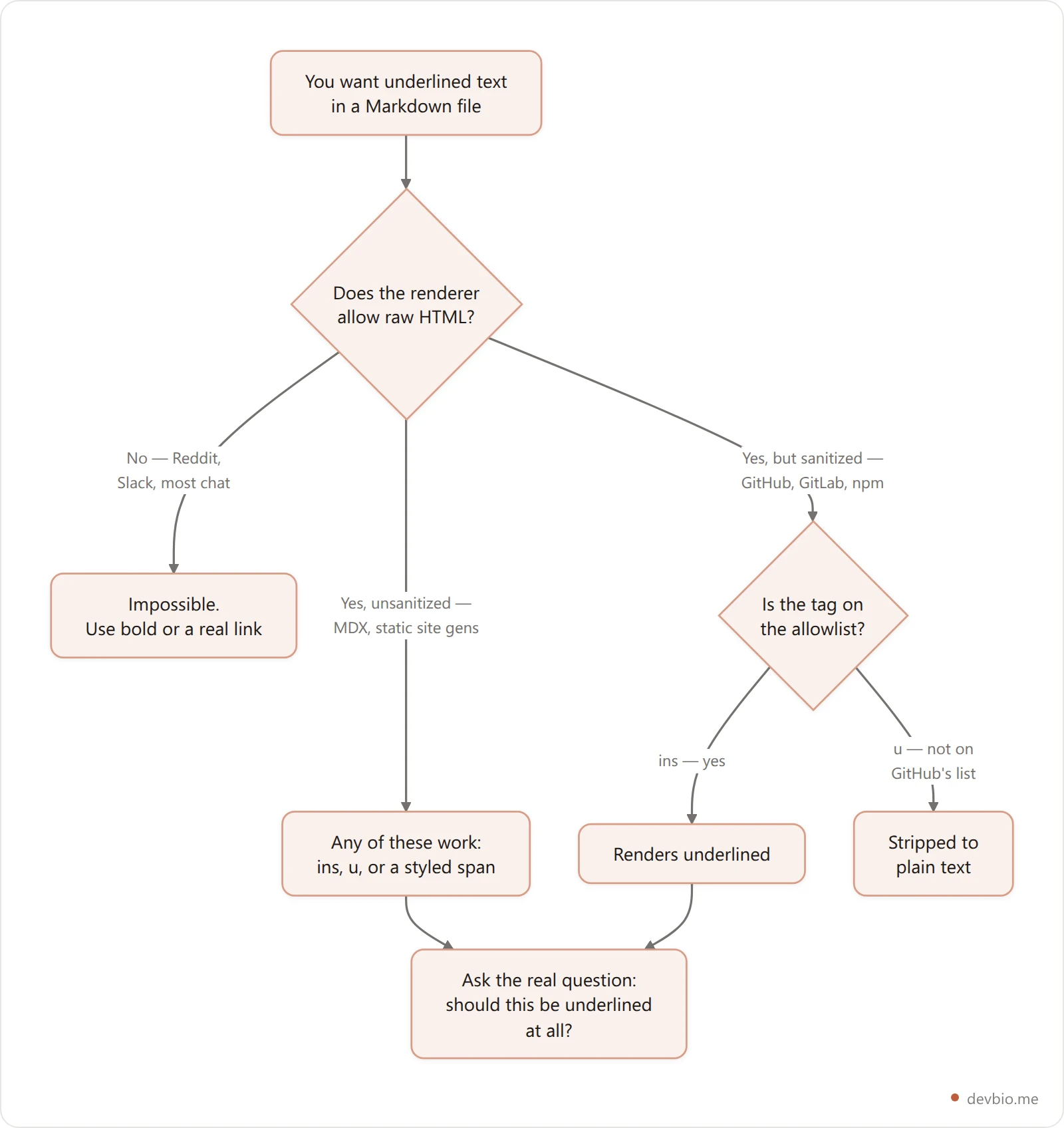
Three buckets, three different answers. Most articles on this topic pick one bucket and present it as the universal rule, which is why the advice you find contradicts itself.
Markdown underline on GitHub: use <ins>, not <u>#
Here's the part almost every guide gets wrong.
The GFM spec is explicit that rendering doesn't stop at Markdown-to-HTML: "GitHub.com and GitHub Enterprise perform additional post-processing and sanitization after GFM is converted to HTML." That sanitization runs against an element allowlist.
GitHub's own open-source sanitization filter ships that allowlist in the html-pipeline project. Read the filter's element list and the picture is unambiguous. It permits ins, del, mark, sub, sup, kbd, s, strike, details, summary, span, abbr, cite, and dfn. The element u appears nowhere in it. We checked on 1 October 2026: it's missing from the ALLOWLIST in v2.14.3 (sanitization_filter.rb) and from the rewritten list in v3.2.4, the current release.
That is the whole story in one line. <ins> and <u> look identical while you're writing: both draw a line under the text in any local preview. Only one of them is on the list that decides what survives the trip to github.com.
So GitHub markdown underline support is decided by that allowlist, not by the Markdown parser — which is why the same snippet behaves differently in your editor and on the site.
<ins>This renders underlined on GitHub.</ins>

<u>This one isn't on the allowlist.</u>
So the tag that a decade of Stack Overflow answers recommends is the one tag that isn't guaranteed to survive. <ins> is:
On the allowlist, so it renders in READMEs, issues, pull requests, and comments
Semantically correct — it means "inserted text," which is why browsers underline it by default
Accessible, because it carries meaning rather than pure decoration
Attribute-friendly, accepting
citeto point at why the text was inserted
One caveat worth knowing: <u> often does render in local Markdown previews — VS Code, Obsidian's HTML handling, most desktop editors — because those don't sanitize anything. That's exactly why people ship it and only discover the problem after pushing. Preview locally, verify on the platform.
Markdown underline tested: 7 attempts in 4 renderers#
The allowlist is the theory. To see it in practice, we ran the same seven snippets through four common JavaScript Markdown pipelines on 1 October 2026: remark 11 + rehype-raw 7 + rehype-sanitize 6.0.0 (whose default schema is modeled on GitHub's), markdown-it 15.0.2 with html: true, markdown-it with its default settings, and marked 18.0.14.
Input | rehype-sanitize (GitHub-like) | markdown-it, html on | markdown-it, default | marked 18 |
|---|---|---|---|---|
| underlined | underlined | literal tag text | underlined |
| stripped to plain text | underlined | literal tag text | underlined |
| span kept, | underlined | literal tag text | underlined |
| stripped to plain text | highlighted | literal tag text | highlighted |
| bold | bold | bold | bold |
| italic | italic | italic | italic |
| literal | literal | literal | literal |
Three things fall out of that table:
<ins>is the only underline that survived every renderer that allows HTML at all.<u>and the styled<span>both died in the sanitized pipeline, exactly as GitHub's allowlist predicts.markdown-it's default config (
html: false) doesn't strip tags, it escapes them, so readers see a literal<u>in the text. That's the failure people mean when they say "the tag showed up on the page."++text++is not Markdown. It only underlines where someone installed the markdown-it-ins plugin (which outputs<ins>anyway); no core parser recognizes it.
One surprise: rehype-sanitize's default schema drops <mark>, while GitHub's own list keeps it. "GitHub-like" isn't "GitHub", so test on the platform you actually publish to.
What renders where#
The same Markdown file produces different results depending on where you publish it. Here's how the major platforms handle raw HTML, and which tag to reach for on each. The rule of thumb: the less control you have over the renderer, the more conservative your tag choice needs to be.
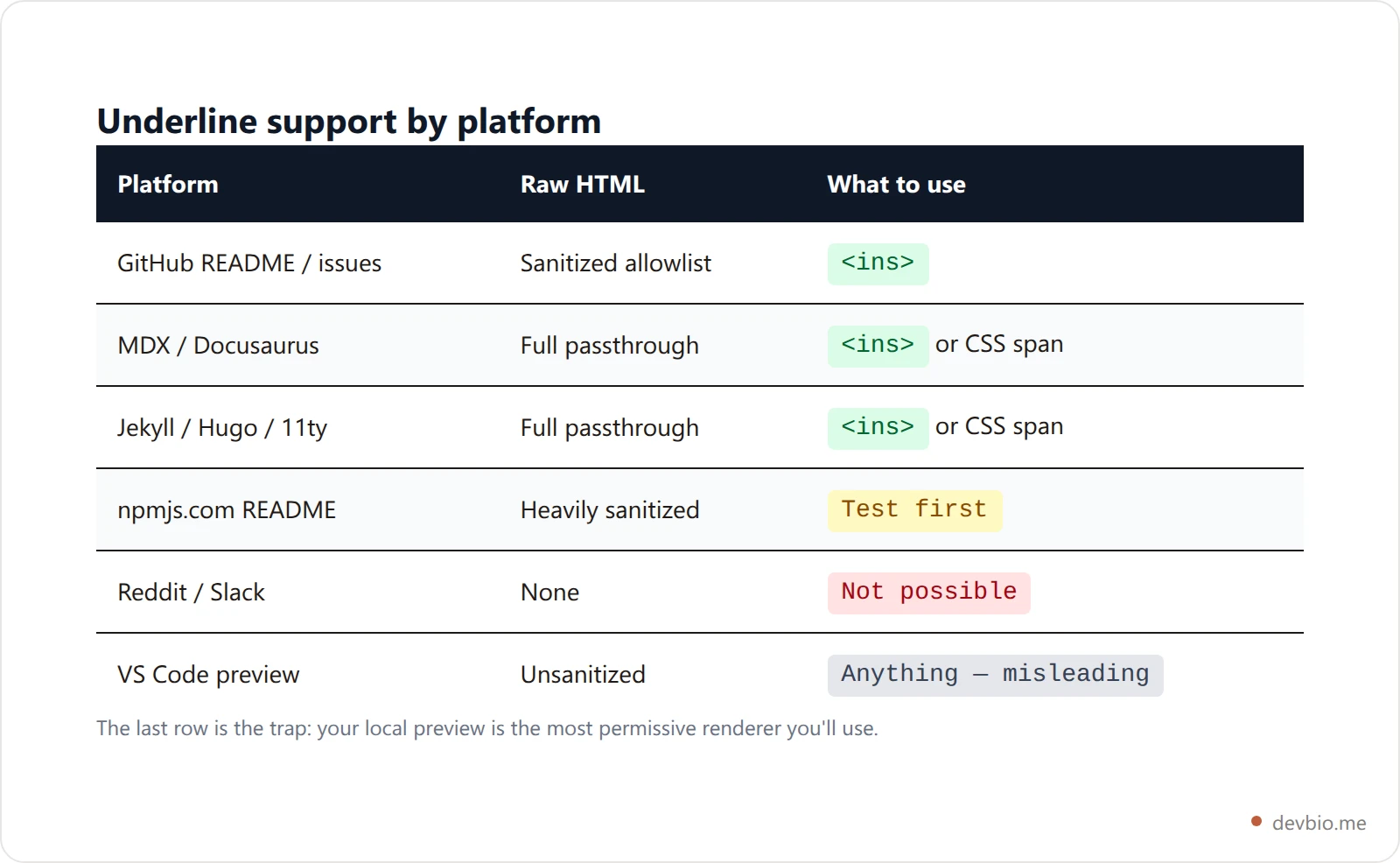
The pattern is consistent. Anywhere content is user-generated and public — GitHub, npm, package registries — HTML is sanitized, and the allowlist decides. Anywhere you control the build — your own site, your docs — HTML passes through untouched and you can do whatever you want. It's the same split that decides what a profile page can show: a README is somebody else's sandbox, while your own dev bio isn't.
The three workarounds, ranked#

1. The <ins> tag — use this on GitHub and anywhere sanitized. It's on the allowlist, it means something, and it needs no styling.
Deploys now run on <ins>every merge to main</ins>, not nightly.2. A styled <span> — use this where you control the CSS. MDN's recommendation for genuinely non-semantic underlining. It won't survive GitHub's sanitizer, which strips style attributes, so keep it to your own site.
<span style="text-decoration: underline">Underlined on your own site only.</span>3. A CSS class — use this in a real docs site. Cleanest option when you have a stylesheet, and the only one that lets you use text-decoration-style: dotted or a custom underline offset.
.u { text-decoration: underline; text-underline-offset: 0.15em; }What isn't a workaround: heading underlines. Setext-style headings look like underlining but produce an <h1> or <h2>, not underlined text.
This is a heading, not underlined text
======================================
Should you underline at all?#
Usually not. On the web an underline already signals a hyperlink, so underlined text that isn't clickable reads as a broken link. Reserve it for cases where the underline carries real meaning — an insertion, a diff, a changelog entry — and reach for bold, a highlight, or an actual link for everything else.
This is where most guides stop being useful, because that honest answer disappoints anyone who came looking for a syntax.
MDN's documentation for the u element carries an explicit warning: "Avoid using the <u> element with its default styling (of underlined text) in such a way as to be confused with a hyperlink, which is also underlined by default." It goes further: "You should not use <u> to underline text for presentation purposes."
In a README, that risk is at its worst. Readers scan a project page looking for links: install commands, docs, the demo. Underlined text that isn't clickable costs them a click attempt and a small hit to your credibility. Nobody files an issue about it; they just trust the page a little less.
MDN's suggested alternatives map cleanly onto what READMEs actually need:
You want to signal | Use this | Renders as |
|---|---|---|
Strong importance |
| bold |
Stress emphasis |
| italic |
A key term to find later |
| highlighted |
Something added since last version |
| underlined |
Something removed |
| struck through |
A keyboard key |
| key cap |
Every tag in that table is on GitHub's allowlist. The habit generalizes: markup that says what something is survives machines that markup describing how it looks never does, which is the whole argument behind a machine-readable developer profile. If you're building out a profile README, the same reasoning applies to tech stack badges and every other bit of formatting: pick the element that carries the meaning, not the one that looks the way you pictured.
Building a README that gets read?
Formatting is the easy part. The hard part is proving the work is real — live star counts, live revenue, shipped projects that update themselves.
See what a live dev bio looks likeA worked example: changelogs in a README#
The one case where underline genuinely earns its place is marking what changed — which is precisely what <ins> is for.
## What's new in v2.1

- <ins>Added</ins> Postgres 16 support
- <del>Removed</del> the deprecated `--legacy` flag
- Config now lives in `config/app.toml` <ins>(was `app.config.js`)</ins>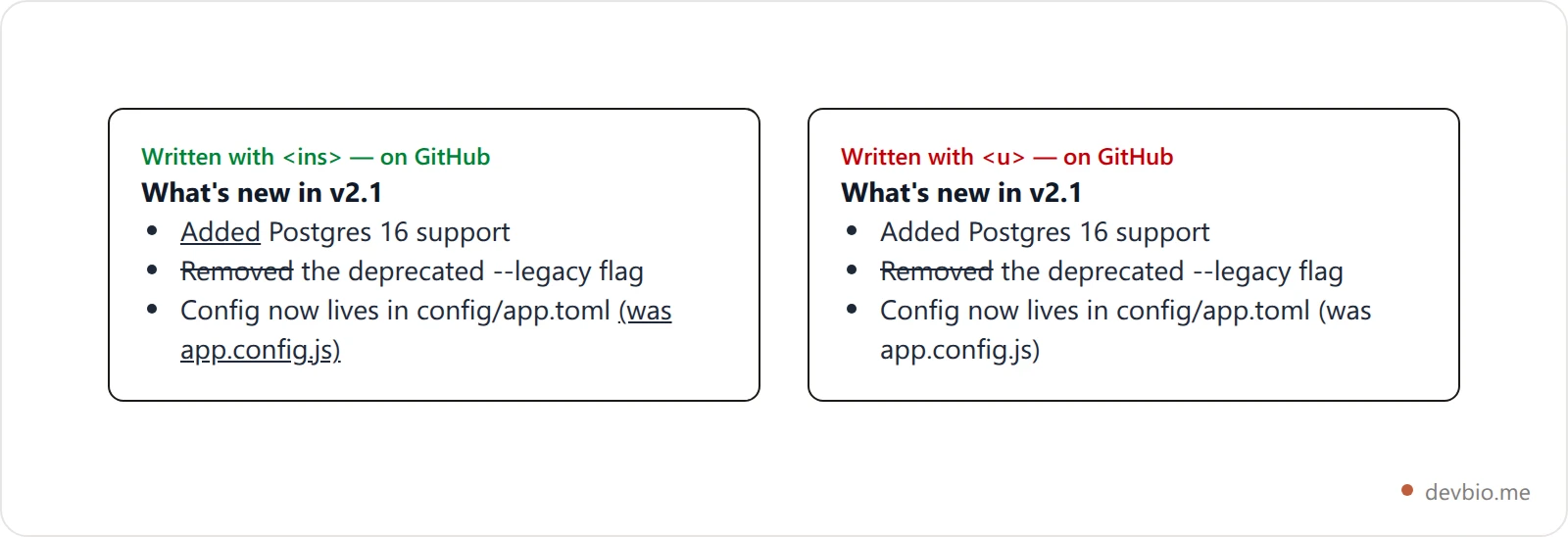
That renders with real underlines and strikethroughs on GitHub, and it tells a screen reader something true about the content. Compare it to the same block written with <u>: half of it silently flattens to plain text and the diff becomes unreadable.
If you're keeping a section like this current by hand, that's the same maintenance problem profile READMEs have in general — static text describing work that keeps moving. A README generator handles the scaffolding, and pulling numbers from live sources handles the drift.
Testing before you push#
Local previews lie, so verify on the platform:

Draft in an issue comment. Open a new issue on any repo you own, paste the block, hit Preview, and don't submit. It's the same renderer and sanitizer your README will hit.
Check a Gist. Gists render with the same pipeline — useful for testing a whole README. See our guide to GitHub Gists for what else they're good for.
Look for silent stripping. A tag that fails doesn't error; the text just shows up unstyled. If your underline vanished, the tag wasn't on the allowlist.
Use ins, test on GitHub, and underline less#
Markdown has no underline syntax — CommonMark and GFM both leave it out on purpose.
Every underline in a Markdown document comes from raw HTML the renderer allowed through.
On GitHub, use the
<ins>tag.<u>isn't on GitHub's sanitization allowlist (v2.14.3 or v3.2.4);<ins>is, and it's semantically correct.In our 4-renderer test,
<ins>was the only underline that survived every pipeline that accepts HTML.Local previews don't sanitize, so they'll show you underlines that won't survive a push.
Most of the time you want bold (
**text**),<mark>, or a real link — underlined text that isn't clickable reads as a broken link.
Frequently Asked Questions#
Why doesn't __text__ underline in Markdown?#
Because CommonMark assigns double underscores to strong emphasis, which renders as bold. Single underscores give you italics. Neither produces an underline, and no combination of underscores will — the spec has no underline rule at all, so the parser has nothing to match.
Does <u> work in a GitHub README?#
It isn't on the element allowlist that GitHub's open-source sanitization filter ships, so you shouldn't rely on it — the text renders unstyled when it's stripped. Use <ins> instead, which is explicitly on the allowlist and means "inserted text," so browsers underline it by default.
What's the difference between <u> and <ins>?#
<u> is purely presentational — it draws a line and means nothing. <ins> marks text as inserted relative to a previous version, and browsers underline it as a side effect. Screen readers can announce the insertion, and GitHub's sanitizer keeps it. Semantics plus survivability.
Can I underline text in Reddit or Slack comments?#
No. Neither renders raw HTML in user content, and neither Markdown flavor defines an underline. Use bold for emphasis. Chat apps that do offer underline expose it through a keyboard shortcut or their own flavor rather than through standard Markdown syntax.
How do I underline text on my own Markdown-powered site?#
If you control the build — Hugo, Jekyll, Docusaurus, MDX — raw HTML passes straight through, so a <span> with text-decoration: underline or a CSS class both work. A class is better: it keeps styling in your stylesheet and lets you adjust text-underline-offset for readability.
Is underlining bad for accessibility?#
Not inherently, but underlined non-links are a known usability problem — MDN warns against styling that can be confused with a hyperlink. If the underline carries meaning, use the element that expresses it: <ins> for insertions, <mark> for highlights, <strong> for importance. If it's purely decorative, reconsider.
Formatting is the cheap part of a good developer page. The expensive part is keeping it true — and that's the part a live bio solves that no Markdown tag can.


