Most developers spend three weekends building a personal site, ship it, and never touch it again. Two years later the copy is stale, the lockfile has a dozen advisories, and the projects section still lists a bootcamp to-do app.
A developer personal website is any page you control that proves what you build. The quickest setups go live in about ten minutes on a hosted profile. The most flexible take a weekend of Astro or Next.js. The right pick comes down to one question: do you want to maintain code, or maintain content?
This guide ranks seven real setups on launch time, cost, custom-domain support, and the number nobody plans for — how much upkeep each one demands a year later.
The 7 setups at a glance#
# | Setup | Time to launch | Cost per year | Custom domain | Upkeep |
|---|---|---|---|---|---|
1 | Hosted developer bio page | ~10 min | $0 free, $12 paid tier | Paid tier | None |
2 | GitHub Pages + static site generator | 2–4 hrs | $0 + domain | Free | Low–medium |
3 | Astro or Next.js on Vercel | 1–2 days | $0 hobby + domain | Free | Medium–high |
4 | One-page builder (Carrd) | ~30 min | Free to low annual | Paid tiers | Very low |
5 | Blog-first platform | ~1 hr | $0 | Usually yes | Low |
6 | Link-in-bio page | ~5 min | Free to paid | Paid | None |
7 | GitHub profile README | ~20 min | $0 | No | Low |
Two columns matter more than the rest. Time to launch decides whether the site exists at all — an unbuilt site converts nobody. Upkeep decides whether it still tells the truth in eighteen months.

1. Hosted developer bio page — about 10 minutes#
A hosted bio page gives you one URL that pulls live data instead of hand-written claims. You sign in with GitHub, pick which components appear, and the page is public immediately at a path like devbio.me/yourname.
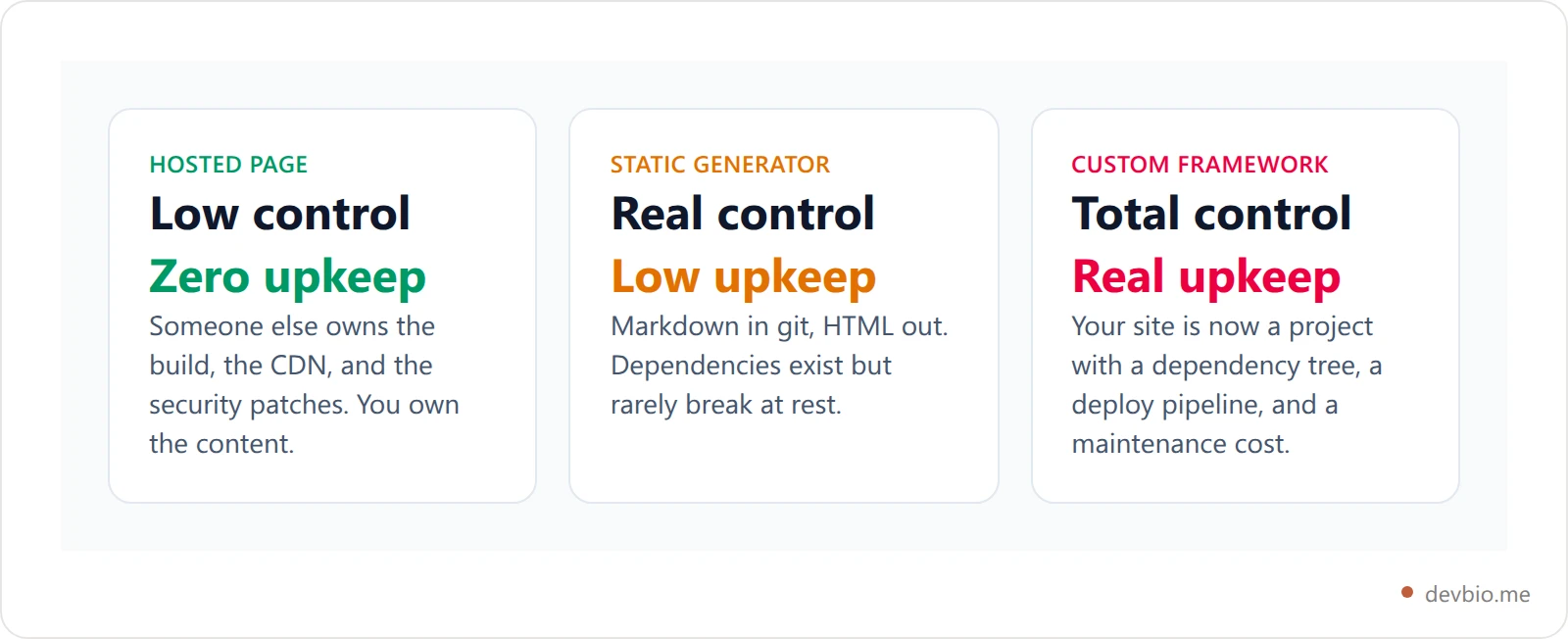
The trade you are making is explicit: you give up layout control and get zero maintenance. Nothing to deploy, no dependency upgrades, no build that breaks when Node ships a major version.
On DevBio the free tier covers the public bio at devbio.me/{you}, every bio component, GitHub public-repo metadata, a LaTeX-generated PDF resume, a marketplace listing, and a custom theme with dark mode. The Pro tier — $2/month or $12/year at the time of writing, with a 7-day trial — adds a custom domain, removes the "Powered by devbio" mark, unlocks full analytics with 30-day history, pulls private-repo stats and the contribution heatmap, and syncs revenue hourly instead of every six hours.
That last detail is the honest dividing line for hosted pages generally: the custom domain almost always sits behind the paid tier. If an apex domain is non-negotiable and you refuse to pay anything, skip to setup 2.
Best for: developers who want proof online this week, and who would rather ship side projects than maintain a website.
2. GitHub Pages + a static site generator — an afternoon#
GitHub Pages serves a static site straight from a repository at <owner>.github.io, and it takes a custom domain for free — no paid tier, no upsell. Point a CNAME at it, enable enforced HTTPS, done.
Pair it with a generator you already understand: Jekyll (built in, no Actions workflow needed), Hugo (fast builds), or Astro if you want components without shipping a framework to the browser.
Know the documented limits before you commit. Per GitHub's usage limits, a published Pages site may be no larger than 1 GB, bandwidth carries a soft limit of 100 GB per month, and builds are soft-limited to 10 per hour — though that build cap does not apply when you publish with a custom GitHub Actions workflow. For a personal site those ceilings are generous. They only bite if you start hosting video.
Best for: developers who want their site in git, want a free custom domain, and are fine writing posts in Markdown.
3. Astro or Next.js on Vercel — a weekend#
If the site is the portfolio piece — you are a front-end engineer and the craft of the page is the argument — build it yourself. Vercel and Cloudflare Pages both offer free hobby tiers with git-push deploys, preview URLs per branch, and free custom domains with managed certificates.
Be honest about the cost curve. A hand-built site is a project you now own forever: framework majors, a package manager that changes its lockfile format, an image-optimization API that gets deprecated. Budget an afternoon a year, minimum, or accept that it will quietly rot.
There is also a subtler failure. A bespoke site is where developers put the design effort and skip the proof — beautiful animations, and a projects grid that hasn't changed since launch. If you go this route, wire it to real data: pull repos from the GitHub API at build time so the page updates itself.
Our breakdown of developer portfolio examples covers which layout patterns actually convert once you have the build in place.
4–5. No-code routes: one-page builders and blog-first platforms#
One-page builders. Carrd is the reference point: a visual editor, a single scrolling page, and templates that look far better than what most of us produce by hand at 1 a.m. Free to start; custom domains and forms sit on the paid annual plans. We broke the tiers down in Carrd pricing in 2026. It is the strongest option for backend and systems developers who want a designed page without pretending to be a designer.
Blog-first platforms. If your case is writing — deep-dives, incident write-ups, library docs — start from a publishing platform rather than a homepage. Hashnode, Bear Blog, and Mataroa all map a custom domain onto a writing surface with almost no configuration. Your "personal website" becomes the archive, and the about page is a footnote.
The failure mode here is the empty blog. Three posts in year one beats a beautifully themed site with a single "Hello world" from 2024.
One URL that stays true without a deploy
A hosted bio page pulls repos, stack, and revenue live — so the page is accurate on a week you never open the editor.
See real developer pages6–7. The two setups that aren't really websites#
Link-in-bio pages. A Linktree-style page is a list of links with your face on it. It is genuinely useful in a social profile field and genuinely bad as a homepage: no depth, no proof, and on most services a paid tier before you can attach your own domain. Our rundown of the best link in bio for developers covers when this is the right tool — mostly, when the audience is already mid-scroll.
Your GitHub profile README. The special username/username repo renders Markdown at the top of your GitHub profile. It reaches exactly the audience that matters when a reviewer clicks through from a pull request, and it costs nothing but twenty minutes. But it is not a website: no custom domain, no analytics, no control over the chrome around it, and it only exists where GitHub exists. Treat it as a companion — see what to include in a GitHub profile README — and not as the destination you put on a resume.
If you are still deciding whether you need a homepage at all, developer portfolio vs personal site vs link in bio works through the distinction properly.
Developer website hosting: what each option actually costs#
Developer website hosting is close to free at personal scale, so the real spend is a domain plus your own hours. A .com runs roughly $10–15 a year at cost-price registrars; .dev and .io run higher. The variable that moves the total is time.

The hosted tier looks most expensive in dollars and is by far the cheapest in hours. The custom build inverts it. Neither is wrong — pick the currency you have more of.
Whichever you choose, buy the domain. A domain you own is the one piece that survives every migration: platforms get acquired, free tiers get cut, and a CNAME change moves your identity in ten minutes. Our custom domain developer bio walkthrough covers the DNS records end to end.
How to pick in 60 seconds#
Need a page live this week? Take the hosted bio page. Is the site itself your portfolio piece? Build it in Astro or Next.js. Do you write regularly? Start from a blog platform. Comfortable in Markdown and git? Use GitHub Pages. Otherwise, use a one-page builder.
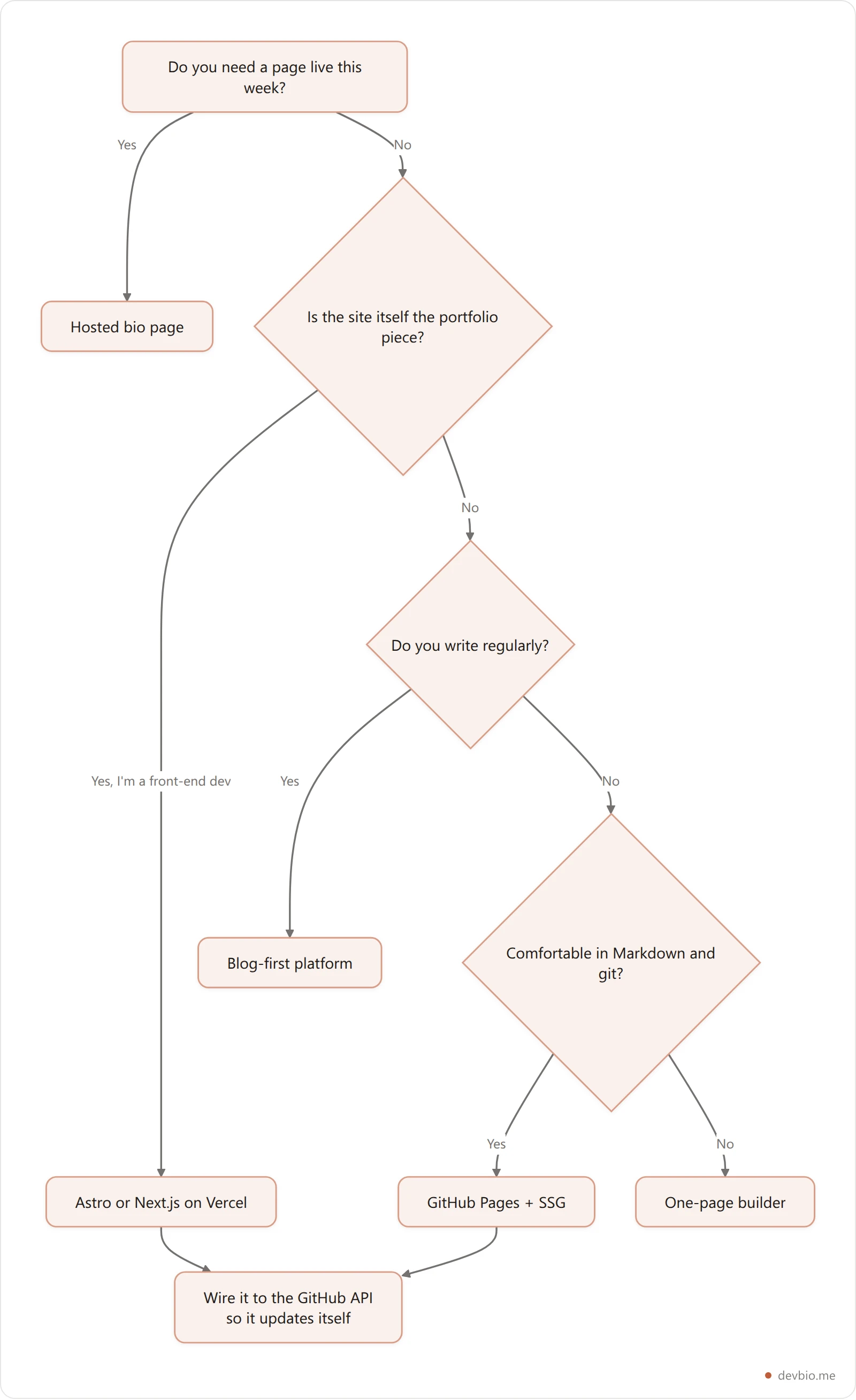
Three rules that hold across every branch:
Ship the smallest version first. A live page you improve beats a perfect one in a branch. You can always graft a custom build onto the same domain later.
Put proof above the fold. Shipped things, live numbers, real repos — not a skills bar chart claiming 85% CSS.
Pick the setup whose upkeep you will actually do. The best developer personal website is the one that is still accurate the day someone reads it.
For the content side — what belongs on the page once you have picked the stack — the developer portfolio guide covers what to build and what to skip.
Key takeaways#
Launch beats polish. A hosted bio page live in ten minutes outperforms a custom build you never finish.
Upkeep is the hidden price. Hosted pages cost dollars; custom builds cost hours, and hours are what you run out of first.
Own the domain regardless. It is the only asset that survives a platform shutting down or a free tier disappearing.
Wire the page to live data. Repos, stack, and revenue pulled from an API stay accurate on the weeks you never open the editor.
Companion, not replacement. A GitHub profile README and a link-in-bio page sit alongside a personal website; neither replaces one.
Frequently Asked Questions#
Do developers still need a personal website in 2026?#
Yes, but not as a brochure. The value is owning a URL that outlives any platform and can show live proof — repos, revenue, writing — in one place. If your only presence is a profile on a service someone else controls, you inherit every decision that service makes about your visibility.
Should my personal website and my portfolio be separate?#
Usually not. For most developers one page does both: a short intro, live project proof, and a way to contact you. Splitting them only makes sense when you publish enough writing that a blog deserves its own information architecture.
Is GitHub Pages good enough for a personal website?#
For a personal site, yes. It serves static files with a free custom domain and HTTPS, and its documented limits — 1 GB site size, 100 GB monthly soft bandwidth, 10 builds an hour — sit far above personal-site traffic. It is not the right host for anything needing a server runtime or a database.
What should a developer personal website include?#
At minimum: who you are in one line, what you have shipped with links that work, your current stack, and a contact path. Everything else is optional. Recruiters and collaborators scan for evidence first and read the prose second.
How long should this actually take?#
Ten minutes on a hosted page, an afternoon on GitHub Pages, a weekend on a custom build. If you have been "about to build my site" for six months, that is a strong signal to take the ten-minute option now and upgrade later — the domain carries over.
Does a personal website help with recruiter search?#
Indirectly. A personal site rarely ranks for your name on its own at first, but it gives recruiters something to land on from LinkedIn, GitHub, and conference bios — and it is the one link you can put in a resume that will not 404 when you change jobs.