

You ship the project, paste the link in Slack, and get a gray rectangle with a bare URL in it. No title. No image. Nothing that says what you built. The page works perfectly — it just looks abandoned everywhere a link gets shared.
A meta tag generator fixes that by turning a short form into the block of HTML that belongs in your page's <head>. You fill in a title, description, URL and image; it returns the title, description, robots, canonical, Open Graph and Twitter Card tags, correctly formatted and ready to paste. No hand-typing attribute names.
That's the whole job. What most generators don't tell you is which of those tags actually change anything, which ones every platform quietly ignores, and why a card can still render blank after you've pasted all of them. This post covers all three, using the free meta tag generator on devbio as the reference implementation.
On this page
What a meta tag generator does (and doesn't) do#
A generator is a formatter, not an oracle. It can't know your page's subject, and it can't check whether the image URL you typed resolves. It does three useful things: it remembers every tag name so you don't, it applies the right syntax to each one, and it escapes your text so a stray quote or ampersand in your title doesn't break the attribute it lives in.
That last one matters more than it sounds. A title like Ship & Sync — "the fast way" pasted raw into an attribute produces malformed HTML that unfurlers give up on. devbio's generator runs every value you type through HTML escaping before it lands in the output, so the apostrophes and ampersands in real product names survive the trip.
What it can't do is validate. The generator will happily emit an og:image pointing at a URL that 404s, because it never fetches anything — the whole tool is client-side compute with no API calls, so nothing you type leaves your browser. Verification is a separate step, and it's the one people skip.
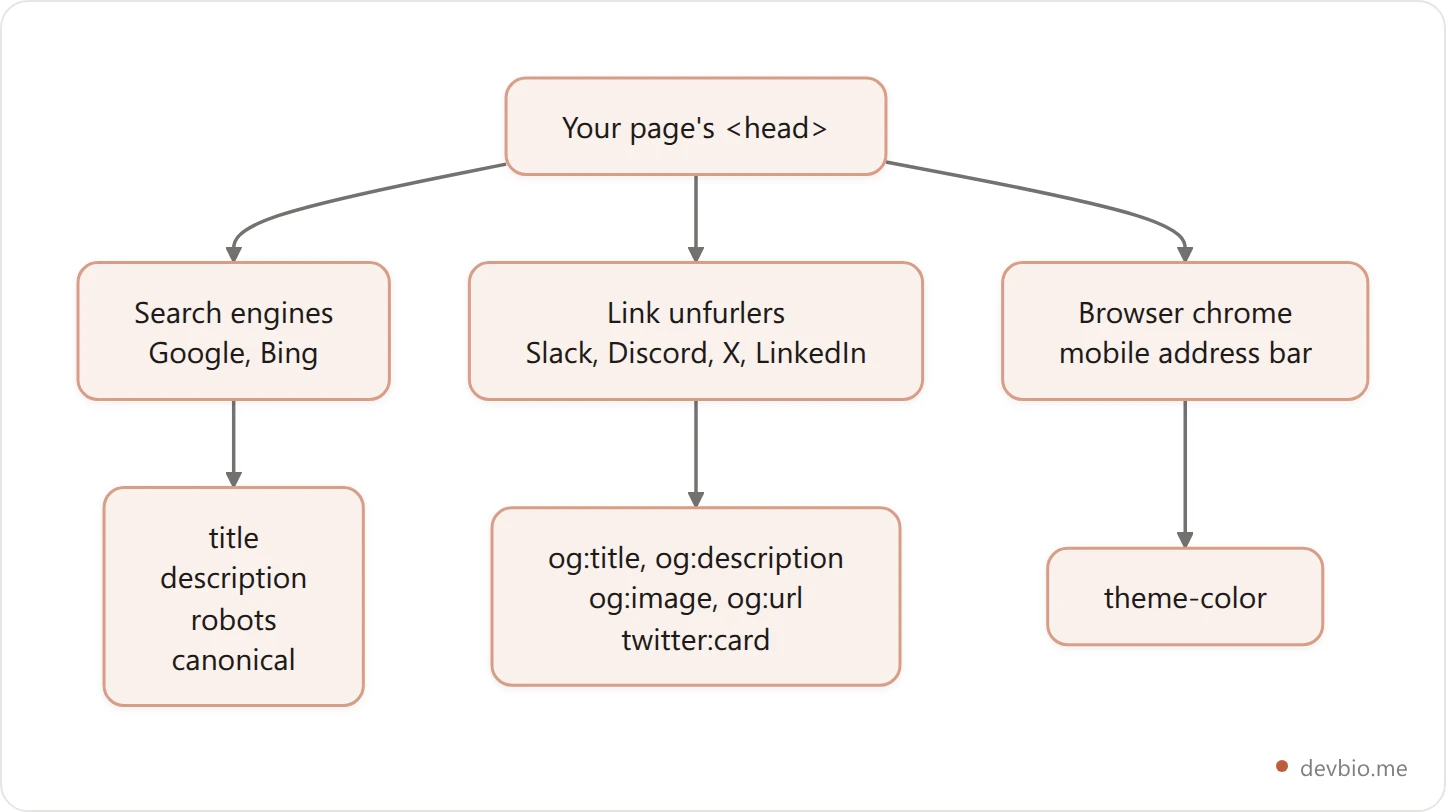
Three separate audiences read three separate subsets. Nothing in the visible page changes when you add any of them.
The tags that actually change something#
Strip away the dozens of legacy tags people still copy around and you're left with a short list. Here is what devbio's generator emits, and what each one is for.
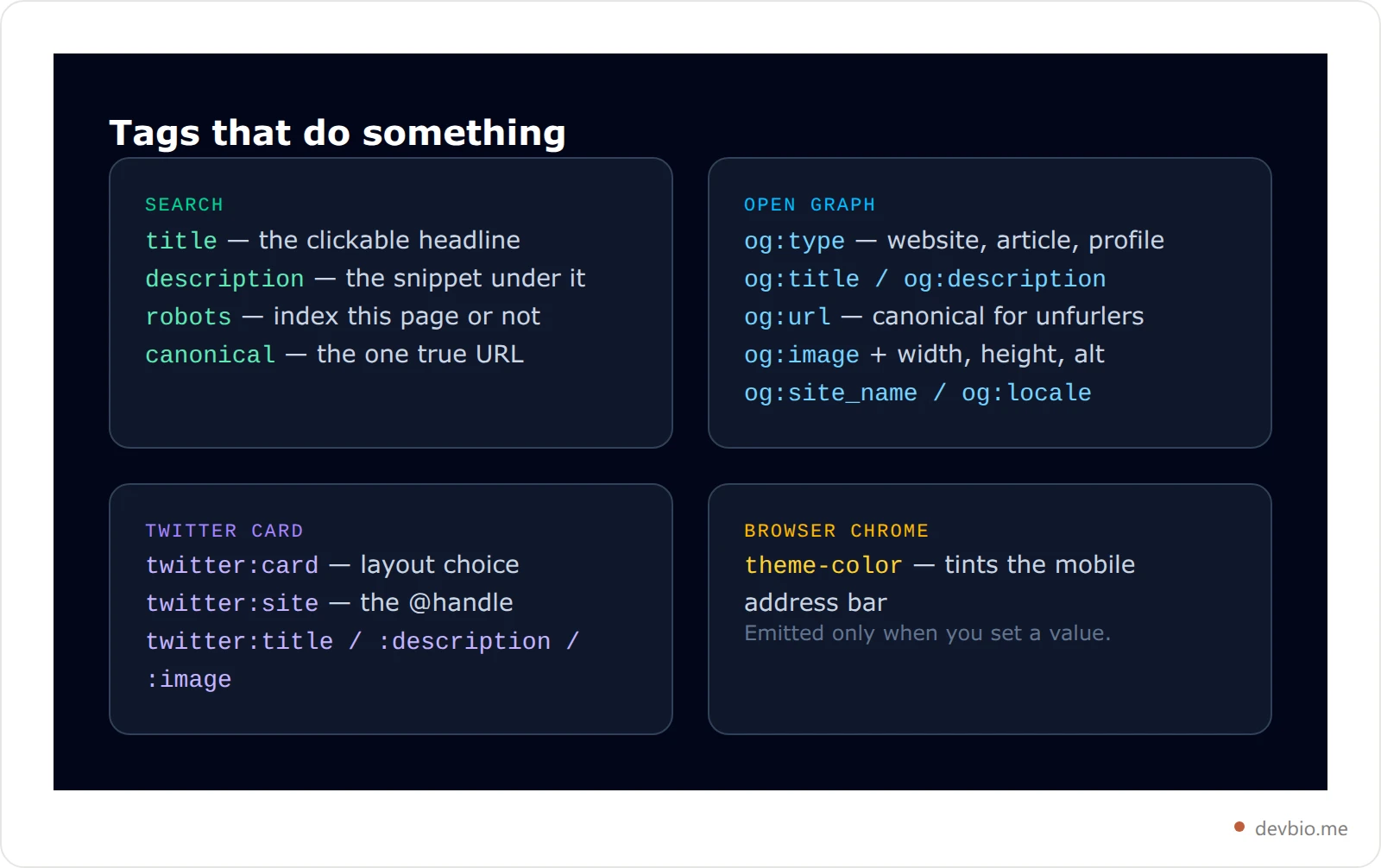
Notice what's missing. There's no meta keywords tag, because Google stopped using it in 2009 and nothing has picked it back up. There's no meta author, no revisit-after, no distribution — those are cargo cult, carried forward from templates written two decades ago. A generator that still emits them is padding its output.
Fed its own page details, here's the complete block the generator produces — every URL in it is live, so you can fetch them and compare:
<title>Meta tag generator — Open Graph, Twitter Card, canonical · devbio</title>
<meta name="description" content="Fill a form, get copy-paste HTML for every tag that matters, with a live search-result and social-card preview." />
<meta name="robots" content="index, follow" />
<link rel="canonical" href="https://devbio.me/tools/meta-tags" />

<!-- Open Graph -->
<meta property="og:type" content="website" />
<meta property="og:title" content="Meta tag generator · devbio" />
<meta property="og:description" content="Generate every meta tag your page needs — Open Graph, Twitter Card, canonical — with a live preview. Free, no signup." />
<meta property="og:url" content="https://devbio.me/tools/meta-tags" />
<meta property="og:site_name" content="devbio" />
<meta property="og:locale" content="en_US" />
<meta property="og:image" content="https://devbio.me/opengraph-image" />
<meta property="og:image:width" content="1200" />
<meta property="og:image:height" content="630" />

<!-- Twitter -->
<meta name="twitter:card" content="summary_large_image" />
<meta name="twitter:title" content="Meta tag generator · devbio" />
<meta name="twitter:description" content="Generate every meta tag your page needs — Open Graph, Twitter Card, canonical — with a live preview. Free, no signup." />
<meta name="twitter:image" content="https://devbio.me/opengraph-image" />
Seventeen lines. That's the entire surface area, and roughly half of it is the same three strings repeated for different consumers.
Title and description: where 60 and 160 come from#
Every generator warns you at 60 characters for the title and 160 for the description. Neither is a technical limit. Nothing truncates your string, no parser rejects it, and Google's own documentation describes no fixed maximum.
They're the point where a typical desktop search result runs out of pixel width and cuts your sentence with an ellipsis. Because the real constraint is width in pixels rather than count in characters, a title full of capital W's clips earlier than one full of lowercase i's. The character count is a proxy, and a rough one.
devbio's generator treats them that way. It shows a live counter and turns it amber past the threshold, but it never trims your text — going over is a judgment call, not an error, and a 64-character title whose first 50 characters carry the meaning is fine.
Which points at the habit that actually matters: front-load. Search may rewrite your title, truncate it, or swap in your H1, but whatever survives comes from the start of the string. Put the distinctive part first and the brand name last. "Meta tag generator — Open Graph, Twitter Card, canonical · devbio" survives a trim. "devbio | The best developer tools for modern teams building at scale" does not.
The same logic applies to the description: write something the title didn't already say. A description that repeats the title verbatim wastes the second line of your search result, which is the only free advertising copy you get.
Open Graph vs Twitter Card: who reads what#
This is where most of the confusion lives, and the answer is simpler than the tag count suggests.
Open Graph meta tags are the standard. Facebook invented them, but Slack, Discord, LinkedIn, iMessage, WhatsApp and X all read them. If you only had time to ship one set, ship this one.
Twitter Card meta tags are an override, not a requirement. X falls back to Open Graph for the title, description and image when the twitter:* equivalents are absent. The one tag that has no Open Graph equivalent — and therefore genuinely earns its place — is twitter:card, which chooses between a small thumbnail and a full-width image.
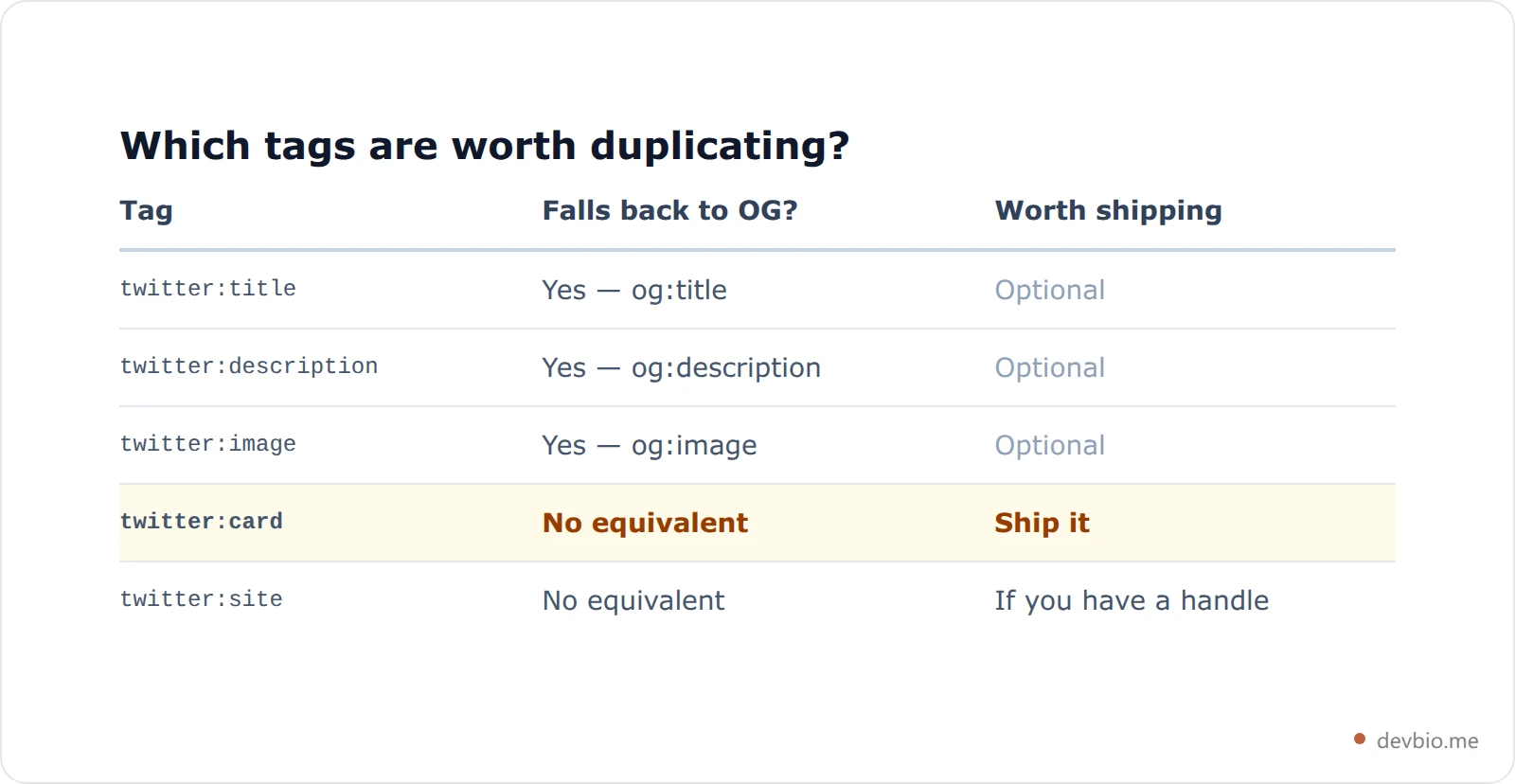
There's a detail in devbio's generator worth copying into whatever you build. When you pick "Large image" but leave the image URL empty, the output silently emits summary instead of summary_large_image. That's deliberate: a large-image card with no image renders as an empty box with a hairline border, which looks worse than the compact card it would otherwise have been. The generator picks the layout your inputs can actually support rather than the one you clicked.
Similarly, og:image:width and og:image:height are emitted as 1200 and 630 automatically whenever you supply an image, because unfurlers that read the dimensions can reserve the right space before the image downloads — and 1200×630 is the ratio that survives every major platform's crop. If you're generating those images rather than hand-designing them, the full OG image size spec covers what each platform does to them.
Canonical and robots: the two tags that decide indexing#
These two do the most damage when they're wrong, and they're the two generators most often leave out.
canonical names the real URL for a page that's reachable at several. Query strings, trailing slashes, www and bare domains, staging mirrors — all of them create duplicates, and Google consolidates them onto whichever URL you nominate. Get it wrong and you consolidate onto a page you didn't mean to. Leave it out and Google picks for you.
robots is the blunt one. devbio's generator always emits it explicitly — index, follow by default, or noindex, nofollow when you tick the box — rather than relying on the implicit default. Being explicit costs one line and removes an entire category of "why isn't this indexed" investigation. The robots meta tag reference lists the full set of values if you need something more surgical than the two presets.
The trap: a noindex tag shipped to production on a staging template. It's a one-word difference that removes a site from search entirely, and because nothing visibly breaks, it can sit there for months. Check it on the live URL after every deploy that touches your layout.
Want the tags without the copy-paste step? Generate the full block for your page and paste it once.
Five mistakes that break link previews#
Everything below is something a generator will let you do, because the output is syntactically valid. Only the live page reveals the problem.
Relative image paths.
og:imageneeds an absolute URL with the scheme. Unfurlers fetch it from their own servers, where/og.pngmeans nothing. This is the single most common cause of a card that works locally and fails in Slack.An image behind auth or a firewall. The unfurler is an anonymous bot. If the image sits behind a login, a signed URL, or an IP allowlist, the bot sees a 403 and the card renders blank.
Tags injected by client-side JavaScript. Most unfurlers read the raw HTML response and never execute JS. Tags added by a client-side router after hydration are invisible to them — they need to be in the server-rendered
<head>.A stale cache. Slack, X and LinkedIn cache unfurl results aggressively. After you fix a tag, the old card can persist for a day or more. Most platforms have a debugger that forces a re-fetch.
og:urldisagreeing withcanonical. When they point at different URLs, engagement gets split across both and neither accumulates the full signal. Set them to the same string.
Notice that four of the five are about the image, and none of them are things a form can catch. They only surface when something fetches your live page.
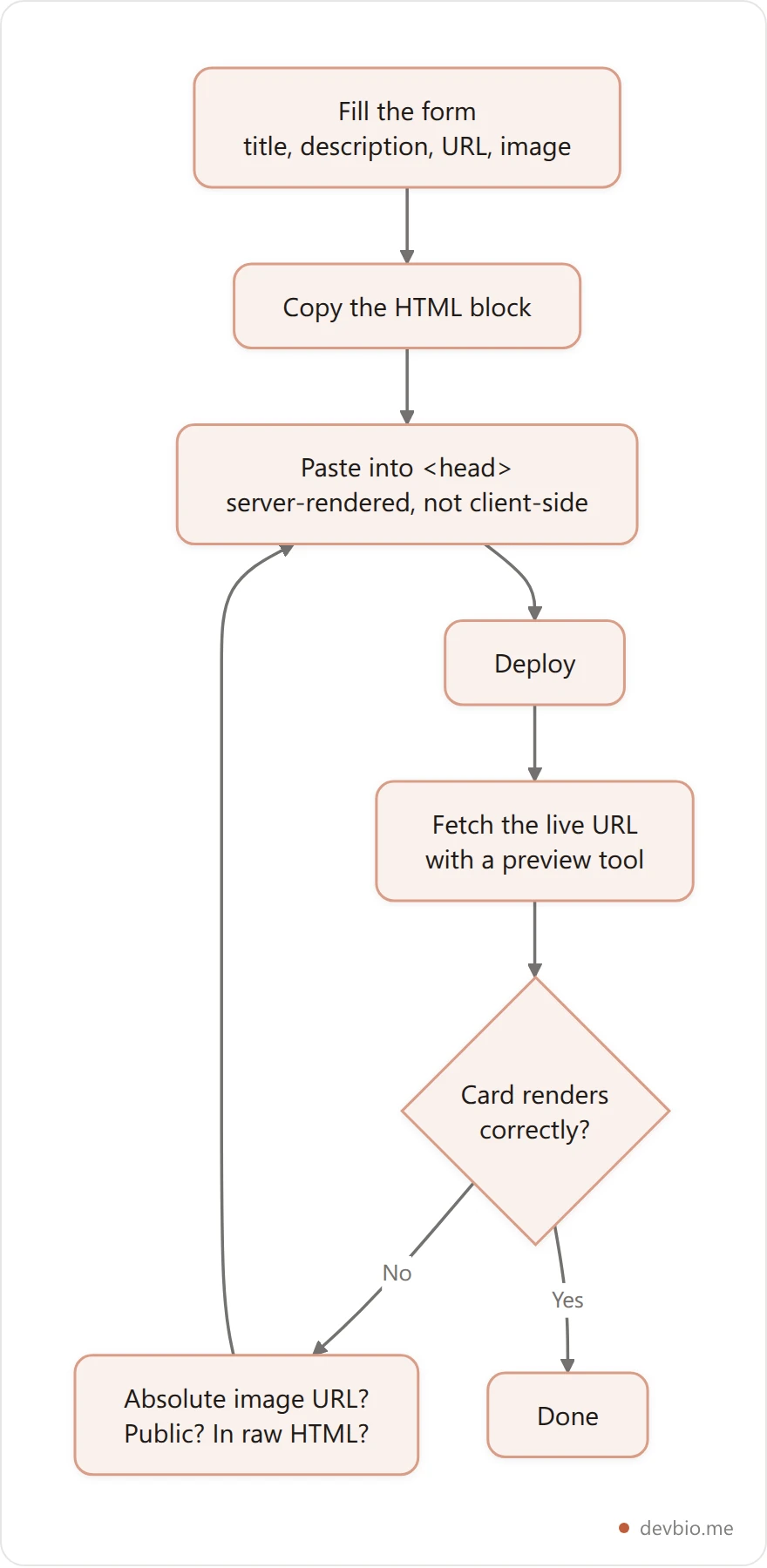
Generate the tags, then verify them on the live URL#
Authoring and validating are two different jobs, and you need both. A generator produces the block; something else has to confirm the deployed page actually serves it.
That's why devbio ships the two as separate tools that cross-link. The meta tag generator authors tags from a form. The OG preview tool takes a live URL, fetches it, and renders the card the way each platform would — so you find the relative path or the 403 before anyone else does. Generate, deploy, then check.
If you'd rather not maintain any of this by hand, that's the other option. A devbio profile page generates its own head tags from your profile data: title, description, canonical, og:type set to profile, og:url, and a twitter:card of summary_large_image, plus a per-page Open Graph image rendered from your name and tagline. There's nothing to paste and nothing to keep in sync when your tagline changes — the same reasoning behind treating your profile as machine-readable data rather than a hand-maintained HTML file.
The same applies if you point a custom domain at your bio: the canonical and og:url follow the domain automatically instead of pinning to the old one, which is the usual way a domain migration quietly halves a page's search signal.
Skip the head tag entirely
A devbio page ships correct title, description, canonical, Open Graph and Twitter Card tags — including a per-page OG image — with nothing to paste anywhere.
Claim your free pageFrequently Asked Questions#
Do meta tags still affect SEO rankings?#
The title influences ranking and is the headline in results. The description doesn't affect ranking directly, but it's the copy that decides whether anyone clicks. robots and canonical affect whether the page is eligible to rank at all. meta keywords has done nothing for over fifteen years.
Why is my Open Graph image not showing?#
In order of likelihood: the URL is relative rather than absolute, the image isn't publicly reachable, the tags are added by client-side JavaScript the unfurler never runs, or the platform cached an older version. Fetch the live URL with a preview tool to tell them apart.
Do I need Twitter Card tags if I already have Open Graph?#
Only twitter:card. X falls back to Open Graph for title, description and image, so duplicating those three changes nothing. twitter:card has no Open Graph equivalent and decides between a small thumbnail and a full-width image, so it's the one worth adding.
What size should my og:image be?#
1200×630 pixels, a 1.91:1 ratio. Every major platform either uses that ratio directly or center-crops toward it, so keeping text away from the edges is what actually protects your card across platforms.
Is 60 characters a hard limit for the title tag?#
No. Nothing truncates at 60 — that's roughly where a desktop search result runs out of pixel width. Since the real limit is width, not count, treat 60 as guidance and front-load the distinctive words so a trim costs you nothing.
Where exactly do the tags go?#
Inside <head>, in the server-rendered HTML response. Order among them doesn't matter, but they must be present before any JavaScript runs, because most unfurlers read the raw response and never execute scripts.
Key takeaways#
A meta tag generator saves you from remembering attribute names and from escaping your own strings — that's real, if modest, value. The judgment it can't supply is what to write and whether the deployed page serves what you pasted.
Ship the short list: title, description, robots, canonical, the six Open Graph tags, and twitter:card. Front-load the title. Use an absolute image URL at 1200×630. Then fetch the live page and look at the card before you announce anything.
Generate your tags now — or let your profile page handle its own head tags and never think about it again.


