

You paste your link into Slack and it renders as a bare blue URL. The og:image tag is right there in the head — you checked. The problem usually isn't the tag. It's that the image behind it is the wrong shape, too heavy, or too slow to arrive before the scraper gives up.
The short answer: ship one 1200×630 PNG or JPG, keep it under 1 MB, and point og:image at an absolute HTTPS URL. That one file renders correctly on Facebook, LinkedIn, Slack, Discord, iMessage, and WhatsApp, and X will use it for a large card as long as twitter:card says summary_large_image. GitHub repositories are the one real exception, and they want 1280×640.
Everything below is the detail behind those two sentences — including the constraint almost nobody writes down, which has nothing to do with pixels.
OG Image Size at a Glance#
If you only read one thing, read this table. These are the target dimensions and hard limits per surface as of 2026.
Surface | Target size | Ratio | Keep under | Notes |
|---|---|---|---|---|
Facebook, LinkedIn, Slack, Discord | 1200×630 | 1.91:1 | 1 MB | The universal default |
X large card | 1200×630 works; 2:1 crops cleanest | ~2:1 | 5 MB | Needs |
WhatsApp, iMessage | 1200×630 | 1.91:1 | ~300 KB | Heavy files get skipped, not resized |
GitHub repo social preview | 1280×640 | 2:1 | 1 MB | Uploaded in repo Settings, not a meta tag |
Absolute minimum anywhere | 200×200 | any | — | Below this, most platforms drop the image |
One image at 1200×630 satisfies every row except GitHub. If you maintain exactly two assets, make them 1200×630 and 1280×640 and you're done.

Why 1200×630 Became the Default#
1200×630 won because Facebook's link-share layout defined the 1.91:1 ratio, and every other platform adopted it rather than ask the web for a second file. Meta's own sharing documentation still names 1200×630 as the size for large-format link posts.
The number is deliberately generous. Most feeds render the card at roughly 500 to 600 pixels wide, so a 1200-pixel image is being downscaled about 2× — which is exactly what you want on a high-density display. Ship a 600×315 image and it hits the same ratio but looks soft on every modern phone.
Going much bigger stops helping. A 2400×1260 export is four times the bytes for a card nobody sees above 600 pixels, and it pushes you toward the file-size limits that actually cause failures.
The Safe Zone: What Survives Cropping#
Open graph image dimensions describe the file. They don't describe what people see. Each platform crops to its own container, and the edges are the first thing to go.
Treat the centre 1080×600 as the only region you can count on. Anything outside it — a logo tucked into a corner, a URL along the bottom edge, text hugging the left margin — is at the mercy of whichever surface renders the card.
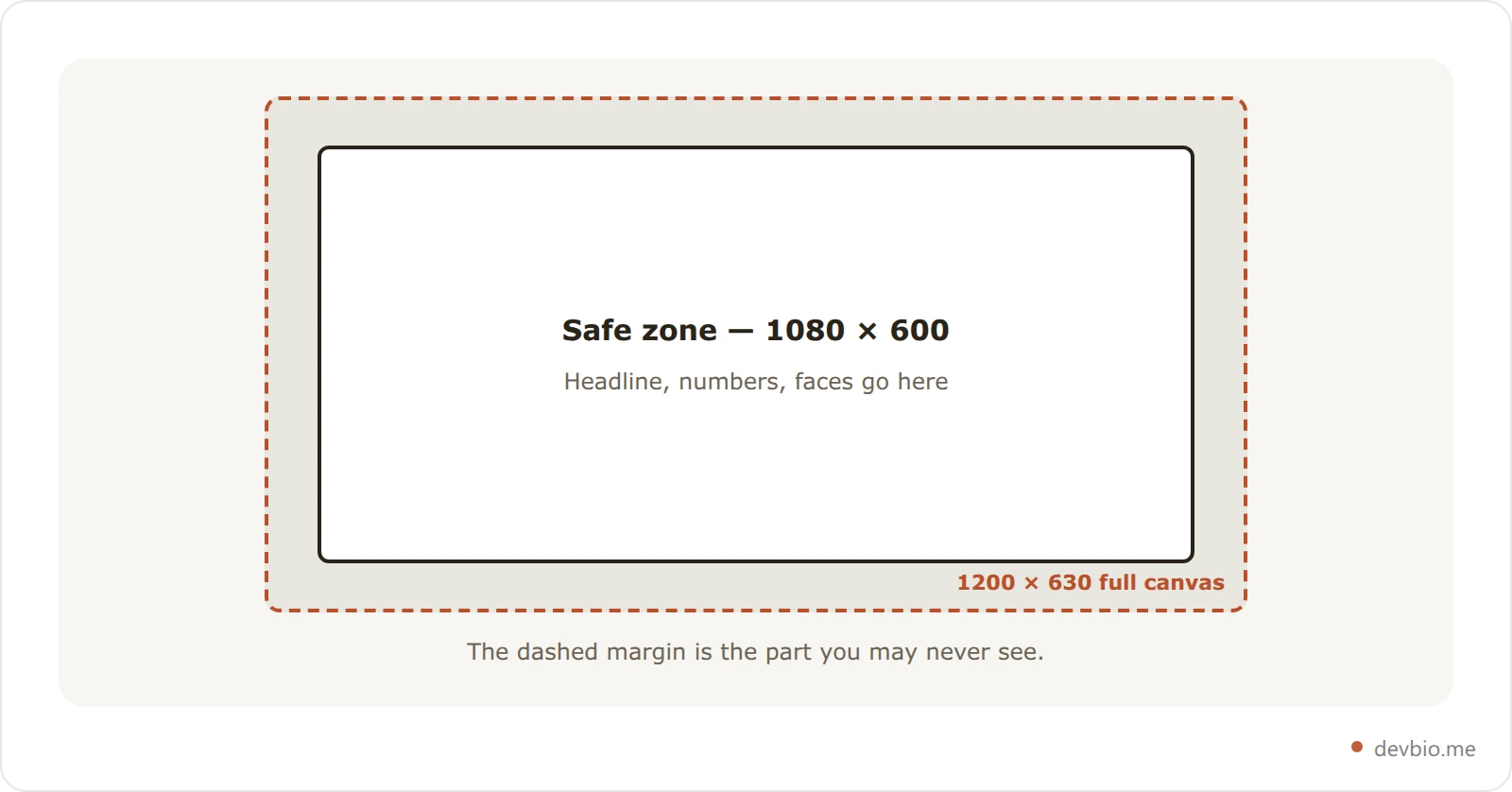
Two practical rules follow. Keep your largest text at 48 px or above in the source file, because it's about to be halved. And never put anything load-bearing in the outer 5% — that band exists to be sacrificed.
GitHub Social Preview Is Its Own Size#
The GitHub social preview is the image that appears when someone shares a link to your repository, and it doesn't come from a meta tag at all. You upload it in the repository's own settings.
GitHub's official documentation is specific about the file: a PNG, JPG, or GIF under 1 MB, at least 640×320, with 1280×640 recommended for best display. You'll find the control under Settings, in the "Social preview" block.
Two details are easy to miss. GitHub supports PNG transparency, which matters because so many chat clients render cards on a dark background — a transparent preview adapts instead of sitting on a white slab. And the image only shares from a public repository; upload one to a private repo and it won't render for anyone else.
A repo with no social preview falls back to a generic image showing the repo name and owner. That's fine for a throwaway fork, and a waste for anything you've pinned to your profile as evidence of what you build. The same gap applies one level up: your profile link needs a card too, and you can get one without designing it.
File Size and Format: The Limits That Actually Bite#
Dimensions get all the attention, but weight is what silently breaks previews.
Stay under 1 MB. It's the practical ceiling across Facebook, LinkedIn, and GitHub. X tolerates more, but nothing rewards you for using it.
Aim under 300 KB for chat apps. WhatsApp and iMessage are the least forgiving. An oversized file doesn't get resized — it gets dropped, and you see a text-only card.
PNG for flat colour and text, JPG for photographs. Most developer cards are text on a solid background, which PNG compresses far better than JPG, without the fringing artefacts around letterforms.
Skip WebP and AVIF. Support across unfurl bots is still uneven, and this is the one place on the web where a decade-old format is the safe call.
Always use an absolute HTTPS URL. A relative path like
/og.pngis silently discarded by every scraper. This is still the single most common cause of a missing preview.
The Meta Tags That Carry the Size#
The Open Graph protocol defines a small set of structured properties for images. You need two of them; the rest are situational.
<meta property="og:image" content="https://devbio.me/opengraph-image" />
<meta property="og:image:width" content="1200" />
<meta property="og:image:height" content="630" />
<meta property="og:image:type" content="image/png" />
<meta property="og:image:alt" content="Jane Kim — backend engineer, 2.4k GitHub stars" />
<meta name="twitter:card" content="summary_large_image" />
That og:image URL is a live one — open it and you'll get the actual PNG this site serves to scrapers. Declaring og:image:width and og:image:height isn't required, but it lets a platform reserve the right space before the image finishes downloading, which avoids a layout flash on progressive renderers. og:image:alt is the accessible description, and it's the one most sites forget entirely.
If you skip twitter:card, X falls back to a small square thumbnail regardless of how large your image is. That single line is the difference between a banner and a postage stamp.
If you'd rather not hand-write that block, a meta tag generator emits the whole set — including the width and height properties at 1200×630 — from a short form.
Stop hand-maintaining your card
A profile that generates its own 1200x630 card from live GitHub and revenue data never goes stale, never needs a re-export, and never drifts from the numbers on your page.
Build your profile freeThe Undocumented Constraint: Your Endpoint Has About Five Seconds#
Here's the part the size guides leave out, and it's the reason correctly-sized images still fail.
If your OG image is a static file, none of this applies. But the moment you generate it dynamically — a /api/og route, a Next.js opengraph-image.tsx, any endpoint that renders per request — you're no longer serving a file. You're racing a bot with a stopwatch.
X's unfurl bot gives up after roughly five seconds. That sounds generous until you count what a dynamic render actually does on a cold container: boot the runtime, query a database, call the GitHub API, maybe call a payments API, then rasterise the whole thing through a renderer like Satori. On a warm path that's a few hundred milliseconds. On a cold start it can blow straight past the deadline — and when it does, the bot doesn't retry politely. It caches the failure.
DevBio's own per-profile card is built around that deadline rather than hoping to beat it:
A hard upstream timeout well below the bot's. Data fetches are bounded at 2.5 seconds, so even a cold container starts rasterising in time to finish.
A two-tier cache in front of the renderer. An in-memory layer holds the most recent cards for instant hits; a filesystem layer behind it survives across requests. The first visitor pays the render cost, and every scraper after them gets a byte-for-byte hit.
Cache keys derived from a content hash. When the profile changes, the hash changes and the next render warms a fresh entry. There's no invalidation step to forget.
A CDN window that never makes a bot wait. The card is served with a one-day fresh window and a one-week stale-while-revalidate, so an expired card is still returned immediately while a new one renders in the background.
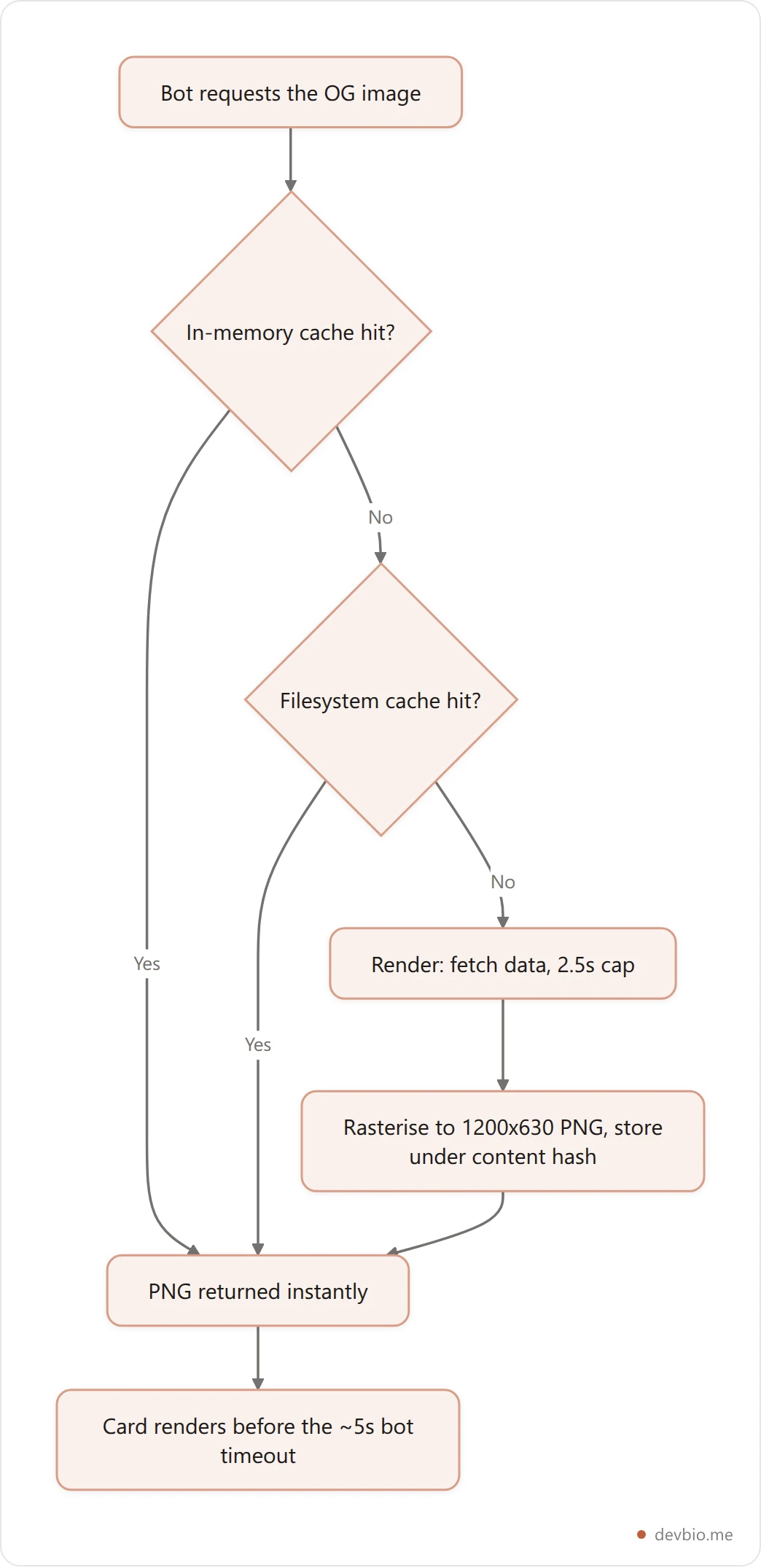
The takeaway generalises past any one stack: if your OG image is generated, cache it aggressively and bound every upstream call. A perfectly sized 1200×630 card that arrives in six seconds is, to a scraper, the same as no card at all.
Static File, Open Graph Image Generator, or Generated Endpoint#
Three routes get you a correctly sized image, and they fail in different ways.
Approach | Effort | Stays accurate | Fails when |
|---|---|---|---|
Static export from Figma or Canva | Low, but repeated | No — manual re-export | You change anything and forget |
Open graph image generator (template tools) | Low | Rarely — templates, not live data | The template drifts from reality |
Self-built | High, ongoing | Yes, if wired to real data | Cold starts miss the bot deadline |
Profile with a built-in generated card | None | Yes, refreshed daily | — |
A hosted open graph image generator is a reasonable middle ground for a one-off landing page. For anything carrying numbers — stars, commits, revenue — a static export starts lying the day after you make it, and a stale figure reads worse than a blank card.
If you'd rather not own that maintenance at all, DevBio builds the card from your live profile data — correctly sized, cached ahead of the bot, and refreshed daily.
If you're building the endpoint yourself, Next.js ImageResponse is the shortest path, with two caveats worth knowing before you start: only flexbox layouts are supported, so no CSS grid, and the whole render is bundle-capped, so keep fonts light.
How to Check Your OG Image Size Before You Share#
Check the tag and the file separately, because they fail separately: confirm og:image is in the server-rendered HTML, open the image URL to verify its real dimensions and weight, then force a re-scrape so the platform drops its cached copy. The whole pass takes about two minutes.
Confirm the tag is server-rendered. Run
curl -s https://yoursite.com | grep og:image. Most unfurl bots don't execute JavaScript, so a tag injected client-side is invisible to them even though it looks fine in DevTools.Confirm the file's real dimensions. Open the
og:imageURL directly. A tag claiming 1200×630 while the file is 800×418 is a mismatch every platform resolves differently.Check the byte size.
curl -sI <image-url> | grep -i content-lengthgives you the number that matters for WhatsApp.Force a re-scrape. Platforms cache aggressively, so a fix won't show until you push a fresh crawl through LinkedIn's Post Inspector or Facebook's Sharing Debugger.
Read every tag at once. A meta tag preview tool pulls the full
og:andtwitter:set in one pass. DevBio's runs a regex parser over the head rather than a full DOM parse — deliberately, because that's closer to what the social scrapers themselves do, so what it shows you is what they'd see.
That last distinction matters more than it sounds. A headless-browser preview tool renders your page the way a person's browser would, which can show you an image a scraper will never find.
For the wider question of what your card should actually say once it's the right size, our guide to the developer profile social preview image covers the content side — this page is the spec sheet.
One contrast worth keeping in mind: an OG image has a spec telling you exactly how big to make it, while an image inside a README has none. Markdown has no width syntax, so setting a markdown image size takes an HTML tag or a parser-specific extension.
Frequently Asked Questions#
What is the best OG image size in 2026?#
1200×630 pixels, in a 1.91:1 ratio, under 1 MB. That single file renders correctly on Facebook, LinkedIn, Slack, Discord, WhatsApp, and iMessage, and X will show it as a large card provided twitter:card is set to summary_large_image. Only GitHub repository previews want something different.
Do I need a separate image for X?#
No. X's large card crops closest to a 2:1 ratio, but a standard 1200×630 image renders fine there. The tag matters far more than the pixels: without twitter:card set to summary_large_image, X shows a small square thumbnail no matter what size you supply.
What size should a GitHub social preview be?#
1280×640 pixels for best display, per GitHub's own documentation, with 640×320 as the minimum. The file must be a PNG, JPG, or GIF under 1 MB, and you upload it under the repository's Settings rather than declaring it in a meta tag.
Why is my OG image not showing even though the size is right?#
Three usual causes. The URL is relative instead of absolute HTTPS. The platform cached an earlier failure and hasn't re-crawled. Or the image is generated on demand and your endpoint didn't respond before the bot's roughly five-second timeout — the most common cause on dynamic routes and the hardest to spot, because the URL works fine in your browser.
Does a bigger OG image look sharper?#
Only up to a point. Cards render around 500 to 600 pixels wide, so 1200 px already gives you a 2× buffer for high-density screens. Past that you're adding bytes without adding clarity, and pushing toward the file-size limits that cause chat apps to drop the image entirely.
Can I use WebP or AVIF for an OG image?#
Not reliably. Support across unfurl bots is still inconsistent in 2026, and a card that fails to render is a far worse outcome than a slightly larger PNG. Stick to PNG for text-heavy cards and JPG for photographic ones.
Key Takeaways#
Three numbers cover almost every case. 1200×630 is the universal open graph image size. 1280×640 is the GitHub repository social preview. 1 MB is the ceiling, and about 300 KB if you care about WhatsApp.
Past the numbers, two things decide whether a correctly sized card actually appears. Keep your content inside the centre 1080×600, because the edges belong to whichever platform is cropping. And if the image is generated rather than stored, treat the scraper's five-second budget as the real specification — cache the result and bound every upstream call, or you'll ship a perfect image that nobody ever sees.
That's also the argument for not maintaining this by hand. A card built from live data stays correct without a re-export, which is the same logic behind keeping the rest of your profile machine-readable rather than hand-written — and it survives a move to a custom domain without a single tag to update.
Your code already proves you can build. Put it behind a link whose preview says so — devbio.me.


