

You clone a developer portfolio template on a Saturday morning. By lunch it builds, deploys, and looks sharp. Then you open the config file and hit a wall of empty strings: tagline, about, projects: []. The template solved the layout in twenty minutes. It solved none of the writing, and the writing is the part that gets you hired.
A developer portfolio template is a pre-built site skeleton — layout, styling, and a config file — that you fill with your own content. The good ones cost nothing, ship in under an hour, and range from single-file Next.js configs to Jekyll academic starters. What separates them is stack, license, and how much of your data they can pull in automatically.
This piece compares seven free options, then covers the three things template roundups almost never mention: which of them a software developer should actually pick, which sections you have to fill in yourself, and which licenses quietly follow you home. One of the most-starred templates here still builds on Create React App, which the React team officially sunset in 2025, and the roundups still recommend it without saying so. I re-checked every template's own repo files in September 2026.
On this page: Comparison table · The 7 templates · Which fits a software developer · developerFolio setup · Sections to fill in · What survives into a resume · Licenses · Static vs live data · Pick in 60 seconds · FAQ
Developer Portfolio Template Comparison#
Template | Stack | License | Stars | Best for |
|---|---|---|---|---|
Next.js 16, React 19, Tailwind 4, shadcn/ui, Magic UI | MIT | 1.5k | Modern single-config site | |
React 16, Create React App, SCSS | GPL-3.0 | 6.6k | Auto-pulling GitHub + Medium | |
Jekyll, Ruby | MIT | 16.1k | Academics, researchers, labs | |
Hugo, Bootstrap | MIT | 1.1k | Portfolio plus a real blog | |
Bootstrap, Pug, SCSS | MIT | 2.2k | A CV-shaped one-pager | |
Plain HTML5 + CSS3 | CC Attribution | — | No build step at all | |
JSON + npm themes | MIT (per theme) | 400+ themes | Data first, design swappable |
Star counts are from August 2026. Stacks come from each repo's own package.json, checked in September 2026. Stars are a rough proxy for how many people will have seen the same design. If you want to look different, the 16k-star option is working against you.
The 7 Templates, One by One#
dillionverma/portfolio#
Described by its author as a "Minimalist developer portfolio using Next.js 14, React, TailwindCSS, Shadcn UI and Magic UI." That README line is out of date: the repo's package.json now pins Next.js 16.1.1, React 19 and Tailwind 4, so you're starting on a current stack. Its selling point is the configuration model: you edit one file, src/data/resume.tsx, and the whole site follows. No CMS, no content directory, no front matter scattered across a dozen markdown files.
That single-file design is the reason it's the fastest of the seven to personalise honestly. When every field lives in one place, you can see the gaps you haven't filled — which is exactly the problem most template users have.
developerFolio#
The most-starred pure portfolio template here at 6.6k stars, and the one with the biggest asterisk: its toolchain. The package.json still pins React 16 and react-scripts 5, which is Create React App, and the React team sunset Create React App in February 2025. It also carries a GPL-3.0 license, which matters more than the star count (see the license section below).
Technically it's the most automated option: a build-time script queries GitHub's GraphQL API for your pinned repositories and can pull your Medium posts. That automation needs a GitHub personal access token in a .env file, which means secrets management before you've written a word. The setup section below shows exactly where that token goes.
al-folio#
At 16.1k stars and 13.1k forks, this is the most-used template on the list — "A simple, clean, and responsive Jekyll starter for academic websites." It's aimed squarely at professors, researchers, and grad students: publications, lab pages, course sites.
One architectural detail worth knowing: version 1.x is a thin starter rather than a monolithic theme, with runtime features shipped as independently versioned Ruby plugin gems. You update features incrementally instead of re-forking. If you've ever abandoned a template because upgrading meant re-applying six months of your own edits, that design is the fix.
hugo-profile#
"A highly customizable and mobile first Hugo template for personal portfolio and blog." MIT, 1.1k stars, needs Hugo 0.87.0 or higher. It ships About, Education, Experience, Blog, and Gallery sections, plus light/dark/auto themes and internationalisation.
Pick this one if the blog is a real commitment rather than a placeholder link. Hugo builds are fast enough that a few hundred posts stay instant.
Start Bootstrap Resume#
"A resume and CV theme for Bootstrap... a fixed sidebar with content sections to build a simple, yet elegant resume." MIT, 2.2k stars. This is the least ambitious option and that's the point: it's a one-pager shaped like a CV, not a portfolio with case studies.
If your goal is a link you can paste into an application form, this beats a heavier template you'll never finish.
HTML5 UP#
Plain HTML5 and CSS3, no build step, no Node version to fight. The site reports over 21 million template downloads. You edit HTML directly and deploy the folder anywhere.
The catch is the license: Creative Commons Attribution, which requires you to credit the designer. That credit link is in the footer when you download it, and removing it without permission breaks the terms.
JSON Resume#
Not a template so much as a schema. You write your career once as structured JSON, then render it through any of 400+ community themes — swap ?theme=flat for ?theme=kendall in the registry URL and the same data appears in a different design.
This is the only option on the list where changing your mind about the design costs nothing. If that appeals, we've covered the format in depth in our JSON Resume guide.

Which Template Fits a Software Developer?#
If you're after a software developer portfolio template specifically, three of the seven are aimed at you and four aren't. Pick dillionverma/portfolio for a modern single-config site, hugo-profile if you'll blog, or JSON Resume if you want your data to outlive the design. Skip al-folio unless you publish papers.
That distinction matters more than it sounds. al-folio has the most stars on this list by a wide margin, which is exactly why it keeps topping search results — but it's an academic website starter. Its first-class citizens are publications, lab pages, and course listings. A software developer filling it in ends up with a bibliography-shaped site and an empty publications section.
Start Bootstrap Resume has the opposite mismatch. It's a CV one-pager, so there's nowhere to write a project up properly. Good as a link you paste into an application form, thin as an engineering portfolio where the case studies are the whole point.
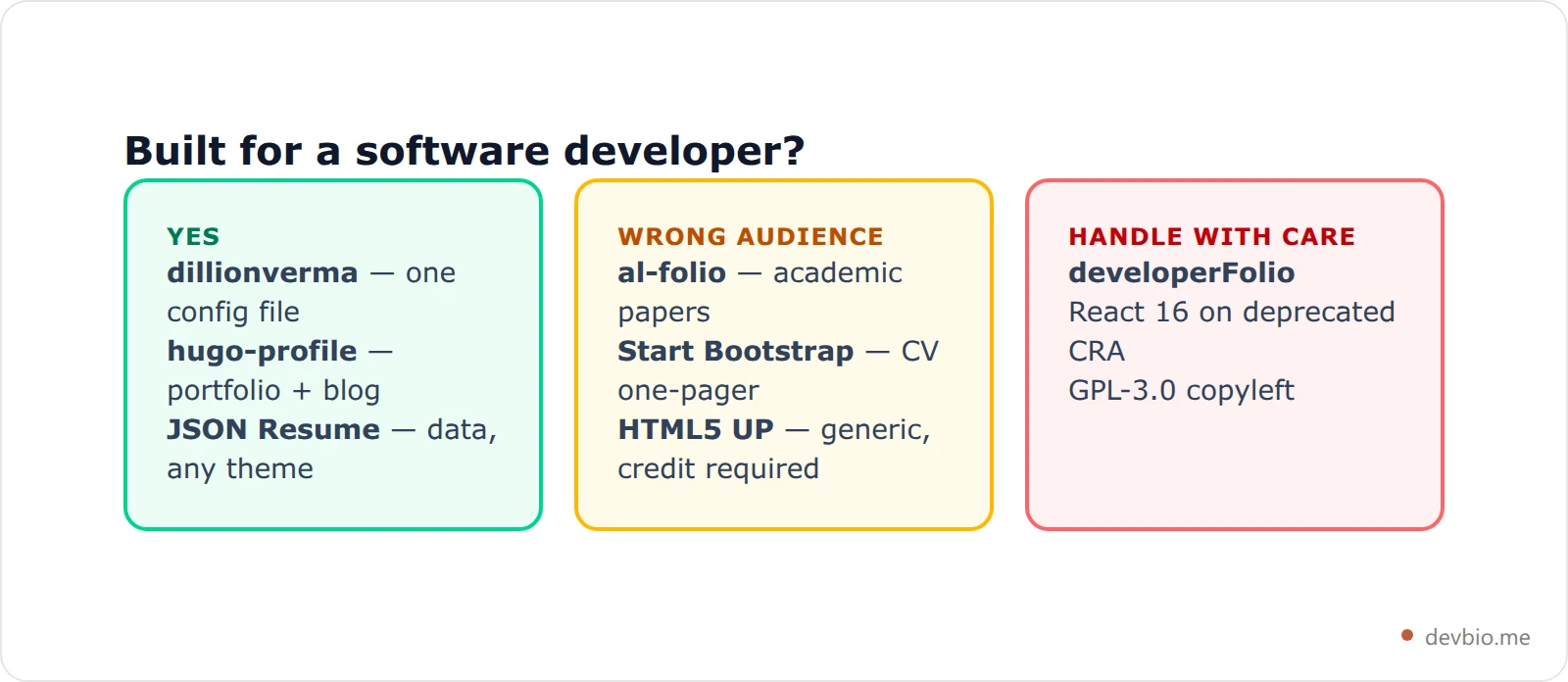
developerFolio looks like the obvious software-developer pick — it renders your pinned repos straight from the GitHub API — and it's the one to be most careful with. It runs on React 16 and Create React App, which no longer gets new features, and its GPL-3.0 license is copyleft. Clever automation on an aging dependency tree is a weekend you end up spending twice.
developerFolio Setup: What the GitHub Token Actually Does#
If you searched for developerFolio by name, here's how it works under the hood, read from its own fetch.js and package.json.
Both npm start and npm run build run node fetch.js first. That script only calls GitHub when USE_GITHUB_DATA is set to "true" in your .env. It then sends one GraphQL query to api.github.com/graphql for your name, bio, avatar, location, and up to six pinned repositories with their stars, forks, and primary language, and writes the result to public/profile.json. With MEDIUM_USERNAME set, it also pulls your Medium feed through rss2json.com into public/blogs.json.
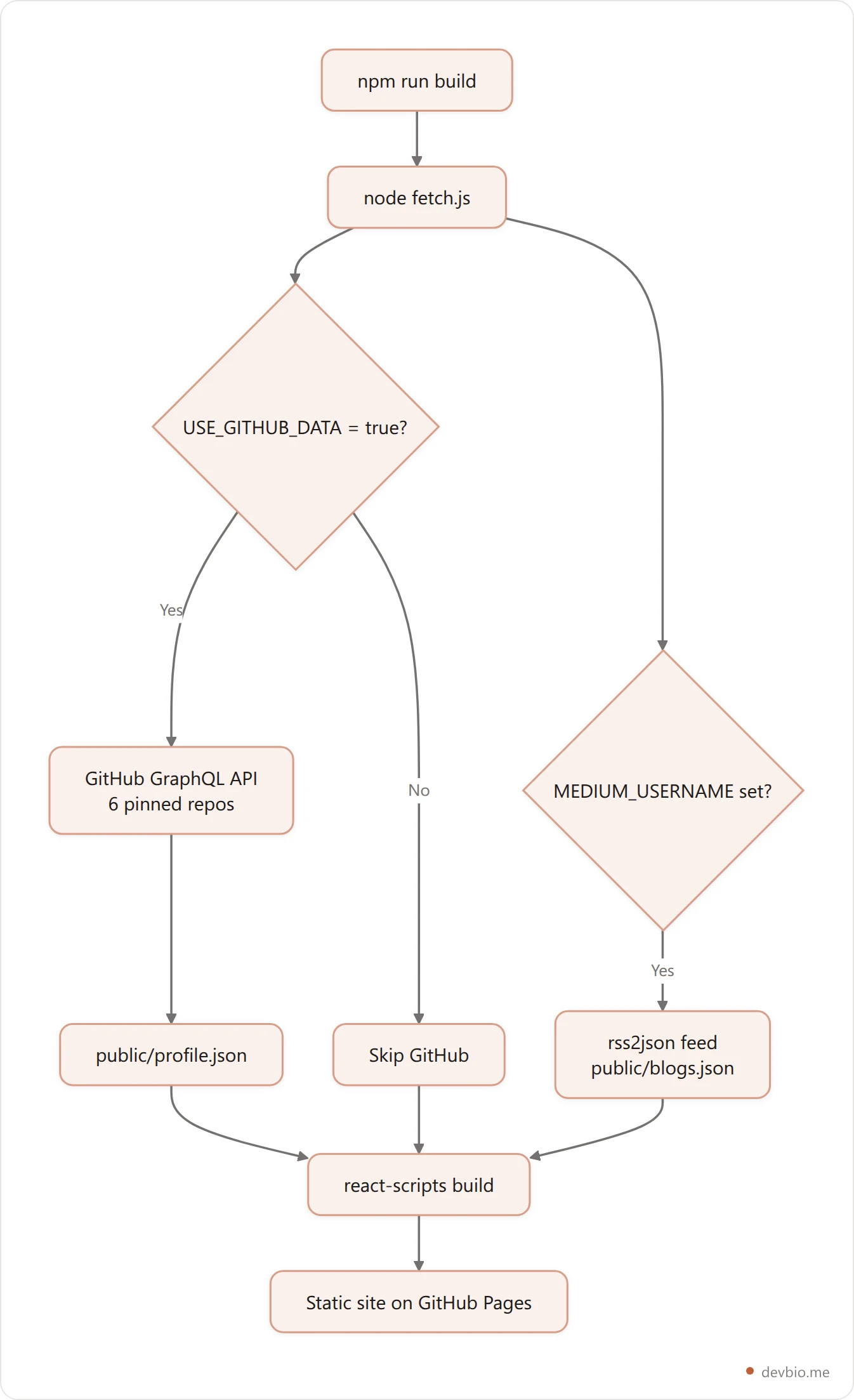
Three things follow from that design:
The token stays in the build. The key is named
REACT_APP_GITHUB_TOKEN, but onlyfetch.jsreads it. None of thesrc/files reference it, so it doesn't end up in the browser bundle. The pinned-repo data does ship, as a public JSON file.Your data is frozen at build time. Pin a new repo and nothing changes until the next deploy. The included GitHub Action rebuilds on push, not on a schedule.
Everything else lives in
src/portfolio.js. Greeting, skills, education, work experience, projects, achievements, talks, podcasts and resume each have their own object with adisplayflag you can switch off.
That's a solid design for 2019-era React. If you want the same pinned-repo idea on a modern stack, dillionverma/portfolio or a hosted profile that syncs GitHub for you are the lower-maintenance routes.
That leaves the three at the top. Choose between them on two questions: will you blog, and would you rather edit one config file or a data schema?
The Sections a Template Won't Fill In For You#
Every template above gives you a layout. None of them decides what goes in it. That decision is more standardised than it looks — build enough developer profiles and the same set of blocks keeps appearing.
DevBio is built as exactly that list: eleven components you switch on or off, rather than a page you design from scratch. Basic info, avatar, banner, about, skills, projects, work experience, links, GitHub stats, contribution heatmap, and revenue.
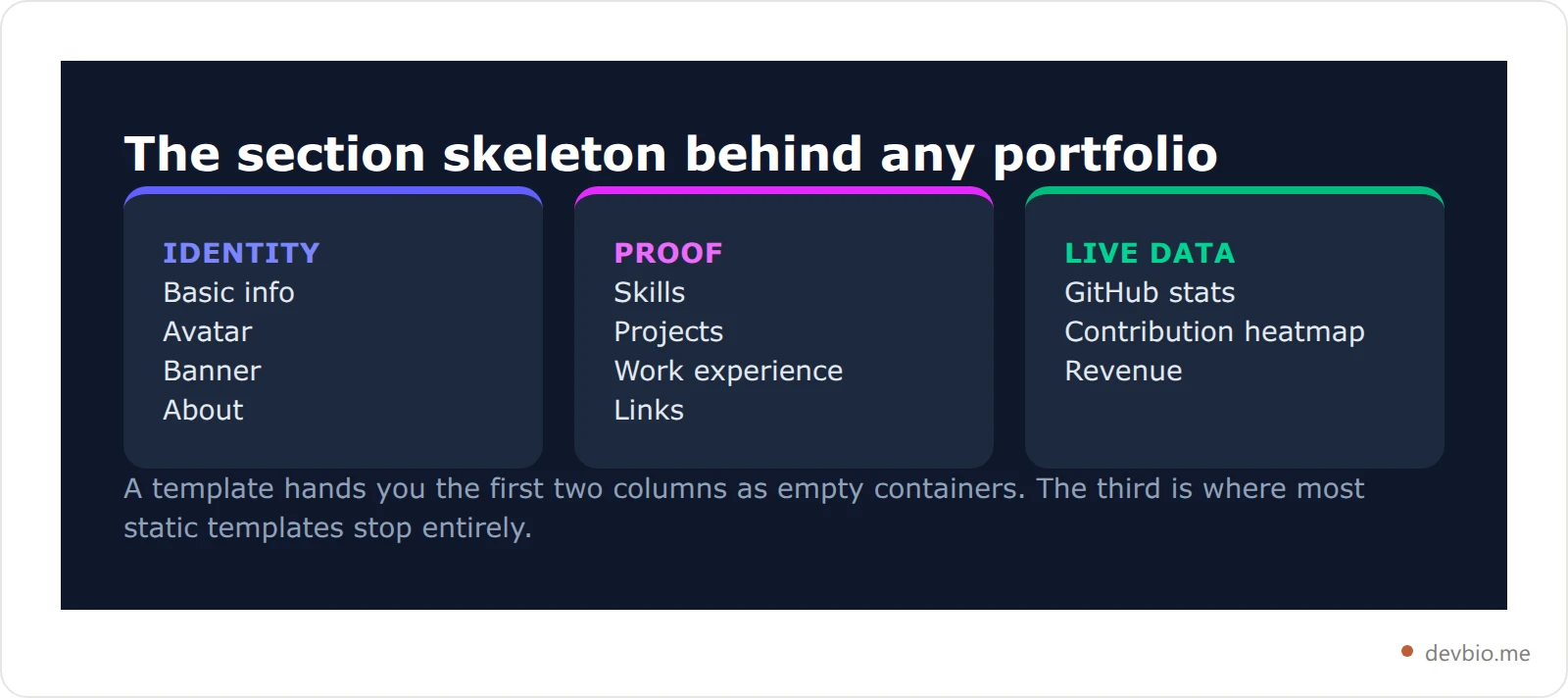
The useful exercise before you clone anything: write those eleven headings in a plain text file and fill them in. If you can't fill a section, the template won't rescue it — a beautifully styled empty Projects grid reads worse than no grid at all. Our breakdown of portfolio patterns that actually get results covers what belongs under each one.
Start with the sections, not the CSS
Which Sections Survive Into a Resume#
Six sections carry into a resume PDF: basic info, about, skills, work experience, projects, and links. Avatar, banner, contribution heatmap, and revenue stay web-only, and GitHub stats collapse to a single header line. Portfolio sections and resume sections are not the same list.
Here's a detail that catches people out. A portfolio and a resume are not the same document, and the sections don't map one to one.
When DevBio compiles a bio into a PDF resume, it walks a fixed order: basic info, about, skills, work experience, projects, links. Avatar, banner, GitHub stats, the contribution heatmap, and revenue are deliberately excluded — the GitHub numbers collapse into a single summary line referenced from the header, and revenue is left out of the resume by design.
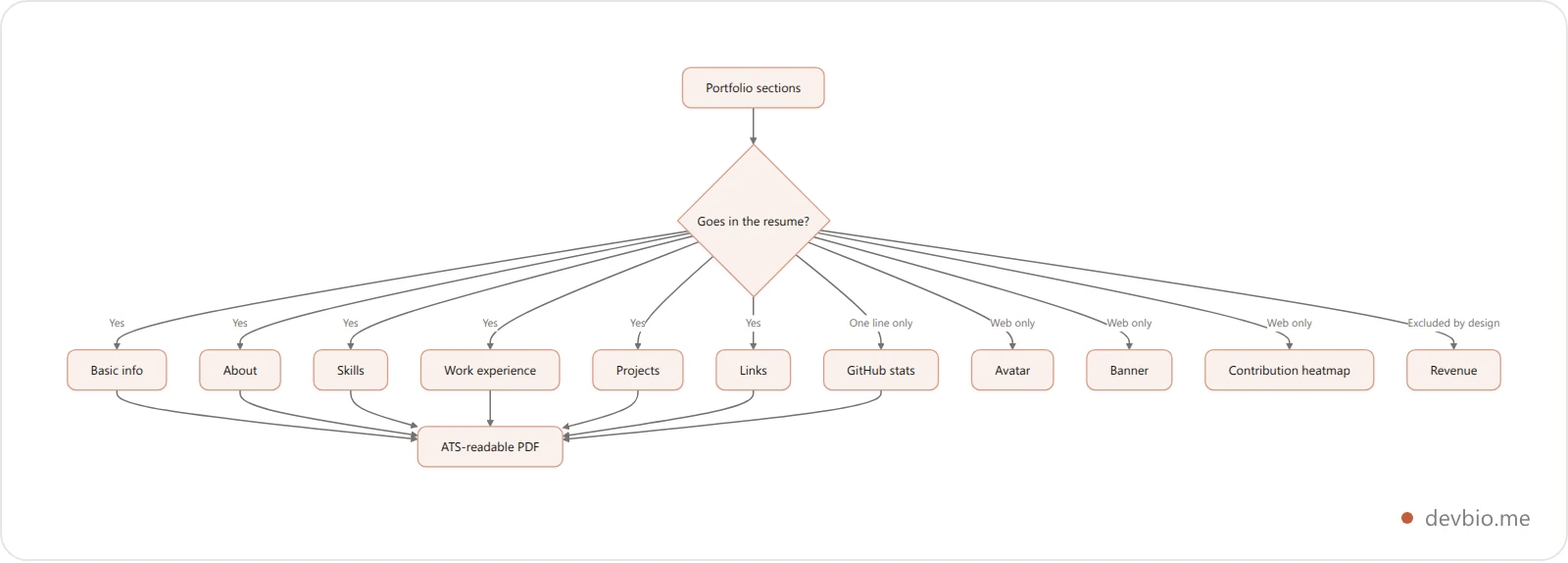
Why exclude the visual sections? Because an applicant tracking system reads text, not pictures. A resume assembled from real text and compiled to PDF stays parseable; a portfolio screenshotted into an image does not. If you're going the template route, budget for maintaining a separate text resume — or read our guide to an ATS-ready developer resume first.
Licenses: The Part Nobody Reads#
Three of the licenses on this list behave very differently, and the difference only shows up later.
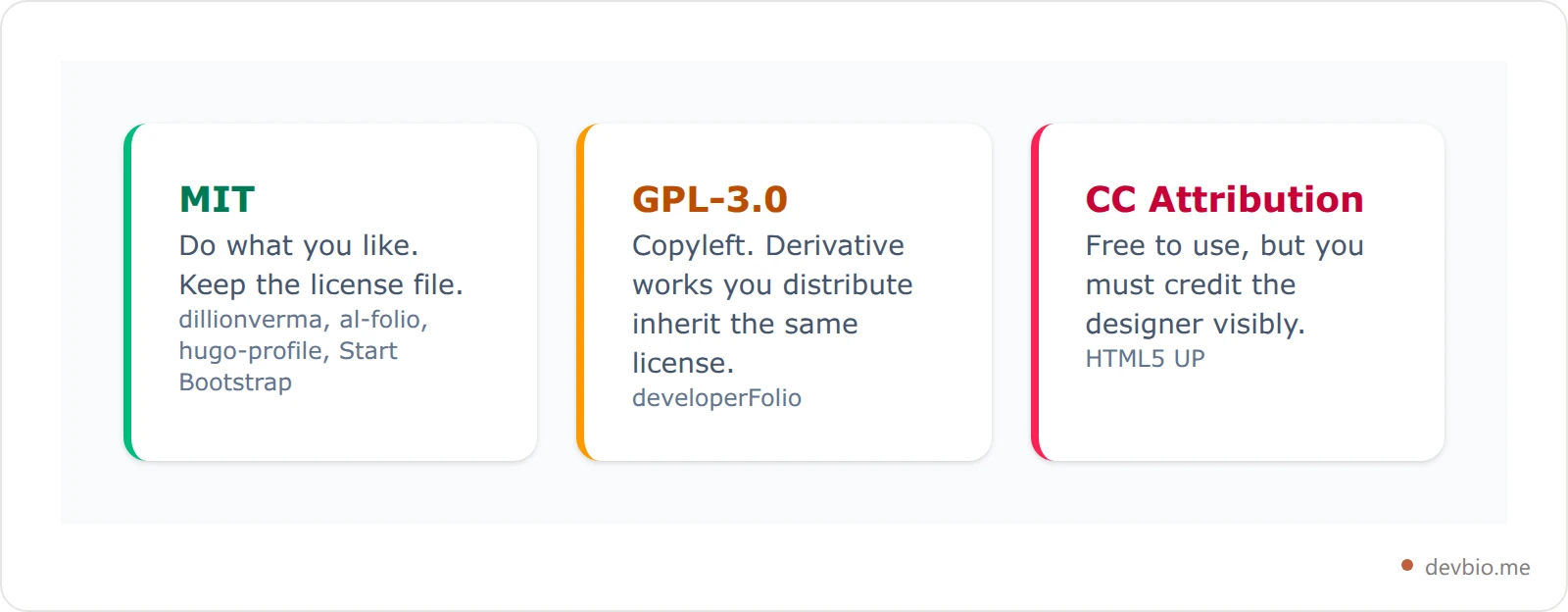
MIT is the boring, safe answer: use it commercially, modify it, keep the license file around. Four of the seven are MIT.
GPL-3.0 is copyleft. developerFolio uses it. For a personal site you host yourself this rarely bites, but if you fork it into something you distribute — a template you sell, a starter you ship to clients — that derivative inherits GPL-3.0. Read the terms before you build a business on it.
Creative Commons Attribution is HTML5 UP's license. The templates are genuinely free, and the requirement is that the credit stays visible. Stripping the footer link is the single most common license violation in the portfolio world, and it's the easiest to avoid.
If reading license terms before you can publish a bio sounds like the wrong problem to have, there's a hosted route with none of this.
Static Template vs Live Data#
Every template on this list renders whatever you typed into it at build time. Six months later, the "currently building" line is stale, the project you shipped in March isn't there, and your commit graph is frozen at whenever you last ran a deploy.
Two of the seven push against that. developerFolio queries the GitHub API at build time for pinned repos. JSON Resume separates data from presentation so at least the update is a single file edit.
The alternative is a profile that syncs rather than rebuilds. DevBio connects GitHub and a payment gateway once, then keeps GitHub stats, the contribution heatmap, and revenue current — hourly on the Pro plan. Projects with a connected payment gateway can surface on the marketplace with live MRR and a twelve-month trend. If revenue as public proof is the part that interests you, we've written up the live MRR profile setup in detail.
This is the real fork in the road, and it's worth being honest about: a template gives you total design control and a maintenance job. A hosted profile gives you less design control and no maintenance job. Neither is wrong. Our comparison of portfolio vs personal site vs link in bio walks through when each wins.
How to Pick in 60 Seconds#
Pick by maintenance appetite first, then audience. No appetite for a codebase means a hosted profile or HTML5 UP. Academia means al-folio. Regular blogging means hugo-profile. Otherwise choose the stack you already ship in — the best template is the one you can fix at 11pm.
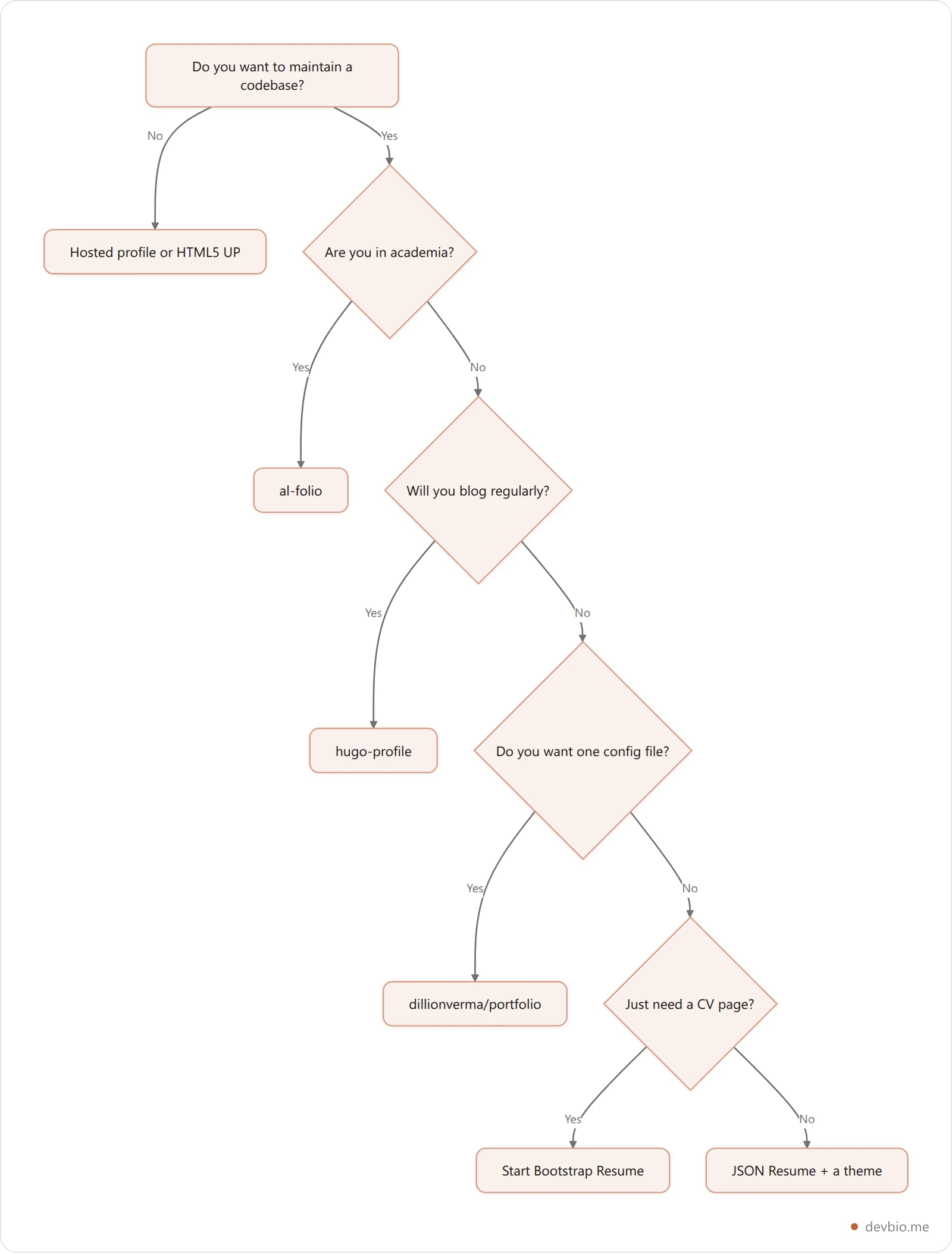
A shortcut that saves a weekend: pick the template whose stack you already ship in. A Next.js developer debugging a Ruby gem conflict at 11pm is not building a portfolio, they're learning Jekyll. The best template is the one you can fix.
Common Mistakes With Portfolio Templates#
Leaving the demo content in. Every template ships with a fictional developer's projects. Search the codebase for the author's name and email before you deploy — placeholder contact details in a live portfolio are a genuinely common and embarrassing bug.
Choosing on looks alone. The 16k-star template looks great precisely because thousands of people shipped it. Distinctiveness is worth more than polish when a hiring manager opens twenty tabs.
Not checking mobile. Most recruiters open your link on a phone. Test at 375px before you call it done, and check that the projects grid doesn't collapse into unreadable cards.
Never buying the domain. A portfolio on a subdomain of a hosting provider ages badly and moves badly. Our custom domain guide covers the ten-minute setup.
Treating the template as the work. The layout is 10% of the outcome. The project write-ups are the other 90%, and no starter writes those for you. The developer portfolio guide covers what to put in them.
Frequently Asked Questions#
What's the best software developer portfolio template?#
For most software developers, dillionverma/portfolio: Next.js 16 with every field in a single config file, MIT licensed, and few enough forks that it still looks distinctive. Choose hugo-profile instead if you'll blog regularly, or JSON Resume if you want to swap designs later without rewriting your content.
Are free developer portfolio templates good enough for job applications?#
Yes. Hiring managers care about what your projects do and whether the links work, not whether the CSS is bespoke. A well-filled free template beats a half-finished custom build every time. Spend the saved hours writing project descriptions instead.
Which developer portfolio template is easiest for beginners?#
HTML5 UP, because there's no build step, no Node version, and no framework to learn — you edit HTML and upload the folder. Start Bootstrap Resume is the next easiest if you want a CV-shaped one-pager rather than a full site.
Can I remove the credit link from a free template?#
Only if the license allows it. MIT templates let you remove visible credits as long as you keep the license file in the repo. HTML5 UP's Creative Commons Attribution license requires the credit to stay visible unless you buy a separate license.
Do portfolio templates hurt my SEO because others use the same one?#
No. Duplicate design isn't duplicate content — search engines index your text, not your stylesheet. What does hurt is shipping the template's demo copy, since that text genuinely is duplicated across every unedited fork.
How often should I update my portfolio?#
Every time you ship something worth showing, which in practice means quarterly for most developers. This is the strongest argument for templates with a single config file or a hosted profile that syncs — the higher the friction, the staler the site.
Should I use a template or a hosted developer profile?#
Use a template if you want full design control and enjoy maintaining a codebase. Use a hosted profile if you want live GitHub and revenue data without a build pipeline. The deciding question is whether you'll still be running npm update on it a year from now.
Key Takeaways#
Four of the seven are MIT licensed — the safest default. One is GPL-3.0 copyleft (developerFolio), one requires visible attribution (HTML5 UP).
developerFolio still runs on React 16 and Create React App, which React sunset in 2025, despite having the second-highest star count on the list.
Match the template to your stack, not to the screenshot. A Next.js developer debugging Ruby gems has stopped building a portfolio.
Fill the eleven sections before you clone anything. A styled empty Projects grid reads worse than no grid.
Only six sections belong in a resume, and an ATS reads text rather than images — budget for maintaining both.
Delete the demo content, including the original author's name and email, before you deploy.
Static templates go stale. If you won't run
npm updatein a year, choose something that syncs instead of rebuilds.
Your profile, without the build pipeline
Eleven components, live GitHub and revenue data, and a free ATS-readable PDF resume generated from the same content. No template to fork, no deploy to maintain.
Build your DevBio

