

You wrote a quote, pressed Enter twice in your head but only once on the keyboard, and typed the next paragraph. GitHub rendered both as one quote. You add more > characters, delete them, retype the whole block — and it still looks wrong.
A markdown blockquote is a line starting with > plus an optional space. The part nobody mentions is the laziness rule: inside a quote, any line that continues a paragraph does not need its own >. That's not a bug, it's CommonMark section 5.1 — and it's why your next paragraph got absorbed.
On this page
Markdown blockquote syntax the spec actually requires#
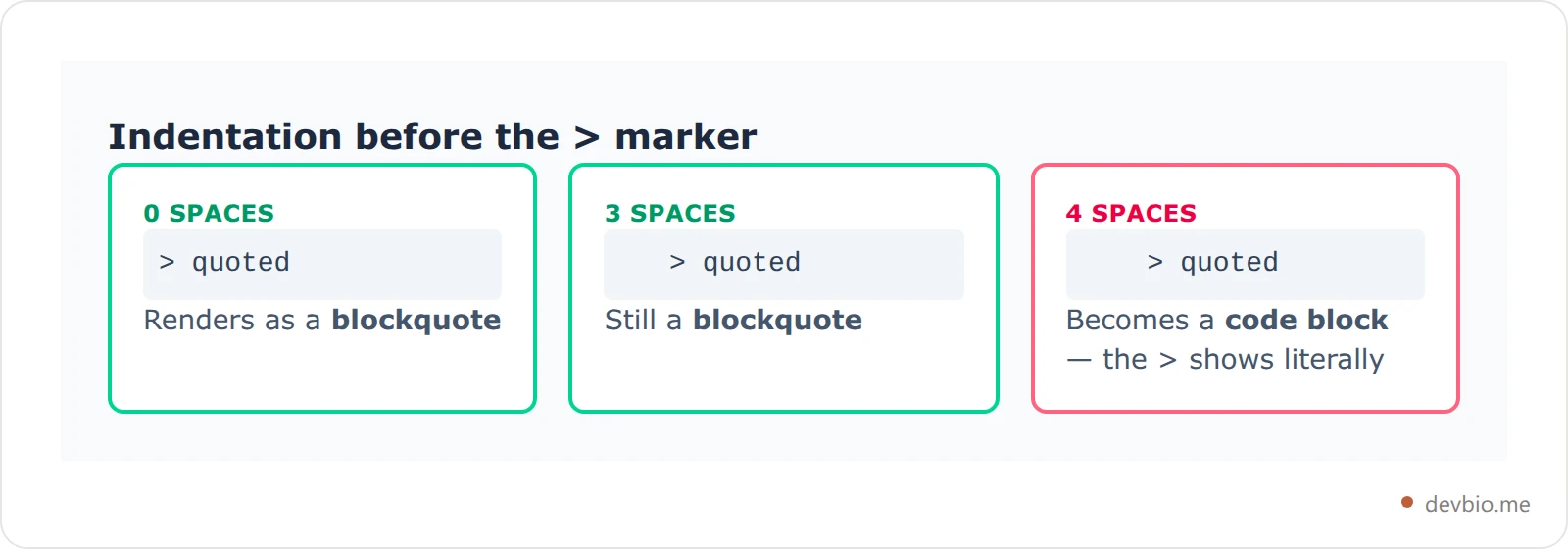
CommonMark 0.31.2, dated 28 January 2024, defines the CommonMark block quote marker precisely — and it's looser than most tutorials suggest. The marker is optionally preceded by up to three spaces of indentation, and consists of either a > followed by a space, or a single > with no space at all.
So all three of these produce identical HTML:
> # Foo
> bar
> baz># Foo
>bar
> baz > # Foo
> bar
> bazThree spaces of indentation is fine. Four is not — at four spaces the line becomes an indented code block instead, and your > characters render literally:
    > # Foo
    > bar
That renders as a code block containing > # Foo, not as a quote. It's the single most common cause of "my blockquote shows the arrow character" inside an already-indented list item.
One more detail worth knowing: a blockquote can be completely empty. A single > on its own line is a valid, empty <blockquote> element.
Laziness: the rule that ate your next line#
Here is the rule that costs people the most time. CommonMark calls it Laziness:
If a string of lines Ls constitute a block quote with contents Bs, then the result of deleting the initial block quote marker from one or more lines in which the next character other than a space or tab after the block quote marker is paragraph continuation text is a block quote with Bs as its content.
In plain English: once a paragraph has started inside a quote, the following lines stay inside that quote whether or not you type >.
> # Foo
> bar
baz
That produces a heading and a single paragraph reading bar baz — all inside the blockquote. The unmarked baz line joined the quote.
Now the failure everyone hits. You write a quote, then start your own commentary on the very next line:
> bar
baz
You expected a quote followed by your paragraph. You got one blockquote containing bar baz. The fix is a blank line, nothing else:
> bar

baz
A > on its own line also works, because it ends the paragraph inside the quote:
> bar
>
baz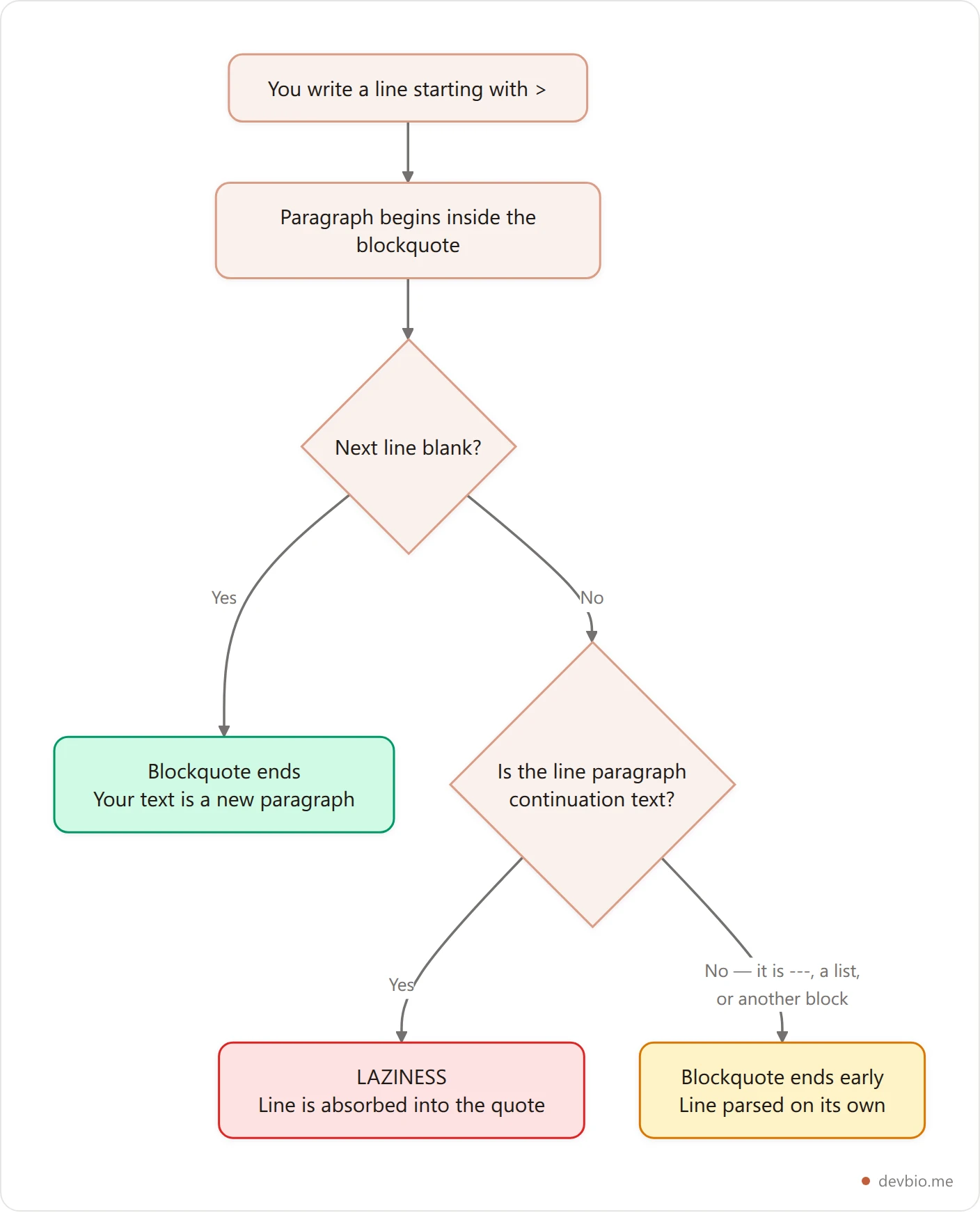
Laziness is why the two-space hard break and the blank line behave so differently around quotes. If line endings inside paragraphs trip you up generally, the same spec section drives the two-space trap in markdown line breaks.
Where laziness stops and the quote breaks early#
Laziness only applies to lines that would have continued a paragraph. Any line starting a new block — a --- underline, a list marker, a heading — ends the markdown blockquote instead. That's the opposite surprise: the quote stops sooner than you wanted and the next line renders outside it.
Three cases cover nearly every occurrence.
A setext heading underline is the classic case:
> foo
---
The --- is not paragraph continuation text, so the quote closes after foo and the --- becomes a horizontal rule outside it. (If you have ever had a --- silently turn into a heading instead, that's the markdown horizontal line trap.)
A list marker does the same thing:
> - foo
- bar
The quote contains a one-item list with foo. The - bar line starts a second, separate list outside the quote entirely.
There's a genuinely counter-intuitive one too:
> foo
    - bar
Four spaces of indentation would normally mean a code block — but indented code blocks cannot interrupt a paragraph, and - bar is indented too far to start a list. So it falls through to paragraph continuation text, and laziness pulls it in. The quote contains the paragraph foo - bar.
Your bio page shouldn't need a markdown degree
devbio.me renders a developer profile from structured data — no whitespace rules to memorize, no quote that swallows the next paragraph.
See devbio.meOne quote or two? The blank-line rule#
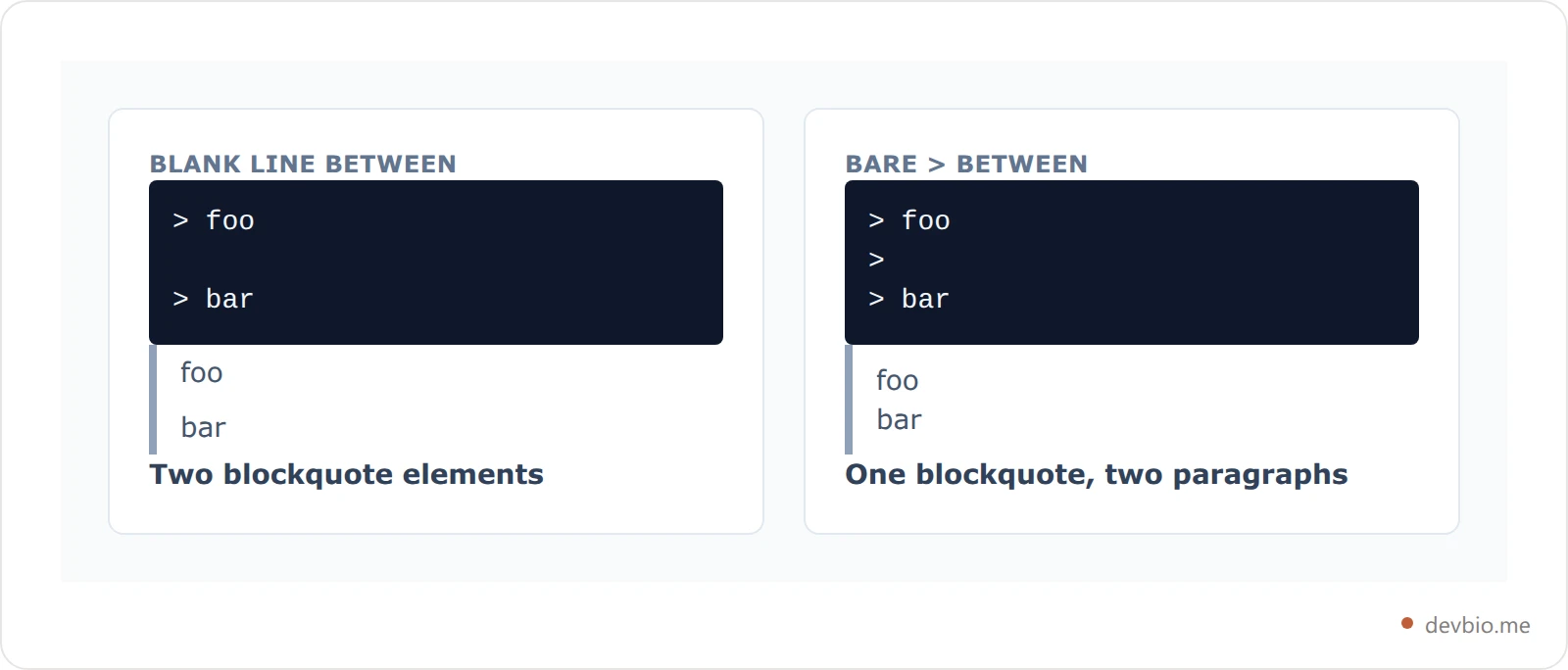
CommonMark's Consecutiveness rule says a document cannot contain two block quotes in a row unless there's a blank line between them. This is a deliberate break from older parsers.
> foo

> bar
CommonMark produces two separate blockquote elements. The spec calls this out explicitly: most older implementations, including John Gruber's original Markdown.pl, parse it as one quote with two paragraphs. CommonMark decided the author should get to choose.
To get one quote with two paragraphs, use a bare > as the separator:
> foo
>
> bar
And blockquotes can interrupt a paragraph, which not every block-level construct can do:
foo
> bar
That's a paragraph followed by a blockquote — no blank line required.
Nested blockquotes and the lazy shortcut#
A nested blockquote works by stacking markers. >> is a quote inside a quote, >>> goes three deep, and the spaces between them are optional:
>>> foo
> bar
>>baz
All three lines land in the same triple-nested blockquote, because after foo starts a paragraph, laziness handles the rest — the marker counts on continuation lines are simply ignored.
Taken to its conclusion, laziness means you can omit every > on a continuation line of a nested quote:
> > > foo
bar
foo bar ends up as one paragraph, three levels deep. This is elegant and also a reliable way to confuse yourself six months later — when nesting, write the markers out on every line even though the parser doesn't demand it.
Headings, lists and code inside a quote#
A blockquote is a container block, so it holds other blocks: headings, lists, code fences, even tables on GitHub.
> ## Release notes
>
> - Fixed the parser
> - Shipped the CLI
>
> ```bash
> npm install
> ```
Indented code inside a quote has one sharp edge. The block quote marker includes the > and its following space, so you need five spaces after the > to get an indented code block — four gets you an ordinary paragraph:
>     code

>    not code
The first is a code block inside a quote. The second is just a paragraph. Fenced code blocks avoid the whole problem, which is one more reason to prefer them — see markdown code block syntax, languages and nesting.
Task lists work inside quotes too, following the same first-block rule they follow anywhere else — covered in why your markdown checkbox renders as text.
GitHub alerts: blockquote syntax that isnt in the spec#
GitHub renders five coloured callouts built directly on blockquote syntax:
> [!NOTE]
> Useful information that users should know, even when skimming content.
The five types are [!NOTE], [!TIP], [!IMPORTANT], [!WARNING] and [!CAUTION]. GitHub's own documentation describes them as "a Markdown extension based on the blockquote syntax."
Here's the part worth knowing before you rely on them. I downloaded the GFM specification — GitHub's own formal Markdown spec, version 0.29-gfm, dated 6 April 2019 — and counted every term these callouts could be described by:

Blockquotes appear 144 times. "Alert", "callout" and "admonition" appear zero times. Alerts are a github.com rendering feature, not part of GitHub Flavored Markdown as specified — the same relationship :shortcode: emoji have, which is why :tada: isn't markdown.
Practically: > [!NOTE] renders as a coloured callout on github.com, and as a plain blockquote containing the literal text [!NOTE] almost everywhere else. Write the alert body so it still reads correctly when the badge doesn't render.
Where blockquotes dont render at all#
The assumption that bites hardest is that every text box accepting "markdown" accepts all of it. Most don't — they ship a small inline subset.
devbio.me is a concrete example I can show you from the inside, because I read the component source myself. Its About component uses a deliberately tiny inline renderer supporting exactly three things: **bold**, *italic*, and links. Body text is split into paragraphs on blank lines, and everything else is passed through as plain text. A line starting with > in a devbio About section renders with the > visible, because block-level parsing never runs on that field.
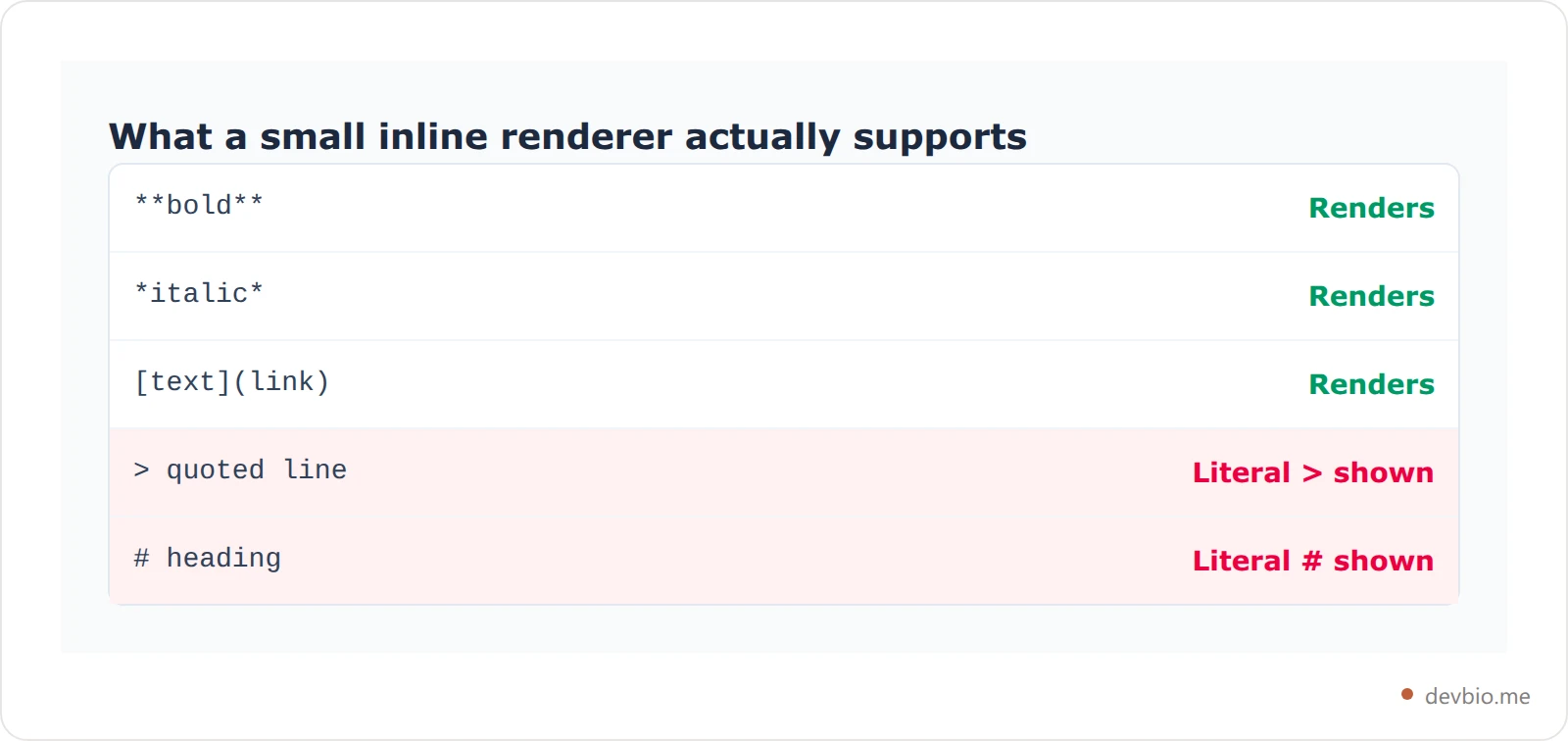
This is the norm, not an outlier. Bio fields, commit messages, issue titles, chat inputs and profile summaries across most platforms run inline-only parsers for the same reasons: predictable layout and no untrusted block-level HTML. Before you paste a quote into any short text field, test one line first. The same caution applies to centering text in markdown and underlines, which GitHub strips outright.
Frequently Asked Questions#
Why does my markdown blockquote include the paragraph after it?#
Because of CommonMark's laziness rule. Once a paragraph starts inside a quote, following lines continue that paragraph whether or not they carry a >. Insert a blank line between the quote and your next paragraph, or end the quote with a bare > on its own line.
Do I need a space after the greater-than sign?#
No. The spec defines the marker as > followed by a space of indentation, or a single > with no space. >quoted and > quoted produce identical output. The space is convention, not requirement — but it keeps the raw text readable.
How do I nest blockquotes in markdown?#
Stack the markers: >> for two levels, >>> for three. Spaces between markers are optional. Laziness means continuation lines can drop the markers entirely, but writing them on every line keeps the source readable and portable across parsers.
Why does my blockquote render as a code block?#
You have four or more spaces of indentation before the >. The spec allows up to three; at four, the line becomes an indented code block and the > characters render literally. This usually happens inside already-indented list items.
Do GitHub alerts work outside GitHub?#
Rarely. [!NOTE] and friends are a github.com rendering feature — they appear zero times in the GFM specification. Elsewhere they render as an ordinary blockquote with the literal text [!NOTE] at the top, so write the body to stand alone.
Can a blockquote interrupt a paragraph?#
Yes. Unlike indented code blocks, a blockquote can start on the line immediately after paragraph text with no blank line between them. The > line opens the quote straight away.
Key takeaways#
The marker is
>with an optional following space, and up to three spaces of indentation. Four spaces makes it a code block.Laziness is the rule behind most surprises: paragraph continuation lines stay in the quote without a
>. A blank line is how you get out.Lines that start a new block —
---, list markers, headings — end the quote early instead.A blank line between quotes makes two elements in CommonMark; a bare
>makes one quote with two paragraphs.GitHub alerts are built on blockquote syntax but are absent from the GFM spec — treat them as a github.com feature.
Most short text fields run inline-only parsers where
>never becomes a quote at all. Test one line before committing to a format.
One link that renders the same everywhere
devbio.me gives developers a profile page built from real data instead of markdown that breaks differently in every text box.
Build your developer bio

