

You typed three dashes under a line of text, hit preview, and the sentence above them swelled into a giant heading. No line anywhere. It's the most common markdown horizontal line failure there is, and it isn't a parser bug — it's two rules colliding in a specific order.
The short version: a markdown horizontal line is three or more -, *, or _ characters alone on a line. Use ---. But --- placed directly beneath a paragraph is read as a setext heading underline instead, which promotes that paragraph to an H2. Leave a blank line above the dashes and you get a rule every time.
That one blank line is the whole fix. It's worth understanding why, though, because the same collision explains a handful of related surprises: why *** never has the problem, why four spaces of indentation breaks a divider completely, and why the three dashes at the top of a blog post file mean something else entirely. This guide walks the rule from the spec down to the practical habits, including how a README generator has to solve it structurally when it can't see the finished document.
In this guide:
The three characters that draw a line#
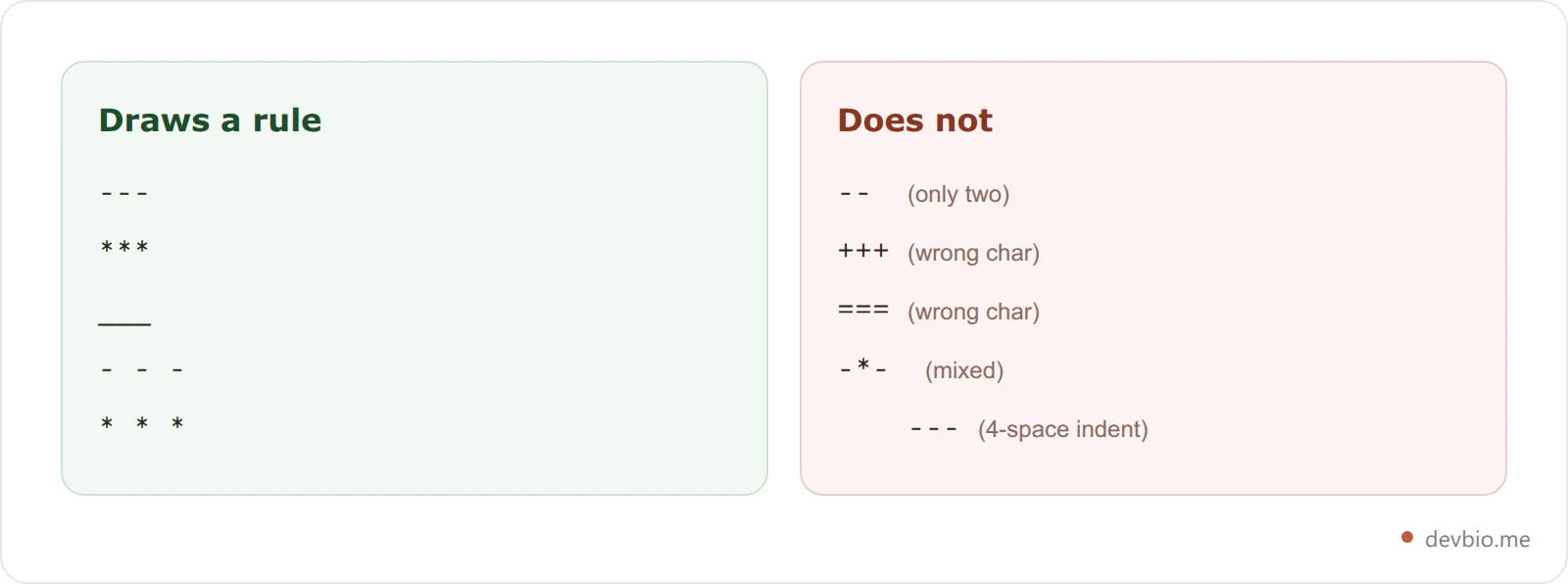
The CommonMark spec calls this a thematic break, and it accepts exactly three characters: -, _, and *. You need at least three of them, and every non-whitespace character on the line has to match — you can't mix.
---
***
___
All three render identically: an <hr> element. Nothing about the output changes based on which one you pick, so the choice is purely about which one causes you the fewest problems.
---(three hyphens) — the most common, the most readable in raw text, and the only one with the heading trap described below.`` (three asterisks)* — no heading collision, but easy to confuse with bold or italic markers when you're scanning a diff.
___(three underscores) — no heading collision either, and visually distinct, but the least used, so it looks unfamiliar to reviewers.
Note what's not on the list: + and = don't work. Neither does a single -, and neither does --. Three is the floor.
The setext trap: why your text became a heading#
Here's the collision. Markdown has a second, older heading syntax called a setext heading, where you underline a line of text instead of prefixing it with #. Equals signs make an H1; hyphens make an H2.
My Section Title
---
That is not a title followed by a horizontal line. That's an H2 that reads "My Section Title" — and the dashes vanish into the markup. The CommonMark spec is explicit about the precedence: when a line of dashes could be read as either a thematic break or a setext heading underline, "the interpretation as a setext heading takes precedence."
So the parser isn't guessing. It's following a documented priority rule, and the rule works against you exactly when you're trying to close out a section — which is the moment you most want a divider.
This is why the failure feels so arbitrary in practice. The same three characters produce a line in one place and a heading fifteen lines later, and the only difference is whether the line above them happened to be blank.
The same precedence rule claims a second victim inside quotes. A --- on the line after a quoted line isn't paragraph continuation text, so it ends the quote early and renders as a rule outside it — one of the cases in why a markdown blockquote eats the next line.
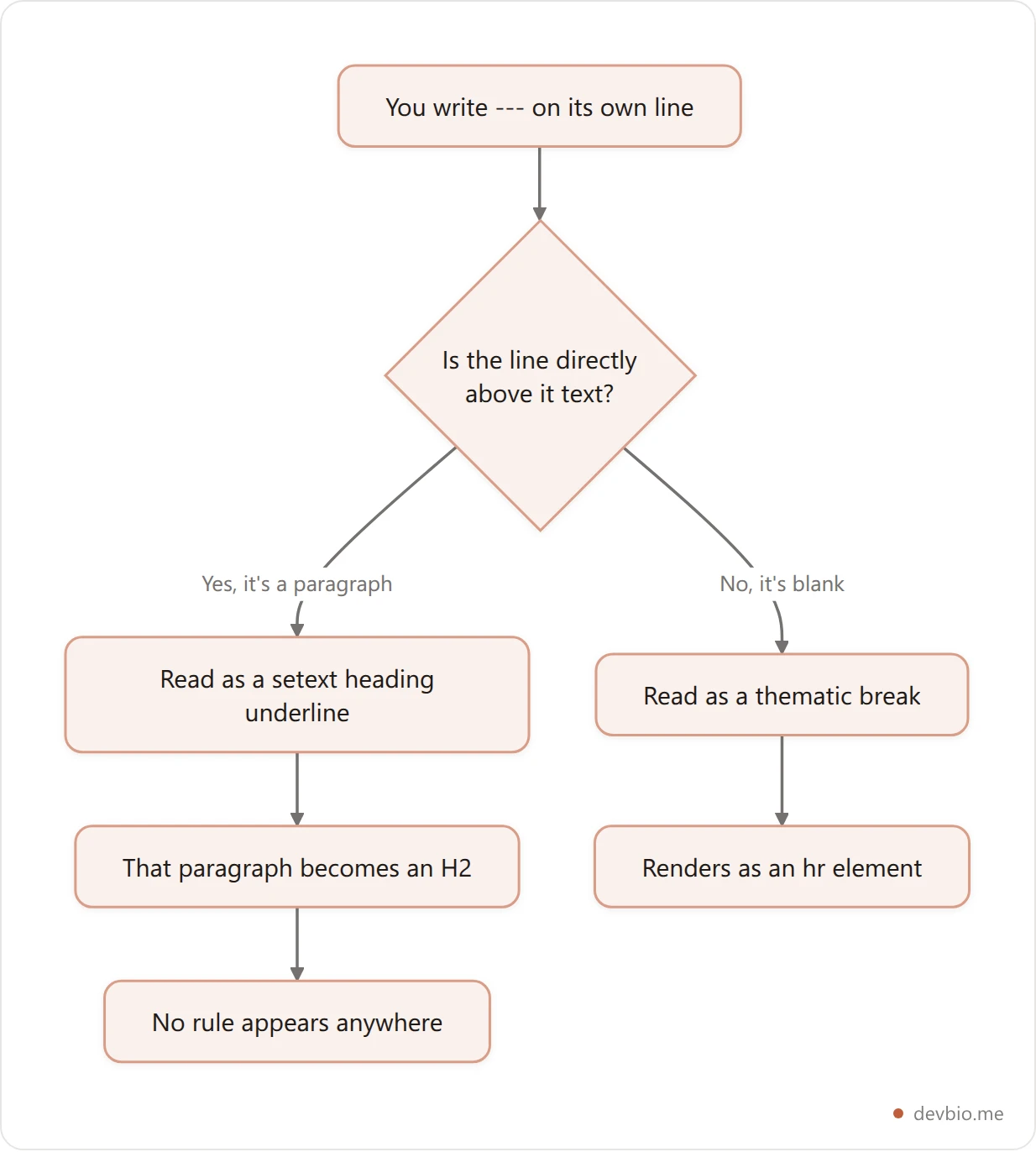
Worth knowing: *** and ___ have no setext equivalent. Only = and - underline headings. So if you want a divider that can never be misread no matter where it lands, *** is the genuinely safe choice — it's just less readable to humans.
The blank line that fixes everything#
One blank line above the dashes ends the paragraph, which means there's nothing left for the dashes to underline, which means they fall through to the thematic-break rule.
The last sentence of your section.

---

The first sentence of the next one.
A blank line below is optional for correctness, but include it anyway — some renderers will otherwise glue the following paragraph tight against the rule, and it keeps the raw file readable.
If you'd rather not think about it at all, *** sidesteps the decision entirely:
The last sentence of your section.
***
The first sentence of the next one.
That renders a rule even with no blank line, because asterisks were never part of the setext syntax. The tradeoff is legibility in the raw file — and since the whole point of markdown is that the source stays readable, most people take the blank line and keep their dashes. The same blank-line-as-separator logic governs how markdown handles line breaks and paragraph spacing generally, so it's a habit worth building once.
Generate a README that gets the dividers right
Build a GitHub profile README from a form — headings, badges, stats, and a properly spaced horizontal rule before the footer. No sign-up, no markdown debugging.
Try the README generatorSpaces, tabs, and indentation still count#
The spec is more permissive than most people expect about what sits between the characters, and stricter than expected about what sits before them.
Spaces and tabs are allowed between the markers and at the end of the line. So all of these are valid horizontal rules:
- - -
*  *  *
___
That's a real convenience: - - - is noticeably easier to read in a raw file than ---, and it carries the same meaning. Some teams standardise on the spaced form for exactly that reason.
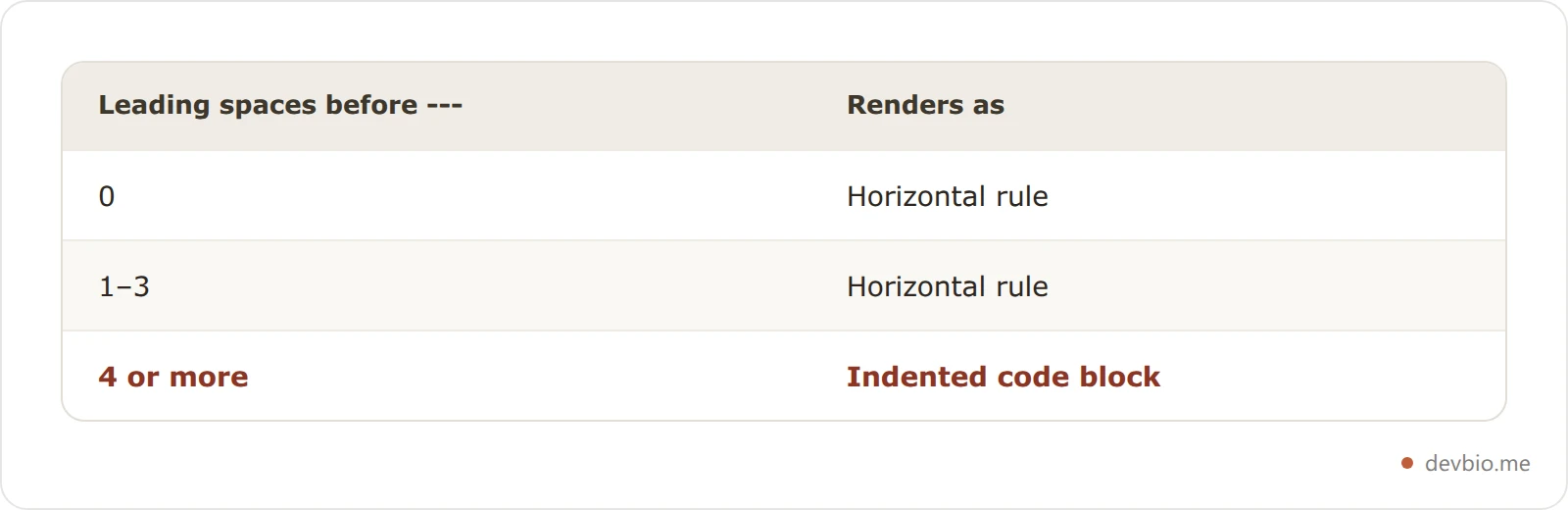
Indentation is where it breaks. Up to three spaces of leading indentation is fine. Four spaces is too many — at four, the line stops being a horizontal rule and becomes an indented code block, so you'll see three literal dashes in a monospace box instead of a divider.
That four-space cliff bites most often inside list items, where content is already indented to line up under the bullet. A markdown divider nested inside a list is usually not what you want anyway; break out of the list first.
Front matter dashes are a different animal#
If you write for a static site generator — Jekyll, Hugo, Astro, Next.js with MDX — the first thing in your file is probably this:
---
title: My Post
date: 2026-09-03
---
Those dashes are not horizontal rules. They're YAML front matter delimiters, consumed by the site generator before the markdown parser ever sees the file. This is a preprocessing step, not a markdown feature, which is why the same three characters mean something completely different in the first two lines of a file than they do in the body.
Two practical consequences. First, a stray --- near the top of a file can be swallowed as a front matter fence and silently eat your content up to the next ---. Second, front matter has to start on line one — a blank line above it breaks the delimiter, and the generator will render the raw YAML as body text instead.
Once you're past the closing fence, normal rules resume and --- behaves like any other markdown line separator.
Where horizontal rules quietly don't work#
Horizontal rules render on full-file markdown surfaces — READMEs, docs sites, wikis, static site posts. They generally don't render in chat apps, single-line input fields, or restricted inline bio renderers. The failures are silent: you get literal dashes or nothing at all, never an error message.
The specific surfaces worth knowing:
Discord doesn't render horizontal rules. Its markdown subset covers bold, italic, strikethrough, and code, and
---shows up as three literal dashes in your message.Slack is the same story: no
<hr>in its message formatting.GitHub issue and PR titles, commit messages, and most single-line input fields don't run a markdown parser at all.
Restricted inline renderers. Plenty of bio and profile surfaces deliberately support only a handful of inline elements. DevBio's own About section is one — it renders
**bold**,*italic*, and links, and treats everything else as plain text, so a---there appears verbatim rather than as a divider. That's a deliberate call: the renderer accepts no raw HTML and no block-level syntax, which keeps user-supplied bios from breaking page layout.
The pattern is consistent. Full-file markdown surfaces — READMEs, docs, static site posts, most wikis — render horizontal rules. Message boxes, form fields, and inline bio renderers usually don't. When you're not sure, test with *** first; if that doesn't render either, the surface isn't doing block-level markdown at all.
Interestingly, GitHub's own basic formatting documentation walks through headings, lists, code blocks, footnotes, and alerts — but never documents horizontal rules. They work perfectly in GitHub markdown; they're just undocumented there, which goes a long way toward explaining why this question keeps landing on Stack Overflow instead of in the docs.
How a generator avoids the trap entirely#
A generator can't eyeball the finished file, so it has to guarantee the blank line structurally rather than hope for one. Three rules do it: end every block with a blank line, collapse runs of blank lines without ever removing them, and escape user text before insertion.
Reading through the DevBio README builder's source, that's exactly the shape it takes — and the three guarantees generalise to any markdown you assemble programmatically.
Every section closes with a blank line. The builder pushes an empty string after each block it writes, so by the time the footer separator gets appended, the preceding line is always blank. The --- can never land under a paragraph.
Runs of blank lines get collapsed, never removed. A final pass rewrites three-or-more consecutive newlines down to exactly two. That's the important half: it normalises spacing without ever reducing the gap to zero, so the blank line protecting the rule survives cleanup.
User text gets escaped before insertion. Names, taglines, and project descriptions run through an escape step that backslashes markdown control characters — hyphens included. Someone whose tagline is -- building things -- gets that text rendered literally instead of accidentally producing a rule or a heading.
## Stats
<p align="center">...</p>
---
<p align="center"><sub>Full bio, projects & resume → ...</sub></p>That's the actual shape of the output: content, blank line, rule, blank line, footer. The same discipline applies whether you're hand-writing a GitHub profile README or generating one — end the block, leave the gap, then draw the line.
Build your README with the spacing handled for you, or read the full walkthrough of the generator if you'd rather understand the output before you use it.
Frequently Asked Questions#
What is the markdown horizontal line syntax?#
Three or more -, *, or _ characters alone on a line, with a blank line above them. --- is the most common form. All three characters produce an identical <hr> element, and you can't mix them within a single line.
Why does --- create a heading instead of a line?#
Because a line of dashes directly under a paragraph is a setext heading underline, which makes that paragraph an H2. CommonMark gives the heading interpretation precedence over the thematic break. Add a blank line above the dashes and you get a horizontal rule instead.
How many dashes do I need for a horizontal line in markdown?#
At least three. One or two dashes render as literal text. There's no upper limit, so ----- works fine — but three is the convention, and extra dashes change nothing about the output.
Can I put spaces between the dashes?#
Yes. Spaces and tabs are allowed between the markers and at the end of the line, so - - - and * * * are both valid. Leading indentation is capped at three spaces; four or more turns the line into an indented code block.
Does a markdown divider work in Discord or Slack?#
No. Both use a reduced markdown subset covering inline formatting like bold, italic, and code, with no block-level horizontal rule. Three dashes appear as literal dashes in the message.
Are the --- lines at the top of my file horizontal rules?#
No, those are YAML front matter delimiters. Static site generators strip them before the markdown parser runs. Front matter must start on line one, and normal markdown rules resume after the closing fence.
Can I style a markdown horizontal rule?#
Not in markdown itself. On surfaces that allow raw HTML — GitHub READMEs included — you can write an <hr> tag with inline styles or a CSS class. On surfaces that strip HTML, the rule renders with whatever styling the platform applies, the same constraint that makes coloured and centred text hard in markdown.
Key Takeaways#
A markdown horizontal line is three or more matching -, *, or _ characters on their own line, and the single thing standing between you and a working divider is a blank line above it. Without that gap, --- underlines the paragraph above and turns it into an H2 — documented behaviour, not a bug, and the cause of nearly every "my horizontal rule disappeared" report.
Three habits cover the rest. Leave a blank line above and below every rule. Reach for *** when you want a divider that can't be misread, since asterisks have no setext meaning. And remember that --- at the top of a file belongs to your site generator, not your markdown parser.
Everything else is surface support: full-file markdown renders rules, message boxes and inline bio fields generally don't, and the fastest way to find out is to paste one in and look. If you're formatting a profile README specifically, the same spacing rules that govern rules also govern bold and emphasis edge cases.
Your README should be the easy part. Put your projects, stack, and live GitHub activity on one link — devbio.me


