

You centered your README headline, pushed it, and the page looks right. Then you centered the line below it and your bold text rendered as literal asterisks. Nothing is broken — you just crossed a boundary that Markdown never advertises.
Every markdown center text answer online hands you the same tag and stops there. The tag is the easy half. What follows is how to center text in Markdown and keep the rest of your file rendering the way you wrote it.
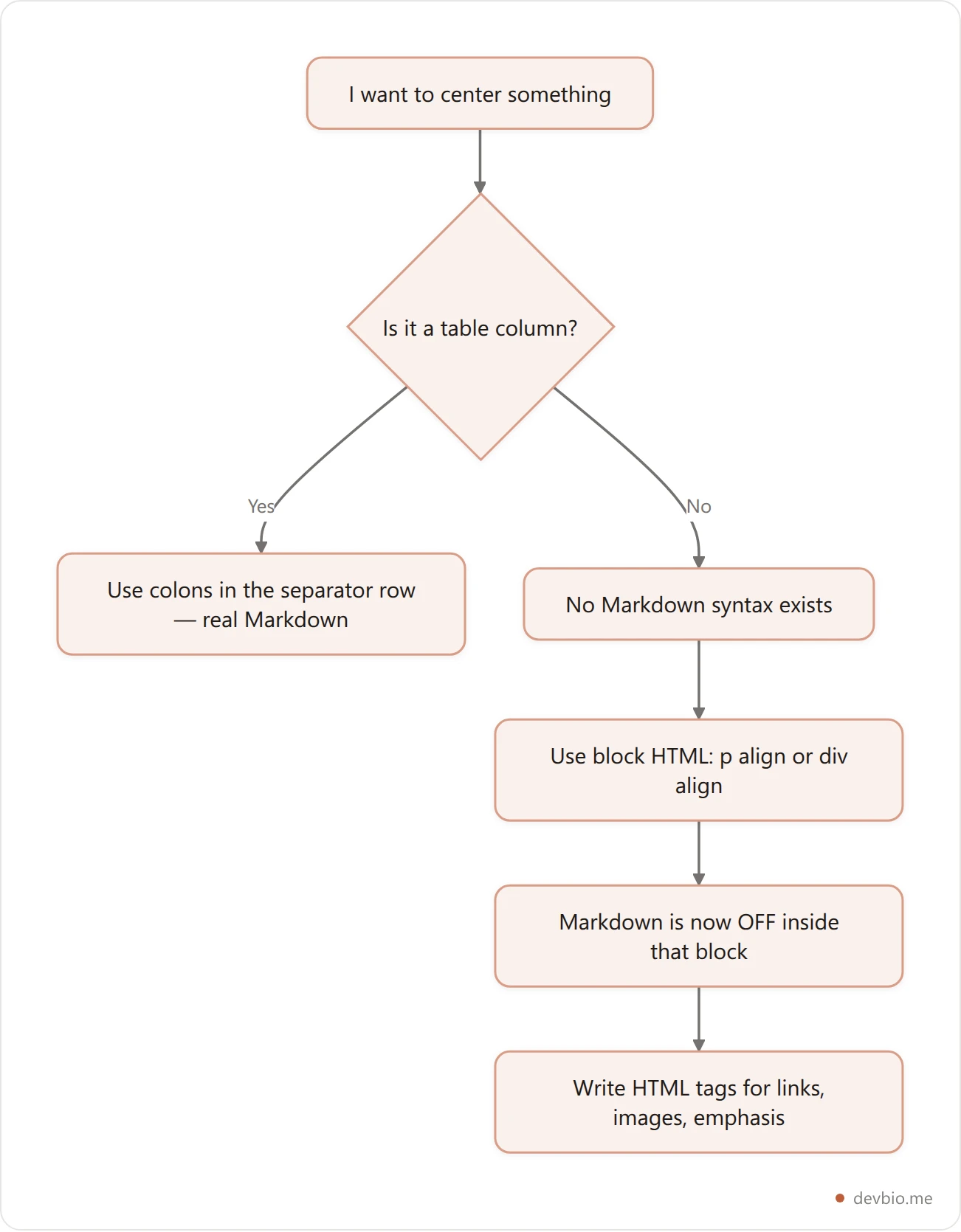
There is no Markdown syntax for centering text. Not in CommonMark, not in GitHub Flavored Markdown. The only reliable method is a block-level HTML tag carrying the align attribute — <p align="center"> or <div align="center"> — and the moment you open that tag, Markdown stops being parsed inside it.
That second sentence is the part every other guide leaves out, and it's the one that costs you twenty minutes. This guide covers what survives GitHub's HTML sanitizer, what it silently deletes, the blank-line rule that decides whether the rest of your file renders, and the exact recipes for centering text, images, badges, and tables.
Markdown Center Text: Why There's No Native Syntax#
Markdown was designed to describe structure, not presentation. A heading is a heading; where it sits horizontally is the renderer's business. So the spec offers # for headings, * for emphasis, and nothing at all for alignment.
That's not an oversight. CommonMark — 0.31.2 is the current spec revision — deliberately keeps layout out of scope, which is why the same document can render sensibly to HTML, PDF, or a terminal. Alignment is the one common formatting need the language punts on entirely — with a single exception: table column alignment, via the colons in a table's separator row. That's it.
So every technique below is really HTML. The question isn't "what's the Markdown for centering" — it's "which HTML does my renderer let through."
Why align="center" Works and style Gets Stripped#
Here's the thing most people try first, and why it fails.
GitHub does not render your raw HTML as-is. It runs the output through a sanitizer built on an allowlist: a fixed set of permitted elements and attributes. Anything not on the list is removed before the page is served. GitHub's Markdown rendering is built on the open-source html-pipeline project, and its sanitization filter is where the rules live.
Two facts from that allowlist explain nearly every centering failure:
alignis an allowed attribute, applied globally across elements.<p align="center">and<div align="center">survive intact.styleis not on the allowlist at all. It is stripped from every element, every time.
That second one is the killer. The instinct of anyone who knows CSS is to write <div style="text-align:center">. It renders perfectly in your local preview, in VS Code, in every offline Markdown tool you own — and arrives on GitHub as a plain <div> with the styling silently deleted. No error, no warning. Your text just sits on the left.
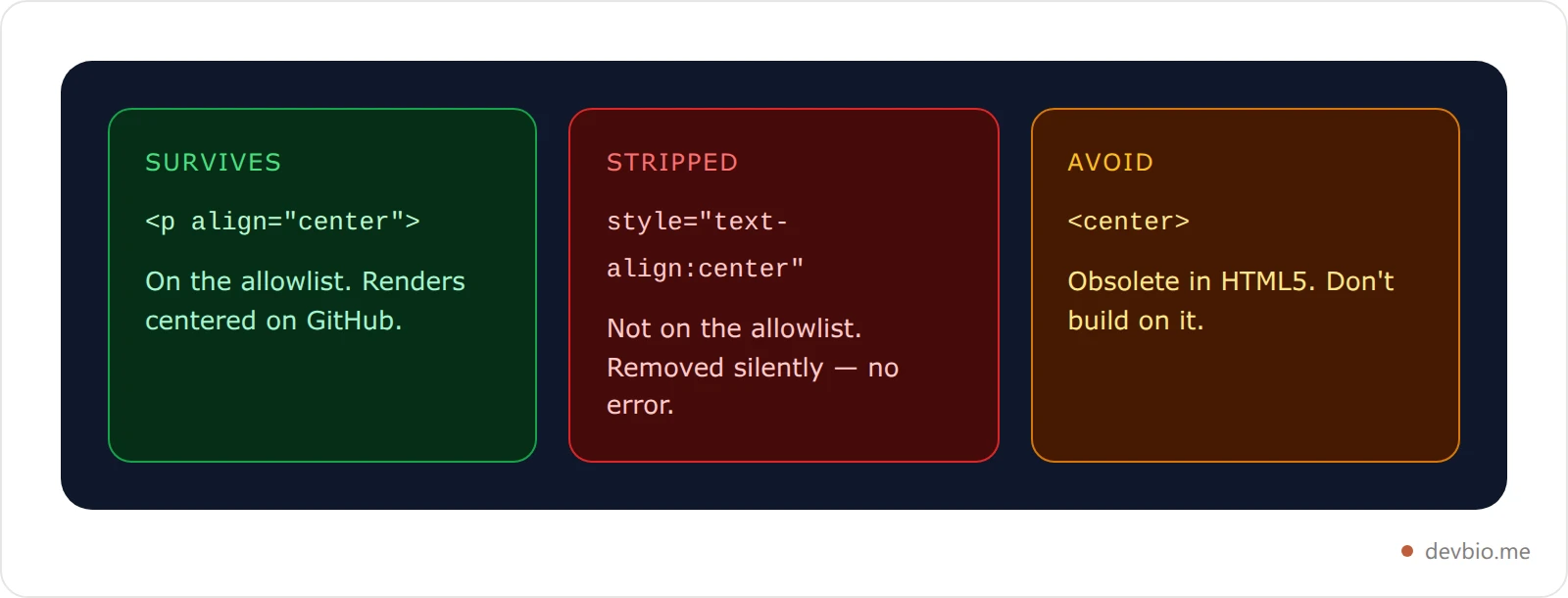
What about <center>? It's the tag everyone remembers from 1998, and MDN lists it as obsolete — deprecated in HTML 4, removed from the living standard. It isn't in html-pipeline's element allowlist either. Even where a renderer still honors it out of leniency, you're depending on a tag the web has formally retired. Use the align attribute instead; it costs the same keystrokes and is on the list.
The Trap: Markdown Stops Working Inside the Block#
This is the behavior that sends people to Stack Overflow, and it isn't a bug. It's the spec.
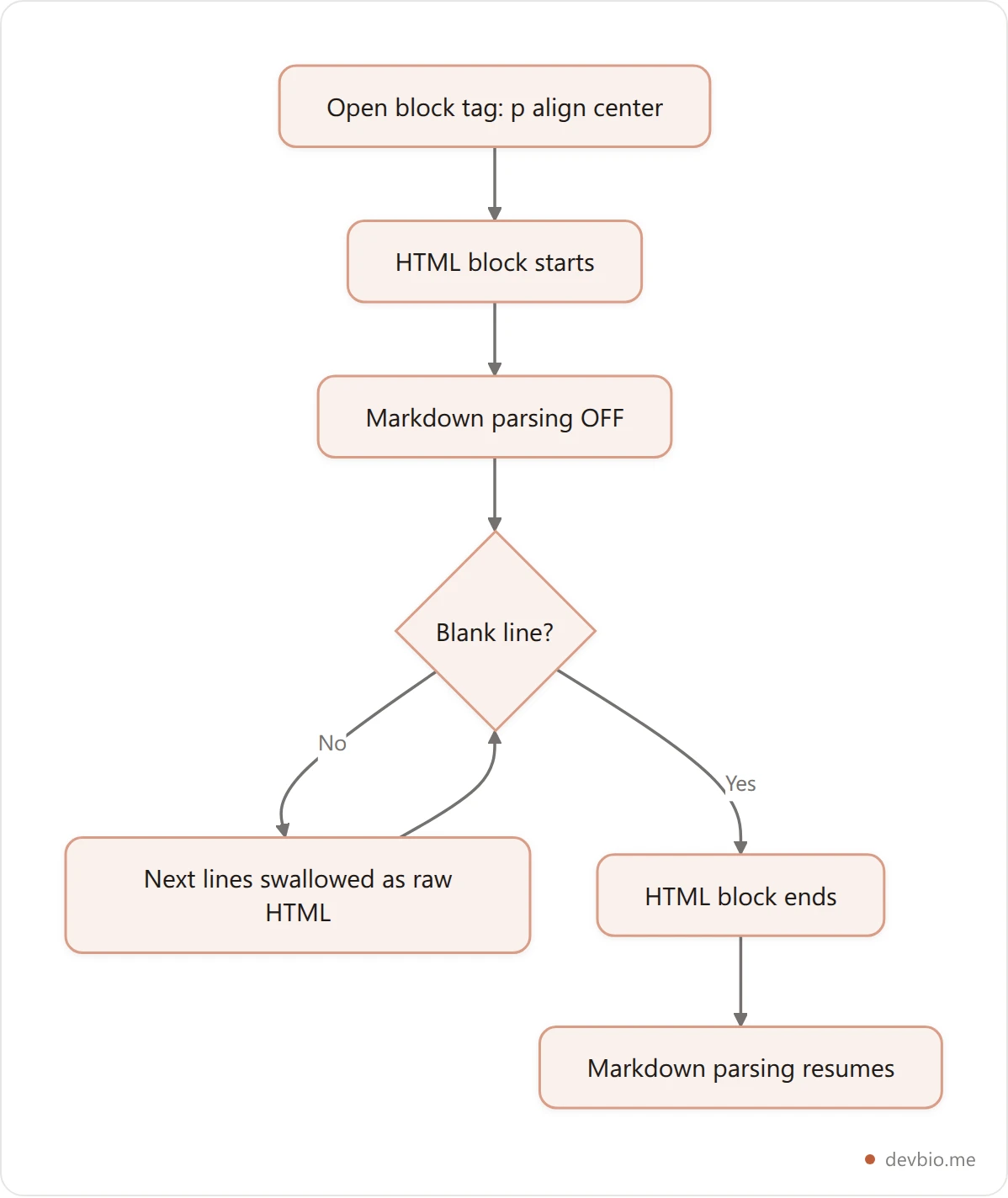
CommonMark defines an HTML block as "a group of lines that is treated as raw HTML." Raw means raw: the parser hands the contents through untouched and never looks for Markdown inside. Emphasis, links, images — all of it stops working the instant you open a block-level tag.
So this does not do what you want:
<p align="center">
**My tagline** and a [link](https://example.com)
</p>
That renders as literal asterisks and literal brackets, centered. The fix is to write the HTML equivalents:
<p align="center">
<strong>My tagline</strong> and a <a href="https://example.com">link</a>
</p>
Here's the translation table you'll need:
Markdown | HTML equivalent inside a centered block |
|---|---|
|
|
|
|
|
|
|
|
` |
|
smaller text |
|
If you've hit the sibling version of this problem with emphasis, our breakdown of where bold syntax actually breaks and the one on what underlining really does both come down to the same root cause: Markdown's parser has boundaries it doesn't announce. Colored text is the same story from the other side of the allowlist — there the attribute you need is the one that gets stripped.
The Blank Line Rule That Breaks the Rest of Your File#
The second half of the HTML-block rule is the one that produces the truly baffling bug: everything after your centered section renders as plain text.
Per CommonMark, an HTML block of this type ends at a blank line. If you don't leave one, the parser keeps treating subsequent lines as raw HTML — so your next heading, your next list, your next paragraph all pass through unparsed.
Broken:
<p align="center">Centered headline</p>
## About
- First bullet
That ## About renders as the literal characters ## About. Fixed, with one empty line:
<p align="center">Centered headline</p>

## About

- First bullet
One blank line. That's the entire difference between a clean README and one where half the file looks like source code. It's the same class of whitespace-sensitivity that makes Markdown line breaks so unintuitive — and the same missing blank line that turns three dashes into a heading instead of a horizontal rule.
Recipes: Center Text, Images, Badges, and Tables#
These are the markdown center text recipes worth keeping to hand. Copy them directly — each one already leaves the required blank line after the closing tag.
Center a headline. Use a real heading tag so it still lands in the document outline:
<h1 align="center">Hi, I'm Sam 👋</h1>

<p align="center"><em>Backend engineer. Distributed systems.</em></p>
Center an image. Markdown image syntax won't parse here, so use <img>:
<p align="center">
  <img src="./banner.png" alt="Project banner showing the library name and logo" width="600" />
</p>
Center a row of badges. Same rule — raw <img> tags, wrapped in one centered paragraph:
<p align="center">
  <img src="https://img.shields.io/badge/TypeScript-3178C6?logo=typescript&logoColor=white" alt="TypeScript language badge" />
  <img src="https://img.shields.io/badge/React-61DAFB?logo=react&logoColor=black" alt="React framework badge" />
</p>
Center a row of links with breathing room. Regular spaces collapse in HTML, so use entities as separators:
<p align="center">
🌐 <a href="https://example.com">website</a>
·
✉️ <a href="mailto:[email protected]">email</a>
</p>Center table columns. This is the one case with genuine Markdown syntax — colons in the separator row:
| Left | Center | Right |
| :--- | :----: | ----: |
| a    | b      | c     |
Note the difference: that centers the contents of the columns, not the table on the page. Centering the table element itself needs the HTML wrapper again.
Generate a centered README without writing any of this by hand — the builder emits the tags for you.
How DevBio's README Generator Handles It#
Worth showing a real implementation, because the tradeoffs are visible in the output. We maintain DevBio's generator against exactly the rules above, and each one shows up as a specific line of code rather than a style preference.
DevBio's README generator builds a profile README as plain string assembly — no AI, no external API. Reading its builder, every centering decision follows the rules above:
The headline is
<h1 align="center">, and the tagline beneath it is<p align="center"><em>…</em></p>—<em>, not asterisks, because Markdown is off inside the block.The identity row joins its links with
· , exactly because raw spaces would collapse.Location and pronouns get
<p align="center"><sub>…</sub></p>for smaller centered text.Every centered block is followed by an emitted blank line. The builder pushes an empty string after each one — that's the blank-line rule enforced in code rather than left to chance.
The most telling detail is what isn't centered. The tech-stack badge row is written as ordinary Markdown images and left-aligned, while the GitHub stats row is centered and therefore switches to raw <img height="160" …> tags. Same page, two different constructs, and the deciding factor is precisely whether the content sits inside a centered HTML block.
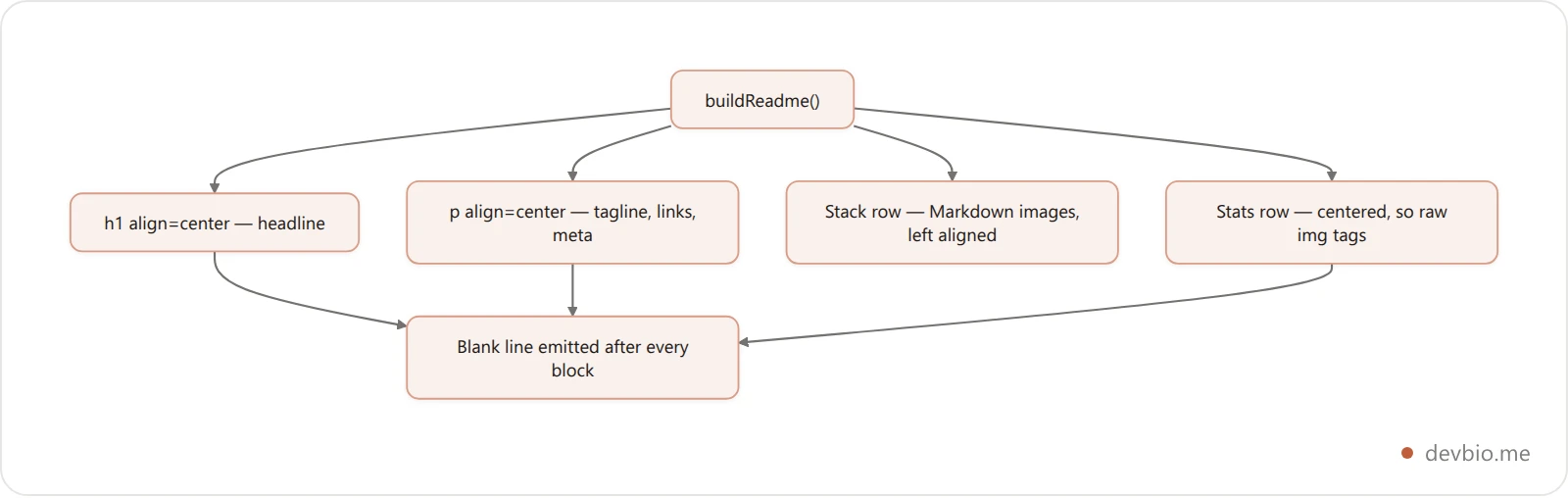
As a final pass the builder collapses any run of three or more newlines down to two — enough to close every HTML block, never enough to leave ragged gaps. If you're assembling Markdown programmatically, that one-line normalization is worth stealing.
Skip the HTML plumbing
Fill in a form and get a profile README with the centering, badges, and stats blocks already correct — free, no sign-up.
Open the README builderWhere Centering Silently Fails#
Markdown center text is reliable on GitHub once you use align="center". It is not universal, because every platform runs its own sanitizer with its own allowlist.
The Markdown Guide's hacks page files alignment in the same "depends entirely on your processor" bucket as colored text and footnotes — it is documented as non-portable, not merely undocumented. The failure mode is consistent and worth recognizing: your centered block either renders left-aligned (the attribute was stripped) or appears as visible <p align="center"> text (raw HTML is escaped entirely). Neither produces an error message.
Before you rely on centering anywhere that isn't GitHub:
Preview on the actual target. Your editor's preview pane uses a different renderer than the site you're publishing to. VS Code showing it centered proves nothing about GitHub, npm, or a docs site.
Assume
styleis gone everywhere. No mainstream Markdown host allows inline CSS in user content. This is the safest assumption you can make.Keep centering decorative. If a reader who sees your file left-aligned still gets the full meaning, a stripped attribute costs you nothing. If your layout depends on it, you've built on sand.
Remember plain-text readers. Anyone reading the raw file — in a terminal, a diff, a code review — sees your HTML tags, not the effect.
That last point is the honest argument for restraint. A README with three centered blocks reads as designed; one with fifteen reads as an HTML document that lost an argument with Markdown. The best practices guide for profile READMEs covers where the line usually sits.
Common Mistakes to Avoid#
Using
style="text-align:center". Stripped by the sanitizer on GitHub. This is the single most common cause of "it worked locally."Leaving Markdown syntax inside the block.
**bold**inside<p align="center">renders as literal asterisks. Switch to<strong>.Forgetting the blank line after the closing tag. Everything downstream stops parsing as Markdown. If a chunk of your file suddenly looks like source, this is why.
Using
for a centered image. Markdown image syntax doesn't parse inside an HTML block. Use<img src="…" alt="…" />.Reaching for
<center>. Obsolete in HTML5 and not on the allowlist.<div align="center">does the same job and is supported.Separating centered links with plain spaces. HTML collapses consecutive whitespace. Use
if you want visible gaps.Centering everything. Centered body paragraphs are measurably harder to read than left-aligned ones, because each line starts at a different x-position.
Alignment isn't the only thing markdown leaves out. There's no markdown image size syntax either, which is why a centred logo usually ends up wrapped in the same HTML tag you just used to centre text.
Frequently Asked Questions#
How do I center text in Markdown?#
You can't with Markdown syntax alone — none exists. Wrap the content in a block-level HTML tag carrying the align attribute, such as <p align="center">Your text</p>, and leave a blank line after the closing tag. Inside that block, write HTML rather than Markdown for any links or emphasis.
Why doesn't text-align center work in my README?#
GitHub sanitizes rendered HTML against an allowlist, and the style attribute isn't on it. Your inline CSS is removed before the page is served, with no error shown. Local previews don't sanitize, which is why the same file looks correct in your editor and wrong once pushed.
How do I center an image in Markdown?#
The markdown center image pattern is a raw <img> tag inside a centered paragraph: <p align="center"><img src="banner.png" alt="Project banner image" width="600" /></p>. Markdown's  syntax will not parse inside an HTML block, so it renders as literal text instead of an image.
Does markdown text align work on every platform?#
No. Each host runs its own sanitizer, so align="center" may be honored, stripped, or escaped depending on where you publish. It's dependable on GitHub. Everywhere else, preview on the real target before relying on it, and keep centering purely decorative.
Can I center a whole table in Markdown?#
The colons in a table's separator row center the contents of each column, which is real Markdown syntax. Centering the table element itself on the page requires wrapping it in a <div align="center"> — and inside that wrapper you'd need to write the table as HTML too.
Why did my headings stop working after a centered block?#
You almost certainly omitted the blank line after the closing tag. CommonMark ends this type of HTML block at a blank line; without one, the parser keeps consuming following lines as raw HTML, so headings and lists never get parsed.
Key Takeaways#
Markdown center text has no native syntax. Table column alignment is the only exception.
align="center"on a block-level tag is the method that works;styleis stripped by GitHub's sanitizer and<center>is obsolete.Markdown parsing turns off inside an HTML block — use
<strong>,<em>,<a>, and<img>in there.A blank line after the closing tag is mandatory, or the rest of your file stops rendering as Markdown.
Centering is decorative. Build so that a reader who sees it left-aligned loses nothing.
Learning how to center text in Markdown is not hard once you know the two rules — allowlist in, Markdown off — but nothing in the syntax hints at either. That's why the same twenty minutes gets lost by a new developer every day.
If you'd rather not hand-write the tags at all, build the README in a form and copy the output. The centering, the blank lines, and the escaping come out correct the first time.


