

You clone github.com/yourname/yourname, open a blank README.md, and stare at it. That's the standard first step to a GitHub profile README, and it's why most generators exist — nobody wants to hand-write badge markup and stats widget URLs from scratch.
A GitHub README generator is a form-based tool that turns your bio, tech stack, and pinned projects into ready-to-paste README.md markdown, complete with stats widgets and badges. The best ones need no sign-up, show a live preview as you type, and let you copy or download the finished file in under two minutes. That's the entire job — no AI writing your bio for you, no account required, no lock-in.
This guide compares the free generators actually worth using in 2026, walks through building one from scratch, and covers something most of these tools won't tell you: the README you generate today starts going stale the moment you commit it. For the full picture beyond just the README file, see our complete GitHub profile guide.
What a GitHub README generator actually does#
A README generator is a form. You fill in fields — name, tagline, GitHub handle, tech stack, pinned projects — and the tool assembles those fields into markdown using a template. Some also splice in third-party widgets: a stats card, a streak counter, a set of tech-stack badges rendered as SVGs.
Nothing here is magic. The generator doesn't read your GitHub account, analyze your commit history, or write your bio for you (a few AI-flavored tools now do the latter, more on that below). It's a formatter. You give it structured input, it gives you structured markdown, and you paste that markdown into your profile repo.
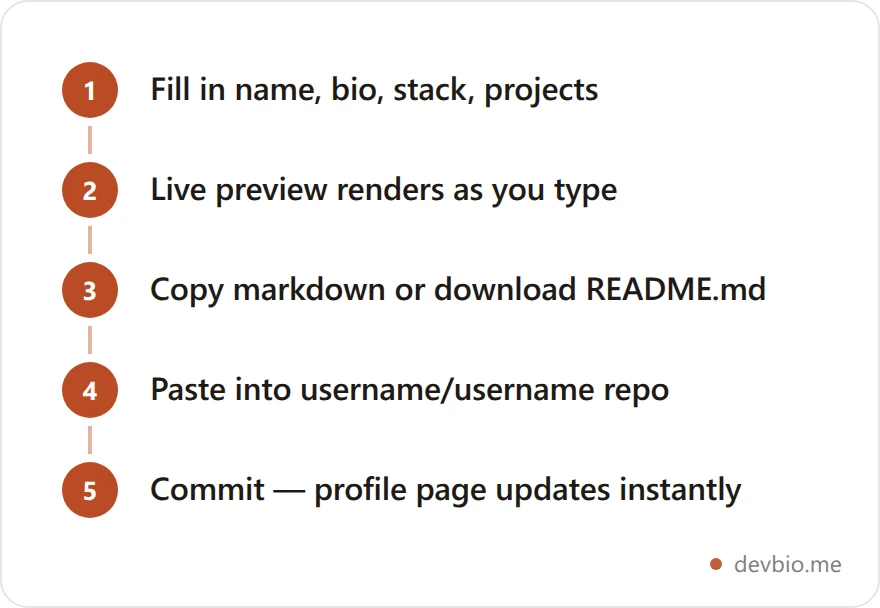
That last step matters: your profile README lives in a special repository named exactly after your GitHub username. Push a README.md there and GitHub renders it at the top of your profile page automatically — no config, no build step. GitHub's own docs cover the repo-naming requirement if you've never set one up.
Free GitHub README generators compared in 2026#
Every generator claims to be the fastest way to a "professional" profile. In practice they split into three categories: plain form-builders, widget-heavy builders, and the newer AI-assisted tools that draft your copy for you.
Tool | Sign-up required | AI-written copy | Live GitHub widgets | Badge source | Best for |
|---|---|---|---|---|---|
No | No | Embeds github-readme-stats + streak-stats | Own SVG badge API | Fast, no-nonsense form builder | |
No | No | Yes, many widget presets | shields.io | Profiles that want lots of widgets | |
No | No | Optional add-ons | shields.io | Classic form builder, long track record | |
No | No | No, manual only | Manual | Drag-and-drop section ordering | |
AI generators (ReadmeCodeGen, AutoDoc-style tools) | Usually no | Yes | Varies | Varies | Repo/project docs more than profile bios |
The pattern worth noticing: none of the free, no-signup form builders — including DevBio's — write your bio for you or pull your GitHub activity into the text itself. They wire your handle into the same handful of community-run widget services and hand you the assembled markdown. The AI-flavored tools are aimed more at generating documentation for a project repo (installation steps, usage examples) than a profile bio, so don't expect them to replace a form builder for this specific job.
Which one to reach for depends on what you're optimizing for. If you want the fastest path to something clean with zero extra widgets to configure, a plain form builder gets you there in one pass. If you want a profile dense with visual widgets — visitor counters, typing animations, multiple stats cards — a tool like GPRM has more presets built in. If you'd rather write the structure yourself and just need help with formatting, a drag-and-drop editor like readme.so skips the form entirely. None of them is wrong; they're solving slightly different problems.
Build your README in under 2 minutes#
Using a plain form builder like DevBio's free tool, the steps are the same regardless of which one you pick:
Enter your basics. Name, one-line tagline, GitHub handle, and any social links you want listed. Skip the job-title-as-tagline trap ("Full Stack Developer") — say what you actually build instead.
Add your stack. Pick the languages and tools you actually use — badge generators typically pull from a shared icon set, so obscure or internal-only tools may not render as a badge and are worth listing as plain text instead.
List your pinned projects. Name, one-line description, URL, and a single real metric per project (stars, users, MRR — whatever is true and checkable). Two or three is enough; a wall of six projects reads as noise, not proof.
Pick a stats widget theme. Transparent, dark, or a themed variant — this is cosmetic, it doesn't change what data shows or how often it refreshes.
Copy or download. Paste the markdown into
username/username/README.mdand commit. GitHub renders it immediately, no build step or redeploy needed.
That's it. No build step, no API keys, no account. The entire output is static text plus a couple of embedded image URLs.
Who actually reads your profile README#
It's easy to treat a profile README as decoration. The GitHub numbers say otherwise. The platform crossed 180 million developers in 2025, adding 36 million new accounts — more than one every second — and pushed nearly 1 billion commits, a 25% jump year over year, according to GitHub's 2025 Octoverse report. At that density, a profile that explains itself in five seconds has a real edge over one that doesn't.
Most of that activity is invisible to a casual visitor by default. Only a fraction of what developers do on GitHub is public — private repos, internal work, and unlisted contributions don't show up on a profile at all — which is part of why the 2025 Stack Overflow Developer Survey matters here too: roughly three-quarters of engineers describe themselves as not actively job-hunting or only "somewhat open." A README doesn't need to convert a stranger into a lead. It needs to make sense to someone who's not actively looking but glances at your profile anyway — a passive audience that rewards clarity over volume.

If you'd rather work from a checklist first, our GitHub Profile README guide breaks down exactly what to include before you open a generator, and the 10 README template patterns post is worth a look if the default layout feels generic.
Why your GitHub stats widget breaks#
The GitHub stats card and streak counter almost every generator embeds aren't rendered by GitHub. They're SVGs served by community-run projects — most commonly anuraghazra/github-readme-stats, which has passed 65,000 GitHub stars and become the de facto standard.
Here's the part generators don't mention: the public instance of that project is a shared, free service with a real rate limit. GitHub's API caps requests at 5,000 per hour per account, and the hosted endpoint additionally enforces roughly 100 requests per hour per IP address before it starts failing — a limit documented in the project's own issue tracker. During traffic spikes, or if your network shares an IP with other users hitting the same endpoint, your widget can simply stop rendering.

At that scale, a shared free widget service getting rate-limited isn't an edge case — it's expected load. The project's own maintainers recommend self-hosting or running it through a GitHub Action for anything you actually depend on being reliable. Most people generating a README never do that, which is why "why is my GitHub stats card not showing" is a recurring thread in GitHub's own community forums.
None of this means skip the widget. It means treat it as best-effort decoration, not a guarantee. If a widget goes down for a day, your README still has a bio, a stack, and pinned projects doing the actual work — the stats card was always the least important part of the file, even though it's usually the part people spend the most time picking a theme for.
The 30-Day README problem#
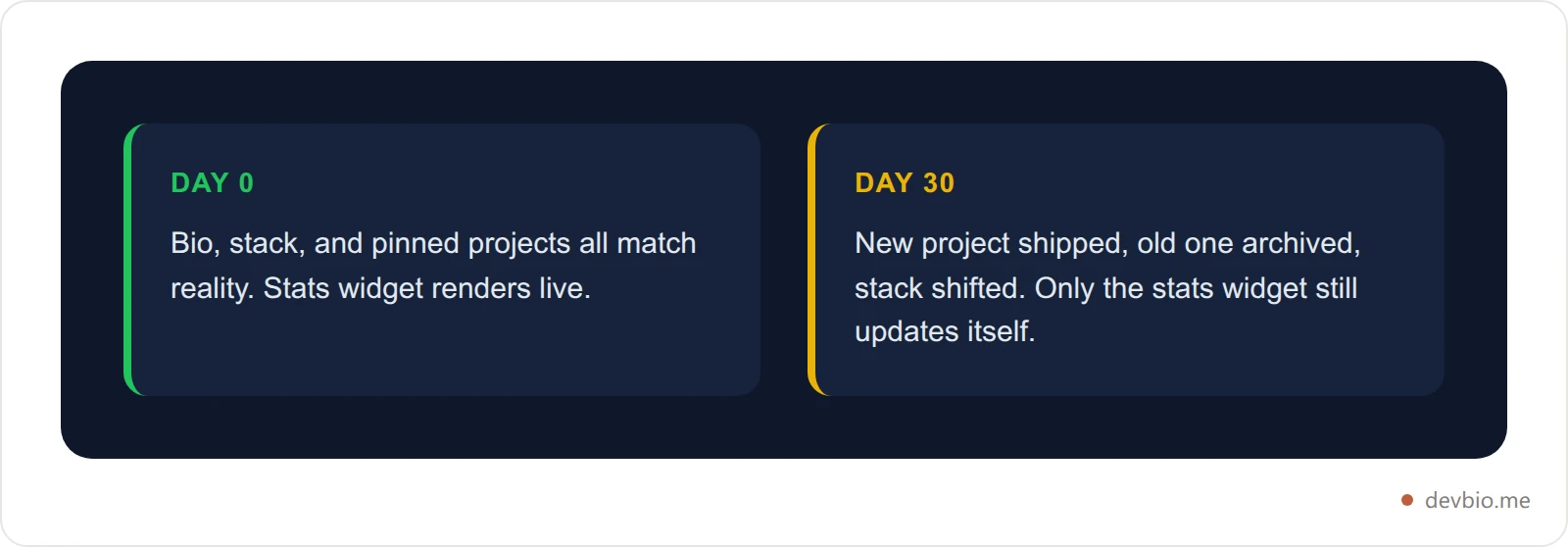
Here's the bigger issue, and it has nothing to do with rate limits. Call it the 30-Day README problem: everything you typed into that form — your tagline, your stack, your pinned project list, the one metric next to each project — is frozen the second you commit it. Only the stats widget image genuinely updates on its own, because it's fetched fresh by GitHub's image proxy on every profile view.
Ship a new project next month? Your README doesn't know. Your side project crosses 1,000 stars? Still says whatever number you typed in when you built the file. Change your primary stack from Vue to Svelte? The badges don't move unless you go back, refill the form, and recommit.
That's not a knock on any specific generator — every static-markdown tool has this property by construction. A form that outputs text can't also watch your GitHub account and your Stripe dashboard for changes. It's worth being honest about this trade-off before you spend twenty minutes tuning badge colors: a generated README is a snapshot, not a feed. It'll read as accurate today and slightly out of date in a month, the same way an unrefreshed résumé PDF does.
Copy-paste README starter block#
If you want to skip the form entirely and hand-edit markdown, here's a minimal starting structure that covers the same five elements a good generator produces — bio, stack, one live widget, pinned work, and a single link out:
### Hi, I'm {{name}} 👋
{{one-line tagline — what you build, not a job title}}
**Currently building:** [{{project name}}]({{project url}}) — {{one real metric}}

🔗 {{link to your portfolio, devbio profile, or site}}Swap in your own values — including STATS_CARD_URL, which is the community stats-card endpoint broken down in our GitHub README stats guide — or drop the widget line entirely if you'd rather avoid the rate-limit issue above, then commit. One formatting note while you're hand-editing: each of those lines is separated by a blank line on purpose, because a single newline is not a line break in Markdown and the whole block would otherwise collapse into one paragraph. The same blank line decides dividers too — three dashes tucked directly under a line of text render as a heading, not a horizontal rule. And if you paste a snippet in, the fence rules for a markdown code block decide whether it renders as code or quietly swallows the rest of the file. It's shorter than most generator output, which is the point — a profile README works best at about one screen: a sharp bio, your stack, a couple of pinned projects with real numbers, and a way to reach you.
Common mistakes when generating a profile README#
Most of these show up because a generator makes it fast to add things, not because it makes them a good idea:
Listing every repo instead of pinning two or three. A generator will happily loop through your entire project list. Nobody reads a profile with fifteen bullet points — pick the two or three that best represent what you build now.
A tagline that's just a job title. "Software Engineer" tells a visitor nothing they didn't already guess from the fact that they're on GitHub. "I build offline-first sync engines" tells them what you're actually good at.
Stacking three or four stats widgets. One stats card is proof. Four stats cards, a streak counter, and a visitor badge is visual noise that also multiplies your exposure to the rate-limit issue above.
Metrics that can't be checked. "10,000+ users" next to a project with no public link invites skepticism instead of trust. Only include a number a visitor could plausibly verify by clicking through.
Forgetting to revisit it. This is the 30-Day README problem in practice — a generator makes creating the file easy, not remembering to update it. Put a recurring reminder on your calendar if you're keeping a static file long-term.
Before and after: what a filled-out README actually changes#
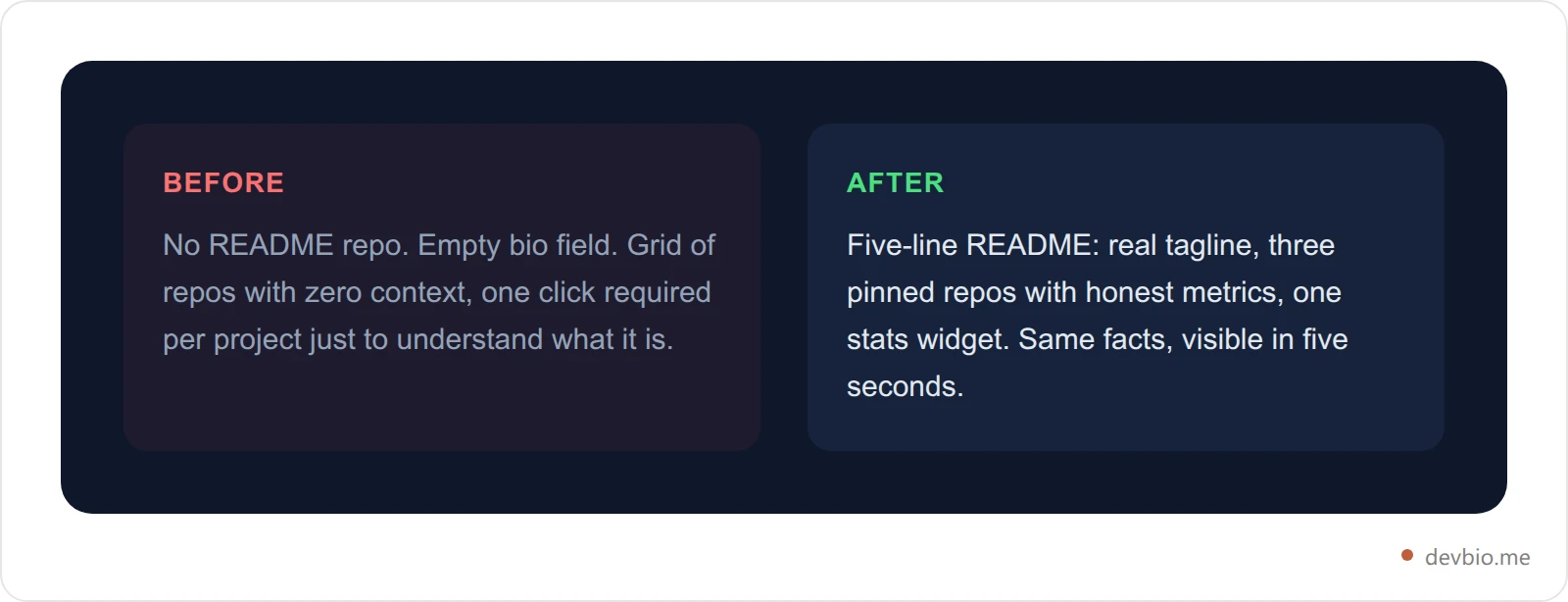
Picture two versions of the same GitHub profile. Before: the default green square avatar, no README repo at all, and a profile description field left blank because nobody filled it in during signup. A visitor lands on the profile, sees a grid of repos with no context, and has to click into each one to figure out what they're looking at.
After: a five-line README with a real tagline, three pinned repos each with a one-line description and an honest metric ("last active this week," "1 open-source dependency used by 40 other repos," "shipped v2 in June 2026"), and a single stats widget. Nothing here required new work — every fact was already true. The only change is that it's now visible in the first five seconds instead of buried across a dozen repo pages.
That's the entire value of a README generator: not making you look more accomplished, just making what's already true legible faster.
GitHub README generator vs. a live developer profile#
A generated README is genuinely useful for exactly what it is: a static, no-cost summary that lives where GitHub already puts it, in front of anyone browsing your repos. It's not trying to be more than that.
Where it runs out of road is anywhere you want your numbers to stay current without manual upkeep — a stats section that reflects this week's commits, a projects list where MRR or stars update on their own, or a version of your profile you can point recruiters or clients to that isn't a markdown file living inside a code repo. That's a different tool for a different job: a project card that pulls live GitHub stars and commits alongside actual Stripe or Lemon Squeezy MRR, refreshed automatically instead of retyped.
The two aren't competing for the same use case, either. A profile README only ever exists inside GitHub, seen by people already browsing your repos. A standalone profile is the link you'd actually put in an email signature, a LinkedIn bio, or a portfolio site footer — a URL that works whether or not the person on the other end has a GitHub account. Plenty of developers end up keeping both: a short, honest README for GitHub natives, and a fuller live profile for everyone else.
If a static README is the fast, zero-friction option, claim a devbio.me/yourname profile when you want the version that doesn't need a monthly re-edit — same proof, none of the staleness.
Frequently Asked Questions#
Is a GitHub README generator actually free?#
Yes, for the form-based tools covered here — DevBio's, GPRM, gh-profile-readme-generator, and readme.so are all free with no paid tier required to export markdown. AI-assisted generators sometimes gate advanced features behind a paywall, so check before relying on one.
Do I need to sign up to use a GitHub README generator?#
No. The generators in this guide run entirely as forms in your browser — no account, no OAuth connection to GitHub, no email required. You type your info, copy the output, and commit it yourself.
Will my generated README update automatically?#
Only the embedded stats widget image updates on its own, since it's fetched fresh on every profile view. Everything you typed — bio, stack, pinned project list, metrics — stays exactly as written until you manually edit and recommit the file.
Why isn't my GitHub stats widget showing up?#
The most common cause is rate limiting on the free public widget service, which caps requests per IP address. Wait for the limit to reset, try a cache-busting refresh, or self-host the widget if you need it to be reliable long-term.
What's the difference between a profile README and a repo README?#
A profile README lives in a repository named exactly after your username and renders at the top of your GitHub profile page. A repo README documents one specific project — installation, usage, contributing — and only shows on that repo's page.
Can I use a GitHub README generator without knowing markdown?#
Yes — that's the entire point of a form-based generator. You fill in plain-text fields and the tool outputs correctly formatted markdown, including image embeds and badge syntax, without you writing any of it by hand. If you start hand-editing later, the usual surprise is formatting Markdown simply doesn't have: there's no underline in Markdown, no syntax for colored text, and no way to center text in Markdown either — only the HTML tags GitHub agrees to render. Centering is the one worth reading before you hand-edit generator output, because the <h1 align="center"> block at the top of the file turns Markdown parsing off for everything inside it. The other common trip-up is the Markdown line break, which needs two trailing spaces, a backslash, or a <br> tag — pressing Enter once does nothing in a .md file.
How long should a GitHub profile README be?#
Short. One screen is enough for most people: a one-line bio, your core stack, two or three pinned projects with real metrics, and one stats widget. Longer READMEs with games, visitor counters, or animated GIFs can work for personal projects but rarely help a hiring-focused profile.
What's a good alternative to a static README?#
A live developer profile — one where project cards, GitHub stats, and revenue pull from connected accounts instead of being retyped. It solves the staleness problem a generated README can't, at the cost of needing an account to set up once.
The takeaway#
A GitHub README generator gets you from a blank profile to a real one in under two minutes, for free, with no account required — that's the whole pitch, and for a static summary of who you are, it delivers. Just go in knowing two things: the stats widget most generators embed runs on a free, rate-limited service that can silently stop rendering, and everything else in the file is frozen the moment you commit it.
Neither of those is a reason to skip generating one. It's a reason to treat it as a starting point, not a finished profile you never touch again. Your code already proves you can build. Put it on one link that stays current — devbio.me.


